Hardware Explainer
PCIe, decoded. Lanes, generations, bottlenecks.
Your GPU runs at ×16. Your NVMe runs at ×4. Pop in a second M.2 and suddenly your GPU drops to ×8. Most builders never notice. Sometimes you should.
- slot widths
- ×1 to ×16
- 2x per gen
- Gen 3 → 6
- CPU lanes
- 24-28
What PCIe actually is
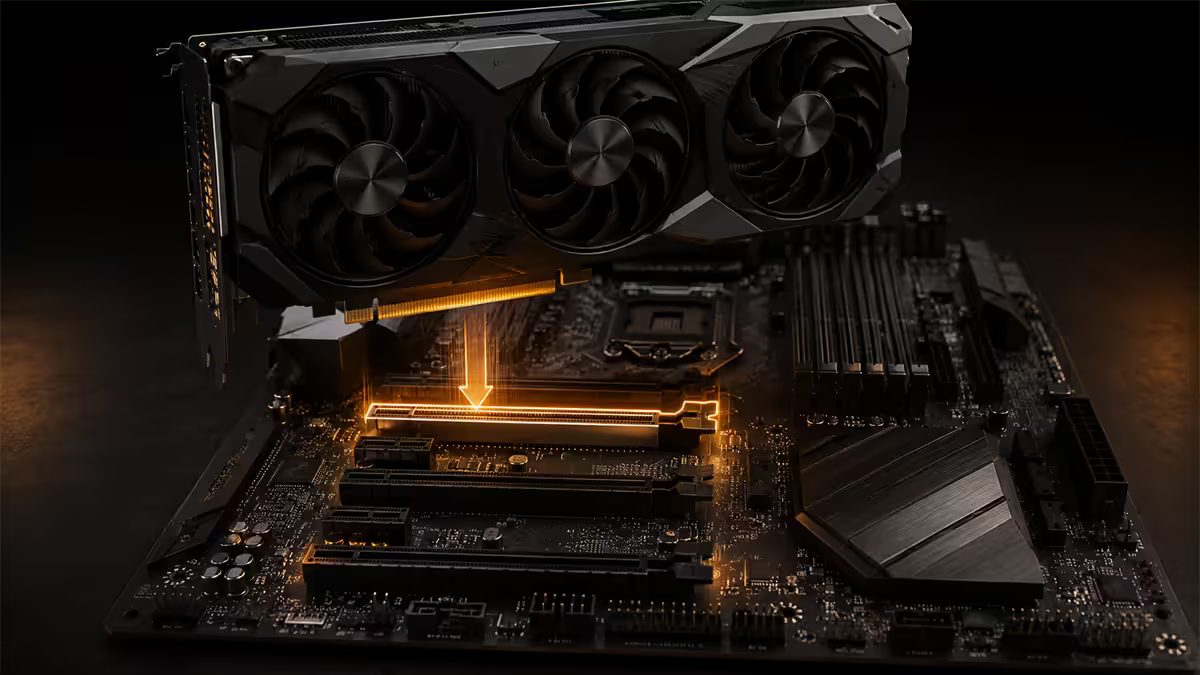
PCIe — Peripheral Component Interconnect Express — is the high-speed serial bus standard that connects your CPU to almost every other expansion device in your PC: the GPU, your NVMe SSDs, your network card, your USB controller, your sound card and so on.
Before PCIe (introduced in 2003), motherboards used a tangle of different bus standards — AGP for graphics, PCI for everything else, IDE for drives. PCIe unified the lot under a single point-to-point serial standard that scales by lane count and generation.
The two attributes you'll see quoted on every motherboard and component spec sheet:
- Lane count — written as ×1, ×4, ×8 or ×16. More lanes run more data in parallel.
- Generation — Gen 3, Gen 4, Gen 5, Gen 6 (just emerging). Each generation doubles bandwidth per lane.
Total bandwidth is simply lane count × per-lane bandwidth. A PCIe Gen 4 ×16 slot delivers 2 GB/s × 16 = 32 GB/s. A PCIe Gen 5 ×4 NVMe SSD delivers 4 GB/s × 4 = 16 GB/s — equal to a full Gen 3 ×16 slot, in a quarter of the physical footprint.
Lanes and slot widths explained
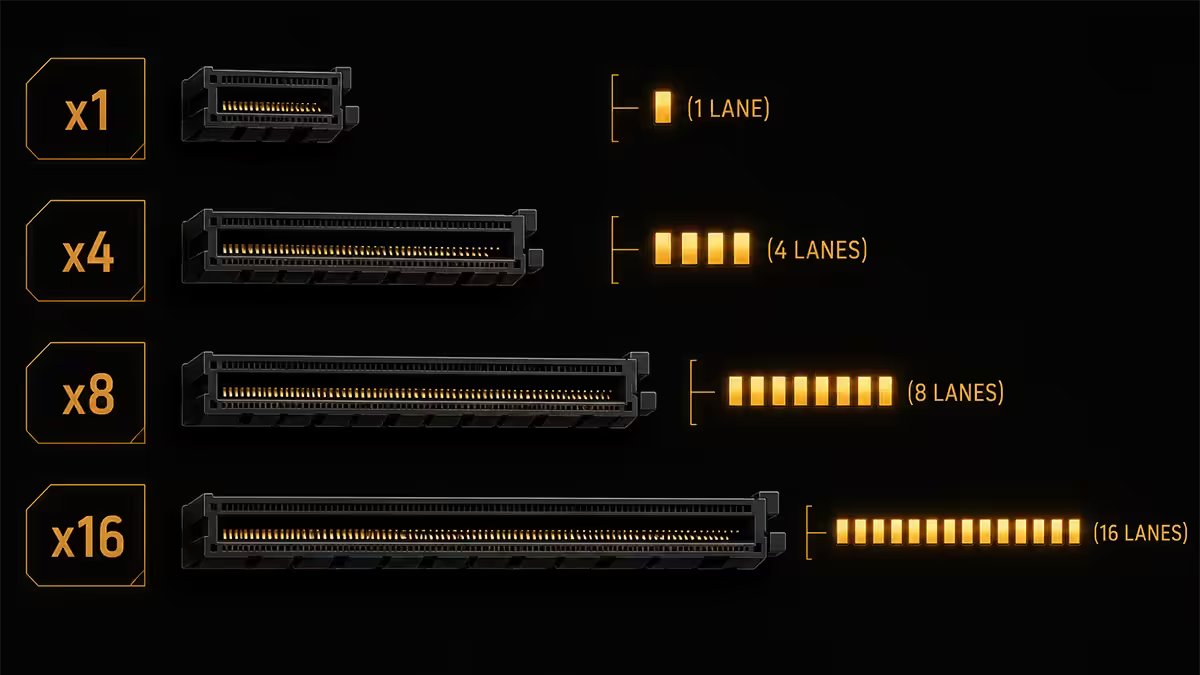
A single PCIe lane is two pairs of differential wires — one pair transmits, the other receives. That's it. The whole standard scales up by adding more of these pairs in parallel.
| Slot width | Typical use | Physical slot length |
|---|---|---|
| PCIe ×1 | Sound cards, capture cards, network cards, NVMe adapter cards | 25 mm |
| PCIe ×4 | NVMe SSDs (M.2 form), high-end network cards, RAID controllers | 39 mm |
| PCIe ×8 | Older GPUs, secondary GPUs, high-end NICs | 56 mm |
| PCIe ×16 | Modern GPUs (primary slot), workstation accelerator cards | 89 mm |
Crucial nuance: the physical slot length is the maximum lane count. A slot that physically looks like ×16 might actually only have ×8 lanes electrically wired — the unused 8 lanes are just empty pins. Always check the motherboard spec sheet for electrical lane count, not just the visual slot length.
Cards are also forward-compatible in slot width. A PCIe ×1 sound card works in a ×16 slot. A PCIe ×8 card works in a ×16 slot at ×8 speed. Cards are not backward-compatible past their physical edge — a ×16 GPU will not fit in a ×8-physical slot unless the ×8 slot is open-ended.
Generations and the bandwidth doubling rule
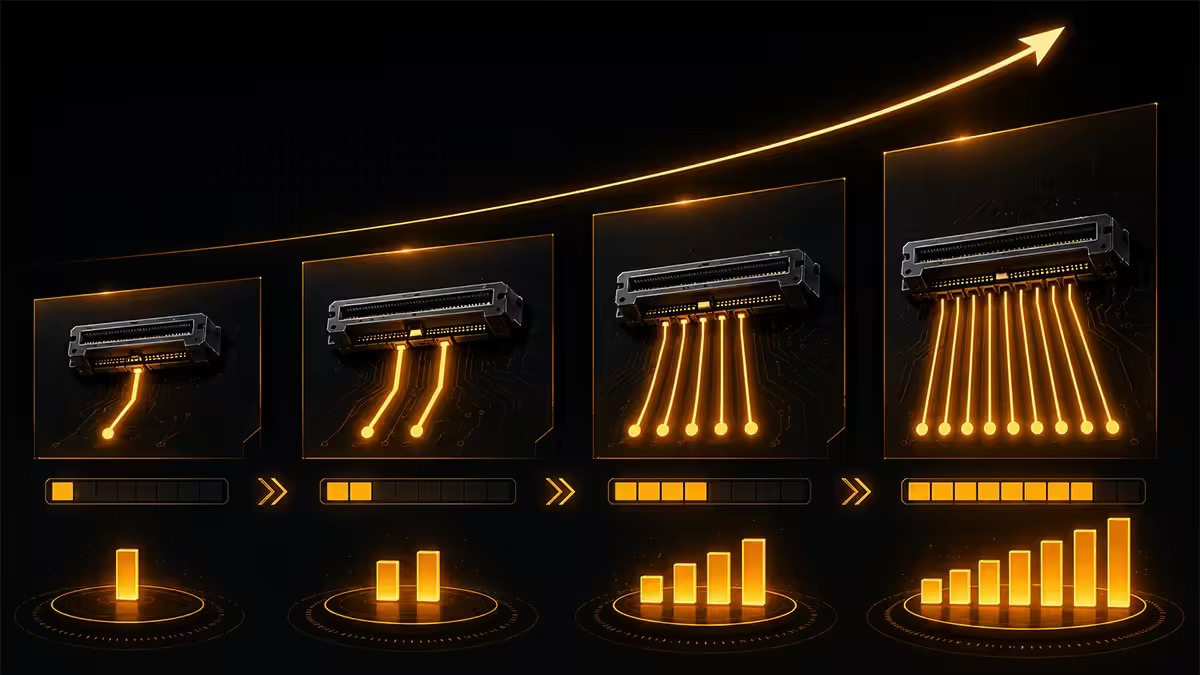
PCIe generations follow a clean rule: each generation roughly doubles the per-lane bandwidth of the previous. This is achieved by ratcheting up the signalling speed (GT/s) and improving the encoding efficiency.
| Generation | Per-lane bandwidth | ×16 slot bandwidth |
|---|---|---|
| PCIe Gen 3 (2010) | 1 GB/s | 16 GB/s |
| PCIe Gen 4 (2017) | 2 GB/s | 32 GB/s |
| PCIe Gen 5 (2019, retail 2022) | 4 GB/s | 64 GB/s |
| PCIe Gen 6 (enterprise 2025, consumer 2027) | 8 GB/s | 128 GB/s |
Backward and forward compatibility is built in. A Gen 5 ×16 slot will run a Gen 3 GPU at Gen 3 speed. A Gen 4 ×16 GPU in a Gen 5 slot runs at Gen 4. The slot negotiates down to the lowest common generation. There's no penalty beyond the bandwidth ceiling of the older device.
For 2026 SA buyers, Gen 4 and Gen 5 are the relevant generations. Gen 3 is end-of-life consumer (only on cheap reused boards), and Gen 6 won't appear in consumer motherboards before late 2027.
Lane sharing — the hidden trap on consumer boards
Consumer CPUs expose a limited pool of PCIe lanes directly. AMD AM5 (Ryzen 7000/8000/9000) gives 24-28 usable lanes. Intel LGA1851 (Core Ultra Series 2) gives 20-24. These are the only lanes that run at the CPU's full native PCIe speed — every additional lane on a motherboard comes via the chipset, at the chipset's slower aggregated bandwidth.
Typical AM5 lane allocation:
- ×16 to the primary GPU slot (Gen 4 or Gen 5 depending on chipset).
- ×4 to the primary M.2 NVMe slot (usually Gen 5 on X870 chipsets).
- ×4 to the chipset, which then expands into secondary M.2 slots, SATA, USB controllers, etc.
Where it gets awkward: some boards route the second M.2 slot directly off the CPU's lane pool. Populate that slot and the motherboard automatically reduces the GPU slot from ×16 to ×8 to free four lanes for the SSD. This is called lane sharing and it's the single most common surprise builders encounter when looking at their second SSD slot.
The good news: Gen 4 ×8 still delivers 16 GB/s — far more than any current GPU needs at 1440p or below. Even at 4K, only RTX 5090-class flagships start to show 2-3% FPS loss. For most builds, lane sharing is a non-issue. But it's worth knowing about before you buy a board.
Reading the PCIe layout in a motherboard manual
Every motherboard manual has a section titled "PCIe Configuration" or "Slot Configuration" — usually 2-3 pages of dense tables and a block diagram at the end. It looks intimidating but follows a consistent pattern.
What to look for:
- Each slot's electrical lane count — written as something like "PCIE1 supports x16 mode at PCIe 5.0".
- Slot sharing rules — "When M2_3 is populated, PCIE1 drops to x8 mode".
- Generation per slot — primary slot might be Gen 5, secondary Gen 4, third Gen 3.
- Block diagram — the schematic showing which slots route directly to the CPU vs through the chipset. This is the single most important page in the manual.
If you can't find this information in the printed manual, every motherboard maker publishes the same data on the product page online — look for the "Slot configuration" or "PCIe" expandable section.
When PCIe actually bottlenecks performance
For most builds in 2026, PCIe bandwidth is genuinely a non-issue. Modern GPUs don't saturate Gen 4 ×16 (32 GB/s) in any current game. Modern NVMe SSDs running Gen 5 ×4 (16 GB/s) don't change game load times noticeably from Gen 4 ×4 (8 GB/s).
The realistic bottleneck scenarios:
- Gen 3 ×8 on an old board with a modern flagship GPU at 4K. 8 GB/s genuinely limits an RTX 5090. 5-10% FPS loss measurable.
- Workstations with multiple GPUs. Two GPUs sharing CPU lanes at ×8 + ×8 vs one at ×16 — meaningful for AI/ML workloads, not for gaming.
- Content creators moving very large project files. 4K/8K video editors moving multi-GB clips benefit from Gen 5 SSDs and full-speed PCIe slots.
- USB4 / Thunderbolt 4 docks running external GPUs. Limited to ×4 link speed — much worse than internal.
Gen 5 vs Gen 6 — what's worth caring about in 2026
PCIe Gen 5 is the current top consumer tier. Available on AM5 X670/X870/B850 boards and Intel Z790/Z890. Used for primary GPU slot and primary M.2 NVMe. Worth it for: future-proofing the GPU slot (Gen 5 GPUs are coming), and content creators benefitting from Gen 5 NVMe speeds.
PCIe Gen 6 arrived in enterprise hardware in 2025 (Intel Xeon 6, AMD EPYC 9005), but consumer adoption is at least 12-18 months away. Don't pay a premium for a "Gen 6 ready" board today — the spec isn't finalised for consumer.
PCIe configurations by build type
| Build type | Minimum PCIe config | Sweet spot |
|---|---|---|
| Entry gaming (1080p) | Gen 4 ×16 GPU + Gen 4 ×4 NVMe | B650 chipset |
| Mid-range (1440p) | Gen 4 ×16 GPU + Gen 4 ×4 NVMe | B650 or B850 |
| High-end (4K gaming) | Gen 5 ×16 GPU + Gen 4 ×4 NVMe | X670 or X870 |
| Flagship (RTX 5090 / 4K-240Hz) | Gen 5 ×16 GPU + Gen 5 ×4 NVMe (no sharing) | X870E |
| Content creator | Gen 5 ×16 GPU + Gen 5 ×4 + Gen 4 ×4 NVMe | X870E |
| Workstation with capture/RAID | Threadripper / HEDT with 48+ PCIe lanes | TRX50 / TR Pro |
Common PCIe shopping mistakes
Buying a Gen 5 SSD for gaming. The best Gen 4 SSDs load every current game within 1-2 seconds of Gen 5. The premium is wasted on a typical gaming workload.
Ignoring slot sharing on second M.2. Populating Slot 2 sometimes drops your GPU to ×8. Check the manual before adding a second SSD if you have a flagship GPU at 4K.
Assuming all ×16 slots are equal. A PCIe Gen 3 ×16 slot delivers 16 GB/s. A PCIe Gen 5 ×16 slot delivers 64 GB/s. The same physical width carries 4× the bandwidth. Check both generation and lane count.
Buying a "Gen 6 ready" board today. Consumer Gen 6 isn't shipping. Marketing claims here are largely future-proofing fiction. Pay for what works now.
Plugging a GPU into a chipset-routed slot. Some mATX boards route the second physical ×16 slot through the chipset at Gen 4 ×4 speeds. If you put your GPU there by mistake, FPS drops 20-40%. Always use the primary slot (closest to CPU) for the GPU.
Key takeaways
- A PCIe lane = one bidirectional data link. ×16 = 16 lanes in parallel. More lanes = more bandwidth.
- Each generation doubles per-lane bandwidth. Gen 4 = 2 GB/s/lane, Gen 5 = 4 GB/s/lane, Gen 6 = 8 GB/s/lane.
- Consumer CPUs only expose 24-28 native PCIe lanes. Lane sharing means a second M.2 can drop the GPU to ×8.
- For typical 2026 gaming, Gen 4 ×16 GPU + Gen 4 ×4 NVMe is plenty. Gen 5 SSDs are content-creator territory.
- Always read the motherboard's block diagram. Slot length isn't lane count, and shared slots collapse under load.
Frequently asked questions
What is a PCIe lane?
A single high-speed serial link — two pairs of wires moving data between CPU and peripheral. Lanes bundle to form ×1, ×4, ×8 or ×16 slot widths. GPUs use ×16; NVMe SSDs use ×4.What's the difference between PCIe Gen 3, Gen 4, Gen 5 and Gen 6?
Each generation doubles per-lane bandwidth. Gen 3 = 1 GB/s. Gen 4 = 2 GB/s. Gen 5 = 4 GB/s. Gen 6 (enterprise 2025, consumer 2027) = 8 GB/s per lane.Do I need a PCIe Gen 5 SSD for gaming?
No. Best Gen 4 SSDs load every modern game within 1-2 seconds of Gen 5. Gen 5 premium (40-70%) is worthwhile only for content creators moving large project files.What does ×1, ×4, ×8 and ×16 mean on a PCIe slot?
Lane count. ×1 = capture cards. ×4 = NVMe SSDs. ×8 = older GPUs. ×16 = modern GPUs. Physical slot length matches max lane count, but electrical width can be lower.Why does my motherboard share PCIe lanes between the GPU and second M.2?
Consumer CPUs expose only 24-28 PCIe lanes. Some boards route the second M.2 directly off the CPU pool, dropping GPU to ×8. Others route through the chipset at slower speeds, keeping GPU at ×16.Will my Gen 4 GPU work in a Gen 5 PCIe slot?
Yes. PCIe is fully backward and forward compatible. The slot negotiates down to the lowest common generation. No penalty beyond the older generation's bandwidth ceiling.Can a GPU bottleneck if it's running PCIe ×8 instead of ×16?
For modern GPUs at Gen 4 or Gen 5 ×8 — no. Flagship cards show 2-5% loss at 4K. Older Gen 3 ×8 does bottleneck top-tier modern GPUs noticeably.How do I read the PCIe layout in a motherboard manual?
Look for "PCIe layout" or "Slot configuration" section. Check electrical lane count, generation per slot, and lane-sharing rules. The block diagram at the back shows CPU vs chipset routing.
Get the Evetech app
Exclusive app-only prices, daily flash sales, and free delivery on orders over R4,000 — download the app and start saving.