Glossary · Laptop Specs
Laptop specs decoded. — Read the sticker. Buy the right machine.
Modern laptop spec sheets are a soup of suffixes, wattage envelopes and acronym salad. TGP, PL2, LPDDR5X, M.2 2230, sRGB versus DCI-P3 — half the figures matter, half are marketing. Here's the half that matters.
- decoded here
- 15+ specs
- most buyers miss
- 3 traps
- SA laptop range
- R12k-R80k
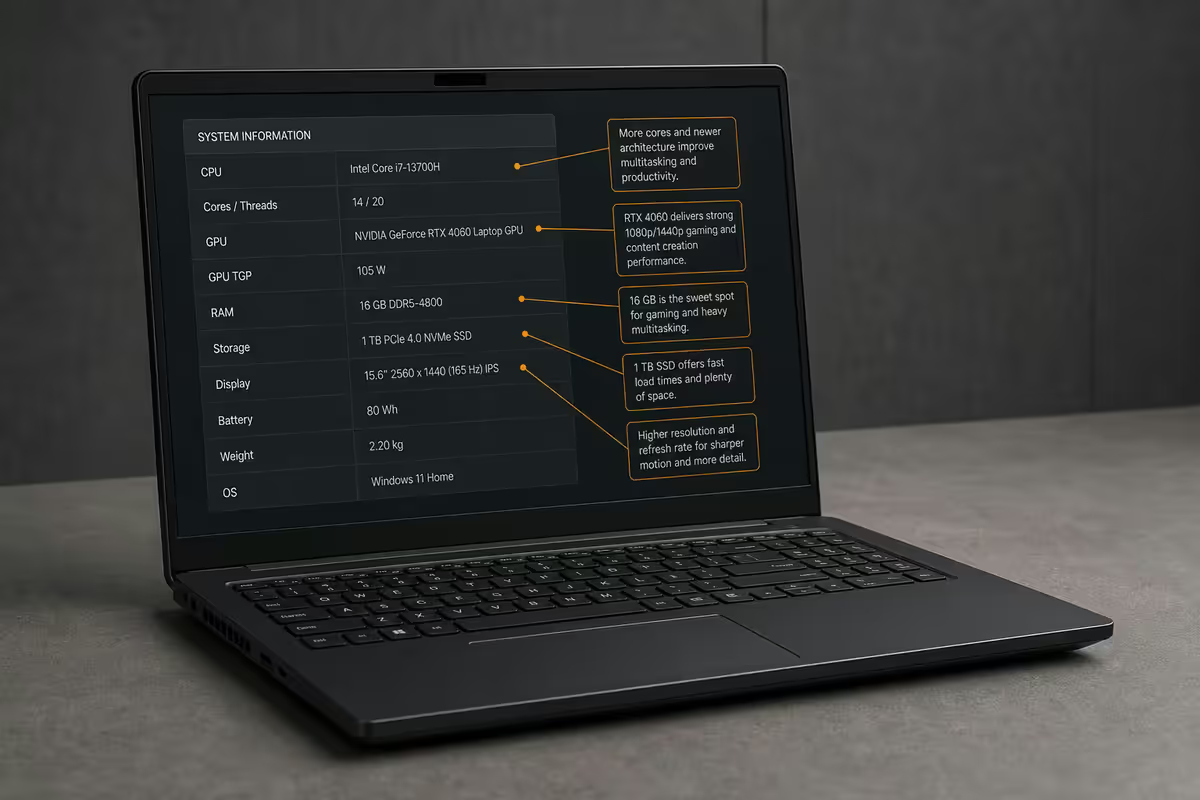
CPU naming — Intel, AMD, Snapdragon
In 2026 there are three CPU families to recognise on a laptop spec sheet, and each uses its own naming logic. Read them once and you'll parse them forever.
Intel Core Ultra (Series 2): the model number takes the shape Core Ultra 7 258V. "Ultra 7" is the tier (5 / 7 / 9 replaces the old i5 / i7 / i9). The first digit is the series — 1 = Meteor Lake, 2 = Lunar Lake (ultra-mobile) or Arrow Lake (performance), 3 = Panther Lake. The letter suffix is the platform: V = Lunar Lake thin-and-light, H = Arrow Lake-H mainstream gaming and creator, HX = Arrow Lake-HX desktop-replacement workstation with up to 24 cores.
AMD Ryzen AI 300 and 400 series: the model number reads Ryzen AI 9 365. "Ryzen AI 9" is the tier (5 / 7 / 9). The first digit of the three-number block (3 = 300 series Strix Point, 4 = 400 series Strix Halo) is the generation. The middle digit is performance tier within the generation. The trailing letter is power class: HS = 35-54W mainstream, HX = 55W+ enthusiast.
Snapdragon X (Qualcomm Arm): the model reads Snapdragon X Elite X1E-84-100. "X Elite" or "X Plus" is the tier; the numeric block encodes core count and clock speed. Snapdragon laptops run Windows on Arm — most x86 apps work via emulation, native Arm apps run brilliantly, and battery life is in another league entirely.
| What you see | What it means | Reads as |
|---|---|---|
| Core Ultra 7 258V | Lunar Lake ultra-mobile, ~17-37W envelope | Thin-and-light, all-day battery |
| Core Ultra 9 285HX | Arrow Lake-HX 24 cores, 55-157W | Desktop-replacement workstation |
| Ryzen AI 9 365 | Strix Point Zen 5 mainstream | Creator / gaming laptop |
| Ryzen AI Max+ 395 | Strix Halo with massive iGPU | Workstation alternative, no dGPU |
| Snapdragon X Elite X1E-84-100 | 12-core Arm, ~23W typical | Productivity ultrabook, 20h battery |
TDP, PL1, PL2 — and why none of them tell the truth alone
TDP (Thermal Design Power) used to mean something. In 2026, on a laptop, it's mostly a marketing baseline. What actually matters is the sustained wattage the laptop's thermal design lets the CPU run at — set by the OEM, not by Intel or AMD.
Modern laptop CPUs operate within two power limits: PL1 (sustained, the wattage held for minutes of full-load work) and PL2 (boost, the wattage allowed for short bursts of seconds). A Core Ultra 9 285H has a base TDP of 45W, a PL1 typically set between 35-65W by OEMs, and a PL2 up to 115W. Same chip; three vastly different real-world performances depending on chassis cooling.
This is why two laptops with the same CPU can post 30% different benchmark scores. Cooler design wins or loses the performance fight more than the CPU model on the sticker.
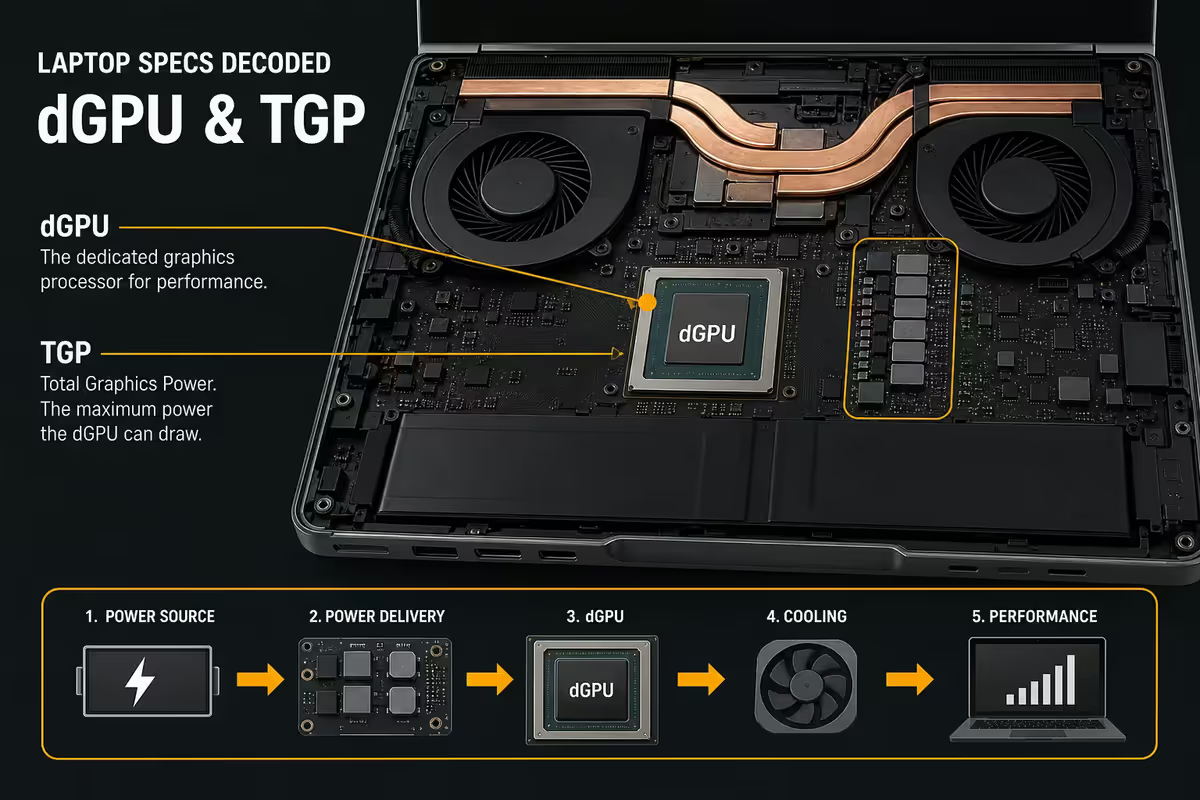
dGPU and TGP — the spec OEMs love to bury
If a laptop has a discrete GPU, the most important number on the spec sheet isn't the GPU model — it's the TGP (Total Graphics Power) in watts. TGP is the wattage budget the OEM has allocated to the dGPU. The same GPU model can be configured by laptop makers anywhere from a power-starved minimum to a near-desktop maximum, and the performance difference is enormous.
An RTX 5070 Laptop GPU at 60W TGP is roughly equal in gaming performance to an RTX 5060 Laptop at 115W TGP. A 90W RTX 5080 Laptop is slower than a 130W RTX 5070 Laptop in many titles. The GPU model name without TGP is almost meaningless.
Typical TGP ranges in 2026:
- Ultraportable gaming / creator — 60-90W TGP, thin chassis, quieter fans.
- Mainstream gaming — 100-130W TGP, the sweet spot for 14-16-inch performance laptops.
- Desktop replacement — 140-175W TGP, thick chassis, loud fans, near-desktop performance.
Dynamic Boost / Advanced Optimus: Nvidia's tech that lets the chassis shift some unused CPU wattage to the GPU when the CPU is idle. Adds 10-25W of headroom in GPU-bound workloads. Look for "Dynamic Boost 2.0" or "Advanced Optimus" on the spec sheet — they're meaningful features.
RAM — LPDDR5X soldered vs SODIMM
In 2026, laptop RAM comes in three forms. Each is a different trade-off, and the choice locks you in for the life of the machine.
LPDDR5X soldered — surface-mounted directly to the motherboard, runs at 7500-8533 MT/s, draws roughly 30% less power than SODIMM equivalents, sits closer to the CPU for lower latency. The catch: zero upgradability. Whatever you buy is what you have for the life of the laptop. Standard on every modern ultrabook, every Snapdragon laptop and every Apple Silicon Mac.
SODIMM DDR5 — slotted modules, 5600-6400 MT/s, slightly higher power draw and latency. The upside: user-upgradable from 16GB to 32GB to 64GB over time. Common on gaming laptops and mobile workstations where the chassis has room for slots.
CAMM2 modules — the new hybrid. Thinner than SODIMM, faster than SODIMM (similar to LPDDR5X speeds), and user-replaceable. Slowly appearing on premium 2026 machines. CAMM2 is the future, but adoption is still patchy.
Storage — NVMe Gen, M.2 sockets, and headroom
Modern laptops ship NVMe SSDs in two physical formats: M.2 2280 (the standard 80mm-long stick) and M.2 2230 (the tiny 30mm stick used in ultraportables, the Steam Deck, and Surface devices). 2280 is faster, cheaper per gigabyte, and easier to find replacements for. 2230 is shorter; the only reason a laptop uses 2230 is chassis space.
Slot count matters more than starting capacity. A laptop with two M.2 sockets — one populated, one empty — is genuinely upgradable. You can buy the cheaper 1TB SKU at purchase, then add a 4TB Gen4 drive in year two without cloning your boot drive. A single-slot machine forces a clone-and-replace operation every time you outgrow storage.
PCIe Gen4 versus Gen5: Gen4 NVMe (around 7,000 MB/s sequential) is the right answer for almost every laptop workload. Gen5 (12,000+ MB/s sequential) generates significantly more heat, drains battery faster, and only shows benchmark differences in synthetic tests. Real-world game loads, app launches and Windows boot times are dominated by random 4K reads — which both Gen4 and Gen5 handle similarly.
Display specs — the seven numbers that matter
Display marketing throws ten numbers at you. Seven matter. Here's how to read them.
Brightness (nits): 250-300 is the dim minimum (you'll hate it in any bright room). 400+ is comfortable indoor. 500+ for outdoor use. 600-1000+ for HDR.
Resolution and pixel density: 1920×1200 (WUXGA) is plenty on 14-inch laptops. 2560×1600 (2.5K) is the sweet spot for 14-16-inch. 3840×2400 (4K+) on a laptop drains battery for marginal visual gain — only worth it for video editors and photo retouchers.
Refresh rate: 60Hz is fine for productivity. 90-120Hz makes everything feel smoother (worth it). 165-240Hz only matters if you play competitive shooters.
Colour gamut: 100% sRGB is the everyday baseline. 100% DCI-P3 or 100% Adobe RGB matters for creative work — photographers, video editors, illustrators.
Panel type: OLED gives perfect black, infinite contrast, near-instant pixel response and stunning HDR — the best premium choice for media and creative work, with a small burn-in risk and lower peak brightness than top mini-LED IPS panels. IPS is brighter, uniform, burn-in-immune, and slightly less dramatic. Mini-LED IPS bridges the gap with thousands of dimming zones for OLED-like contrast.
I/O — USB-C, Thunderbolt, HDMI, the rest
Port count and standards matter more than you'd think — they decide whether your monitor, dock, eGPU and external SSD all work the way the marketing implies.
USB-C vs Thunderbolt: Thunderbolt is a superset of USB-C. Every Thunderbolt port is also a full-power USB-C port (DisplayPort alt-mode, Power Delivery charging). Not every USB-C port is Thunderbolt. Thunderbolt 4 is 40 Gbps and guarantees dual 4K monitor support and eGPU compatibility. Thunderbolt 5 doubles bandwidth to 80 Gbps (with up to 120 Gbps for displays alone). For dock and multi-monitor setups, Thunderbolt 4 minimum.
HDMI version: HDMI 2.0 caps at 4K 60Hz. HDMI 2.1 handles 4K 120Hz or 8K 60Hz. If you're driving a 4K 120Hz gaming TV or monitor, demand HDMI 2.1.
Wi-Fi and Bluetooth: Wi-Fi 7 / Bluetooth 5.4 is the 2026 baseline. Wi-Fi 6E is an acceptable fallback. Wi-Fi 6 is starting to feel aged on flagship machines.
Webcam and biometrics: 1080p webcam is the minimum acceptable spec. Windows Hello IR camera for face unlock is now standard on premium laptops. Fingerprint readers are reliable on most business-class machines.
Battery (Wh), weight (g), build
Battery in Wh (watt-hours) is the only honest battery figure. Ignore "up to X hours" marketing claims — they're measured in best-case scenarios you'll never hit. The honest calculation: divide Wh by your typical system power draw. An 8W idle ultrabook on a 70Wh battery delivers 8-9 hours real-world. The same chassis gaming at 45W lasts 90 minutes.
Snapdragon X laptops extract dramatically more battery life per Wh than x86 equivalents — 16-22 hours is common, double what an Intel/AMD ultrabook delivers from the same Wh. If battery is the priority and your software is Arm-native, Snapdragon is unmatched.
Weight in grams matters more than people think for daily carry. Under 1.2kg is featherweight (you'll forget it's in the bag). 1.4-1.6kg is the standard ultrabook range. 1.8-2.2kg is performance laptop territory. 2.5kg+ is desktop-replacement category — fine on a desk, brutal on a daily commute.
Build material: aluminium unibody chassis is the gold standard for stiffness, heat dissipation and longevity. Magnesium alloy is lighter and still rigid (common on premium business laptops). Polycarbonate or "plastic with metallic finish" is the budget tier — usable, but flexes under pressure and dents more easily.
Key takeaways
- Full CPU model number (e.g. Core Ultra 7 258V, not "Ultra 7") tells you the platform and wattage envelope.
- Sustained wattage (PL1) matters more than TDP. Cooler design decides real performance.
- dGPU TGP changes performance more than the GPU model name. Demand the watt figure.
- LPDDR5X soldered is faster but locked. Buy 32GB up front if you're going soldered.
- Two M.2 NVMe slots = future-proof storage. One slot = clone-and-replace forever.
- Battery in Wh, weight in grams. Marketing hours are theatre; do the maths yourself.
Frequently asked questions
What does Core Ultra 7 258V actually mean?
Intel's 2024+ naming. "Core Ultra" replaces i3/i5/i7. The first digit is the series (2 = Lunar Lake/Arrow Lake), the second is the tier (5/7/9), and the letter suffix is the platform (V = Lunar Lake ultra-mobile, H = mainstream, HX = workstation).Why is TDP misleading on a laptop CPU?
Every modern laptop CPU runs within OEM-set PL1/PL2 power limits. Two laptops with the same chip can post 30% different benchmarks depending on chassis cooling and sustained wattage configuration.What is TGP and why does it matter more than the GPU model?
TGP (Total Graphics Power) is the wattage the OEM allocates to its dGPU. An RTX 5070 Laptop at 60W TGP is dramatically slower than the same chip at 140W — often a 30-40% gap. Always check TGP.LPDDR5X soldered vs SODIMM — which should I want?
Soldered LPDDR5X is faster and lower-power but zero upgradability — buy 32GB up front. SODIMM is slower but user-replaceable; common on gaming laptops where you can upgrade later.How many NVMe slots should a laptop have?
One M.2 2280 slot in most ultrabooks. Gaming and creator laptops should have two — one populated, one empty. Two slots = future-proof storage upgrades without cloning.What display specs actually matter on a laptop?
Brightness (400+ nit indoor, 500+ outdoor), gamut (100% sRGB everyday, 100% DCI-P3 creative), refresh (90-120Hz sweet spot), panel type (OLED for contrast, IPS for brightness uniformity).What's the difference between USB-C, Thunderbolt 4 and Thunderbolt 5?
All Thunderbolt is USB-C-shaped, but not all USB-C is Thunderbolt. TB4 = 40 Gbps, guaranteed dual 4K and eGPU. TB5 = 80 Gbps (120 Gbps for displays). For docks and external monitors, TB4 minimum.How do I read battery Wh and estimate real-world battery life?
Divide Wh by system power draw. 70Wh at 8W idle = 8-9h ultrabook. Same chassis at 45W gaming = 90 minutes. Snapdragon X laptops extract roughly 2× more life per Wh than x86 equivalents.
Get the Evetech app
Exclusive app-only prices, daily flash sales, and free delivery on orders over R4,000 — download the app and start saving.