Laptop Guide · Thermals
Laptop thermal throttling. — What it is. What actually fixes it.
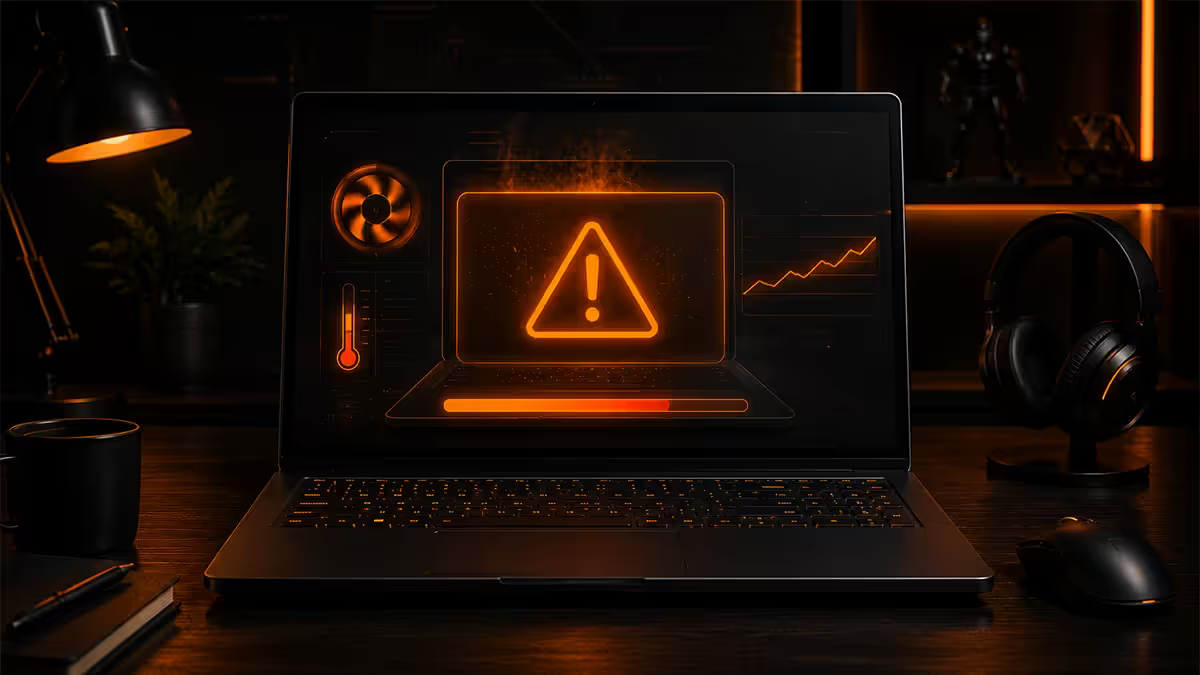
When your laptop hits 100°C the CPU pulls its own clocks down to save itself. Frame rate drops. Audio crackles. Spotify lags. Here's the diagnosis and the fixes that work — ranked by effort.
- throttle point
- 95-100°C
- undervolt gain
- 5-15°C
- repaste gain
- 8-15°C
What thermal throttling actually is
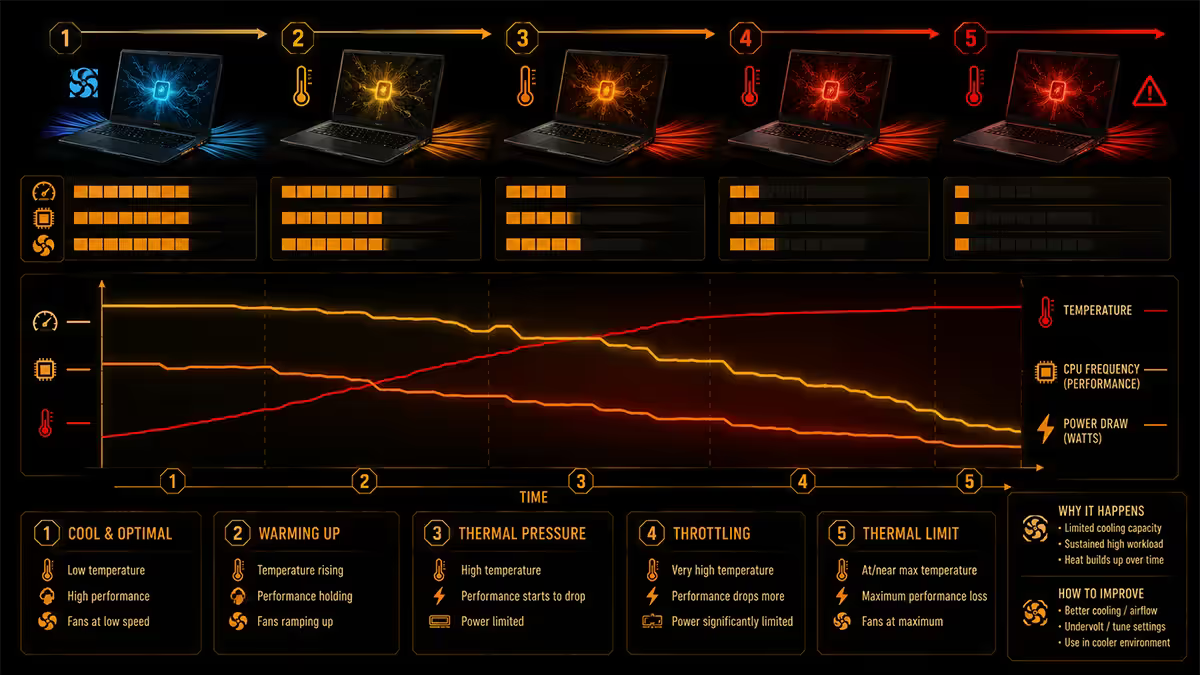
Thermal throttling is the CPU (or GPU) silently dropping its clock speed and voltage the moment it reaches a thermal limit. The chip protects itself from physical damage by reducing heat output until temperature comes back into a safe range. The visible symptoms:
- Frame-rate suddenly drops mid-game from 90fps to 45fps.
- Audio crackles or skips during rendering / video calls.
- Foreground apps go sluggish for 5-30 seconds.
- CPU temperature pegs at exactly 95°C or 100°C in HWInfo64.
- Clock speed in HWInfo drops from 4.5-5.0 GHz to 2.0-2.8 GHz under sustained load.
Modern Intel Core Ultra and AMD Ryzen mobile CPUs throttle at 100°C by default. Some OEMs configure firmware to begin throttling earlier — at 90°C or 95°C — to keep chassis surface temperatures comfortable for hands and laps.
Why thin-and-light laptops throttle harder
A 15W ultraportable cooling system simply cannot dissipate the 45-65W a Ryzen 7 or Core Ultra 7 produces under sustained load. The chip boosts hard for 30-60 seconds, hits 100°C, and throttles. This is by design — Intel and AMD count on burst workloads for ultraportables.
The thermal budget hierarchy in 2026 looks like this:
| Chassis tier | Sustained TDP | Throttle behaviour |
|---|---|---|
| Fanless ultraportable (12.5mm) | 10-15W | Throttles within seconds of boost |
| Single-fan ultraportable (16mm) | 15-25W | Throttles after 30-60 seconds |
| Dual-fan creator (17-19mm) | 28-45W | Sustains most workloads |
| Gaming laptop (20-23mm) | 45-65W CPU + 80-150W GPU | Sustains gaming indefinitely if maintained |
| Workstation (24mm+) | 55W+ sustained | Sustains rendering at full boost |
Undervolting — the free 5-15°C drop
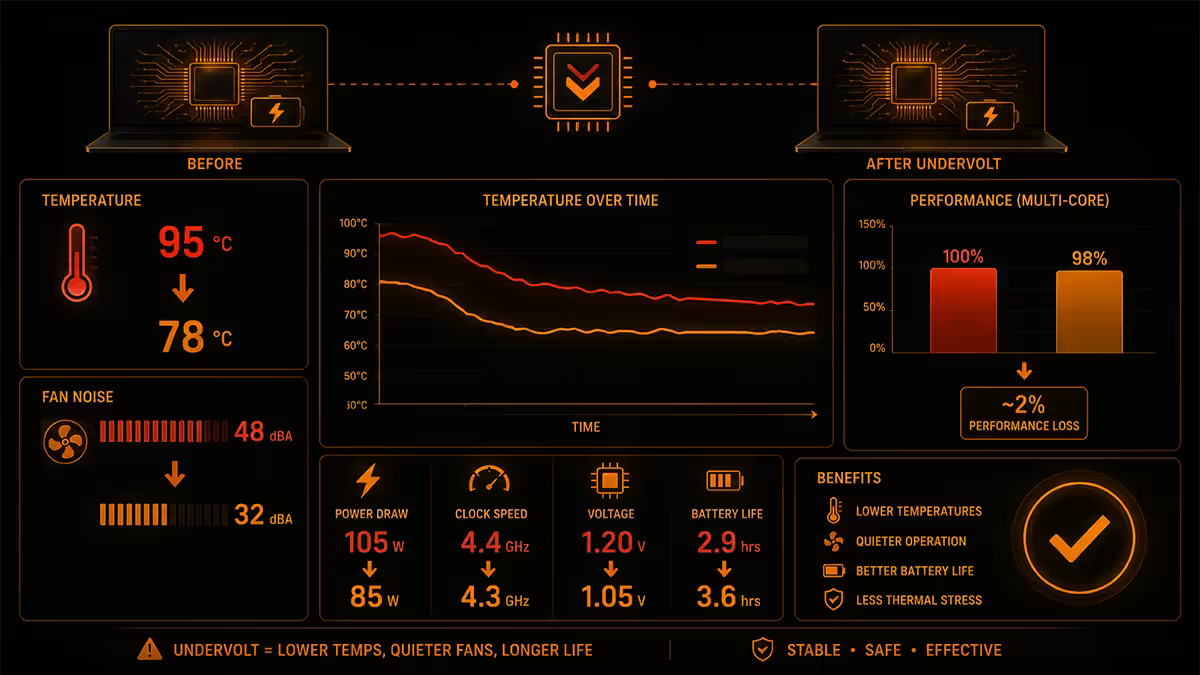
Undervolting is reducing the voltage your CPU receives at each clock state. Modern silicon ships with conservative voltage targets (to guarantee stability across the entire production batch). Most individual chips run perfectly stable at -50mV to -100mV below stock, producing less heat for the same clock speed.
Tools by platform:
- ThrottleStop — best tool for Intel 8th-10th gen. Free, mature, granular control.
- Intel XTU (Extreme Tuning Utility) — official Intel tool. Works on unlocked 11th gen and newer mobile SKUs.
- Ryzen Master — official AMD tool. Curve Optimiser on Ryzen 7000+ delivers per-core undervolts.
- Asus G-Helper / MSI Center / Lenovo Vantage — OEM-specific undervolt panels on gaming laptops.
Procedure: apply -50mV offset, run Cinebench R23 for 10 minutes. If stable, drop another 10-20mV. Continue until the system crashes or throws WHEA errors, then back off 20mV. Most laptops land between -70mV and -120mV stable.
Fan curve tuning
Most laptops ship with conservative fan curves — fans stay quiet until the CPU is already approaching 90°C, then ramp to max. Custom curves ramp earlier in the temperature band, preventing the spike to 100°C in the first place.
OEM tools that expose fan curve control:
- Asus ROG Armoury Crate — fan-curve editor in Manual mode.
- MSI Dragon Center / MSI Center — User-defined fan profiles.
- Lenovo Vantage — Custom mode on Legion-series.
- HP Omen Gaming Hub — Performance modes with fan ramp adjustment.
- Razer Synapse — Per-Mode fan curves on Blade-series.
Set the fan to ramp to 60-70% at 70°C and 100% at 85°C. The trade-off is noticeably louder operation under load — sometimes uncomfortably so on thin chassis. Worth it during gaming sessions; switch back to quiet mode for office work.
Repaste with PTM7950 — the 2-3 year fix
Most laptops ship with mediocre thermal paste from the factory. After 18-36 months that paste dries out and the CPU-to-heatsink thermal resistance climbs significantly. PTM7950 is the modern answer:
PTM7950 is a phase-change thermal pad from Honeywell that becomes liquid at 45°C and re-solidifies on cooldown. It doesn't pump-out (the repeated heat-cool cycling that thins regular paste). Real-world drops on a 2-3 year old laptop with dried factory paste: 8-15°C lower CPU temperatures after replacement.
Procedure:
- Disconnect battery, remove back panel, photograph existing cable routing.
- Remove heatsink screws in numbered order (1→2→3→4 or X-pattern).
- Clean old paste from CPU die and heatsink with 99% IPA on a microfibre cloth.
- Cut PTM7950 sheet slightly smaller than the CPU die; peel off protective film both sides.
- Place PTM7950 on the die; reseat heatsink with even tension across all screws.
- First boot will run at slightly elevated temps for 5-10 minutes as PTM7950 reaches phase-change activation.
PTM7950 availability in SA: stocked by Wootware, Evetech, RebelTech and select Takealot specialists. An 80mm x 80mm sheet runs R250-R400 and is enough for 3-4 laptops.
Cooling pad & elevation hacks
Elevation is free and often as effective as a cooling pad. Most laptops draw intake air from the bottom panel. Sitting flat on a desk blocks 30-50% of that intake. Raising the laptop 2-3cm with a folded book, a laptop stand or pop-up legs restores airflow and commonly drops CPU temps 3-5°C.
Cooling pads — boards with built-in fans you place the laptop on — deliver another 2-4°C on top of elevation. Worth the R400-R800 if you regularly run sustained workloads. Choose a model with the fans positioned over the laptop's intake vents (varies by laptop model — measure first).
What doesn't help: running the laptop on a soft surface (bed, sofa, lap) — this blocks intakes and traps exhaust. Always run sustained workloads on a hard, flat surface with at least 5cm of clearance around the exhaust vents.
When the chassis is the root cause
Some laptops simply have undersized cooling for the chip they ship with. The classic example: single-heatpipe ultraportables paired with H-class CPUs. Marketing demands a fast-sounding chip; engineering ships a cooling system that can't keep up with it. No software, paste or pad fixes this.
Symptoms of fundamentally undersized cooling:
- CPU hits 95°C within 60 seconds of any sustained load, even after a fresh PTM7950 repaste.
- Undervolting moves the throttle point back by 5-8°C but doesn't eliminate it.
- Custom fan curves at 100% can't keep temps below 90°C.
- The same chip in a thicker chassis (your friend's gaming laptop) sustains full boost indefinitely.
If you're hitting all four, the chassis is the bottleneck. Options:
- Accept it. Use the laptop for burst workloads (typical ultraportable use case) and avoid sustained renders.
- Use an external eGPU enclosure for heavy graphics workloads, offloading them from the internal GPU.
- Pair with a quiet desktop at home for sustained work; the laptop covers mobility.
- Upgrade to a thicker laptop with H-class chips in a 17-20mm chassis with dual fans.
Key takeaways
- Throttle = CPU dropping clock at 95-100°C to protect itself. Designed behaviour, not damage.
- Free fixes first: elevate the laptop 2-3cm and undervolt with ThrottleStop / XTU / Ryzen Master.
- Tune fan curves in OEM software — earlier ramp, fewer spikes to throttle point.
- Repaste with PTM7950 on laptops 2-3 years old. 8-15°C improvement typical.
- If a thin chassis still throttles after all fixes, the cooling system is undersized — only a different laptop solves it.
Frequently asked questions
What is laptop thermal throttling?
The CPU automatically dropping its clock speed at 95-100°C to protect itself. Frame rates drop, audio crackles, apps go sluggish until the chip cools.At what temperature does a laptop CPU thermal throttle?
100°C by default on modern Intel and AMD mobile CPUs. Some OEMs configure earlier 90-95°C limits for chassis comfort.Why do thin and light laptops throttle so hard?
A 15W cooling system can't dissipate 45-65W under sustained load. The chip boosts hard, hits 100°C and throttles. By design — ultraportables are tuned for burst workloads.Will undervolting fix thermal throttling on my laptop?
Often, yes — typical 5-15°C drop with no performance loss. Use ThrottleStop, Intel XTU or Ryzen Master. Note that 11th-gen Intel and newer lock undervolting unless the OEM allows it.What's PTM7950 and why repaste with it?
Honeywell phase-change thermal pad that doesn't pump-out like regular paste. 8-15°C improvement typical on 2-3 year old laptops.Do laptop cooling pads actually work?
Marginal — 2-5°C. Elevation alone (lifting the laptop 2-3cm) commonly delivers similar benefit for free. Both together is best.Can I fix throttling by tuning fan curves?
Yes if the OEM software exposes fan controls. Asus ROG, MSI, Lenovo Legion, HP Omen, Razer Blade all do. Ramps fans earlier in the temperature band, preventing the spike to throttle point.When is throttling the chassis's fault and unfixable?
When undersized cooling pairs with an H-class CPU. Software, paste and cooling-pad fixes push back the throttle point by 5-8°C; the rest requires a different laptop.
Get the Evetech app
Exclusive app-only prices, daily flash sales, and free delivery on orders over R4,000 — download the app and start saving.