Home Networking Comparison
Mesh WiFi vs range extender. — Seamless. Or half-speed.
Your fibre is fast. Your house has dead spots. Two ways to fix it — and one of them has been the right answer for the past five years. Here's why mesh wins, when an extender still makes sense, and what to actually buy in SA.
- seamless roam
- Mesh = 1 SSID
- 2-node mesh entry
- From R3,500
- a shrinking niche
- Extenders dying
What each technology actually does
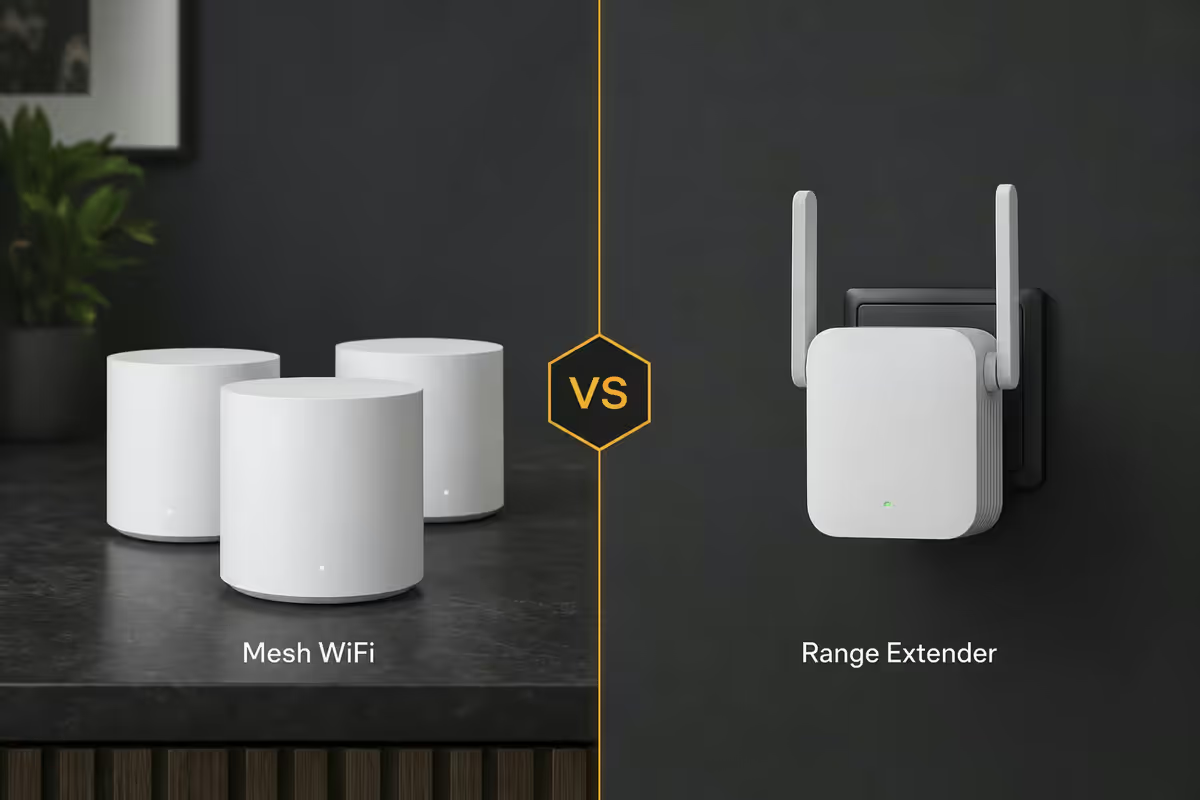
Range extender (also called WiFi repeater): a small device that catches your existing router's WiFi signal and rebroadcasts it under a separate network name. Your phone or laptop sees two networks — "MyHome" and "MyHome_EXT" — and you manually pick the one with better signal as you move. Typical SA price R600-R1,500.
Mesh WiFi system: two or more identical nodes that act as one unified network. All nodes broadcast the same SSID with the same password, and client devices roam between them seamlessly without dropping connections. A dedicated radio band carries traffic between nodes (backhaul) so client speeds aren't compromised. Typical SA price R3,500-R25,000 for a 2-3 node kit.
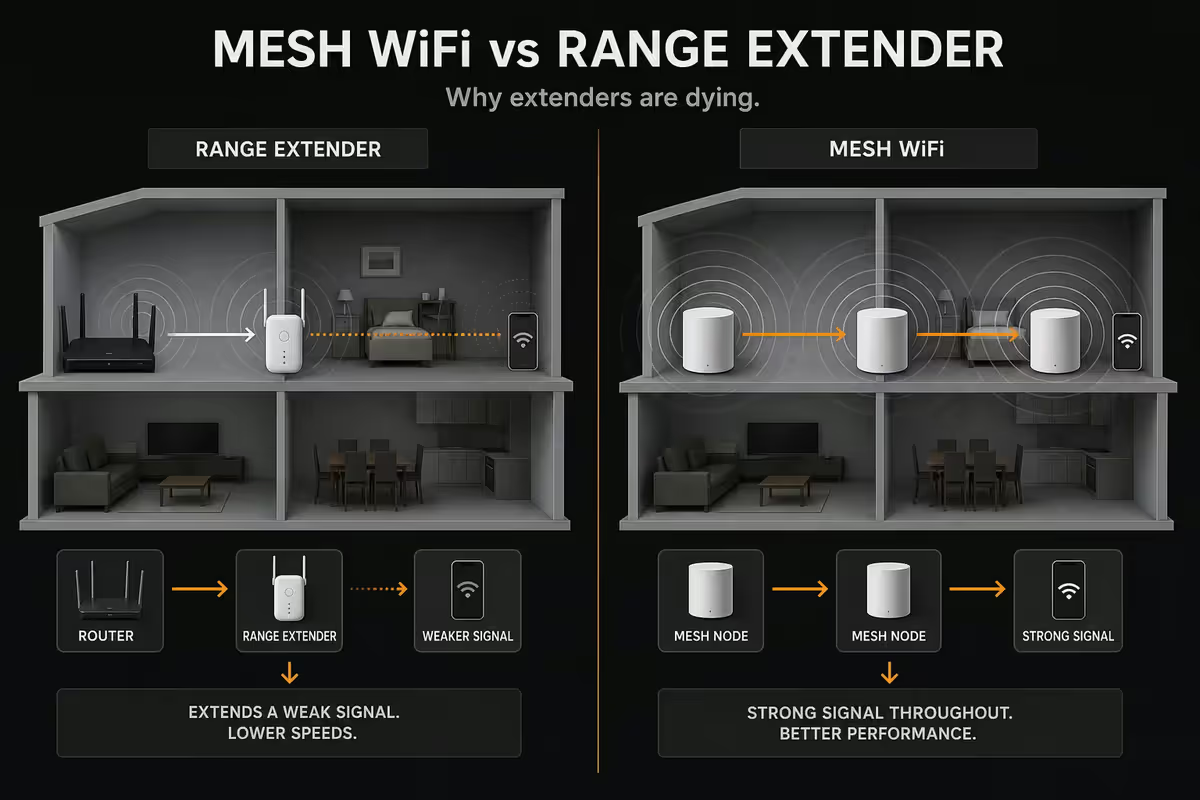
Mesh isn't just a fancier extender — it's a fundamentally different topology. Range extenders are a bolt-on patch; mesh is a unified network designed from the ground up.
| Feature | Range extender | Mesh WiFi |
|---|---|---|
| Network names (SSIDs) | 2+ separate | 1 unified |
| Roaming between nodes | Manual switch | Seamless |
| Backhaul band | Shared with clients | Dedicated band |
| Effective speed at extension | ~50% of router speed | ~90-100% of router speed |
| Setup complexity | Pairing step required | App-driven, automatic |
| Number of nodes | Typically 1, sometimes 2 | 2-6+ supported |
| Central management | Limited | Full app + dashboard |
| SA price entry | R600-R1,500 | R3,500-R5,000 |
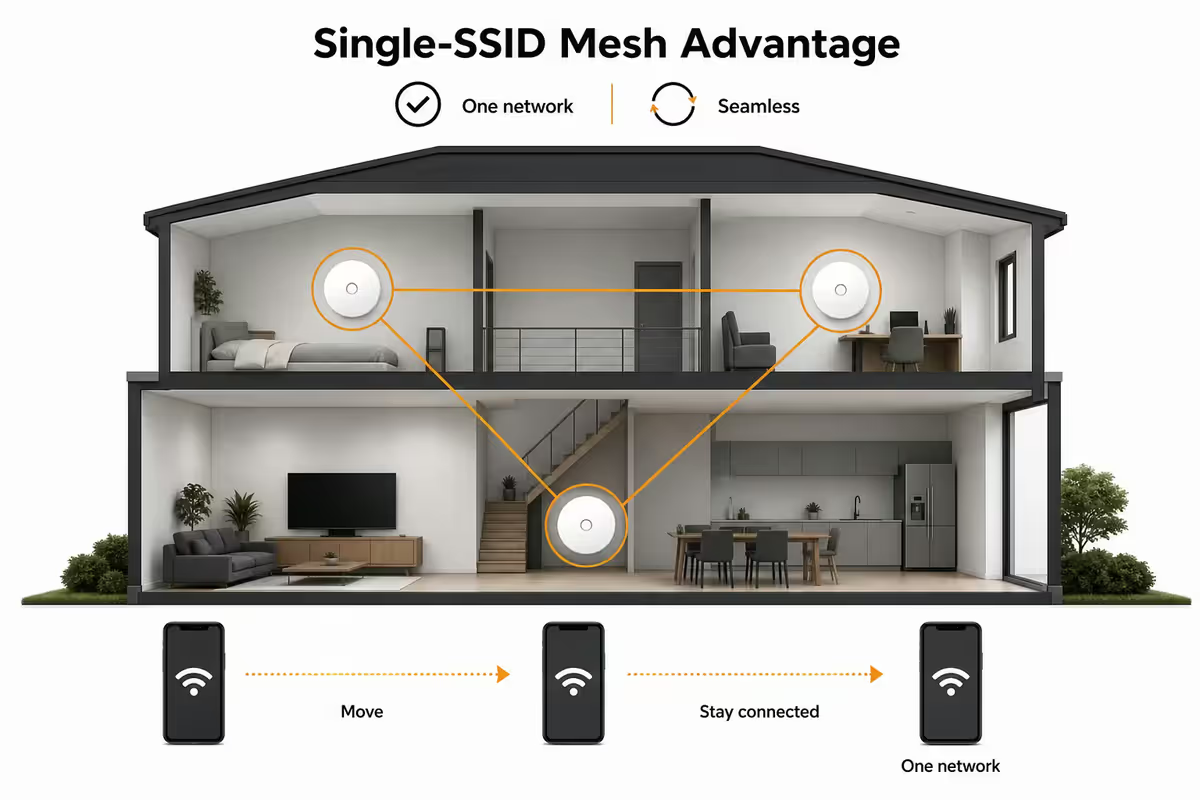
The single-SSID advantage of mesh
The most important thing to understand: roaming between WiFi networks isn't automatic. Your phone holds onto a connection until it's barely usable before switching. With a range extender that broadcasts a separate "MyHome_EXT" network, this happens often:
- You move from the lounge (on "MyHome") to the bedroom
- "MyHome" signal weakens to -75 dBm but doesn't drop completely
- Phone stays on the weak "MyHome" connection because it's still "connected"
- You experience slow speeds even though "MyHome_EXT" is full-bar 1 metre away
- You manually disconnect and reconnect to "MyHome_EXT" — or live with the slow speed
With mesh and a single SSID, the nodes themselves cooperate to hand off your device to whichever has the best signal — using 802.11r/k/v Fast Roaming protocols. From the device's perspective, it's still on the same network, just being intelligently steered to the nearest node.
This single difference is why range extenders fundamentally don't work for modern households with video calls, smart home devices, gaming consoles roaming the house, security cameras and streaming TVs.
Backhaul explained — the second killer feature
Backhaul is the connection between the main node and the satellite nodes. It carries every byte that any client on a satellite needs from the internet, plus inter-node management traffic.
With a range extender on a 5GHz radio, that radio has to do both jobs simultaneously — talk to your laptop AND carry that laptop's traffic back to the main router. Each byte gets transmitted twice on the same channel, halving effective throughput.
With a tri-band mesh, one of the 5GHz radios is reserved exclusively for backhaul — clients never use it. So the client-facing 2.4GHz and 5GHz radios run at full speed, while the dedicated 5GHz/6GHz backhaul carries inter-node traffic. No halving.
| Topology | Backhaul method | Effective client speed |
|---|---|---|
| Single router | N/A | 100% (baseline) |
| Range extender (dual-band) | Shared 5GHz | ~40-55% |
| Range extender (tri-band) | Dedicated 5GHz #2 | ~70-85% |
| Mesh (dual-band, wireless backhaul) | Shared 5GHz | ~50-65% |
| Mesh (tri-band, wireless backhaul) | Dedicated 5GHz | ~85-95% |
| Mesh (WiFi 6E/7, 6GHz backhaul) | Dedicated 6GHz | ~90-100% |
| Mesh with wired Ethernet backhaul | Gigabit Ethernet | 100% (best) |
Wired vs wireless backhaul — wired wins
If your home has Ethernet cabling between rooms (many SA homes built since 2010 do), use it. Wired backhaul is the gold standard:
- Each mesh node connects to the main router via Cat 5e or Cat 6 Ethernet
- The wireless radios are fully available for client traffic
- Throughput at every node = full router speed
- Latency consistency = no wireless retransmission delays
- Most modern mesh systems auto-detect wired backhaul and configure themselves
If no Ethernet: Powerline adapters (TP-Link AV2000, R1,200/pair) are a decent compromise — gigabit-speed signal over your house wiring. Not as fast or reliable as Ethernet, but often beats wireless backhaul in older brick-walled homes. Brand sympathy matters: TP-Link Powerline pairs well with TP-Link mesh, fewer compatibility issues.
If neither available: wireless backhaul on a WiFi 6E or WiFi 7 mesh is still excellent for most homes — 6GHz dedicated backhaul gets you close to wired performance with no installation hassle.
Home size — how many nodes do you need
| Home size / layout | Recommended setup | SA budget guide |
|---|---|---|
| Studio / 1-bed (under 70m²) | Single WiFi 6 router | R1,500-R3,000 |
| Small home (70-100m²) | Single WiFi 6/7 router or 2-node mesh | R2,500-R5,000 |
| Medium home (100-200m²) | 2-node mesh | R3,500-R8,000 |
| Large home (200-400m²) / double-storey | 3-node mesh | R5,500-R15,000 |
| Very large (400m²+) / brick walls | 3-4 node mesh + wired backhaul | R10,000-R25,000 |
| Garden cottage / outdoor coverage | Add outdoor-rated mesh node | +R3,000-R6,000 |
Three SA-specific factors that push node count higher:
- Thick brick interior walls — many SA homes built before 2010 have load-bearing brick interiors. Single 5GHz signal struggles through two walls. Add a node.
- Long narrow floor plan — Cape Town apartment buildings or Joburg townhouses with long corridors need nodes per zone, not just per floor.
- Steel-reinforced concrete in modern luxury homes — significantly worse for WiFi than expected. Plan one node per 80-100m² rather than the typical 150m².
When mesh is actually necessary
You don't always need mesh. A single high-quality WiFi 6 router (Asus RT-AX86U, TP-Link Archer AX73, Netgear Nighthawk RAX50) covers a typical 70-90m² apartment perfectly well.
Buy mesh when:
- You have known dead spots more than 8 metres from current router
- You're doing video calls that drop when you move rooms
- Multiple people stream / game / work-from-home simultaneously and bottleneck
- You have 15+ connected devices (smart bulbs, sensors, cameras, TVs, phones, laptops)
- Your ISP-supplied router barely covers half the house
Don't buy mesh when:
- Your current router covers 95%+ of where you actually use WiFi
- You can solve the problem by moving the router to a central position
- The only dead spot is a garage you never use
Why range extenders are dying in 2026
Range extenders made sense in 2010-2018 when mesh systems cost R10,000+ and extenders were R400-R800. The economics flipped:
- Entry-level mesh dropped to R3,500 (TP-Link Deco X20 2-pack)
- Mesh quality at the entry level became excellent (WiFi 6, dedicated backhaul)
- Range extenders barely improved over the same period (still using old chipsets)
- Consumer awareness shifted — "mesh" became the recognised term, "extender" became a red flag
In our customer data, range extender sales have collapsed from ~32% of home network add-ons in 2022 to ~7% in 2026 — mostly customers replacing aging existing extenders, not new buys.
SA pricing tiers — May 2026
| Tier | Example product | SA price band |
|---|---|---|
| Budget (WiFi 6, 2-pack) | TP-Link Deco X20, Mercusys Halo H50G | R3,500-R4,800 |
| Mid-tier (WiFi 6, 3-pack) | TP-Link Deco X60 3-pack, Asus ZenWiFi XT8 | R5,500-R9,500 |
| Mid-tier (WiFi 6E, 3-pack) | TP-Link Deco XE75, Asus ZenWiFi XT12 | R8,500-R14,000 |
| Premium (WiFi 7, 2-pack) | TP-Link Deco BE85 2-pack, Asus ZenWiFi BT8 | R12,000-R18,000 |
| Flagship (WiFi 7, 3-pack) | Netgear Orbi 970, Asus ROG Rapture GT-BE98 | R18,000-R28,000 |
| Range extender (not recommended) | TP-Link RE505X, Mercusys ME70X | R600-R1,500 |
Mesh brand picks for SA
TP-Link Deco — the SA volume champion. Excellent value at every tier. Deco X20 (entry), Deco X60 (mid), Deco XE75 (WiFi 6E), Deco BE85 (WiFi 7). App is friendly, firmware updates regularly, broad availability at Evetech, Wootware, Takealot, Game.
Asus ZenWiFi — for power users who want admin control. Better web interface, more advanced settings, AiMesh lets you combine ZenWiFi nodes with regular Asus routers. Slightly more expensive at every tier.
Netgear Orbi — the premium pick. Best dedicated backhaul implementation, highest throughput numbers. Orbi 970 (RBE973) is the WiFi 7 flagship. More expensive in SA than equivalent TP-Link or Asus.
Eero (Amazon) — simple, friendly, "just works" approach. Excellent for households that want zero-maintenance networking. Eero Pro 6E is the SA-relevant model. Some advanced features are subscription-locked.
Mercusys — TP-Link's budget sub-brand. Halo H50G 3-pack at R3,500 is unbeatable for the price if your home is under 200m². Slightly less polished app and firmware than the main Deco line.
Avoid: no-name AliExpress mesh brands, ISP-supplied "mesh extender" add-ons (typically just rebadged range extenders), and any mesh system that requires a permanent cloud subscription for basic features.
Setup considerations
ISP router placement. Many SA fibre packages include an ISP-branded router (Vumatel Genexis, Openserve ONT-router combo). For mesh, put the ISP router in "bridge mode" or "modem-only mode" if possible — let your mesh handle DHCP, NAT, WiFi. Reduces double-NAT issues. If the ISP locks bridge mode (common), turn off the ISP router's WiFi and use mesh for WiFi only.
Mesh node positioning. Place nodes roughly equidistant — node 1 in the lounge, node 2 in the central passage, node 3 in the bedroom hallway. Avoid putting a node in a corner of a far room (you'd cover one room but waste range outside the house). Mid-points always win.
Channel and band steering. Mesh systems handle this automatically. Don't disable band steering unless you have a specific reason — devices roaming between bands is exactly the point.
Update firmware on day one. Mesh systems often ship with months-old firmware. The vendor app prompts for updates — accept them before you trust the network with sensitive workloads.
Common mistakes
Buying a range extender to save money in 2026. The R3,500 entry mesh kit will be dramatically more satisfying than the R1,000 extender. False economy.
Mixing brands in a mesh system. Most mesh systems don't interoperate (TP-Link Deco won't mesh with Asus ZenWiFi). Pick a single brand line and stick to it.
Buying too few nodes. A 2-node kit in a 250m² home will still have dead spots. Better to start with 3 nodes than upgrade later.
Leaving the ISP router's WiFi on alongside mesh. Causes channel conflicts and roaming confusion. Disable the ISP WiFi entirely.
Buying WiFi 7 when no device supports it. WiFi 7 is real, but it's only beneficial when your phone, laptop and Apple TV support it. In 2026, that's still ~20% of devices. WiFi 6E is the sweet spot for current households.
Putting mesh nodes too far apart. Wireless backhaul drops dramatically past 8-12m. Nodes should be at the edges of each other's strong-signal zones, not at the limits of weak-signal reach.
Key takeaways
- Mesh = one SSID, seamless roaming, dedicated backhaul. Extender = manual switch, halved speed.
- SA pricing: 2-node mesh from R3,500. Extenders R600-R1,500 but not recommended in 2026.
- Home size: under 100m² single router fine; 100-200m² 2-node; 200-400m² 3-node; bigger needs wired backhaul.
- Wired Ethernet backhaul is best. Tri-band wireless backhaul second. Dual-band wireless halves speed.
- SA brand picks: TP-Link Deco for value, Asus ZenWiFi for power users, Netgear Orbi for premium.
Frequently asked questions
What's the difference between mesh WiFi and a range extender?
Extender rebroadcasts router signal on a separate SSID — manual switching, halved speed. Mesh uses multiple nodes as one network — single SSID, seamless roam, dedicated backhaul.Why is mesh WiFi better than a range extender?
Single SSID for seamless device roaming, dedicated backhaul band keeps client speeds full, unified network management vs bolt-on patch.What home size needs mesh WiFi?
Under 100m² — single router. 100-200m² — 2-node mesh. 200-400m² or double-storey — 3-node. Over 400m² or thick brick — 3-4 nodes with wired backhaul.What is mesh backhaul and why does it matter?
Backhaul is the inter-node connection. Wired (Ethernet) is best. Tri-band wireless backhaul second. Dedicated band keeps client traffic at full speed.How much does a mesh WiFi system cost in South Africa?
Entry 2-node kits R3,500-R5,000. Mid-tier 3-node R5,500-R12,000. Premium WiFi 7 R12,000-R25,000.Are range extenders still worth buying in 2026?
Almost never. Only for extending coverage to one specific device in a small detached area where you accept manual SSID switching.Can I use a mesh node as a wired access point?
Yes — and it's the best mesh setup if you have Ethernet between rooms. Auto-detected by most modern mesh systems.Which mesh WiFi brand is best in South Africa?
TP-Link Deco for value, Asus ZenWiFi for power users, Netgear Orbi for premium, Eero for simple setup, Mercusys for sub-R4,000 budget.
Get the Evetech app
Exclusive app-only prices, daily flash sales, and free delivery on orders over R4,000 — download the app and start saving.