GPU Power Explainer
GPU TDP & power consumption. — Rated watts lie. Transient spikes don't.
Your shiny new RTX 5070 says "220W". Your PSU sees 380W bursts. The gap between rated TDP and what the card actually pulls at full tilt is the single biggest reason new builds shut down mid-game. Here's what TDP really means — and how to size for it.
- actual watts
- TDP ≠
- transient spike
- 200%+
- PSU sizing rule
- ×1.4
What TDP officially means
TDP stands for Thermal Design Power, and the textbook definition is "the maximum amount of heat the cooler is required to dissipate under typical sustained workload, expressed in watts". It is, strictly, a thermal engineering figure intended to size cooling solutions — not a power-draw figure.
In practice, the marketing teams at NVIDIA and AMD have collapsed the term to mean "approximate sustained wattage of the card under load". Same number, different vendor branding:
- NVIDIA TGP (Total Graphics Power) — the chip's typical sustained draw.
- NVIDIA TBP (Total Board Power) — TGP plus memory, fans, RGB and board electronics.
- AMD TBP (Typical Board Power) — same idea as NVIDIA TBP.
- "TDP" in general spec sheets — usually shorthand for whichever of the above the vendor wants to advertise.
For PSU sizing, treat all four as roughly equivalent. The card draws approximately whatever wattage figure appears on the spec sheet, sustained.
What TDP actually means in your build
Here's the gap between specification and reality: TDP describes typical sustained behaviour. Your card does not draw a constant TDP-rated wattage. It oscillates — milliseconds idle, milliseconds at peak, millions of times per second as the GPU pipeline schedules and completes work.
On modern Ada Lovelace (RTX 40), Blackwell (RTX 50) and RDNA 4 (RX 9000) silicon, the gap between the "average" power and the "peak instantaneous" power is enormous because of how the architectures schedule work. Ray tracing pipelines in particular pull big asymmetric bursts when shader compute spikes during BVH (bounding volume hierarchy) traversal.
Concrete example: an RTX 5070 rated at 220W TDP will sit between 180W-260W during sustained rasterised gameplay, but the moment a ray-traced reflection scene triggers, the card can pull 350-400W for 1-10 millisecond bursts. A PSU rated for 220W average can supply 220W average — but if its over-current protection (OCP) trips at 350W on the 12V rail, the system shuts down.
The transient spike problem
Transient spikes are the single most common reason "but my PSU is rated 650W and the GPU is only 220W" still leads to mid-game shutdowns. Let's break this down clearly.
What triggers spikes:
- Ray tracing — BVH traversal and ray sorting are bursty workloads
- Shader compilation — first time a new shader compiles in-game, the GPU floors compute units
- Game-loading bursts — asset decompression hits the GPU as well as CPU
- Frame generation activation — DLSS FG, FSR FG and AFMF 2 add their own compute load
- Switching workloads — alt-tabbing into a benchmark, multi-monitor video playback
Spike magnitudes by GPU class:
| GPU | Rated TDP | Typical spike (1-10ms) |
|---|---|---|
| RTX 4060 / RX 7600 | 115W / 165W | 170W / 220W |
| RTX 5070 / RX 9070 | 220W / 220W | 350W / 320W |
| RTX 5070 Ti / RX 9070 XT | 280W / 295W | 430W / 450W |
| RTX 5080 / RX 7900 XTX | 360W / 355W | 560W / 530W |
| RTX 5090 | 575W | ~900W in extreme cases |
GPU classes by TDP — 2026 lineup
A quick reference for current-generation cards. Use these numbers when running the PSU sizing formula in the next section.
| Class | NVIDIA | AMD |
|---|---|---|
| Entry-level (under 150W) | RTX 4060 — 115W | RX 7600 — 165W |
| Mid-tier 1080p / 1440p | RTX 5070 — 220W | RX 9070 — 220W |
| Upper mid 1440p / entry 4K | RTX 5070 Ti — 280W | RX 9070 XT — 295W |
| Enthusiast 4K | RTX 5080 — 360W | RX 7900 XTX — 355W |
| Flagship | RTX 5090 — 575W | — |
AIB partner cards (Asus ROG Strix, MSI Suprim X, Gigabyte Aorus Master, Sapphire Nitro+, ASRock Taichi) typically run 10-15% higher TDP than founders/reference designs because of factory overclocks and beefier power delivery. Check the specific card's listed TBP rather than the chip's reference TDP when sizing.
PSU sizing formula — the only one you need
After running tens of thousands of builds through our test bench, the single most reliable PSU sizing formula is:
The components:
- CPU TDP + GPU TDP — published spec values; sum them.
- + 80W — covers RAM (2-5W per stick), NVMe SSDs (3-8W each), fans, RGB, motherboard, USB peripherals.
- × 1.4 — multiplier that absorbs transient spikes (×1.2) plus PSU efficiency loss at higher load (×1.15).
Worked examples:
- Ryzen 7 9700X (105W) + RTX 5070 (220W) → (105 + 220 + 80) × 1.4 = 567W → buy a 650W 80+ Gold unit.
- Ryzen 9 9900X (170W) + RTX 5070 Ti (280W) → (170 + 280 + 80) × 1.4 = 742W → 850W 80+ Gold unit.
- Core Ultra 9 285K (250W) + RTX 5090 (575W) → (250 + 575 + 80) × 1.4 = 1267W → 1300W 80+ Platinum unit.
- Ryzen 5 7600 (65W) + RX 9070 (220W) → (65 + 220 + 80) × 1.4 = 511W → 650W 80+ Gold (smallest safe size in SA stock).
Round up to the nearest available PSU class (550W, 650W, 750W, 850W, 1000W, 1200W, 1300W, 1600W). Always round up, never down. A PSU running at 60-70% of rated capacity sits in its peak efficiency band — both quieter and longer-lived.
80+ efficiency tiers — what they actually mean
The 80+ rating describes how much wall-socket wattage actually reaches your components vs how much is lost as heat in the PSU itself. Higher tier = less waste heat = quieter fans and lower electricity bill.
| Rating | Efficiency at 50% load | Recommended for |
|---|---|---|
| 80+ White (basic) | 82% | Office PCs, light gaming under 400W |
| 80+ Bronze | 85% | Entry gaming under 500W |
| 80+ Gold | 90% | Mainstream gaming 500W-1000W |
| 80+ Platinum | 92% | High-end gaming, longer life |
| 80+ Titanium | 94% | Workstation, enthusiast, 24/7 systems |
Worth the upgrade premium? For builds drawing 600W+ regularly, the jump from Bronze to Gold pays for itself in SA electricity costs within 18-24 months. Going beyond Gold (Platinum, Titanium) has steeply diminishing returns — pay the premium only if you keep PSUs for 7+ years or run 24/7 workstations.
Undervolting GPUs — free 30-50W back
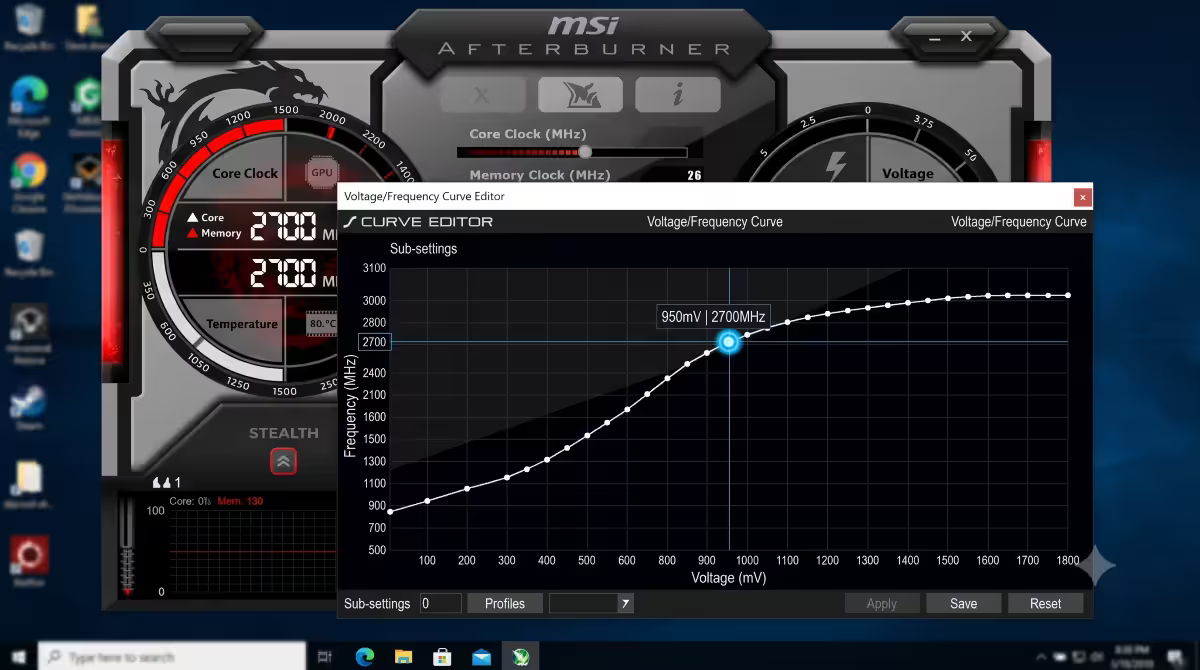
Stock GPU voltage curves are set with significant safety margin to ensure every chip across the silicon lottery is stable. Most individual chips will run perfectly stable at meaningfully lower voltages. Lower voltage = lower power draw = lower heat = lower fan noise — at the same clock speed and same performance.
Tool: MSI Afterburner (free, works for both NVIDIA and AMD). Open the Voltage/Frequency curve editor, drag the curve down by 50-100mV at the target clock, apply, run a 30-minute stress test (3DMark Speed Way or Furmark + a real game). If stable, save the profile.
Typical undervolt results (current generation):
- RTX 5070 (220W stock) → 175-185W undervolted, same FPS
- RTX 5080 (360W stock) → 290-310W undervolted, same or +1% FPS
- RX 9070 XT (295W stock) → 245-260W undervolted, same FPS
- RTX 5090 (575W stock) → 475-510W undervolted, same FPS
Counterintuitively, undervolting often improves performance slightly because thermal throttling kicks in less often. The card holds boost clocks longer because it never gets as hot.
Case airflow — the secondary cooling system
A 280W GPU does not magically vent 280W of heat into outer space. That heat goes into your case interior, then has to be removed by case fans before it cooks the rest of the build. The cooler the air entering the GPU intake, the lower its sustained temperature and the longer it holds boost clocks.
Targets for high-TDP builds:
- 3 intake fans, 1-2 exhaust fans minimum — slight positive pressure keeps dust out and brings cool air to the GPU intake.
- Case interior temp under 40°C at sustained load (measured with HWiNFO64 motherboard sensor) — this is the deciding factor for GPU boost stability.
- 140mm fans over 120mm where the case supports them — more airflow at lower RPM = quieter.
- Don't mix intake and exhaust on the same panel — recirculation kills your delta over ambient.
If your GPU is hitting the thermal limit (83°C for most NVIDIA, 95°C junction for most AMD) and throttling, the answer is not always "buy a bigger cooler" — usually it's "add or fix case airflow first".
SA-specific — UPS sizing and load shedding
The single biggest GPU power consideration unique to SA: grid instability. Load shedding itself doesn't damage hardware — your GPU just powers off, same as if you'd pressed the wall switch. The real damage happens around load shedding:
- Voltage sag before shutdown — grid drops to 180V for 30-60 seconds, PSU struggles, components run undervolted.
- Voltage spike when power returns — substations switching back can deliver 260V for milliseconds, frying capacitors.
- Repeated power cycles — drives, SSDs and capacitors degrade faster with frequent hard shutdowns.
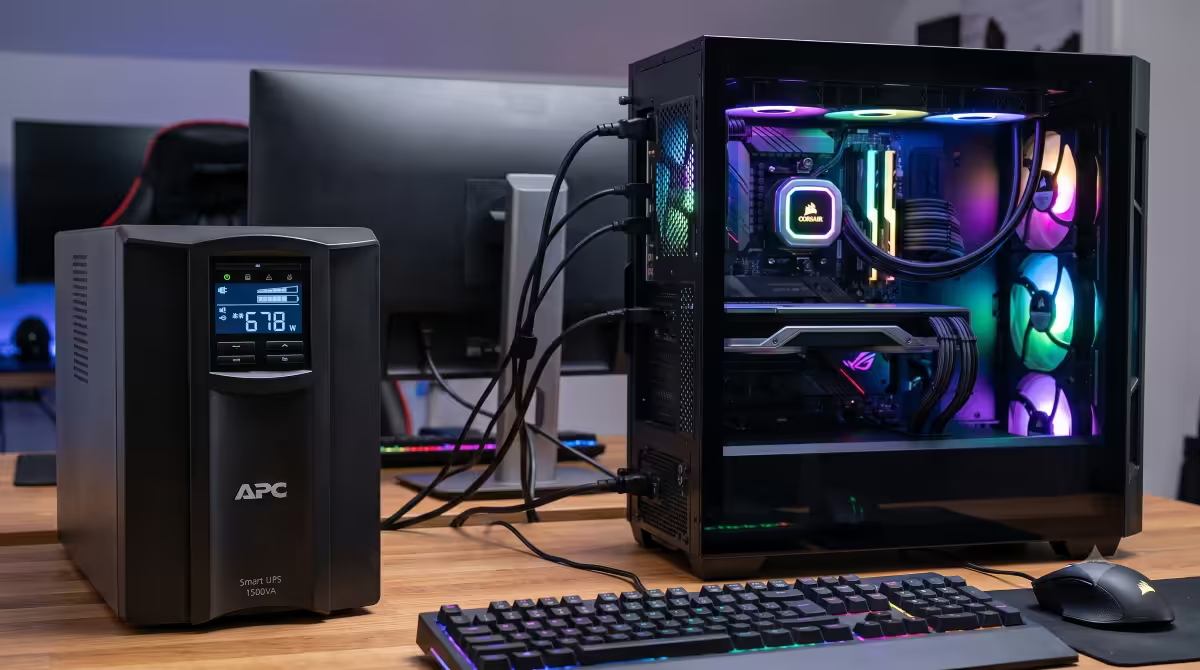
UPS sizing for high-TDP builds: use sustained system draw (CPU TDP + GPU TDP + 80W) × 1.5 as the VA rating. Examples:
- RTX 5070 + Ryzen 7 9700X → ~600W draw, needs 900VA / 600W UPS minimum, 1500VA / 900W ideal.
- RTX 5080 + Ryzen 9 9900X3D → ~750W draw, needs 1500VA / 900W UPS, 2200VA / 1320W ideal.
- RTX 5090 + Core Ultra 9 285K → ~1100W draw, needs 2200VA / 1320W UPS minimum.
Common power-sizing mistakes
Reusing the previous PSU after a major GPU upgrade. A 550W PSU that ran an RTX 3060 perfectly may shut down with an RTX 5070, even though the TDP numbers look similar. New generations spike harder.
Trusting the manufacturer's minimum PSU recommendation. NVIDIA's "650W minimum" for an RTX 5070 assumes a low-spike scenario and modest CPU. Add a 170W Ryzen 9 and you'll trip OCP on a 650W budget unit.
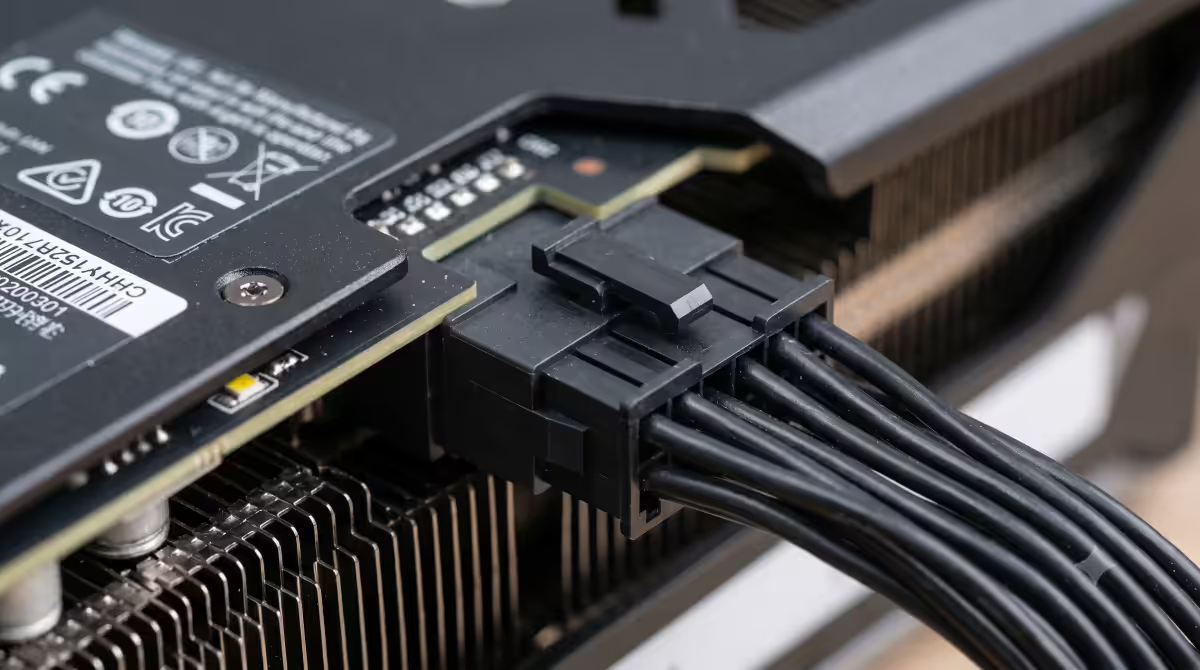
Buying daisy-chain power adapters for 16-pin connectors. Use native PSU cables only. Cheap adapters have caused the connector-melt issue in early RTX 4090 builds.
Underestimating CPU TDP at boost. Modern CPUs report "PPT" (Package Power Tracking) values 30-60% above the base TDP. A "105W" Ryzen 7 9700X can draw 142W PPT in turbo. Use PPT, not base TDP, in the formula if known.
Skipping 80+ Gold to save R400. The efficiency loss on a Bronze unit at 70% load is real — over 5 years it costs more in extra electricity than the upfront PSU price difference.
Not undervolting. Free 30-50W of headroom, free 3-5°C drop in temperature, free reduction in fan noise. Skipped by most builders because "it looks technical". It's a 30-minute one-time task.
Key takeaways
- TDP is sustained power, not peak. Modern GPUs spike 200-300% of TDP for milliseconds — size your PSU for the spike.
- Use (CPU TDP + GPU TDP + 80W) × 1.4 to size the PSU. Round up to the next available class.
- 80+ Gold is the sweet spot for 500W+ builds. The premium pays for itself in 18-24 months on SA electricity costs.
- Undervolt any GPU drawing 250W+. Free 30-50W back with zero performance loss using MSI Afterburner's V/F curve.
- UPS-protect SA builds. Online UPS sized to system draw × 1.5 for high-TDP cards. Load shedding is the threat, dirty restore voltage is the killer.
Frequently asked questions
What does GPU TDP actually mean?
TDP = Thermal Design Power, officially how much heat the cooler must dissipate. In practice used as a proxy for sustained wattage. Real peak draw can be 20-40% higher, with millisecond transient spikes reaching 200-300% of TDP.How big should my PSU be for a given GPU?
Use (CPU TDP + GPU TDP + 80W) × 1.4. Worked example: Ryzen 7 9700X + RTX 5070 = (105 + 220 + 80) × 1.4 = 567W → buy 650W 80+ Gold.What is a transient power spike and why does it matter?
A 1-10ms burst far above sustained TDP. Cards rated 220W can spike 350-400W. PSUs that handle the average draw shut down when the OCP threshold trips on a spike — sudden shutdowns rather than gradual issues.Does 80+ Gold actually matter or is Bronze fine?
Gold is worth the premium for any 500W+ build. The efficiency gain pays for itself in SA electricity within 18-24 months and the PSU runs cooler and quieter. Bronze is fine for office/light builds under 500W.How much can I save by undervolting my GPU?
Typically 30-50W with zero performance loss. Sometimes +1% performance because of less thermal throttling. Use MSI Afterburner V/F curve — 30 minutes once, permanent savings.What's the difference between TGP, TDP, TBP and Total Graphics Power?
Vendor branding variations. NVIDIA uses TGP (chip) and TBP (whole board). AMD uses TBP. Treat all three as the sustained wattage of the card for PSU sizing purposes.Does load shedding damage a GPU?
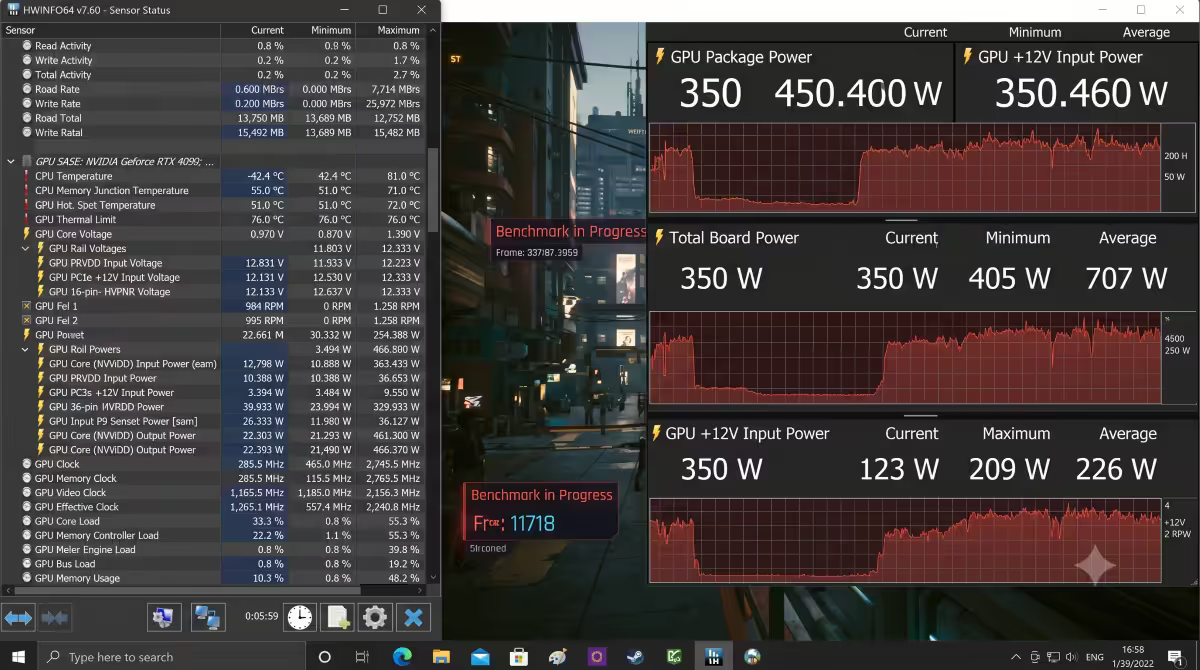
Load shedding itself doesn't — but voltage sag before shutdown and surge events when power returns can damage caps. UPS sized to system draw × 1.5 with online double-conversion topology protects against all three.How do I monitor real GPU power draw in games?
HWiNFO64 (free) is the gold standard for board power and rail readings. MSI Afterburner adds live in-game overlay. Adrenalin (AMD) and NVIDIA App include built-in overlays. Compare to your rated TDP to detect overclocked AIB cards.
Get the Evetech app
Exclusive app-only prices, daily flash sales, and free delivery on orders over R4,000 — download the app and start saving.