Gaming Performance Guide
How much FPS do you actually need?
— The honest answer is lower than you think.
- comfortable floor
- 60 FPS
- sweet spot
- 144 FPS
- competitive only
- 240+
The human-eye FPS myth
You've probably encountered the claim that "the human eye can only see 30 FPS" or some variant — 24, 60, 100. The number changes but the framing is consistently wrong.
The human visual system doesn't process frames at all. It processes continuous light input from the retina, sending streams of nerve impulses to the visual cortex. There's no "frame rate" in biological vision the way there is in a digital display.
What we can measure is how the visual system responds to displayed motion. Several findings:
- Flicker fusion threshold (the point where a flickering light appears continuous): roughly 50-90 Hz for most people in standard viewing conditions, higher (up to 500+ Hz) in peripheral vision with bright stimuli.
- Motion detection: trained observers can distinguish between 240 Hz and 360 Hz displays in motion-tracking tasks; differences past 480 Hz become difficult for almost everyone.
- Object recognition during fast motion: improves measurably up to ~144 Hz for most people, with diminishing returns past 240 Hz.
- Input latency perception: humans can detect motor-to-display latency down to roughly 4-8ms in carefully designed tests — meaning the difference between 240 FPS (4.2ms frame time) and 360 FPS (2.8ms) is detectable.
Practical takeaway: 60 to 144 FPS is a massive perceptual improvement for everyone. 144 to 240 is meaningful but smaller. 240 to 360 is detectable in specific tasks (competitive gaming) but invisible to most people in casual play. 360 to 480+ is only meaningful at the top of professional esports.
30 FPS — cinematic but compromised
30 FPS has a specific cultural association from console gaming and cinema (24 FPS film). For story-driven single-player games — Death Stranding, Red Dead Redemption 2 in cinematic mode, walking-simulator titles — 30 FPS with proper frame pacing can feel acceptable. The pace of the game matches the visual experience.
Where 30 FPS fails: any game requiring rapid camera movement, fast aiming, or twitch reaction. First-person shooters at 30 FPS feel genuinely sluggish — input lag is high (~33ms per frame), motion blur during turns is severe, and aiming becomes guesswork. Modern action games (Elden Ring, Black Myth Wukong, God of War Ragnarok) at 30 FPS lose the dodge-and-parry precision they're designed around.
Console context: PS5 and Xbox Series X have largely moved past 30 FPS as the default — most current console games offer a 30 FPS "Quality" mode and 60 FPS "Performance" mode, with the Performance mode now winning the cultural argument. The PC equivalent of 30 FPS in 2026 is "your GPU is genuinely outmatched by the game."
60 FPS — the comfortable floor
60 FPS is where modern gaming becomes genuinely comfortable. Input lag drops to ~16ms per frame, motion clarity improves dramatically, and the game starts to feel responsive rather than reactive.
60 FPS handles well: single-player RPGs (Baldur's Gate 3, Cyberpunk 2077, Witcher 4), strategy games (Civilization, Stellaris, Total War campaign view), turn-based titles, walking-paced exploration, and the bulk of casual multiplayer. A 60Hz monitor (R2,500-R4,500 in SA) paired with a GPU delivering 60 FPS is a perfectly enjoyable mainstream gaming setup.
60 FPS feels compromised when: playing competitive multiplayer FPS against 144+ FPS opponents (you'll see them move smoothly while they see you in slightly-delayed frames), running games with poor frame pacing where 60 FPS feels like 50 or 45 in motion, or playing fast-action single-player titles (Doom Eternal, Devil May Cry V) where the sense of speed is dampened.
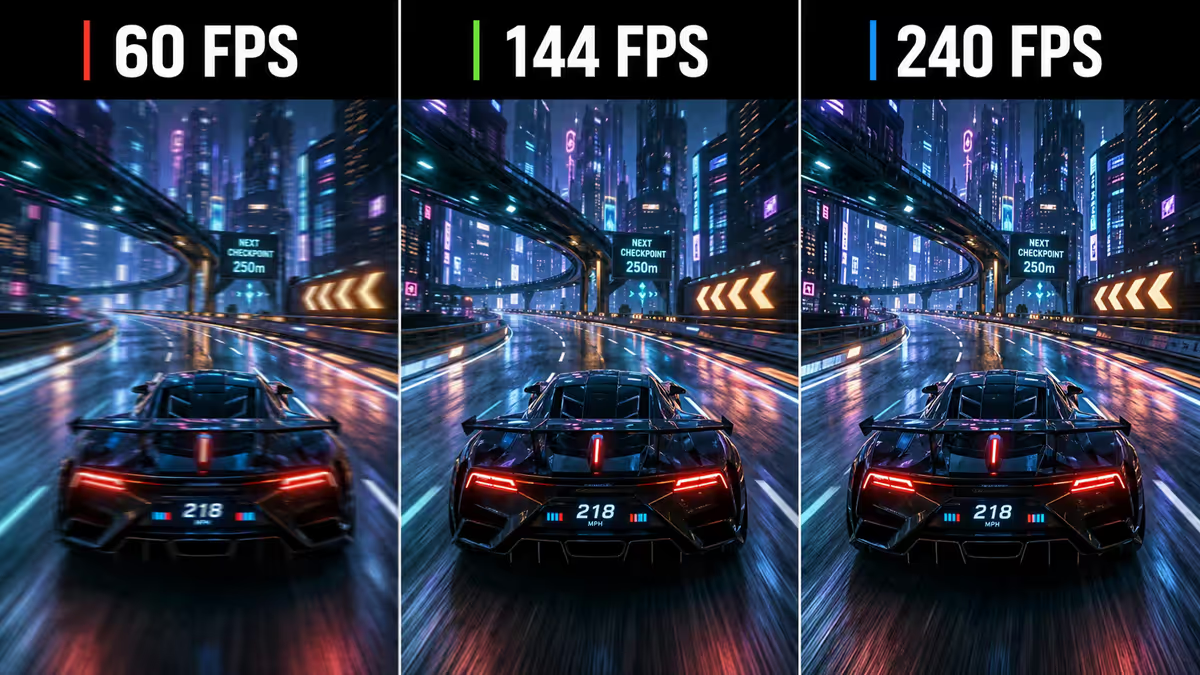
The 60-to-144 upgrade is the single biggest perceptual improvement most gamers will experience. If you've only ever gamed at 60 FPS, the first time you experience 144 FPS feels like a different medium entirely — mouse movement is gluey-smooth, motion clarity is striking, and going back to 60 feels noticeably stuttery.
144 FPS — the sweet-spot upgrade
144 FPS (and the 144Hz monitor required to display it) is the genuine value sweet spot for the overwhelming majority of gamers in 2026. The performance gain over 60 FPS is dramatic; the visual quality gain over 240 FPS is small enough that most people can't perceive it without a side-by-side comparison.
What you get at 144 FPS:
- Input lag drops from 16ms (60 FPS) to ~7ms — the mouse-to-screen latency feels immediate.
- Motion clarity dramatically improves — text on signs during fast camera turns stays readable.
- Competitive aim feels comfortable — you can track targets visually without "frame-skip" guessing.
- Single-player action games feel notably crisper — Doom Eternal at 144 FPS feels twice as fast as at 60.
- VRR ranges typically extend 48-144 Hz, meaning any FPS in that window benefits from G-Sync/FreeSync smoothness.
Hardware requirements: a 144Hz 1440p IPS monitor costs R5,500-R7,500 in SA (LG 27GP850, Gigabyte M27Q, Samsung Odyssey G5). To drive 144 FPS at 1440p in modern AAA games, you need at least an RTX 4070 (R12,500) or RX 7700 XT (R10,500) for non-RT gaming, RTX 4070 Ti Super (R17,500) for ray tracing.
240+ FPS — competitive territory only
240 FPS and above is where the perceptual curve flattens hard for non-competitive players. The jump from 144 to 240 is real but smaller than 60 to 144 — most players notice it as "feels slightly smoother in fast motion" rather than "fundamentally different."
Where 240 FPS earns its premium:
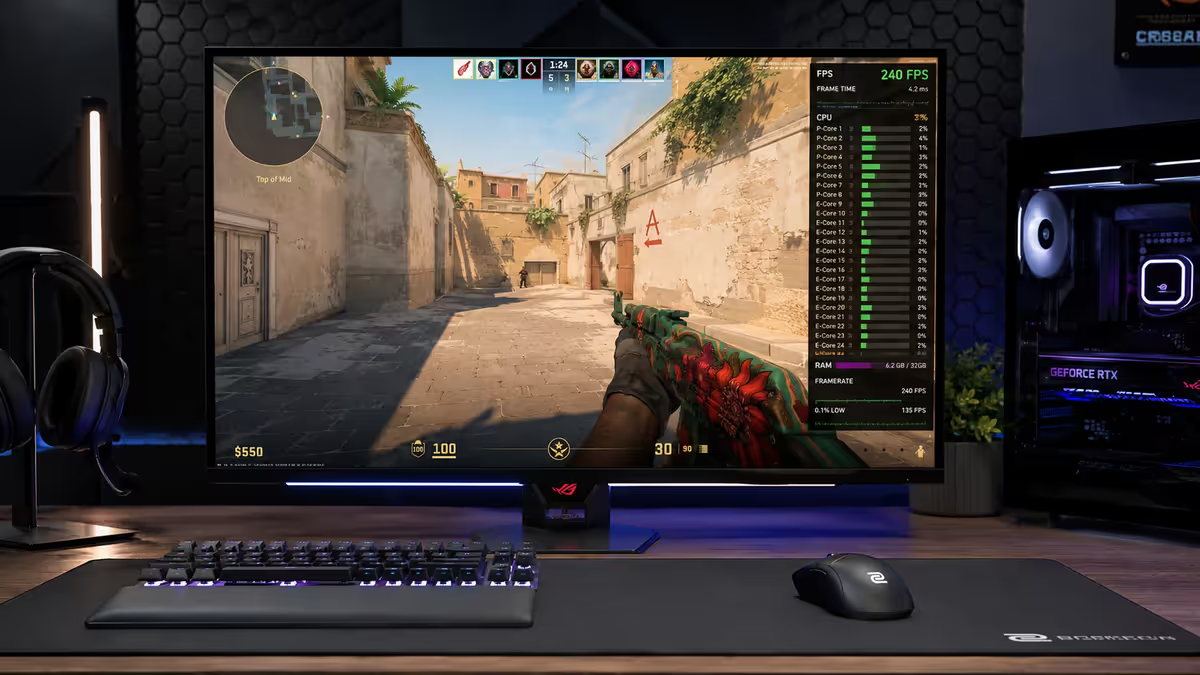
- Competitive FPS at high ranks. CS2 Premier, Valorant Immortal+, Apex Predator, Overwatch GM. At these levels, 3-5ms of additional input lag is detectable in twitch aim duels and 240 Hz provides measurable advantage.
- Aim training and reflex development. If you do regular aim training in Aim Lab, KovaaK's or similar, 240 Hz provides a better feedback loop than 144.
- Fast-paced movement shooters. Quake Champions, Diabotical, Apex (specifically) where strafe-tracking benefits from the extra motion clarity.
- You're playing on a 240+ Hz OLED. OLEDs have near-instant pixel response — combined with 240+ FPS they show the genuine motion clarity benefits more dramatically than IPS or VA panels do.
Where 240+ FPS doesn't earn it: single-player gaming, casual ranked play, story-driven titles, MOBA games (Dota 2, League of Legends), MMORPGs (Final Fantasy XIV, WoW), strategy titles. In all of these, 144 FPS is indistinguishable from 240 FPS in actual gameplay experience.
360 FPS and beyond: exclusively for top-tier competitive esports. Pro CS2 players at major tournaments target 360+ FPS on 360 Hz monitors. For everyone else — including very good amateurs — the gain over 240 is measurably present but practically invisible. The hardware cost (1080p TN/IPS 360 Hz monitor R10,500-R14,500, plus the GPU and CPU to drive 360+ FPS) rarely justifies the perceptible gain.
Monitor refresh-rate matching
Your monitor's refresh rate is a hard ceiling on what you can perceive — regardless of what your GPU outputs. This is the most-violated rule in PC building.
If your monitor is 60Hz: your eyes will see at most 60 frames per second. GPU rendering 200 FPS into a 60Hz monitor still displays 60 frames; the extra 140 are discarded (or, with V-Sync off, contribute to screen tearing). The extra GPU work is wasted — except for marginal input-lag reduction.
If your monitor is 144Hz: you benefit from any FPS up to 144. Beyond that, additional FPS only marginally helps input lag (each extra frame is delivered slightly sooner).
If your monitor is 240Hz: aim for 240+ FPS to extract value. If your hardware delivers only 180 FPS in your typical games, you're paying for a monitor capability you can't use.
The general rule for build planning: match GPU power and monitor refresh rate. Common balanced pairings in SA pricing:
| Monitor | GPU pairing | SA total monitor+GPU |
|---|---|---|
| 1080p 60Hz IPS | RTX 4060 / RX 7600 | R10,500-R12,000 |
| 1440p 144Hz IPS | RTX 4070 / RX 7700 XT | R17,500-R20,500 |
| 1440p 240Hz IPS/OLED | RTX 4070 Ti Super / RX 7800 XT | R28,000-R42,000 |
| 4K 144Hz IPS | RTX 4080 / RX 7900 XTX | R32,000-R42,000 |
| 4K 240Hz OLED | RTX 5080 / 5090 (only) | R45,000-R80,000 |
| 1080p 360Hz TN/IPS (competitive) | RTX 4070 or higher | R23,000+ |
Mismatches cost money: 4K 144Hz OLED paired with an RTX 4060 means your GPU can't drive 144 FPS at 4K and the monitor's premium is wasted. Conversely, an RTX 5090 paired with a 1080p 60Hz monitor sees 90% of its capability ignored.
Frame pacing matters more than raw FPS
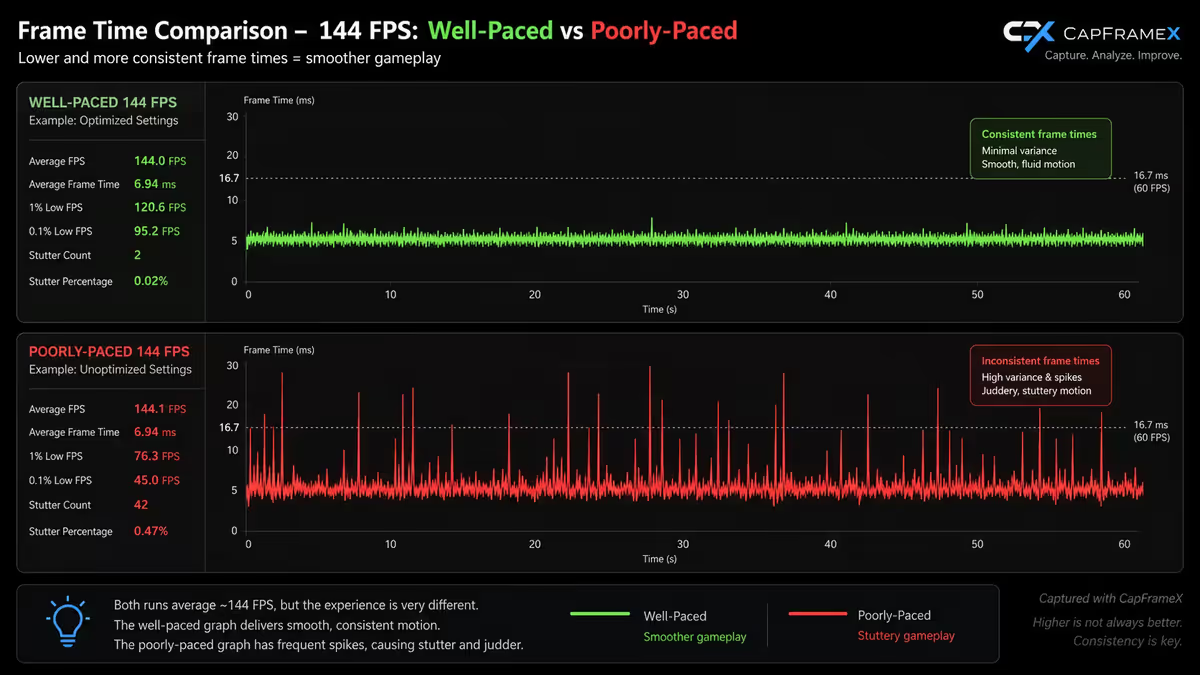
A game running at consistent 90 FPS feels smoother than the same game oscillating between 60-140 FPS, even though the average is higher in the second case. This is frame pacing — the regularity of the time between frames.
Why frame pacing matters: your visual system is more sensitive to changes in motion than to absolute motion speed. A 1ms hitch followed by 14ms then 30ms feels visibly stuttery; consistent 11ms-per-frame (90 FPS even pacing) feels smooth. Average FPS doesn't capture this — frame time variance does.
How to check frame pacing: MSI Afterburner can show "1% low FPS" and "0.1% low FPS" metrics. These represent your worst-case frame times. A game averaging 144 FPS with 1% low of 130 FPS is well-paced; one averaging 144 FPS with 1% low of 65 FPS is stuttery. CapFrameX is the dedicated frame-time analysis tool — produces beautiful frame-time graphs that show pacing issues immediately.
Common causes of poor frame pacing: shader compilation stutter (modern UE5 games at first launch), CPU bottleneck spikes during AI/physics-heavy moments, asset streaming from slow storage (HDDs are a frame-pacing nightmare), background applications stealing CPU cycles, GPU memory thrashing when VRAM is nearly full.
VRR — why lower FPS feels better than you'd expect
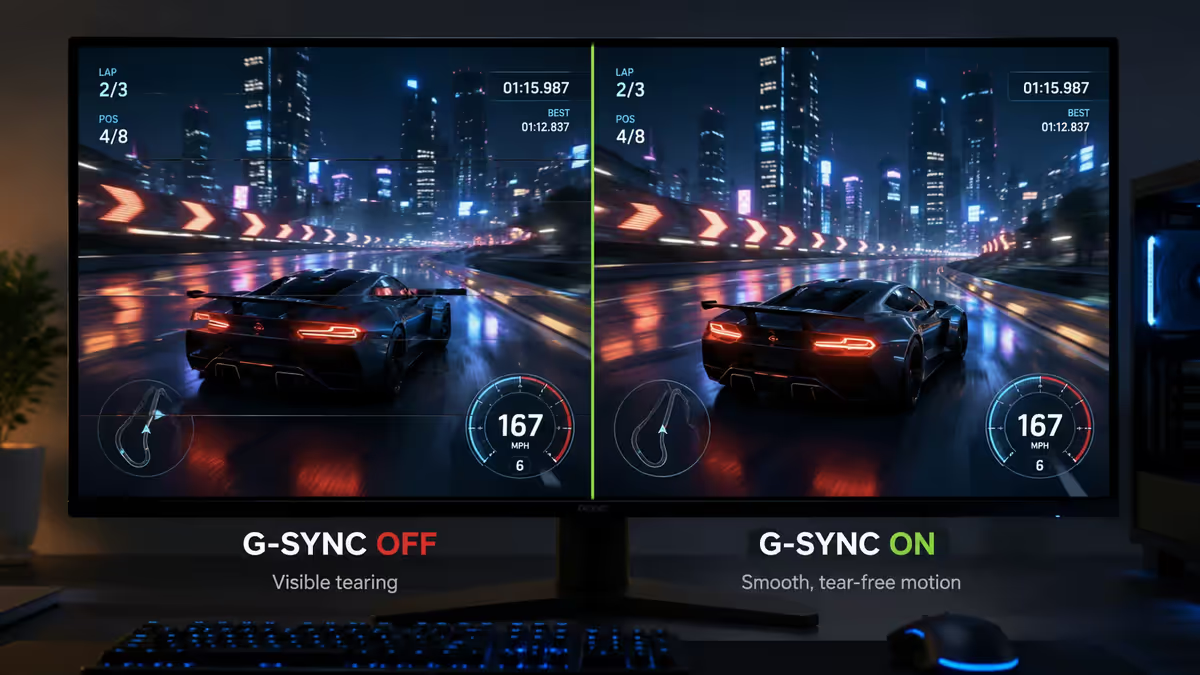
Variable Refresh Rate (VRR) is the single most under-appreciated quality-of-life feature in modern monitors. G-Sync (NVIDIA) and FreeSync (AMD/Intel, now widely supported by NVIDIA too) sync the monitor's refresh rate to whatever FPS your GPU outputs in real time.
What VRR does for the visual experience:
- Eliminates screen tearing — no more horizontal artifacts mid-frame.
- Removes stuttering perception from minor FPS dips — 75 FPS with VRR feels smooth; 75 FPS without VRR feels stuttery.
- Makes the entire FPS range feel consistent — VRR handles a swing from 80 to 130 FPS smoothly, where non-VRR would show visible hitches.
- Reduces input lag compared to traditional V-Sync.
The practical implication: a 144Hz monitor with VRR running at 75-110 FPS feels comparable in smoothness to a non-VRR 144Hz monitor pinned at exactly 144 FPS. This is why VRR support is the single best feature to verify when buying a monitor — every modern gaming monitor should have it.
VRR ranges and "LFC": most VRR monitors have an effective range — typically 48-144 Hz on a 144Hz monitor, 30-240 Hz on a 240Hz panel. Low Framerate Compensation (LFC) extends this below the minimum by duplicating frames — so a 144Hz LFC monitor handles 30 FPS as smoothly as 60. Verify the spec — older budget monitors lack LFC and show stutter at low FPS.
Per-genre FPS targets
Competitive FPS / battle royale
CS2, Valorant, Apex Legends, Overwatch 2, Marvel Rivals. Minimum 144 FPS at 144Hz; 240 FPS at 240Hz for competitive players in Diamond/Master tiers; 360 FPS only for tournament-level competitive. SA hardware: RTX 4070 + 1440p 144Hz IPS at R20,000 is the comfortable spot.
AAA single-player action
Cyberpunk 2077, Black Myth Wukong, Alan Wake 2, Doom Eternal, Helldivers 2. 60 FPS minimum, 90-120 FPS the comfortable target, 144 FPS the upper limit of meaningful improvement. Visual quality matters more than raw FPS here — many players prefer 4K with ray tracing at 70 FPS over 1080p Ultra at 144 FPS. SA hardware: RTX 4070 Ti Super + 1440p 144Hz at R26,000-R32,000.
Story-driven RPGs and walking simulators
Baldur's Gate 3, Disco Elysium, Death Stranding, RDR2, Witcher 4. 60 FPS comfortably handles all of these. 120-144 FPS is nicer but the visual upgrade matters less than in action games. SA hardware: RTX 4060 + 1440p 144Hz monitor at R13,500 total is the value spot.
Strategy and city-builder titles
Civilization VII, Stellaris, Cities Skylines 2, Total War campaign view, Frostpunk 2. 60 FPS is genuinely sufficient. These games are CPU-bottlenecked late-game regardless of GPU; chasing high FPS here yields nothing. Prioritise CPU spec and RAM over GPU.
Flight and racing sims
Microsoft Flight Sim, iRacing, Assetto Corsa Competizione, BeamNG. 90-144 FPS is the meaningful target — these benefit from VRR more than most genres. Triple-monitor sim setups need GPU power to drive 144 FPS across 3 monitors (3× the pixel count) — this is the one genuine 4K-multi-monitor use case for the RTX 5090.
MOBAs and MMORPGs
Dota 2, League of Legends, Final Fantasy XIV, WoW Retail, New World. 144 FPS is the practical cap on perceptible benefit — these games are CPU-bottlenecked in busy team fights or 40-man raids. 240 FPS in Dota 2 is technically possible but indistinguishable in play from 144 for almost everyone.
Cinematic indie / pixel-art / 2D titles
Hades II, Hollow Knight Silksong, Stardew Valley, indie roguelikes. 60 FPS is comfortable, 120 FPS is luxurious. Hardware barely matters — integrated graphics handle most of these.
Common FPS-related mistakes
Chasing FPS that your monitor can't display. 200 FPS into a 60Hz monitor still shows 60 frames. Monitor first, FPS target second.
Buying a 360Hz monitor for casual gaming. Unless you're competitively ranked, 360Hz delivers diminishing returns vs 144 or 240Hz at significantly higher cost.
Disabling VRR "because I want raw FPS." VRR doesn't cap FPS — it syncs monitor refresh to GPU output. Always leave G-Sync or FreeSync on; the smoothness is free.
Optimising only for average FPS, ignoring frame pacing. A game averaging 100 FPS with 1% lows at 50 feels worse than 80 FPS averaged with 1% lows at 70. Check 1% low values in MSI Afterburner.
Believing "more FPS always feels better" with no upper bound. The perception curve flattens. Past 240 FPS in non-competitive contexts, you're paying for benefits you can't perceive.
Buying an OLED 240Hz monitor with a budget GPU. The OLED motion clarity benefit requires high sustained FPS. Pair OLED 240Hz with RTX 4070 Ti Super minimum, ideally RTX 5080.
Ignoring monitor response time. A 144Hz IPS monitor with 4ms response time vs 1ms response time produces visibly different motion clarity at the same FPS. Check both refresh rate and gtg response time spec.
Targeting 60 FPS in 2026 if you have any choice. Modern GPUs and monitors have made 144 FPS attainable in the R15,000-R25,000 total budget range. 60 FPS is the floor; aiming for it as a goal is leaving easy gains on the table.
Key takeaways
- 60 FPS comfortable floor, 144 FPS the sweet spot for the large majority of gamers, 240+ only matters for competitive.
- The eye-sees-30-FPS myth is wrong — perception is continuous, curve flattens past 144 FPS.
- Monitor refresh rate caps your perceived FPS — match GPU output to monitor capability.
- Frame pacing matters more than average FPS — check 1% low values in MSI Afterburner.
- VRR (G-Sync/FreeSync) makes 80 FPS feel like 100 FPS without — always enable it.
Frequently asked questions
How much FPS do humans actually see?
The "30 FPS limit" myth is wrong — the eye processes motion continuously. Perceptual upgrades are massive 30 to 60, large 60 to 144, smaller 144 to 240, minimal 240 to 360+ for most people.Is 60 FPS enough for gaming in 2026?
60 FPS is the comfortable floor for almost all gaming. Sufficient for single-player and casual multiplayer. Inadequate for competitive multiplayer FPS where 144+ provides a meaningful advantage.Can you actually see the difference between 144 and 240 FPS?
Yes but smaller than 60 to 144. Most players notice it in fast motion. Casual gamers report "smoother but didn't change my gameplay"; competitive players report meaningful improvement.What FPS do I need for competitive games like CS2 and Valorant?
Pros target 360+ FPS. Tournament-tier amateurs 240+. Ranked players well-served at 144. Below pro level, 240Hz won't make you climb ranks faster than 144Hz.What is VRR (G-Sync/FreeSync) and why does it matter?
VRR syncs monitor refresh to GPU output. Eliminates screen tearing, reduces stutter at variable FPS, makes lower FPS feel smoother. Always enable it — every modern gaming monitor supports it.What FPS do I need for single-player games?
60-90 FPS is genuinely sufficient. 120-144 FPS adds noticeable smoothness in action sequences but is not necessary for enjoyment. 240+ FPS delivers diminishing returns in single-player.Does monitor refresh rate matter more than raw FPS?
They matter together. Your monitor caps perceived FPS regardless of GPU output. Aim for FPS matching or exceeding monitor refresh; mismatched combos waste hardware.How much does a high-refresh-rate monitor cost in SA?
144Hz 1440p IPS R5,500-R7,500 (sweet spot). 240Hz 1440p IPS R9,500-R14,000. 360Hz 1080p R10,500-R14,500. 240Hz 1440p OLED R18,000-R28,000.