Hardware Explainer
What is VRAM, and how much do you actually need?
VRAM has become the spec sheet number gamers fixate over — sometimes correctly, sometimes catastrophically wrong. Here's exactly what it does, when it matters, and the right amount for your resolution.
- 1080p floor
- 8 GB
- 1440p sweet
- 12 GB
- 4K & creator
- 16 GB+
What VRAM actually is
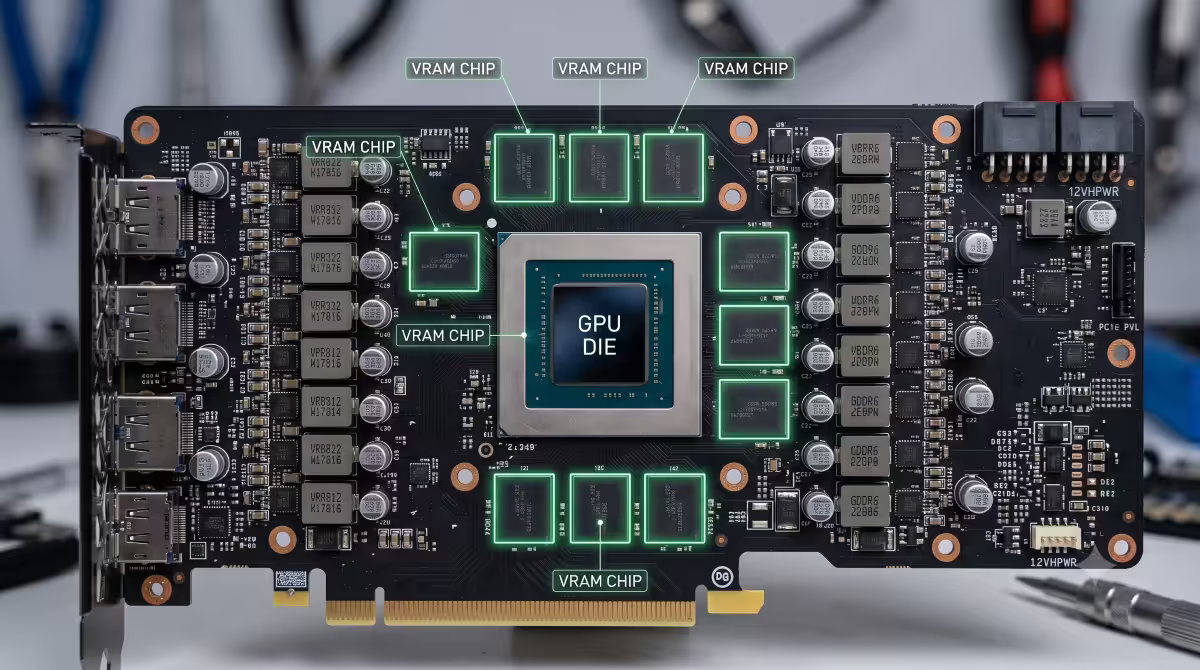
VRAM (Video RAM) is the dedicated memory soldered directly onto your graphics card's PCB, sitting right next to the GPU chip. In 2026, current GPUs use GDDR6, GDDR6X, or the newer GDDR7 modules. Eight memory chips at 2GB each gives you a 16GB card; six chips at 2GB gives 12GB, and so on.
The GPU talks to its VRAM via a wide, dedicated memory bus running at very high bandwidth — typically 500-1000 GB/s on current cards. Compare that to system RAM bandwidth (~80-120 GB/s on DDR5) and you start seeing why it has to be separate: the GPU needs to read and write texture data thousands of times per frame at 60-240 FPS.
What VRAM stores during gameplay: high-resolution textures for the current scene, geometry data (3D models), shader programs, the frame buffer (the image you're about to see), depth and motion buffers for ray tracing and post-processing, and increasingly — AI model data for DLSS and FSR upscaling.
VRAM vs system RAM — they're not interchangeable
The most common confusion: "I have 32GB of RAM, surely my 8GB GPU has plenty of help?" It doesn't work that way.
| Spec | VRAM | System RAM |
|---|---|---|
| Used by | GPU only | CPU and OS |
| Type | GDDR6 / 6X / 7 | DDR5 (or DDR4) |
| Bandwidth | 500-1000+ GB/s | 80-120 GB/s |
| Typical capacity | 8-32 GB | 16-64 GB |
| Physical location | On the GPU board | DIMM slots on motherboard |
| Upgradeable separately | No (soldered) | Yes |
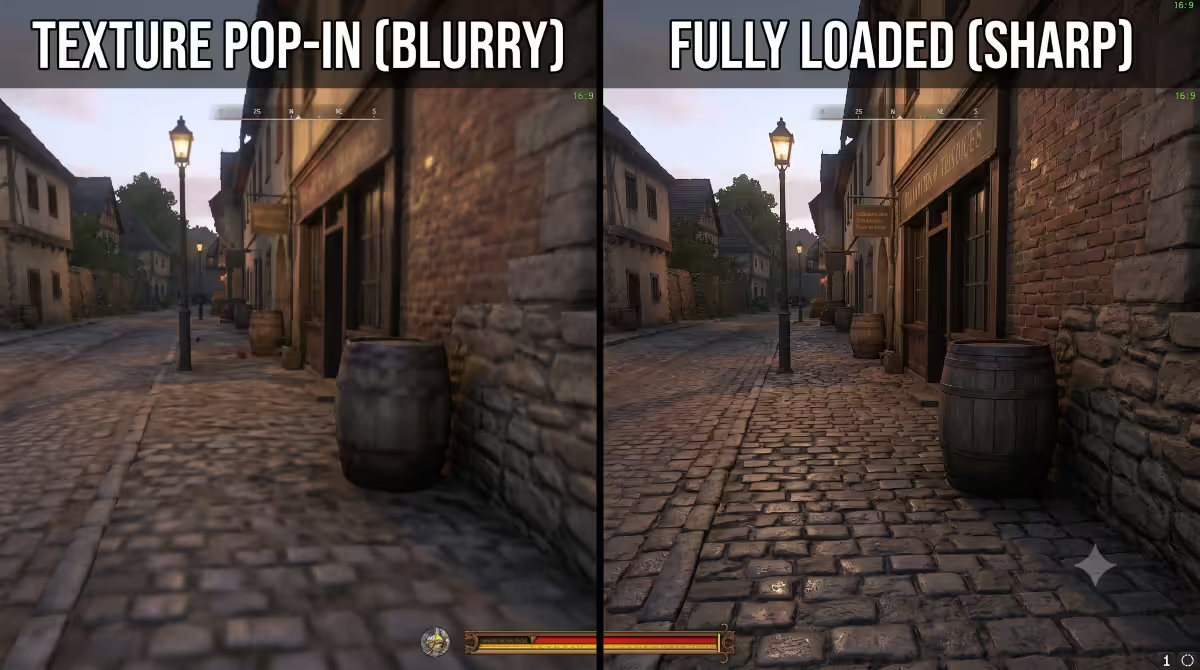
When a game runs out of VRAM, the GPU has to fetch missing data from system RAM through the PCIe bus — which is 20-30× slower than VRAM. That's where the stuttering and texture pop-in comes from. Your 32GB of system RAM doesn't help fix this; it just provides a slower fallback.
How much VRAM you actually need
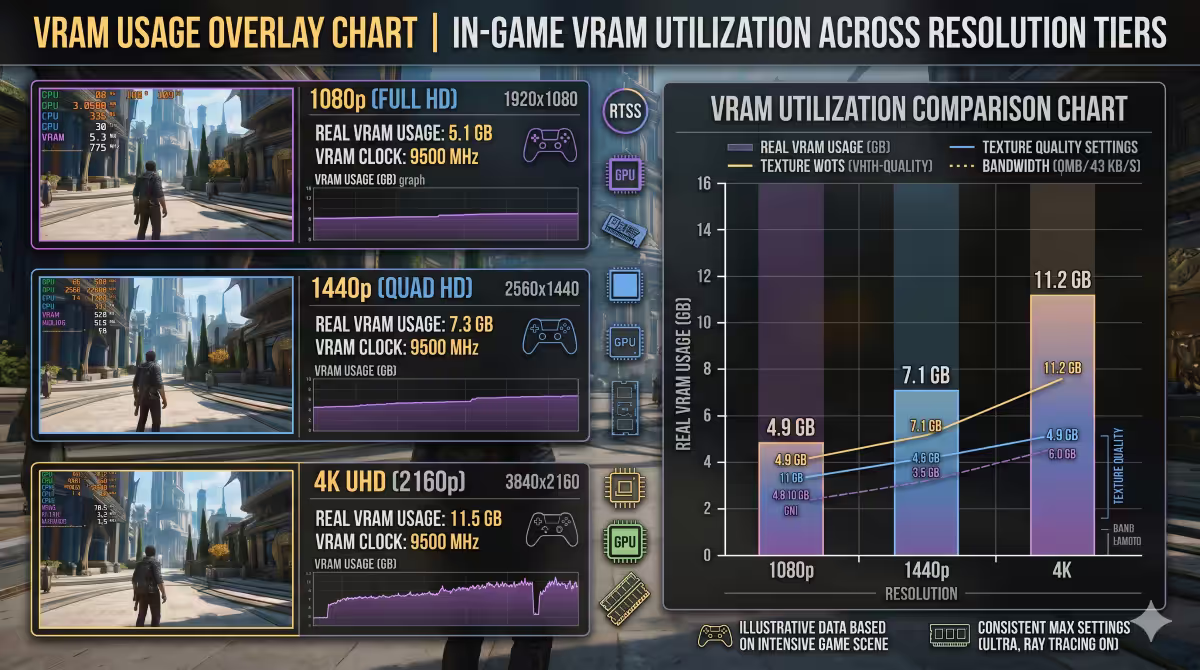
Real-world VRAM usage at typical 2026 settings, measured from in-game monitoring:
How to spot a VRAM bottleneck
VRAM exhaustion looks very specific. Watch for these three symptoms together:
- Texture pop-in. Surfaces load as blurry, low-resolution placeholders that take 1-3 seconds to sharpen. Most obvious when entering a new area or rotating the camera quickly.
- Sudden frame drops to 5-15 FPS. Not just lower FPS — sudden cliff-edge stutters when crossing zone boundaries or loading effects. The PCIe bus is desperately fetching data.
- VRAM usage sits at 99-100%. In MSI Afterburner or in-game overlay, the VRAM bar pegs to max and stays there — even momentarily exceeding capacity causes the issues above.
The fix: drop texture quality from Ultra to High or Medium (usually invisible to the eye), drop resolution one tier, or upgrade the GPU. Texture quality is the single setting most directly tied to VRAM usage — dropping it from Ultra to High typically saves 1-2GB of VRAM with no visible quality loss in most games.
VRAM myths worth debunking
Myth 1: "More VRAM means a faster GPU." The GPU chip itself decides how fast frames render. VRAM size only determines what fits in memory at once. A weak GPU with 16GB doesn't outperform a strong GPU with 12GB.
Myth 2: "I need 16GB for any modern gaming." Not at 1080p. The vast majority of 1080p high settings use 6-8GB. 12GB+ matters at 1440p and above.
Myth 3: "VRAM is faster if I overclock my system RAM." They're separate memory pools. System RAM speed has no effect on VRAM bandwidth.
Myth 4: "GDDR7 vs GDDR6 doesn't matter for gaming." It actually does at the high end. GDDR7 (RTX 50-series) provides 30-50% more bandwidth than GDDR6, which translates to noticeable gains at 4K with ray tracing.
Myth 5: "Sharing RAM with the GPU saves money." Integrated graphics that share system RAM are dramatically slower than even budget discrete GPUs. There's no scenario where shared memory wins on performance.
GPU picks by VRAM tier
| VRAM | Current GPUs (2026) | Right for |
|---|---|---|
| 8 GB | RTX 4060, RX 7600, RTX 5060 | 1080p high |
| 12 GB | RTX 4070, RTX 5070, RX 7700 XT | 1440p sweet spot |
| 16 GB | RTX 4080, RTX 5080, RX 7800 XT, RX 9070 XT | 4K high, 1440p ultra + RT |
| 20-24 GB | RTX 4090, RTX 5090 (24-32GB) | 4K ultra + RT, creator, local AI |
| 32 GB | RTX 5090, RTX 6000 Ada | 8K editing, pro 3D rendering, large AI |
VRAM in 2026-2028
The trend for the next two years is clear: baseline expectations are rising. AAA developers increasingly target 10-12GB minimum at 1440p, and ray tracing + Path Tracing adds another 1-3GB to memory budgets. Two specific shifts:
- 8GB cards are aging out for AAA. A new GPU buyer in 2026 targeting AAA games at 1080p should look at 10-12GB cards. The RTX 5060 8GB is fine for esports and older AAA, but newer AAA at 1080p high will increasingly stress it.
- GDDR7 changes the bandwidth picture. RTX 50-series GDDR7 cards run 30-50% more bandwidth than equivalent GDDR6 cards. This matters more at higher resolutions and with ray tracing — at 1080p the bandwidth difference rarely shows.
- AI workloads start needing serious VRAM. Local LLM inference (Llama 3, Qwen, Phi), Stable Diffusion fine-tuning, and image generation all need 16GB+ for comfortable use. Buyers who care about AI alongside gaming should bump up a tier.
Key takeaways
- VRAM is dedicated GPU memory — not interchangeable with system RAM. Soldered to the card, not upgradeable separately.
- 1080p high: 8-10GB. 1440p sweet spot: 12GB. 4K: 16GB+. Creator/AI: 16-24GB+.
- VRAM exhaustion shows as texture pop-in, sudden FPS cliffs, and 100% VRAM usage on overlays.
- More VRAM than your games use doesn't help — match capacity to resolution, not the spec sheet.
- Baseline expectations are rising — 8GB is aging out for new AAA at 1080p. Buy with 2-3 years ahead in mind.
Frequently asked questions
What is VRAM?
VRAM (Video RAM) is dedicated memory on your graphics card. Stores textures, frame buffers and shaders for the GPU. Separate from system RAM, faster bandwidth, soldered to the card.How much VRAM do I need for 1080p gaming in 2026?
8GB is the practical floor. 10-12GB gives comfortable 1080p headroom for this generation. Some 2025-2026 AAA titles spill past 8GB even at 1080p high.How much VRAM do I need for 1440p gaming?
12GB is the 1440p sweet spot. RTX 5070 12GB or RX 7800 XT 16GB are right-sized. 8GB causes stuttering in newer AAA at 1440p.How much VRAM do I need for 4K gaming?
16GB or more. AAA at 4K high-ultra typically uses 11-15GB. RTX 5080 16GB and RTX 5090 32GB are right-sized 4K cards.What happens when a game runs out of VRAM?
Texture pop-in (blurry placeholders), sudden FPS drops to 5-15 in new areas, and micro-stutter. GPU has to fetch data from system RAM through slow PCIe bus.Is more VRAM always better?
Only up to what your games and apps use. A weak GPU with 16GB doesn't outperform a strong GPU with 12GB in 10GB games. Match capacity to target resolution.Does VRAM affect 4K video editing?
Yes — 16GB+ for 4K editing in DaVinci Resolve and Premiere Pro, especially with effects and grading. 8GB cards run out during 4K timeline playback.Is GDDR6 vs GDDR6X a big difference?
Yes — 30-50% higher bandwidth than standard GDDR6. RTX 4070 Ti+ uses 6X. Matters more at 4K and with ray tracing. GDDR7 in RTX 50-series pushes bandwidth higher again.
Get the Evetech app
Exclusive app-only prices, daily flash sales, and free delivery on orders over R4,000 — download the app and start saving.