Hardware Technology Explainer
What is 3D V-Cache. — Stacked silicon. Faster gaming.
AMD's X3D chips have dominated gaming benchmarks since 2022 — not because the cores are faster, but because there's a literal extra layer of cache memory stacked on top of the compute die. Here's exactly how it works and when it matters.
- typical gaming
- +15% FPS
- TSV vias
- Stacked die
- naming suffix
- X3D only

What 3D V-Cache physically is
Picture a regular CPU die: a flat slab of silicon with billions of transistors etched onto it, including the cores and some Level 3 cache memory. That die is mounted to a substrate and capped with a heat spreader (IHS).
3D V-Cache changes one thing: an additional cache-only silicon die is physically stacked on top of the compute die before the IHS is attached. The two layers communicate through through-silicon vias (TSVs) — tiny vertical wires that pierce both pieces of silicon and connect them with extremely low latency, far better than putting the cache on the same substrate next to the CPU.
The cache die itself is built on a different (cheaper) process and contains nothing but L3 cache cells. AMD adds 64MB of L3 this way. So a Ryzen 7 9800X3D has roughly:
- 32MB native L3 on the compute die (same as the non-X3D 9700X)
- +64MB stacked L3 on the V-Cache die
- = ~96MB total L3 visible to games and applications
Compare this to the non-X3D Ryzen 7 9700X with just 32MB L3 — the X3D has roughly 3x the L3 cache for the same CPU cores.
Why extra cache matters specifically for gaming
Modern CPUs are limited by memory latency far more than raw clock speed. Every time the CPU needs data that isn't already in its cache, it has to fetch it from DDR5 RAM — taking 70-100 nanoseconds, the equivalent of waiting forever in CPU terms. Cache access takes 5-15 nanoseconds.
Games are especially cache-sensitive because:
- Game state — entity positions, animation data, AI state — is small enough to mostly fit in 96MB but not 32MB
- Physics simulations need fast random-access to a lot of small data structures
- Streaming game world data benefits when more of it stays cached between frames
- Frame time consistency improves when the CPU rarely has to wait on RAM
The result: an X3D chip executing exactly the same game code as a non-X3D, at slightly lower clock speed, often outperforms it by 10-20% in real frame rates simply because the CPU isn't stalling on memory access as often.
FPS uplift by game genre

The X3D advantage varies enormously by game and resolution. A rough guide:
| Game type | X3D uplift (1080p) | X3D uplift (4K) |
|---|---|---|
| Competitive esports (CS2, Valorant, Apex) | +18-30% | +4-8% |
| Open-world AAA (Cyberpunk, Hogwarts, Black Myth) | +12-22% | +3-6% |
| Simulation (MSFS, Cities Skylines II, Factorio) | +25-35% | +10-18% |
| RTS (StarCraft II, Age of Empires IV) | +20-30% | +8-14% |
| MMORPG large raids | +15-25% | +5-12% |
| Single-player linear (God of War, Spider-Man) | +8-14% | +2-5% |
Why the 4K uplift is smaller: at 4K, the GPU is the bottleneck — the CPU could push more frames, but the GPU can't render them. Cache size doesn't help if the GPU is the limit.
Where X3D dominates: high-refresh-rate 1080p / 1440p gaming where the goal is hitting 240Hz+ frame rates and the CPU is the bottleneck. Competitive esports players almost universally pick X3D for this reason.
When X3D doesn't help — productivity workloads
Cache helps when your workload has high latency-sensitivity and fits in the cache. Many productivity workloads have neither property.
Workloads where X3D is neutral or slightly slower:
- Video encoding (Handbrake, DaVinci Resolve render). Streaming through GBs of data — doesn't fit in cache regardless.
- Compilation (large C++ / Rust builds). Mostly disk and parallel-core bound.
- 3D rendering (Blender, V-Ray). Embarrassingly parallel; cores matter more than cache.
- Scientific compute (numerical simulation, ML training). Mostly memory-bandwidth bound.
In these workloads, the X3D is usually 2-5% slower than the equivalent non-X3D Ryzen because the cache die forces slightly lower sustained clocks to stay within thermal limits.
Current X3D lineup in 2026
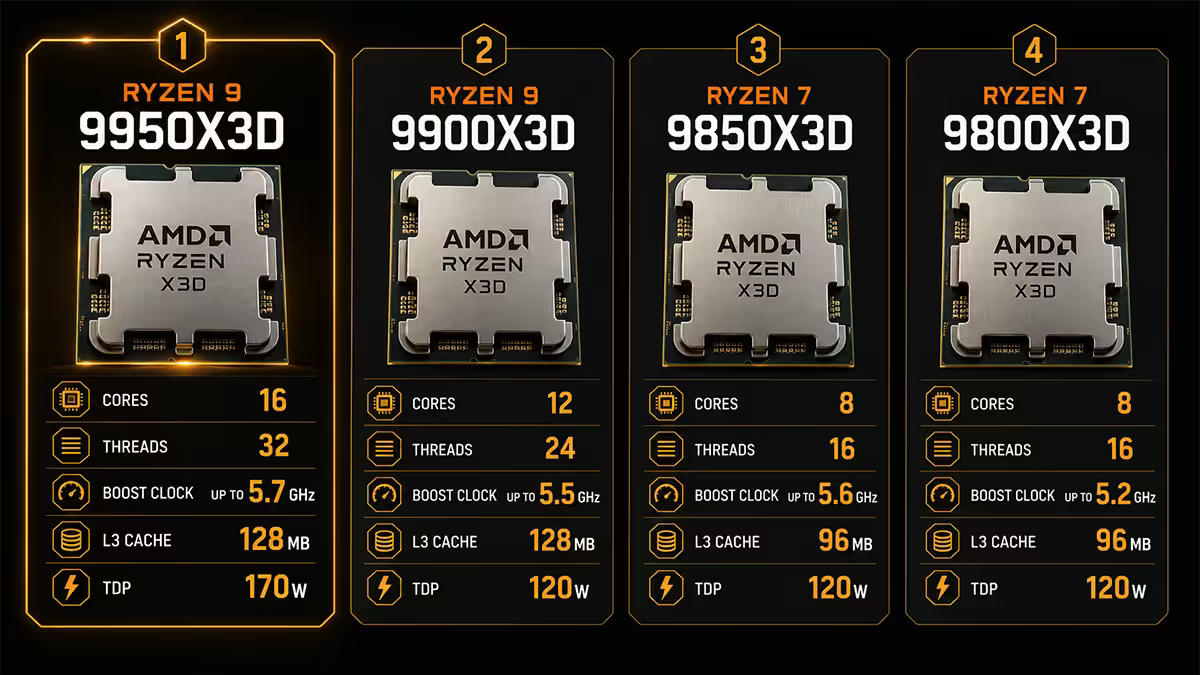
| Chip | Cores | Total L3 cache | SA price (May 2026) |
|---|---|---|---|
| Ryzen 7 5800X3D (AM4) | 8c / 16t | 96 MB | ~R5,500 (EOL) |
| Ryzen 7 7800X3D (AM5) | 8c / 16t | 96 MB | ~R7,800 |
| Ryzen 7 9800X3D (AM5) | 8c / 16t | 96 MB | ~R10,500 |
| Ryzen 9 7950X3D (AM5, dual-CCD) | 16c / 32t | 128 MB | ~R12,500 |
| Ryzen 9 9950X3D (AM5, dual-CCD) | 16c / 32t | 128 MB | ~R16,500 |
The clean gaming picks: 7800X3D and 9800X3D — single-CCD with all 8 cores on the X3D die. No scheduler complexity. Both are excellent.
The hybrid picks: 7950X3D and 9950X3D — dual-CCD with one X3D + one non-X3D, giving you both worlds in one chip. Worth it if gaming and heavy productivity matter equally.
The legacy pick: 5800X3D — still the best gaming chip on the AM4 platform, and an exceptional upgrade for older AM4 builds without changing motherboard or RAM.
The 9950X3D dual-CCD complexity
The dual-CCD X3D chips (7950X3D, 9950X3D) split their 16 cores across two physical chiplets:
- CCD 0: X3D die — 8 cores with the stacked V-Cache, slightly lower max clocks (gaming-tuned)
- CCD 1: Regular die — 8 cores with normal cache, higher max clocks (productivity-tuned)
The trick: Windows must put game threads on CCD 0 and productivity threads on CCD 1 for the chip to live up to its design. If a game accidentally runs on CCD 1, you lose all the X3D benefit and the chip performs worse than a 7800X3D.
How AMD solves this:
- AMD's chipset drivers identify games via Xbox Game Bar tagging
- Windows scheduler routes detected game processes to the X3D CCD
- Non-game workloads default to either CCD based on load
When it breaks: games not tagged in Xbox Game Bar (older or niche titles), games with multiple processes (some launchers), unusual workload mixes. The fix is Process Lasso — pin specific games to the X3D CCD manually.
X3D thermal behaviour — runs cooler
Counter-intuitive but true: X3D chips run cooler than their non-X3D siblings under gaming load. Two reasons:
- Slightly lower clocks and voltage — AMD ships X3D with conservative power limits to stay within thermal margins of the stacked die.
- Better thermal distribution — the cache die has fewer hot spots than densely-packed cores, smoothing heat across the IHS area.
- Higher cache hit rate means cores are stalled (idle) more often waiting for execution, generating less heat per benchmark second.
Typical thermal delta: the 9800X3D runs 3-7°C cooler than the 9700X under the same gaming workload. The 9950X3D is comparable to or slightly cooler than the 9950X.
Cooling pick: a quality 280mm AIO (Arctic Liquid Freezer III 280, NZXT Kraken 280 Elite) is more than enough for any X3D chip. Even a premium air cooler (Noctua NH-D15 G2, Be Quiet Dark Rock Pro 5) handles the 9800X3D comfortably.
AMD vs Intel — no equivalent exists
In 2026, Intel has no shipping consumer CPU using stacked-cache technology. Intel's approach has been to:
- Enlarge L3 cache through traditional die area (wider, not taller)
- Add a separate L4 / "system cache" on the package (Lunar Lake mobile)
- Demonstrate prototypes of stacked cache via Foveros — but no consumer CPU has shipped with it yet
| CPU | L3 Cache | Gaming-FPS at 1080p (relative) |
|---|---|---|
| Ryzen 7 9800X3D | 96 MB (32+64) | 100% (baseline) |
| Ryzen 9 9950X3D | 128 MB | ~100% (same X3D CCD) |
| Core Ultra 9 285K | 36 MB | ~85-88% |
| Ryzen 7 9700X (non-X3D) | 32 MB | ~83-86% |
The result: AMD's gaming-CPU lead in 2024-2026 is largely attributable to X3D. Without stacked cache, AMD vs Intel would be roughly tied at the top of the gaming charts. With it, the 9800X3D pulls ahead by 10-15% in CPU-bound titles.
The future — Zen 6 and multi-layer stacking
AMD has signalled that 3D V-Cache 2 / multi-layer stacking is coming with Zen 6 (Ryzen 10000-series, expected 2026-2027). Expected improvements:
- Higher cache density per layer (potentially 96-128MB per stacked die)
- Multiple cache layers stacked (potentially 2-3 dies high)
- Improved thermal handling — no clock-speed compromise on X3D variants
- Eventually: HBM-style stacked memory directly on the CPU package
Intel is expected to ship its first stacked-cache consumer chip via Foveros around the same timeframe — likely in late-2026 or 2027 Core Ultra Gen 3 / Gen 4.
Should you buy X3D — the decision framework
Buy X3D if:
- You game more than 50% of your computing time
- You play CPU-bound competitive titles aiming for 240Hz+
- You play simulation, RTS, MMORPG or open-world AAA games
- You target 1080p or 1440p resolution (where CPU bottleneck shows)
Buy non-X3D if:
- Your primary work is video editing, 3D rendering, compilation, ML
- You game occasionally (under 30% of usage)
- You're 4K gaming where GPU is always the bottleneck
- Your budget is constrained — non-X3D variants cost 15-25% less
Buy dual-CCD X3D (9950X3D) if:
- Gaming and heavy productivity are both important (≈50/50 split)
- You're willing to tolerate occasional CCD scheduling quirks
- You want one machine doing everything well rather than compromising
Common mistakes around X3D
Buying X3D for productivity-primary builds. If you don't game much, a non-X3D chip is faster for your actual workload and cheaper. The marketing makes X3D sound like it's always better — it isn't.
Overclocking X3D too aggressively. The stacked die has lower voltage tolerance than a regular Ryzen. Standard PBO is fine; pushing manual voltage past 1.4V risks shortening the cache die's life. Stay conservative.
Pairing X3D with a budget cooler thinking "it runs cool anyway". Yes, X3D runs cooler under most workloads, but it still benefits from a good cooler — keep the thermal headroom for boost behaviour.
Ignoring the 9950X3D scheduler setup. If you buy the dual-CCD chip and don't install AMD's latest chipset drivers, the Windows scheduler may not route games to the X3D CCD correctly — leaving you with worse-than-7800X3D performance.
Comparing X3D vs Intel at 4K only. At 4K, the gap narrows because the GPU bottlenecks everything. The X3D advantage is real at 1080p / 1440p / high-refresh. Pick the test resolution that matches your actual usage.
Key takeaways
- 3D V-Cache stacks a 64MB L3 cache die on top of the compute die — total ~96MB L3.
- Gaming uplift: 10-20% typical, up to 35% in cache-heavy sims. Smaller at 4K (GPU-bound).
- Productivity workloads see no benefit and are sometimes 2-5% slower vs non-X3D.
- 9800X3D for gaming-primary; 9950X3D for mixed workloads; non-X3D for productivity-primary.
- No Intel equivalent in 2026 — AMD's gaming lead is largely the X3D effect.
Frequently asked questions
What is 3D V-Cache?
AMD's tech that stacks a 64MB L3 cache die on top of the CPU compute die, connected by TSVs. Total ~96MB L3 vs 32MB on non-X3D.How much faster is X3D for gaming?
10-20% typical in CPU-bound games at 1080p/1440p. Up to 35% in cache-heavy sims. Just 2-8% at 4K (GPU-bound).Does X3D help with productivity work like rendering or compiling?
Generally no — and sometimes 2-5% slower vs non-X3D due to lower clocks. Buy non-X3D for productivity-primary use.What X3D processors are available in 2026?
5800X3D (AM4), 7800X3D, 9800X3D, 7950X3D, 9950X3D (all AM5). 9800X3D is the current gaming flagship.What is the dual-CCD complexity on 7950X3D and 9950X3D?
Two chiplets — one X3D for gaming, one regular for productivity. Windows scheduler must route games to the X3D CCD. Usually works automatically; edge cases need Process Lasso.Does X3D run cooler than regular Ryzen CPUs?
Yes — typically 3-7°C cooler than equivalent non-X3D under gaming load. Lower clocks and better thermal distribution from the stacked die.Is there an Intel equivalent to 3D V-Cache?
No direct equivalent in 2026. Intel uses traditional L3 enlargement. Stacked-cache prototypes shown via Foveros but no shipping consumer chip yet.Should I buy an X3D chip?
Yes for gaming-primary use. No for productivity-primary use. Dual-CCD 9950X3D for mixed workloads.
Get the Evetech app
Exclusive app-only prices, daily flash sales, and free delivery on orders over R4,000 — download the app and start saving.