Capacity Comparison
1TB vs 2TB SSD — how much? — Call of Duty alone is now 250 GB.
1TB was the gaming sweet spot for years. In 2026, with single AAA games topping 250 GB and Windows 11 eating 100 GB, the calculation has changed. Here's how to size your next drive.
- CoD MW III install
- 250 GB
- 1TB → 2TB gap
- R1,400
- fill limit before slowdown
- 85%
Modern game install sizes are out of control
Three years ago, a 1TB SSD comfortably held an entire active gaming library. In 2026, a single Call of Duty installation can occupy a quarter of that 1TB on its own.
Current install sizes (verified May 2026):
| Game | Install size | Notes |
|---|---|---|
| Call of Duty: Modern Warfare III / Warzone | 250-280 GB | Largest mainstream title currently shipping |
| Baldur's Gate 3 | 150 GB | Full content + patches |
| Starfield | 140 GB | With all current updates |
| Red Dead Redemption 2 | 130 GB | Single-player + online |
| Forza Motorsport (2023) | 130 GB | All car packs |
| Microsoft Flight Simulator 2024 | 120-200 GB | Depends on cached areas |
| Cyberpunk 2077 + Phantom Liberty | 100 GB | Patch 2.1+ |
| GTA V (Enhanced) | 100 GB | Online included |
| Hogwarts Legacy | 85 GB | Full game |
| Diablo IV + DLC | 80 GB | With Vessel of Hatred |
| The Last of Us Part II | 75 GB | Remastered PC |
| Valorant / CS2 / Rocket League | 20-40 GB each | Esports titles stay lean |
Five typical AAA games installed simultaneously easily totals 700-900 GB. Add an esports rotation (Valorant + CS2 + League + Apex = ~150 GB) and you're north of 1TB before you've considered Windows or anything else.
Why are games so much bigger now? Three reasons: uncompressed 4K texture packs ship as standard in 2025-2026 titles; high-fidelity audio assets in multiple languages add 10-20 GB per AAA; and shader pre-compilation caches (especially on DirectX 12 / Vulkan) add another 5-15 GB per title after first launch.
Windows + apps — the hidden 100 GB
Before a single game installs, your "1TB drive" already has 80-120 GB consumed by everything that comes before gaming.
| Component | Typical size | Notes |
|---|---|---|
| Windows 11 (full install + updates) | 40-55 GB | Grows with each Windows Update |
| Pagefile + hibernation file | 20-40 GB | Scales with RAM size |
| WinSxS + driver store | 10-15 GB | Component store, drivers history |
| Office 365 / Adobe / common apps | 15-25 GB | Office + Photoshop + a few others |
| Browsers + caches | 3-8 GB | Chrome/Edge/Firefox accumulate |
| System Restore / shadow copies | 5-15 GB | Default Windows allocation |
| Game launchers + cache (Steam, Epic, GOG, Battle.net) | 5-10 GB | Before any games installed |
Realistic Windows + apps footprint: 100-130 GB on a 1TB drive. On a fresh install with the same apps it's around 80 GB; after a year of use it climbs steadily.
The 1TB math — what actually fits
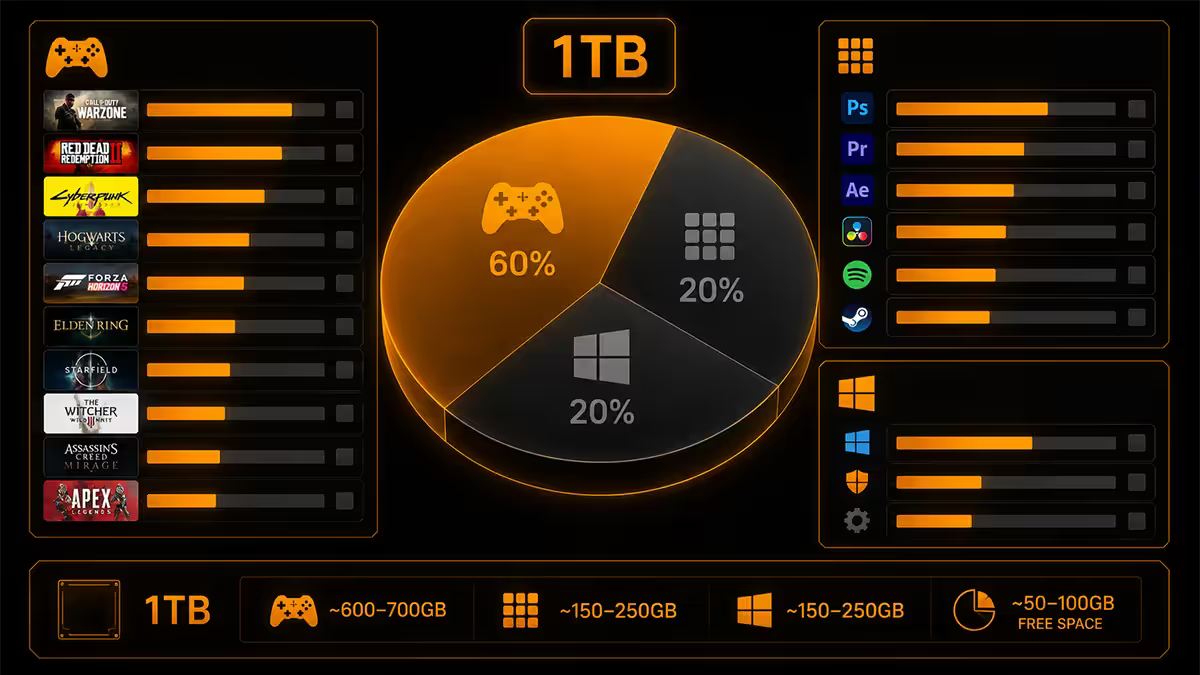
Starting from 1024 GB advertised capacity:
That 175 GB of free space looks comfortable until you realise:
- Drive slowdown threshold = 85% full. SSDs need 15% spare for the controller's wear-levelling and garbage-collection algorithms. Cross that line and writes slow by 30-60%.
- One large new release (Call of Duty, Baldur's Gate 3, MS Flight Sim) consumes 150-250 GB of that buffer instantly.
- Game updates routinely add 10-30 GB. Major patches across 4-5 active games can chew through 100 GB in a single Patch Tuesday.
In practice, an active gamer on 1TB ends up constantly juggling installed games — uninstalling something to make room for the next thing, then reinstalling weeks later. It's not a hardware problem; it's a friction problem that gets old fast.
On 2TB, the same five AAA games + Windows + apps occupy 830 GB, leaving 1170 GB free — roughly room for five more AAA titles before the 85% rule kicks in. The friction disappears.
Content creator workflows — different math entirely
If you produce video, photography, audio, or 3D content alongside gaming, the storage calculation shifts dramatically.
Video editor (YouTube / TikTok / Twitch VOD):
- 4K raw footage: 60-120 GB per hour shot (depending on codec).
- Premiere Pro / DaVinci Resolve project caches: 50-150 GB per active project.
- Render outputs in multiple formats: 20-50 GB per finished project.
- Active project storage on the working drive: typically 300-700 GB.
Photographer (RAW workflow):
- ~50 MB per RAW file (45 MP modern bodies).
- A typical 1,000-photo wedding shoot = 50 GB.
- Lightroom previews and cache: 20-100 GB.
- Active catalogue with 12 months of recent shoots: 500 GB-1.5 TB.
3D artist / Blender user:
- Per-project asset libraries: 5-50 GB per project.
- Render cache and intermediate files: 20-100 GB per active project.
- Texture libraries (Quixel, Substance Source): 100-500 GB.
A reasonable creator-plus-gamer setup in 2026: 1TB NVMe OS drive + 2TB NVMe active-projects/active-games drive + 4TB external archive. Total active storage 7-8 TB is normal for full-time creators. For a part-time creator, 2TB + external archive often suffices.
Endurance and capacity — they scale together
SSDs have a finite write capacity expressed as TBW (Terabytes Written). Higher-capacity drives have proportionally higher TBW ratings because they have more NAND cells to distribute writes across.
| Drive | Typical TBW | Daily writes for 10 years |
|---|---|---|
| 1TB Gen4 NVMe (mid-tier) | 600 TBW | 165 GB/day |
| 2TB Gen4 NVMe (mid-tier) | 1200 TBW | 330 GB/day |
| 1TB Gen4 NVMe (premium — Samsung 990 Pro, WD SN850X) | 1000-1200 TBW | 275-330 GB/day |
| 2TB Gen4 NVMe (premium) | 2000-2400 TBW | 550-660 GB/day |
For a typical gamer: daily writes are 5-20 GB (Windows updates, game saves, patches, browser caches). Even a 600 TBW 1TB drive lasts decades at that rate. Endurance is not the limiting factor for gamers.
For a video creator: daily writes can hit 100-300 GB on a working drive. A 1TB drive's 600 TBW rating works out to about 6 years at that pace — within typical drive lifespan, but tightening. A 2TB's 1200+ TBW gives you double the runway.
When 1TB is plenty
1TB still makes sense in five clear scenarios:
Casual gamers — 1-2 active titles at a time. If you've played Hogwarts Legacy for 6 months and now you're moving to Baldur's Gate 3 (uninstalling the previous), 1TB works fine forever.
Office / productivity builds. If gaming isn't the use case, 1TB is more than ample for Office, browsers, business apps and reasonable file storage.
Secondary boot drive on a multi-drive build. A 1TB Gen4 NVMe as the OS drive paired with a larger SATA SSD for games and media is a classic SA-budget configuration.
Older systems being upgraded. A 1TB SATA SSD in an older H110/B250 system transforms boot time and feel. Don't overspend on a 2TB for an aging platform.
HTPC / media centre / SteamOS console builds. A few hundred GB of Plex media or a handful of console-equivalent games doesn't need 2TB.
When 2TB becomes required
Conversely, 2TB is the right pick whenever any of these apply:
Active gamer with 4+ titles installed. Especially if any of them are Call of Duty, Baldur's Gate, MS Flight Sim, or Starfield. The maths above doesn't lie.
Content creator (even part-time). Project files, raw footage, RAW photos and 3D scenes all consume capacity faster than you'll predict.
Game library hoarder. If you're the type who wants to leave 8-10 games installed "just in case I want to play it again," 2TB removes the constant juggling.
Heavy local media library. Plex, Jellyfin, or local-only music/video archives quickly outgrow 1TB.
Future-proofing. If you plan to keep this drive for 5+ years, sizing up at purchase costs much less than upgrading later. The R1,400 spent now is far cheaper than buying a separate drive in year 3.
The hybrid strategy — best of both worlds
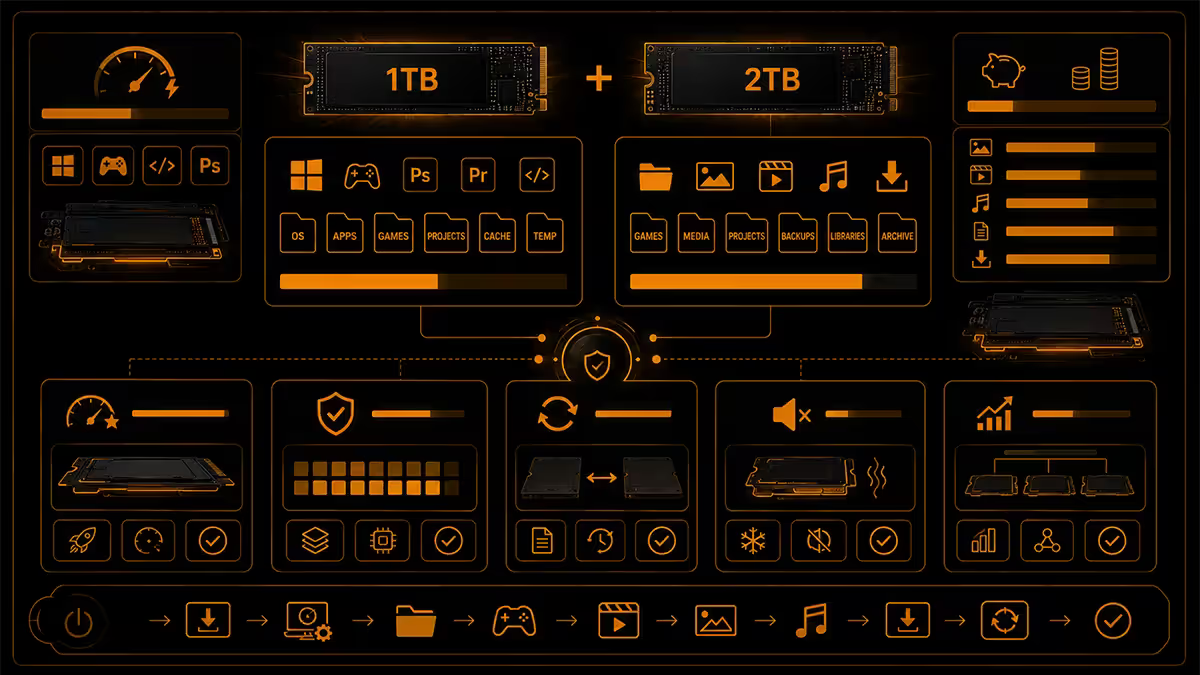
For SA builders with a constrained budget but heavy storage needs, the most cost-effective configuration in 2026 is a hybrid NVMe + SATA setup.
Recommended hybrid build:
- 1TB Gen4 NVMe (~R1,650-R2,400) — Windows, essential apps, and 2-3 currently-active AAA games for fastest load times.
- 2TB SATA SSD (~R1,950-R2,400) — Steam library, photo and media archive, secondary games, downloaded content.
- Total: ~R3,500-R4,500 for 3TB combined.
Compare to:
- Single 2TB Gen4 NVMe: R2,950-R3,800 for 2TB total.
- Single 4TB Gen4 NVMe: R6,500-R8,000 for 4TB total.
The hybrid gives you 50% more total capacity than the single 2TB at a marginally higher cost, and you don't sacrifice game load speeds on your active titles. The trade-off: it consumes an M.2 slot plus a SATA port, where the single 2TB NVMe only uses the M.2 slot.
SA price-gap math (May 2026)
| Drive | SA price | R per GB |
|---|---|---|
| 500 GB Gen4 NVMe | R1,100-R1,400 | R2.20-R2.80 |
| 1TB Gen4 NVMe (mid) | R1,650-R2,000 | R1.65-R2.00 |
| 1TB Gen4 NVMe (premium — 990 Pro, SN850X) | R2,000-R2,400 | R2.00-R2.40 |
| 2TB Gen4 NVMe (mid) | R2,950-R3,400 | R1.48-R1.70 |
| 2TB Gen4 NVMe (premium) | R3,400-R3,800 | R1.70-R1.90 |
| 4TB Gen4 NVMe | R6,500-R8,000 | R1.63-R2.00 |
| 1TB SATA SSD | R950-R1,250 | R0.95-R1.25 |
| 2TB SATA SSD | R1,950-R2,400 | R0.98-R1.20 |
| 4TB SATA SSD | R4,200-R5,200 | R1.05-R1.30 |
Key observation: 2TB Gen4 NVMe is the cheapest tier per-GB in the NVMe range. 2TB SATA is the cheapest overall per-GB. The sweet spots in SA pricing are both at the 2TB capacity point.
The R1,400 gap between 1TB and 2TB Gen4 NVMe is genuinely small considering the practical impact. For comparison, the same R1,400 saved on storage and spent on the CPU would only step you up half a tier (e.g. Ryzen 5 7600X to 7700X). The storage upgrade is far more felt in daily use.
SA picks by use case
| Use case | Recommendation | SA price |
|---|---|---|
| Active gamer, 4+ titles | 2TB Gen4 NVMe (WD SN850X / 990 Pro) | R2,950-R3,800 |
| Casual gamer, 1-2 titles | 1TB Gen4 NVMe (WD SN770 / Kingston NV3) | R1,100-R2,000 |
| Gamer + light content | 2TB Gen4 NVMe + external 4TB archive | R3,500 + R3,000 external |
| Hybrid budget build | 1TB NVMe (boot) + 2TB SATA (library) | R3,500-R4,500 |
| Full-time content creator | 1TB NVMe (OS) + 2TB Gen4 NVMe (projects) + 4TB external | R5,500-R7,500 |
| Office / non-gaming build | 1TB SATA SSD | R950-R1,250 |
Key takeaways
- 2TB is the new default for active gamers and content creators — game install inflation has changed the math.
- 1TB is still right for casual gamers, office builds, secondary drives, and older platforms.
- The R1,400 SA price gap between 1TB and 2TB Gen4 NVMe is the single best per-Rand upgrade in modern builds.
- Keep at least 15% of any SSD free — drives slow noticeably past 85% capacity.
- Hybrid setup (1TB NVMe + 2TB SATA) is the smartest budget play for total capacity without sacrificing peak load speed.
Frequently asked questions
Is 1TB still enough storage in 2026?
Borderline for active gamers. Windows + apps eat 80-120 GB; a modern library of 4-5 titles eats 500-700 GB, leaving 200-300 GB headroom — barely enough for one large new release. Fine for casual gamers playing 1-2 titles, tight for active gamers and creators.What is the price difference between 1TB and 2TB NVMe in SA?
~R1,400 in May 2026 — 1TB Gen4 NVMe sits R1,650-R2,400; 2TB sits R2,950-R3,800. Per-GB pricing strongly favours 2TB. If budget allows R1,400 more, 2TB is the better long-term value for active users.How much storage do modern games actually take?
2026 install sizes: CoD MW III 250-280 GB; BG3 150 GB; Starfield 140 GB; Cyberpunk 100 GB; Forza Motorsport 130 GB; RDR2 130 GB. Five AAAs together consume 700-900 GB easily. Esports titles stay under 40 GB.Does a 2TB SSD last longer than a 1TB?
Yes — endurance scales with capacity. 1TB Gen4 mid-tier = 600 TBW; 2TB = 1200 TBW. Both outlast a 10-year gaming lifespan easily (you'd write 165+ GB daily for 10 years to reach 600 TBW). Heavy creators benefit more from the higher 2TB endurance.Should I get one 2TB SSD or two 1TB SSDs?
One 2TB is usually better — cheaper per GB, occupies one M.2 slot, simpler. Two 1TB makes sense only if you need physical separation (work/personal) or a small fast Gen4 boot drive + larger Gen3 storage.What about hybrid strategies — NVMe + SATA?
1TB Gen4 NVMe + 2TB SATA SSD is brilliant in 2026 — combined R3,500-R4,500. Peak performance for active games, bulk capacity for storage. The smartest play for SA builders with R3,000+ SSD budget.How much storage does a content creator need?
Significantly more. Project files alone can hit 500 GB-1 TB. Reasonable setup: 1TB NVMe (OS) + 2TB or 4TB NVMe (projects) + external 4TB-8TB archive. Total 5-8 TB active is normal for full-time YouTubers and photographers.What happens when my SSD fills up?
SSDs slow past 85% full — less spare for wear-levelling and garbage collection. Boot drives feel sluggish, sustained writes drop. Aim for 15% free (~850 GB usable on 1TB, ~1700 GB on 2TB). A real practical reason 2TB feels much better than 1TB for active users.
Get the Evetech app
Exclusive app-only prices, daily flash sales, and free delivery on orders over R4,000 — download the app and start saving.