Storage Explainer
NVMe vs SATA — the real difference.
The synthetic benchmark gap between NVMe and SATA is enormous. The real-world gap is much smaller — and that matters when you're deciding where to spend the money on your next build.
- NVMe Gen4 peak
- 7,000 MB/s
- SATA III peak
- 560 MB/s
- real game load gain
- 20-35%
The bus is the whole story
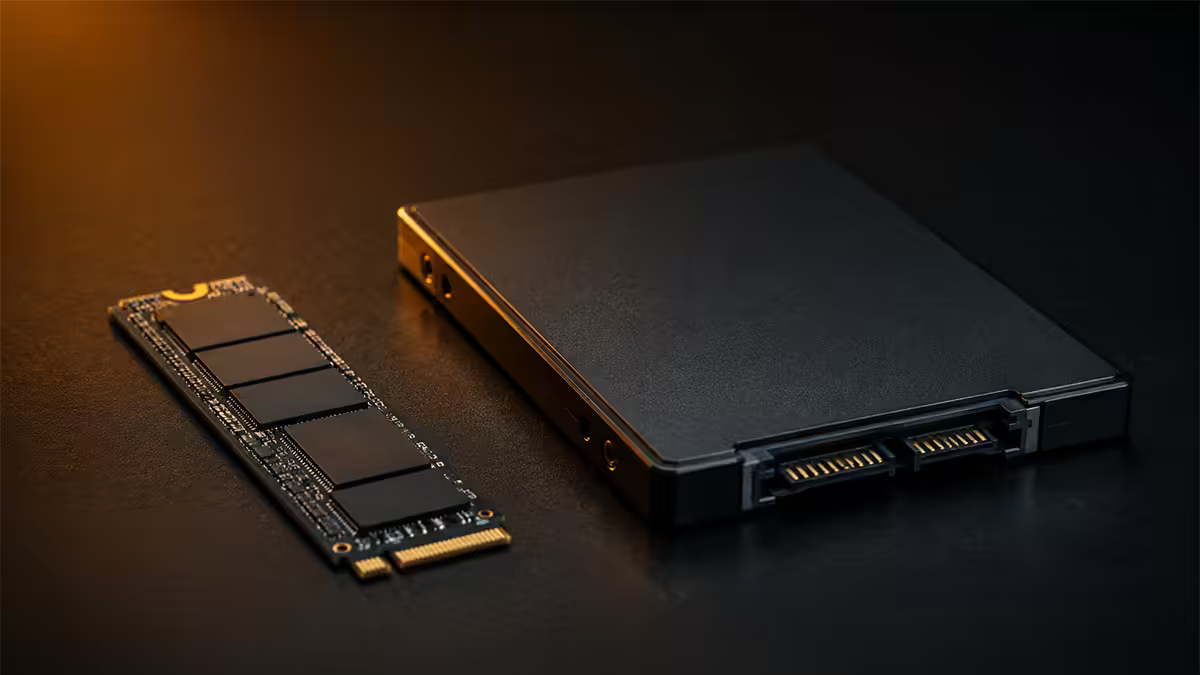
SATA SSDs and NVMe SSDs use the same underlying NAND flash storage technology. The difference between them is the road the data drives on.
SATA III tops out at 6 Gb/s of theoretical bandwidth, of which about 560 MB/s is usable after protocol overhead. The SATA standard was designed for spinning hard drives in the early 2000s, and it has been a bottleneck for SSDs since roughly 2013.
NVMe rides on the PCIe bus — the same high-speed lanes your graphics card uses. A modern Gen4 NVMe drive uses four PCIe 4.0 lanes (x4), giving it a theoretical ceiling of 8 GB/s, with real-world peaks around 7,000 MB/s. That's roughly twelve times the SATA ceiling.
The other key difference is the protocol itself. SATA uses AHCI, which was designed around the physical seek-and-rotate latency of mechanical drives. NVMe was built ground-up for flash storage, supporting thousands of queues with thousands of commands each. In small random-read workloads, that protocol advantage is more important than the raw bandwidth number.
Real-world speeds vs benchmarks
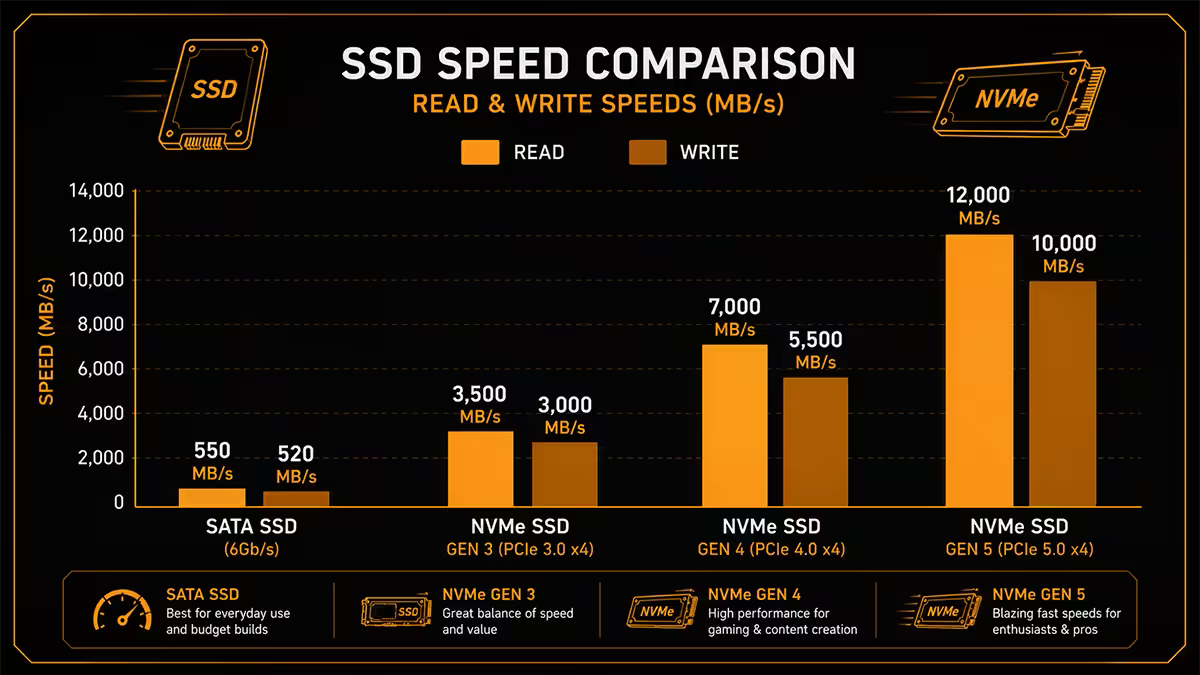
Open CrystalDiskMark on a Gen4 NVMe and you'll see numbers like 7,200 MB/s read and 6,800 MB/s write. Open it on a SATA SSD and you'll see 560/520. That's a 12x gap on paper.
Now boot Windows on both. Boot time difference: maybe two seconds. Launch Chrome — almost instant on either. Open a 50 MB Photoshop document — both feel identical. Where did the 12x go?
The synthetic benchmark measures one specific thing: peak sequential transfer of a contiguous 1 GB test file. Almost no real-world workload looks like that. Operating system workloads are dominated by small random reads — tens of thousands of 4 KB reads scattered across the drive. In that workload, both NVMe and SATA hit the same ceiling: the IOPS limit of the controller, the latency of the flash itself, and the overhead of the OS.
| Workload | SATA III | Gen4 NVMe |
|---|---|---|
| Synthetic sequential read | 560 MB/s | 7,000 MB/s (12x) |
| Windows boot time | ~14 seconds | ~12 seconds |
| Cyberpunk 2077 load | ~25 seconds | ~17 seconds |
| Starfield zone change | ~14 seconds | ~9 seconds |
| 20 GB file copy (same drive) | 9-12 min | 35-50 sec |
| 50 MB Photoshop file open | ~1 second | ~1 second |
The two workloads where NVMe runs away from SATA are large file transfers (where the sequential bandwidth gap actually matters) and game level loads that read hundreds of textures and meshes in rapid succession.
Game loading reality in 2026
Game engines built before about 2020 were designed around the assumption of a spinning hard drive. They aggressively pre-cache assets to RAM and tend to load levels in long sequential reads. On these older titles, NVMe and SATA load times are within a second or two of each other.
Modern engines — Unreal 5, idTech 8, Creation Engine 2, the COD MW engine — were rebuilt around fast solid-state storage. They stream textures and meshes on demand, with hundreds of small reads happening continuously as you move through the world. This is where NVMe earns its keep.
Recent titles tested at our service bench show consistent NVMe advantages of 20-35% on level loads, fast travel, and zone transitions. Microsoft's DirectStorage API pushes that gap wider on titles that support it — Forza Motorsport, Ratchet & Clank Rift Apart and a growing list of UE5 games.
Texture streaming pop-in is the more visible advantage. On SATA, you may notice low-res textures momentarily on fast-paced open-world games. On NVMe Gen4, the engine keeps up almost transparently.
The M.2 2280 form factor
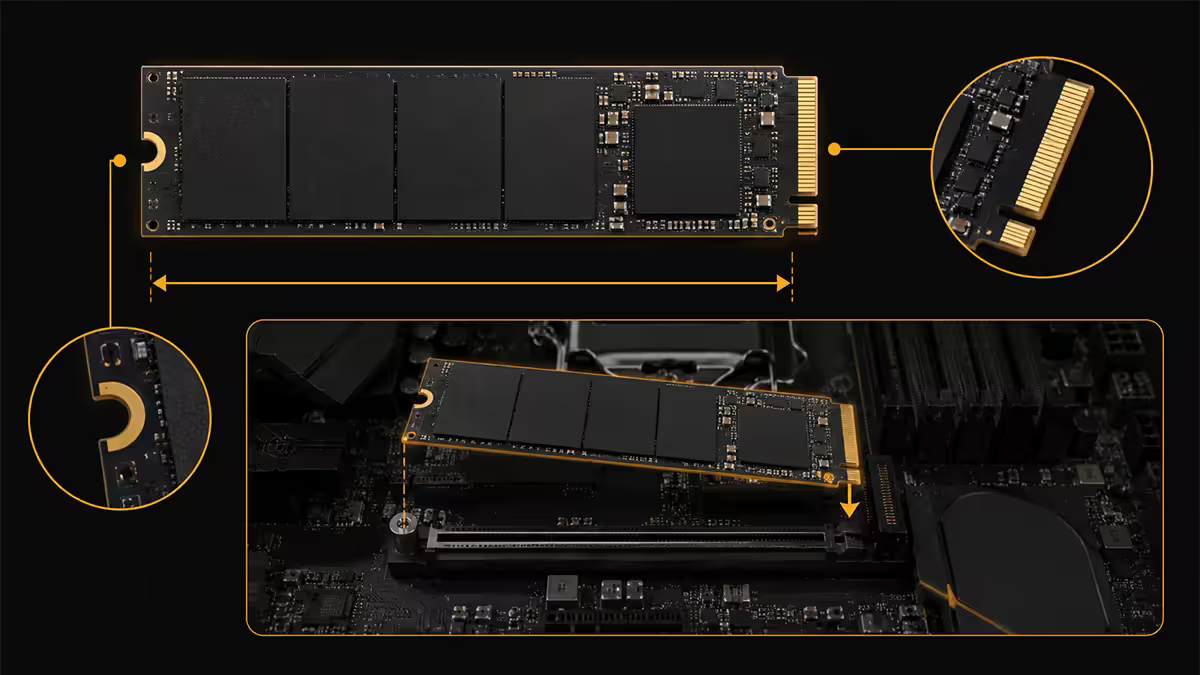
Every NVMe SSD you'll likely buy in 2026 uses the M.2 2280 form factor — 22 mm wide, 80 mm long. The drive plugs directly into a slot on your motherboard, no cable required. No SATA cable, no power cable, no 2.5" mounting bracket. It's a vastly cleaner build.
Two M.2 sub-types exist:
- M-key (NVMe) — what you actually want. Connects to PCIe lanes for full bandwidth.
- B-key (SATA M.2) — physically smaller drives that use the SATA protocol through an M.2 slot. Still bottlenecked to 560 MB/s. Rare in 2026.
When you buy an "M.2 SSD," verify the listing says NVMe and ideally PCIe Gen3 x4 or higher. An M.2 SATA SSD costs about the same as a 2.5" SATA SSD but offers no benefit.
Shorter form factors (M.2 2230) exist for handhelds — the Steam Deck and ROG Ally use them. They're not common in desktop boards.
NVMe Gen3 vs Gen4 vs Gen5
Each PCIe generation doubles bandwidth per lane. The naming refers to the PCIe revision the drive uses.
| Generation | Peak sequential | Real-world gain |
|---|---|---|
| NVMe Gen3 x4 | ~3,500 MB/s | Baseline |
| NVMe Gen4 x4 | ~7,000 MB/s | 5-15% over Gen3 in games |
| NVMe Gen5 x4 | ~12,000-14,000 MB/s | Marginal — content creator focus |
Gen3 is still excellent for general use. A Samsung 970 Evo Plus or WD Black SN770 (Gen3 / Gen3+) costs less and feels indistinguishable from Gen4 in 95% of workloads.
Gen4 is the 2026 sweet spot. Drives like the WD Black SN850X, Samsung 990 Pro, Crucial T500 and Kingston KC3000 hit the price-performance bullseye. Any modern AM5 or LGA1700/1851 board supports Gen4 natively.
Gen5 is overkill for gamers. The 14,000 MB/s peak is amazing on paper, but games and Windows can't read that fast. Gen5 makes sense for video editors moving raw 8K footage, AI workloads loading enormous models from disk, and database servers. Gen5 drives also run hot — they need a meaty heatsink and good case airflow.
When SATA still makes sense
SATA SSDs are not obsolete. Three scenarios where they remain the smart pick:
Older systems without M.2 slots. If you're upgrading a 2014-2017 build with H81, B85, H110 or similar chipsets, your board has no M.2 NVMe support. A 1TB SATA SSD transforms boot time and feel for under R900 — a near-magical upgrade compared to a HDD.
Secondary storage. Your active games and OS belong on NVMe. Your photo library, video archive, completed-but-rarely-played game backups, and ISO files don't care about access speed. A 4TB SATA SSD as a secondary drive saves real money and you'll never notice the speed difference for that workload.
Multiple drives in one system. Motherboards typically have 1-3 M.2 slots but 4-8 SATA ports. If you need bulk SSD storage (a creator running a media server, a content archive workstation), SATA SSDs let you stack capacity that M.2 slots can't physically host.
The cost-per-GB advantage of SATA over NVMe has narrowed considerably in 2026 — but at the 4TB+ tier, the math still favours SATA for non-performance-critical storage.
Heat & heatsinks
NVMe drives generate real heat. Under sustained writes, a Gen4 drive can hit 70-80°C in seconds and start thermal-throttling — at which point performance drops to roughly SATA levels.
For most workloads (gaming, web browsing, Office work), thermal throttling never triggers because writes are short bursts. For video editors, downloaders, and anyone copying large files often, the heatsink question is real.
Gen3 drives: heatsink optional. They rarely heat above 55°C even under sustained use.
Gen4 drives: heatsink helpful for heavy workloads. Most modern motherboards (B650, B760, X670, Z790 and up) include built-in M.2 heatsinks on the primary slot. Use them.
Gen5 drives: heatsink mandatory. Many ship with bundled active-cooled heatsinks that look like miniature CPU coolers — that's not marketing, it's necessary.
SA pricing snapshot (May 2026)
| Drive class & capacity | Example model | SA price |
|---|---|---|
| SATA 1TB | WD Blue SA510, Crucial MX500 | R950-R1,250 |
| SATA 2TB | Samsung 870 Evo, Kingston KC600 | R1,950-R2,400 |
| SATA 4TB | Samsung 870 QVO, WD Red SA500 | R4,200-R5,200 |
| NVMe Gen3 1TB | WD Black SN770, Kingston NV2 | R1,100-R1,500 |
| NVMe Gen4 1TB | WD Black SN850X, Samsung 990 Pro | R1,650-R2,400 |
| NVMe Gen4 2TB | WD Black SN850X, Crucial T500 | R2,950-R3,800 |
| NVMe Gen5 1TB | Crucial T700, Corsair MP700 Pro | R3,200-R4,100 |
| NVMe Gen5 2TB | Crucial T705, Samsung 9100 Pro | R5,800-R7,400 |
Recommended drives by use case
| Use case | Pick | SA price band |
|---|---|---|
| 2026 boot drive (gamer/creator) | WD Black SN850X 1TB / Samsung 990 Pro 1TB | R1,650-R2,400 |
| Budget gaming OS drive | Kingston NV3 / WD Black SN770 1TB | R1,100-R1,500 |
| Steam library secondary drive | Samsung 870 Evo 2TB or WD Black SN850X 2TB | R1,950-R3,800 |
| Bulk media archive | Samsung 870 QVO 4TB (SATA) | R4,200-R5,200 |
| Content creator / 4K editor | Crucial T705 2TB Gen5 | R5,800-R7,400 |
| Older H110/B250 upgrade | Crucial MX500 1TB (SATA) | R950-R1,250 |
Key takeaways
- NVMe is the right OS drive in any new 2026 build — the real-world gain over SATA is ~30%, not 12x, but it's tangible.
- Gen4 NVMe is the price/performance sweet spot. Gen5 is overkill for gamers; Gen3 is fine on budget builds.
- SATA still wins for secondary storage, older boards, and bulk capacity at 4TB+.
- Mix drives: 1TB NVMe for OS and active games, 2TB+ SATA for library and media.
- Gen4/Gen5 drives need heatsinks — most modern motherboards include one for the primary M.2 slot.
Frequently asked questions
Is NVMe really 6x faster than SATA in real-world use?
On paper yes — sequential read speeds of 7,000 MB/s vs 560 MB/s. In real-world use the gap collapses. Windows boot is about 2 seconds faster on NVMe. Game level loads are 20-35% faster, not 600%. The synthetic benchmarks measure peak sustained sequential transfers; everyday workloads are mostly small random reads, where the gap is much smaller. NVMe is still the right pick for a new build — but don't expect a transformative speed difference for general use.Does my motherboard support NVMe?
Almost every motherboard sold from 2018 onward has at least one M.2 NVMe slot. AM4, AM5, LGA1200, LGA1700 and LGA1851 boards all support NVMe. Older boards (LGA1150, LGA1151 with H81/B85 chipsets) only support SATA SSDs in 2.5" form factor. Check your board manual for M.2 slot count — entry-level boards often have one slot, mid-range two, and high-end three or four.What is the difference between NVMe Gen3, Gen4 and Gen5?
Each PCIe generation doubles bandwidth. Gen3 NVMe runs up to 3,500 MB/s sequential read, Gen4 up to 7,000 MB/s, and Gen5 up to 14,000 MB/s. In real gaming and OS workloads, Gen3 vs Gen4 difference is 5-15% in game loads. Gen5 is overkill for almost everyone — it benefits content creators moving massive uncompressed files. For most builds in 2026, a Gen4 NVMe is the sweet spot.When does a SATA SSD still make sense?
SATA SSDs remain useful in three scenarios: older systems without M.2 slots; secondary storage for games, photos and media where peak speed doesn't matter; and bulk capacity at lower cost per GB. A 4TB SATA SSD costs significantly less than a 4TB NVMe and the speed difference is invisible for cold game libraries or media archives.Do NVMe drives need heatsinks?
Gen3 NVMe drives rarely need heatsinks. Gen4 drives benefit from one under sustained writes (large file transfers, video editing). Gen5 drives need heatsinks — they throttle quickly without active cooling, sometimes within 30 seconds of sustained writes. Most modern motherboards include M.2 heatsinks for the primary slot, so check your board before buying a separately heatsinked drive.Will an NVMe SSD make my games load faster?
Yes, but less dramatically than benchmarks suggest. Modern game engines (Cyberpunk 2077, Starfield, Forza Motorsport, Call of Duty) load 20-35% faster on NVMe vs SATA. Older titles see almost no difference because they were built around HDD-era loading patterns. DirectStorage-enabled games show bigger gains on Gen4 NVMe — but that technology is still rolling out across the industry.Can I use NVMe and SATA SSDs together?
Yes — and it's a great strategy. Use a 1TB NVMe as your boot/OS/active-games drive and a 2TB or 4TB SATA SSD as your storage drive. The NVMe handles speed-critical workloads, the SATA SSD handles bulk capacity at lower cost. Most modern motherboards happily run multiple SATA SSDs alongside NVMe with no performance penalty.Is there a downside to NVMe vs SATA?
Three things to consider. NVMe drives run hotter — up to 70°C under sustained writes — and require airflow or a heatsink. M.2 slots are limited (1-3 per board) where SATA can host 4-8 drives. And NVMe per GB is still slightly more expensive than SATA at the 2TB+ tier. For most builds these are minor considerations — but worth knowing before committing.
Get the Evetech app
Exclusive app-only prices, daily flash sales, and free delivery on orders over R4,000 — download the app and start saving.