Hardware Explainer
SSD vs HDD — which storage to buy.
The fastest NVMe SSD reads at 7,000 MB/s. A modern 7,200 rpm hard drive manages 150 MB/s. That single number changes every part of how a PC feels. But on bulk storage, HDDs still win the rands-per-terabyte argument — by a lot.
- NVMe Gen4 peak
- 7,000 MB/s
- 7,200 rpm HDD
- 150 MB/s
- HDD bulk price SA
- R0.40/GB
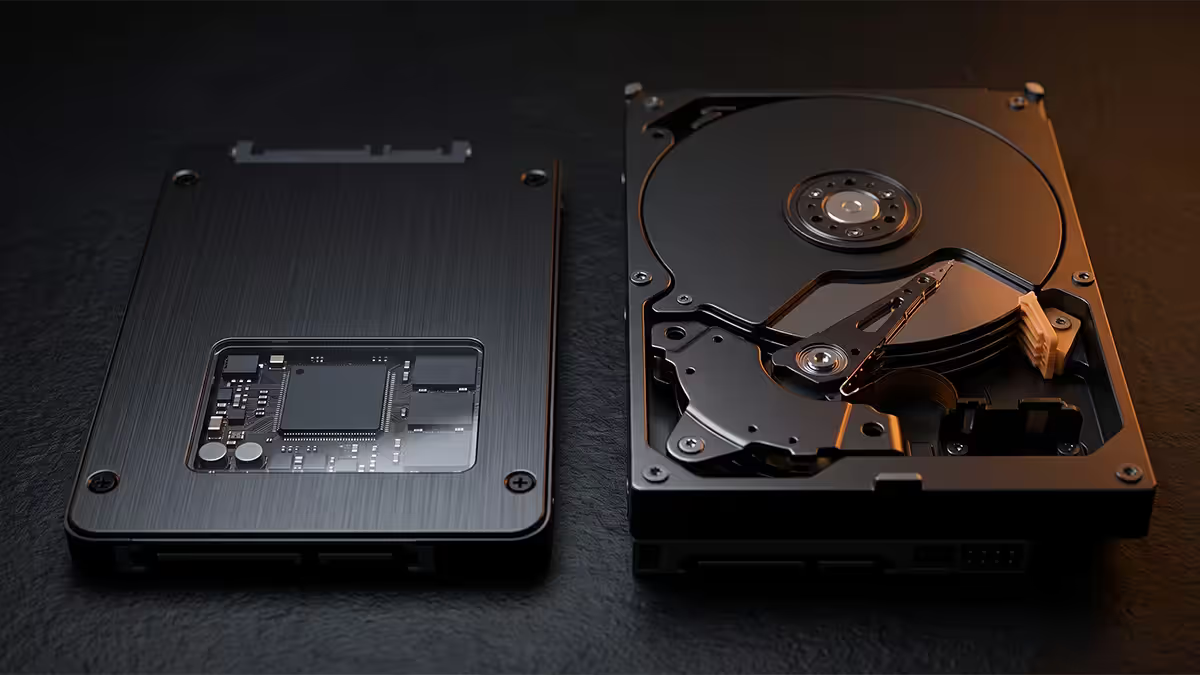
The speed gap — bigger than every other PC upgrade combined
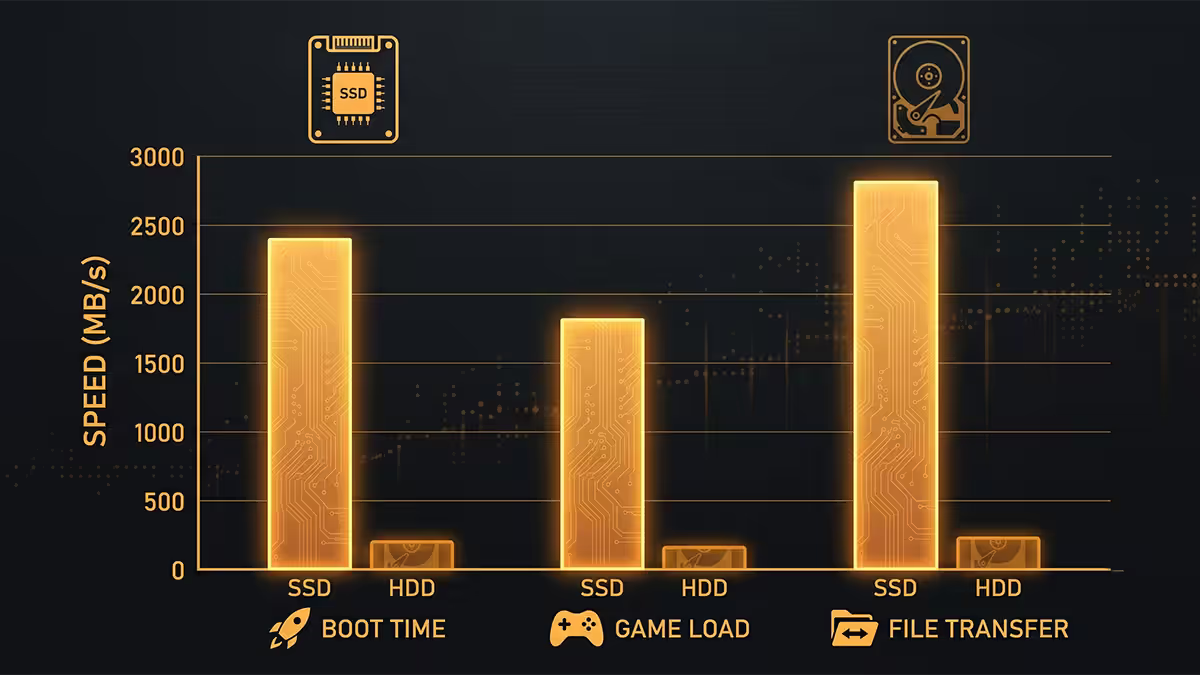
There is no other component swap in a modern PC that delivers as much felt difference as replacing a hard drive with an SSD. Not a CPU bump. Not a GPU upgrade. Not extra RAM. The reason: storage touches everything — boot, app launch, file save, game load, alt-tab, even web browser tab restore. When the floor of every operation is 40× faster, the whole machine feels different.
In raw sequential numbers, a PCIe Gen4 NVMe SSD like the Samsung 990 Pro or WD Black SN850X reads at around 7,000 MB/s. A modern 7,200 rpm 3.5" HDD like the Seagate IronWolf or WD Red Plus tops out at 150-200 MB/s in the best zones of the platter, and drops to 70-90 MB/s in the worst. That's roughly a 40-45× difference at peak — and the gap grows further when the drive isn't being read in long sequential blocks.
| Workload | NVMe Gen4 SSD | 7,200 rpm HDD |
|---|---|---|
| Sequential read | 7,000 MB/s | 150 MB/s |
| Sequential write | 6,500 MB/s | 140 MB/s |
| Random 4K read (IOPS) | 700,000+ | ~100 |
| Windows boot | 8-12 s | 45-90 s |
| Cold game load (AAA) | 3-6 s | 30-60 s |
| Noise | Silent | Audible spin + head clicks |
The numbers in that table aren't theoretical lab figures — they're what you see on a fresh Windows install of a typical Evetech build. Boot times that used to make people get coffee are now finished before the monitor finishes its display handshake.
Random reads — where games and Windows actually live
Sequential bandwidth is the headline number SSDs are sold on, but it's not what makes them feel fast in real use. The metric that actually matters for everyday performance is random read IOPS — input/output operations per second on small, scattered 4 KB blocks. This is what Windows does when it loads system DLLs at boot, what a game engine does when it streams hundreds of small texture and mesh files at level load, what your browser does when it restores tabs.
An HDD does maybe 100 random IOPS — limited by how fast the actuator arm can physically move the head between locations on the platter. An NVMe SSD does 700,000+. The ratio there isn't 45× — it's 7,000×. This is why the same game can take 45 seconds to load from a hard drive and 4 seconds from an NVMe drive: the level isn't one big file, it's thousands of small ones, and the HDD's mechanical arm has to physically seek to each one.
Cost reality — rands per gigabyte in SA
SSDs have got dramatically cheaper. They haven't reached parity. Here's where the SA market sits in mid-2026:
- 4-8 TB HDDs sit around R0.30-R0.50 per GB. A 4 TB Seagate IronWolf or WD Red Plus runs R1,400-R1,800.
- 1-2 TB SATA SSDs sit around R2-R3 per GB. A 2 TB Samsung 870 EVO or Crucial MX500 runs R2,400-R3,200.
- 1-2 TB NVMe Gen4 SSDs sit around R2.50-R4 per GB. A 2 TB WD Black SN850X or Samsung 990 Pro runs R2,800-R4,800.
- 4 TB NVMe drives are R5,500-R8,500. Big jump per GB because controllers and PCB density get expensive at higher capacities.
The maths: 4 TB of HDD is roughly R1,800. 4 TB of NVMe is roughly R12,000. SSD is still 5-7× more expensive per gigabyte at large capacities. For most builders, that gap doesn't matter — your boot drive needs to be SSD, but you might not need 4 TB of fast storage. But for video editors, hoarders of Steam libraries, or anyone with a 4+ TB media collection, HDDs are still the rational choice for the cold-storage half of that data.
Durability — moving parts versus solid state
An SSD is a printed circuit board. A controller chip, NAND flash chips, capacitors. Nothing moves. Drop one from desk height and it lands, slightly annoyed, with your data intact. Throw it in a backpack with no padding and it survives the train ride home.
A hard drive is a precision mechanical instrument. A motor spinning platters at 7,200 rpm. A read/write head floating on a microscopic cushion of air, microns above the platter surface. Drop one while it's powered on and there's a meaningful chance the head crashes into the platter, gouging the surface and destroying whatever data was on the affected tracks. Hard drives have come a long way — modern units include shock sensors that park the head when they detect motion — but the basic physics hasn't changed.
For anything that moves — laptops, external drives, portable workstations, gaming handhelds — SSDs are the only sensible choice. A spinning hard drive in a Steam Deck or a backpack laptop is a data loss waiting to happen. Even in desktops, SSDs survive case bumps, transport between LAN parties, and accidents like knocking a tower over while the system is running.
Lifespan — TBW vs MTBF, and which one matters
SSDs and HDDs measure lifespan in different units, and the differences confuse first-time buyers.
SSDs use TBW (terabytes written). NAND flash cells wear out a tiny bit each time data is written to them. A typical consumer 1 TB NVMe SSD is rated for 600-1,200 TBW. To hit that limit in 5 years, you'd need to write 330 GB per day, every single day. Normal use is more like 10-30 GB per day. You will replace the drive long before you exhaust the TBW.
HDDs use MTBF (mean time between failures), typically 1-1.5 million hours. That sounds enormous — but MTBF is a statistical measure across the population of drives, not a guarantee for any individual one. In real-world use, hard drives fail mechanically in a way SSDs don't: sudden head crashes, motor failures, controller board burnout. Backblaze's annual drive reliability reports show HDD annual failure rates of 1-3% across most consumer models, climbing rapidly after year 5.
The hybrid setup — the right answer for most builders
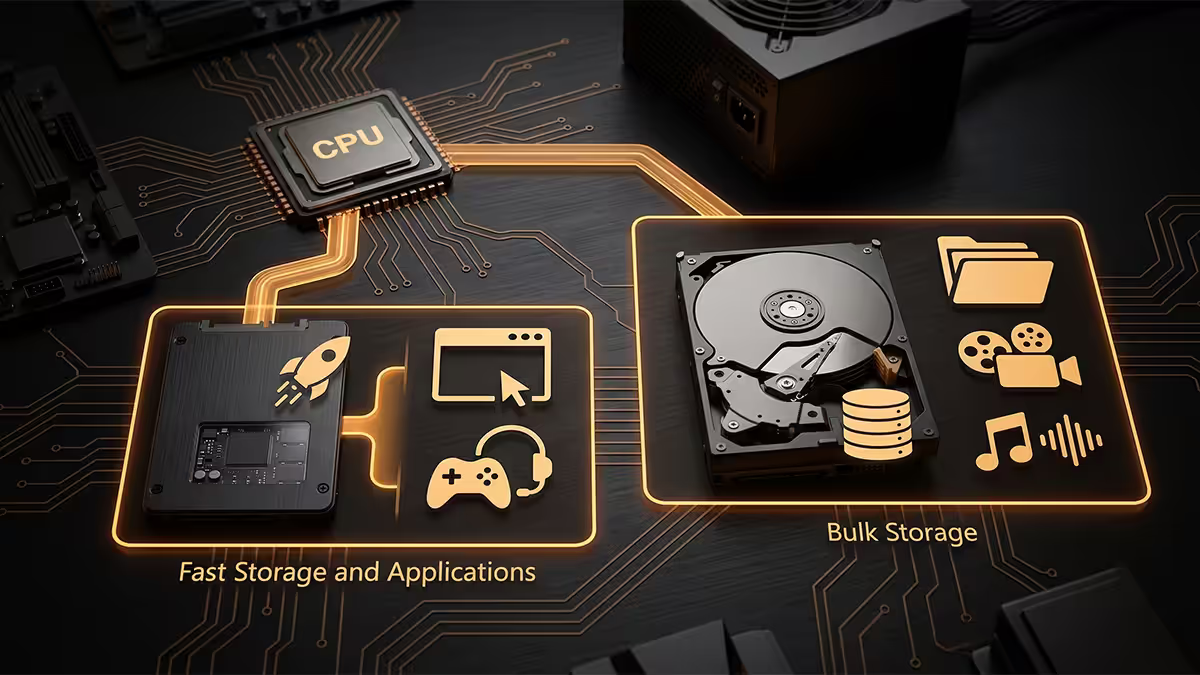
For anyone with more than 2 TB of stuff, the practical answer is to use both drive types in the same machine, with each holding the data it's best suited to.
The recommended SA setup:
- Primary drive — 1 or 2 TB NVMe Gen4 SSD. Windows, programs, your most-played 4-8 games, current work projects. R1,800-R3,500.
- Secondary drive — 4 or 8 TB 7,200 rpm HDD. Archived games not currently being played, video projects, photo libraries, ISO collection, family backups. R1,600-R3,500.
- Total spend: R3,500-R7,000 for 5-10 TB combined, with the speed of NVMe where it matters and the cheap capacity of HDD for everything else.
The mental model is simple: "hot" data goes on SSD, "cold" data on HDD. A game you're playing this month sits on the NVMe drive. When you finish it, drag the install folder to the HDD via Steam's "move install folder" option. Photo and video projects stay on SSD while you're editing them, then archive to HDD when done. Boot, work and games stay fast; everything else stays cheap.
Across the 200,000+ custom PCs we've shipped from Centurion, the storage upgrade we recommend most often isn't a CPU or GPU at all — it's adding a 1 TB NVMe Gen4 SSD as the boot drive on a machine that was running on a SATA SSD or, worst case, a hard drive. The customer call-back rate after this single upgrade is the lowest of any service we offer. Storage performance is felt every second the machine is on — not just in benchmarks. Don't undersize this part of your build.
Behind the Build · From our service bench
When the HDD still wins
Despite everything above, there are legitimate scenarios where a hard drive is still the smarter purchase in 2026:
Bulk archive over 4 TB. If you're storing 6 TB of video projects, 8 TB of family photos, or a 10 TB Steam library, the cost difference matters. R3,200 for an 8 TB HDD vs R20,000+ for the same in SSD. The data isn't accessed daily — sequential read speed is fine.
NAS and home server use. Multi-bay NAS units (Synology, QNAP, TrueNAS) are still built around hard drives. RAID-protected HDDs in a NAS give you 16-32 TB of network-accessible storage at a fraction of SSD cost, and the network connection (1 GbE = 125 MB/s, 2.5 GbE = 312 MB/s) is the bottleneck anyway, not the drive.
Surveillance and CCTV recording. Drives like the WD Purple and Seagate SkyHawk are designed for 24/7 sequential writes from security cameras — a workload SSDs would burn through write endurance on. Hard drives are the correct tool for the job.
Cold backup drives. External 3.5" HDDs in a dock, used once a month for a backup rotation and otherwise unplugged, are still the cheapest reliable long-term backup medium. Don't try to use SSDs as cold storage — they require occasional power to refresh charge in NAND cells.
Key takeaways
- NVMe Gen4 SSDs are 40-45× faster than HDDs on sequential and 7,000× faster on random reads.
- Windows and games belong on NVMe. Boot drops from 60 s to 10 s, game loads from 45 s to 4 s.
- HDDs are still 5-7× cheaper per GB at large capacities — use them for bulk archive over 4 TB.
- SSDs have no moving parts — survive drops, vibration and transport. Mandatory for laptops and portables.
- The hybrid setup — 2 TB NVMe + 4-8 TB HDD — is the right answer for most SA builders at R3,500-R7,000.
Frequently asked questions
Is an SSD really worth it over an HDD in 2026?
For your OS and games, absolutely yes. NVMe reads at 7,000 MB/s vs HDD at 150 MB/s. Windows boot drops from 60 s to under 10 s. HDDs still make sense for cold bulk storage over 4 TB.How much faster is NVMe compared to a hard drive?
Around 40-45× on sequential reads and 7,000× on random 4K reads — the metric that matters for Windows and game loads. PCIe Gen4 NVMe does 700,000+ IOPS; HDDs do roughly 100.What is the cost per gigabyte in South Africa for SSD vs HDD?
HDDs sit at R0.30-R0.50/GB for 4-8 TB drives. SATA SSDs are R2-R3/GB at 1-2 TB. NVMe Gen4 is R2.50-R4/GB. 4 TB of HDD is around R1,800; 4 TB of NVMe is R12,000-R16,000.Will an SSD make my games load faster?
Yes — 5-10× faster on most titles, 20-30× on DirectStorage games. If you only have budget for one storage upgrade, replace the game drive first.How long does an SSD last compared to a hard drive?
A typical 1 TB NVMe is rated for 600-1,200 TBW — 10+ years of normal use. HDDs fail mechanically after 5-7 years on average. SSDs also fail more gracefully (read-only mode rather than total loss).Can I run an SSD and HDD together in the same PC?
Yes — and this hybrid setup is the right answer for most builders. NVMe for Windows and current games, HDD for archive. R3,500-R5,500 buys both at 2 TB + 4 TB.Are SSDs more shock-resistant than hard drives?
Massively. SSDs have no moving parts and survive drops, vibration and being thrown in a backpack. HDDs can crash a head into the platter from a single bump while powered on.Do I need a Gen5 NVMe SSD or is Gen4 enough?
Gen4 is enough for 99% of use. Gen5 hits 12,000-14,000 MB/s but real-world game load differences are under 1 second, drives run hotter and cost R1,000-R2,000 more. Capacity beats peak speed.
Get the Evetech app
Exclusive app-only prices, daily flash sales, and free delivery on orders over R4,000 — download the app and start saving.