ARGB / RGB Lighting Explainer
ARGB vs RGB. — Two pin counts. One ecosystem decision.
The two letters before "RGB" decide whether your fans do a rainbow chase or strobe one block colour. The cable they plug into decides whether anything lights up — or burns out. The ecosystem you pick decides whether it ever syncs together.
- ARGB addressable
- 3-pin 5V
- RGB single colour
- 4-pin 12V
- cross the streams
- Don't
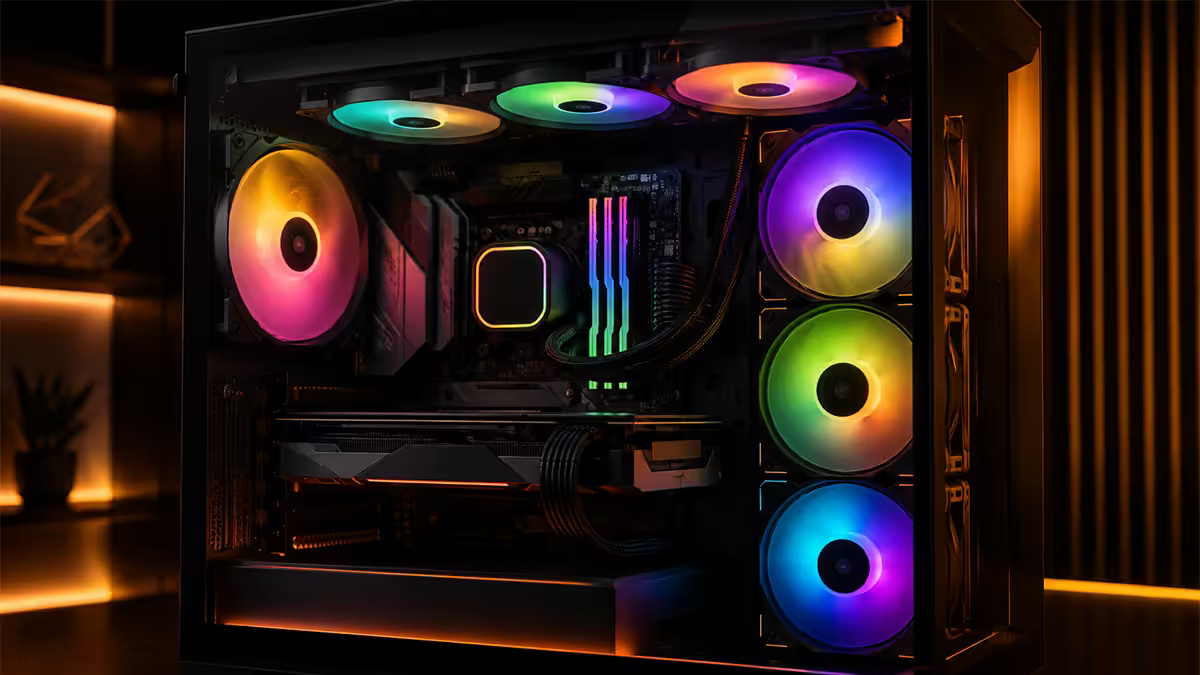
ARGB vs RGB — the real difference
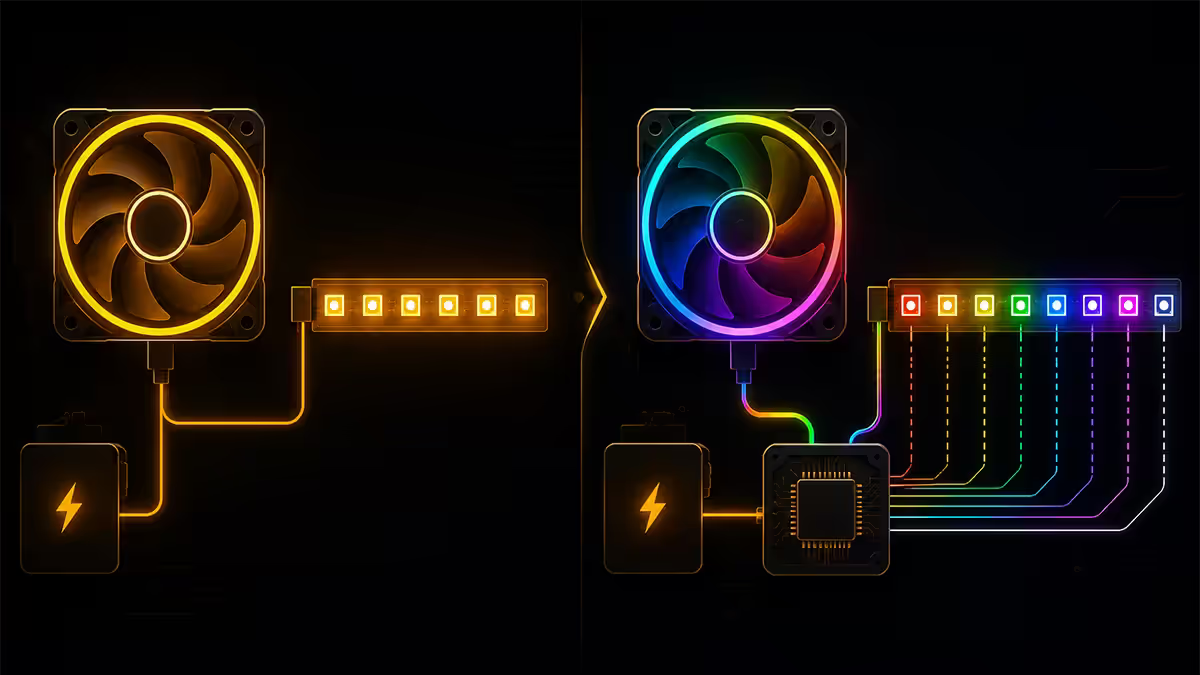
Both are coloured LEDs in PC components. The difference is whether you can address each LED individually or only set the whole string to one colour at a time.
| Standard | Connector | Capability |
|---|---|---|
| RGB (legacy) | 4-pin · 12V · 4 wires | One colour at a time across all LEDs |
| ARGB (modern) | 3-pin · 5V · 3 wires (D-G-V) | Individual LED control · effects · chases |
| RGBW | 5-pin · 12V | RGB + dedicated white channel · niche |
Why ARGB won. Static single-colour RGB looked impressive in 2017. Once builders saw rainbow waves, audio-reactive pulses and per-fan chases possible with addressable LEDs, RGB looked dated overnight. Almost every fan, AIO, strip and case ARGB-enabled product launched since 2020 is ARGB, not RGB.
When RGB still wins. Single-colour lighting is roughly half the cost of ARGB. If you genuinely want one cyan glow for a themed build (no animations, no chases), 4-pin RGB strips and fans cost less.
Motherboard headers — what plugs where
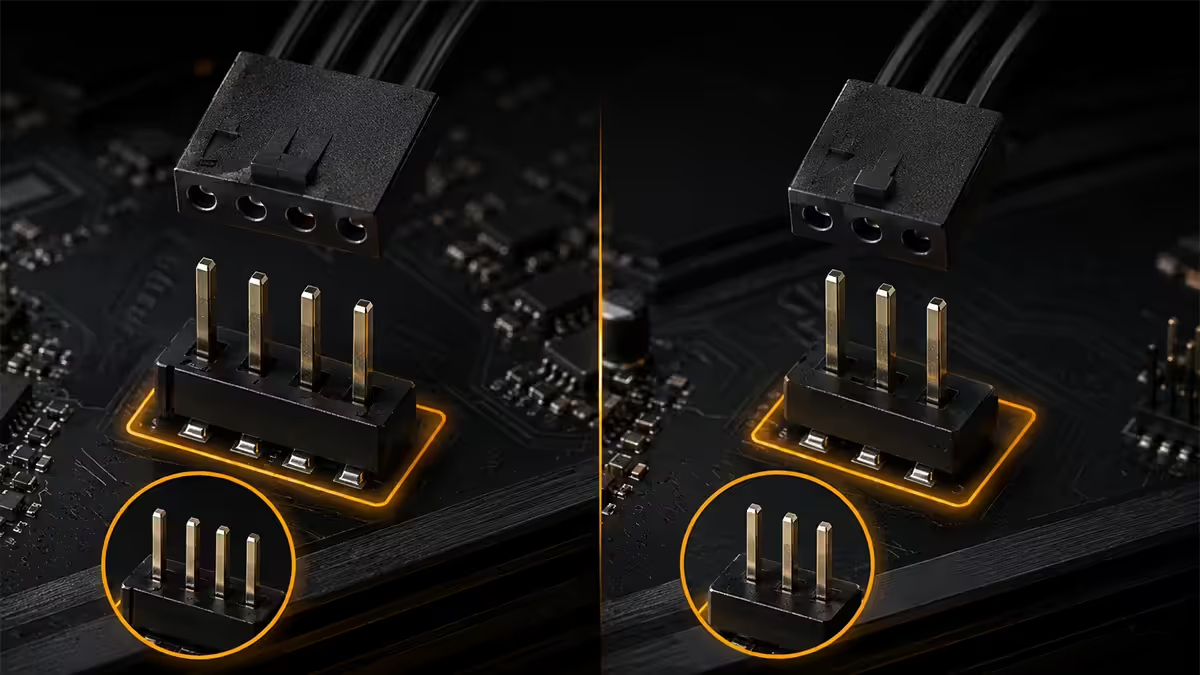
Modern motherboards include both ARGB and RGB headers (sometimes only one — check the spec sheet). They are physically and electrically different:
- JRAINBOW / JARGB / ADD_HEADER: 3-pin 5V ARGB. ASUS calls it "Addressable Gen 2" header, MSI "JRAINBOW", Gigabyte "D_LED1", ASRock "ADDR LED". Plug only ARGB devices here.
- JRGB / RGB_HEADER: 4-pin 12V RGB. Used for legacy strips and single-colour devices. Plug only 4-pin RGB devices here.
- PWM fan header: 4-pin, also fan power and speed control. Completely separate from lighting. Every fan needs a PWM header in addition to its lighting cable (unless you're using a hub that combines both).
The wiring nightmare. A single ARGB fan typically has two cables — one for PWM (fan speed) and one for ARGB (lighting). Six fans means twelve cables snaking across the motherboard, half of which need to chain together to fit the limited headers.
Daisy-chain and controller hubs
Two solutions emerged to tame the cable chaos of multi-fan ARGB builds:
Daisy-chain fans
Fans connect to each other in a chain — fan 1 → fan 2 → fan 3 → controller. One cable per chain, not per fan. Lian Li UNI Fan pioneered this with magnetic edge-mating connectors; Corsair iCue Link uses a similar single-cable system. Cable management goes from a nightmare to a single elegant run per radiator/intake panel.
Controller hubs
For non-daisy-chain fans, a hub aggregates many fan + ARGB cables into a single motherboard ARGB header and one USB header for software control:
- NZXT RGB & Fan Controller (Gen 3): 9 fan + 4 ARGB strip channels. NZXT CAM software.
- Corsair Commander Core / Commander Pro: 6 fan + 6 ARGB channels. iCue software.
- Lian Li L-Connect 3 Controller: 4 fan chains + strip channels. L-Connect 3 software.
- MSI EZ DEBUG Hub / Gigabyte RGB Fusion Hub: motherboard-brand hubs that work with native software.
Most hubs draw power from SATA (not the motherboard fan headers), so amperage isn't a concern. The hub reports each chain back to the software as a single virtual device.
The ecosystem lock-in — and why it matters
Every major brand ships its own RGB software:
- Razer Chroma (mice, keyboards, headsets, some fans). Razer Synapse.
- Corsair iCue (fans, AIO, keyboards, mice, RAM, PSU). Corsair iCue.
- ASUS Aura Sync (motherboard, GPU, ROG components).
- MSI Mystic Light (motherboard, GPU, fans).
- Gigabyte RGB Fusion (motherboard, GPU, some peripherals).
- NZXT CAM (fans, AIO, controllers).
- Lian Li L-Connect 3 (UNI Fans, controllers).
- HyperX NGENUITY / Logitech G HUB (peripherals).
The honest reality. These ecosystems do not natively sync with each other. A Corsair iCue Link AIO will rainbow-wave at a different phase than your ASUS Aura motherboard, even if you set both to "rainbow wave 5 seconds". Cross-brand mismatched sync looks visibly broken — fans cycling at slightly different speeds, colours not matching, effects starting at different times.
What "matched ecosystem looks premium" means. Pick one brand for your full lighting chain — fans, AIO, RAM, strips, peripherals — and the software runs everything in lockstep. Picking up after starting cross-brand becomes increasingly painful as the build grows.
OpenRGB — the DIY route
OpenRGB is free, open-source software that controls RGB/ARGB across most brands from a single interface — bypassing manufacturer software entirely. Originally a community-maintained project, now widely supported across hundreds of devices.
What it does well:
- Controls Corsair iCue, ASUS Aura, MSI Mystic Light, Gigabyte Fusion, Razer Chroma, Lian Li and most third-party fans from one app.
- Lightweight — no bloated manufacturer background services.
- SignalRGB integration for audio-reactive effects and game integration (Discord notifications colour the rig red, Spotify track changes the wave).
- Genuinely allows mixed-brand builds to sync.
What it doesn't do well:
- Setup is more manual than iCue or L-Connect 3 — device detection sometimes requires SDK plugins.
- No fan speed / temperature control (you still need manufacturer software for that, or BIOS fan curves).
- Some peripheral firmware updates break compatibility — wait for community patches.
Who should use OpenRGB: builders who refuse single-brand lock-in, anyone with an existing mixed-brand RGB collection, and the "three RGB apps in my taskbar" crowd looking for one unified control panel.
Best ARGB fans & ecosystems for 2026 SA builds
| Tier | Pick | SA price (per fan) |
|---|---|---|
| Budget ARGB | DeepCool FK120 ARGB · ID-Cooling AS-120 | R200-R300 |
| Mid-tier ARGB | Arctic P12 A-RGB · be quiet! Light Wings PWM ARGB | R350-R500 |
| Premium ARGB | NZXT F120 RGB Duo · Phanteks T30 ARGB | R500-R750 |
| Daisy-chain flagship | Lian Li UNI Fan SL120 V2 · Lian Li UNI Fan TL120 LCD | R650-R1,000 |
| Ecosystem flagship | Corsair iCue Link QX120 RGB · iCue Link LX120 | R750-R950 |
| Performance + lighting | Noctua NF-A12x25 (no RGB) + ARGB ring add-on | R450 + R100 |
3-fan packs ship with the controller hub included — typically R1,800-R3,500 for three premium daisy-chain fans plus the hub and cables. Always buy the starter pack first; expansion fans (no hub) are R600-R800 each from there.
Common ARGB / RGB mistakes
Plugging ARGB into a 12V RGB header. The single most expensive lighting mistake. Burns the LEDs immediately. Always check the header label.
Buying RGB when you wanted ARGB. Single-colour 4-pin RGB fans still ship — usually labelled "RGB" not "ARGB" on the box. If you want rainbow chases or audio sync, you need ARGB (also marketed as "Addressable RGB", "A-RGB", "iCue Link", "UNI Fan").
Overloading the motherboard ARGB header. Each ARGB header is rated for roughly 3 amps. Three high-density ARGB fans is the safe ceiling per header. Beyond that, use a SATA-powered controller hub.
Mixing ecosystems and expecting sync. Corsair iCue won't sync with ASUS Aura natively. NZXT CAM and Lian Li L-Connect 3 don't sync with each other. If you want unified lighting, pick one brand or use OpenRGB.
Forgetting that RGB consumes power and motherboard fan headers consume amperage budget. A high-end build with 9 fans, 3 strips, and AIO lighting can exceed budget motherboard ARGB amperage. SATA-powered hubs solve this; budget motherboards can't.
Key takeaways
- ARGB = 3-pin 5V, individual LED control, rainbow chases. RGB = 4-pin 12V, single colour across all LEDs.
- Never plug ARGB into an RGB header — 12V burns the 5V LEDs. Always check the header label.
- For 6+ fans, use a SATA-powered controller hub (NZXT, Corsair, Lian Li). Saves motherboard amperage and cables.
- Pick one ecosystem for matched sync. Corsair iCue, Lian Li L-Connect 3 and NZXT CAM are the safest SA bets.
- For mixed-brand builds, run OpenRGB — free, open-source, unifies most ecosystems in one panel.
Frequently asked questions
What is the difference between ARGB and RGB?
RGB is 4-pin 12V lighting where every LED on the strip or fan shows the same colour at the same time. ARGB (addressable RGB) is 3-pin 5V where each individual LED can show a different colour, enabling rainbow effects, chasing patterns and complex animations. ARGB is the modern standard; almost every new case fan, AIO and strip ships ARGB. RGB still exists on budget components and older builds.Can I plug ARGB into an RGB header or vice versa?
No — you'll damage the LEDs. ARGB uses 3-pin 5V; RGB uses 4-pin 12V. Plugging an ARGB device into a 12V RGB header doubles the voltage and burns out the LEDs. Plugging RGB into a 5V ARGB header just doesn't light up. The connectors are physically different (3-pin spaced wider with one position skipped vs flat 4-pin) but it's possible to force-fit. Always check the motherboard header label: JRAINBOW/JARGB = ARGB, JRGB = RGB.How many ARGB fans can a motherboard run?
Most motherboards have 2-3 ARGB headers, each rated for roughly 3 amps total. Three high-density ARGB fans per header is a safe ceiling. For builds with 6-9 fans plus strips, use a dedicated ARGB controller hub (NZXT RGB & Fan Controller, Corsair Commander Core, Lian Li L-Connect 3) that powers fans from SATA and connects to the motherboard via a single ARGB cable plus USB.What is ecosystem lock-in with RGB?
Each manufacturer's software (Razer Chroma, ASUS Aura, MSI Mystic Light, Corsair iCue, NZXT CAM, Lian Li L-Connect) controls only its own ecosystem. A Corsair iCue fan can't sync to ASUS Aura motherboard lighting natively. Mixing brands creates fragmented control. The 'matched ecosystem looks premium' philosophy means picking one brand (commonly Corsair, Lian Li or NZXT) and sticking with it for fans, AIO, keyboard, mouse and headset.What is OpenRGB and is it worth using?
OpenRGB is free open-source software that controls RGB/ARGB across most brands from one interface — bypassing manufacturer software like Aura, iCue, Mystic Light. It's brilliant for mixed-brand builds, lightweight (no bloated background processes), and supports SignalRGB-style audio reactive effects. Setup is more manual than iCue, but worth it if you want one unified control panel and to avoid the 'three RGB programs in your taskbar' problem.Do ARGB fans cost more than non-RGB?
Yes — typically R150-R300 more per fan. A non-RGB Arctic P12 PWM costs R250; the ARGB version is R450-R500. A premium ARGB fan like Lian Li UNI Fan SL120 V2 runs R600-R750 per fan, vs R350-R450 for a comparable non-RGB Noctua NF-A12x25. Add a controller hub (R600-R1,200) if you're running 6+ fans. The lighting premium on a full 6-fan setup adds roughly R1,200-R2,500 over a non-RGB build.What's the best ARGB fan ecosystem for South African builders?
Three strong choices in SA stock: Lian Li UNI Fan (daisy-chain design, premium feel, L-Connect 3 software), Corsair iCue Link (premium magnetic connection, iCue ecosystem unified with AIO and keyboards), NZXT F Series RGB Duo (twin LED rings, NZXT CAM software, value-tier). All three are widely available at Evetech, Wootware and Rebel Tech. Avoid Razer fans — premium price for marginal lighting differentiation.What is daisy-chain in fan lighting?
Daisy-chain is a design where fans connect directly to each other in a chain — fan 1 plugs into the controller, fan 2 plugs into fan 1, fan 3 plugs into fan 2, and so on. The end of the chain plugs into one ARGB and one PWM motherboard or controller cable. Lian Li UNI Fan pioneered this with magnetic edge connectors; Corsair iCue Link uses a similar single-cable design. Massive cable management win over the legacy two-cable-per-fan approach.
Get the Evetech app
Exclusive app-only prices, daily flash sales, and free delivery on orders over R4,000 — download the app and start saving.