2 Years Local Warranty
Model No : TP-LINK Archer C20
Price Inc. Vat
R 499
Save R 200
ListR 699
499Change Quantity:
In Stock with Evetech
Price Inc. Vat
R 499
Save R 200
ListR 699
499Change Quantity:
In Stock with Evetech
Trusted Partners
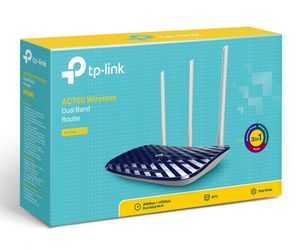
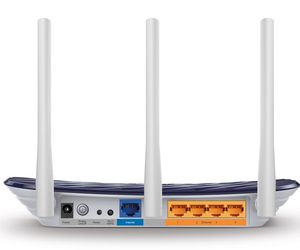
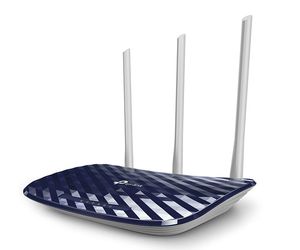
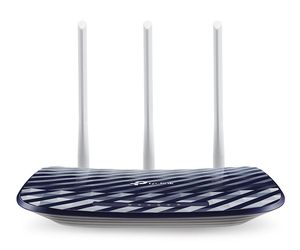
Please Note: Product images are for illustrative purposes only and may differ from the actual product.
Hand-pick every part with live stock, compatibility, and instant pricing.
Try the new builderTP-Link Archer C20 AC750 Dual-Band Wi-Fi 5 Router
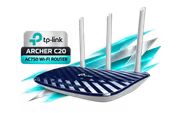
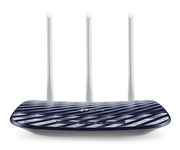
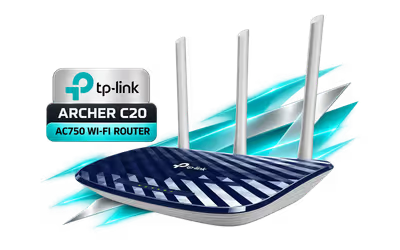
The TP-Link Archer C20 is an AC750 dual-band Wi-Fi 5 router. It offers up to 433Mbps on the 5GHz band and 300Mbps on 2.4GHz, with three fixed external antennas. Those are maximum signal rates, so real speeds depend on your devices, your line and the layout of your home.
The TP-Link Archer C20 is an AC750 dual-band Wi-Fi 5 router. It offers up to 433Mbps on the 5GHz band and 300Mbps on 2.4GHz, with three fixed external antennas. Those are maximum signal rates, so real speeds depend on your devices, your line and the layout of your home.
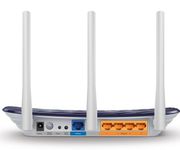
The Archer C20 has one WAN port and four LAN ports, all 10/100Mbps Fast Ethernet. Wired connections, including the internet line on the WAN port, top out at 100Mbps. It is a router, not a modem, so it needs a fibre ONT or modem that hands over the connection by Ethernet.
The Archer C20 has one WAN port and four LAN ports, all 10/100Mbps Fast Ethernet. Wired connections, including the internet line on the WAN port, top out at 100Mbps. It is a router, not a modem, so it needs a fibre ONT or modem that hands over the connection by Ethernet.
TP-Link lists three working modes. Run it as a router, as an access point that adds Wi-Fi to an existing wired network, or as a range extender for an existing Wi-Fi network. IPTV services are supported through IGMP proxy, IGMP snooping and bridge or tag VLAN settings.
TP-Link lists three working modes. Run it as a router, as an access point that adds Wi-Fi to an existing wired network, or as a range extender for an existing Wi-Fi network. IPTV services are supported through IGMP proxy, IGMP snooping and bridge or tag VLAN settings.
Set up one 2.4GHz and one 5GHz guest network so visitors stay off your main devices. Parental controls add URL filtering and time controls. TP-Link also lists QoS by device, an SPI firewall, access control and IP and MAC binding.
Set up one 2.4GHz and one 5GHz guest network so visitors stay off your main devices. Parental controls add URL filtering and time controls. TP-Link also lists QoS by device, an SPI firewall, access control and IP and MAC binding.
Set up and manage the Archer C20 from the TP-Link Tether app on Android or iOS, or from the web interface in a browser. It supports IPv4 and IPv6. Check the hardware version on the box label, because TP-Link has sold several versions of this router.
Set up and manage the Archer C20 from the TP-Link Tether app on Android or iOS, or from the web interface in a browser. It supports IPv4 and IPv6. Check the hardware version on the box label, because TP-Link has sold several versions of this router.
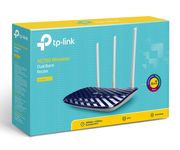
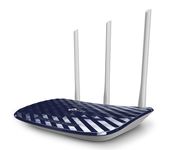
TP-Link lists the Archer C20 at 230 x 144 x 35 mm. The box holds the router, a power adapter, an RJ45 Ethernet cable and a quick installation guide. It is white with a dark blue top panel and a 9V 0.6A power input.
TP-Link lists the Archer C20 at 230 x 144 x 35 mm. The box holds the router, a power adapter, an RJ45 Ethernet cable and a quick installation guide. It is white with a dark blue top panel and a 9V 0.6A power input.
Everything you need to know about this product
Up to 433Mbps on 5GHz and 300Mbps on 2.4GHz, 733Mbps combined, which is why it is sold as AC750. Those are maximum wireless signal rates; real speeds depend on your devices, your internet line and the walls in the way.
No. All five Ethernet ports, one WAN and four LAN, are 10/100Mbps Fast Ethernet. Wired speeds, including the internet line through the WAN port, are capped at 100Mbps.
Yes. TP-Link lists three working modes: router, access point and range extender.
TP-Link's South Africa page for this version does not list mesh. The global page lists EasyMesh and OneMesh only for the newer V6.20 hardware, so check the version label on the box before counting on it.
No. It is a router with an Ethernet WAN port. It needs a fibre ONT, a cable or DSL modem, or another device that hands over the internet connection by Ethernet.
With the TP-Link Tether app on Android or iOS, or through the router's web interface in a browser.
WEP, WPA, WPA2 and WPA/WPA2-Enterprise (802.1x) on the version TP-Link lists for South Africa. WPA3 appears only on newer hardware versions.
TP-Link lists it at 230 x 144 x 35 mm. The box holds the router, a power adapter, an RJ45 Ethernet cable and a quick installation guide.


AI-Generated Content: These FAQs are generated by an automated AI system and may contain inaccuracies or omissions. Evetech makes no warranties, express or implied, regarding their completeness or reliability. For definitive information, please refer to the manufacturer's official specifications.
Hand-pick every part with live stock, compatibility, and instant pricing.
Try the new builder