GPU Sag Hardware Explainer
What is GPU sag. — Two kilograms hanging on two screws.
Modern flagship GPUs weigh more than a brick. The PCIe slot they hang from was never designed for it. Here's what sag is, what damage it does, and the R300 fix that prevents all of it.
- RTX 5080 weight
- 2 kg
- PCIe slot rated max
- 1.6 kg
- aftermarket bracket
- R200-R400
What GPU sag actually is
A graphics card is fixed to your PC at only two points: the PCIe slot connector (gold fingers on the PCB pressed into the slot) and the I/O bracket screws at the case rear. Everything past those points — the rest of the cooler, the heatsink, the second and third fans — hangs unsupported.
The "free end" of the card is the side opposite the PCIe slot, the end where the display outputs are. On a horizontal motherboard installation, that free end is being pulled downward by gravity around the slot-side hinge. Over time, the PCB flexes, the cooler tilts, and the gap between the rear of the GPU and the rear of the case opens up.
That is GPU sag. It is not a manufacturing defect — it is the predictable physical consequence of mounting a 2-kilogram heatsink horizontally with a single connector and two M3 screws holding it.
Why modern flagship GPUs sag — the weight problem
PCIe was specified in an era when graphics cards weighed 400-700g. The slot connector and motherboard PCB tracks were designed around that mass with comfortable safety margin. Then GPUs got bigger.
| GPU class | Weight range | Sag risk |
|---|---|---|
| Entry tier (RTX 5060, RX 9060) | 0.6-0.9 kg | Negligible — no support needed |
| Mid-tier (RTX 5070, RX 9070) | 1.0-1.5 kg | Low — borderline, watch over time |
| Upper mid (RTX 5070 Ti, RX 9070 XT) | 1.4-1.8 kg | Moderate — fit support |
| Flagship (RTX 5080, RX 7900 XTX) | 1.8-2.2 kg | High — support essential |
| Halo (RTX 4090, RTX 5090) | 2.2-2.5 kg+ | Critical — never run without support |
Industry-wide rule of thumb: the PCIe slot connector plus two bracket screws are safe up to roughly 1.6kg of card weight. Beyond that, the static load is at or past the connector's design margin, and any vibration (chassis movement, shipping, knocks) pushes it harder.
The damage progression — what sag actually does over time
Sag damage is not instantaneous. It is a slow degradation that progresses over months and years. The earlier stages are reversible by fitting support; the later stages are not.
Stage 1 — Cosmetic droop (immediate to a few weeks)
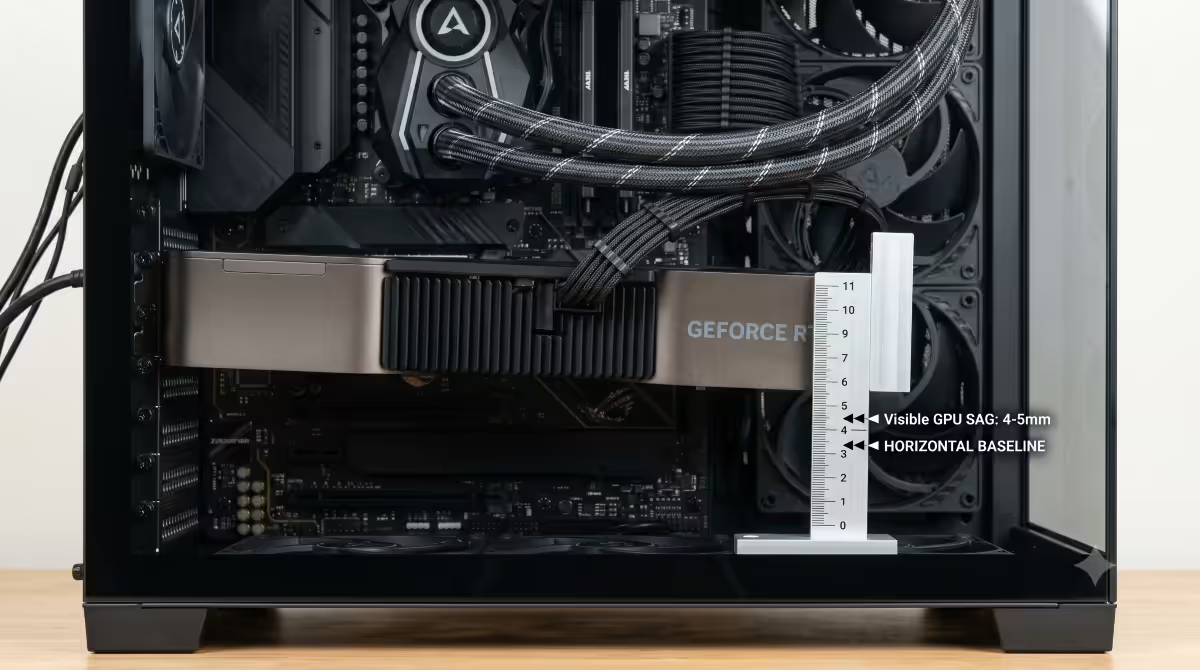
The card visibly tilts downward at the free end. A horizontal line drawn along the PCIe slot would show the rear of the card sitting 2-5mm lower than the slot end. This stage is purely cosmetic and fully reversible by fitting support.
Stage 2 — PCB flex and micro-cracks (months to 1-2 years)
The PCB is now under sustained bending load. Modern PCBs are stiff but not rigid, and over time the flex causes micro-cracks in the solder joints near the PCIe fingers — particularly around the power-delivery components and the GPU die mounting area. These don't cause immediate failure but they become a long-term reliability problem.
Stage 3 — PCIe slot connector degradation (2-5 years)
The downward force on the card pulls the PCIe fingers against the underside of the slot connector contacts. Over thousands of thermal cycles, the contact pressure becomes uneven — some pins make solid contact, others intermittently disconnect. Symptoms: random GPU drop-outs, PCI bus errors in Event Viewer, the GPU showing as PCIe 3.0 instead of PCIe 4.0/5.0, or simply not being detected on boot.
Stage 4 — Catastrophic failure (rare, 5+ years)
At the extreme end: the GPU itself fails from cumulative PCB damage, or the motherboard PCIe slot connector becomes damaged to the point that the slot is unusable. The motherboard often still works (other slots fine), but the primary PCIe x16 is gone and the board needs replacement. This is rare but documented in long-term high-end builds.
How to spot GPU sag in your build
Three quick checks. All can be done in under a minute with the case side panel open and the PC powered off.
Check 1 — Side view alignment. Open the side panel and look at the GPU from directly to the side, at the same height as the card. Mentally draw a horizontal line along the PCIe slot. The rear (free) end of the GPU should sit on or above that line. If it sits visibly below, you have sag.
Check 2 — Rear gap. Look at where the GPU's I/O bracket meets the case rear, then look at the rear of the GPU (the end opposite the bracket). If there's a visible gap between the rear of the GPU's cooler and the rear vertical line of the case (where the side panel meets), the card is tilted forward — sag.
Check 3 — Gentle press test. With a single finger, gently press upward on the free end of the GPU. If the card moves up noticeably (3-5mm or more) before resistance, the PCB is already under tension. A fully supported card moves only 1mm or less.
Prevention methods — four ways to stop sag
Method 1 — Included anti-sag bracket from the GPU manufacturer
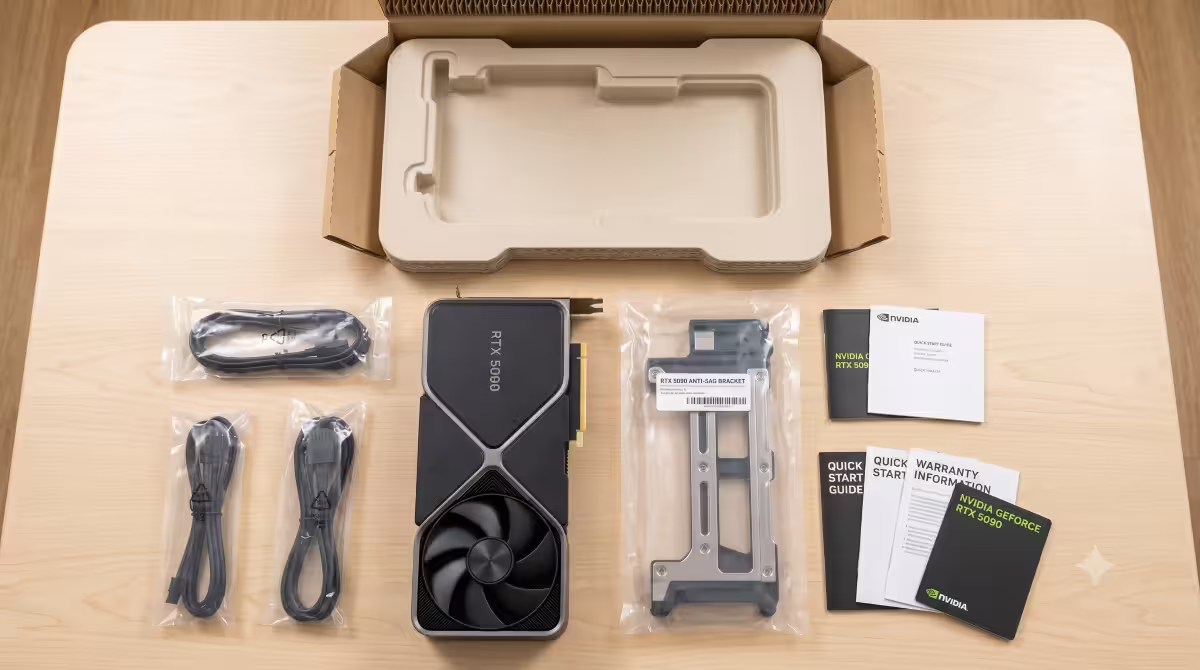
RTX 50-series and RX 9000-series flagship cards from ASUS ROG, MSI Suprim, Gigabyte Aorus and Sapphire Nitro+ include an anti-sag bracket in the box. It's usually a small L-shaped metal arm that screws to the case backplate or mounts to a motherboard standoff and presses up under the free end of the GPU.
Cost: free (already in the box). Effort: 5 minutes. Check the box contents list before assuming you need to buy something — manufacturers don't advertise these brackets prominently.
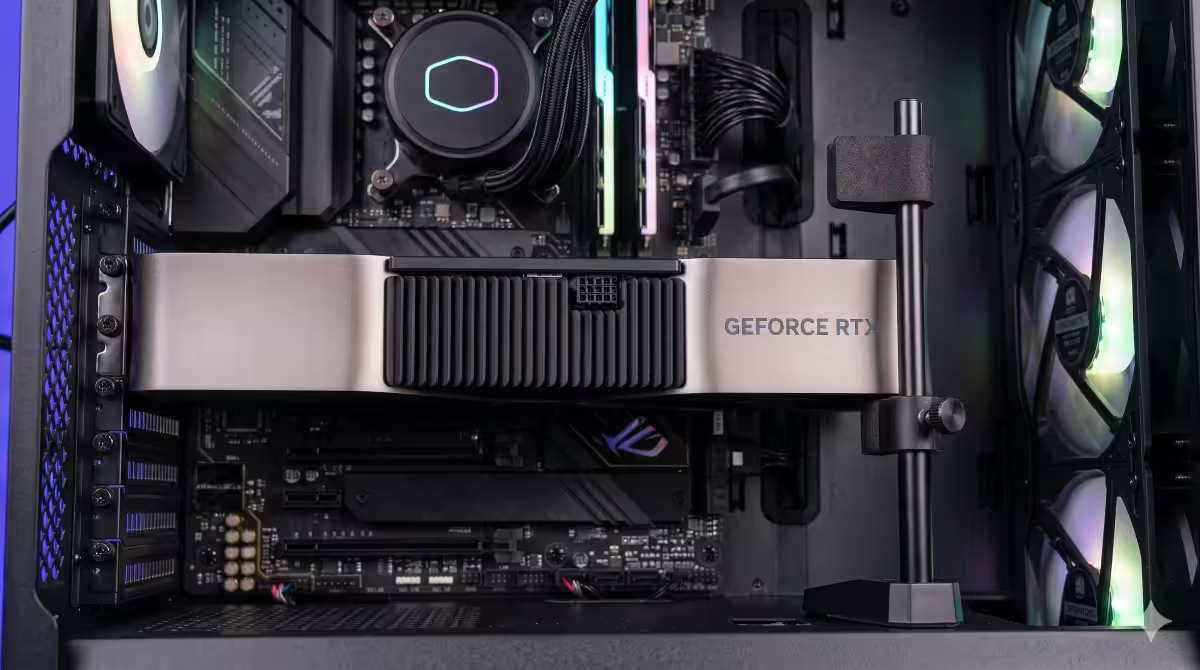
Method 2 — Aftermarket adjustable support stand
If your GPU didn't include a bracket, the aftermarket option is a free-standing adjustable post that sits on the PSU shroud or case floor and supports the free end of the GPU at adjustable height. Available in SA from Cooler Master, Lian Li, Phanteks and a range of imported generic brands.
Cost: R200-R400. Effort: 10 minutes including adjustment. Pros: works with any GPU and any case, fully adjustable. Cons: visible in windowed cases (cosmetic preference matters).
Method 3 — Vertical GPU mount
Mount the GPU vertically instead of horizontally so the slot connector takes load along its length, not across it. Vertical mounting eliminates sag entirely. Trade-off: airflow.
Detailed in the next section.
Method 4 — Horizontal showcase mount with anti-sag built in
High-end showcase cases (Lian Li O11 Dynamic EVO, Hyte Y60, Hyte Y70 Touch) include a horizontal display rail behind the GPU that supports the free end and shows the card off through the side glass. Cost is baked into the case price (R3,500-R6,500), but the build aesthetic is the selling point.
Vertical GPU mount — solves sag, may cost you airflow
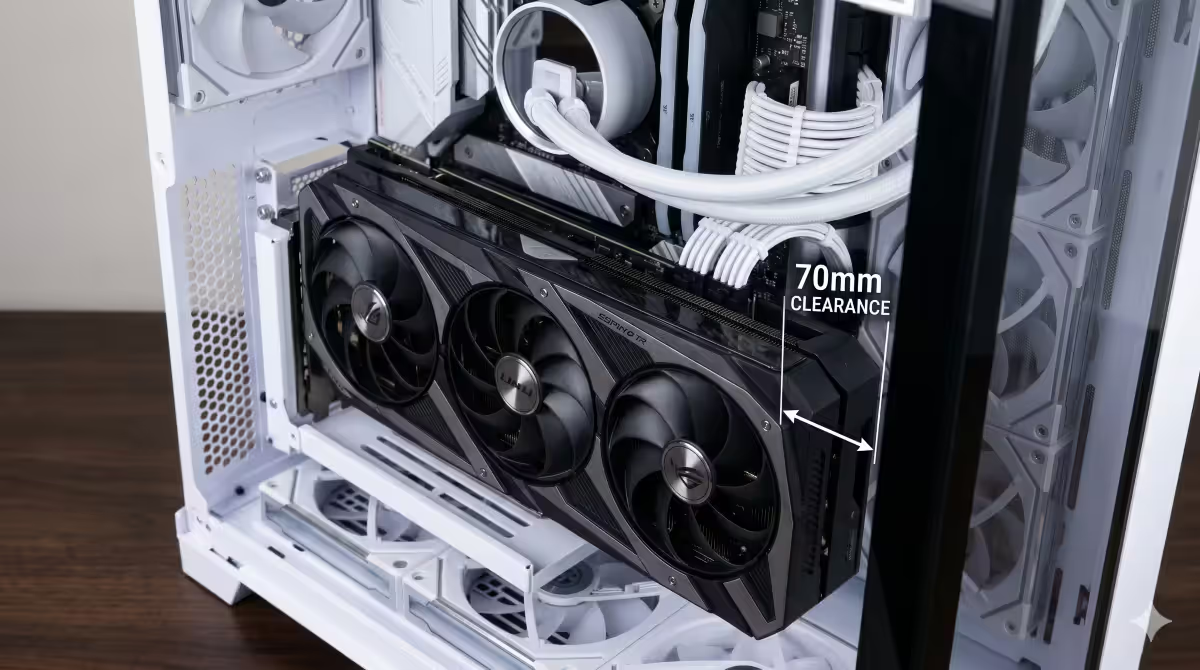
Vertical mounting rotates the GPU 90° so it's parallel to the side panel of the case rather than perpendicular. A PCIe riser cable connects the slot on the motherboard to the GPU. With the card now hanging from a side-panel-mounted bracket, the slot connector load is along the length of the contacts rather than across them — sag is solved.
The airflow problem: many older or budget cases place the vertical mount close to the side panel, leaving only 20-40mm clearance between the GPU intake fans and the glass. Modern GPUs are open-air designs that pull air through the cooler from below — blocking that intake adds 4-8°C to GPU temps under sustained load.
Cases that solve this: Lian Li O11 Dynamic EVO (offers 70mm+ clearance with riser kit), Hyte Y60 / Y70 (purpose-built for vertical GPU), Phanteks NV5 / NV7 (vertical mount with proper clearance). If your case is one of these, vertical is a great pick. If your case is a generic mid-tower with a single tight vertical mount slot, the temperature cost may outweigh the cosmetic benefit.
SA brand picks for anti-sag support
| Use case | Pick | SA price |
|---|---|---|
| Already in the box (check first) | ASUS ROG / MSI Suprim / Gigabyte Aorus / Sapphire Nitro+ bracket | Included |
| Best aftermarket value | Cooler Master GPU Support Bracket | R200-R280 |
| Premium aftermarket | Lian Li O11 Dynamic GPU Anti-Sag Bracket | R350-R450 |
| RGB / showpiece | Phanteks GPU Holder with ARGB | R400-R600 |
| Budget / Aliexpress import | Generic adjustable jackstand | R80-R180 |
| Vertical mount kit (cases without one) | Cooler Master Vertical GPU Holder | R600-R900 |
| Premium vertical riser | Lian Li PCIe 5.0 Riser Cable | R900-R1,400 |
Common GPU sag mistakes
Leaving the included bracket in the box. The most common mistake. Customers receive a flagship GPU with a bracket included, but the bracket is in a separate accessory bag and gets missed during assembly. Always inventory the box contents before mounting the card.
Assuming sag is purely cosmetic. The first stage is cosmetic, but the damage compounds over years. A small visible sag today is a PCIe slot replacement four years from now if ignored.
Mounting vertically in a case not designed for it. The classic mistake. A generic mid-tower with a vertical bracket slot but only 25mm of clearance turns into a thermal disaster. Verify clearance before committing.
Using something soft as a support. A folded piece of foam or a wrapped power cable will compress over weeks and stop supporting the card. Only rigid supports work — metal, hard plastic, or actual Lego bricks (yes, really).
Tightening the I/O bracket screws too hard to "fix" sag. The bracket screws hold the I/O end in place; they don't lift the free end. Over-tightening them just stresses the case frame and damages the thread.
Key takeaways
- Modern flagship GPUs weigh 1.8-2.5kg — over the ~1.6kg practical limit of a PCIe slot connector plus bracket screws.
- Sag damage progresses from cosmetic droop (immediate) to PCB micro-cracks (months) to PCIe slot wear (years) to complete failure (rare, 5+ years).
- RTX 4080+, RTX 5070+, RX 9070+ and any 3-slot 30cm+ card needs support. Cards under 1kg generally don't.
- Check the GPU box first — most RTX 50 and RX 9000 flagships include a free bracket. Aftermarket stands are R200-R400 in SA.
- Vertical mounting solves sag entirely but only works if your case provides 60mm+ clearance from the side glass.
Frequently asked questions
What is GPU sag and is it actually a problem?
GPU sag is the downward droop of the card's free end under its own weight. Cosmetic at first, but over 2-5 years it can cause PCB micro-cracks, PCIe slot wear, and in extreme cases motherboard slot damage. Flagship-class cards (1.8kg+) should always be supported.Which GPUs need anti-sag support?
Anything 1.5kg or heavier. In practice: RTX 4080, RTX 4090, RTX 5070 and up, RX 7900 XT/XTX, RX 9070 and up, and any 3-slot or 30cm+ card. Sub-1kg cards (RTX 5060, RX 9060) generally don't need it.Does my GPU come with an anti-sag bracket?
Most RTX 50 and RX 9000 flagships from ASUS ROG, MSI Suprim, Gigabyte Aorus and Sapphire Nitro+ now include one. Lower-tier SKUs (Ventus, Eagle, Pulse) often don't. Check the box contents list before buying aftermarket.What damage does GPU sag actually cause?
Cosmetic droop immediately, PCB micro-cracks over months to years, PCIe slot connector wear after 2-5 years, and at the extreme end complete GPU or motherboard slot failure. Early stages are reversible with support; later stages aren't.Is vertical GPU mounting a good fix for sag?
Yes — it eliminates sag entirely. The trade-off is airflow: some vertical mounts position the GPU 20-30mm from the side panel, choking the intake and adding 4-8°C. Only do it in cases purpose-built for vertical (Lian Li O11, Hyte Y60/Y70, Phanteks NV5/NV7).How do I know if my GPU is already sagging?
Open the side panel and look from the side — the free end should be level with the slot end. Check for a gap between GPU rear and case rear. Gently press the free end upward — if it springs up 3-5mm before resistance, the PCB is already flexed.Does GPU sag void my warranty?
Sag itself doesn't void warranty — it's expected physical behaviour. But damage caused by sag (cracked PCB, damaged PCIe fingers) is classified as physical damage and isn't covered. The R300 bracket is cheap insurance for a R20,000+ GPU.Can I use a Lego brick or random object to support my GPU?
Functionally yes — any rigid, non-conductive object of the right height works. The famous Lego meme is genuinely fine. Downsides: looks unprofessional in a windowed case, can shift if the case is moved, and lacks adjustability. A proper bracket is cleaner.
Get the Evetech app
Exclusive app-only prices, daily flash sales, and free delivery on orders over R4,000 — download the app and start saving.