Hot-Swap Explainer
The keyboard that grows up with you. — Hot-swap explained. No solder. No regret.
A hot-swap keyboard turns a one-shot purchase into a platform. The chassis stays. The switches change. You can lube, swap, mod and tinker — without a soldering iron or a single regret.
- per switch swap
- 5 sec
- accepts everything
- 5-pin
- quality hot-swap entry
- R3000+
What is a hot-swappable keyboard
On a traditional mechanical keyboard, each switch is permanently soldered to the PCB. To change a switch — for repair, upgrade or experimentation — you need a soldering iron, desoldering wick or pump, and an hour per switch.
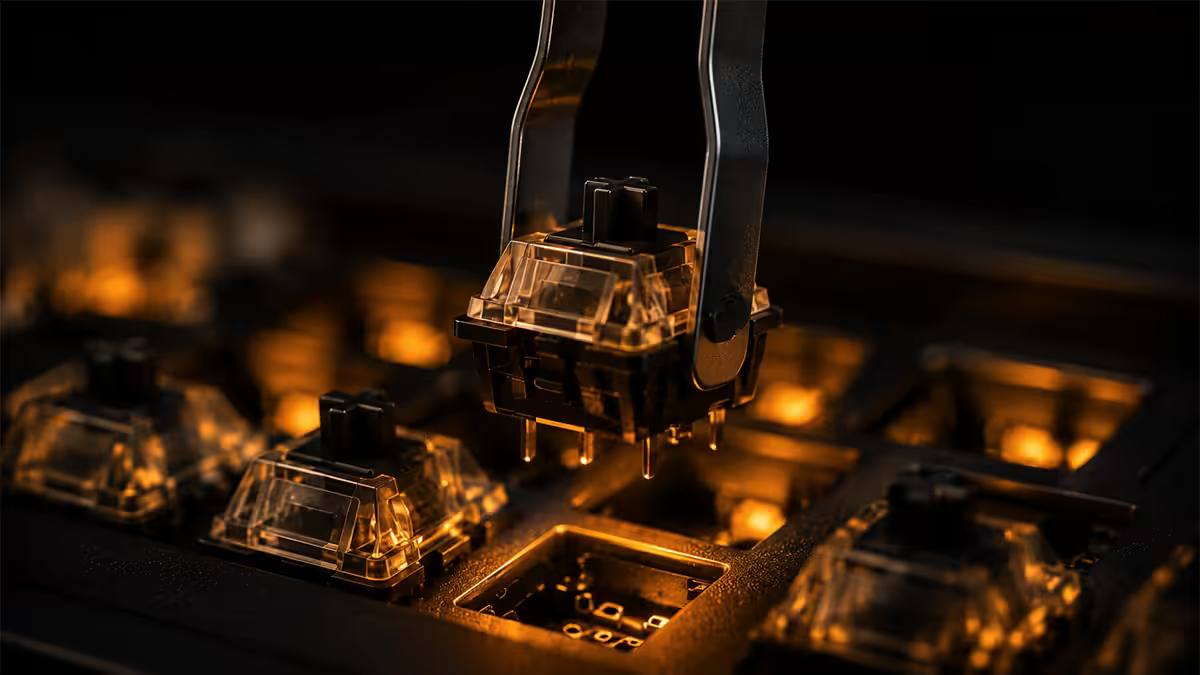
A hot-swappable keyboard replaces the solder joints with mechanical sockets. The PCB has small spring-loaded contacts that grip the switch pins on insertion. You can pull any switch out with a switch puller and push a different one in. Five seconds. No tools beyond the puller. No risk.
What this unlocks:
- Try multiple switch types on the same board without buying a new keyboard.
- Mix switch types per key — linear on WASD, tactile on the rest, for example.
- Replace a single broken switch in 5 seconds instead of replacing the whole board.
- Lube switches without desoldering — pull, lube, push back.
- Migrate switches between boards if you upgrade chassis.
The trade-offs: hot-swap boards cost R200–R500 more than equivalent soldered builds, and very early hot-swap boards had slightly less rigid socket grip. By 2026, modern Kailh and Gateron 5-pin sockets feel as solid as soldered installations.
3-pin vs 5-pin — the only compatibility you need to know
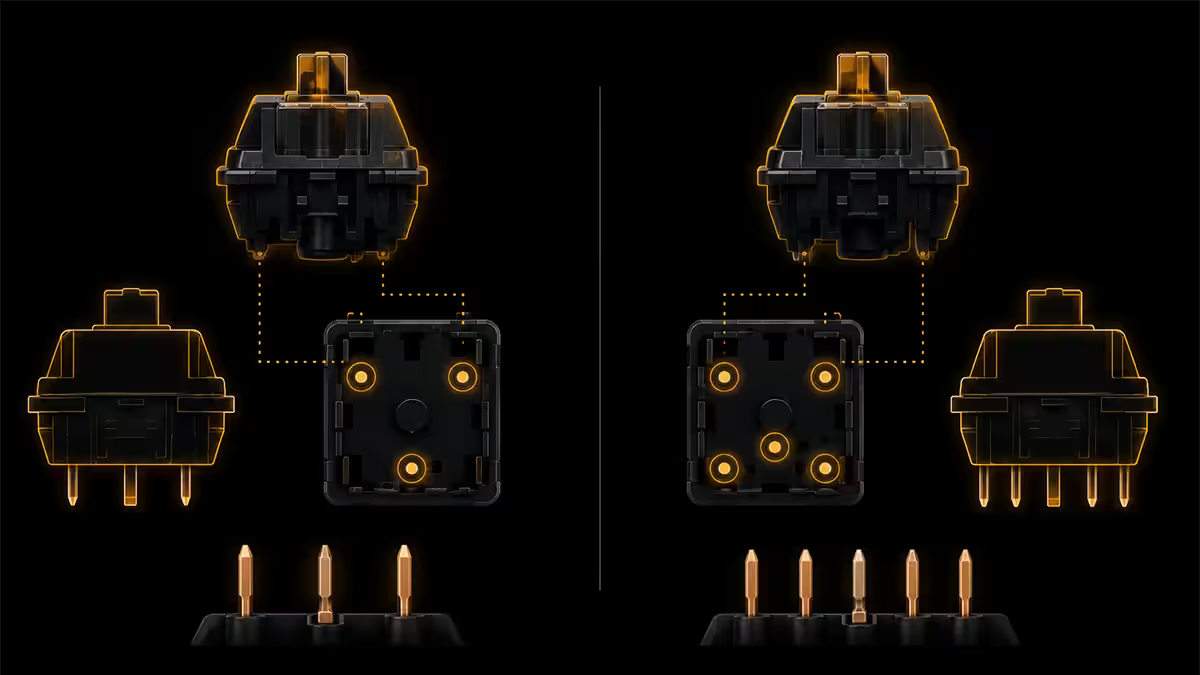
Switches come in two pin counts and both work with most modern boards. Here's the quick version.
5-pin switches have two extra plastic alignment pins beneath the housing. These pins exist for stability when soldering — they hold the switch perfectly upright while you flip the PCB to solder. The two electrical contact pins still do the work.
3-pin switches drop those plastic alignment pins, leaving only the central column plus two electrical pins. They're slightly more wobbly during installation but identical in operation.
| Socket type | Accepts 3-pin? | Accepts 5-pin? | Most boards |
|---|---|---|---|
| 5-pin hot-swap | Yes | Yes | Keychron Q/V-series, Glorious GMMK Pro, NuPhy, modern Akko |
| 3-pin hot-swap | Yes | Only after clipping plastic pins | Older budget kits, some low-profile boards |
The rule: when shopping, look for "5-pin hot-swap" in the spec sheet. It accepts everything. If a board is only 3-pin compatible, you'll need to snip the extra pins off your 5-pin switches with side cutters — a 5-second job, but easy to over-cut and damage the housing.
Almost every reputable 2025–2026 hot-swap board uses 5-pin Kailh or Gateron sockets. The few 3-pin holdouts are budget Glorious GMMK 1-series and some early NuPhy Air models — check the spec sheet before buying.
The best hot-swap keyboards in 2026
Hot-swap availability has exploded. These are the boards most worth your money in SA right now, by tier.
Budget tier (R2000–R3500)
- Akko MOD007B — gasket-mount, hot-swap, thocky sound. Genuinely premium-feel at sub-R3500.
- Royal Kludge RK84 / RK87 — entry hot-swap, wireless, hot-shoe of the budget world.
- Keychron V-series (V1, V3, V6) — plastic case version of the Q-series; full QMK/VIA support.
- Epomaker TH80 / TH96 — hot-swap with PBT keycaps included.
Mainstream tier (R3500–R6500)
- Keychron Q-series (Q1, Q2, Q3, Q5, Q6, Q11) — the dominant aluminium hot-swap line. Gasket mount, QMK/VIA, screw-in stabilisers. The default recommendation.
- NuPhy Halo65 / Halo75 / Field75 — premium typing feel, RGB done right, wireless options.
- Keychron K Pro series — wireless aluminium hot-swap at slightly lower cost than Q-series.
- Akko 5075B Plus — Akko's mainstream gasket-mount with all the modern features.
Premium / enthusiast tier (R6500+)
- Glorious GMMK Pro — CNC aluminium, gasket mount, modular build. Designed for tinkerers.
- Drop CTRL / CSTM65 / CSTM80 — North American enthusiast favourite, import via PriceCheck.
- Mode Sonnet / Envoy — boutique CNC, end-game build quality, import only.
- Keychron Q1 HE / Q5 Max — hall-effect or wireless premium variants.
How to swap a switch — the 30-second guide
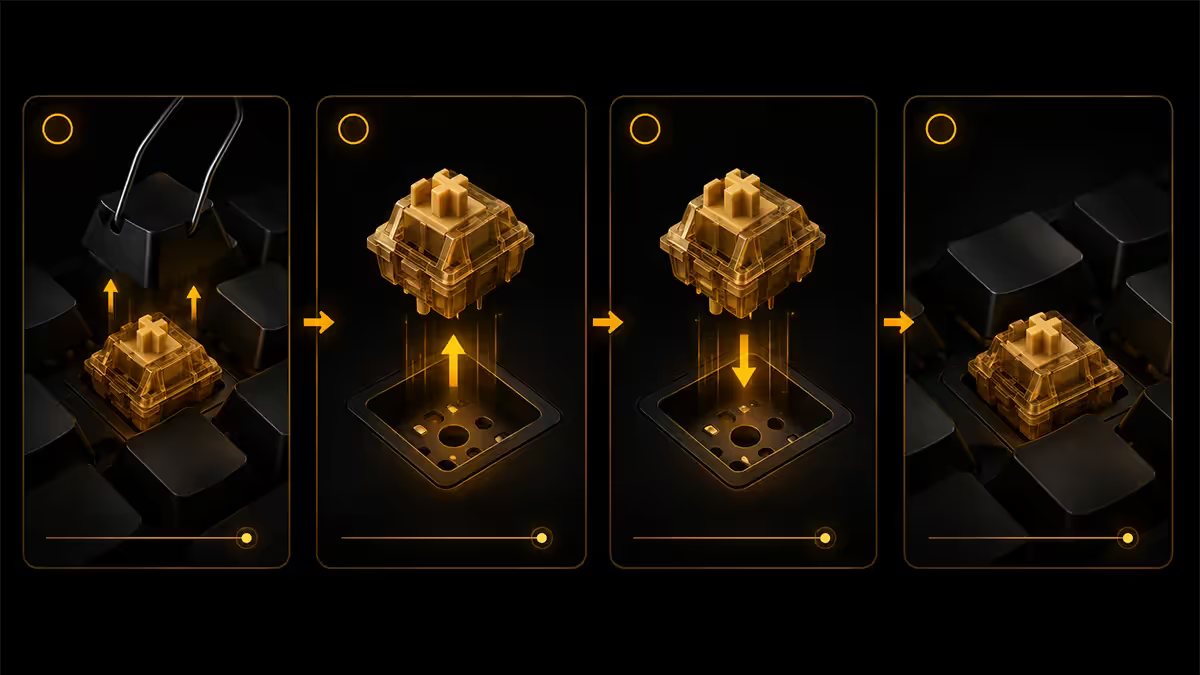
You need: a switch puller (the wire-and-plastic tool that came with your board) and a keycap puller (the looped wire tool also usually included).
Procedure:
- Use the keycap puller to remove the keycap. Pull straight up — never sideways.
- The switch is now exposed. Use the switch puller to grip the switch housing tabs at the top and bottom (NOT the keycap side, NOT the pins).
- Pull straight up firmly. The switch pops out of the socket.
- Align the new switch — make sure the pins are straight (a bent pin won't insert and is hard to spot).
- Push the switch straight down into the socket. You should feel it click into place.
- Replace the keycap. Test the key.
Total time: under a minute per switch once you've done your first. For a full 75-key board, expect 30–45 minutes including keycap removal/replacement.
Lube, film and mod — what hot-swap unlocks
Hot-swap turns a keyboard into a hobby. The same chassis can be modded over and over without ever picking up a soldering iron.
Switch lubing. Hand-lubing transforms a budget switch's smoothness. Pop the switch out, open the housing, apply Krytox 205g0 to the stem rails and spring with a small brush. Reassemble and reinsert. Tedious but oddly meditative. R150–R250 for a 2g pot of Krytox 205g0 — enough for 200+ switches.
Switch films. Thin plastic films sit between the top and bottom switch housings to reduce wobble and tighten sound. Deskeys Films or TX Films in 100-packs for R150–R250 in SA. Adds 30–45 minutes per board but produces a noticeably tighter feel.
Stabiliser tuning. Spacebar, shift and enter keys use stabilisers (stabs) which rattle unless lubed and clipped. This is the biggest single sound upgrade most builds need. Holee mod (band-aid technique) and Krytox 205g0 + dielectric grease combo is the community standard.
Case foam, plate foam, PE foam. Each layer changes the sound. Most modern hot-swap boards ship with multiple foam options to swap during build. Different combinations move sound from clacky to thocky to creamy.
The “lifetime upgrade” framing
Here's why hot-swap is the most important keyboard buying decision in 2026.
A traditional soldered keyboard is a single product. The switches that ship are the switches you use, full stop. If you decide in 18 months that you actually prefer tactile to linear, you buy a new keyboard.
A hot-swap board is a platform. The chassis, plate, foam, keycaps and acoustics — the parts that define how the keyboard feels and sounds — all stay the same. The switches, which define actuation feel, are upgradeable forever. Five years from now you might be running hall-effect switches in your 2026 Keychron Q1, paying R2000 to upgrade switches rather than R6000 to replace the whole board.
This changes the buy calculus. Spending an extra R500 today for hot-swap is buying optionality on every future switch generation. If you replace switches once over the life of the board, the upgrade pays for itself. Most enthusiasts replace switches three to five times.
Through 2024–2026 we've watched hot-swap go from enthusiast curiosity to mainstream default. The Keychron Q-series alone now outsells every soldered premium keyboard combined on our online channel. Customers come back not for a new board but for a new switch and a small pot of Krytox. The board they bought two years ago still feels like an upgrade — because it is one, every time they tinker.
Behind the Bench — Evetech peripheral lab
Common hot-swap mistakes
Pulling from the wrong angle. The switch puller grips the housing's plastic tabs at top and bottom. If you grip from the keycap-facing side or the pin-facing side, you'll bend pins or break the housing.
Forcing a bent pin into the socket. Each pin must be straight before insertion. Check before pushing. A bent pin pushed into a socket can damage the socket itself, which is much harder to replace.
Buying a 3-pin-only board. The 5-pin standard accepts everything. 3-pin-only boards force you to clip pins off every 5-pin switch you ever buy. Avoid.
Assuming hot-swap means QMK/VIA. Hot-swap is hardware. QMK/VIA is firmware. Many cheap hot-swap boards have proprietary software with limited remapping. Keychron Q/V, GMMK Pro, NuPhy and Drop boards all support QMK/VIA — confirm before buying if programmability matters.
Hot-swapping with power connected. The “hot” in hot-swap is shorthand for swapping while the board is powered, but most manufacturers recommend unplugging USB during the swap to be safe. The risk is minimal but the discipline costs nothing.
Key takeaways
- Hot-swap = sockets instead of soldered switches. Pull one out, push another in. No tools beyond a switch puller.
- Always buy 5-pin compatible boards — they accept both 3-pin and 5-pin switches.
- Keychron Q-series is the default 2026 mainstream pick — gasket-mount aluminium, QMK/VIA, under R5000.
- Hot-swap turns a keyboard into a platform — switches upgrade over years, chassis stays.
- Pull from housing tabs, never the keycap side. Check pins are straight before inserting.
Frequently asked questions
What does hot-swappable mean on a keyboard?
A keyboard with sockets soldered into the PCB instead of switches. You can change switches with a puller in 5 seconds — no soldering, no special tools, no commitment to one switch type forever.What's the difference between 3-pin and 5-pin hot-swap?
5-pin switches have two extra plastic alignment pins. 5-pin sockets accept both 3-pin and 5-pin switches. 3-pin sockets only accept 3-pin switches (or 5-pin with pins clipped). Always buy 5-pin compatible boards.What are the best hot-swappable keyboards to buy?
Keychron Q-series and V-series for mainstream value. Glorious GMMK Pro for premium custom feel. NuPhy Halo for low-profile and wireless. Akko MOD007B for budget thock.Can I hot-swap switches without a switch puller?
Technically yes with pliers but you'll bend pins or damage the housing. A proper switch puller (R50–R150 in SA, often included) grips the housing safely. Don't pull from the keycap side.Does hot-swap reduce board quality or feel?
In 2026, no. Modern Kailh and Gateron 5-pin sockets are mechanically as solid as soldered installations. Gasket-mount engineering and case design matter more for feel than socket vs solder.Can I lube switches without desoldering on a hot-swap board?
Yes — pop the switch out, lube the stem rails and spring with Krytox 205g0, push it back. The biggest hot-swap advantage. R150–R250 for a 2g lube pot in SA, enough for 200+ switches.Are hot-swap keyboards more expensive than soldered ones?
Usually R200–R500 more for the same chassis. Hot-swap sockets cost more than direct soldering. For most builders the upgrade is worth it — you can experiment without solder skills.What is the ‘upgrade lifetime’ framing?
A hot-swap keyboard becomes a platform — the same chassis can run different switch generations over years. You upgrade switches (R600–R2500) rather than entire keyboards (R5000+). Pays back after one upgrade.
Get the Evetech app
Exclusive app-only prices, daily flash sales, and free delivery on orders over R4,000 — download the app and start saving.