Hardware Explainer · HDR 2026
HDR in gaming — is it worth it in 2026?
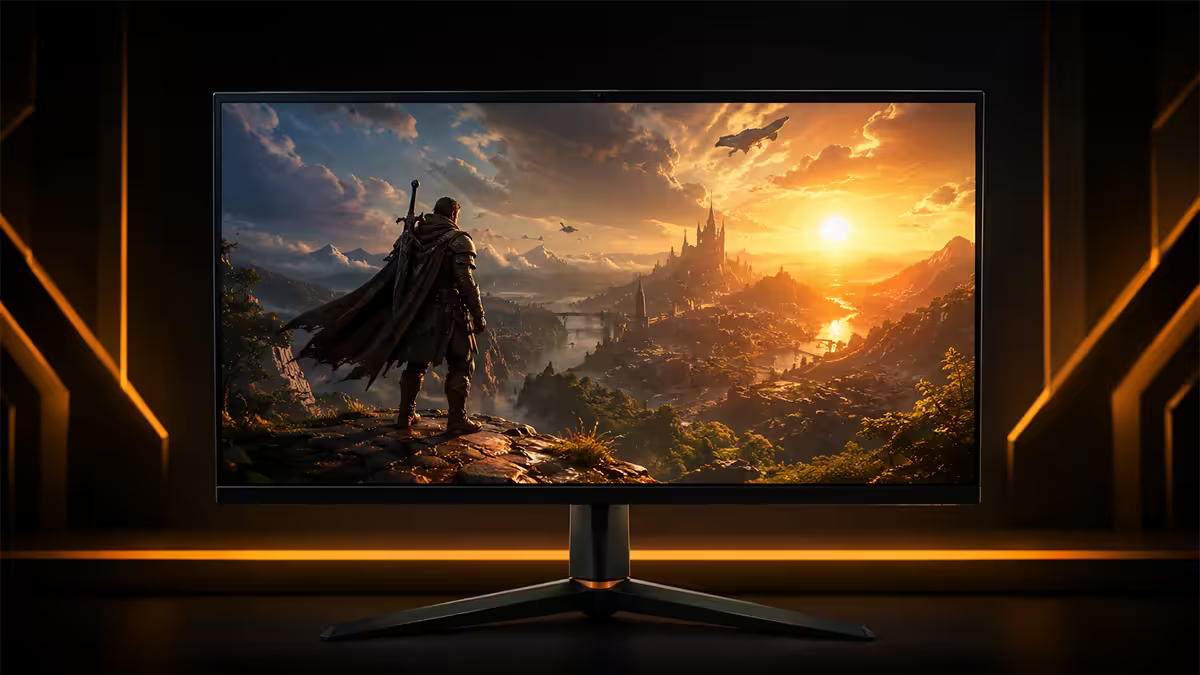
A decade after the spec went mainstream, HDR on PC actually works — but only on the right panel, with the right Windows version, calibrated correctly. The gap between great HDR and fake HDR is wider than ever.
- nits for real HDR
- 1000+
- dimming zones min
- 384+
- SA entry price
- R8.5K+
HDR tiers — the real ones and the marketing ones
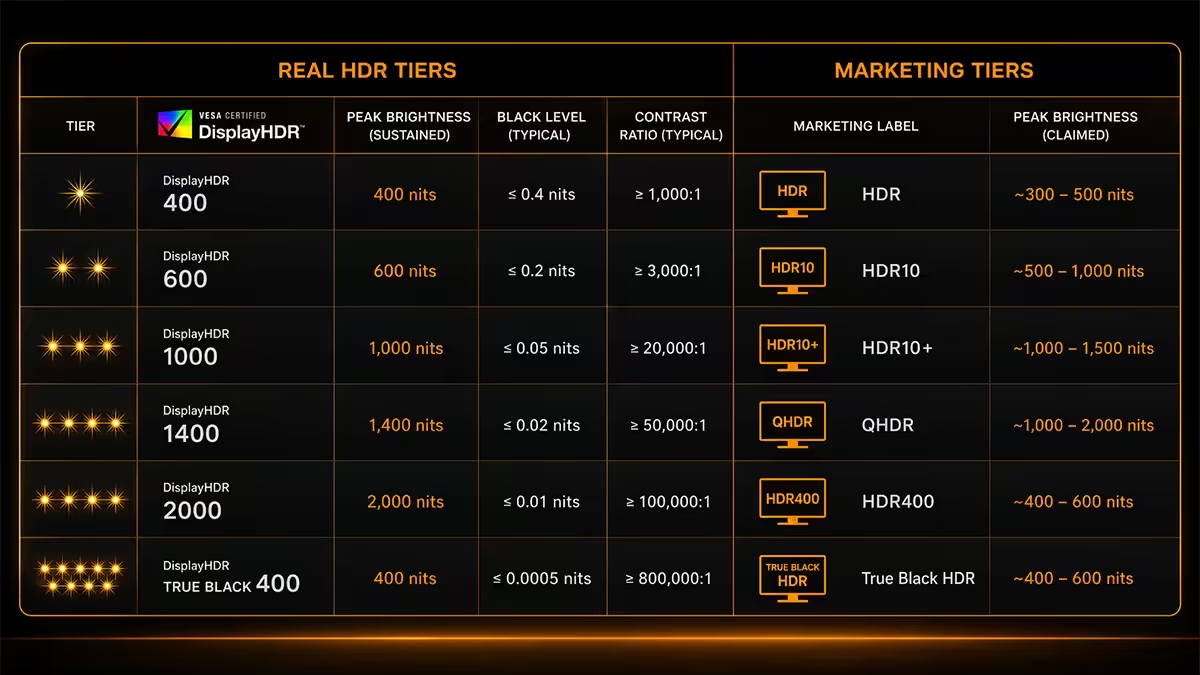
VESA's DisplayHDR certification is the spec sticker you'll see on monitor boxes in SA, and it ranges from DisplayHDR 400 (entry) to DisplayHDR 1400 (extreme). The number is roughly the peak brightness in nits, but the brightness alone doesn't make HDR — it's the combination of peak brightness, contrast control (local dimming), wide colour gamut and 10-bit colour depth that produces the effect.
| Tier | What it actually does | Verdict |
|---|---|---|
| DisplayHDR 400 | 400 nit peak, no local dimming, 8-bit colour | Fake HDR — marketing only |
| DisplayHDR 500 / 600 | 500-600 nits, basic local dimming, 10-bit | Entry — visible HDR |
| DisplayHDR 1000 | 1,000 nits, 384+ Mini-LED zones, 10-bit, wide gamut | Real HDR — buy this |
| DisplayHDR True Black 400 / 500 | OLED panels — infinite contrast per-pixel | Real HDR — best for dark rooms |
| DisplayHDR 1400 | 1,400+ nits, dual-layer LCDs or top Mini-LED | Premium / professional |
The most important thing to understand: peak brightness without local dimming is useless for HDR. A 400-nit monitor that can't selectively dim regions of the panel can't produce the contrast HDR was invented to deliver. That's why HDR400-only panels look identical (or worse) than SDR.
OLED HDR vs Mini-LED HDR — pick by room, not by spec
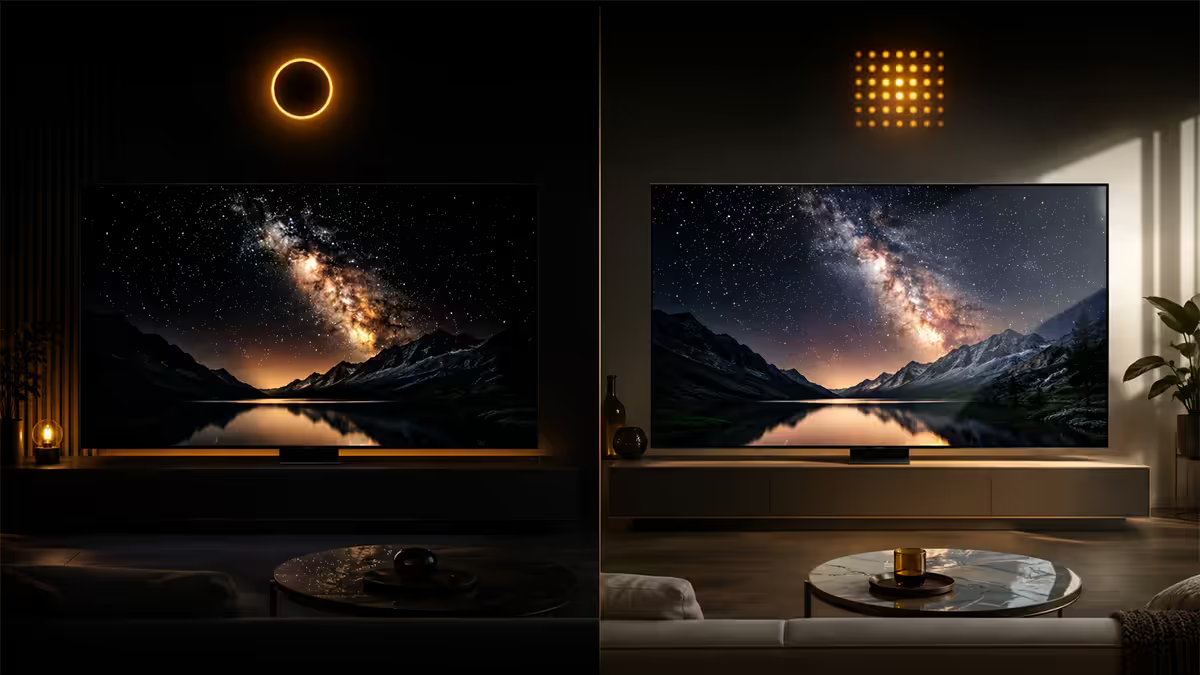
In 2026, real HDR comes in two technologies that take opposite approaches to the same problem. Choosing between them is about your room lighting first, not raw spec sheets.
OLED (LG WOLED, Samsung QD-OLED)
Per-pixel local dimming. Each of the panel's millions of pixels controls its own light, so blacks are genuinely black with no light leakage. HDR True Black 400 certifies 400-nit peak in a 10% window — modest sounding, but the infinite contrast does the heavy lifting. Specular highlights pop, shadows hold texture, and the picture has the cinematic feel HDR was built for.
Weakness: peak full-screen brightness is limited (250-400 nits), so in a sunlit lounge with reflections on the panel, the picture can feel dim. Burn-in is no longer an everyday risk on 2024+ panels with pixel-shift and per-pixel compensation, but heavy static UI use over years can still cause it.
Mini-LED (Samsung Neo G, Asus PA, MSI MPG)
Hundreds to thousands of LED zones behind the LCD panel can dim or brighten independently. Modern 2026 Mini-LED gaming panels hit 1,200-2,000-nit peaks with 1,000-2,000+ zones. Bright rooms? Mini-LED dominates. Highlights are more eye-catching than OLED. Static UI elements pose zero risk.
Weakness: blooming — bright objects on a dark background show a halo of light spilling around them, because the dimming zones are larger than individual pixels. Modern algorithms minimise it, but it's never gone. In a dark room watching credits on a film, Mini-LED's halo is visible; OLED's per-pixel control isn't.
Windows 11 finally fixes HDR on PC
For five years, "HDR is broken on PC" was a meme — a half-baked Windows 10 implementation, missing colour management, washed-out desktops and no calibration tooling. Windows 11 24H2 (released October 2024) finalised the long-promised overhaul, and the 2025-2026 updates have polished it further.
What works correctly now:
- Per-app HDR colour management. SDR apps render correctly while a single HDR game is active — desktop and Chrome no longer turn pale.
- Windows HDR Calibration app. Free in the Microsoft Store, walks through three test patterns and sets the peak nits Windows reports to games. This solves 80% of "washed-out HDR" complaints.
- Auto HDR. Microsoft's compatibility layer that adds HDR to older SDR DirectX 11/12 titles — often a transformation on games like Skyrim or older Resident Evils.
- Per-game Auto HDR toggle. If Auto HDR breaks a specific game's look, disable it for that EXE alone in Display Settings → HDR.
If you've had HDR turned off in Windows since the bad old days, it's worth trying again. The platform has actually changed.
Auto HDR — which games it helps, which it ruins
Auto HDR is Microsoft's runtime that intercepts SDR DirectX 11/12 game output and expands its tonal range into HDR. On games that never had native HDR support, it's near-magic — Skyrim Special Edition, Dark Souls III, Sekiro, GTA V, original Witcher 3 and a long list of older titles light up with believable highlights and richer skies.
Where Auto HDR breaks things:
- Games with native HDR already. Cyberpunk 2077, Alan Wake 2, Forza Horizon 5 have proper HDR pipelines — Auto HDR runs in parallel and the colours fight, leading to over-saturated reds and crushed shadows.
- Cel-shaded / stylised titles. Persona 5 Royal, Hi-Fi Rush, Borderlands — the artists made colour choices that Auto HDR pushes past intent.
- DirectX 9 / older titles. Auto HDR only kicks in on DX11/12. Older games are unaffected.
The fix is per-game control: Settings → System → Display → HDR → Use HDR → Choose display → Per-app HDR settings. Toggle Auto HDR off for the offending EXE while leaving it on globally.
Tone mapping and HGiG — the calibration that fixes everything
Tone mapping is how the game maps its internal "scene-referred" brightness values (which can go far above a display's capabilities) to what your panel can actually show. Do it wrong and you get crushed highlights (everything bright becomes pure white) or muddy mid-tones (the scene looks flat).
HGiG (HDR Gaming Interest Group) is the industry agreement that solves this. Step-by-step:
- Enable HGiG mode in your monitor's OSD (look under Picture → HDR / Gaming menu).
- Disable Dynamic Tone Mapping on the display — let the game do the work.
- Find your panel's measured HDR peak nits (RTings.com publishes this, or use Windows HDR Calibration's measured value).
- In each game's HDR settings, set the peak brightness slider to that exact nit value (e.g. 1,000 for HDR1000, 400 for True Black 400, 800 for many real-world Mini-LED panels).
- Set paper-white to 200-250 nits (UI/subtitle brightness) — most people set this too high.
With HGiG plus correct sliders, the game knows your panel's limits and maps highlights up to (but not past) them — so a 1,000-nit sun looks like the brightest pixel on the screen instead of clipping into a flat white blob.
Content that actually looks great in HDR
Not every game gains from HDR. The pipeline has to be designed for it; a thin SDR-to-HDR upscale (like Auto HDR) gives you a glimpse, but native HDR mastered for the medium is the real deal. As of 2026, the standout titles are:
- Cyberpunk 2077 with Phantom Liberty — neon nights, dawn over Pacifica, ray-traced reflections in HDR are reference material.
- Alan Wake 2 — possibly the best HDR implementation ever shipped. The dark places are properly dark.
- Horizon Forbidden West and Spider-Man 2 — Sony first-party PC ports with mature HDR work.
- Forza Horizon 5 — sunrise over a saltflat in HDR is the demo you show family.
- Red Dead Redemption 2 — disable RDR2's broken legacy HDR mode and use Auto HDR or community fixes.
- Resident Evil 4 Remake and Resident Evil Village — torchlight in a Romanian village is a genre showcase.
- Avatar: Frontiers of Pandora — the most aggressively HDR-mastered open world to ship.
Where HDR adds nothing (or hurts): competitive shooters. CS2, Valorant, Apex Legends, Overwatch — these are designed around clear, flat, predictable lighting where enemies stand out from environment. HDR introduces dynamic range that obscures contrast cues. Pro players run SDR.
SA buying picks — what we actually stock
South African HDR monitor pricing in 2026 has finally cracked the "real HDR for under R10K" barrier. Three honest tiers:
| Use case | Pick | SA price |
|---|---|---|
| Real HDR entry · bright room | Mini-LED 27" 1440p HDR1000 (e.g. Cooler Master GP27Q, MSI MAG 274QRF QD) | R8,500-R11,000 |
| Best HDR experience · 27" | QD-OLED 27" 1440p HDR True Black 400 (e.g. Samsung Odyssey OLED G6) | R12,000-R15,000 |
| Big-screen HDR | QD-OLED 32" 4K HDR True Black 400 (e.g. Asus PG32UCDM, MSI 321URX) | R22,000-R28,000 |
| Premium Mini-LED 4K | Samsung Odyssey Neo G8 32" 4K HDR2000 | R26,000-R32,000 |
| Console + PC living-room | LG C-series 42" 4K OLED TV | R20,000-R26,000 |
Common HDR mistakes that ruin the picture
Running Windows in HDR all day. SDR content (most YouTube, web browsing, productivity) ends up muted or wrong. Use the Game Bar HDR toggle and enable HDR only when launching an HDR game.
Skipping the HDR Calibration app. Without telling Windows your panel's actual peak nits, every game ships highlights into a clipped void. The free MS Store app takes 90 seconds and transforms HDR quality.
Leaving display Dynamic Tone Mapping on with HGiG enabled. The two systems fight; pick HGiG (game-driven) or DTM (display-driven) — not both.
Setting paper-white to maximum. Bright-white menus, subtitles and HUDs will burn your eyes and ruin night-scene immersion. 200-250 nits is the cinema-grade target.
Buying a DisplayHDR 400 monitor expecting HDR. The most expensive mistake. If the only HDR sticker is HDR400 — treat the monitor as SDR and budget for the real thing later.
Key takeaways
- HDR400 is fake — DisplayHDR 600 minimum, HDR1000 or HDR True Black 400 for the real effect.
- OLED HDR for dark rooms; Mini-LED HDR for bright rooms. Both are real in 2026.
- Windows 11 24H2+ fixed HDR on PC. Run the HDR Calibration app from the Microsoft Store after enabling.
- Enable HGiG, disable display Dynamic Tone Mapping, set the in-game peak slider to your panel's measured nits.
- Use Win+Alt+B to toggle HDR per-session. Never leave Windows in HDR mode for SDR work.
Frequently asked questions
Is HDR400 real HDR?
No. DisplayHDR 400 is the entry tier of the VESA certification and is essentially marketing — it only requires 400 nits peak brightness, no local dimming, and 8-bit colour. Real HDR starts at DisplayHDR 600 with local dimming, with HDR1000 and HDR True Black 400 (OLED) delivering the actual cinematic effect. If a monitor only lists HDR400, treat it as an SDR display.Is OLED HDR better than Mini-LED HDR in 2026?
Different strengths. OLED (LG WOLED, Samsung QD-OLED) delivers infinite contrast and per-pixel local dimming — perfect black levels and the most cinematic HDR experience. Mini-LED (typically 1,000+ zones in 2026) gets brighter (1,200-2,000 nit peak) and is better for sunlit rooms but has visible blooming around bright objects on dark backgrounds. For dark-room gaming choose OLED; for bright-room gaming choose Mini-LED.Does Windows 11 fix HDR on PC?
Largely yes. Windows 11 24H2 and onwards added Auto HDR, AutoHDR per-game toggles, and proper HDR colour management — the long-running 'HDR is broken on PC' problem is mostly solved. You still need to calibrate using the Windows HDR Calibration app and disable Auto HDR for older games that look washed out with it on, but the platform is finally usable.What is HGiG and should I enable it?
HGiG (HDR Gaming Interest Group) is a tone-mapping standard that tells the game your display's actual peak brightness so it can map highlights correctly instead of clipping. Enable HGiG on the display, set the game's HDR brightness slider to your display's measured peak (1000 nits for HDR1000, 400 nits for True Black 400), and disable the display's own dynamic tone mapping. The result is highlights that show detail rather than being blown-out white.Which games actually look good in HDR?
Cyberpunk 2077, Alan Wake 2, Forza Horizon 5, Resident Evil 4 Remake, Red Dead Redemption 2, Horizon Forbidden West, Spider-Man 2, Avatar: Frontiers of Pandora and most current Sony first-party PC ports are spectacular in HDR. Competitive titles (CS2, Valorant, Apex) gain nothing from HDR and often look worse — keep them SDR.Should I enable HDR all the time in Windows?
No. Enable HDR per-game using the Game Bar (Win+G) or have Auto HDR toggle it. Leaving Windows in HDR mode 24/7 makes the desktop look dim and washed out, and SDR content (most YouTube, web browsing, productivity apps) renders incorrectly. The Game Bar HDR toggle (Win+Alt+B) makes this a 1-second flick.What's the cheapest real HDR monitor in SA?
As of 2026, the entry point for real HDR in South Africa is around R8,500-R11,000 for a 27-inch Mini-LED HDR1000 panel (look for 384+ local dimming zones) or R12,000-R15,000 for a 27-inch QD-OLED with HDR True Black 400. Avoid anything advertised only as HDR400 — you're paying nothing for HDR.Why does HDR look washed out on my PC?
Three common causes: (1) you have a DisplayHDR 400 panel that physically can't do HDR — the only fix is a better monitor; (2) Windows HDR Calibration has never been run — open the HDR Calibration app from Microsoft Store and run it; (3) Auto HDR is enabled on a game that has native HDR and they're fighting — disable Auto HDR for that specific title in Windows display settings.
Get the Evetech app
Exclusive app-only prices, daily flash sales, and free delivery on orders over R4,000 — download the app and start saving.