Small Business Buying Guide
The laptop your business deserves. — Built to type all day. Survive a fall. Boot in 8 seconds.
A consumer laptop is a great deal until it dies in week 14 of your busy season. Business-class machines cost R3-5k more upfront and last twice as long — because the keyboard, hinge, BIOS, warranty and support model are all built for daily commercial use.
- drop tested
- MIL-810H
- 2026 minimum
- 16/512
- support SLA
- 3-yr NBD

Durability — MIL-STD-810H and what it actually means
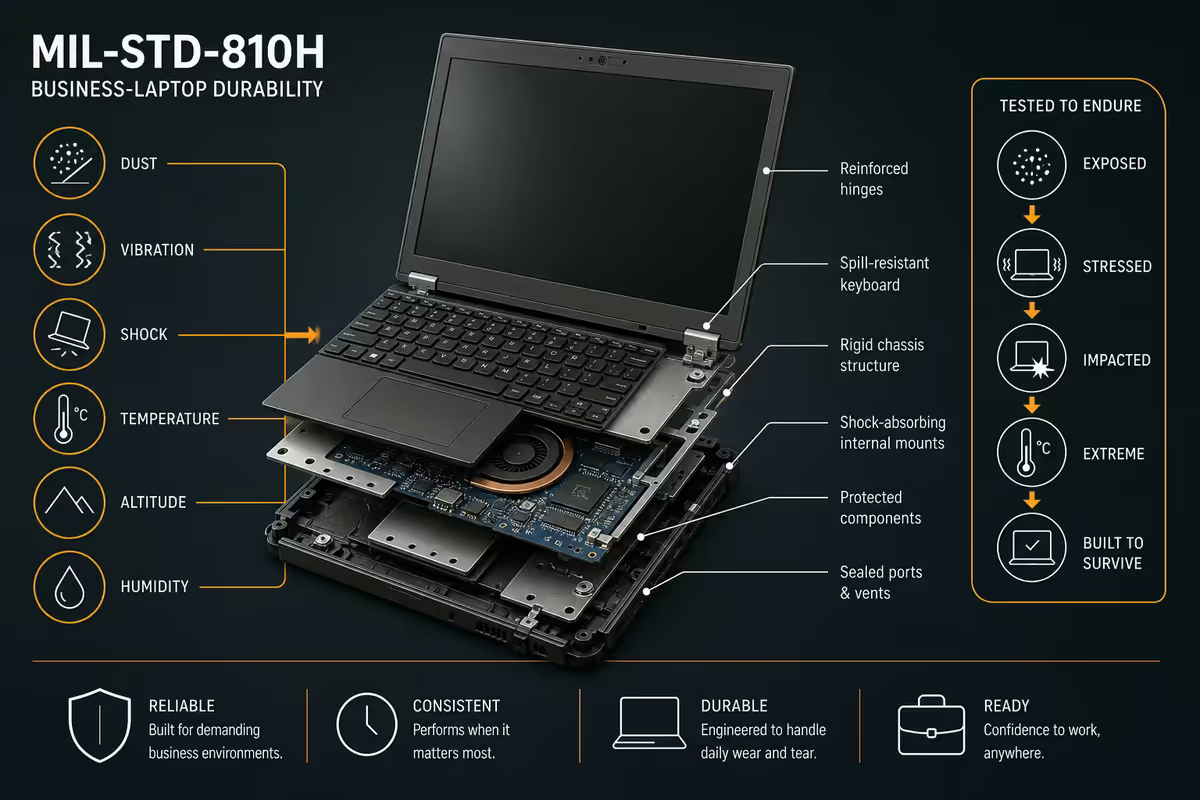
Most consumer laptops survive desk-to-floor falls about half the time. Business-class laptops survive them almost every time. The difference isn't marketing — it's certified testing.
MIL-STD-810H is the US Department of Defense durability standard. Business laptop lines (Lenovo ThinkPad T/X/L, HP EliteBook 800, Dell Latitude 5000/7000, ASUS ExpertBook B5) typically certify against multiple of these tests:
- Drop test: 76 cm onto plywood, 26 separate face drops.
- Vibration: simulated transport vibration during operation.
- Dust: sealed against fine dust ingress (chassis dust resistance).
- Humidity: 95% RH for 240 hours.
- Altitude: operational at 4,572 m (relevant for SA Highveld at 1,750 m + flights).
- Temperature shock: from -29°C to 60°C cycling.
A typical small business laptop accumulates the equivalent of years of abuse in 12-18 months: jolted in a backpack on the Gautrain, dropped onto a coffee shop floor, baked in a parked car at OR Tambo, jammed shut with a USB stick on the hinge, taken into humid coastal client offices. The chassis and hinge engineering on business-class laptops simply survives this where consumer laptops crack.
Keyboard & screen — what business class buys you
If you type 4+ hours a day for work, the keyboard is more important than the GPU. Consumer laptop keyboards average 1.0-1.2 mm of key travel; business laptops average 1.5-1.8 mm with quieter dampers and longer-lasting switches.
The genuinely best business keyboards in 2026:
- Lenovo ThinkPad T/X series — the long-standing reference. 1.5 mm travel, slight key cup curvature, redoubtable longevity. The TrackPoint nub (the little red joystick) is divisive but legendary among power users.
- HP EliteBook 800 series — second-best business keyboard. 1.5 mm travel, quietest of the four. Excellent for open-plan offices.
- Dell Latitude 7000 series — solid keyboard, slightly stiffer feel than Lenovo, very durable.
- Apple MacBook Air M-series — Magic Keyboard. Shallow (1.0 mm) but extremely consistent. Polarising — either you love it or you don't.
- ASUS ExpertBook B5 — newer entry into business class. 1.5 mm travel, decent feel, sometimes-flaky longevity vs the established three.
Screen for spreadsheets and video calls:
- 14-inch 1920×1200 (16:10) IPS is the modern business standard — vertical pixels matter for spreadsheets and code.
- 16:9 1080p is the budget-tier compromise. Workable but cramped.
- OLED on business laptops is rare and not worth chasing — IPS is fine. Brightness 300+ nits matters more than panel tech for outdoor use.
- Anti-glare coating is essential for client-facing work. Glossy displays glare in every coffee shop window.
- Webcam: 1080p is the 2026 minimum. 720p (still common in budget business laptops) is embarrassing on Teams.
RAM, SSD, battery — the 2026 minimums
| Spec | 2026 minimum | 2026 sweet spot |
|---|---|---|
| RAM | 16 GB DDR5 | 32 GB DDR5 |
| Storage | 512 GB NVMe | 1 TB NVMe |
| CPU | Core Ultra 5 / Ryzen 5 7×40 | Core Ultra 7 / Ryzen 7 8×40HS |
| Battery | 10 hours real-world | 14+ hours real-world |
| Wi-Fi | Wi-Fi 6E (AX) | Wi-Fi 7 (BE) |
| Charging | USB-C PD 65 W | Thunderbolt 4 / USB4 PD 100 W |
| Webcam | 1080p IR (Windows Hello) | 1080p IR + physical privacy shutter |
Why 16 GB RAM in 2026? A typical small business desktop runs Windows 11 Pro + Teams + Outlook + Edge with 15 tabs + Slack + OneDrive sync + a PDF viewer + maybe a CRM web app. That's 11-12 GB before you've started actually working. 8 GB causes constant disk paging within 18 months as Windows updates and app bloat compound. The R1,500 saving today is paid back as lost productivity within a year.
Why 32 GB sweet spot? If your team runs accounting (Sage, Xero, QuickBooks Online), CRM (HubSpot, Pipedrive, Salesforce Lightning) and a video call simultaneously, 32 GB starts feeling necessary. Also future-proofing — laptops with 16 GB soldered today will feel cramped by 2028.
Why 512 GB minimum SSD? Windows 11 + Office + a year of OneDrive sync + Teams cache + browser cache + downloaded PDFs and presentations easily fills 256 GB. The R600 extra for 512 GB is the single best value upgrade on any laptop spec.
Windows 11 Pro & dock compatibility
Consumer laptops typically ship with Windows 11 Home. Business laptops ship with Windows 11 Pro. The R1,500-R2,500 difference is non-negotiable for any small business laptop because Pro adds four features that matter:
- BitLocker drive encryption — essential for POPIA compliance if the laptop ever holds client personal data. Without BitLocker, a stolen laptop is a breach notification event.
- Entra ID / Active Directory join — lets you (or your IT support) centrally manage the laptop, push policies, remotely lock and wipe it.
- Remote Desktop server — lets you RDP into the laptop from another machine.
- Group Policy + Hyper-V — runs VMs, applies security baselines, manages Edge / Office settings centrally.
Upgrading Home to Pro after purchase costs R1,500-R2,400 retail — wiping most of the saving. Buy Pro from day one.
Thunderbolt 4 / USB4 dock compatibility
If team members work from a desk at the office and travel between client sites, the dock setup is the single biggest quality-of-life feature. A single Thunderbolt 4 cable plugs in and connects:
- Power (60-100 W charging through the same cable).
- One or two 4K external displays.
- Wired Ethernet (faster and more reliable than office Wi-Fi).
- USB hub (keyboard, mouse, webcam, headset).
- Audio passthrough to speakers / monitor.
Solid Thunderbolt 4 dock picks for SA:
- Dell WD22TB4 / WD24TB4 — best with Dell Latitude, available locally via authorised resellers.
- Lenovo ThinkPad Universal TB4 Dock — pairs perfectly with ThinkPad T-series.
- HP G5 Thunderbolt Dock — pairs with EliteBook.
- CalDigit TS4 — best universal third-party option, R8-10k.
- UGREEN Revodok Max 213 / Anker 778 — value picks at R3-5k.
Top picks per brand
Lenovo ThinkPad T14 Gen 5 — the safe default
Core Ultra 7 / 16-32 GB / 512 GB-1 TB / 14" 1920×1200 / Win 11 Pro / MIL-STD-810H (12 tests) / TB4 / 1080p IR webcam. R28-36k. Legendary keyboard, on-site Premier Support available, Lenovo's after-sales is the best in business for SA. The ThinkPad X1 Carbon (R45-55k) is the slimmer, lighter, more premium version — same DNA in a 1.1 kg chassis.
HP EliteBook 845 G12 — second-best default
Ryzen AI 7 PRO / 16-32 GB / 512 GB-1 TB / 14" 1920×1200 / Win 11 Pro / MIL-STD-810H / TB4 / quietest keyboard. R26-34k. Slightly cheaper than ThinkPad, slightly quieter keyboard, HP CarePack support is solid in SA. The EliteBook 1040 G11 is the premium version, lighter chassis.
Dell Latitude 7450 — the most polished build
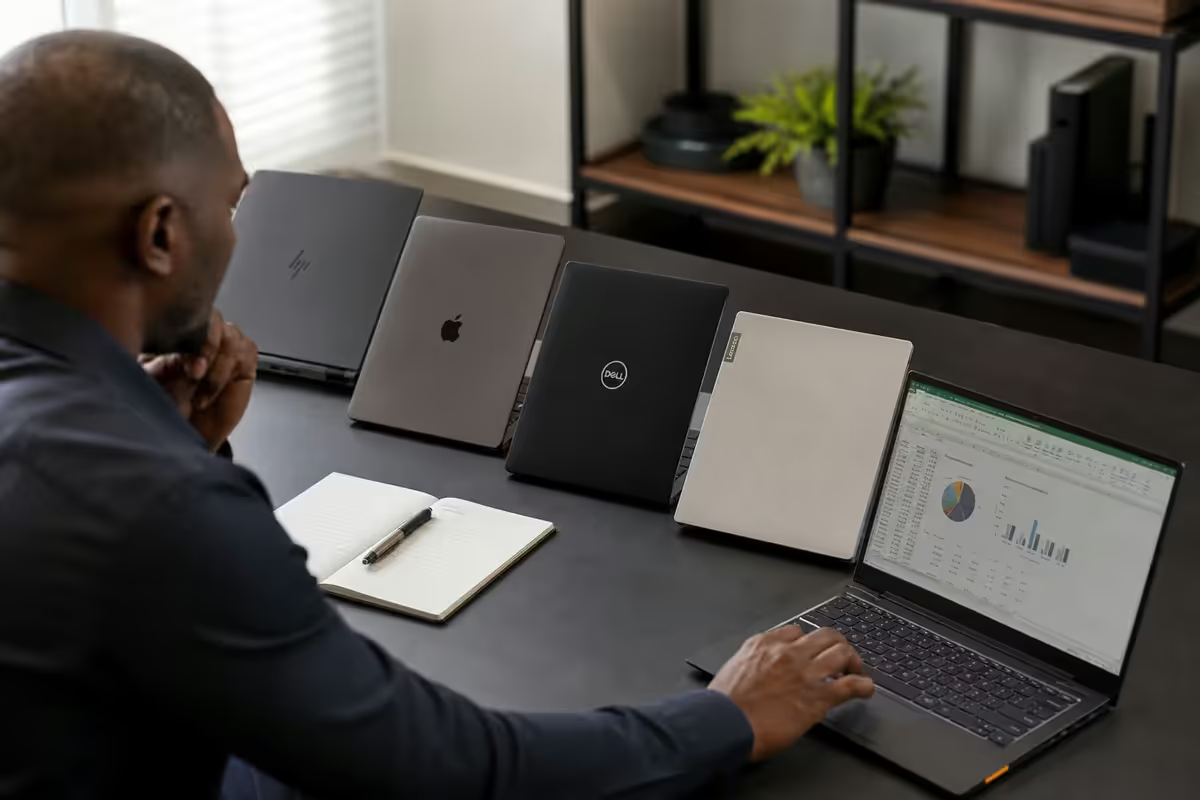
Core Ultra 7 / 16-32 GB / 512 GB-1 TB / 14" 1920×1200 / Win 11 Pro / MIL-STD-810H / TB4. R30-38k. Best chassis tolerances, ProSupport NBD is the gold standard if you can afford it. Dell's SA service network is excellent in Gauteng and Cape Town.
ASUS ExpertBook B5 — the value challenger
Core Ultra 5/7 / 16-32 GB / 512 GB-1 TB / 14" 1920×1200 / Win 11 Pro / MIL-STD-810H / TB4. R22-30k. Newest entry in the business tier, R3-5k cheaper than ThinkPad/EliteBook at similar spec. After-sales support not yet as mature as the big three but improving. Worth considering if budget is tight.
Apple MacBook Air M4 — for Apple-native businesses
M4 / 16-24 GB / 512 GB-1 TB / 13" or 15" / macOS / no MIL-SPEC but legendarily durable chassis / TB4. R22-30k. The right pick if your business is small, design-focused, lives in iCloud/Google Workspace and doesn't need on-prem Active Directory. Battery life is unmatched. AppleCare+ at R4,500 for 3 years adds accidental damage coverage. For Pro-tier workloads (Final Cut, Logic, heavy code), MacBook Pro M4 14" (R29-34k) is the right step up.
Build tiers — R15k, R25k, R40k
| Tier | Pick | Use case |
|---|---|---|
| R15k entry business | Lenovo ThinkPad E14 G6, HP ProBook 460 G11, Dell Inspiron 14 Pro | Sole trader, junior team member, light email + Office workload |
| R20k mid-tier business | ASUS ExpertBook B5 OLED, Lenovo ThinkPad L14, HP ProBook 460 Pro | SMME team member, mixed Office + browser-based CRM |
| R25k-R30k workhorse | Lenovo ThinkPad T14 G5, HP EliteBook 845 G12, MacBook Air M4 15" | Owner, senior staff, daily heavy use, client-facing |
| R35k-R45k premium | ThinkPad X1 Carbon, HP EliteBook 1040 G11, Dell Latitude 7450 fully spec'd, MacBook Pro M4 14" | Founder, exec, heavy travel, premium client-facing |
| R45k+ workstation-class | ThinkPad P14s / P16s, Dell Precision 5680, ZBook Studio | Engineering, CAD, video editing roles |
Warranty length & support SLAs
Standard manufacturer warranty on business laptops is 1 year carry-in. This is genuinely useless for anything you rely on commercially. The right warranty for a small business laptop is 3-year on-site / next-business-day (NBD) support.
| Support tier | What you get | Cost added at purchase |
|---|---|---|
| Standard 1-yr carry-in | Take laptop to service centre, 5-14 days turnaround | Included |
| 2-3 yr carry-in extension | Extended same service period | R800-R1,500 |
| 3-yr Premier / ProSupport / CarePack NBD | Technician comes to your office next business day, parts included | R1,800-R3,500 |
| 3-yr + Accidental Damage | NBD + cover spill, drop, surge damage | R3,000-R5,500 |
| AppleCare+ 3-yr (Mac) | Apple repair priority + 2 accidental incidents/year | R3,500-R5,500 |
What "next business day on-site" actually means in SA: for Joburg / Pretoria / Cape Town / Durban with active Dell ProSupport, Lenovo Premier or HP CarePack NBD, a certified technician arrives at your office within one business day of the support ticket. They bring the parts. Repair happens at your desk. Realistic uptime: 24-48 hours from "laptop broke" to "fully working again". Compare to standard carry-in: 5-14 days, no laptop at all.
Key takeaways
- ThinkPad T14 G5, HP EliteBook 845 G12, Dell Latitude 7450 or ASUS ExpertBook B5 — pick any. MacBook Air for Apple-native design biz.
- 16 GB RAM / 512 GB SSD is the 2026 minimum. 32 GB / 1 TB is the sweet spot. RAM is usually soldered — spec for 4 years out.
- Always buy Windows 11 Pro (BitLocker + Entra). Always look for MIL-STD-810H if the laptop travels.
- Thunderbolt 4 / USB4 is non-negotiable for desk dock setups. One cable handles power + dual 4K + Ethernet.
- Buy 3-year on-site / NBD support if you're in a major SA metro. Worth every rand for downtime avoided.
Frequently asked questions
What's the best laptop for a small business in South Africa in 2026?
Lenovo ThinkPad T14 Gen 5 (Core Ultra 7 / 16-32 GB / 512 GB-1 TB / Windows 11 Pro, R28-36k) is the right pick for most SA small businesses — MIL-STD-810H tested, best-in-class keyboard, on-site warranty SLA, easy to dock and easy to support. HP EliteBook 845 G12, Dell Latitude 7450 and ASUS ExpertBook B5 are all comparable alternatives at similar pricing. MacBook Air M4 (16/512, R22-26k) is the right pick for small design-focused businesses already on Apple ecosystem.Why MIL-STD-810H for a business laptop?
MIL-STD-810H is the US military durability standard covering drop, vibration, dust, humidity, altitude and temperature shock testing. Business laptops marketed as 'MIL-SPEC' have passed multiple of these tests — typically drop from 76 cm onto plywood, vibration during operation, and dust resistance. For a working device travelling between client sites, coffee shops, taxis, and home, this matters in real life. A R12k consumer laptop dropped from a desk usually means a cracked hinge or display; a MIL-STD-810H ThinkPad T or EliteBook 800 series typically survives.How much RAM does a small business laptop need in 2026?
16 GB is the new minimum for any small business laptop in 2026. Windows 11 Pro + Teams + Outlook + Edge with 15 tabs + Slack + OneDrive sync + a PDF viewer already touches 11-12 GB. 32 GB is the sweet spot if your team runs CRM (Salesforce, HubSpot, Pipedrive) plus accounting (Xero, Sage, QuickBooks) plus video calls simultaneously. 8 GB will work but feel slow within 18 months — false economy.Why Windows 11 Pro instead of Home for business?
Windows 11 Pro adds the four features that matter for business use: BitLocker drive encryption (essential for any laptop with client data, by POPIA standard); Active Directory and Entra ID domain join (lets the laptop be centrally managed); Remote Desktop (lets you connect to office machines); and Group Policy support. Consumer laptops shipping with Windows 11 Home are R1,500-R2,500 cheaper but you'll pay almost that much to upgrade to Pro later. Buy Pro from day one.Is Thunderbolt 4 important on a business laptop?
Yes if you'll dock the laptop at a desk regularly. Thunderbolt 4 (or USB4) lets a single cable deliver charging, dual 4K displays, USB hub, wired Ethernet and audio passthrough to a dock — a clean desk with one cable to plug in. Without Thunderbolt, you're either juggling separate HDMI/USB/charger cables every morning or buying a separate USB-C hub that handles less. Look for at least one Thunderbolt 4 / USB4 port on any business laptop in 2026.Should I buy a MacBook Air for my small business?
MacBook Air M4 (16/512, R22-26k) is the right pick if your business already runs on Mac, lives in Google Workspace or Microsoft 365 cloud (no on-prem AD), and ideally does design / creative / video work. The pros: legendary battery, build, resale value, and Adobe / Figma run beautifully. The cons: less corporate support tooling, fewer dock options at SA business pricing, and most SA corporate software (Pastel, Sage, niche industry tools) is Windows-only.What warranty length should I buy on a business laptop?
3-year on-site / next-business-day (NBD) is the right warranty for any laptop your business depends on. Standard 1-year carry-in is fine for personal devices but useless if a fault halts a client deliverable. Dell ProSupport, Lenovo Premier Support and HP CarePack 3y NBD all cost roughly R1,800-R3,500 added at purchase — and dramatically reduce downtime. AppleCare+ 3-year for MacBook is roughly R4,500 and includes accidental damage coverage.What's the typical SA repair turnaround for business laptops?
With 3-year on-site / NBD support active: 1-3 working days for parts repair at your office. Without the upgraded plan, standard carry-in warranty service runs 5-14 working days at the SA authorised service centre (Mustek, Pinnacle, Tarsus distribution networks). For Apple, AppleCare+ typically delivers 3-7 working day turnaround through iStore Sandton or Yuppiechef Service. For ThinkPad and EliteBook business-class lines, parts availability in SA is consistently better than consumer lines — common faults are usually fixed in under a week.
Get the Evetech app
Exclusive app-only prices, daily flash sales, and free delivery on orders over R4,000 — download the app and start saving.