Dust Removal Guide
How to clean your PC. — 30 minutes. 8-15°C cooler. No drama.
Dust is the silent enemy of every gaming PC, especially in South Africa's Highveld and Karoo climates. A proper clean every few months keeps temperatures down, fans quiet, and components alive years longer.
- SA cleaning interval
- 3-4 mo
- basic clean time
- 30 min
- post-clean temp drop
- 8-15°C
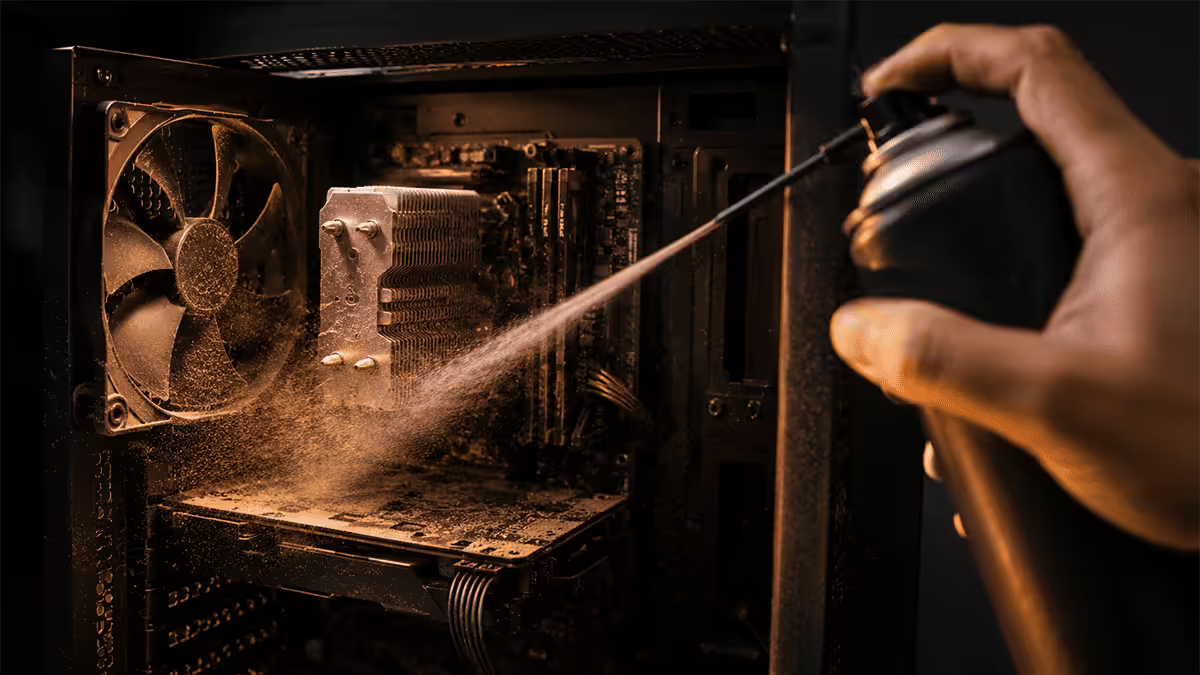
How often to clean — set the rhythm
There's no universal answer because dust loads vary enormously by environment. A PC in an open-plan Sandton apartment with carpeted floors and two cats accumulates dust much faster than the same PC in a tiled Cape Town flat with HEPA filtration.
As a general rule:
- Every 2-3 months — Highveld dust environments (Pretoria, Centurion, parts of Johannesburg), carpeted rooms, homes with pets, dusty industrial neighbourhoods.
- Every 3-4 months — typical SA suburban environment, tiled floors, occasional cleaning.
- Every 6 months — coastal homes with regular wet-vac cleaning, air-conditioned rooms with filtration, low-pet households.
The "feel" check is just as reliable as a calendar. If you can see dust on the top of the case or through the side panel, or if your fans have gotten audibly louder under the same gaming load, it's time. CPU and GPU idle temperatures rising 5-10°C over baseline is another reliable signal.
A 5-minute "quick clean" of the front dust filter and the GPU fan area every 4-6 weeks dramatically reduces how often a full clean is needed. Make it a habit when you do your monthly Windows updates.
Tools you actually need

The shopping list is short and most of it lasts years.
| Tool | Purpose | SA cost |
|---|---|---|
| Compressed air can (large) | Primary dust-blower for fans and filters | R80-R140 |
| Electric blower (Xpower A-2 or similar) | Long-term replacement for cans — much better value | R650-R900 |
| Anti-static brush | Loosening stuck dust on fan blades and shrouds | R50-R80 |
| 99% Isopropyl alcohol (200 ml) | Cleaning CPU IHS, GPU die, sticky residues | R60-R120 |
| Microfibre cloth | Wiping case panels, GPU shrouds, glass | R30-R60 |
| Cotton buds | Tight spots — fan blade roots, heatsink corners | R20-R40 |
| Phillips #2 screwdriver | Removing GPU, fans, panels | R50-R150 |
| Anti-static wrist strap (optional) | For deep disassembly involving CPU/RAM removal | R80-R120 |
The single biggest upgrade in cleaning tools is moving from canned compressed air to an electric blower. A R650 Xpower A-2 or similar pays itself off after about five cleans and produces dramatically more airflow without the propellant frostbite risk that canned air carries.
Prep & safety — before you open the case
Shut down the PC. Fully shutdown — not sleep, not hibernate. Wait until the case lights are completely off.
Unplug the power cable from the wall. Don't trust the rear PSU switch alone. Press the PC's front power button once to drain any residual capacitor charge.
Move the PC to a workable spot. Outside on a patio or in a garage is ideal — you don't want to redistribute the dust around your living room. A folded old sheet on a clean table catches falling debris.
Ground yourself. Touch a bare metal part of the case before reaching inside. If you have an anti-static wrist strap, clip it now. The static risk on dry SA winter days is genuine — your body can hold 5,000-15,000 volts of static charge, more than enough to damage RAM or NVMe.
Take photos with your phone before disconnecting anything. Cable routing, fan orientation, RGB header positions — a quick photo saves 30 minutes of confusion on reassembly.
Step-by-step — the 30-minute basic clean
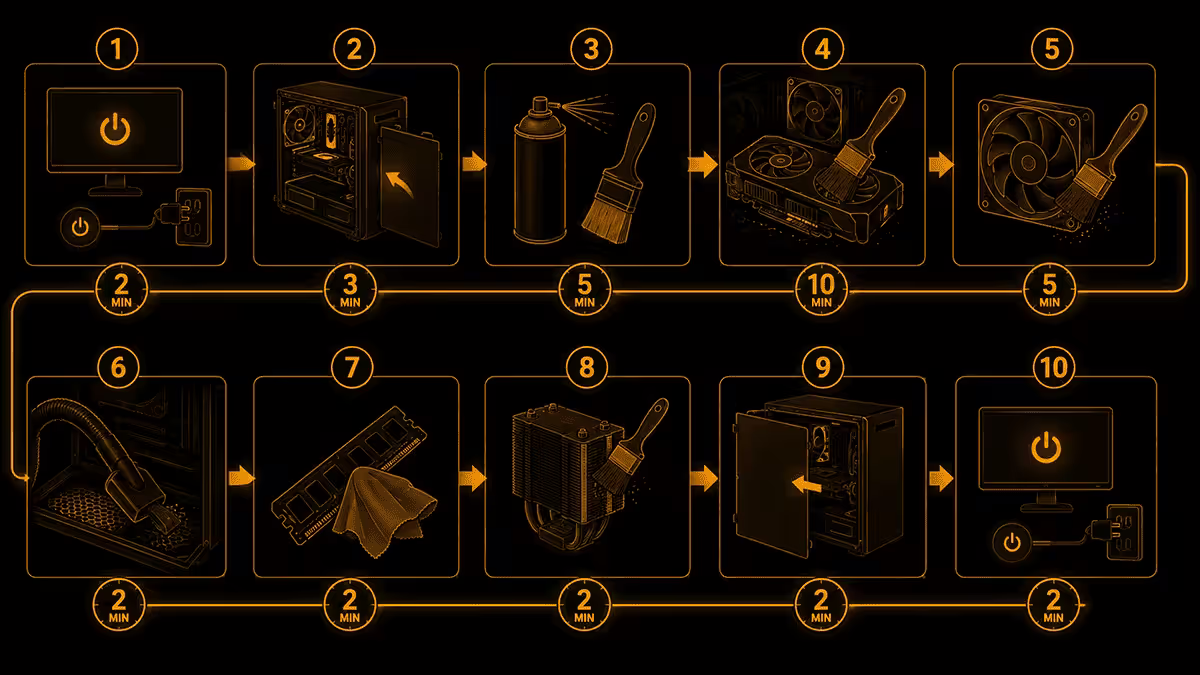
- 01
Remove side panels & filters
Both side panels, plus the front and top magnetic dust filters. Take them outside. (2 min) - 02
Clean the filters
Tap out heavy dust, then blow through with compressed air. If filthy, rinse with warm water and dish soap; dry 24 hours. (5 min) - 03
Blow out the case interior
From top to bottom. Hold the case at an angle so dust falls outward, not deeper inside. (5 min) - 04
Clean every fan
Hold each blade still with a finger or brush. Blow from the side opposite to the airflow direction. (5 min) - 05
Heatsink & radiator fins
Blow lengthwise through the fins. For embedded dust, an anti-static brush helps dislodge it before blowing. (5 min) - 06
GPU shroud & PSU intake
Blow GPU fans (holding blades still) and the PSU intake grille from outside the case. (3 min) - 07
Wipe panels & tempered glass
Microfibre cloth on glass (slightly damp with IPA for fingerprints). Brush metal panels first if dusty. (3 min) - 08
Reassemble & power test
Filters back in, panels reseated, power on. Verify all fans spin within 30 seconds of boot. (2 min)
Total time: 30 minutes for a clean done right, less once you've done it a few times.
Dust filters in detail
Modern cases — Fractal Design, Lian Li, NZXT, Corsair, Phanteks — have magnetic dust filters that pop off in seconds. They're the single most important hygiene component because they trap most of the dust before it reaches the internals.
Light dust: tap on the side of the bin, then blow through with compressed air. Done.
Heavy dust (typical SA Highveld): rinse with warm water and a single drop of dish soap. Run lukewarm water through until clear. Pat dry with a clean towel, then air-dry for at least 24 hours. Never reinstall a damp filter — moisture inside the case causes far worse problems than a few extra dust particles.
Old / yellowed filters on cases 3+ years old often get permanently dust-stained. They still function but never look factory-fresh again. Replacement mesh filters (Demciflex, custom-cut DustEnd) are available for popular cases in SA and last 5+ years.
If your case lacks built-in dust filters (older or budget cases), a roll of adhesive PC filter mesh from Takealot or Yuppiechef makes a R200 upgrade that pays itself off in cooling improvements within weeks.
Heatsink, radiator, AIO & pump care
CPU heatsinks and AIO radiators are dust magnets. Their fin density (5-25 fins per inch) traps everything that gets past your filters, and they're the hardest part to clean back to factory-fresh.
For air coolers (Noctua NH-D15, Deepcool AK620, Arctic Freezer 36): remove the fans first (4-6 screws or push-clips), then blow compressed air lengthwise through the fin stack from both directions. An anti-static brush helps dislodge dust trapped between fins before blowing.
For AIO radiators (Arctic Liquid Freezer III, NZXT Kraken, Corsair iCUE): identical approach — remove fans, blow through fins both directions. The pump unit itself doesn't need cleaning beyond a wipe-down of the housing.
Do NOT open or service a sealed AIO. The coolant inside is engineered for the closed loop and topping it up with water destroys the pump. If your AIO is leaking, making coil-whine noises from the pump, or pump-failing, the entire unit needs replacement.
Custom open-loop systems need full coolant drain, fitting inspection, and fluid replacement every 12-18 months. That's a dedicated process beyond standard dust removal and requires draining tools, fresh coolant, and good case prep.
In the 200,000+ custom builds we've shipped from Centurion and the thousands brought in for cleaning service yearly, the average customer's PC has reached 22°C of accumulated thermal debt by the time they bring it in — most of which traces to dust-clogged radiator fins and GPU heatsinks. A proper 30-minute clean recovers virtually all of it. The PCs that come back regularly for every-6-month preventative cleans never see this drift in the first place and last visibly longer before component upgrades become necessary.
Behind the Build · From the Centurion bench
When to also replace thermal paste
Most cleans don't require repasting. Modern quality paste (Arctic MX-6, Thermal Grizzly Kryonaut, Noctua NT-H2) lasts 3-5 years comfortably. Don't repaste annually as a routine — it's unnecessary work and a small risk of CPU socket damage on each remount.
Repaste when:
- It's been 3+ years since the last application.
- CPU temps have crept 8-15°C above baseline even after a thorough dust clean.
- You've removed the cooler for any reason during cleaning (always — never reuse spread paste).
- The paste is visibly dry, cracked, or has migrated off the centre of the IHS.
The repaste procedure — remove cooler, clean both surfaces with 99% IPA on a lint-free cloth, apply a pea-sized dot of new paste in the centre of the IHS, remount the cooler with even tension. See our dedicated thermal paste guide for the full walkthrough.
When to replace fans (not just clean them)
Fans don't last forever. Quality case fans (Noctua, be quiet!, Arctic, Fractal Aspect) carry 6-7 year MTBF ratings. Cheap fans (no-name OEM, very budget bundled fans) often start to fail after 2-3 years.
Signs a fan needs replacement, not cleaning:
- Rattling, grinding or buzzing noises at startup or under any RPM — bearing failure.
- The fan no longer spins freely when nudged by hand (with power off and a clean blade) — bearing seizure.
- Fan stops or restarts intermittently at the same RPM — motor coil or controller failure.
- Visible blade damage — cracks, missing chunks, warped blades.
A quality 120mm replacement fan in SA costs R250-R700 depending on tier (Arctic P12 PWM around R280; Noctua NF-A12x25 around R650). Replacing a dying fan now prevents the rest of the case running hotter trying to compensate.
South African dust reality
SA has notably challenging conditions for PC longevity, and pretending otherwise leads to disappointment.
Highveld dust — fine, dry, abundant. Pretoria, Centurion, parts of Johannesburg and the East Rand have substantial outdoor dust loads that infiltrate even sealed buildings. PCs in these areas need more frequent cleaning and benefit massively from positive case pressure (more intake CFM than exhaust) so all incoming air passes through filters.
Coastal salt air — Durban, Cape Town, East London. Salt corrodes contacts and connectors over years. Sealed cases with dehumidifying gel packs in tower-style PCs sitting on the floor offer a measurable lifespan advantage. Avoid placing PCs directly under open coastal-facing windows.
Bushveld pet hair — homes with dogs and cats (combined with carpeted floors) generate enormous hair burdens. PC dust filters clog within 4-6 weeks in these environments. Front filter shake-outs every 2-3 weeks dramatically extend full-clean intervals.
Karoo & rural dust storms — fine ochre dust gets into everything during dust-storm season. Sealing the PC under an inverted box during known storm days, or moving to a sealed cabinet, is a sensible defence in affected areas.
Key takeaways
- Clean every 3-4 months in SA conditions; every 2-3 months for Highveld dust environments.
- Compressed air or electric blower only — never use a vacuum (static damage risk).
- Always hold fan blades still while blowing — free-spinning fans can damage motherboard headers.
- 30 minutes for a complete clean; expect an 8-15°C temperature drop on dust-clogged systems.
- Only repaste during cleans if 3+ years have passed or temps are still high after dust removal.
Frequently asked questions
How often should I clean my PC?
Every 3-4 months for most SA builds. Highveld dust environments closer to every 2-3 months; coastal homes with sea air every 6 months. A quick filter wipe every 4-6 weeks extends full-clean intervals significantly.What tools do I need to clean my PC?
Compressed air or electric blower, anti-static brush, microfibre cloth, 99% IPA, cotton buds. Optional: phillips screwdriver, fresh thermal paste if repasting. Electric blower (R650-R900) pays itself off vs canned air after about 5 cleans.Can I use a vacuum cleaner to clean my PC?
No. Vacuum cleaners generate static electricity that can damage components. Use compressed air or an electric blower instead. The static risk is real — we've seen motherboards killed by vacuum use.Should I disassemble my PC to clean it?
For a basic clean every 3-4 months, no — side panel + filters + fans only. For a deep clean every 12-18 months, remove GPU and CPU cooler for thorough access. Full disassembly is also when to repaste if 3+ years have passed.Do I need to hold the fan blades when blowing them?
Yes — always. When compressed air spins a fan beyond rated RPM, it acts as a generator and can send voltage back into the motherboard fan header, damaging it. Hold each blade with a finger or anti-static brush.How do I clean dust filters?
Most modern filters are magnetic — remove in seconds. Light dust: blow through with compressed air. Heavy dust: rinse with warm water and dish soap, rinse clear, dry 24+ hours. Never reinstall a wet filter.When should I replace the thermal paste during a clean?
Repaste when: 3+ years since last application, temps still high after dust removal, you've removed the cooler for any reason, or paste is visibly dry. Quality modern paste (Arctic MX-6, Kryonaut) lasts 3-5 years — don't repaste annually.How do I clean a custom or AIO water cooling loop?
AIO radiators: remove fans, blow through fins both directions. Wipe fan blades with damp microfibre. Don't open sealed AIOs — not user-serviceable. Custom open-loops need full coolant drain and refill every 12-18 months.
Get the Evetech app
Exclusive app-only prices, daily flash sales, and free delivery on orders over R4,000 — download the app and start saving.