RTX 5060 Future-Proofing Guide
How long will the RTX 5060 last?
The entry RTX card every 1080p builder is eyeing — 8GB GDDR7, R7-R9k in SA, and a real question hanging over it: will it still feel good in 2029? Here's the honest answer.
- VRAM buffer
- 8GB GDDR7
- 1080p high
- 3 yrs
- SA price
- R7-9k
RTX 5060 spec realism for 2026
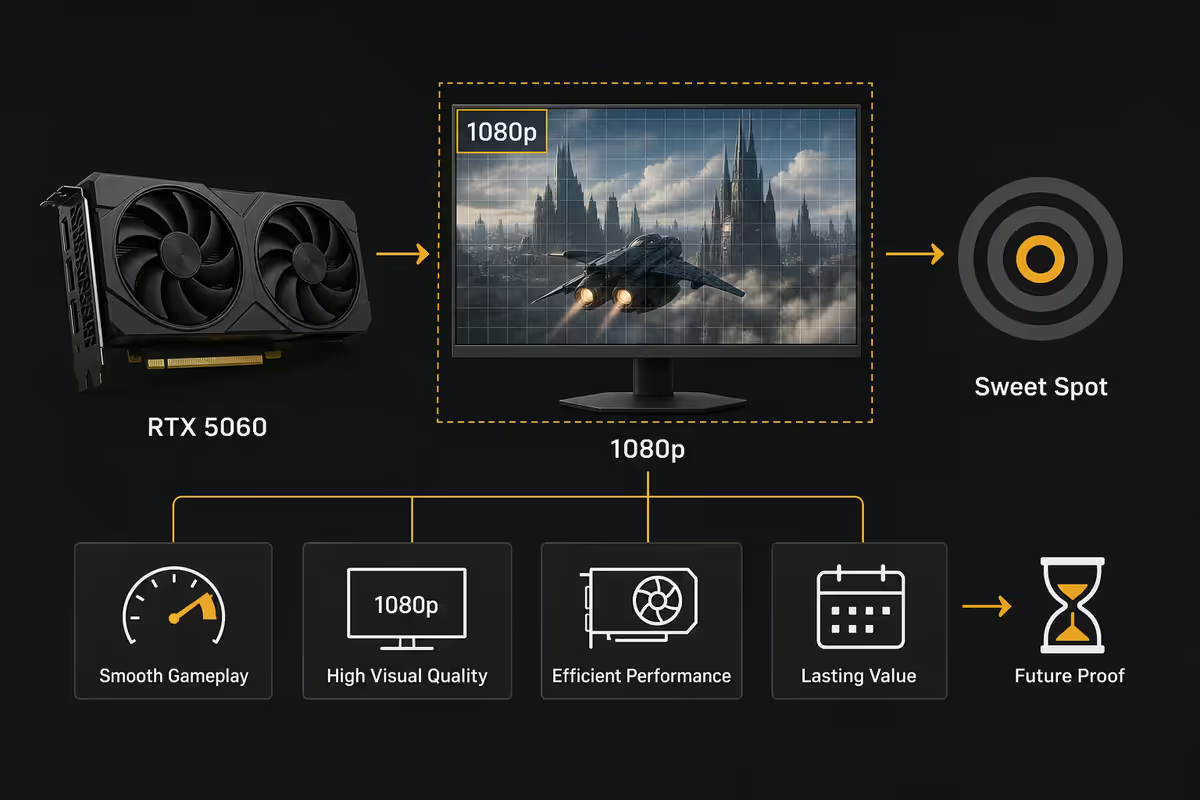
The RTX 5060 sits at the bottom of NVIDIA's Blackwell 50-series consumer stack — and that's exactly the position it's been designed for. It is not a 1440p card. It is not a "buy once, keep forever" investment. It is the modern equivalent of the entry-1080p workhorse, and judged against that brief, it earns its keep.
The headline numbers that matter:
| Spec | RTX 5060 | Why it matters in 2026 |
|---|---|---|
| GPU architecture | Blackwell | Same arch as 5090. Full DLSS 4 / Multi-Frame Gen support. |
| CUDA cores | 3,840 | ~20% uplift over RTX 4060. Real, not marketing. |
| VRAM | 8GB GDDR7 | The 2026 minimum, not comfortable. Bottleneck risk after 2027. |
| Memory bandwidth | ~448 GB/s | GDDR7 helps offset the narrow bus. Better than 4060's GDDR6. |
| TDP | ~150 W | Runs cool, fits in 500W PSU budget builds. |
| Connectors | PCIe 5.0 x8 · DP 2.1b | Future-proof on the I/O side. Won't bottleneck on a new motherboard. |
Performance lands roughly between an RTX 4060 Ti and RTX 3070 in raw raster — and pulls ahead of both with DLSS 4 enabled. Against the AMD competition (Radeon RX 8600), the 5060 trades raster blows but wins on upscaling quality and frame generation.
The 1080p sweet spot — and what it actually means
The RTX 5060 is engineered around a single resolution target: 1920×1080, high settings, native or DLSS Quality. Step outside that box and you start running into the card's limits very quickly.
Here's the honest performance band you can expect on a Ryzen 5 7600 / Core i5 14400 build with 32GB DDR5:
| Resolution + setting | Expected FPS (AAA) | Verdict |
|---|---|---|
| 1080p Low / Esports | 240+ FPS | Effortless. CS2, Valorant, Apex, Fortnite. |
| 1080p High native | 75-110 FPS | The card's sweet spot. Most AAA games comfortable. |
| 1080p Ultra + RT | 45-65 FPS native | Needs DLSS Quality to feel smooth. 70-95 FPS with DLSS on. |
| 1440p High | 50-70 FPS native | Possible but the 8GB VRAM starts to hurt. DLSS Performance recommended. |
| 1440p Ultra | 30-45 FPS | Not the right resolution for this card. Drop to 1080p. |
| 4K anything | — | Wrong card. Look at 5070 Ti minimum. |
If you're shopping a 27" 1080p monitor or a 24" 165Hz panel — the most common SA builder pairing — the 5060 is the exact match. If you're already running a 1440p display, look at the 5060 Ti 16GB or 5070. Putting a 5060 behind a 1440p panel is asking the card to do work it wasn't designed for.
DLSS + frame-gen — the longevity multiplier
The single most important fact about the RTX 5060's lifespan is this: it lives or dies by DLSS. The card has solid raw silicon, but the 8GB VRAM buffer needs the resolution-reduction trick that DLSS Quality provides to stay in the comfortable zone after 2027.
DLSS 4 (the version supported on Blackwell) includes:
- DLSS Super Resolution. Renders the game at a lower internal resolution (e.g. 720p) and uses AI to upscale to 1080p output. The image quality at DLSS Quality preset is excellent — often indistinguishable from native to the naked eye.
- DLSS Frame Generation. Inserts AI-generated frames between rendered frames. Effectively doubles perceived FPS without doubling GPU work. Adds ~10ms latency, so still feels responsive in single-player titles.
- DLSS Multi-Frame Generation (MFG). New for 50-series. Generates up to three intermediate frames per rendered frame. Trades latency for high-refresh smoothness. Game-changing for AAA cinematics on high-refresh monitors.
- DLSS Ray Reconstruction. Replaces the traditional denoiser for ray traced workloads. Improves RT image quality at lower performance cost.
What this means for longevity: in 2027 when a new AAA title launches and natively the 5060 falls to 35-40 FPS at 1080p high, you'll switch DLSS Quality on and it'll climb back to 55-65 FPS. Add Frame Generation and you're at 90-110 FPS perceived. That's exactly how the 5060 buys itself another year or two of usefulness past its "natural" lifespan.
When 8GB VRAM bottlenecks you — the honest answer
This is the most important section of the guide. 8GB of VRAM is the new minimum for AAA gaming in 2026 — and "minimum" means you'll feel it. Texture pop-in, settings forced to medium, and DLSS becoming mandatory rather than optional are all symptoms.
Games that already exceed 8GB at 1080p Ultra with ray tracing on:
- Indiana Jones and the Great Circle — needs ~10GB at 1080p Ultra+RT
- Hogwarts Legacy — texture pop-in clearly visible at 1080p Ultra on 8GB cards
- Alan Wake 2 — RT path tracing pushes well past 9GB
- Stalker 2 — Ultra textures cap out 8GB cards in dense environments
- Cyberpunk 2077 (with full RT + Path Tracing) — needs ~11GB; the 5060 has to run RT Medium
- Resident Evil 4 Remake — Ultra textures crash 8GB cards; needs the "High" texture preset
What this looks like in practice on a 5060: you launch the game, set 1080p Ultra with the highest texture preset, and the textures stream in late (pop-in) or look blurry until 1-2 seconds after a scene loads. Dropping textures from Ultra to High solves it instantly and is visually almost identical. The 5060 forces you to make those small concessions.
The path forward, not around it:
- Use the in-game "8GB VRAM preset" when offered (most 2025+ AAA titles include one).
- Drop ray tracing settings before lowering textures — RT memory cost is higher than visual return.
- Run DLSS Quality always. It reduces VRAM pressure by rendering at lower internal resolution.
- Disable expensive features (path tracing, ultra screen-space reflections) at 1080p Ultra.
By 2028, expect to be running a mix of High and Medium settings in new AAA releases — not Ultra. That's the trajectory. It's not a flaw, it's the design. The 5060 was sold as a 1080p entry card, not a flagship.
The 60-class legacy — can the 5060 match the 1060?
The GTX 1060 (launched 2016, 6GB VRAM) is the most legendary entry-tier GPU NVIDIA has ever shipped. It topped the Steam Hardware Survey for nearly five years straight. Builders who bought it in 2017 were still gaming comfortably on it in 2022. Six years of mainstream relevance from a R3,500 card.
The natural question: can the RTX 5060 do the same?
| Card | Era | VRAM headroom | Real-world lifespan |
|---|---|---|---|
| GTX 1060 6GB | 2016-2022 | Comfortable for 6 yrs | ~6 yrs at 1080p high |
| GTX 1660 Super | 2019-2024 | Adequate until ~2022 | ~4 yrs at 1080p high |
| RTX 3060 12GB | 2021-2027 (est.) | Generous; still solid | ~5 yrs (and counting) |
| RTX 4060 8GB | 2023-2028 (est.) | Already tight | ~4 yrs at 1080p high |
| RTX 5060 8GB | 2026-2029 (est.) | Tight from launch | ~3-4 yrs at 1080p high |
The honest verdict: the 5060 won't match the 1060's six-year run in AAA games — the era of stagnant game requirements is over. AAA developers are now scaling VRAM demand aggressively (8K texture packs, ray tracing, path tracing, Nanite-style streaming systems). That puts an 8GB card under steady pressure year after year.
Where the 5060 will match the 1060's longevity is the esports and indie space. CS2, Valorant, League, Dota 2, Fortnite, Apex, Rocket League, Marvel Rivals and every Stardew/Hades/Hollow Knight indie title will run beautifully on a 5060 in 2032 and beyond. If your gaming mix leans esports-first, the 5060 is genuinely a five-to-six-year card.
GTA 6 fit — minimum vs recommended
Rockstar hasn't released official PC system requirements as of mid-2026 — GTA 6 console launch is Q4 2026 with PC following 6-12 months later. But based on the GTA 5 PC port pattern and what we know about RAGE engine 9, here's the realistic prediction:
| GTA 6 PC tier (predicted) | GPU spec | Where the 5060 fits |
|---|---|---|
| Minimum (1080p Low, 30 FPS) | RTX 3060 / RX 6600 | 5060 well above. Effortless. |
| Recommended (1080p Med-High, 60 FPS) | RTX 4060 / RX 7700 XT | 5060 sits right at this tier. The right card. |
| High (1080p High + DLSS Quality, 60 FPS) | RTX 4070 / RX 7800 XT | 5060 needs DLSS Quality + Frame Gen to match. |
| Ultra (1440p Max, 60+ FPS) | RTX 5070 Ti / RX 8800 XT | 5060 is the wrong card here. Skip to 5070. |
The realistic 5060 + GTA 6 experience: 1080p, medium-to-high settings, DLSS Quality on, Frame Generation on. Expect 55-75 FPS perceived. Visually it'll look good. Won't be the showcase 4K Ultra screenshots you see online — but it'll be GTA 6, playing well, on a R8,000 card. That's a win.
If you're specifically building a system for GTA 6 release and want to play it at high settings or 1440p, that's where the 5060 Ti 16GB or 5070 makes more sense. The 5060 is the right pick if GTA 6 is one of many games you'll play on the system, not the only reason you're buying.
Upgrade path — 5060 Ti or skip to 5070?
If you're standing in front of the Evetech page with a slightly flexible budget, here are the three real options:
Option A — RTX 5060 8GB at R7,000-R9,500
The honest entry pick. Right for: strict budget, 1080p-first build, esports + occasional AAA, three-year planning window. Pair with Ryzen 5 7600 / Core i5 14400, 32GB DDR5, 1TB Gen4 SSD, 600W PSU. Total build R18,000-R22,000.
Option B — RTX 5060 Ti 16GB at R11,500-R13,500
The smart upgrade if you can stretch R3,000-R4,500. Double the VRAM (16GB vs 8GB), 20-25% more raw performance, a card that will hold 1080p Ultra and stretch comfortably to 1440p high. This is the smarter future-proof play for buyers planning to keep the GPU 3-4+ years and play current-gen AAA titles. The single best "stretch the budget" upgrade in the 50-series stack.
Option C — RTX 5070 12GB at R14,500-R17,000
The full leap. Right for: 1440p first-day, 4-5+ year planning window, plays everything maxed at 1080p with headroom. If your budget allows R15k+, this is the better long-term choice than the 5060 Ti. The 5070 is genuinely a 1440p card; the 5060 Ti is a 1080p-plus card stretched to 1440p.
Key takeaways
- The RTX 5060 is a three-year card at 1080p high settings, with DLSS extending useful life into year four.
- 8GB GDDR7 is the 2026 minimum — expect to drop textures to High in AAA games, not Ultra.
- DLSS Quality + Frame Generation is the longevity multiplier. The 5060 lives or dies by upscaling.
- For esports-first builds, the 5060 stays comfortable for 5-6 years — close to the legendary 1060's run.
- GTA 6 will run at 1080p medium-to-high with DLSS Quality + Frame Gen comfortably. The 5060 hits the recommended tier.
- If your budget stretches to R11,500, the RTX 5060 Ti 16GB is the smarter long-term call — double the VRAM, longer life.
- At R7,000-R9,500 in SA, the 5060 is the honest entry-1080p pick when the budget is fixed.
Frequently asked questions
How long will the RTX 5060 last for 1080p gaming?
Plan for three solid years at 1080p high (2026-2029), plus another year or two of usefulness with DLSS Quality + Frame Generation carrying the load. For esports titles the 5060 stays comfortable well past 2030.Is 8GB of VRAM enough in 2026?
At 1080p with sensible settings, yes — but 8GB is the new floor, not a comfortable ceiling. AAA titles already push past 8GB at 1080p Ultra+RT. DLSS Quality reduces VRAM pressure and keeps the 8GB buffer viable for 2-3 more years.Will the RTX 5060 run GTA 6?
At 1080p medium-to-high with DLSS Quality + Frame Generation — yes, comfortably. The 5060 will sit at the recommended spec tier. Expect 60+ FPS. 1440p will require lowering settings further; better to step up to 5060 Ti 16GB or 5070 for that.RTX 5060 vs RTX 5060 Ti — which is the smarter buy?
If budget caps at R8,000, the 5060 is the honest pick. If you can stretch to R11,000-R12,500 for the 5060 Ti 16GB, you get double the VRAM and 20-25% more performance — the smarter future-proof play.Can the RTX 5060 match the GTX 1060's six-year run?
In AAA games, unlikely — game VRAM demands are scaling faster than during the 1060's era. In esports and indies, yes, the 5060 will comfortably do six-plus years. The 5060's lifespan is bounded by the games it has to run, not the silicon itself.How much does the RTX 5060 cost in South Africa?
R7,000-R9,500 at Evetech depending on cooler tier. Gigabyte Eagle and MSI Ventus are entry (R7,000-R7,800). ASUS Dual and Gigabyte Gaming OC are mid (R8,000-R8,800). ASUS TUF and MSI Gaming X are premium (R8,800-R9,500).Should I skip the RTX 5060 and wait for the next generation?
No — the RTX 6060 isn't expected before late 2027. If you need a GPU now, the 5060 is a strong three-year buy. If you can wait six months and the rumoured 5060 Super 12GB materialises in 2027, that would be a meaningful upgrade. But "wait for the next gen" rarely pays off.Will DLSS 4 still work on the RTX 5060 in 2029?
Yes. NVIDIA shows strong commitment to DLSS backward compatibility — DLSS 2 still runs on 2018 Turing cards. DLSS 4 will keep working on Blackwell for the foreseeable future, and DLSS 5 will almost certainly remain Blackwell-compatible.
Get the Evetech app
Exclusive app-only prices, daily flash sales, and free delivery on orders over R4,000 — download the app and start saving.