Setup & Aesthetic Guide
The all-white gaming setup. — Tonal discipline. The yellowing is real.
White-on-white builds look effortless on Reddit but are the most demanding tonal exercise in PC building. Three white finishes can sit next to each other and read as a mistake. Done right, it's a discipline. Done wrong, it's a TikTok comment thread.
- cool · warm · pearl-grey
- 3 tones
- to noticeable yellowing
- 2-4 yrs
- build range
- R28k-R65k
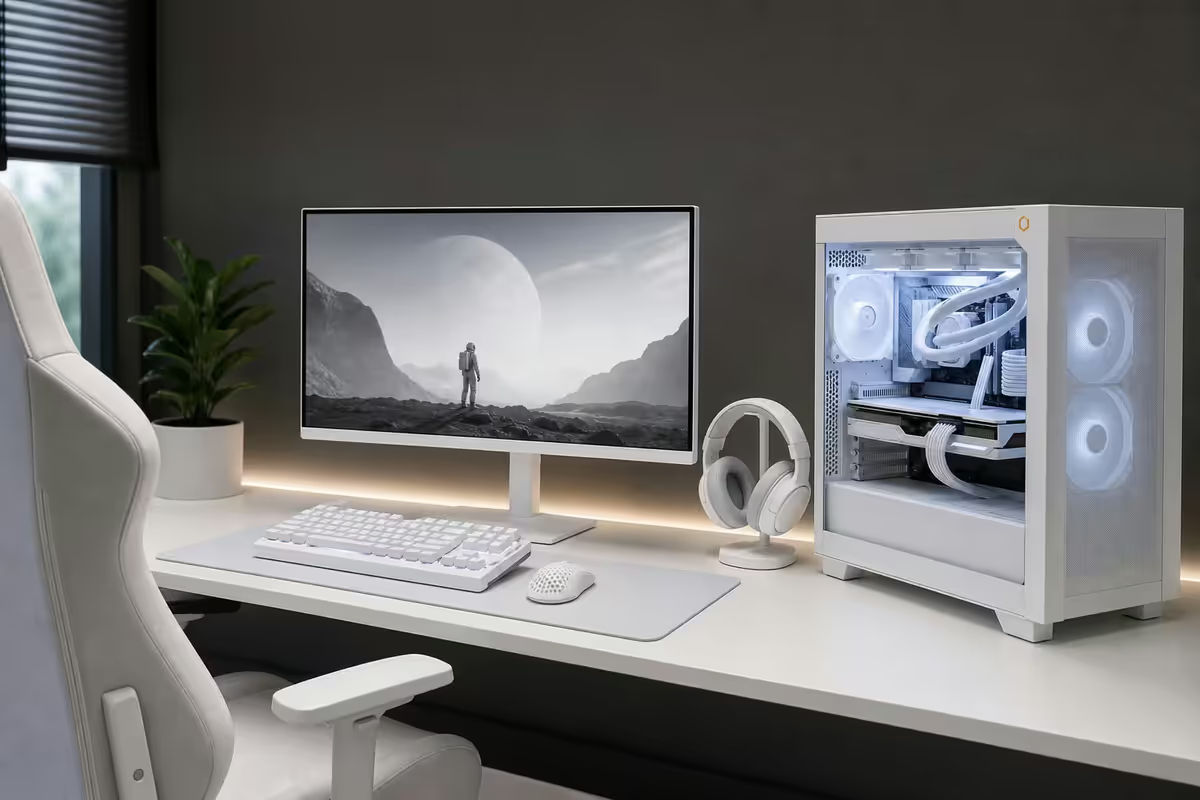
The discipline of white-on-white
An all-white setup is the hardest tonal exercise in PC building. Three white finishes that look identical in a product photo can sit next to each other in a tempered-glass case and read as three different colours. The reason: white doesn't exist as a colour, only as a reflection. Different plastics, different powder coats, different anodised finishes pick up the LED spill, the ambient room light and any RGB bleed differently.
There are three workable tone families in 2026:
- Cool-white (slight blue undertone) — Lian Li O11 series, ASUS ROG Strix-A white motherboards, Corsair iCUE LINK 3500X, MSI MPG Sekira White.
- Warm-white (cream / ivory undertone) — NZXT H series Flow whites, Kingston Fury Renegade White RAM, Logitech G Pro X Superlight White, most Be Quiet Pure Base whites.
- Pearl-grey (the safe middle) — NVIDIA Founders Edition shrouds, ASUS TUF Gaming White, Razer Quartz line, Cooler Master MasterFrame whites.
The most common mistake is mixing tones across hero pieces. Cool-white Lian Li O11 + warm-white NZXT GPU shroud = visible contrast under any RGB lighting. Pick a family. Stick to it. Verify with in-store side-by-side photography if at all possible — product page photos lie.
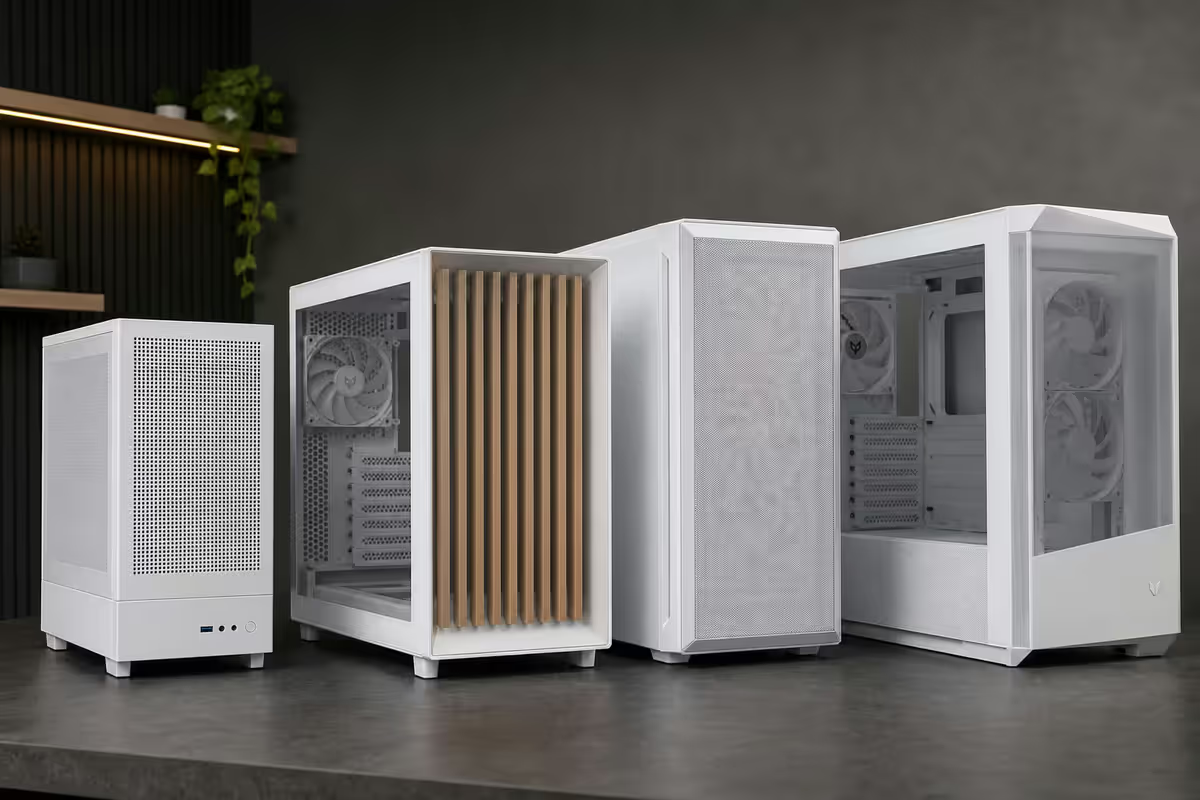
White PC case picks
The case is the largest single white surface in the build — it sets the tone family for everything else. Three cases dominate the SA white-build market in 2026:
| Case | Best for | SA price |
|---|---|---|
| Lian Li O11 Vision White | Showcase glass-front build | R4,800-R5,500 |
| Lian Li O11 Dynamic EVO Snow White | Cult-favourite dual-chamber | R3,500-R4,200 |
| NZXT H7 Flow White | Airflow-first thermal build | R3,200-R3,800 |
| Corsair iCUE LINK 3500X White | Tool-less, RGB-heavy | R3,800-R4,500 |
| ASUS ROG Hyperion GR701 White | EATX, no compromises | R7,500-R8,800 |
| Phanteks NV5 White | Mesh-front showcase | R3,500-R4,200 |
| Cooler Master HAF 700 Berserker | XL-ATX with white panels | R6,500-R7,500 |
The Lian Li O11 Vision White remains the showcase tower of choice — three glass panels (front, top, side), proper internal lighting and a finish that reads as architectural rather than gamer. It's cool-white, so plan the GPU and RAM around that.
NZXT H7 Flow White is the warm-white pick — better airflow than the Lian Li, cleaner cable management compartment, and the NZXT signed white finish matches their AIOs (Kraken Elite) and fans perfectly. The trade-off is less glass on display.
GPU & motherboard — the hardest pieces
White GPUs are the limiting factor in 99% of white builds. There are four options:
- NVIDIA Founders Edition — RTX 4080 Super, 4090, 5080 and 5090. Silver-white aluminium shroud, no plastic, no yellowing. Pearl-grey tone family. At MSRP they're the cleanest option, but SA stock is rare and resellers add a premium.
- ASUS ROG Strix White Edition — full-cover plastic shroud, cool-white. Premium R1,500-R2,500 over the standard Strix. The RGB ROG logo on top glows beautifully against the white.
- NZXT signed cards (collab with PNY) — warm-white, perfect tone match for an NZXT H7 build.
- MSI Suprim White / ASUS TUF White / Gigabyte Aero White — varying quality of white finish. The MSI Suprim is closer to pearl-grey, the TUF is closer to warm-white.
For motherboards: the white pickings are slim. ASUS ROG Strix B650-A White (AM5) and ROG Strix Z890-A White (LGA 1851) cover Intel and AMD. ASUS Prime A series in white covers entry-level. MSI MAG B650M Mortar White exists for mATX. AsRock and Gigabyte have minimal white SKUs — plan around ASUS.
White RAM, AIO and cables
White RAM
Four DDR5 white kits dominate SA stock in 2026:
- Corsair Vengeance RGB White DDR5 (R2,200-R2,800 for 32GB CL36) — cool-white. Pairs perfectly with Lian Li and ASUS ROG Strix-A white motherboards.
- Kingston Fury Renegade White DDR5 (R2,400-R3,000) — warm-white. Pairs with NZXT and ASUS Prime A whites.
- G.Skill Trident Z5 RGB White (R2,800-R3,400) — cool-white, the tall heat-spreader option for premium builds.
- Corsair Vengeance LPX White (DDR5, R2,000-R2,400) — non-RGB, lowest profile, best for showcase builds where the RAM should disappear behind the AIO radiator.
White AIO
The AIO sits across the top of the case where it's most visible. Tone-match is critical.
- NZXT Kraken Elite 360 White (R6,500-R7,500) — warm-white, LCD pump screen, the NZXT match.
- Corsair iCUE LINK H150i RGB White (R5,500-R6,500) — cool-white, daisy-chain cable system reduces clutter.
- Lian Li Galahad II Trinity White (R4,800-R5,500) — cool-white, the value pick.
- Thermal Right Frozen Magic White (R3,200-R3,800) — pearl-grey, the budget option.
White cables
CableMod Pro ModMesh White custom kits (R1,800-R2,800 imported from Yuppiechef or similar) and Lian Li Strimer Plus V2 White RGB cables (R900-R1,400) transform a build's visual coherence. Budget option: white paracord sleeving DIY kits (R600-R900) over stock PSU cables — labour-intensive but cheaper.
Premium PSUs in white (Corsair SF Platinum White, NZXT C V2 White, be quiet! Pure Power 12 M White) include factory white cables that work for entry-level white builds without the CableMod upgrade.
White peripherals — keyboard, mouse, headset, pad
| Category | Pick | SA price |
|---|---|---|
| Mechanical keyboard | Keychron Q1 Pro White or Logitech G Pro X TKL White | R3,200-R5,800 |
| Gaming mouse | Logitech G Pro X Superlight 2 White or Razer Viper V3 Pro White | R3,500-R4,200 |
| Wireless headset | SteelSeries Arctis Nova 7 White or Logitech G Pro X 2 White | R3,800-R5,500 |
| Microphone | Shure MV7+ White or HyperX QuadCast White | R2,800-R6,500 |
| Mousepad (XL) | Razer Strider Quartz or Logitech G840 White | R650-R950 |
| USB hub | Anker PowerExpand 7-in-1 White | R1,200-R1,500 |
| Webcam | Logitech MX Brio White or Razer Kiyo Pro Ultra | R3,200-R5,500 |
Monitor, desk and the room
White gaming monitors
White monitors are still rarer than the rest of the white peripheral category. The thin bezel hides the front-panel tone mismatch, but the stand or boom-arm is the give-away. Top SA picks for 2026:
- LG UltraGear 27GS75Q-W — 1440p 180Hz IPS white edition, R7,500-R8,500. The mainstream pick.
- Samsung Odyssey G7 White — 1440p 240Hz curved, R12,000-R14,000. Aggressive curved aesthetic.
- ASUS ROG Swift OLED PG27AQDP White — 1440p 480Hz OLED, R18,000+. The flagship.
- Cooler Master Tempest GP27Q Mini-LED White — 1440p 165Hz Mini-LED, R10,500. HDR-focused.
Monitor arm: ditch the white stand entirely with an ErgoTech LX White or NB North Bayou H80 White monitor arm (R800-R1,800). Clamps to the back of the desk, frees up surface space, and removes the most common tone-mismatch point.
Desk surface
A white desk in a white build can read as overwhelming. Most experienced white-build owners go for a light oak or maple wooden desktop with white frame (Secretlab Magnus Pro mat in white, Linsoul XK600 white-frame desk, Cooler Master GD160 ARGB with light-wood top). The warm wood balances the cool tech, and skin oils don't show on wood the way they do on white melamine.
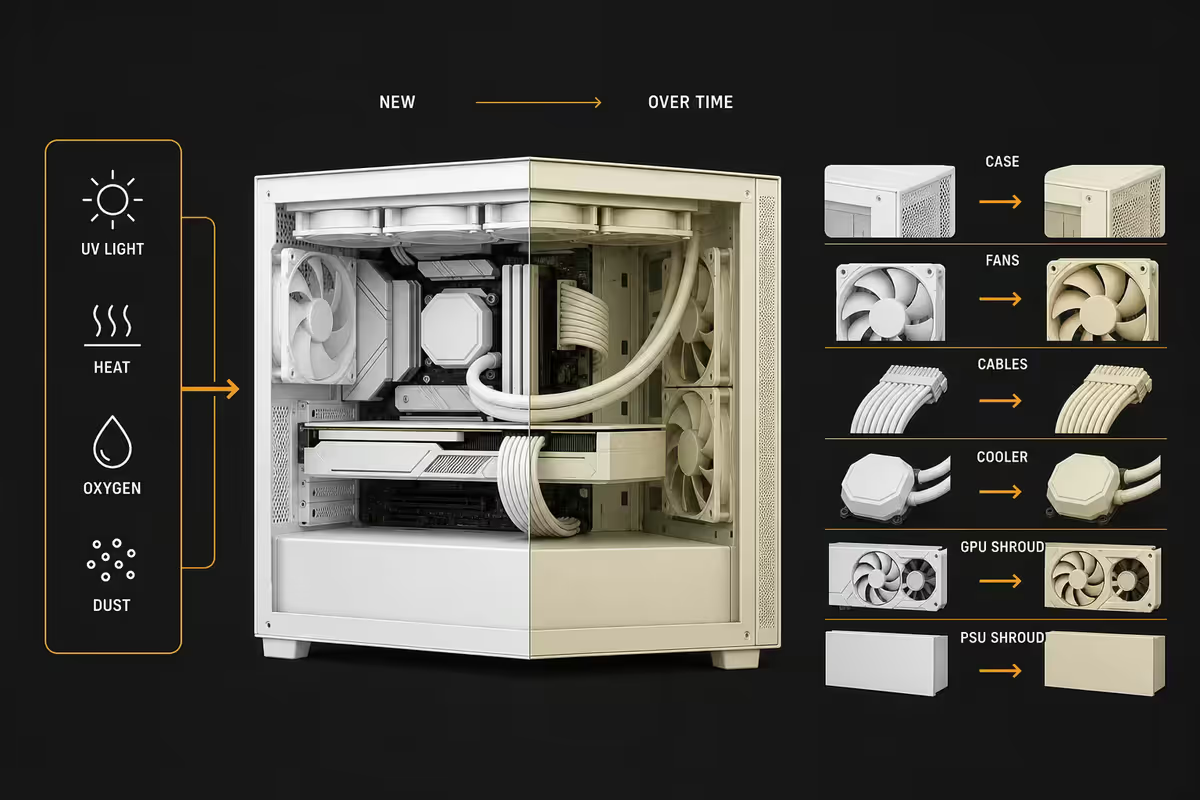
The yellowing reality
Every white PC build yellows over time. The questions are: which parts, how fast, and what to do about it.
What yellows fast:
- ABS keyboard keycaps (12-18 months of sun exposure).
- Headset earcup leatherette (18-24 months of skin contact).
- White cable braiding on cheap PSUs (24-36 months).
- Entry-level GPU plastic shrouds (24-36 months under UV).
- White mousepad surface (depends on hand oils and washing).
What barely yellows:
- Powder-coated steel cases (Lian Li, NZXT, premium ASUS) — 5+ years.
- Anodised aluminium GPU shrouds (NVIDIA Founders Edition) — 5+ years.
- PBT-doubleshot keycap sets — 5+ years.
- Glass panels — never.
- White silicone cable braiding (CableMod Pro) — 4+ years.
Strategies that work: keep the build out of direct sunlight (the single biggest factor), choose PBT over ABS plastics where possible, buy replaceable parts (keycaps, earpads, mousepad surface) you can refresh every 18-24 months, and document the build the day you finish it so you have reference photos when comparing years later.
Key takeaways
- Pick one tone family — cool-white, warm-white or pearl-grey — before sourcing any component.
- Plan around the GPU first. White GPUs are the limiting factor in almost every build — wait for the right one.
- Powder-coated steel and aluminium don't yellow. ABS plastic does — keep ABS keycaps and earcups out of the sun.
- White cables (CableMod Pro or Lian Li Strimer) transform visual coherence — budget R1,500-R2,800 if you can.
- SA's high-UV climate yellows plastics faster. UV-blocking window film is the highest-ROI long-term accessory.
Frequently asked questions
What is an all-white gaming setup?
A tonal build where every visible component uses white or pearl-grey finishes — case, motherboard, GPU, RAM, AIO, cables, peripherals, monitor and desk. The discipline is in matching shades and tracking yellowing over time.What is the best white PC case?
Lian Li O11 Vision White (R4,800-R5,500) for showcase, NZXT H7 Flow White (R3,200-R3,800) for airflow, Corsair iCUE LINK 3500X White (R3,800-R4,500) for tool-less builds. All widely stocked in SA.Are white GPUs more expensive than black?
Usually R500-R1,500 more. NVIDIA Founders Editions are no premium when available. ASUS ROG Strix White, NZXT signed cards and MSI Suprim White command an aesthetic premium for tone-matching.Will my white PC yellow over time?
Yes — ABS plastics develop yellow tint over 2-4 years from UV and heat. Powder-coated steel and anodised aluminium resist this. Keep out of direct sunlight, choose PBT keycaps, replace earpads every 18-24 months.What white RAM should I buy?
Corsair Vengeance RGB White DDR5 for cool-white builds, Kingston Fury Renegade White for warm-white, G.Skill Trident Z5 RGB White for premium. Match to your case tone family.How do I match all the white tones?
Pick one of three tone families: cool-white (Lian Li, ASUS ROG-A), warm-white (NZXT, Kingston Fury), or pearl-grey (NVIDIA FE, Razer). Don't mix families — that's the most common mistake.What is the best white gaming monitor?
LG UltraGear 27GS75Q-W (1440p 180Hz, R7,500-R8,500), Samsung Odyssey G7 White (1440p 240Hz curved, R12,000-R14,000), ASUS ROG Swift OLED PG27AQDP White (480Hz OLED, R18,000+). Consider a white monitor arm to hide stand mismatches.Are white cables worth the upgrade?
For a showcase build, yes. CableMod Pro White (R1,800-R2,800) or Lian Li Strimer Plus V2 White (R900-R1,400) transform visual coherence. Budget DIY paracord sleeves at R600-R900 also work.
Get the Evetech app
Exclusive app-only prices, daily flash sales, and free delivery on orders over R4,000 — download the app and start saving.