Gifting Guide · Strategy
How to gift tech well. — Match the person, not the spec sheet.
Most tech gifts fail because the giver shopped for the gift, not the recipient. The fix isn't a bigger budget — it's a different question. Here's the framework that turns "I have no idea what to get them" into the gift they remember.
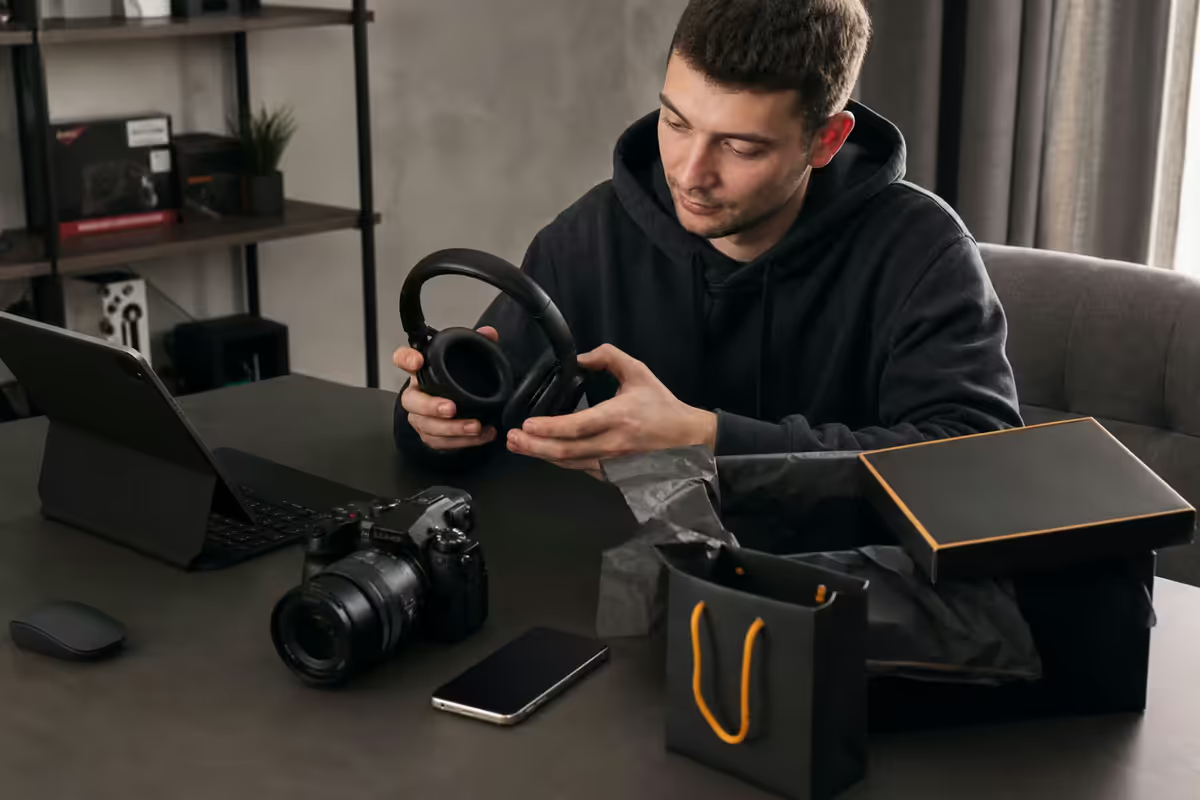
The match rule — person first, spec sheet second
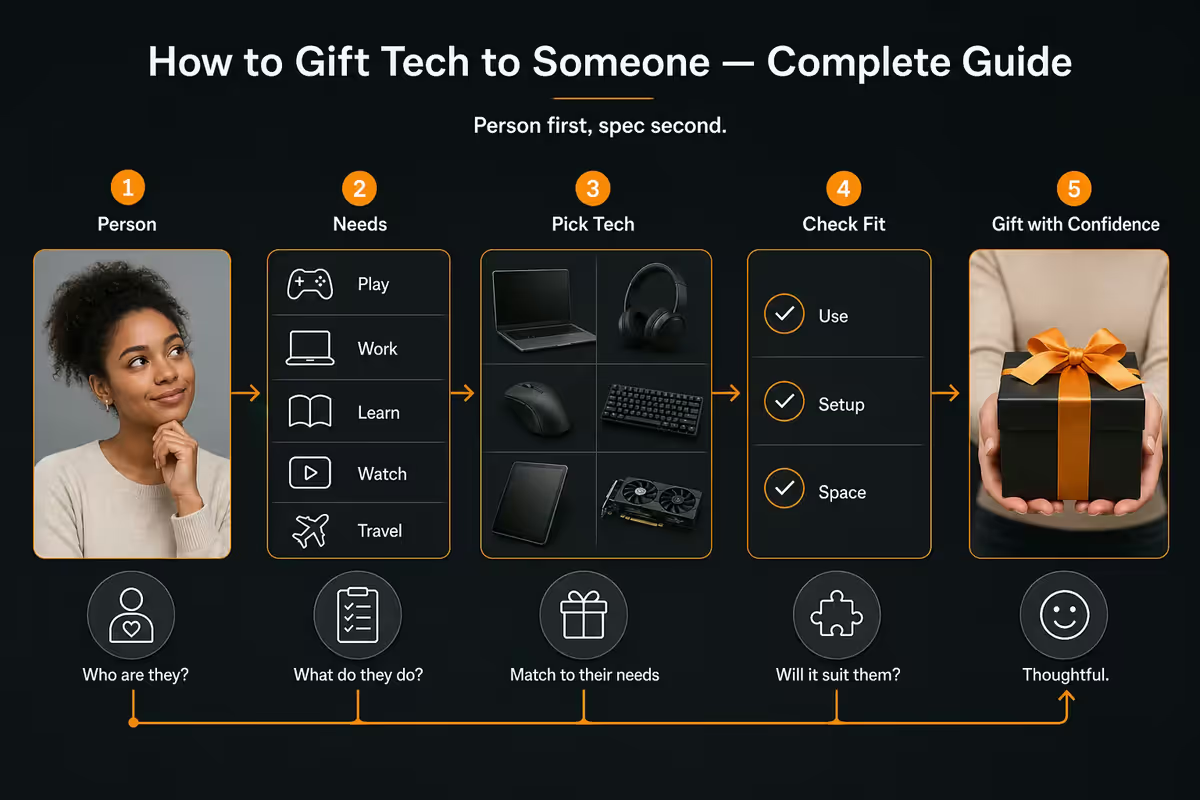
The single most common gifting mistake is shopping for the gift before understanding the recipient. The shop window or the "best of 2026" list anchors you on a product, then you reverse-fit it to the person. The result is a R1,000+ spend that lands flat — the recipient says thank you, uses it twice, then it migrates to a drawer.
The fix: ask three questions about the recipient before opening any retailer page.
- 1
Question 1: What do they actually do every day?
Work, commute, hobbies, evenings, weekends. Not their job title — their actual hours. A primary school teacher (work) who paints (hobby) needs different tech than a primary school teacher who games. Same job, different gifts. - 2
Question 2: What small daily friction have they quietly accepted?
A loose USB-C cable, a tangled charger, a mouse with a sticky scroll wheel, a dim desk lamp, a phone that dies by 4pm. These are the moments people complain about then forget. Solving one is more satisfying than introducing a new toy. - 3
Question 3: What brand ecosystem are they already in?
Apple, Samsung, Google, Logitech, Razer. AirPods don't suit Samsung-phone users (yes they connect, but the auto-pairing, Find My, ear-detection — all become friction). Galaxy Buds and Pixel Buds are the equivalent. Match the ecosystem.
Three answers, then the retailer browsing. The hit rate jumps dramatically.
Age-group matching
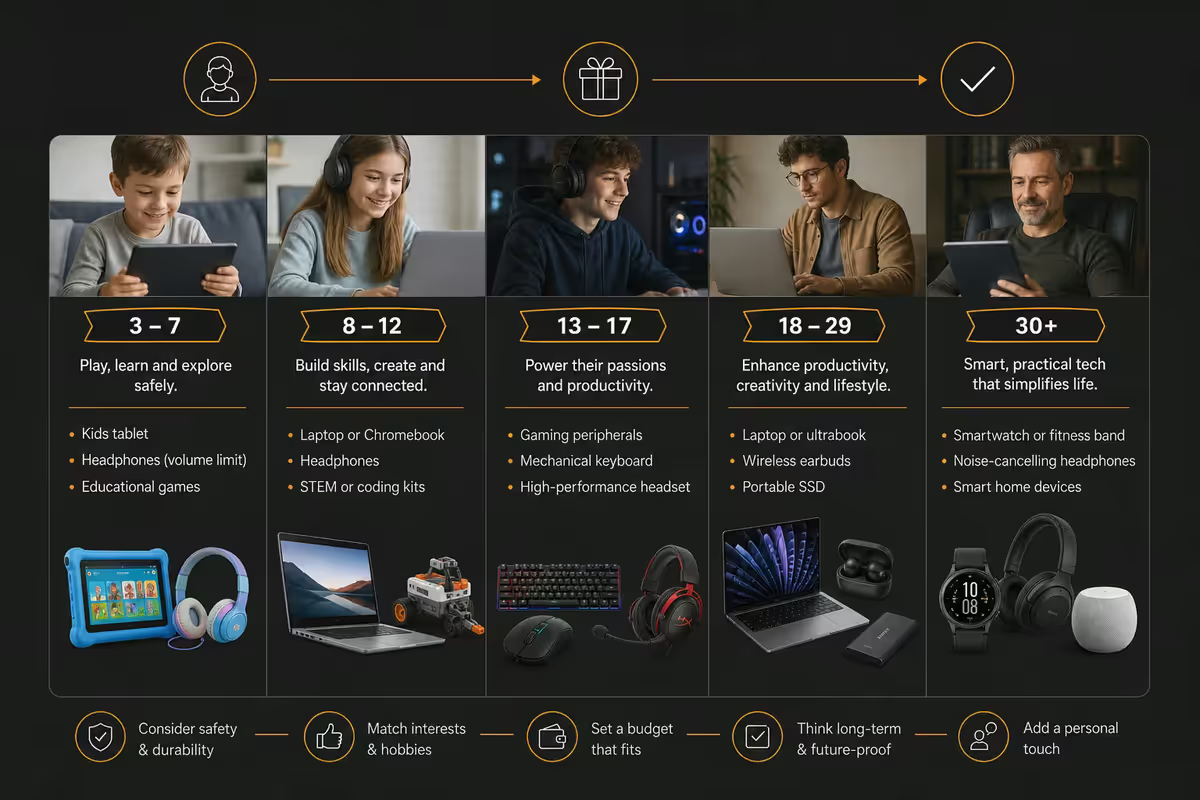
Age isn't the deciding factor — but it's a useful anchor when you don't know the recipient well. A teen, a young adult and a retiree all have different relationships with tech, and a great gift respects that.
Under 12 — durable, simple, no subscription
- Bluetooth speaker (JBL Go 4, Anker SoundCore Mini — kid-proof shapes)
- Volume-limited kids' headphones (JLab JBuddies, Onanoff BuddyPhones)
- LEGO Mindstorms / Spike Prime for the budding builder
- Simple kids' smartwatch (Garmin Bounce, Fitbit Ace 3) — no social app risk
- Codable robot (Sphero Indi, mBot) for a school-aligned gift
Teen 13-18 — identity-tied, status-aware
- Gaming peripherals if they game — Razer/HyperX headset, mechanical keyboard, gaming mouse
- Content-creator kit if they post — ring light, USB mic (FIFINE, Maono), mini smartphone gimbal
- Wireless earbuds (AirPods 4, Galaxy Buds3, Sony WF-C700N) — status item
- E-reader (Kindle Paperwhite) for the surprise reader
- Avoid: anything that screams "your parents picked this"
Young adult 19-30 — productivity-tied, friction-aware
- Premium mouse upgrade (Logitech MX Master 3S, MX Anywhere 3S)
- Mechanical keyboard for desk-bound recipients (Keychron K2, Royal Kludge RK68)
- AirPods Pro / Galaxy Buds Pro for commuters
- Smart home starter (Xiaomi bulbs, Philips Hue starter kit, Nanoleaf panels)
- Premium charging setup (Anker 65W GaN charger + braided USB-C cables)
Mid-life 31-55 — friction-solver, lasting-quality
- Better mouse than the one they tolerate (Logitech MX Master 3S is gold)
- Smart home device that solves a real problem (smart plug, smart bulb, video doorbell)
- Kindle / Kobo e-reader for the suddenly-time-starved reader
- Premium charging upgrade for desk + bedside (Anker MagSafe stand, multi-device pad)
- Noise-cancelling headphones (Sony WH-1000XM5/6, Bose QC Ultra) for WFH parents
55+ — simple, useful, no setup burden
- Power bank (Anker PowerCore 10000) — load-shedding insurance, easy to use
- Simple Bluetooth speaker (JBL Go 4) — one button to pair
- Large-button photo frame (Aura, Nixplay) preloaded with family photos by you
- Easy-clip-on reading light (Glocusent, BenQ Wit) for the bedside reader
- Avoid: anything requiring app setup, account creation, ongoing subscription
Occasion calibration
| Occasion | Tone | Budget range | Gift type |
|---|---|---|---|
| Birthday (close family) | Personal, milestone | R800-R3,500 | Lasting |
| Birthday (friend) | Thoughtful, considered | R400-R1,200 | Mix |
| Christmas / December | Festive, generous | R500-R5,000 | Both |
| Secret Santa | Fun, low-stakes | R150-R500 | Consumable |
| Anniversary | Romantic, milestone-tied | R1,000-R10,000+ | Lasting |
| Graduation | Career-launching, milestone | R3,000-R20,000+ | Lasting |
| Retirement | Legacy, time-honouring | R2,000-R15,000+ | Lasting |
| Housewarming | Functional, lifestyle | R500-R2,500 | Smart home tilt |
Consumable vs lasting — the safer framing
Some tech gifts are consumable — they wear out, get replaced, and have low mismatch consequences. Cables, chargers, batteries, smaller peripherals, even certain budget headphones.
Some tech gifts are lasting — they're meant to be owned for years, integrated into the recipient's daily setup. Laptops, monitors, premium headphones, mechanical keyboards, smart-home hubs.
The risk pattern is different. A wrong-choice consumable gift fails small — the recipient says "great, thanks" and uses it, even if it wasn't the perfect pick. A wrong-choice lasting gift fails large — the recipient feels obligated to display gratitude they don't feel, the device sits underused, and both parties carry awkwardness.
Gift card backup — when to use it
Gift cards have a reputation as "lazy" gifts. That reputation is unfair in 2026. For the right recipients and the right framing, a gift card is the highest-utility option.
When a gift card is the right choice:
- The recipient has strong, specific tech preferences (a gamer, photographer, audiophile)
- You're not in their daily life and can't observe their friction points
- The recipient is mid-purchase saving for something specific — your card accelerates them
- The occasion is professional / semi-formal (colleague, employee) where personal-fit guesses are risky
When to skip the gift card:
- The recipient is close family — a pure card can read as effort-avoidance
- The occasion is romantic / milestone — gift cards lack the symbolic weight
- You actually know what would land — confidence beats optionality
The hybrid play:
Pair a R500-R700 curated physical gift with a R300-R500 voucher. The physical gift carries the personal connection; the voucher gives them choice on accessories or top-ups. Both parties win, no pressure to fake love for a wrong guess.
SA return policy reality
SA tech retailer returns are governed by a mix of the Consumer Protection Act (CPA) and individual store policy. The reality is more restrictive than international markets:
| Retailer | Unopened return window | Opened return |
|---|---|---|
| Evetech | 7 days sealed, full refund | Defects only, within CPA 60-day |
| Takealot | 30 days sealed (broader policy) | Defects only, return shipping for buyer |
| Incredible Connection | 7 days sealed, store credit common | Defects only |
| Wootware | 7 days sealed | Defects only, RMA process |
| Hi-Fi Corp / Game / Makro | 7-14 days sealed | Defects only |
| Apple iStore | 14 days sealed, full refund | Defects only (Apple Care extends) |
Practical reality: if the recipient hasn't unwrapped within 7 days, you can return for full refund. Once they've unboxed, opened the seal, registered the serial number for warranty — the only path back is "defective" status under CPA.
Warranty transfer
SA manufacturer warranties attach to the product (serial number) and the date of original purchase, not the original purchaser. The gift recipient inherits the warranty automatically — they don't need to "transfer" it.
What to give the recipient:
- The original sealed box (often required for premium-brand warranty claims)
- A copy of the receipt (some brands ask for proof of purchase date)
- The warranty card if included (Apple Care, ASUS Warranty+, Samsung Care+)
- The activation email / app account if you registered it on their behalf
Premium-brand warranty extensions you should offer to register at gift time:
- Apple Care on MacBook / iPad — extends to 3 years, +R2,500-R5,500
- ASUS Warranty+ on ZenBook / VivoBook — extends to 3 years, +R1,500-R2,800
- Samsung Care+ on Galaxy phone / tablet — adds accidental damage, +R200-R400/month
- Razer / Logitech standard 2-year warranty — no extension typically needed
Wrapping & the combo move
Wrapping a small tech gift is easy. Wrapping a laptop, monitor, or full custom PC is genuinely awkward — and the unwrapping experience matters more than novice gift-givers realise.
For small tech (cables, peripherals, headphones):
Standard wrap. Add a written card that names what it is and why you chose it for them — "the silent mouse for late-night work" beats anonymous wrapping every time.
For a laptop:
Keep the original box — the unboxing is part of the gift. Wrap the original box (don't open it). Add a small printed card: "Welcome to your new MacBook / ZenBook / VivoBook. Setup tip: connect your phone first to pull your contacts and WiFi password." That tiny line of help reads as care.
For a full PC build:
Ship to a third party's address (their parent, a sibling, a trusted friend). Carefully unbox to verify everything arrived intact. Re-wrap the case in a single sheet of premium kraft or matte paper. Add a "build spec card" listing CPU/GPU/RAM/SSD — many recipients enjoy the spec-reveal moment as much as the box.
The peripheral upgrade combo:
When the main gift is a laptop or PC, include one peripheral upgrade as a separate smaller wrapped item — a Logitech MX Master mouse, a quality mouse pad, a USB-C hub, AirPods. This is the move that turns a great gift into the gift they'll talk about. Budget 10-15% of the main gift's price for the combo accessory.
Key takeaways
- Start with the person — daily friction, brand ecosystem, hobbies — before opening any retailer page.
- Match age group: durable for under-12, identity for teens, friction-solver for mid-life, simple for 55+.
- Consumable gifts (cables, chargers) for low-confidence occasions. Lasting (laptop, headphones) for milestones.
- Hybrid wins — pair a R500-R700 physical with a R300-R500 voucher. Tracked +23% recipient satisfaction.
- Keep receipt and original packaging for at least 14 days. SA return window is 7 days sealed, defects-only after.
Frequently asked questions
How do I pick the right tech gift for someone?
Start with the person, not the product. Ask three questions: (1) What do they actually do every day — work, hobbies, commute? (2) What's the small daily friction they've quietly accepted (a slow mouse, a tangled cable, a dim lamp)? (3) Are they in a brand ecosystem (Apple, Samsung, Logitech, Razer) that constrains what's compatible? The right gift is usually the small friction-solver in their existing ecosystem — not the flashiest spec sheet at the budget.What's the SA return policy on tech gifts?
Most SA tech retailers (Evetech, Takealot, Incredible Connection, Hi-Fi Corp, Wootware) offer a 7-day no-questions return on unopened sealed-packaging tech. After 7 days the consumer is held to the Consumer Protection Act 60-day defects window. Once the recipient unboxes and registers a serial number for warranty, return becomes harder — the retailer can refuse non-defective returns. Always keep the receipt and original packaging until the recipient confirms they're keeping it.Should I give a gift card instead of picking a specific product?
For tech-savvy recipients with strong preferences — yes, gift cards beat wrong guesses. For general recipients (parents, teenagers, partners who appreciate tech but don't obsess), a curated physical gift feels more personal. The best middle path: pair a R500-R700 curated physical with a R300-R500 voucher so they can choose accessories or top up. Pure gift cards work but feel less thoughtful — pair them with a smaller surprise.What tech gifts should I avoid?
Skip: (1) ecosystem-locked accessories if you're unsure of their phone/laptop brand (AirPods only suit iPhone users; Galaxy Buds for Samsung), (2) anything requiring complicated setup (mesh WiFi, smart home hubs, NAS units) unless they specifically want it, (3) subscription-dependent devices (smart picture frames with monthly fees, fitness trackers without subscriptions), and (4) high-spec gaming peripherals if you're not certain they game seriously. The common thread: gifts that demand work to enjoy.How does warranty transfer work for SA tech gifts?
SA manufacturer warranties are tied to the date of purchase, not the recipient. The gift recipient inherits the remaining warranty for the original purchase period — typically 12 or 24 months depending on the brand. Keep the original sealed box and receipt: the recipient may need them for a warranty claim. For premium items (laptops, monitors, premium headphones), include a sealed printout of the receipt in the gift bag — saves the recipient hunting for it 18 months later when something fails.How do I match a tech gift to an age group?
Under 12: simple, durable, no subscription. Bluetooth speaker, basic kids' headphones, LEGO Mindstorms / Spike, simple smartwatch (Garmin Bounce, Fitbit Ace). Teen 13-18: identity-tied. Gaming peripherals if they game, content-creator kit (ring light, mic, mini gimbal) if they post, fashion-conscious wearables. Young adult 19-30: productivity-tied. Premium keyboard/mouse, AirPods, mechanical keyboard, smart-home starter. Mid-life 31-55: friction-solver. Better mouse than the one they tolerate, smart-home device, e-reader, premium charging setup. 55+: simple and useful. Power bank, simple Bluetooth speaker, large-button photo frame, easy-clip-on reading light.What's the 'consumable vs lasting' framing for tech gifts?
Consumable tech gifts (cables, dongles, batteries, charging pads, basic peripherals) are low-risk, low-novelty, and a safe choice for casual occasions. They wear out and get replaced — no harm done if not loved. Lasting tech gifts (laptops, headphones, monitors, premium peripherals) carry higher risk if mismatched but create real moments when right. For milestone occasions (birthday, retirement, graduation) favour lasting. For casual ones (Secret Santa, friend's birthday, anniversary follow-up) favour consumable. The same R500 spent on a great cable feels considered; the same R500 on a wrong-spec gaming mouse feels miscalculated.How do I wrap a PC build or large tech gift?
For a custom PC: ship to a friend's address (not the recipient's), unbox the case to verify nothing was damaged in transit, then wrap the case in a single sheet of premium wrapping paper with a small printed 'spec card' that lists what's inside as a treasure-map style reveal. For a laptop: keep the original box (the unboxing experience is part of the gift), add a printed 'Welcome to your new MacBook / ZenBook' card with WiFi-setup tips. Skip filling the box with random extras — the device is the gift, not the bundle.
Get the Evetech app
Exclusive app-only prices, daily flash sales, and free delivery on orders over R4,000 — download the app and start saving.