Resolution Decoder · Glossary
What is resolution? — 720p, 1080p, 1440p, 4K — what each number means.
Pixel counts, PPI maths, the GPU cost of each step up — the resolution shorthand decoded once and properly, so the next monitor you buy actually pairs with what's driving it.
- 720p → 4K
- 4 tiers
- load per step
- 2x
- 1440p / 27"
- 109 PPI
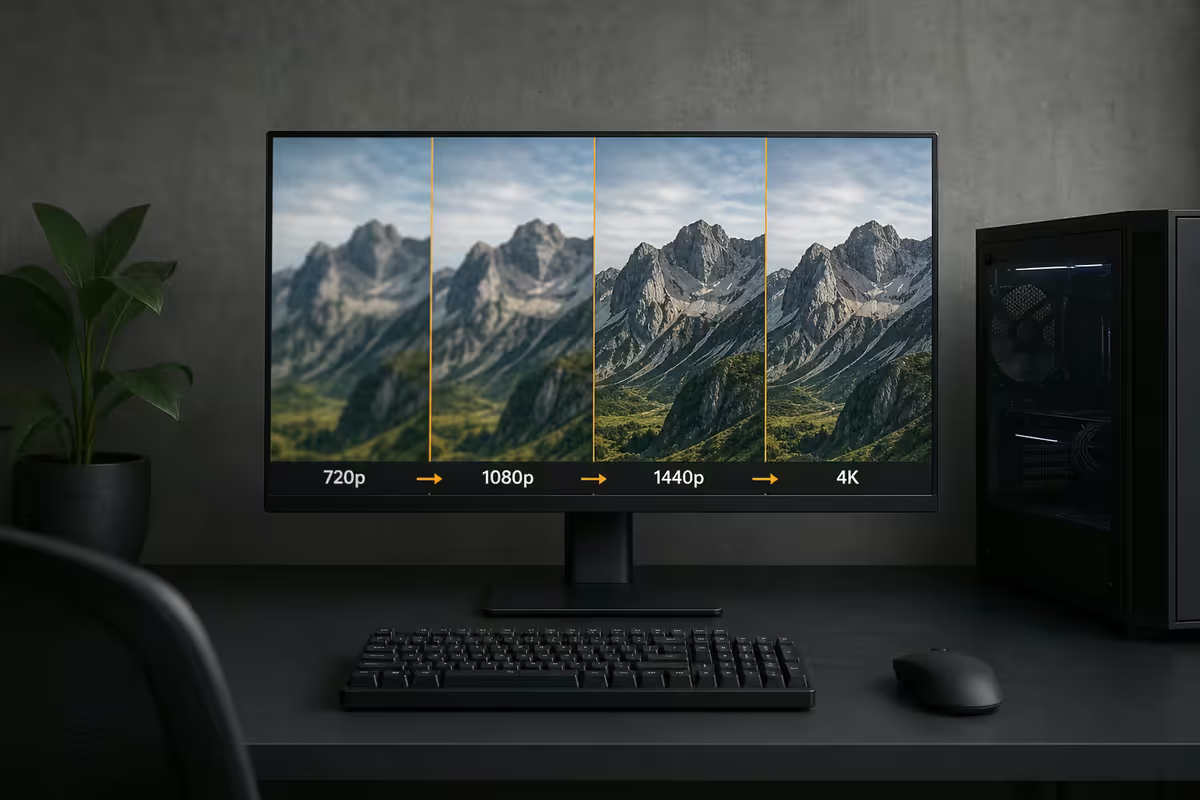
What "resolution" actually means
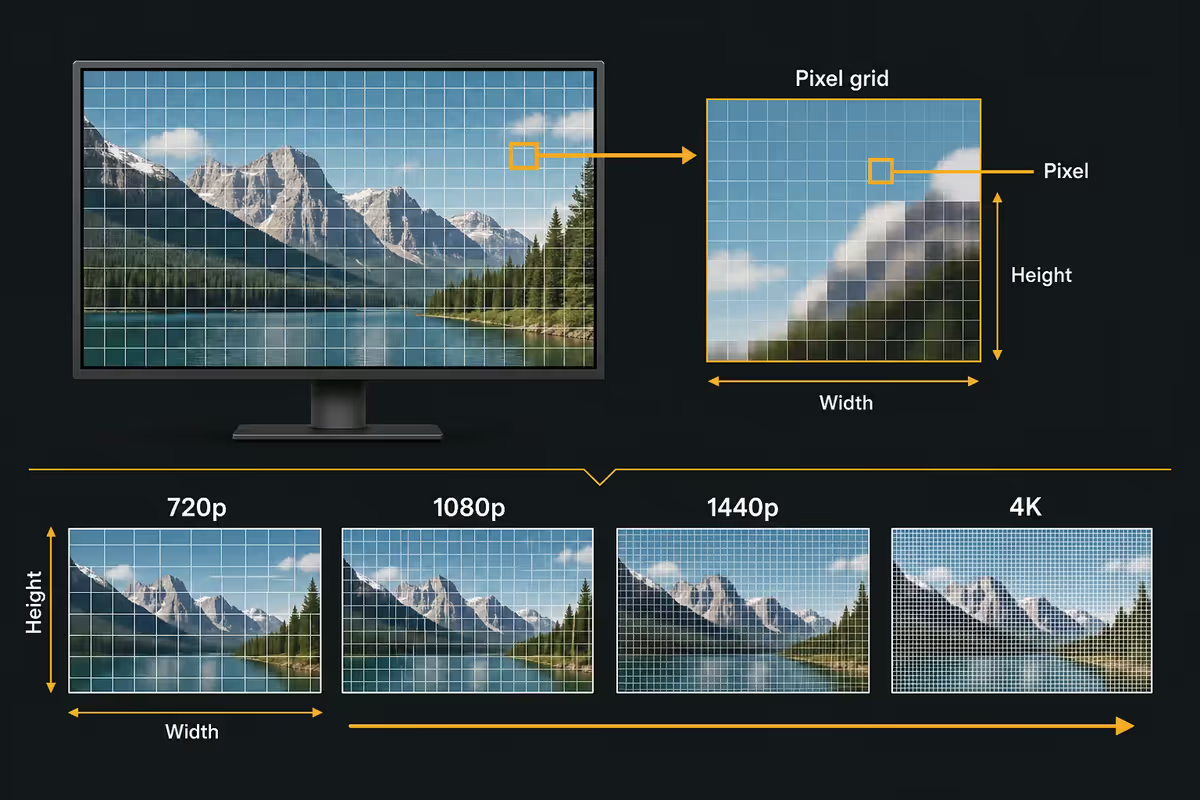
Resolution is the number of pixels a display contains — horizontal pixels by vertical pixels. More pixels means more detail can be displayed. The shorthand (720p, 1080p, 1440p, 4K) refers to either the vertical pixel count or the approximate horizontal pixel count, depending on the era.
Here are the four standard consumer resolutions in plain numbers:
| Name | Pixel dimensions | Total pixels |
|---|---|---|
| 720p · HD | 1,280 × 720 | 921,600 (~0.9 MP) |
| 1080p · Full HD (FHD) | 1,920 × 1,080 | 2,073,600 (~2.1 MP) |
| 1440p · QHD / 2K | 2,560 × 1,440 | 3,686,400 (~3.7 MP) |
| 4K · UHD | 3,840 × 2,160 | 8,294,400 (~8.3 MP) |
| 8K · UHD-2 | 7,680 × 4,320 | 33,177,600 (~33 MP) |
Note on "4K" vs "Cinema 4K": consumer 4K is 3,840 × 2,160. True cinema 4K (DCI 4K) is 4,096 × 2,160. The two terms get used interchangeably but cinema 4K is a slightly wider aspect for film production. For monitors and TVs, "4K" always means 3,840 × 2,160.
PPI — resolution × screen size = sharpness
Pixel count alone doesn't tell you how sharp a screen looks. The same number of pixels stretched over a bigger screen looks softer. The metric that matters is PPI — pixels per inch — calculated as the diagonal pixel count divided by the diagonal screen size.
Here's how the same resolution looks at different sizes:
| Display | 1080p PPI | 1440p PPI | 4K PPI |
|---|---|---|---|
| 24 inch | 92 | 122 | 184 |
| 27 inch | 82 | 109 | 163 |
| 32 inch | 69 | 92 | 138 |
| 34 inch ultrawide | — | 109 | — |
| 49 inch ultrawide | — | 108 | — |
| 55 inch TV | 40 | 54 | 80 |
| 15.6 inch laptop | 141 | 188 | 282 |
The PPI rules of thumb:
- Below 85 PPI — text feels soft, pixels start to be individually visible at normal viewing distance.
- 90-110 PPI — the comfortable everyday sweet spot. Text crisp, images detailed, no individual pixels visible.
- 110-160 PPI — premium tier. Print-grade text sharpness, fine image detail.
- Above 200 PPI — phone-grade or 4K laptop tier. Improvements over 150 PPI are hard to see at normal distance.
Scaling sweet spots — when to use 100%, 125%, 150%
High PPI displays solve sharpness but introduce a problem — at native resolution, UI elements (icons, text, buttons) become tiny. The solution is OS-level scaling, which renders the UI at a higher resolution but displays it at a virtual lower resolution.
The standard scaling settings:
- 27" 1440p: 100% scaling — native UI size is correct.
- 27" 4K: 150% scaling — equivalent workspace to 1440p with much sharper text.
- 32" 4K: 125% or 150% depending on preference — UI sized comfortably without crowding.
- 15-16" 4K laptop: 200% scaling required — otherwise UI elements are unreadable.
- 13-14" 4K laptop: 250-300% scaling — extreme.
Modern Windows and macOS both handle scaling well in 2026. Apps built for the last 5 years scale cleanly. A handful of legacy Windows applications still show blurry text at non-100% scaling, but this is rare. Windows handles integer scaling (100%, 200%) most cleanly; macOS handles fractional scaling (125%, 150%) more elegantly because of its different rendering pipeline.
GPU cost — what each resolution demands
For gaming, resolution is the single biggest driver of GPU requirements. Doubling pixels means doubling the work the GPU does for each frame, which means either bigger GPU or lower frame rate.
Here's the rough 2026 baseline GPU requirement for AAA gaming at high settings and 60 FPS:
| Resolution | NVIDIA | AMD |
|---|---|---|
| 1080p · 60 FPS high | RTX 5060 · RTX 4060 | RX 8600 · RX 7600 |
| 1080p · 144+ FPS competitive | RTX 5070 · RTX 4070 | RX 8700 · RX 7700 XT |
| 1440p · 60 FPS high | RTX 5070 · RTX 4070 | RX 8800 XT · RX 7800 XT |
| 1440p · 144 FPS high | RTX 5070 Ti · RTX 4070 Ti Super | RX 8800 XT · RX 7900 XT |
| 4K · 60 FPS high | RTX 5080 · RTX 4080 Super | RX 9800 XT · RX 7900 XTX |
| 4K · 120+ FPS path tracing | RTX 5090 | — |
The cost ratios in Rand: a 1080p capable GPU is R6,000-R9,000. A 1440p capable GPU is R12,000-R20,000. A 4K capable GPU is R28,000-R55,000. The pixel-doubling penalty shows up directly in your wallet.
1080p — the esports and budget tier
1080p is not dead in 2026. It remains the right choice for two specific use cases.
Competitive esports. Counter-Strike 2, Valorant, Rainbow Six Siege, Apex Legends and other competitive shooters benefit more from 240Hz+ refresh rates than from higher resolutions. Most pros play at 1080p 240-360Hz on 24-inch monitors. The pixel density is lower than ideal at this size, but reaction time matters more than visual fidelity for ranked play.
Budget gaming. A R10,000 PC with an RTX 5060 paired to a 1080p 144Hz monitor delivers a genuinely good experience in modern games. Pushing the same budget toward 1440p would require GPU cuts that hurt frame rates more than the resolution upgrade helps perception.
When 1080p hurts: for productivity (reading documents, browsing, editing), 24-27 inch 1080p shows blurry text. The screen real estate also feels constrained when running multiple apps side by side. For non-gaming work, step up to at least 1440p.
1440p — the 2026 mainstream sweet spot
1440p has become the new default monitor resolution for both gaming and productivity. Here's why it's such a strong middle ground:
- 27" 1440p delivers 109 PPI — sharp text and image detail, comfortable at typical desk viewing distances.
- Mid-range GPUs drive it at high refresh — an RTX 5070 produces 100-180 FPS in most modern titles at 1440p high.
- Content is widely available — YouTube and Netflix both stream native 1440p; gaming engines are tuned for it.
- Windows scaling defaults to 100% at 27" 1440p — no settings to fiddle with.
- Premium monitors (OLED, mini-LED, ultrawide variants) are widely available at 1440p with strong SA stock.
The 1440p ultrawide bonus. 34" 3,440 × 1,440 ultrawide monitors share the same vertical pixel count and PPI as 27" 1440p but add roughly 30% more horizontal screen for multitasking and immersive gaming. The GPU cost is also higher (roughly 30% more pixels to render). For productivity and single-player gaming, ultrawide 1440p is the upgrade from regular 1440p that arguably matters more than going to 4K.
4K — where it matters and where it doesn't
4K has been the marketing default since 2018 but the use case has narrowed as 1440p hardware caught up. Here's where 4K genuinely earns its place in 2026:
Where 4K wins
- 32-inch and larger monitors. At 32 inches, 1440p drops to 92 PPI — noticeably soft. 4K at 32 inches restores 138 PPI sharpness.
- 55-inch and larger TVs. At normal viewing distance, 4K resolution is visibly sharper than 1080p or 1440p on big TVs.
- Content creation. 4K editing workspace, photo work, design tools — more pixels means more workspace and finer detail.
- Productivity multitasking. A 4K monitor at 125% scaling gives you the workspace of two 1440p panels in one screen.
- Long-term future-proofing. 4K HDR content (Netflix, YouTube, Apple TV+) is the baseline for premium streaming.
Where 4K loses
- 27-inch monitors for gaming. PPI gain from 1440p to 4K at 27" is modest; GPU cost is 2.25x.
- Competitive esports. Frame rate trumps resolution. Pros don't play at 4K.
- Older or budget GPUs. Pairing a 4K monitor with an RTX 5060 means running modern games at 30-50 FPS or with aggressive DLSS upscaling.
- Battery-constrained laptops. 4K laptop screens drain battery 20-30% faster than 1440p equivalents.
8K — not consumer-ready yet
8K resolution (7,680 × 4,320 — 33 million pixels) is technically available in high-end TVs (Samsung QN800D, LG Z3, Sony Z8K) and a small number of professional monitors. For consumer use in 2026, it doesn't yet make sense:
- No native 8K content in mainstream streaming. Netflix, YouTube and Disney+ cap at 4K HDR. Some YouTube creators upload 8K but the audience is sparse.
- No console supports 8K output — PS5 Pro and Xbox Series X are 4K platforms.
- No GPU can drive games at native 8K at playable frame rates without aggressive upscaling — even an RTX 5090 struggles.
- Diminishing returns past 4K at most realistic viewing distances. At 7-8 feet from a 65" TV, the human eye can't resolve the difference between 4K and 8K.
- SA stock is rare — 8K TVs are R80,000+ and 8K monitors are niche professional purchases.
When 8K will matter: probably 2028-2030 when GPU generations catch up, streaming services start delivering 8K content, and consumer prices fall. For now, 4K is the realistic ceiling for consumer hardware.
Key takeaways
- Resolutions: 720p = 1,280×720, 1080p = 1,920×1,080, 1440p = 2,560×1,440, 4K = 3,840×2,160.
- Each step roughly doubles GPU load — 4K demands ~4x the GPU of 1080p.
- PPI sweet spot is 100-160 — 27" 1440p delivers 109 PPI, the everyday default.
- 1080p is the esports and budget tier — high refresh wins for competitive play.
- 1440p is the 2026 mainstream sweet spot for both gaming and productivity at 27".
- 4K shines at 32"+ monitors, 55"+ TVs and creators — overkill for 27" gaming.
- 8K is not yet consumer-ready — content, GPU, bandwidth all need to catch up.
Frequently asked questions
What does 1080p, 1440p, 4K actually mean?
These shorthand names refer to vertical pixel counts. 720p means 1,280 × 720 pixels (921,600 total). 1080p (Full HD) means 1,920 × 1,080 pixels (just over 2 million). 1440p (2K / QHD) means 2,560 × 1,440 (3.7 million). 4K (UHD) means 3,840 × 2,160 (8.3 million). Each step up roughly doubles the pixel count, which is why GPU performance requirements double too.What resolution should I buy in 2026?
For laptops and 24-27 inch monitors, 1440p is the sweet spot in 2026 — sharp text, manageable GPU requirements, and content is widely available. 1080p still makes sense for esports-focused gaming (240Hz+ refresh rates) and budget builds. 4K is right for 32-inch monitors, 55+ inch TVs and serious content creators. 720p is essentially obsolete except in budget TVs and entry-level handheld devices.How much GPU power does each resolution need?
Each resolution step roughly doubles the rendering load. As a rough 2026 baseline for AAA gaming at high settings, 60 FPS: 1080p needs an RTX 5060 or RX 8600. 1440p needs an RTX 5070 or RX 8800 XT. 4K needs an RTX 5080 or RX 9800 XT. For high-refresh gaming (165 FPS+), bump up one GPU tier.What is PPI and why does it matter?
PPI (pixels per inch) measures how densely packed the pixels are on a display. Higher PPI means sharper text and image detail. A 27-inch 1440p monitor is 109 PPI — comfortably sharp. A 27-inch 1080p is 82 PPI — text starts to look soft. A 32-inch 4K is 138 PPI — very sharp. The sweet spot for comfortable use is 100-150 PPI. Below 90 PPI, text feels pixelated; above 200 PPI (most modern phones, 4K laptops), differences become hard to see.Is 4K worth it for gaming?
4K is worth it if you have an RTX 5080-class GPU or higher and a 32-inch or larger display. Below that GPU tier, you'll be running at 40-60 FPS in modern titles, which trades responsiveness for sharpness. On a 27-inch display, the PPI jump from 1440p to 4K is hard to see at normal viewing distance, so the GPU cost rarely pays off. 4K shines for productivity, content creation and on big screens.Why is 1440p the sweet spot for most users?
1440p at 27 inches delivers 109 PPI — sharp enough to feel premium without the GPU cost of 4K. Most modern games can be driven at 100+ FPS in 1440p by mid-range GPUs (RTX 5070, RX 8800 XT) where 4K demands the top tier. Content (films, YouTube) widely supports 1440p. Windows scaling works cleanly at 100% on 27-inch 1440p. The combination of sharpness, performance and affordability is why 1440p has become the new default in 2026.Does 8K matter yet?
Not yet for most use cases. 8K (7,680 × 4,320 pixels — 33 million total) is currently confined to large TVs (75 inches and up) and professional displays. Content availability is sparse, no console outputs native 8K, and rendering games at 8K requires multi-GPU setups even at low settings. 8K will become relevant for consumer use around 2028-2030 when GPUs catch up and content libraries grow. For now, 4K is the realistic ceiling for consumer hardware.What scaling should I use at each resolution?
For 27-inch 1440p: 100% scaling — text and UI elements are correctly sized. For 27-inch 4K: 150% scaling — gives you the equivalent of 1440p workspace with much sharper text. For 32-inch 4K: 125% or 150% depending on preference. For 13-15 inch 4K laptops: 200% scaling is essential — otherwise UI elements are tiny. Windows handles modern app scaling well; macOS handles fractional scaling more elegantly.
Get the Evetech app
Exclusive app-only prices, daily flash sales, and free delivery on orders over R4,000 — download the app and start saving.