Monitor Spec Sheet Decoder
Monitor specs decoded. — Resolution, Hz, response time, panel.
A monitor spec sheet has more lies per square centimetre than any other component. Quoted response times bear little resemblance to measured ones. Here's how to read past the marketing.
- specs decoded
- 12+
- that buy frames
- 4
- read time
- 9 min
Resolution — and the DPI maths nobody shows you
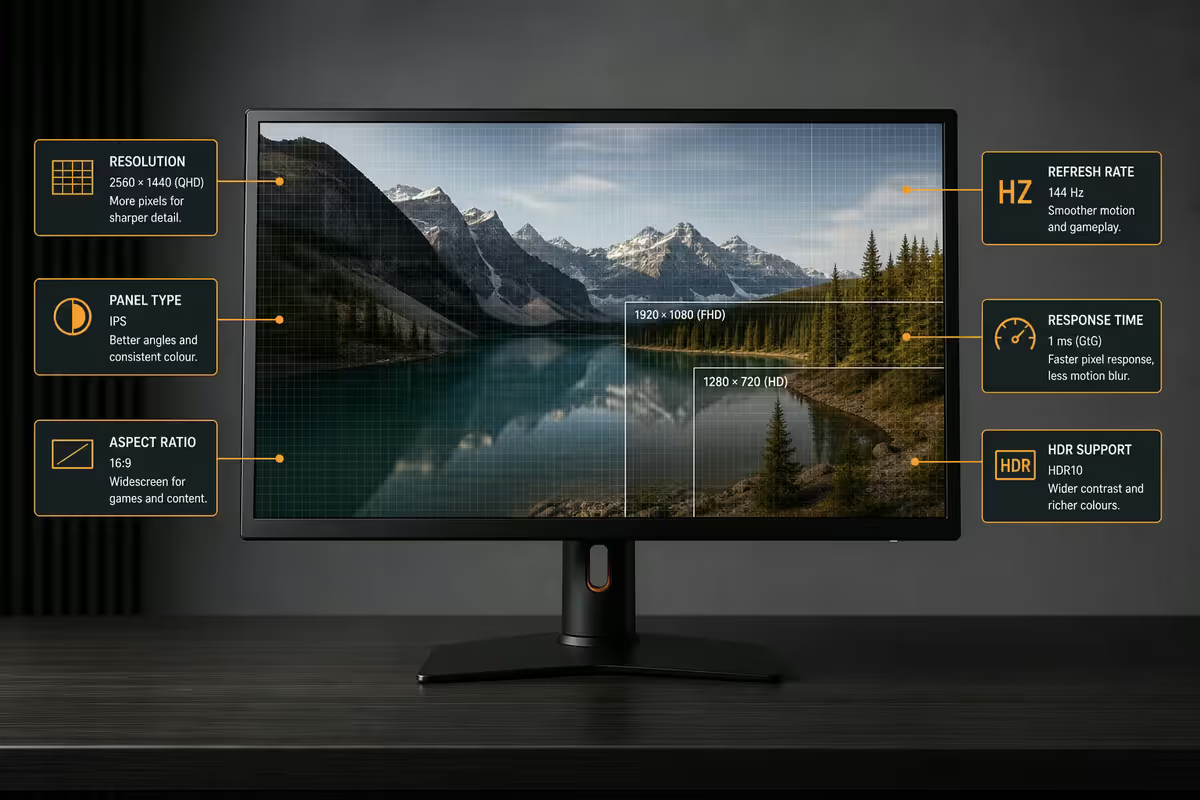
Resolution is the number of pixels horizontally and vertically. 1080p is 1920×1080, 1440p is 2560×1440, 4K is 3840×2160. The trick is that resolution alone doesn't tell you sharpness — pixel density (PPI, pixels per inch) does. A 27-inch 1080p monitor and a 24-inch 1080p monitor are the same total pixels, but the smaller one looks sharper.
| Size · resolution | PPI | Verdict |
|---|---|---|
| 24" · 1080p | 92 PPI | Crisp; competitive esports default |
| 27" · 1080p | 82 PPI | Pixelated text — avoid |
| 27" · 1440p | 109 PPI | 2026 sweet spot |
| 32" · 1440p | 92 PPI | Same as 24" 1080p — okay |
| 27" · 4K | 163 PPI | Very sharp; needs scaling for text |
| 32" · 4K | 138 PPI | Best of both worlds |
| 42-48" · 4K | 95-105 PPI | Sofa / desk hybrid; OLED territory |
The 27-inch 1080p trap. A common mistake is buying a 27-inch panel because it's cheap and presuming 1080p will look fine. At 82 PPI, text is fuzzy and image edges are visibly stair-stepped. 27 inches is 1440p territory; 24 inches is the largest size where 1080p still looks crisp.
Refresh rate (Hz) — the most felt upgrade
Refresh rate is how many times per second the panel redraws its image, measured in Hz. 60 Hz redraws sixty times a second; 240 Hz does it 240 times. The higher the refresh rate, the smoother fast motion looks and the lower your input lag — every frame brings movement on screen closer to what your hand did on the mouse.
The jump from 60 Hz to 144 Hz is dramatic and immediate. Cursor movement looks like silk. Scrolling text stays sharp. First-person camera pans no longer turn into a blurry smear. Most people who try 144 Hz cannot go back to 60 Hz comfortably.
The jump from 144 Hz to 240 Hz is real but subtler. You'll feel it in competitive shooters where target tracking accuracy ticks up. Beyond 240 Hz — 360, 480, 540 — you're firmly in pro-tier diminishing returns. Useful for top-tier CS2 / Valorant players; meaningless to the rest of us.
Response time — GtG vs MPRT and the 1 ms lie
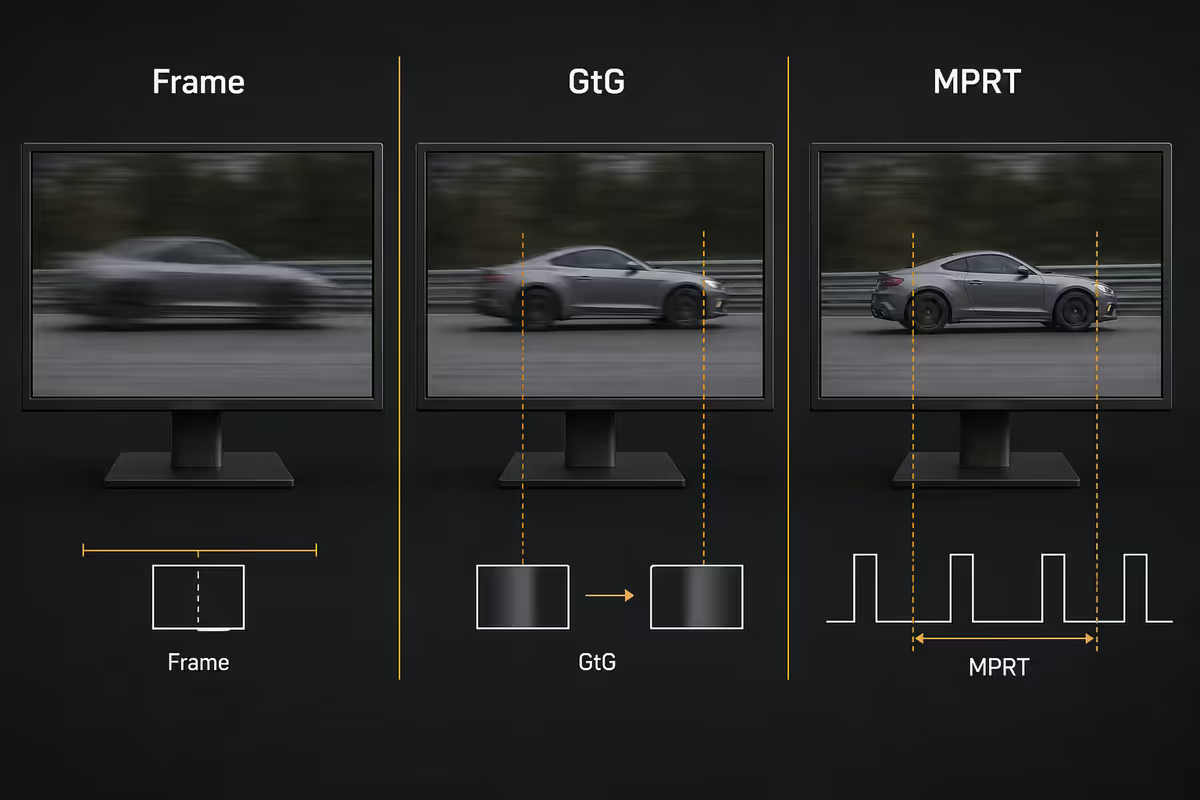
Response time measures how quickly individual pixels can change colour. Slow response causes ghosting and smearing during fast motion. Manufacturers love quoting "1 ms response time" on the box — but the unit they're quoting often is meaningless.
GtG (Grey-to-Grey) is the real measurement — how long it takes a pixel to transition from one mid-grey value to another. Independent measurement by sites like RTINGS shows this is typically 3-6 ms on a good IPS panel, 5-10 ms on VA, and under 0.1 ms on OLED.
MPRT (Moving Picture Response Time) is a calculated value based on the refresh rate using a backlight strobing technique. It can be technically 1 ms on a 240 Hz panel because the math allows it — but it doesn't reflect actual pixel transitions. If a spec sheet only quotes 1 ms MPRT and hides the GtG figure, assume real-world performance is much slower.
Panel types — IPS, VA, OLED, TN
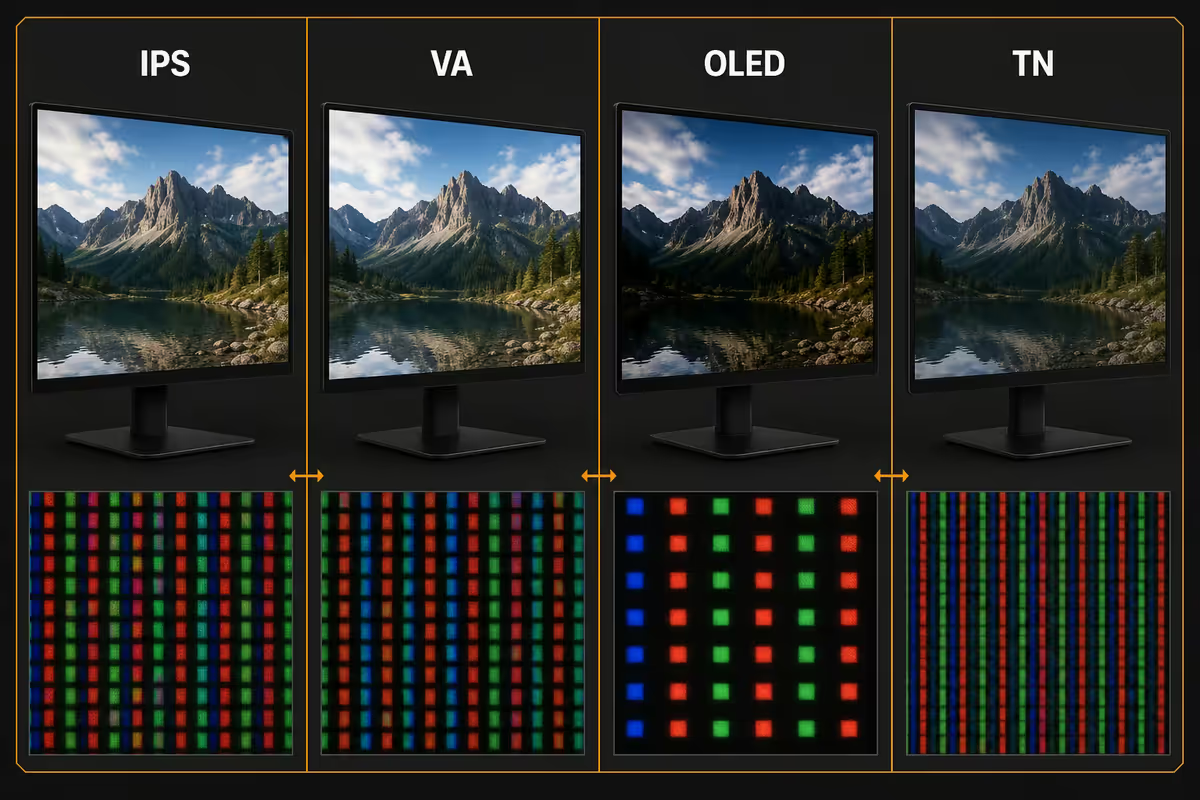
IPS (In-Plane Switching) is the modern default. Excellent colour accuracy, wide viewing angles, fast enough response for most gaming. The downside is contrast — IPS typically delivers around 1000:1 with the somewhat washed-out "IPS glow" in dark scenes. New IPS Black panels improve contrast to 2000:1 and are worth seeking out.
VA (Vertical Alignment) delivers superior native contrast (3000-4500:1) — meaningfully deeper blacks than IPS, excellent for dark games and movies. The tradeoff is slower pixel response, especially dark-to-bright transitions, which can ghost in fast motion. Modern VA panels have closed most of this gap but still aren't preferred for fast competitive games.
OLED is the current visual gold standard. Each pixel emits its own light, so blacks are truly black (contrast is effectively infinite). Response is sub-millisecond. Colours are vibrant. The downsides are burn-in risk on static elements (taskbars, HUDs over years of use), premium pricing, and somewhat lower peak brightness than the brightest LCD panels.
TN (Twisted Nematic) is essentially dead. It persists in some pro esports panels at 360-540 Hz for the lowest input lag, but colours and viewing angles are noticeably weaker than IPS. For almost every buyer, ignore it.
HDR — when the badge is real and when it isn't
DisplayHDR is a VESA certification standard with tiers based on peak brightness in nits, contrast capability and colour gamut coverage.
| Tier | Peak nits | What it really delivers |
|---|---|---|
| DisplayHDR 400 | 400 nits | Marketing tier — accepts HDR signal, doesn't look HDR |
| DisplayHDR 500/600 | 500-600 nits | Starts looking distinctly HDR with FALD backlight |
| DisplayHDR 1000 | 1000 nits | True HDR gaming — bright highlights, deep shadows |
| DisplayHDR True Black 400-600 | 400-600 nits | OLED tier — perfect blacks compensate for lower peak |
| DisplayHDR 1400 | 1400 nits | Flagship LCD — uncommon, expensive |
HDR400 is the trap. It signals only that the panel accepts an HDR signal — not that it can display it properly. Most HDR400 monitors look identical to their SDR equivalents because they lack the peak brightness and local dimming to actually deliver high dynamic range. Don't pay extra for an HDR400 badge.
The two real HDR paths in 2026: DisplayHDR 600 or higher with full-array local dimming (FALD), or any OLED panel. Both deliver the bright-highlight-plus-deep-shadow experience that defines HDR.
Contrast ratio and brightness
Contrast ratio is the difference between the brightest white and the darkest black the panel can produce. Higher contrast means deeper shadows, more dimensional images and a more cinematic look. Real native contrast figures:
- Standard IPS — 1000:1. Black bars look slightly grey in dim rooms.
- IPS Black — 2000:1. Distinct improvement; blacks look black in normal light.
- VA — 3000:1 to 4500:1. Best LCD contrast available; great for movies.
- OLED — effectively infinite. Black pixels emit no light at all.
Brightness is measured in nits (candelas per square metre). For SDR, 250-300 nits is comfortable; 400 nits suits bright rooms; 600+ matters for HDR content. Beyond 1000 nits diminishing returns set in unless you're watching HDR movies in a sunny room — common in SA living rooms where late-afternoon sun hits the desk.
Colour gamut — sRGB vs DCI-P3 vs AdobeRGB
Colour gamut is the range of colours the panel can reproduce, expressed as percentage coverage of a defined colour space.
sRGB is the standard web and game colour space. 99-100% sRGB coverage is the baseline; anything less and colours look muted compared to the source. DCI-P3 is the wider cinema standard and the de facto target for modern HDR content — 95%+ DCI-P3 is the meaningful figure for premium gaming and creative work. AdobeRGB is the print-photo colour space. Unless you do colour-managed print photography, ignore it.
FreeSync vs G-Sync — what to look for in 2026
Adaptive sync matches the monitor's refresh rate to whatever frame rate the GPU is producing. Without it, frames either tear (no v-sync) or stutter (v-sync on) when the GPU can't keep up. With adaptive sync, the monitor waits for the GPU and the image stays clean.
FreeSync is AMD's open implementation. It works on NVIDIA cards too via "G-Sync Compatible" certification. G-Sync Ultimate uses a dedicated NVIDIA hardware module in the monitor, which adds R3,000-R5,000 to the price and improves low-frame-rate compensation but offers little benefit above 60 fps.
In 2026, FreeSync Premium and G-Sync Compatible certifications cover 95% of the real-world adaptive-sync benefit. Unless you specifically need the hardware module advantage at very low frame rates (sim racing, slow-paced strategy games), don't pay for G-Sync Ultimate.
In the 200,000+ custom builds we've shipped from Centurion, the customer who upgrades to a 1440p 144 Hz IPS panel from a 1080p 60 Hz one is the customer who most frequently calls back to say "this is the upgrade I noticed most." Not the GPU. Not the CPU. The monitor. Spend at least 25% of your total build budget on the panel — it's the component you'll stare at for eight hours a day for five years.
Behind the Build · Evetech Centurion floor
Key takeaways
- 1440p at 27" (109 PPI) is the 2026 sweet spot. 27" 1080p looks pixelated.
- 60 Hz → 144 Hz is dramatic. 144 Hz → 240 Hz matters mostly for esports.
- Quoted "1 ms" is usually MPRT, not GtG. Real GtG is 3-6 ms on good IPS.
- HDR400 is marketing. Real HDR needs DisplayHDR 600 + FALD or OLED.
- FreeSync Premium / G-Sync Compatible is enough. Skip G-Sync Ultimate modules.
Frequently asked questions
Is 1440p or 4K worth it over 1080p?
1440p (2560×1440) is the 2026 sweet spot for 27-inch monitors — roughly 109 PPI, sharp text and meaningful image quality gains over 1080p without the GPU demand of 4K. 4K (3840×2160) only makes sense at 27 inches if you sit close, or at 32 inches and above. For competitive esports, stick with 1080p high refresh for the lowest GPU latency cost.What refresh rate Hz should I buy?
60 Hz for productivity and console gaming. 144 Hz is the modern baseline for PC gaming — visible jump from 60 Hz in every genre. 240 Hz is meaningful for esports (CS2, Valorant, Apex) where reaction time matters. 360-540 Hz exists for pros at the elite tier; diminishing returns for everyone else.What's the difference between GtG and MPRT response time?
GtG (Grey-to-Grey) is the real measurement — how fast a pixel transitions between mid-grey values. MPRT (Moving Picture Response Time) is calculated, not measured, and depends on the refresh rate. Manufacturers often quote a misleadingly low MPRT (1 ms) when GtG might be 4-5 ms. Always look for GtG values for the truth.IPS, VA, OLED or TN — which panel is best?
IPS gives the best colour accuracy and viewing angles — current default for productivity and most gaming. VA delivers superior contrast (3000:1+) and is great for dark-scene gaming and movies but slower in pixel transitions. OLED is the visual gold standard with perfect blacks and instant pixel response but carries burn-in risk and high price. TN is essentially dead — only persists in some pro esports monitors for the lowest input lag.What does HDR400 vs HDR600 vs HDR1000 mean?
DisplayHDR certification by peak brightness in nits. HDR400 is barely HDR — most are just SDR monitors with HDR signal acceptance. HDR600 starts looking meaningfully different. HDR1000 with local dimming is true HDR gaming. For real HDR, look for either DisplayHDR 600 with FALD (full-array local dimming) or OLED panels. Avoid HDR400 as a buying criterion.What is contrast ratio and how does it differ between panels?
Contrast ratio is the difference between the brightest white and darkest black the panel can display. IPS typically delivers 1000:1, VA reaches 3000-4000:1 native, and OLED is effectively infinite because black pixels emit no light. Higher contrast means deeper shadows and a more cinematic image — important for movies, dark games and HDR content.What colour gamut should I look for — sRGB, DCI-P3 or AdobeRGB?
sRGB covers ~99% of standard web and game content — fine for general use. DCI-P3 is wider and covers modern HDR content and most streaming. AdobeRGB is for print photo work — irrelevant unless you're a photographer or print designer. For gaming and most creative work, 95%+ DCI-P3 coverage is the meaningful target.FreeSync vs G-Sync — does it matter in 2026?
Both are adaptive sync technologies that match the monitor refresh rate to the GPU output, eliminating screen tearing. FreeSync is AMD's open standard but works with NVIDIA cards via G-Sync Compatible. G-Sync Ultimate has a dedicated NVIDIA module — better at low frame rates but adds R3,000-R5,000 to the price. In 2026 FreeSync Premium / G-Sync Compatible covers 95% of the benefit at any price tier.
Get the Evetech app
Exclusive app-only prices, daily flash sales, and free delivery on orders over R4,000 — download the app and start saving.