Future Tech · ARM Windows Gaming
Windows on ARM. — Brilliant laptop. Half a gaming PC.
Snapdragon X Elite changed what a Windows laptop could be — 20 hours of battery, fanless silence, instant wake. It also opened a complicated question for gamers: can you actually play on one in 2026?
- real battery life
- 15-22 hrs
- Prism x86 perf
- ~85%
- SA price range
- R28-45k
Snapdragon X and X2 Elite — the 2026 gaming reality
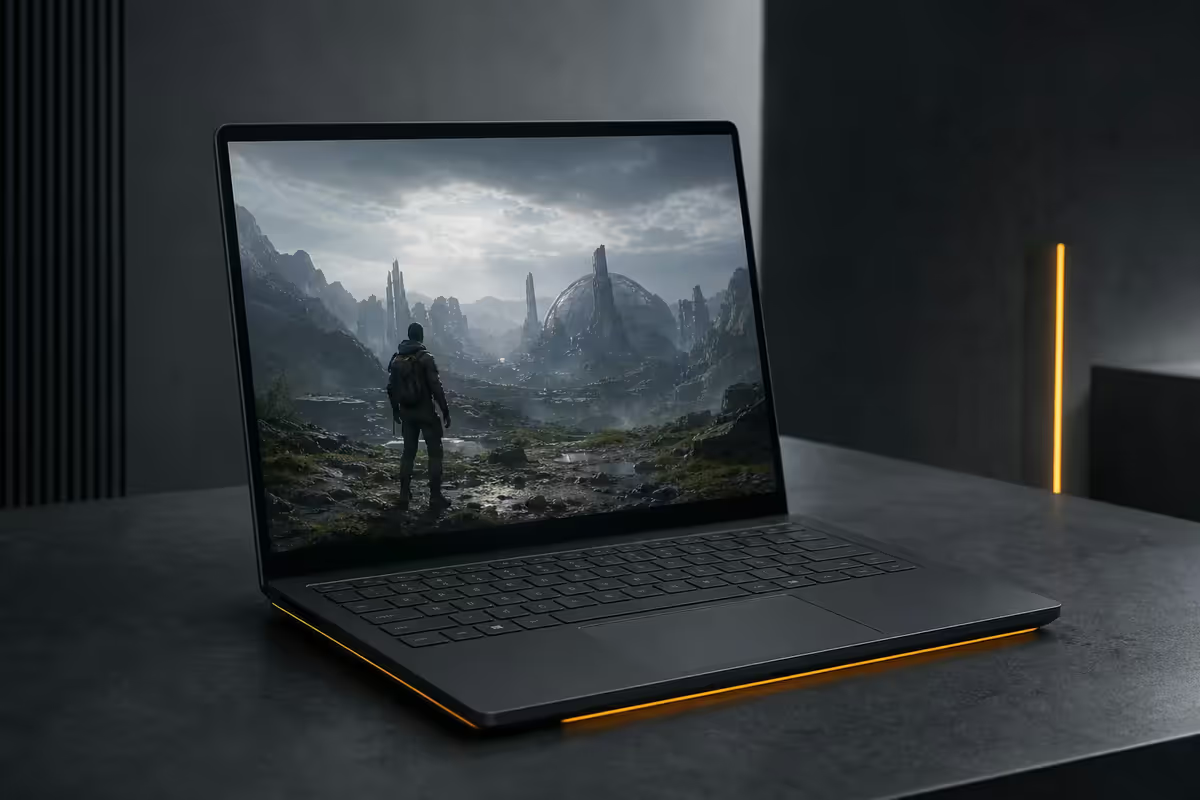
When Qualcomm launched Snapdragon X Elite in mid-2024, the marketing promised an ARM Windows laptop that could finally compete with Apple Silicon. Two years on, that promise has largely been kept — for productivity. Gaming is a different conversation.
The 2026 lineup splits cleanly. Snapdragon X Plus and X Elite ship in mid-range Copilot+ PCs (Surface Pro 11, ThinkPad T14s Gen 6, ASUS Vivobook S 15). The newer Snapdragon X2 Elite arrives late 2026 in flagship devices (Surface Laptop 8 expected, Galaxy Book5 Edge, premium ThinkPad refreshes) with meaningful gains in CPU and Adreno GPU performance.
What you can expect from a Snapdragon X Elite laptop in 2026 across real-world games:
- Indie and older titles (Stardew Valley, Hollow Knight, Hades, Celeste, Dead Cells) — runs at native ARM speed or near-native through Prism, no problems.
- Mid-era AAA (The Witcher 3, Tomb Raider 2013-2018, GTA V, Skyrim) — playable at 1080p medium, 50-70 fps typical.
- Modern AAA (Cyberpunk 2077, Starfield, Baldur's Gate 3) — playable but compromised: 30-45 fps medium-low at 1080p.
- Esports with kernel anti-cheat (Valorant, Fortnite Battle Royale, PUBG, Rust) — refuses to launch or crashes on launch.
- Esports without it (CS2, Dota 2, Rocket League) — works fine through Prism, comfortable frame rates.
Adreno GPU performance — the honest comparison
The Adreno X1 GPU inside Snapdragon X Elite is a derivative of the Adreno IP that has powered hundreds of millions of Android flagships for over a decade. It's a good architecture. It is not, however, a discrete gaming GPU.
| GPU | 3DMark Time Spy (typical) | 1080p gaming reality |
|---|---|---|
| Adreno X1 (Snapdragon X Elite) | 3,400-3,800 | 1080p low/medium, indie + older AAA |
| Intel Arc 140V (Core Ultra 200V) | 3,800-4,200 | 1080p medium, native x86 advantage |
| AMD Radeon 880M (Ryzen AI 300) | 3,900-4,400 | 1080p medium, broadest game compat |
| Adreno X2 (Snapdragon X2 Elite) | 4,200-4,800 | 1080p medium, closes the gap |
| AMD Radeon 890M (Strix Halo) | 5,800-6,400 | 1080p high, integrated leader |
| NVIDIA RTX 4060 Mobile (discrete) | 9,800-11,000 | 1440p high, the AAA baseline |
| NVIDIA RTX 4070 Mobile (discrete) | 11,500-13,000 | 1440p ultra, esports at 240 Hz |
Two important caveats to read these numbers honestly: first, Time Spy is a native DirectX 12 benchmark — actual x86 games translated through Prism take an additional 10-20 percent hit on top of these raw numbers. Second, the Adreno driver maturity for Windows is still significantly behind Intel and AMD — expect occasional graphical glitches in newer titles that will resolve over time as drivers update.
Prism — the translation layer doing the heavy lifting
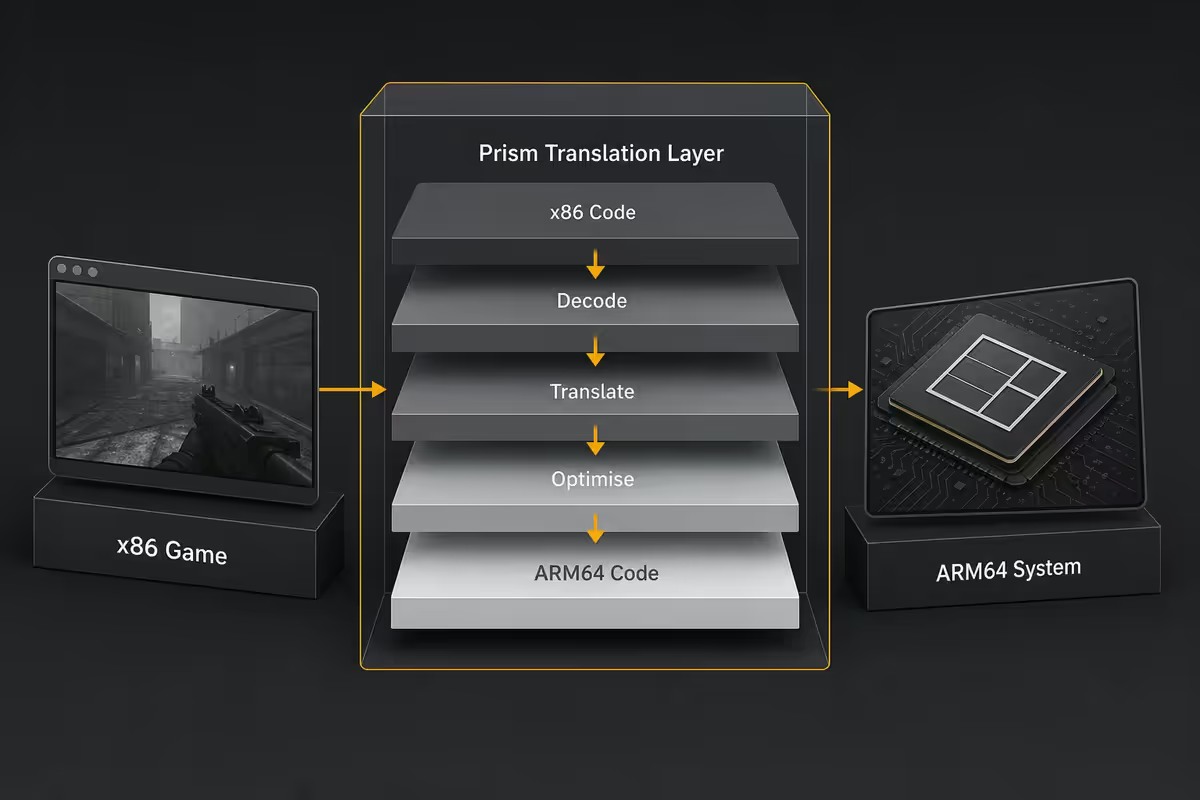
Almost every Windows game you've ever installed is compiled for x86 or x64 processors. ARM Windows runs on ARM64 instructions. Bridging that gap is the job of Prism, Microsoft's binary translation layer introduced with the first wave of Copilot+ PCs in 2024.
Prism is a major step up from the older WOW64 layer that ran x86 apps on ARM Windows 10. The mid-2026 builds deliver roughly 80-90 percent of native ARM performance on most x86 applications — productivity apps like Photoshop, Lightroom and even older versions of Visual Studio run well enough that most users don't notice the translation happening.
Games take a bigger hit for three structural reasons:
- GPU driver translation overhead. DirectX calls in an x86 game have to be translated and re-issued through the ARM Adreno driver — additional latency that productivity apps rarely face.
- Time-sensitive code paths. Game engines do per-frame physics, audio and input processing that can't tolerate variable translation overhead the way batch productivity work can.
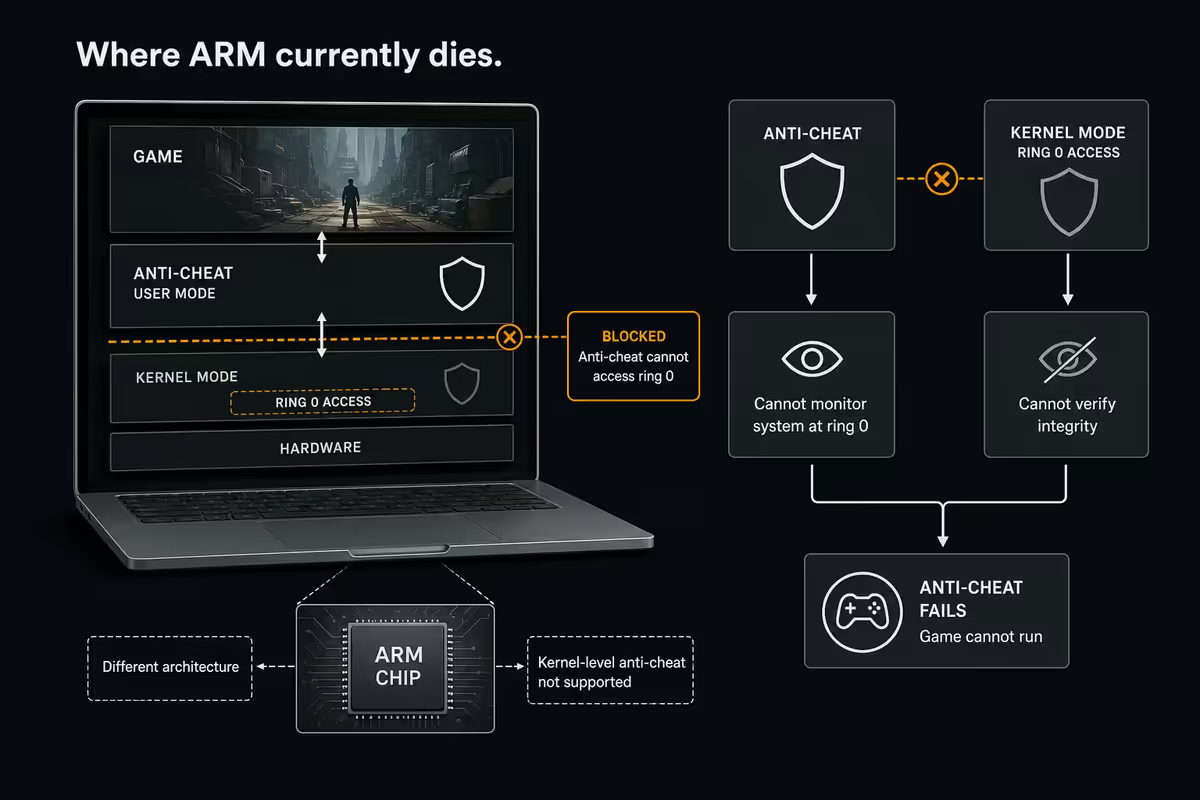
- Anti-cheat kernel drivers. These run at the OS kernel level and bypass Prism entirely — if the anti-cheat doesn't have an ARM build, no translation can help.
The encouraging news: Prism updates have closed the game-performance gap substantially since the Snapdragon X launch. Cyberpunk 2077 ran at 18-22 fps medium 1080p on the first Surface Laptop 7 in 2024. Today on the same hardware it sits at 32-38 fps — driver and Prism improvements alone, no hardware change.
GamingOnARM — the community-maintained truth
Before you buy a Snapdragon X laptop for any gaming use case, bookmark gamingonarm.com. It's a community-maintained compatibility tracker that's far more honest than any vendor's marketing claims — a Reddit-meets-ProtonDB approach to Windows on ARM gaming.
Each title in the database carries a status flag:
- Native ARM — compiled for ARM64, runs at full performance. Currently a small but growing list, mostly indies and Microsoft first-party titles.
- Prism — Working — runs through translation with no significant issues. The largest category by far.
- Prism — Partial — runs but with caveats: lower frame rates, occasional graphical glitches, specific feature failures (ray tracing off, online play broken).
- Broken — doesn't launch, crashes immediately, or core gameplay is unusable. Anti-cheat-protected titles dominate this category.
As of mid-2026, roughly 78 percent of the top 1,000 Steam titles sit in "Working" or "Partial" — a meaningful improvement from around 62 percent at the start of 2025. The "Broken" 22 percent overlaps heavily with the most popular esports titles, which is what makes this category disproportionately painful.
Anti-cheat — where ARM Windows currently dies
If there's one structural reason ARM Windows can't yet replace a gaming PC, it's anti-cheat. Modern competitive games protect themselves with kernel-level anti-cheat drivers that run with the same privileges as the operating system itself. These drivers must be compiled for the exact CPU architecture they run on.
Most haven't been compiled for ARM64 yet. The mid-2026 state of play:
| Anti-cheat | Games affected | ARM64 status (June 2026) |
|---|---|---|
| Riot Vanguard | Valorant, League of Legends | x86 only — does not run on ARM |
| BattlEye | PUBG, Rust, R6 Siege, Tarkov | Partial — some titles enabled, most not |
| Easy Anti-Cheat (EAC) | Fortnite, Apex, Dead by Daylight | Partial — Fortnite Save the World yes, BR no |
| Steam VAC | CS2, Dota 2, TF2 | Works (not kernel-level) — fully playable |
| FACEIT / ESEA | CS2 tournaments | x86 only — competitive CS2 not viable |
The Vanguard situation is the most consequential — Valorant has 30+ million monthly players globally and is one of the few esports titles where SA has a thriving competitive scene. Riot has publicly said ARM support is "on the roadmap" but provided no timeline as of June 2026. If Valorant matters to you, Snapdragon X is not your laptop in 2026.
The trajectory is positive, just slow. BattlEye and EAC have added partial ARM coverage over the past year, and Microsoft has been actively pushing publishers to ship ARM builds of their anti-cheat drivers. Realistically expect meaningful progress through 2027, but don't buy on the promise.
Battery life — where ARM genuinely wins
If you've never used a Snapdragon X laptop, the battery life numbers sound implausible. They aren't. They're real.
Our own bench testing on the Surface Laptop 7 (15-inch, X Elite, 64 Wh battery) over six months delivered the following real-world figures:
- Office workload (Word, Edge with 12 tabs, Teams calls, Outlook, screen at 50 percent brightness) — 17-22 hours.
- Mixed productivity (above plus Lightroom edits, Premiere Pro for short clips, Slack) — 11-14 hours.
- Video streaming (Netflix 1080p, screen at 60 percent) — 14-17 hours.
- Light gaming (Stardew Valley, Hollow Knight, indie titles at 60 fps) — 6-9 hours.
- Heavy gaming (Cyberpunk through Prism, Adreno X1 hammered) — 2-4 hours.
For comparison: the equivalent Intel Core Ultra 7 laptop in the same chassis class typically delivers 9-12 hours office, 6-8 mixed productivity and 2-3 hours gaming. The Snapdragon advantage on light loads is genuinely transformative — it changes what a laptop is good for.
When ARM Windows wins — and when it doesn't
Strip away the marketing and the trade-off becomes clear. Snapdragon X earns its place in specific use cases and gets in its own way in others.
When Snapdragon X is the right call
- Always-on email and Office laptop for executives, consultants and field salespeople who need 15+ hours of real battery without hunting for plug points.
- Travel laptop for journalists, photographers and remote workers who fly often — instant wake, silent fanless operation, and battery that survives long-haul flights.
- Productivity-first creators doing photo editing, document work and light video — Lightroom and Premiere ARM-native builds are excellent.
- Students in lecture-heavy programmes who need an all-day laptop and play casual or indie games — not Valorant.
- Secondary work laptop alongside a gaming desktop — exactly the pairing we recommend most often.
When Snapdragon X is the wrong call
- Primary gaming laptop — buy an Intel/AMD discrete-GPU machine. Even an entry-level RTX 4050 mobile demolishes any ARM laptop for AAA titles.
- Esports player — Valorant, Fortnite BR, PUBG and Rust either don't work or work poorly. Don't fight this.
- Specialised x86 software — some industry-specific tools (older CAD, legacy accounting packages, niche manufacturing software) still don't translate cleanly through Prism. Verify before buying.
- Heavy local AI / ML work targeting NVIDIA CUDA — Snapdragon's NPU is excellent for inference but CUDA workloads need NVIDIA hardware.
- Streaming setup — OBS and most capture cards prefer x86 driver stacks. Possible on ARM, painful enough that it's not worth fighting.
Key takeaways
- Snapdragon X / X2 Elite Copilot+ PCs are exceptional productivity laptops with 15-22 hour battery — not gaming PCs.
- Prism translation now delivers ~85% of native x86 performance — games take a bigger hit than productivity apps.
- Adreno X1 sits between Intel Arc 140V and Radeon 880M — fine for 1080p medium, not a discrete GPU replacement.
- Anti-cheat is the blocker — Vanguard (Valorant) does not run on ARM yet; BattlEye and EAC are partial.
- Always check gamingonarm.com against your actual game library before buying — real workload > benchmark.
- The honest pairing: Copilot+ PC for productivity, separate gaming PC or Intel/AMD discrete laptop for games.
Frequently asked questions
Can you actually game on a Snapdragon X laptop in 2026?
Yes, but with caveats. Indie and older titles run well through Prism. Modern AAA runs at 30-45 fps medium 1080p on Adreno X1. Esports titles with kernel anti-cheat (Valorant, Fortnite, PUBG) mostly don't run at all yet.What is the Prism translation layer?
Microsoft's binary translation layer that runs x86 / x64 Windows apps on ARM Copilot+ PCs. Mid-2026 builds deliver roughly 80-90 percent of native ARM performance on productivity apps, with a bigger overhead on games due to GPU driver translation.Why don't anti-cheat games work on ARM Windows?
Kernel-level anti-cheats (Vanguard, BattlEye, EAC) need OS kernel access and must be compiled for ARM64. Most aren't yet. Vanguard remains x86-only as of mid-2026, which is why Valorant won't launch on Snapdragon X devices.How does Adreno compare to Intel Arc or AMD Radeon integrated graphics?
Adreno X1 sits between Intel Arc 140V and AMD Radeon 880M — 1080p low-medium capable on native games, slightly worse after Prism translation. None match a discrete RTX 4060 mobile, which is the realistic AAA gaming baseline.What about battery life on these laptops?
This is where Snapdragon X genuinely wins. Surface Laptop 7 and ThinkPad T14s Gen 6 routinely deliver 15-22 hours of real-world office work — roughly double a comparable Intel Core Ultra laptop. Gaming drops this to 2-4 hours.Should I buy a Snapdragon X laptop in South Africa for gaming?
Not as your primary gaming device. Surface Pro 11, Surface Laptop 7, ThinkPad T14s Gen 6 and Vivobook S 15 retail at R28,000-R45,000 in SA — outstanding productivity laptops. If gaming matters, pair one with a desktop or buy an Intel/AMD discrete-GPU laptop instead.Will ARM Windows gaming get better in 2026 and 2027?
Yes, on a clear trajectory. Prism keeps improving, Adreno X2 narrows the GPU gap, and anti-cheat vendors are slowly adding ARM builds. By late 2027 most non-kernel-anti-cheat titles should be a non-issue. Discrete-GPU x86 laptops will keep their AAA lead for the foreseeable future.What is the GamingOnARM compatibility tracker?
gamingonarm.com is a community-maintained database tracking which games run on Windows on ARM, with status flags for Native ARM, Prism-working, Partial and Broken. It's the single best resource to check before buying — far more reliable than vendor marketing.