Complete WFH Kit Guide
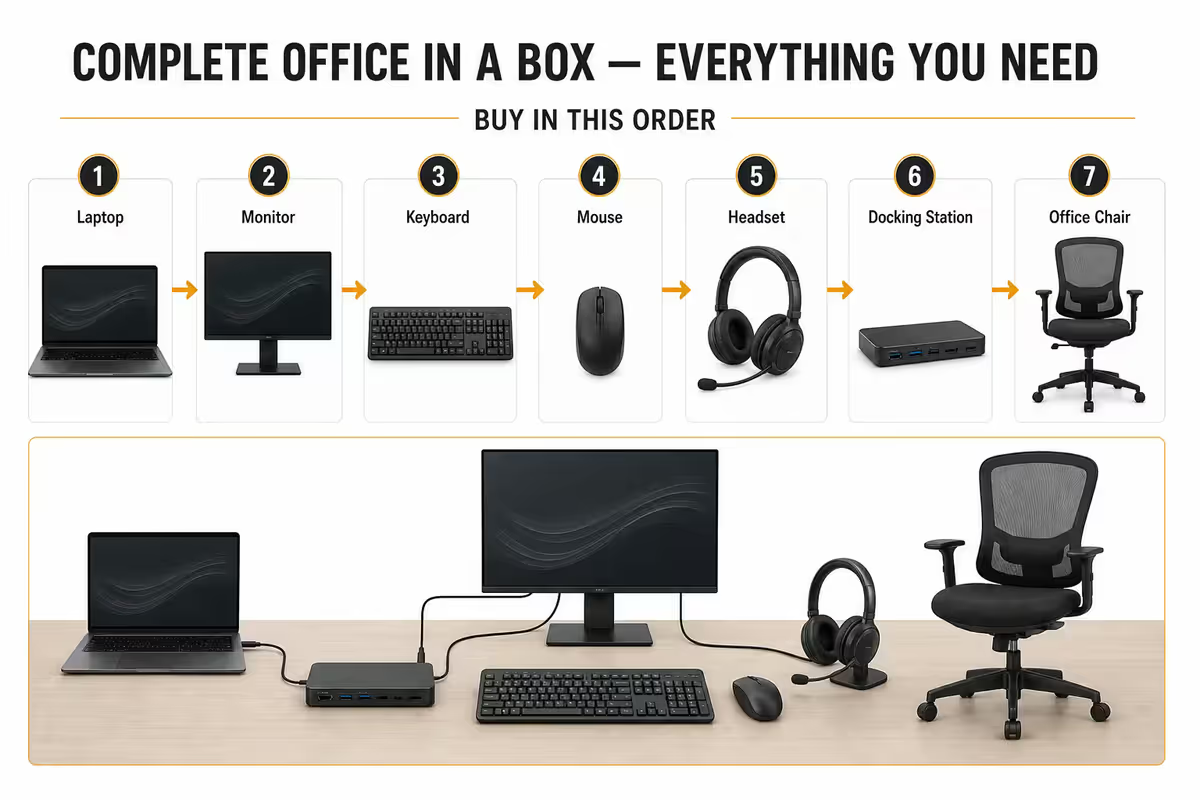
The complete office in a box.
Most home offices are bought in the wrong order — the laptop gets the budget and the chair is whatever was in the spare room. Here's the kit list and the buying sequence that actually delivers a workspace you don't grow to hate.
- the full kit
- 13 items
- three real tiers
- R15k-R75k+
- buying order
- Chair 1st
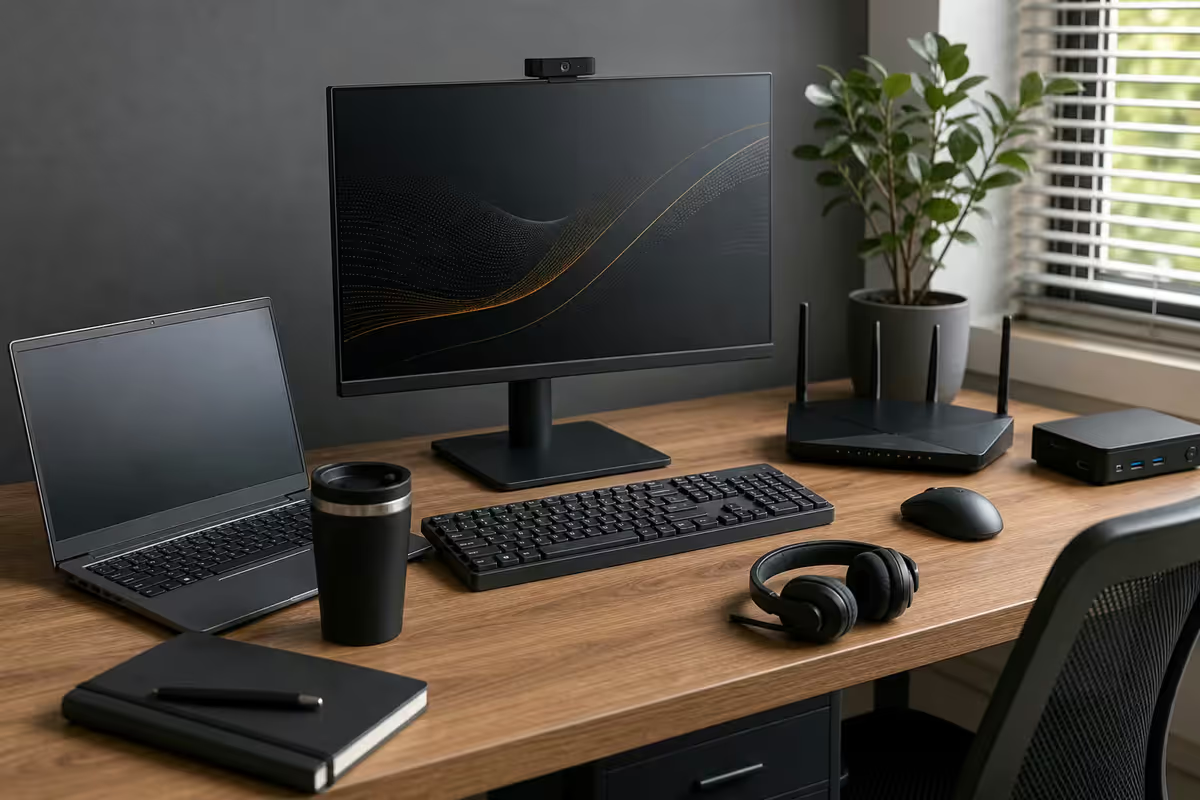
The 13-item checklist
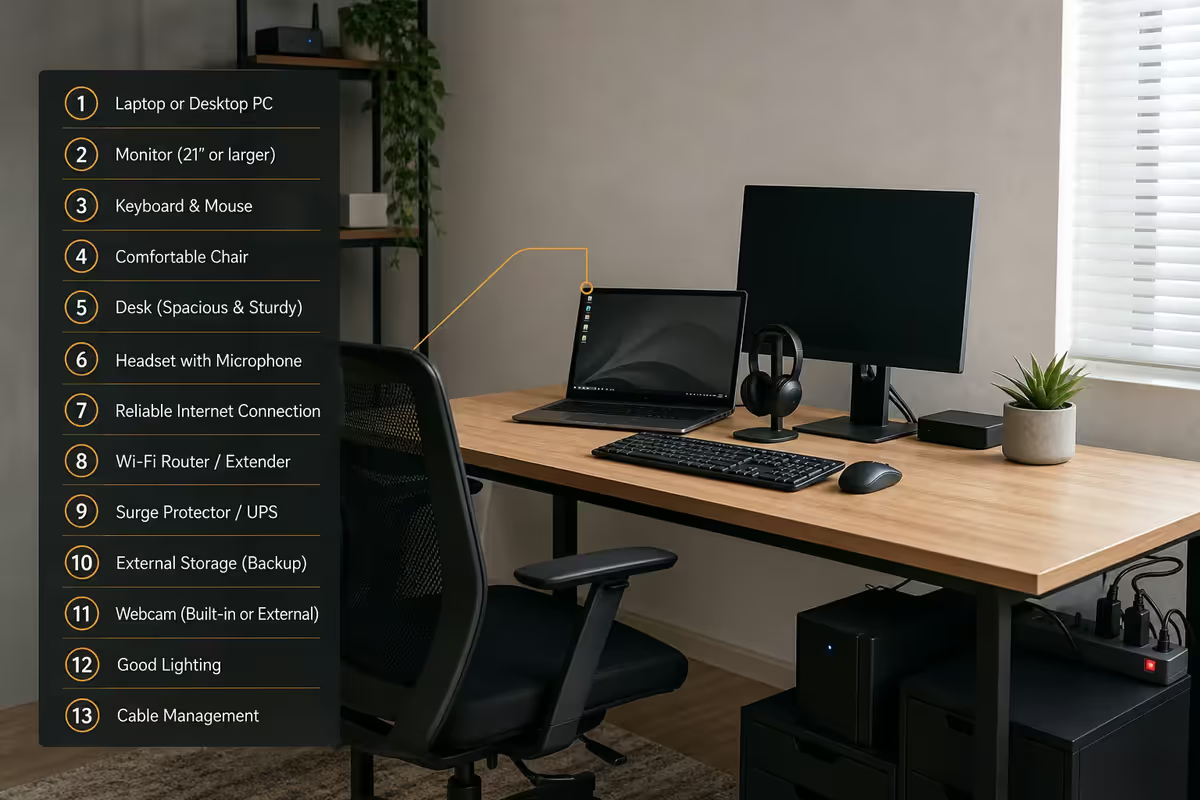
A complete home office is not a laptop. It's a system of thirteen items that all serve daily use. Miss one and you'll notice within a week. Here's the full list — and how much each one really matters.
| Item | What it actually does | Priority |
|---|---|---|
| Chair | Holds your spine for 8 hours a day | 🥇 Critical |
| Monitor | The visual surface you stare at all day | 🥈 Critical |
| Dock | One cable turns laptop into workstation | 🥉 Critical |
| Laptop / desktop | The actual compute | Critical |
| Desk | The platform; height matters more than looks | High |
| Keyboard | What your fingers touch 5+ hours daily | High |
| Mouse | Wrist comfort and click accuracy | High |
| Headset | Calls without echo, focus without noise | High |
| UPS | SA load-shedding insurance | High |
| Webcam | How clients see you on video calls | Medium |
| Key light | Lifts video from "home" to "broadcast" | Medium |
| Cable kit | Cable trays, ties, channels — keeps it sane | Medium |
| Printer | For the occasional contract, signed PDF | Low |
The three critical-with-medal items are the ones that compound. A great chair makes a cheap laptop tolerable. A great monitor makes a cheap chair miserable obvious. A great dock makes the whole switching ritual disappear.
The buying order that prevents regret
The order in which you buy these things determines whether you end up with a workspace you love or a pile of stuff you tolerate. Here's the sequence that's proven out across our customer base.
1. Chair (R3,000 — R25,000)
First buy. Always. A cheap chair causes lower-back, neck and shoulder problems that no other upgrade fixes. Minimum: mesh-back office chair with adjustable lumbar and armrests, around R3,000. Sweet spot: Herman Miller Sayl, Steelcase Series 1 or Ergohuman at R8,000-R14,000. End-game: Herman Miller Aeron at R25k+. If you sit 8 hours a day, the chair is the single highest-ROI item in this list.
2. Monitor (R2,500 — R18,000)
Second buy. A second screen alone bumps productivity 20-30% by removing window-switching. Starter: 24-inch 1080p IPS at R2,500-R4,000. Sweet spot: 27-inch 1440p IPS at R5,000-R8,000. End-game: 32-inch 4K colour-accurate or 34-inch ultrawide at R10,000-R18,000.
3. Dock (R1,500 — R6,000)
Third buy if you use a laptop. The dock collapses the daily "connect laptop" ritual from 6 cables to 1. USB-C dock at R1,500-R2,500 handles one monitor + ethernet + USB peripherals. Thunderbolt 4 dock at R3,500-R6,000 handles dual 4K monitors + everything else, with power delivery.
4. The rest, in any sensible order
Keyboard, mouse, headset, webcam, UPS, lighting, cable kit, printer. Buy these as you notice what's missing from your day. Don't pre-buy everything — you'll over-spend on items you don't actually need.
The R15k starter tier — gets you working
This is the minimum viable home office. Covers everything you actually need, with no upgrades you'll regret. Suited to early-career professionals, students transitioning to remote work, or anyone setting up a spare-room office on a tight budget.
| Item | Pick | SA price |
|---|---|---|
| Laptop | HP Pavilion 14 / Lenovo IdeaPad 5 (Ryzen 5 / Core 5) | R10,000-R13,000 |
| Monitor | 24" 1080p IPS (Acer, LG, Samsung) | R2,500-R3,500 |
| Chair | Mesh-back office chair (Officebase, Vega) | R2,500-R3,800 |
| Desk | 1.2m laminate desk or repurposed | R1,200-R2,200 |
| Keyboard + mouse | Logitech MK295 wireless combo | R800-R1,100 |
| Headset | Jabra Evolve 20 / Logitech H390 | R600-R900 |
| UPS | 650VA line-interactive (Mecer / RCT) | R1,500-R2,000 |
Total comes to roughly R19,100-R26,500 if everything is bought new. Most R15k starter setups cheat by reusing the laptop the employer provides, skipping the printer, and starting with a single monitor. That gets you under R15k comfortably.
The R35k professional tier — the sweet spot
This is where most established remote professionals land — and where the daily experience genuinely upgrades. Proper ergonomics, dual-screen or ultrawide, docking station, decent UPS coverage. You'll spend 8 hours a day here without complaint.
| Item | Pick | SA price |
|---|---|---|
| Laptop | HP EliteBook / Lenovo ThinkPad T-series (Core 7 / Ryzen 7) | R18,000-R24,000 |
| Monitor | 27" 1440p IPS or 34" ultrawide (LG, Samsung, Dell) | R5,500-R9,000 |
| Dock | Thunderbolt 4 dual-display dock (CalDigit, Anker, Lenovo) | R3,500-R5,500 |
| Chair | Ergohuman, Steelcase Series 1, Herman Miller Sayl | R8,000-R14,000 |
| Desk | Manual sit-stand desk (1.4m wide) | R3,500-R5,500 |
| Keyboard | Logitech MX Keys / Keychron K2 | R1,800-R2,800 |
| Mouse | Logitech MX Master 3S / MX Anywhere 3 | R1,500-R2,200 |
| Headset | Jabra Evolve2 65 / Sony WH-1000XM5 | R3,500-R6,500 |
| Webcam | Logitech Brio 500 / OBSBOT Tiny 2 | R2,500-R4,500 |
| UPS | 1000-1500VA line-interactive (APC, Eaton) | R3,500-R5,500 |
| Cable kit | Cable tray + sleeves + clips | R500-R900 |
Realistic total: R52,000-R80,000. The R35k figure assumes the employer provides the laptop and you already have a desk that works. Most professionals at this tier upgrade items annually — chair this year, monitor next year, dock the year after.
The R75k+ studio-grade tier
For founders, senior executives, video-heavy roles (client calls, content creators) and people who simply care about the workspace. Every item is best-in-class with a 10-year time horizon, not a 3-year one.
| Item | Pick | SA price |
|---|---|---|
| Compute | MacBook Pro M5 Pro / 14" MBP or Mac Studio + iPad Air | R45,000-R80,000 |
| Monitor | 32" 4K colour-accurate (Apple Studio Display, LG UltraFine, Dell U3225QE) | R18,000-R35,000 |
| Dock | CalDigit TS4 / OWC Thunderbolt 4 | R6,000-R9,000 |
| Chair | Herman Miller Aeron / Steelcase Gesture | R25,000-R42,000 |
| Desk | Motorised sit-stand (Fully Jarvis, Flexispot E7 Pro) | R10,000-R18,000 |
| Keyboard | Keychron Q1 Pro / Logitech MX Mechanical | R3,500-R5,500 |
| Mouse | Logitech MX Master 3S / Razer Pro Click | R2,000-R2,800 |
| Headset / audio | Sony WH-1000XM6 + Shure MV7+ broadcast mic | R12,000-R18,000 |
| Webcam + lighting | OBSBOT Tiny 2 Lite + Elgato Key Light Mini × 2 | R7,500-R12,000 |
| UPS | Online double-conversion 1500-3000VA | R10,000-R20,000 |
| Cable kit + accessories | Premium cable management + monitor arm | R2,500-R4,500 |
Realistic total: R141,500-R246,800. The R75k figure assumes selectively upgrading 4-5 items from professional tier to studio-grade. Most studio-tier setups are built over 2-3 years, not bought all at once.
Brand-mix discipline — don't go single-brand
A common WFH mistake is buying everything from one brand for "ecosystem" reasons. Reality: every brand has 1-2 categories they nail and 5-6 they're mediocre at. The best home office mixes:
- Logitech for keyboard/mouse/webcam (MX Keys, MX Master, Brio).
- Herman Miller / Steelcase / Ergohuman for the chair (no exceptions).
- LG / Dell / Samsung for monitors (Apple Studio Display if Mac-locked).
- CalDigit / OWC / Anker for docks (laptop-brand docks are often worse than third-party).
- Jabra / Sony for headsets.
- APC / Eaton / Mecer for UPS.
- Elgato for streaming/lighting kit.
- Apple / HP / Lenovo / Dell for the laptop — pick the best for your workload, not for "brand loyalty".
No single brand wins every category. Trust the segment specialist for each item. The cable kit is the only place to be ruthlessly cheap — generic ties, tray, sleeves do the same job as branded ones.
South African pricing reality
Pricing in South Africa is tougher than US/UK guides suggest. Three patterns that matter:
1. Pay the import tax once, not every year. Premium kit (Herman Miller, CalDigit, Elgato) lasts 10+ years. The same R20k spread over a decade is R2k/year. The R6k chair replaced every 2 years is R3k/year — and feels worse.
2. Sit-stand desks are local-makable. A Flexispot E7 Pro frame at R8,500 + locally-cut 1.6m timber top at R1,200 beats the imported R18k all-in-one on every metric except aesthetics. Buy the frame imported, buy the top locally.
3. UPS warranty matters. Local APC/Eaton/Mecer have repair networks. Imported off-brand UPS often have no support when the battery dies after 18 months. Pay 20% more for an SA-warrantied brand.
4. Refurbished is a serious option. Lightly-used Herman Miller, Steelcase and Ergohuman chairs go for 40-60% of new price on Gumtree, Facebook Marketplace and local office liquidators. The frame lasts 30+ years; reupholstered or original, the structural integrity is the same.
Common WFH kit mistakes
Buying a laptop stand without a separate keyboard. A laptop stand raises the screen to eye level — but only works if you have a separate keyboard. Without one you're typing with your hands in the air. Buy them as a pair.
Skipping the dock to save R2,500. The dock is the single biggest daily quality-of-life multiplier. Plugging in 4 cables 200 times a year adds friction that you'll grow to resent. Buy the dock.
Cheap chair, expensive laptop. The most regretted WFH purchase combination. Spend the chair money first.
Forgetting cable management. An untidy desk fights you every day. R500 of cable trays, sleeves and ties on day one saves hours of frustration over the year.
Buying a printer because you "might need one". Most knowledge workers print 0-5 pages a month. The R3k inkjet sits unused while the cartridges dry out. Use a print shop when you need it, or wait six months until you genuinely run into a use case.
Key takeaways
- 13 items make a complete WFH kit: laptop, monitor, dock, chair, desk, keyboard, mouse, headset, webcam, lighting, UPS, cable kit, printer.
- Buy in order: chair, monitor, dock — then everything else. Reverse this order and you'll regret most purchases.
- R15k starter, R35k professional, R75k+ studio-grade are the three real SA tiers. Most pros land at R35k over 2-3 years.
- Mix brands — Logitech for input, Herman Miller-class for chair, CalDigit for dock, LG/Dell for monitor.
- UPS is non-negotiable in SA. 1000VA line-interactive + portable power station covers any stage of load-shedding.
Frequently asked questions
What do I actually need for a home office?
Laptop or desktop, one external monitor, a proper chair, a desk, separate keyboard and mouse, a headset, and a UPS. That's the R15k starter. R35k pro adds dock, dual monitor, webcam upgrade, key lighting. R75k+ adds sit-stand desk, premium chair, 4K colour-accurate monitor, broadcast camera and audio.What should I buy first for my home office?
Chair, monitor, dock — in that order. The chair is what you sit in 8 hours a day. The monitor is the visual surface. The dock makes laptop switching effortless. Everything else flows from those three decisions.How much should I budget for a home office in SA?
R15k starter, R35k professional, R75k+ studio-grade. Most established remote pros land at R35k over 2-3 years of incremental upgrades.Do I need a docking station?
Yes if you use a laptop. USB-C dock R1,500-R2,500 for single-monitor setups; Thunderbolt 4 dock R3,500-R6,000 for dual 4K plus power delivery. The daily friction reduction is worth the cost within a week.Is a UPS essential for working from home in SA?
Essential. 650-1000VA line-interactive UPS (R1,500-R3,500) for laptop + monitor; 1500VA+ for desktop. Pair with a portable power station for extended load-shedding coverage.What monitor size is best for working from home?
27-inch 1440p QHD is the sweet spot. 24-inch 1080p is the budget option. 32-inch 4K for design/finance work. 34-inch ultrawide replaces dual monitors for productivity workloads.Mechanical or membrane keyboard for the office?
Membrane is quieter and cheaper. Mechanical is more comfortable for heavy typists and lasts 5-10x longer. If you type 4+ hours a day, a R1,500-R3,000 mechanical pays for itself in comfort.What webcam should I use for video calls?
Most laptop webcams are fine. For external: Logitech C920 (R1,200) budget, Logitech Brio 500 or 4K (R2,500-R4,500) professional. Lighting matters more than camera resolution — a key light makes a bigger difference than any camera upgrade.