Download Speed Diagnostic Guide
How to improve download speeds.
Slow downloads on a “fast” line are almost never the line. Wi-Fi is usually the bottleneck, Steam’s default region usually isn’t optimal, and Cloudflare DNS is a 2-minute win nobody applies.
- test first
- Wired
- region swap gain
- 2-5x
- DNS in 2 min
- 1.1.1.1
Establish a wired baseline first
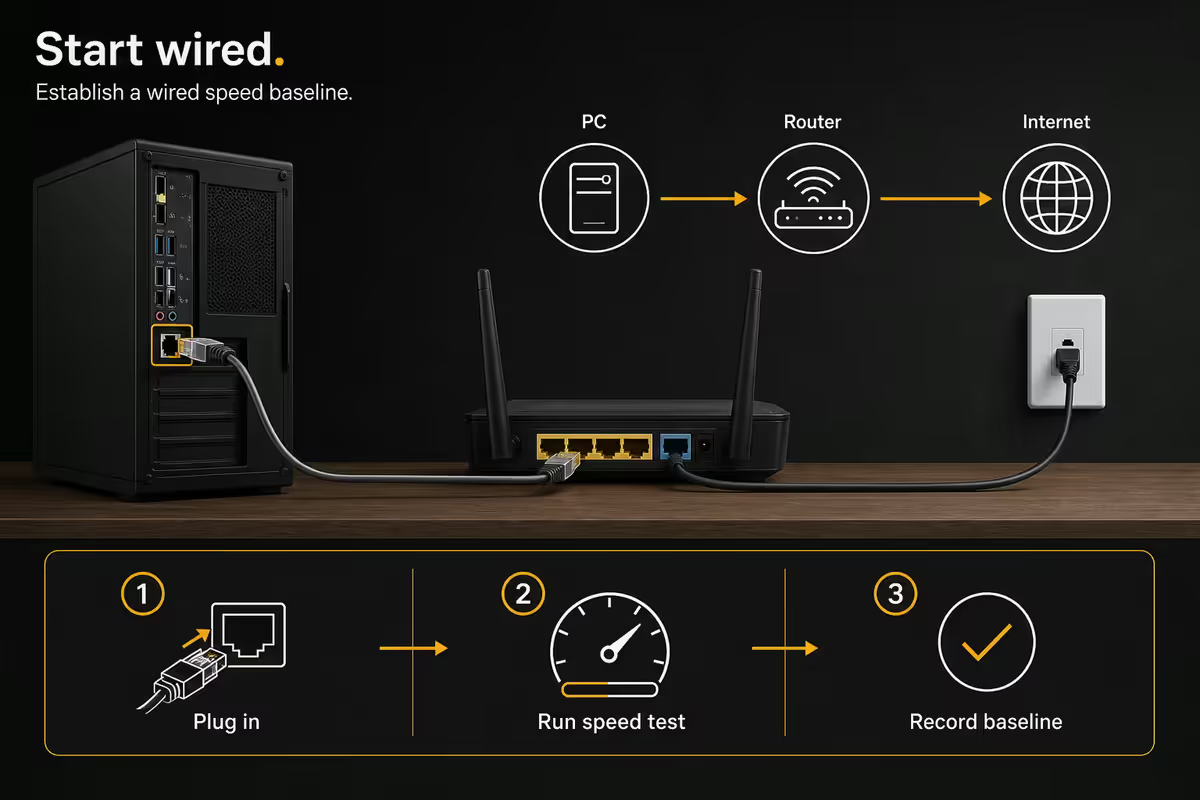
Before changing settings, find out what your line actually delivers. Plug a Cat6 (or better) Ethernet cable directly from your fibre router into your PC. Close every download client, OneDrive, Dropbox, and Steam. Then run a Cloudflare Speed Test at speed.cloudflare.com — it's more accurate than Speedtest.net for SA routing because Cloudflare's edge sits in Johannesburg and Cape Town.
The result is your real baseline. Every change you make afterward gets measured against it. If you're paying for 200 Mbps and Cloudflare reports 195-205 Mbps wired, the line is fine — the problem is downstream. If wired only reports 90 Mbps on a 200 Mbps line, the issue is the router, ONT, ISP routing or the package itself.
| Test method | What it measures | SA accuracy |
|---|---|---|
| Cloudflare Speed Test | Real-world throughput to a JHB/CPT edge | Excellent |
| Speedtest.net (Ookla) | Throughput to a chosen server | Good (pick local server) |
| Fast.com (Netflix) | Throughput to Netflix CDN | OK — Netflix-specific |
| Steam download itself | Single-source throughput | Misleading — region-dependent |
Wi-Fi vs Ethernet — when wired beats wireless dramatically
If your wired baseline is 800 Mbps but Wi-Fi on the same PC reports 250 Mbps, you've already found the bottleneck. This is normal — Wi-Fi was never designed as a 1:1 replacement for cable. Real-world Wi-Fi numbers are sobering:
- Wi-Fi 5 (802.11ac, 5 GHz): 300-500 Mbps in the same room, 100-200 Mbps through a wall.
- Wi-Fi 6 (802.11ax, 5 GHz): 600-900 Mbps in the same room, 300-500 Mbps through a wall.
- Wi-Fi 6E (6 GHz band): 1+ Gbps in the same room, but very short range — falls off through walls.
- Wi-Fi 7 (where supported): 1.5-3 Gbps line-of-sight, still wall-limited.
If you're downloading large games (modern AAA titles are 80-150 GB), run an Ethernet cable. A R150 Cat6 cable from Evetech, routed neatly along the skirting, will save you hours per week and double your effective speed. This is the single biggest "speed upgrade" available for most homes.
Steam download region — the 5-minute fix nobody applies
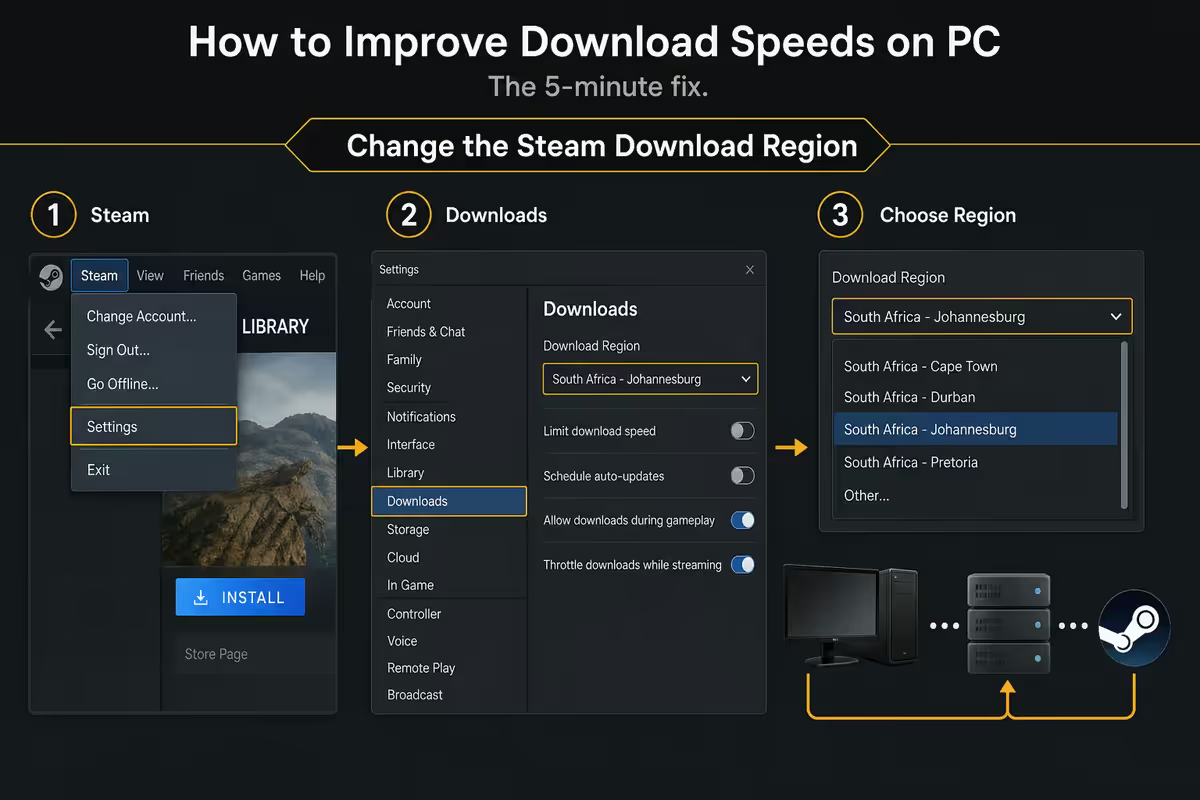
Steam picks a "best" download server when you first install it, then often keeps using it forever even when it's congested or routed poorly for your ISP. The fix takes thirty seconds: Steam → Settings → Downloads → Download Region, then pick one and let a test download run for 60 seconds while watching the speed in the downloads tab.
For SA users the realistic options are:
- Johannesburg — Steam has an SA edge. Usually fastest if it's not congested.
- Cape Town — sometimes available, sometimes not. Worth testing if listed.
- Frankfurt, Germany — surprisingly fast for many SA ISPs because of strong undersea cable routing.
- London, UK — usually slower than Frankfurt from SA but worth a test if both above are slow.
- Avoid: US East/West, Asia-Pacific — generally too far to be competitive.
Time of day matters. The region that's fastest at 11am on a Wednesday might be congested at 9pm on a Saturday. If you queue a huge download regularly, re-test once a quarter.
Windows settings worth changing
Delivery Optimisation (ms-do) for Microsoft Store
Microsoft uses a peer-to-peer system called Delivery Optimisation to distribute Windows Update and Microsoft Store content. On a fibre line it can dramatically speed up Microsoft Store game and app downloads by pulling chunks from nearby peers and local edges. Enable it under Settings → Windows Update → Advanced options → Delivery Optimisation, then set "Allow downloads from other PCs" to "PCs on my local network and PCs on the Internet."
Metered connection — make sure it's off
If your connection is marked as metered, Windows throttles background downloads to save data. This setting sometimes turns on by accident or via a tethering session. Check Settings → Network & Internet → Ethernet (or Wi-Fi) → properties → "Metered connection". Should be off.
Bandwidth limits inside game clients
Steam, Epic, GOG Galaxy and Battle.net all have per-client download speed limits buried in their settings. Make sure they're set to "No limit" — defaults are sometimes capped to "leave bandwidth for browsing" and never updated.
Router and QoS — where most homes lose speed
A modern fibre router from your ISP (Huawei, ZTE, Mikrotik, TP-Link) does fine for a single PC on Ethernet. Where it falls down is multi-device: streaming TV in the lounge, two phones on Wi-Fi, an Xbox downloading an update, and your PC pulling a 100 GB game all at once. The total exceeds your line and your PC's download drops to a crawl.
Quality of Service (QoS) rules in the router let you prioritise specific devices or traffic types. On consumer routers (TP-Link Archer, ASUS RT-series, Mikrotik hAP) you can usually:
- Tag your PC's MAC address as "high priority" for downloads.
- Cap the Xbox/PS5 to a fixed ceiling so it can't saturate the line.
- Reserve a minimum bandwidth slice for video calls.
QoS doesn't make your line faster — it just shares it more fairly. The single best router upgrade for a busy household in 2026 is a Mikrotik hAP ax3 or TP-Link Archer BE550, both with proper QoS and Wi-Fi 6/7.
DNS, VPN and ISP reality
Swap DNS to Cloudflare 1.1.1.1
Your ISP's default DNS works but isn't always fastest, and sometimes resolves CDN content to suboptimal edges. Cloudflare 1.1.1.1 / 1.0.0.1 is free, privacy-respecting, and in many SA tests answers 5-15 ms faster than Telkom or Mweb defaults. Set it under Network adapter → Properties → IPv4 → Use the following DNS servers. Zero downside, takes two minutes.
VPN overhead — disable it for benchmarking
An always-on VPN (NordVPN, Mullvad, ExpressVPN, Cloudflare WARP) typically loses 10-30% of your throughput due to encryption overhead and the extra hop. If you're testing speed, disconnect first. If you need a VPN for work, accept the loss as the cost of the service — it's normal.
Is your ISP throttling? Probably not, honestly.
SA fibre ISPs sell uncapped, unshaped packages by default. Afrihost, Cool Ideas, RSAWeb, Mweb and Webafrica do not throttle by service or content type on fibre. Throttling exists on a small number of legacy ADSL and mobile/LTE plans (usually disclosed in the contract). If your Cloudflare Speed Test hits line rate but a specific site doesn't, that's source-side or routing — not throttling.
The exception: if your line is shared (apartment building with a single fibre feed, shared rural wireless), then contention from neighbours can absolutely tank evening speeds. That's not throttling either — that's bandwidth physics.
Browser concurrent download limits
Chrome, Edge and Firefox cap concurrent connections per host — usually six. For most files this doesn't matter, but downloading large game updates or installers from a single mirror can be slower than necessary. A purpose-built download manager like Free Download Manager or JDownloader opens multiple parallel streams and can sometimes triple effective throughput from a single source.
For Steam, Epic and other game launchers, this doesn't apply — they handle their own parallel chunking and a download manager won't help.
When a download manager helps: single large files from a mirror (Linux ISOs, modding sites, direct game installers from publishers, archive downloads). When it doesn't: anything from Steam/Epic/Battle.net, Microsoft Store, OS updates.
When downloads start fast then slow down
Classic symptom: a 30 GB game starts at 800 Mbps for the first 30 seconds, then drops to 80 Mbps. Almost always one of three causes:
- Source-side throttling. Many CDNs serve a burst from cache then throttle to a sustained rate. There's nothing your end can do about this.
- NVMe thermal throttling. A cheap PCIe 3.0 NVMe writing sustained at 800 MB/s heats up and drops to 200 MB/s. Solution: a basic NVMe heatsink (R150) or move large downloads to a SATA SSD as a write target.
- PC going to sleep. Power settings can suspend networking when the screen sleeps. Set the power plan to "Never sleep" while downloading.
Diagnostic: open Task Manager → Performance → Ethernet. Watch the line. If throughput is rock-steady but slower than expected, it's source-side. If throughput is sawtoothing (high, drop, high, drop), it's thermal or contention.
Key takeaways
- Plug in Ethernet and run a Cloudflare Speed Test — that's your true line baseline.
- Switch Steam download region to Johannesburg, Cape Town or Frankfurt — often 2-5x improvement.
- Enable Windows Delivery Optimisation for Microsoft Store and Windows Update peer-to-peer chunks.
- Set DNS to Cloudflare 1.1.1.1 / 1.0.0.1 — free, no downside, 2-minute setup.
- SA fibre ISPs don't throttle — it's almost always Wi-Fi, Steam region, or source rate-limiting.
Frequently asked questions
Why are my downloads so slow if I'm paying for fast fibre?
Usually Wi-Fi, a congested Steam region, or a single-threaded source. Plug in via Ethernet and run a Cloudflare Speed Test to find the real bottleneck.Does wired Ethernet really beat Wi-Fi for downloading?
Dramatically, in most homes. Cat6 to a gigabit port delivers your full fibre with sub-1ms latency. Wi-Fi 5 caps around 400-600 Mbps; Wi-Fi 6/6E does better but is wall-sensitive.Should I change my Steam download region?
Yes — try Johannesburg, Cape Town and Frankfurt. Steam's default isn't always best for SA ISPs.What is ms-do (Microsoft Delivery Optimisation) and should I enable it?
A peer-to-peer system for Windows Update and Microsoft Store. Enable "PCs on my local network and PCs on the Internet" for faster Store downloads.Do Cloudflare 1.1.1.1 or Google 8.8.8.8 DNS speed up downloads?
They speed up the initial connection lookup, not throughput. Easy win, no downside — set Cloudflare 1.1.1.1 / 1.0.0.1.Does a VPN slow my downloads?
Usually yes — 10-30% loss is normal for a quality VPN. Disable while benchmarking.Is my ISP throttling my downloads?
Most SA fibre ISPs don't throttle. If Cloudflare Speed Test hits line rate but Steam doesn't, it's a Steam-side or routing issue.Why does my download start fast then slow down?
Usually source-side rate limiting after an initial cache burst, NVMe thermal throttling, or other devices grabbing bandwidth.