Lifestyle · Workspace
Manage the cables behind your desk. — Calm under the surface. Quiet on the eye.
The cable nest under your desk isn't just ugly — it gathers dust, traps heat around your PSU, and turns every device change into a 20-minute archaeology dig. A few hundred Rand of the right kit fixes it permanently.
- starter kit
- R500
- mid-tier setup
- R1,500
- to install
- 2 hrs
Why bother — it's not just cosmetic
There are three real reasons to manage cables behind your desk, and only one of them is aesthetic. The other two are practical.
Reason one — dust and heat. A nest of cables on the floor traps fine household dust around the PSU intake and case fans. In a typical SA household, that means a measurably hotter system within 6–8 weeks. PSU efficiency drops, fans spin louder, and the case interior accumulates the fine grey filth that takes 20 minutes to clean out properly. Lift the cables off the floor and the dust problem largely solves itself.
Reason two — accessibility. Every time you swap a monitor, add a peripheral or replace a frayed USB cable, the cost of a tangled nest is 15–20 minutes of "which cable goes where?" archaeology. With cables routed through a tray and labelled with velcro, the same task is 60 seconds.
Reason three — visual calm. The least urgent but most underrated reason. A workspace that looks calm at the periphery of your vision quietly reduces background mental load. You stop seeing the desk as a "mess to deal with later". You sit down faster and focus quicker.
The under-desk cable tray — the foundational piece
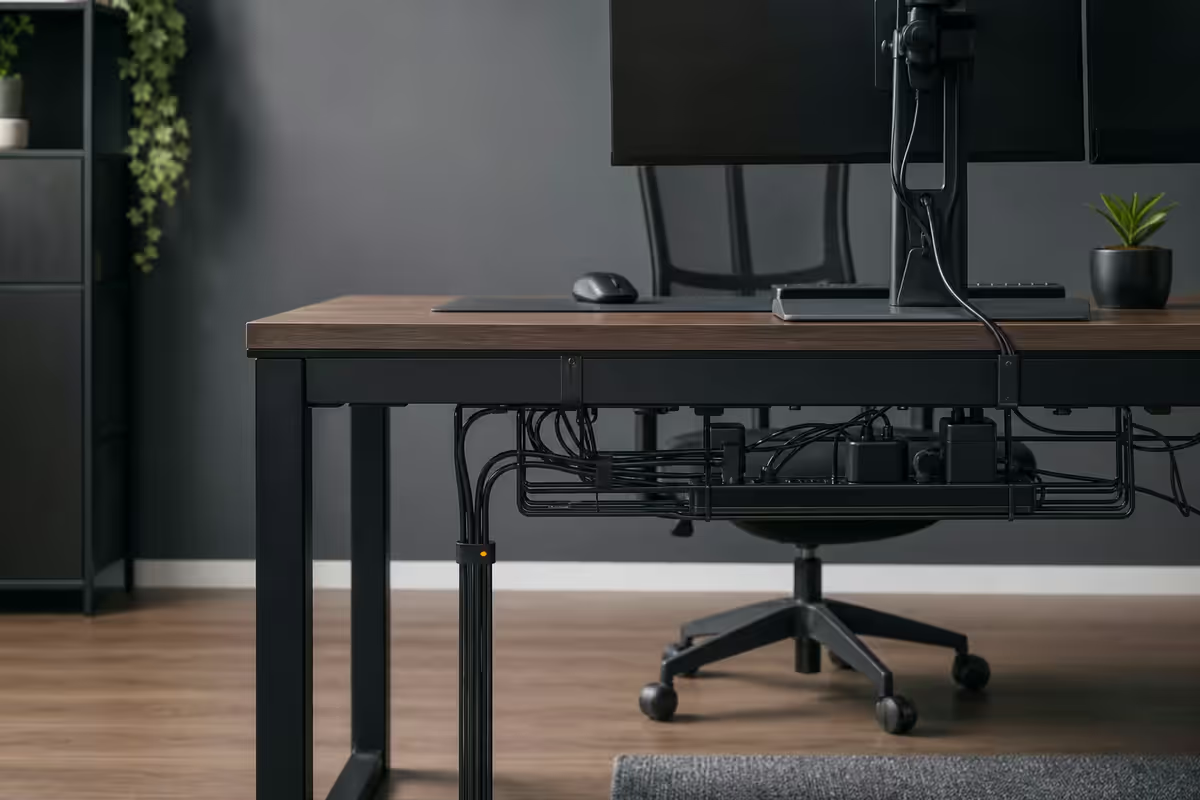
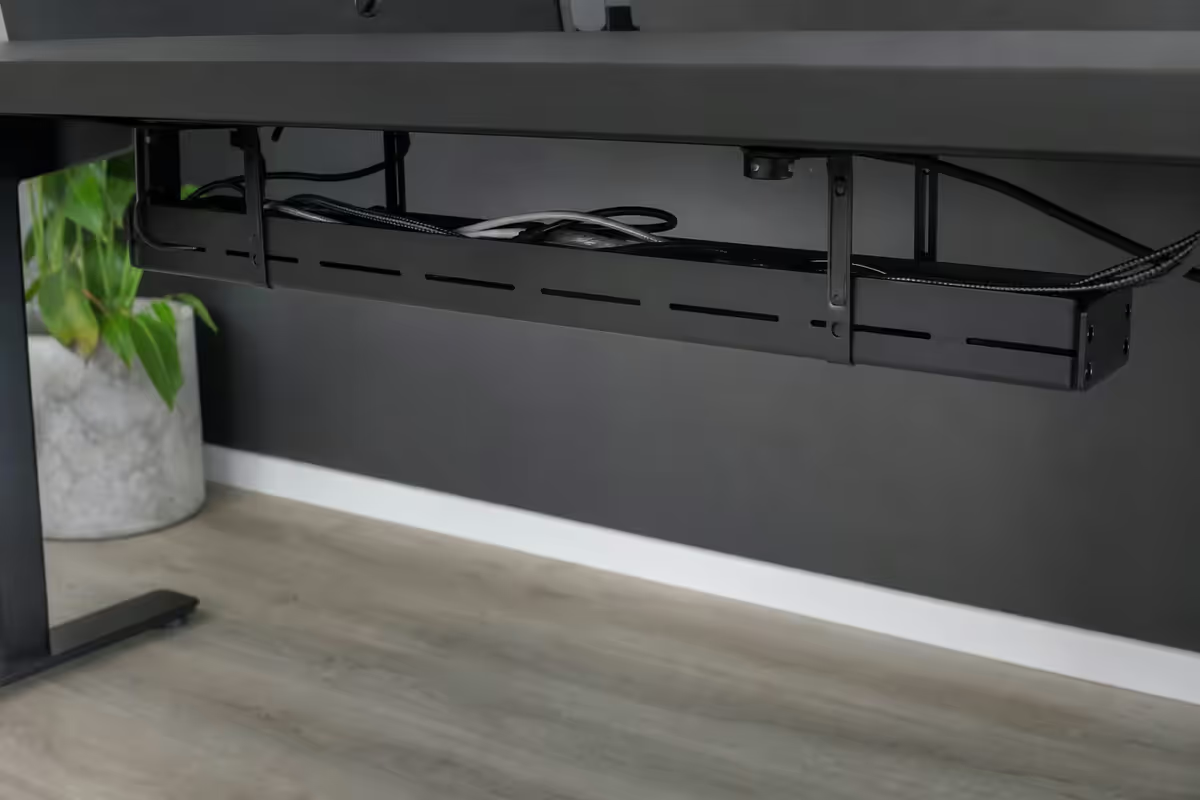
If you only buy one thing, buy an under-desk cable tray. The principle is simple: a perforated metal or mesh basket bolted or stuck to the underside of your desk holds power strips, USB hubs, charger bricks and the messy middle section of every cable.
Two genuine variants are worth considering:
Screw-mount metal trays
IKEA Signum, Brateck CC10, and the various house-brand trays on Takealot. Pros: cheap (R250–R500), robust, hold significant weight, allow good airflow through the perforations. Cons: requires drilling small holes into the underside of your desk — renters and people with antique furniture should look elsewhere.
Adhesive J-channel trays
Flexible plastic or fabric channels that stick to the underside of the desk with industrial adhesive strips. Pros: no drilling, work on glass desks, removable. Cons: hold less weight, adhesive can fail on textured surfaces, less visually clean than metal mesh.
Vertical CPU mount — the single biggest upgrade above R500
If your desk space allows it, a vertical PC mount hung from the underside of the desk frame is the single best upgrade you can make for under R1,200. Adjustable brackets from Brateck, Vivo and Acewill accommodate cases from 150mm to 290mm wide, and pricing in SA sits at R600–R1,200 depending on weight rating.
The benefits cascade:
- Lifts the case 200–250mm off the floor — dust intake drops by an order of magnitude
- Frees up the under-desk space for legs, footrests and chair movement
- Hides 80% of cables behind the case — most rear-panel connections become invisible from the seated position
- Easier access to the back of the PC for connecting peripherals or troubleshooting
- Reduces vibration transmission to the desk surface (helpful with cheap chassis fans)
The one caveat: check your desk's structural rating. Most modern desks (Ikea Bekant, Linnmon-Adils combos, generic Takealot home-office desks) handle a 10–12 kg PC plus mount without issue. Floating wall-mounted desks may not — read the desk's weight specification.
Cable raceways and channels — the wall-side solution
Raceways are rigid plastic channels (typically with a hinged lid) that mount on the wall and hide cables running from wall sockets to your desk. They come in a few flavours:
- Surface-mount paintable raceways — rigid PVC, paintable to match wall colour, screw or adhesive mount. R80–R200 per metre.
- Fabric cable sleeves — flexible velvet-textured tubes that gather a bundle of cables into one neat strand. R150–R350 for a 1.5m sleeve.
- Spiral wraps — coiled plastic that wraps around an existing cable bundle. R40–R120. Useful for short runs.
For renters or people who can't drill into walls, the adhesive raceways from D-Line and the SA-made Brateck channels stick reliably to painted plaster and can be removed without damage at end of lease.
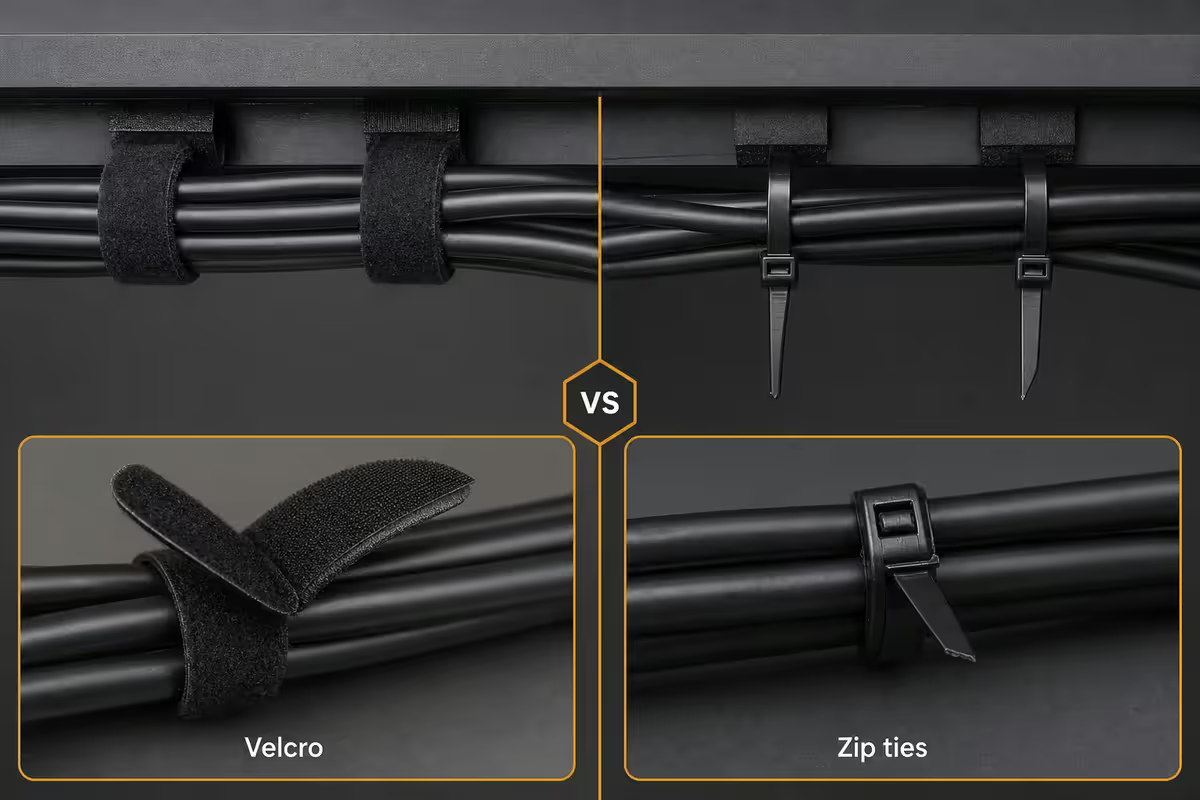
Velcro vs zip ties — velcro wins, every time
This is the most common cable management mistake: defaulting to zip ties because they're cheap. Zip ties are permanent. The moment you want to add a peripheral, you cut the tie and start again. Over a 2–3 year ownership window, you'll go through dozens.
Worse, zip ties pulled too tight pinch cable shielding. For HDMI, DisplayPort and USB 3.x cables (where signal integrity matters), a tight zip tie causes intermittent dropouts months later that are infuriating to diagnose.
Velcro cable tape (R80–R150 for a roll of 5–10 metres) is reusable, doesn't pinch, and lets you add or remove a single cable in 5 seconds. The double-sided fabric loops onto itself. Buy black 10mm width — it's invisible behind a desk and works on any cable thickness from a single USB-A to a thick bundle of 8 cables.
One big bundle vs separation by type
Two schools of thought exist on cable bundling, and they're both right — for different setups.
The one-big-bundle approach
Everything — power cables, USB cables, HDMI/DisplayPort cables, audio cables — bundled together in one neat run from the desk to the floor. Maximum visual cleanliness. Minimum decision fatigue. The right choice for typical gaming, office and casual creative setups where modern shielded cables handle the proximity to power without measurable interference.
The separation-by-type approach
Power cables down one side of the desk, signal cables (USB, audio, video) down the other. Required for audio recording setups with unbalanced line-level cables, microphone preamps, and any analogue audio chain that picks up mains hum. Also useful for high-end USB-C peripherals where electromagnetic interference can cause data integrity issues.
How to decide: if you record audio professionally or notice hum/buzz on your microphone, separate. Otherwise, the one big bundle is fine and looks far better.
Power strip mounting — under the desk, not on the floor
A power strip resting on the floor is a dust magnet and a flood hazard (admittedly, an unlikely flood — but the principle holds for spilled coffee, dropped drinks and the occasional cleaning mishap).
Mount a multi-outlet power strip behind your monitor on the underside of the desk, using either the strip's built-in keyhole mounts (screws into the desk) or 3M VHB double-sided tape for renters. Choose a strip with at least 6 outlets, surge protection (≥1000 joules), and ideally individual switches per outlet so you can power-down individual devices without cutting power to everything.
Recommended specific SA-available picks: the Eurolux 6-way surge strip (R280–R350), the Switched 8-way with individual switches (R450–R600), and the premium Belkin BoostCharge Pro 8-outlet (R900–R1,200) which adds USB-C charging ports.
Across the 200,000+ custom PCs we've delivered, the customers happiest with their setup six months later aren't the ones who bought the most expensive case or the brightest RGB. They're the ones who spent R900 on three small workspace pieces: a tray, a vertical mount, and a roll of velcro. The desk stays tidy through every game launch, every peripheral upgrade, every PC swap. The visual calm carries over into the work that happens on top of it.
Evetech Workspace Team · Centurion
R500 / R1,500 / R2,500 — the three honest tiers
The R500 starter
- 1 roll of velcro tape (R120)
- 1 cable raceway (1 metre, R180)
- 1 adhesive J-channel tray (R200)
Total: ~R500. Already a transformation. Handles 70% of typical setups, no tools required beyond scissors.
The R1,500 mid-tier
- 1 metal under-desk tray (R350)
- 1 velcro tape roll (R120)
- 1 set of monitor arm cable channels (R280)
- 1 decent 6-way surge power strip with switches (R450)
- 1 pack of D-Line raceways (R280)
Total: ~R1,480. Covers almost every household need. Looks professional. Most people don't need more.
The R2,500 enthusiast tier
- 1 vertical CPU mount, premium (R900)
- 1 premium metal tray with cover (R500)
- 1 full raceway run with corner pieces (R450)
- 1 Belkin BoostCharge Pro 8-outlet with USB-C (R900)
- 1 set of velvet cable sleeves (R280)
Total: ~R3,030. Showroom finish. Anything beyond this is luxury, not function.
Where to buy in South Africa
| Category | Best SA source | Price comparison |
|---|---|---|
| Metal trays | IKEA SA, Takealot, Loot | Signum R350–R500 |
| J-channel adhesive trays | Takealot, Loot | R180–R300 |
| Velcro tape | Builders Warehouse, Game | R80–R150 / 5m |
| Raceways | Builders Warehouse, D-Line at Takealot | R80–R200 / m |
| Vertical PC mounts | Wootware, Evetech, Takealot | R600–R1,200 |
| Power strips (surge) | Game, Makro, Takealot | R280–R900 |
| Premium cable sleeves | Evetech, Wootware | R150–R350 |
Key takeaways
- The under-desk cable tray is the single highest-impact upgrade — R250–R500 fixes 60% of the problem.
- Velcro tape beats zip ties every time — reusable, gentler on cables, swap devices in 5 seconds.
- Vertical CPU mount (R600–R1,200) is the second-highest impact upgrade — lifts the case, hides 80% of cables.
- Mount the power strip under the desk, not on the floor. Always surge-rated for SA load-shedding spikes.
- Three honest tiers: R500 starter, R1,500 mid, R2,500 enthusiast. Don't pay more if R500 fixes most of it.
Frequently asked questions
What's the best way to manage cables behind a desk?
The under-desk cable tray is the single highest-impact upgrade — typically R250–R800 for a metal mesh tray with self-adhesive or screw mounts. Combine it with velcro straps (not zip ties) for bundling, and a single behind-monitor power strip mounted under the desk. This three-item combination handles most household setups for under R900 total.Should I separate power cables from data cables?
For audio-sensitive setups (recording, microphones, line-level interconnects), yes — run power cables on one side of the desk and data/USB cables on the other to minimise interference. For typical office or gaming setups with shielded USB and HDMI cables, the interference is below noticeable thresholds and a single bundle is fine. The one big bundle approach prioritises tidiness; separation prioritises signal cleanliness.Are velcro straps or zip ties better for cable management?
Velcro straps — every time. Zip ties are permanent (you cut them off to change anything), can pinch cables tight enough to damage shielding over time, and look messy when over-cut. Velcro is reusable, gentler on cables, and lets you add or remove a device in 5 seconds. The only good zip tie use case is securing the very back of a permanent bundle that will never change. Buy a roll of 10mm velcro tape for R80–R150 and use it everywhere.How do I hide cables on a glass or transparent desk?
Glass desks make traditional under-desk trays visible. Three options: (1) cable raceway channels along the wall behind the desk, with cables running into the channels and exiting only at devices, (2) a vertical CPU stand attached to one leg, hiding most cables behind the case, (3) a wall-mounted power strip below the desk surface but above the floor. Black raceways on a black wall disappear; matte cables blend into shadow.What's the IKEA Signum tray and is it worth it?
The IKEA Signum is a perforated metal cable tray sold for around R350–R500 in SA (slightly higher than EU pricing due to import). It mounts to the underside of any desk with included screws and holds an impressive amount of cable. Pros: cheap, robust, well-vented. Cons: visible from the side, requires screw mounting (not adhesive). For renters who can't screw into desks, the J Channel adhesive trays from Takealot are a better fit at similar pricing.Should I use a vertical CPU mount under the desk?
Yes, almost always. A vertical PC mount lifts the case off the floor (less dust intake), frees up the under-desk space for legs, and hides 80% of the cables behind the case itself. Adjustable mounts (Brateck, Vivo, Acewill) cost R600–R1,200 and accommodate cases from 150mm to 290mm wide. The single biggest workspace upgrade you'll make under R1,200 — it transforms the visual cleanliness of the workstation.What does decent cable management cost in South Africa?
The three tiers most households fall into: the R500 starter (velcro tape, one cable raceway, one adhesive tray) — already a transformation. The R1,500 mid-tier (proper under-desk tray, velcro, monitor arm channels, decent power strip) — pretty much everything most users need. The R2,500 enthusiast (vertical CPU mount, premium tray, full raceway system, behind-monitor power outlet, branded cable sleeves) — the showroom finish. Anything beyond is luxury, not function.Where do I buy cable management products in South Africa?
Takealot and Loot stock the broadest selection at competitive prices. Builders Warehouse and Game stock the basics (velcro, raceways, cable ties). IKEA (online to SA via various proxies) for Signum trays. Evetech and Wootware stock specialist tech-side gear like cable sleeves, magnetic clips and decent power strips. For premium items (NZXT-style cases with PSU shrouds), Amazon import is sometimes the only path.