SA Fibre Router Buying Guide · 2026
The router from your ISP is the bottleneck. — Here's what to replace it with.
You paid for 500 Mbps. Your speed test sees 60. The fibre is fine. The problem is the R400 router Vumatel handed you with the install — outdated chipset, weak WiFi, locked firmware. The fix takes one Sunday afternoon and the right hardware.
- SA fibre line peak
- 1 Gbps
- 2026 mature choice
- WiFi 6
- solid baseline
- R1,500
ISP-supplied router limitations
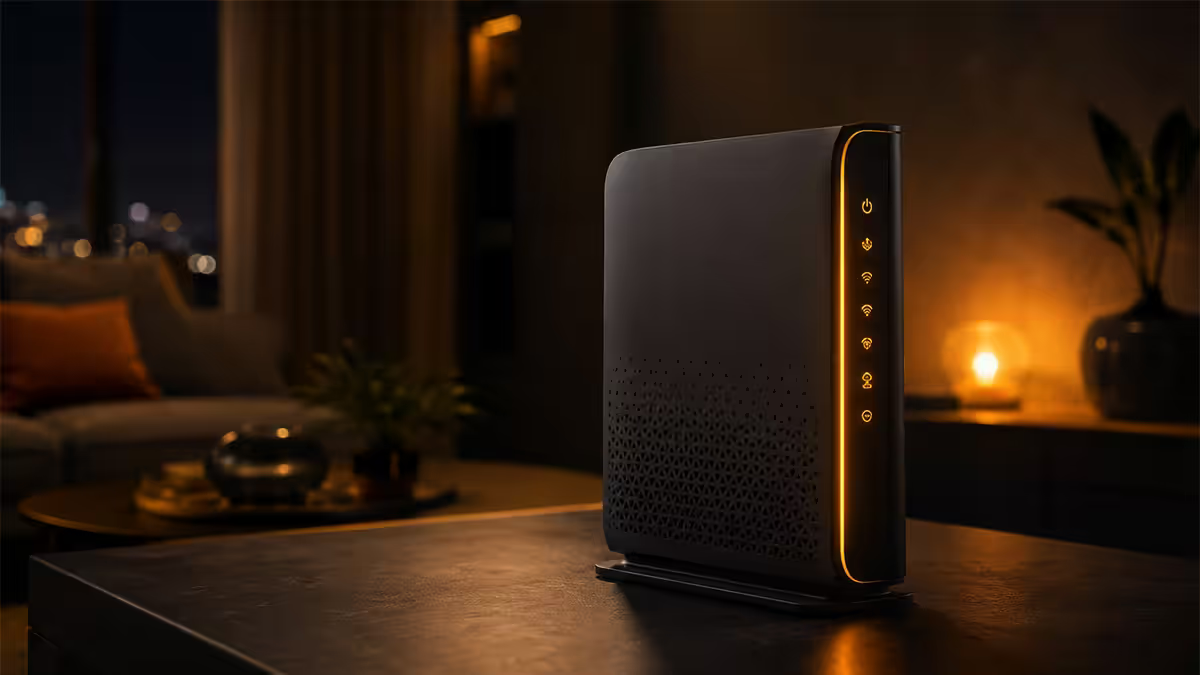
When Vumatel, Openserve, Frogfoot or Octotel installs your fibre line, the technician usually hands you a router as part of the kit — sometimes built into the ONT (optical network terminal), sometimes a separate small box. These routers are sourced for the ISP's lowest-cost-supplier deal, not your home. They share several limitations that no firmware update will fix.
What you typically get from an ISP: a 4-port gigabit switch, dual-band WiFi 5 (or budget WiFi 6 on newer installs), 2 internal antennas, a Broadcom or Realtek SoC clocked under 1 GHz, and locked-down firmware where the password to the admin interface is sometimes the same one across every install in your suburb. The radio output is decent at 5 metres, marginal at 12 metres, and falls off a cliff through a thick brick wall.
For a single-bedroom flat with one laptop and a TV on a 100 Mbps line, this is genuinely fine. The router will deliver close to line speed within 5 metres and not be the bottleneck. The trouble starts when one of three things is true: (1) you upgrade to 500 Mbps or 1 Gbps, (2) your home is bigger than 60 m², or (3) you have 10+ connected devices (smart TV, console, phones, laptops, smart home, doorbell, security cameras). At that point the ISP router becomes the limiting factor and a third-party router pays for itself in user experience.
WiFi 6 vs WiFi 7 — the honest 2026 take
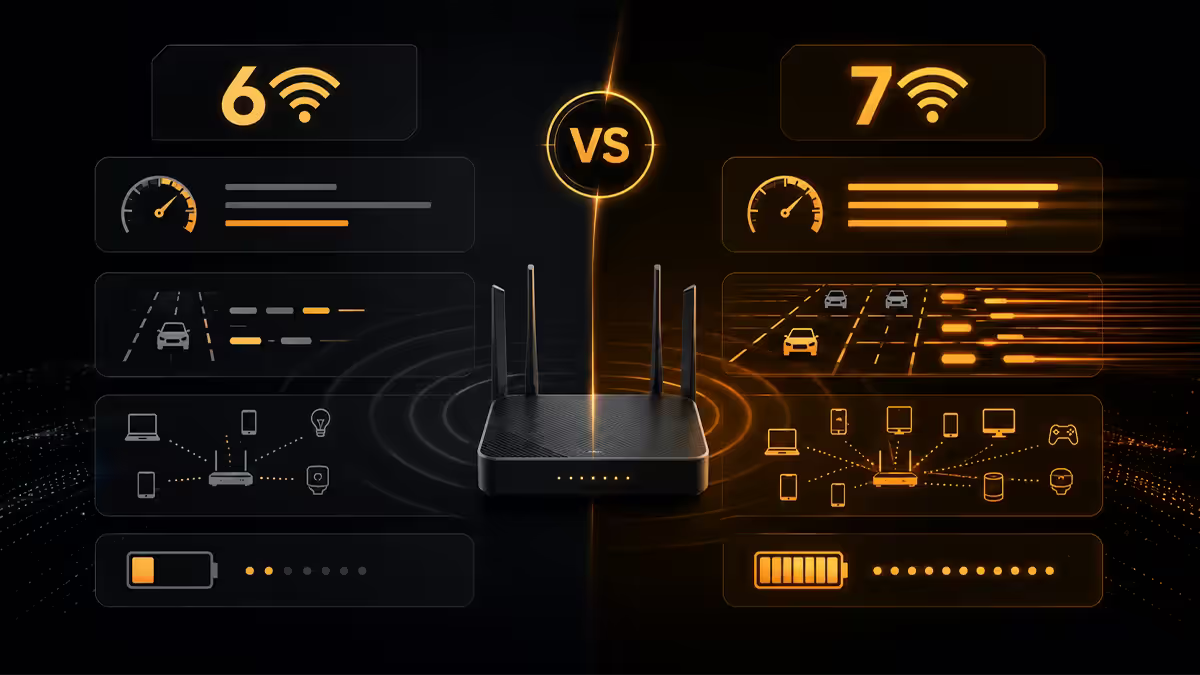
WiFi 6 (802.11ax) launched in 2019 and is now fully mature. Every smartphone since iPhone 11, every laptop since 2020, every smart TV since 2022, supports WiFi 6 natively. Prices have fallen to the point where a good WiFi 6 router or mesh is genuinely affordable in SA. For 2026, WiFi 6 is the right buy for the majority of SA homes.
WiFi 7 (802.11be) is the new standard, ratified in late 2024. Its headline features are wider 320 MHz channels (in the 6 GHz band), multi-link operation (one client device can use 5 GHz and 6 GHz simultaneously for lower latency) and slightly higher peak speeds. In a benchmark lab WiFi 7 is impressive; in a typical SA home the gains are marginal because:
- The 6 GHz band has shorter range and doesn't penetrate walls well — useful in open-plan rooms only.
- Most of your client devices in 2026 are still WiFi 6 (only the highest-end 2024+ phones and laptops are WiFi 7).
- 1 Gbps fibre lines don't saturate WiFi 6 — the WAN is the bottleneck.
- WiFi 7 hardware costs 50-100% more than equivalent WiFi 6.
Buy WiFi 7 if you're future-proofing for 5+ years, you have a 2024+ flagship laptop and phone, or you're building a prosumer setup where the price difference is marginal at the top end (Asus RT-BE96U, TP-Link Deco BE85, Ubiquiti UniFi U7 Pro Max). Buy WiFi 6 if you want the best value for the next 3 years and don't mind potentially upgrading mid-decade.
Mesh WiFi vs single router + access point
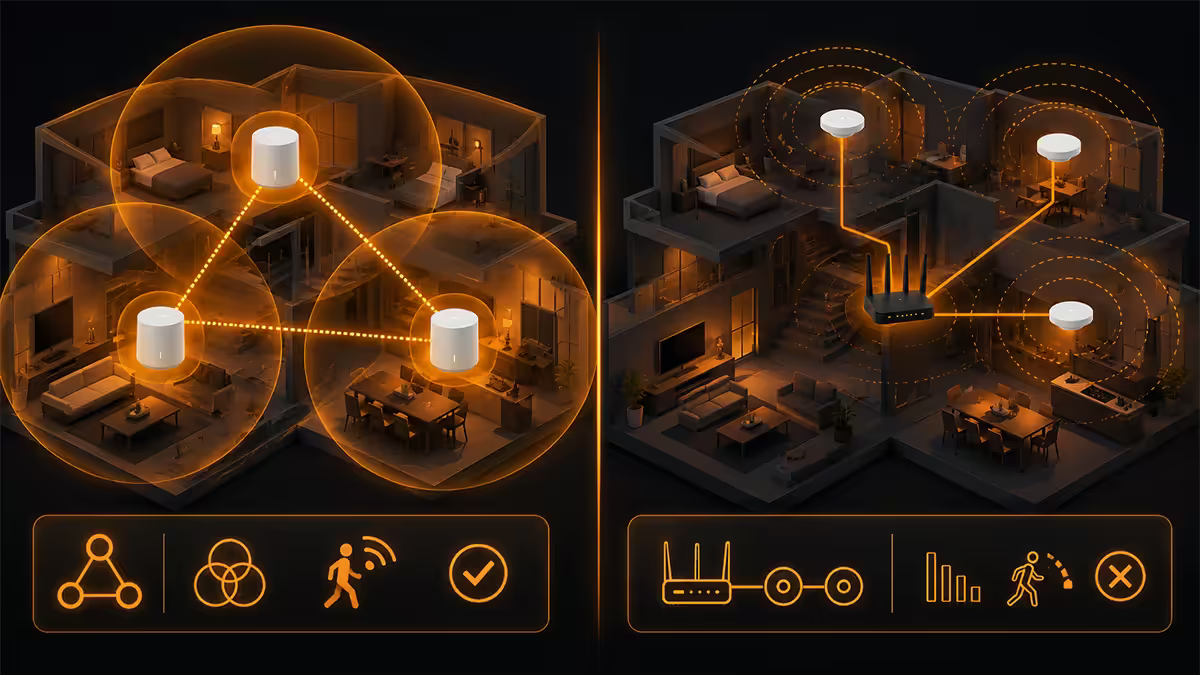
There are two valid architectures for whole-home WiFi coverage. Both work; the right choice depends on your house and your appetite for setup time.
Mesh systems
A mesh system is 2-3 (or more) identical units that talk to each other wirelessly (or over ethernet backhaul if you can run a cable) and present as a single WiFi network. Roaming between them is seamless — your phone stays connected as you walk room to room. Setup is usually app-driven and takes 15 minutes.
Best for: double-storey homes, homes with thick brick or concrete walls, anyone who values simplicity over granular control. Popular SA picks: TP-Link Deco X50 / XE75 (3-pack), Asus ZenWiFi XT8 / XT12, Eero Pro 6E, Ubiquiti AmpliFi Alien.
Single router + access points
A single high-power router at the centre of the home handles routing, NAT, firewall and DHCP. Separate access points (APs) plug into ethernet around the home for extra WiFi coverage. The router can be Mikrotik, Asus, Ubiquiti or similar; APs are usually Ubiquiti UniFi, Mikrotik cAP ax, or TP-Link Omada.
Best for: larger homes where you can run ethernet through ceiling cavities or skirting, prosumer/IT enthusiast setups, anyone who wants VLAN segmentation (guest WiFi, IoT WiFi, main WiFi separated). The performance ceiling is higher than mesh, but setup takes longer. Popular SA picks: Mikrotik RB5009 + UniFi U6 APs, Asus RT-AX86U + AiMesh.
What 1 Gbps fibre actually needs from a router
SA 1 Gbps fibre lines (Vumatel Air Fibre, Openserve Pro, Frogfoot's higher tiers) are now widely available. Many home routers can technically advertise "AX5400" or "AX6000" but can't sustain 1 Gbps WAN throughput because the CPU bottlenecks before WiFi does. The reality test isn't WiFi spec — it's routing throughput.
For sustained 1 Gbps WAN at full duplex, the router needs:
- A CPU rated for at least 1 Gbps routing (a real-world figure, not WiFi peak). Mikrotik hAP ax² and RB5009, Asus RT-AX86U Pro, Asus RT-BE88U, TP-Link Archer AX73/AX90, UniFi Dream Router — all qualify.
- Gigabit WAN port (every modern router has this).
- Either 2.5GbE WAN port or NAT acceleration hardware — necessary for sustaining 1 Gbps with QoS, VPN, deep packet inspection enabled.
- WiFi 6 AX3000 or better — adequate for wireless clients up to 600-800 Mbps real-world.
Avoid for 1 Gbps: any sub-R1,000 budget router, any pre-WiFi 6 model regardless of brand, any travel router. They'll throttle to 300-600 Mbps even on a fresh WAN connection.
Mikrotik, Asus, TP-Link Deco, Ubiquiti UniFi — the SA prosumer picks
Mikrotik (the SA enthusiast favourite)
Latvian company. Makes deeply configurable routers at SA-friendly prices, supports features that normally cost 10× more in enterprise gear (true VLANs, BGP, layer 7 firewall, hardware queues), and has a wide SA distributor network. Learning curve is steeper than Asus or Deco — RouterOS is enterprise-grade and the web interface is utilitarian. For prosumers and IT pros, it's outstanding value. Recommended Mikrotik models for SA homes: hAP ax² (R1,700), RB5009 (R3,800, no WiFi — pair with separate APs).
Asus (the best all-rounder)
Asus AX-series and BE-series are the easiest "great router" recommendation for most SA homes. Good WiFi coverage, friendly web UI plus app, AiMesh lets you mesh-extend later with any other Asus router, built-in Trend Micro IPS (intrusion prevention) at no subscription cost, gaming-grade QoS. Recommended: RT-AX55 (R1,500 entry), RT-AX86U Pro (R3,800 power user), RT-BE96U (R8,000 WiFi 7 future-proof).
TP-Link Deco (the easy mesh choice)
Deco mesh sets are the most beginner-friendly whole-home WiFi solution. App setup in 10 minutes, automatic firmware updates, seamless roaming, attractive price-per-coverage. Less granular control than Asus or Mikrotik but most SA users never miss it. Recommended: Deco X50 3-pack (R3,300 covers ~250m²), Deco XE75 Pro 3-pack (R5,500 WiFi 6E), Deco BE85 (R12,000+ flagship WiFi 7).
Ubiquiti UniFi (the prosumer pick)
UniFi is the enterprise-meets-prosumer ecosystem — UniFi Dream Router or Dream Machine as your central gateway, U6/U7 access points around the home, all managed through the UniFi controller. Best-in-class WiFi coverage, beautiful management UI, granular VLAN/firewall, OK price for what you get. Requires more setup time and more ceiling-mounted hardware. Recommended: Dream Router (R3,200) standalone, or Dream Machine + 2× U6 Pro APs (R8,500 full setup).
| Brand | Strength | Best for |
|---|---|---|
| Mikrotik | Power user features at SA prices | Prosumers, IT enthusiasts |
| Asus AX/BE | Best all-rounder, AiMesh flexibility | Most SA homes wanting "great router" |
| TP-Link Deco | Easy mesh, attractive price | Whole-home coverage, set-and-forget |
| Ubiquiti UniFi | Pro coverage + management UI | Prosumer setup, larger homes |
| Eero (Amazon) | Simplest mesh setup | Tech-averse households |
| Huawei (ISP-supplied) | Costs nothing | Small flats, <200Mbps lines |
Double-NAT and bridge mode
Once you put your own quality router behind your ISP unit, you've created the double-NAT problem: both routers are doing Network Address Translation, creating two layers of private IP space. The visible symptoms are: gaming consoles showing "strict NAT" (party chat fails, matchmaking is slow), VPN clients reconnecting frequently, port forwarding not working, and occasional VoIP / video call quality drops.
The fix is putting the ISP router into bridge mode (sometimes called "modem mode" or "transparent mode" depending on vendor). In bridge mode the ISP unit stops routing — it just passes the WAN signal through to your router, which becomes the only device doing NAT, DHCP and firewall. Your router gets the public IPv4 address (or IPv6 prefix) directly from the ISP.
How to bridge each major SA ISP router (general approach):
- Vumatel-supplied units (TP-Link, Huawei): usually a "Bridge" toggle in the WAN settings. Sometimes locked behind admin login that needs the ISP technician's password — quick phone call to support unlocks it.
- Openserve / Telkom units: "Operation Mode" → switch from "Router" to "Bridge" or "Modem".
- Frogfoot units: generally allow bridge mode directly in the WAN setup page.
- Octotel-supplied units: support for bridge mode varies; some require a support call.
Once bridged, plug an ethernet cable from the ISP unit's LAN port to your router's WAN port, configure the WAN as DHCP (or PPPoE if your ISP uses it), and your router takes over. Strict NAT goes away. Port forwarding works. VPNs stop dropping. The difference is immediate and obvious.
SA price tiers — what to actually buy
R1,500 solid baseline
At this price you get a quality single WiFi 6 router that comfortably handles 500 Mbps - 1 Gbps lines in a typical 80-120 m² flat or townhouse. Good WiFi 5m-12m range, 4 gigabit LAN ports, no fuss. Picks: Asus RT-AX55 (R1,500), TP-Link Archer AX55 (R1,400), Mikrotik hAP ax² (R1,700).
R3,500 mesh sweet spot
At this tier you can either buy a premium single router (Asus RT-AX86U Pro, R3,800) for a smaller home or a 3-pack mesh kit for full whole-home coverage. Most SA double-storey homes land here. Picks: TP-Link Deco X50 3-pack (R3,300), Asus ZenWiFi XT8 2-pack (R3,800), Ubiquiti UniFi Dream Router (R3,200, +R1,500 for an extra U6 Lite AP later).
R6,500+ prosumer
At this tier you're building a serious home network — Mikrotik RB5009 + WiFi 6 access points, Ubiquiti UDM + multiple U6 Pros, or premium WiFi 7 mesh (Deco BE85, Asus RT-BE96U). Picks: Mikrotik RB5009 + 2× UniFi U6 Lite (~R7,200), Ubiquiti Dream Machine + 2× U6 Pro (~R8,500), TP-Link Deco BE85 3-pack (R12,000+), Asus RT-BE96U (R8,000 single).
Key takeaways
- ISP-supplied routers are baseline kit — replace when you have 500Mbps+, a larger home, or 10+ devices.
- WiFi 6 is the 2026 mature choice for SA homes. WiFi 7 only matters if you're future-proofing or have WiFi 7 clients.
- Mesh for double-storey or thick walls. Single router + AP for prosumer control.
- Always bridge the ISP unit when adding your own router. Eliminates double-NAT, fixes strict NAT in gaming.
- SA price tiers: R1,500 baseline, R3,500 mesh sweet spot, R6,500+ prosumer Mikrotik/Ubiquiti.
Frequently asked questions
Do I need to replace the router my ISP gave me?
For 200 Mbps in a small flat, the ISP router is fine. For 500 Mbps+, larger homes or 15+ devices, replacing it brings meaningful improvements in WiFi range, latency and QoS.WiFi 6 vs WiFi 7 — which should I buy in 2026?
WiFi 6 is mature and the right value choice today. WiFi 7 is worth it only for future-proofing 5+ years or if you already have WiFi 7 client devices.What's the double-NAT problem with ISP routers?
When both your ISP router and your own router do NAT, gaming gets strict NAT, VPN drops and port forwarding breaks. Fix by putting the ISP router in bridge mode.Mesh WiFi vs router plus access point?
Mesh is easier and ideal for double-storey or thick-walled homes. Router + AP offers more control. For most homes mesh is the right answer.What does 1 Gbps fibre actually need?
A WAN port at gigabit (every modern router), a CPU capable of routing at line rate (Mikrotik hAP ax², Asus AX-series, Deco, UniFi all qualify), and WiFi 6 AX3000+ for wireless clients.Why is Mikrotik so popular among SA networking enthusiasts?
Deep configurability at SA-friendly prices, enterprise-grade features (VLAN, BGP, layer 7 firewall) at consumer cost, and a wide SA distributor network. Steeper learning curve than Asus but outstanding value for IT pros.When should I 'bridge' my ISP router?
Whenever you've added your own router behind the ISP unit. Eliminates double-NAT, fixes strict NAT in gaming, improves VPN. Vumatel and Openserve typically allow it readily.How much should I spend on a fibre router in SA?
R1,500 baseline (single WiFi 6 router), R3,500 mesh sweet spot, R6,500+ prosumer (Mikrotik, UniFi, or premium WiFi 7 mesh).
Get the Evetech app
Exclusive app-only prices, daily flash sales, and free delivery on orders over R4,000 — download the app and start saving.