LTE / 4G Router Buying Guide
How to choose an LTE router. — Cat-12 minimum. External antenna. SA-tuned bands.
LTE in 2026 is the right answer for the third of SA homes still waiting for fibre, plus every fibre home that needs a failover for load shedding. The router category matters more than the brand.
- minimum target
- Cat-12
- for SA
- Dual SIM
- SA price band
- R1.5k-R12k
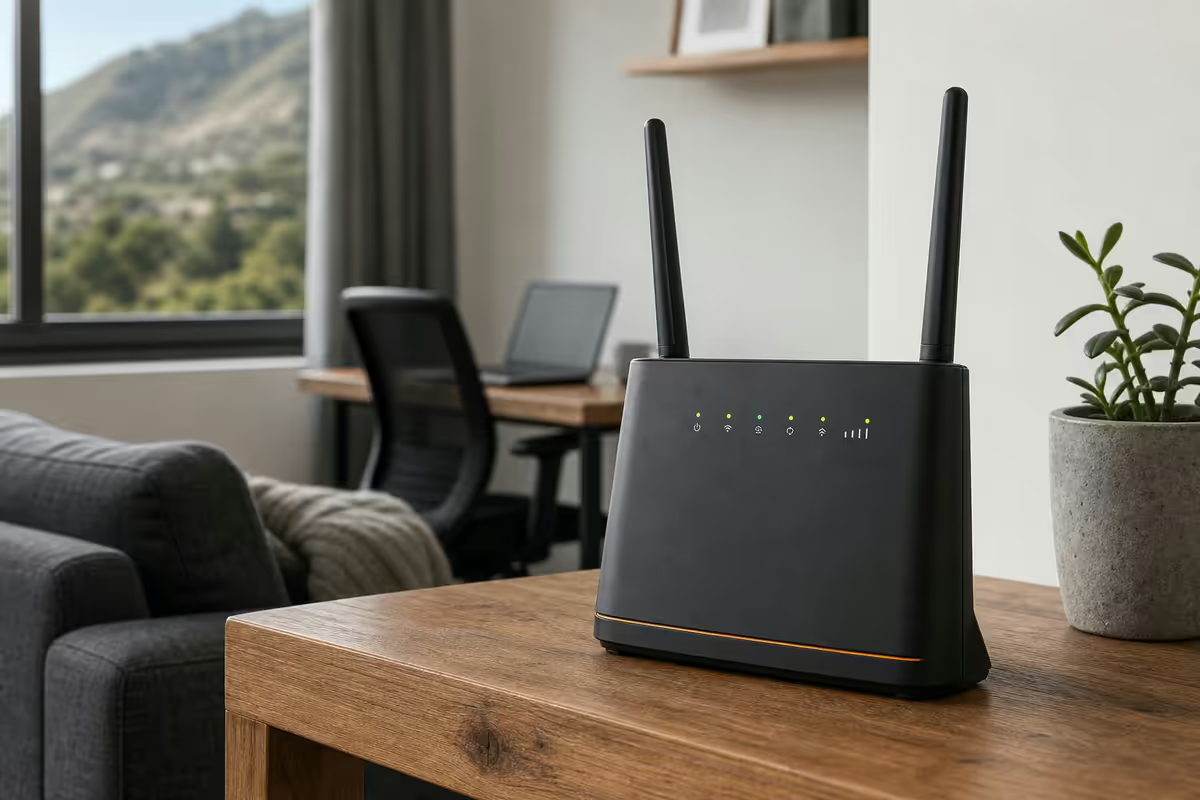
LTE Categories — what the numbers mean
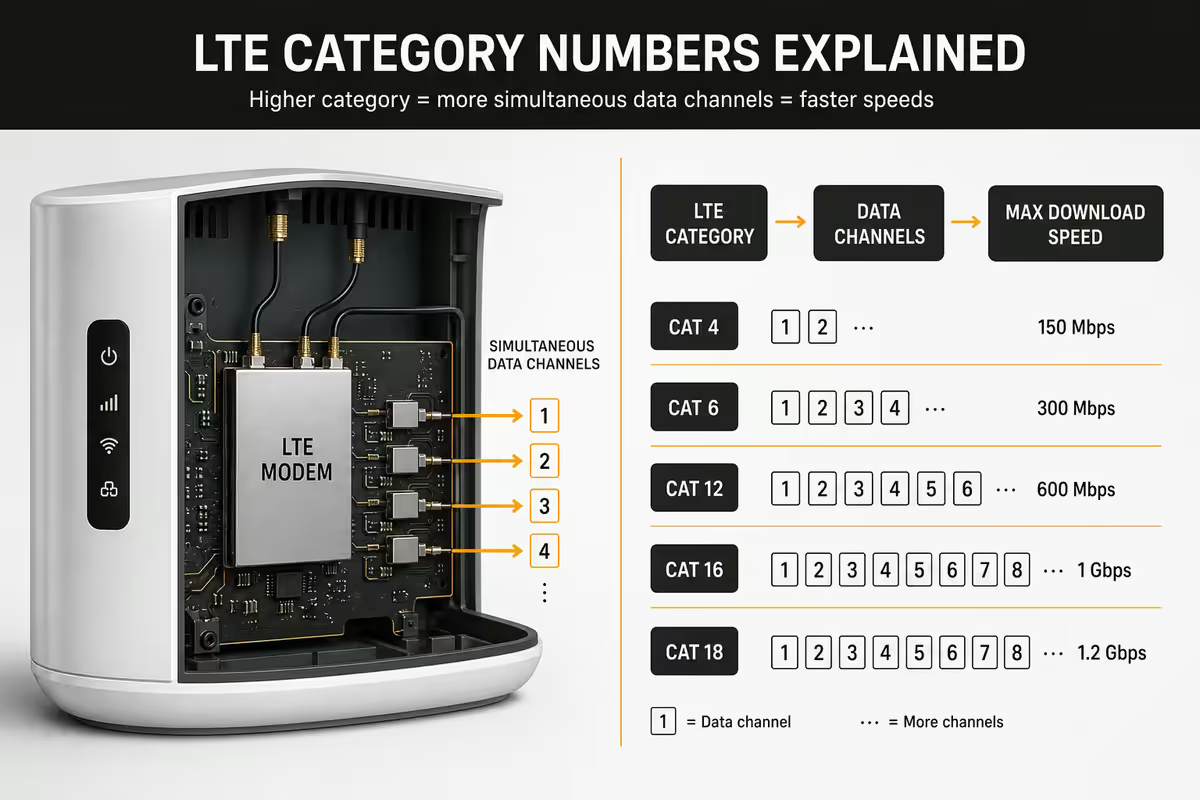
An LTE Category (Cat-4, Cat-6, Cat-12, etc.) describes the modem's theoretical peak speed and how many frequency bands it can aggregate at once. Higher Cat = more bands = higher peak.
| LTE Category | Peak (theoretical) | SA real-world |
|---|---|---|
| Cat-4 | 150 Mbps down | 30-80 Mbps |
| Cat-6 (2-band CA) | 300 Mbps down | 50-130 Mbps |
| Cat-12/13 (3-band CA) | 600 Mbps down | 80-250 Mbps |
| Cat-18/19 (4-band CA) | 1.2 Gbps down | 120-400 Mbps |
| Cat-20+ (gigabit LTE) | 2 Gbps down | 150-500 Mbps where supported |
| 5G sub-6 (NSA / SA) | 2-3 Gbps | 200-600 Mbps real, often higher in Sandton/Stellenbosch |
The real-world speeds in SA cities reflect tower congestion, distance to tower, and how many bands the operator's tower aggregates. Cat-12 is the practical minimum target for new buys in 2026 — the gap between Cat-6 and Cat-12 is significant in real use, while Cat-18+ adds diminishing returns until 5G enters the picture.
Single vs dual SIM
Dual-SIM routers let you keep two networks' SIM cards active simultaneously. The use cases are concrete and unique to SA:
- Network failover. Vodacom outage? Auto-switch to MTN without standing on a chair to reseat a SIM.
- Price/data optimisation. Use Rain for primary (cheaper, uncapped), Vodacom for streaming (better evening speeds).
- Coverage swap. Mid-coverage area where Cell C tower covers the lounge but Vodacom covers the office.
- Load shedding tower failures. Different networks' towers go down at different times — keep both ready.
Routers that support dual SIM well in 2026: Huawei B628 / B818 / B818-263, Mikrotik LtAP / LtAP LR8 / Chateau LTE12, Cudy LT500 / LT700, ZTE MC801A (5G dual). Single SIM saves R200-R500; for most SA buyers the dual-SIM premium is worth paying.
External antennas — the upgrade nobody applies
The single biggest performance boost on an LTE router is an external antenna. The router's built-in antennas are tiny — they have to fit inside a 200 mm chassis. A real outdoor antenna with 5-10 dBi of gain, aimed at the tower, frequently doubles real-world speeds and stabilises ping.
Most LTE routers have SMA or TS9 connectors on the back for adding external antennas. They're usually labelled "Main" and "Aux" — both must be connected for full MIMO performance.
Antenna types worth knowing
- Omnidirectional (panel or stick): Poynting OMNI-A0001, 5-6 dBi. Easy install, no aiming required. Suits multi-tower environments.
- Directional MIMO (Yagi-style): Poynting XPOL-2 (8.5 dBi) or LPDA-92. Mount outdoors, aim at the strongest tower. Best gain.
- Window-mount stick: Cheap, 3-4 dBi. Easy upgrade if you can't drill holes.
When you need an antenna
- Signal strength below -90 dBm (check router admin page).
- Speeds significantly lower than your network's advertised tier.
- Building with steel or thick concrete walls/roof.
- More than 1-2 km from nearest cell tower.
Antenna cable matters too — use LMR-400 or HDF-400 low-loss cable. Cheap thin coax kills 20-30% of your gain over a 10 m run.
Brand picks 2026
Huawei — the SA default
Huawei dominates SA LTE retail and for good reason — their routers are tuned for SA bands, well-priced, and have mature firmware. B628 (Cat-12, ~R3,800) is the right pick for most new installs. B818-263 (Cat-19, ~R5,500) for performance enthusiasts. B311 (Cat-4, ~R1,500) as cheap entry. Huawei H112/H138/H158 are their 5G fixed wireless routers.
Mikrotik — RouterOS on LTE
If you want RouterOS routing, VPN server, firewall and LTE on one box, Mikrotik wins. LtAP LR8 LTE6 (~R5,500) and Chateau LTE12/5G (~R7,500-R12,000). Outdoor-grade SXT LTE6 (~R4,500) if you mount on a roof. Learning curve is real; payoff is huge.
Cudy — budget-aggressive newcomer
Cudy LT500 (Cat-6 dual SIM, ~R1,800) and LT700 (Cat-12, ~R2,800) deliver remarkable price/performance. Smaller community and slower firmware updates than Huawei, but increasingly stocked in SA.
ZTE — 5G specialist
ZTE MC801A (5G NSA/SA, ~R6,500) is one of the best-priced 5G routers in SA. MF286 (Cat-12) is a solid 4G fallback. ZTE's UI is busier than Huawei's but capable.
Avoid
Unbranded routers from import sellers — firmware updates are rare, antenna ports are sometimes fake, and they fail in the first major load-shedding cycle. The R500 saving isn't worth the support void.
SA networks and packages 2026
| Provider | Best for | Typical price |
|---|---|---|
| Rain 4G uncapped | Cheapest primary line, no FUP throttle | R299/month |
| Rain 5G uncapped | Best metro 5G value | R599-R899/month |
| MTN Supersonic LTE | Strong nationwide LTE, fair-use ~500 GB | R499-R899/month |
| Vodacom Smart Broadband LTE | Best metro evening reliability | R449-R799/month |
| Telkom LTE / LTE+ | Decent rural coverage, FUP ~300 GB | R349-R699/month |
| Cell C Home Connect | Budget option, smaller network | R399-R699/month |
| Top-up data prepaid | Backup-only use, 1-100 GB packs | R49-R599 once-off |
Rain wins on simplicity and price for primary connections — flat-rate uncapped, no fair-use throttling, billed monthly. Speeds are typical-SA-LTE (50-150 Mbps 4G, 200-500 Mbps 5G in coverage).
MTN Supersonic tends to have the strongest nationwide coverage and consistent performance, but uncapped tiers throttle after 300-500 GB on most packages.
Vodacom shines in metro evenings when other networks congest. Telkom and Cell C are competitive in specific coverage areas — check the operator's coverage map at your exact address before signing up.
Is 5G worth it in SA right now?
Yes — in metros. MTN, Vodacom and Rain have all rolled out sub-6 GHz 5G across Joburg, Pretoria, Cape Town, Durban, Bloemfontein and Port Elizabeth/Gqeberha. Real-world speeds in good coverage are 200-500 Mbps with 20-40 ms ping — comparable to mid-tier fibre.
When 5G makes sense:
- You're in a metro area with confirmed 5G on at least one operator.
- Your fibre is poor / your area has no fibre planned.
- You can afford the R6k-R12k router price tag plus R599-R899/month airtime.
- You want fibre-like speeds without the install delay.
When LTE Cat-12 is the better buy:
- You're outside metro 5G coverage.
- You only need failover/backup, not primary line.
- You're price-sensitive — Cat-12 LTE setup for ~R5k, 5G is double.
- You already have fibre and just need a load-shedding/outage backup.
LTE as fibre failover and load-shedding survival
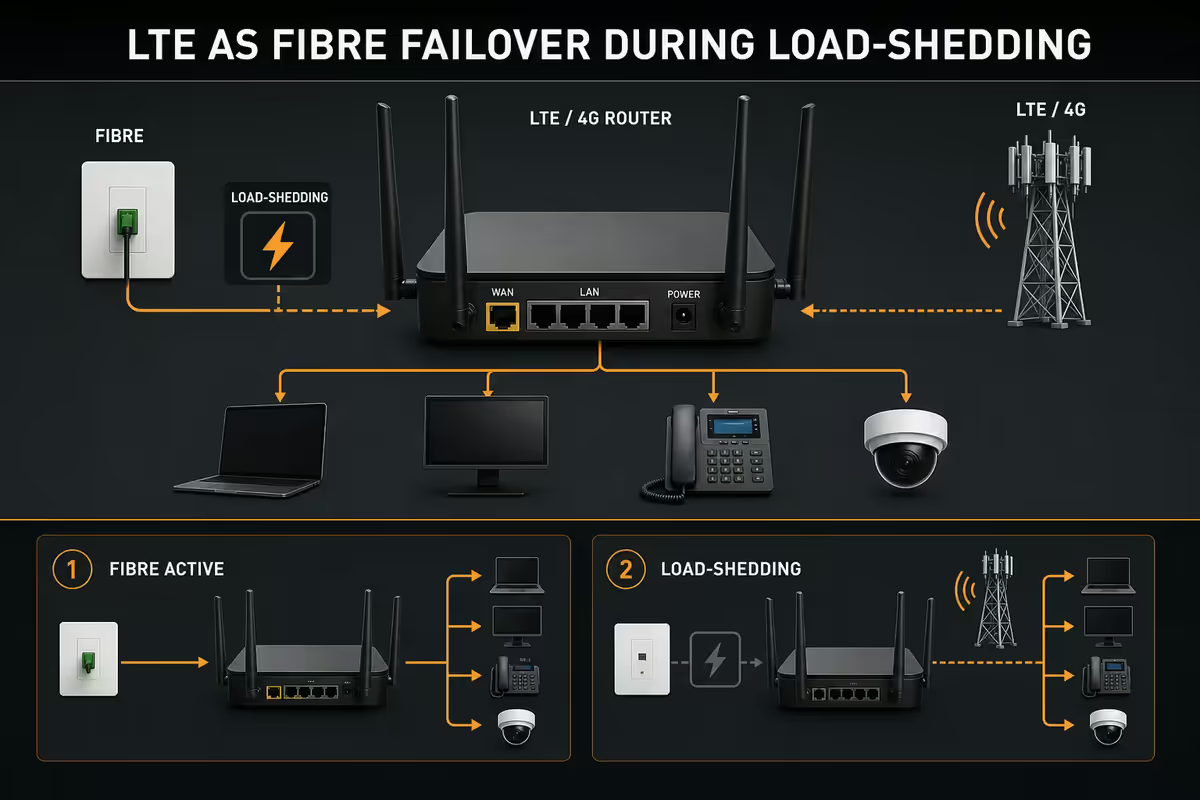
An LTE router behind your main fibre router is one of the highest-value SA networking investments of 2026. When fibre drops (provider outage, cable cut, load shedding kills the ONT), the LTE router takes over.
Failover topology
- 1
Primary uplink
Fibre router → main switch → home devices (primary). - 2
Secondary uplink
LTE router → main switch (secondary uplink). - 3
Failover routing
A router with WAN failover (Mikrotik hAP ax3, OPNsense, pfSense) picks whichever is up.
Simpler setup: LTE router as standby, manually switch when fibre dies. Less elegant but free. Pair the LTE router with a UPS (R1,500-R3,000) so it survives 2-4 hours of load shedding when the rest of your equipment is on backup power.
Total cost of LTE setup
| Component | Tier | SA price |
|---|---|---|
| Entry router (Cat-4/6) | Huawei B311 / B535, Cudy LT500 | R1,500-R2,800 |
| Mid router (Cat-12) | Huawei B628, Mikrotik LtAP LR8 | R3,500-R5,500 |
| High-end LTE (Cat-19/20) | Huawei B818-263, Mikrotik Chateau LTE12 | R5,500-R8,000 |
| 5G router | Huawei H158, ZTE MC801A, Mikrotik Chateau 5G | R6,000-R12,000 |
| External antenna + cable | Poynting XPOL-2 + LMR-400 | R1,000-R2,500 |
| Mobile data (monthly) | Rain / MTN / Vodacom uncapped | R299-R899/month |
| UPS for the router | CyberPower 850-1500VA | R1,500-R3,000 |
Key takeaways
- Buy Cat-12 minimum — Huawei B628 or Mikrotik LtAP LR8 are the SA sweet spot.
- Dual SIM is worth the premium — failover between networks plus coverage flexibility.
- An external antenna (Poynting XPOL-2 + LMR-400) doubles speeds in marginal signal.
- 5G is metro-only — check coverage before paying double. LTE Cat-12 is fine outside metros.
- Pair LTE with a UPS — survives load shedding when fibre dies. The classic SA combo.
Frequently asked questions
What does LTE Cat-4 / Cat-6 / Cat-12 actually mean?
LTE Categories define the theoretical maximum speed and how many bands the modem can aggregate. Cat-4: up to 150 Mbps down, single band. Cat-6: up to 300 Mbps, 2-band carrier aggregation. Cat-12/13: up to 600 Mbps, 3-band aggregation. Cat-18/19: up to 1.2 Gbps with 4-band. Cat-20+: gigabit LTE. The real-world speed you'll see in SA cities is 50-150 Mbps on Cat-6, 80-250 Mbps on Cat-12. Buy Cat-12 minimum if your budget allows.Single SIM vs dual SIM LTE router — which is right?
Dual SIM is the right call for SA — fibre fails, networks have outages, and load shedding can shift cell coverage quality between providers. A dual-SIM router (Mikrotik LtAP LR8, Cudy LT500, Huawei B628) lets you swap providers without re-opening the unit, and some models do automatic failover between SIMs. If you only ever use one network, single SIM saves R200-R500.Do I need an external antenna for my LTE router?
If you're more than 2 km from the cell tower, in a steel-roofed building, or seeing signal under -100 dBm — yes, an external antenna doubles or triples your speeds. SMA / TS9 ports on the back of the router accept directional or omnidirectional antennas (Poynting XPOL-2, MIMO 4G, R600-R2,500). Aim the antenna at the nearest tower. Most reception complaints on LTE in SA are solved by spending R1,000 on antenna and cable, not buying a new router.Is 5G worth it in South Africa in 2026?
In Johannesburg, Pretoria, Cape Town, Durban and major centres — yes. 5G sub-6 GHz from MTN and Vodacom now covers most metro areas with 200-500 Mbps real-world speeds at R599-R899/month uncapped (Rain 5G, MTN 5G). Outside metros, 5G coverage is patchy and LTE remains the right answer. Check 5G coverage with the operator's map before buying a 5G router (R3,500-R8,000+) — pointless if your area doesn't have it.Huawei vs Mikrotik vs Cudy vs ZTE — which LTE router brand?
Huawei B628/B818 — best price/performance for SA fibre alternative, well-tuned for SA bands, easy WebUI. Mikrotik LtAP/LtAP LR8 — best for power users who want RouterOS routing/firewall/VPN on the same box. Cudy LT500/LT700 — newer budget-aggressive option, decent performance, smaller community. ZTE MC801A/MF286 — solid 5G/LTE picks, slightly busier UI. Avoid no-name router boxes that won't get firmware updates.What is the best mobile data package for an LTE router in SA?
For a primary connection: Rain 4G/5G uncapped (R299-R599/month) is the simplest. For failover/secondary: MTN Supersonic LTE (R499-R899), Vodacom Smart Broadband (R449-R799), Telkom LTE+ (R349-R699), Cell C Home Connect (R399-R699). Rain has no FUP throttling, others do at 100-500 GB depending on tier. Watch the fine print — speeds and fair-use thresholds change every 6 months.Can I use my LTE router as a backup for fibre during load shedding?
Yes — this is one of the best use cases for LTE in SA. Set up an LTE router on your network as a failover behind your main fibre router (Mikrotik routers do this natively; OPNsense/pfSense as primary makes it cleaner). When fibre or load shedding drops the main link, traffic switches to LTE automatically. Pair the LTE router with a small UPS (R1,200-R2,500) so the LTE itself survives a 2-hour outage.How much does an LTE router setup cost in SA in 2026?
Entry Cat-4/Cat-6 router R1,500-R2,800 (Huawei B311, B535). Cat-12 router R3,500-R5,500 (Huawei B628, Cudy LT500). 5G router R6,000-R12,000+ (Huawei H158, ZTE MC801A, Mikrotik Chateau 5G). Add R600-R2,500 for an external antenna and cable (highly recommended), plus R150-R600/month for mobile data. UPS for the router another R1,500-R3,000.
Get the Evetech app
Exclusive app-only prices, daily flash sales, and free delivery on orders over R4,000 — download the app and start saving.