Ergonomic Chair Buying Guide
How to choose an office chair.
Your spine has been carrying this decision.
- dominant feature
- Lumbar = #1
- non-negotiable
- 4D armrests
- before R10k+
- Sit-test first
Why an office chair beats a gaming chair for work
If you spend more than 4-5 hours a day at a desk, a proper ergonomic office chair will outperform a gaming chair in nearly every comfort dimension. Gaming chairs are styled after racing buckets — fixed-shape seats with raised bolsters that look great in a streaming setup and feel fine for 90 minutes but actively fight your posture during a long workday.
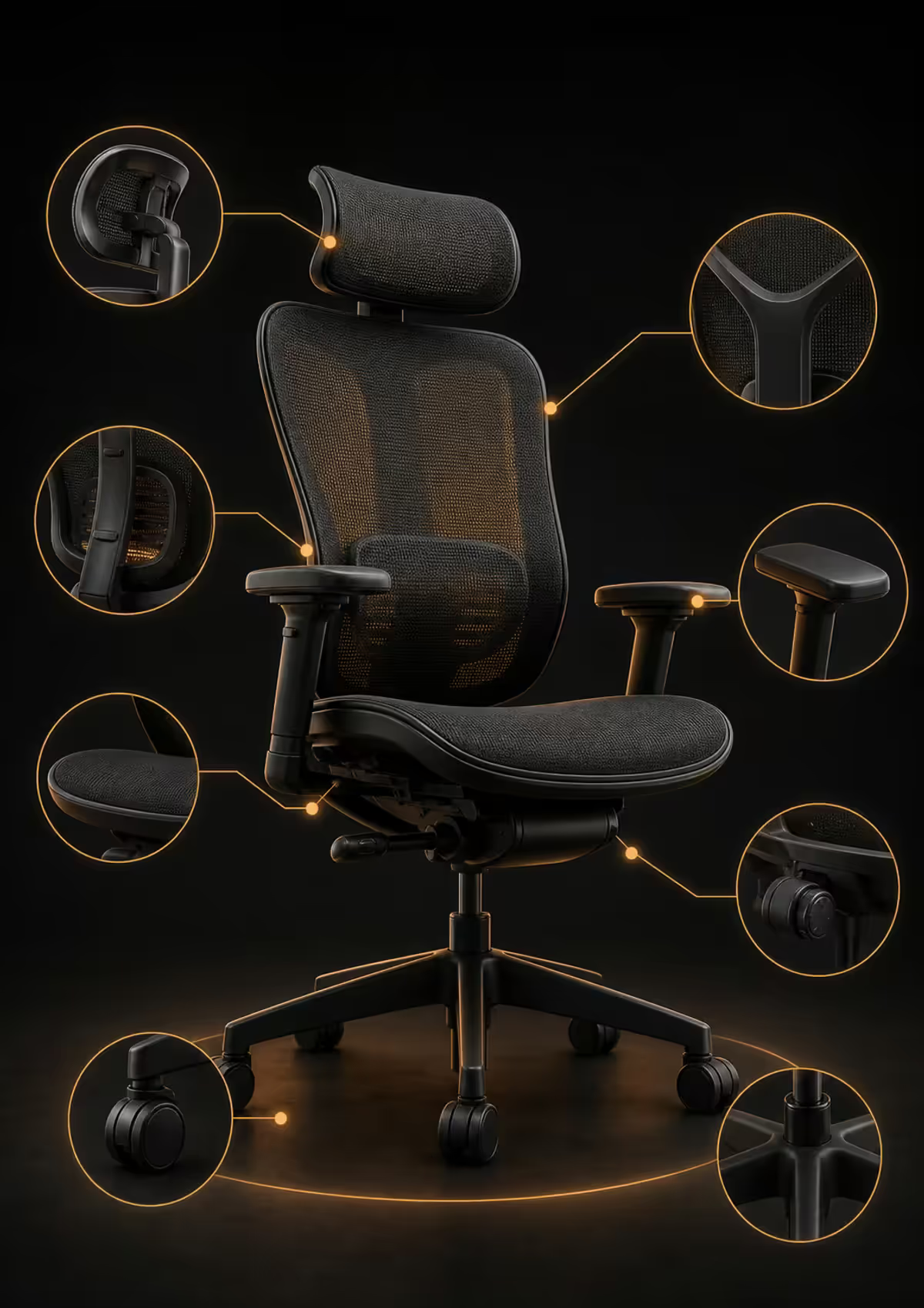
Ergonomic office chairs (Herman Miller Aeron, Steelcase Leap, Steelcase Series 1, Ergohuman, ErgoChair, Humanscale Freedom) are built around posture science: lumbar curvature, weight-distributed seat pans, mesh backs that breathe, mechanism tension that matches body weight, and adjustment ranges large enough to fit different bodies properly.
The two chairs come from genuinely different design priorities. One is meant for short, intense gaming sessions in a styled-up setup; the other is meant to be sat in for 40 hours a week for 10 years.
| Attribute | Ergonomic office chair | Gaming chair |
|---|---|---|
| Lumbar | Adjustable height + depth | Fixed pillow attachment |
| Seat pan | Adjustable depth, flat | Fixed bucket with bolsters |
| Armrests | 4D adjustable | 2D or 3D, often loose |
| Material | Mesh (breathable) | PU leather (hot) |
| Mechanism | Synchro-tilt with tension | Basic recline-only |
| Warranty | 10-12 years (premium) | 2-3 years typical |
| Best for | 8+ hour work sessions | 2-4 hour gaming sessions |
The most common piece of feedback from SA customers who've switched: "I bought the gaming chair for aesthetics and the office chair for my spine." Both can have a place in a home setup — but for the chair you sit in to work, an ergonomic office chair is the right call.
Lumbar support — the single most important feature
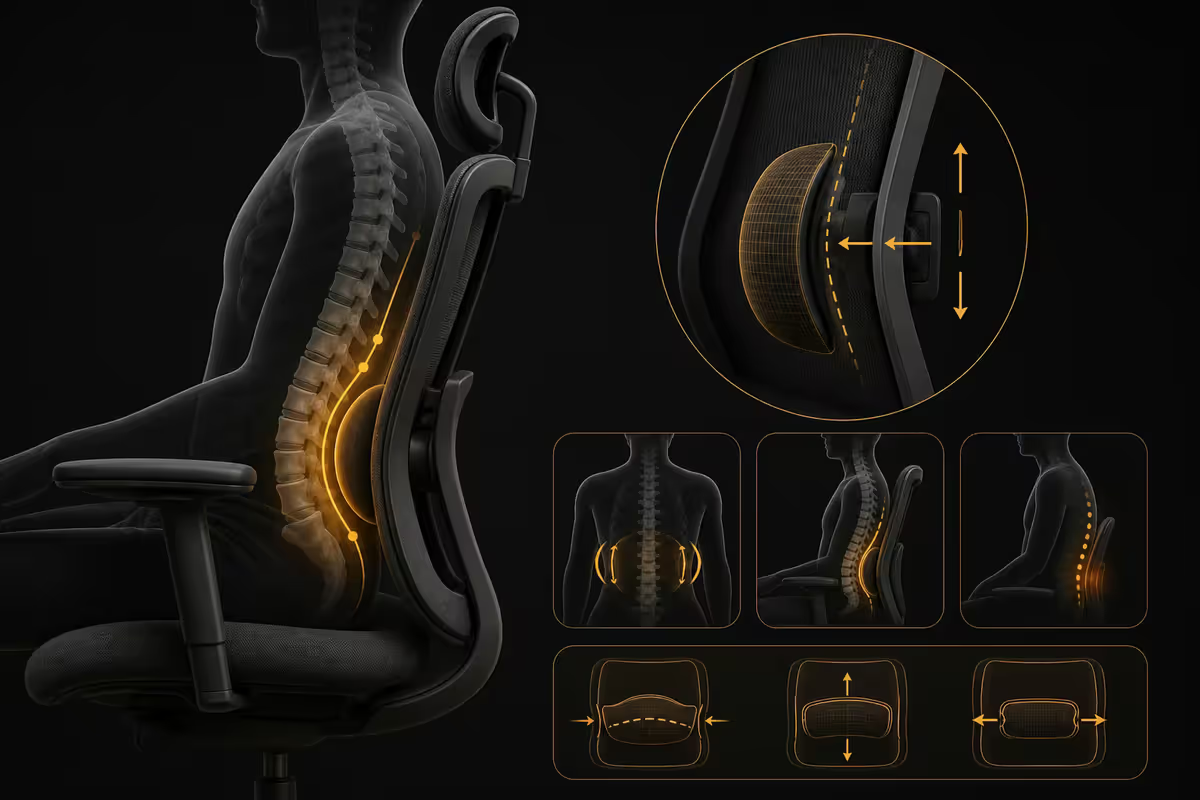
Your lumbar spine — the lower five vertebrae — has a natural inward curve. When you sit slumped without support, that curve flattens or reverses, which is what creates the dull lower-back ache by 4pm. A chair that supports the lumbar curve properly — height-adjusted to your specific spine, depth-adjusted to push into the curve at the right pressure — removes most of that daily fatigue.
There are three levels of lumbar implementation:
- No lumbar support. Found on budget chairs and many gaming chairs. The back is shaped but the lumbar zone is not supported. Adequate for short sessions, painful by end of long day.
- Fixed lumbar. A shaped foam or molded plastic curve built into the chair back. Better than nothing but only works if your spine height matches the chair's fixed support point. Most adjustable office chairs in the R3,000-R8,000 range fall here.
- Adjustable lumbar (height + depth). The lumbar pad slides up and down on the chair back (height) and can be tightened forward or relaxed backward (depth/firmness). This is the gold standard, available from R8,000 upward. Herman Miller PostureFit, Steelcase LiveBack, Ergohuman's height-and-depth slider — all variations on the same idea.
How to test lumbar support: sit fully back in the chair. The lumbar pad should sit just above your beltline, pressing gently but firmly into the natural curve of your lower back. If you feel pressure too high (mid-back) or too low (tailbone), the height needs adjusting. If you feel no pressure at all, the depth needs increasing.
Seat depth and width
When you sit fully back in a chair, there should be roughly a two-finger gap between the back of your knee and the front edge of the seat. If the seat is too deep, the front edge presses into the back of your knees and cuts circulation. If the seat is too shallow, your thighs aren't supported and pressure concentrates on your tailbone.
For taller users (180cm+), seat depth is critical — most stock chairs are sized for average heights, leaving taller users with insufficient thigh support. For shorter users (under 160cm), the opposite problem — most chair seats are too deep.
Look for chairs with a seat depth slider — usually a lever under the right front of the seat that lets you extend or retract the seat pan by 5-7cm. Ergohuman, Steelcase Series 1, Humanscale, and most R10,000+ ergonomic chairs include this. Most chairs under R5,000 do not.
Seat width matters less than depth for most people — but if you're broader through the hips, look for chairs with at least 50cm seat width. Some chairs (Herman Miller Aeron Size A vs Size B vs Size C) come in multiple sizes specifically to handle this.
4D armrests — what each dimension does
"4D" armrests adjust in four independent directions:
- Height (1D). Up and down. Most important — your elbows need to sit at 90° with shoulders relaxed.
- Width (2D). Closer to or further from the body. Important if you're broader through the chest or want arms tucked in for typing.
- Depth (3D). Forward and back. Lets you slide armrests under the desk for typing, then forward for reclining.
- Angle / pivot (4D). The armrest top rotates inward or outward. Useful for mousing at an angle without rotating your whole wrist.
3D armrests (no pivot) cover 90% of needs for most users. 2D armrests (height + width only) are the minimum acceptable for an ergonomic chair. Fixed armrests belong on cheap visitor chairs, not on a chair you work in.
Armrest top material and shape also matter. Soft polyurethane pads beat hard plastic. Wider pads (8-10cm) distribute pressure better than narrow pads (4-5cm). Pads that slope inward toward the body are more comfortable for typing than flat pads.
Recline mechanism — synchro-tilt and tension
The recline mechanism is the joint that lets the backrest tilt back when you lean. There are several types:
- Basic tilt. Whole chair tilts as a single unit. Cheap and uncomfortable for long sessions.
- Synchro-tilt. Backrest tilts at a different ratio to the seat (typically 2:1 — back tilts 20°, seat tilts 10°). This is the standard for ergonomic chairs; it keeps your eyes at the screen and your feet on the floor as you recline.
- Synchro-tilt with multiple lock positions. Lock the recline at several angles — typing, reading, leaning back for a call. Found on R10,000+ chairs.
- Self-adjusting weight tension (Steelcase Leap, Herman Miller Embody). The mechanism senses your weight and adjusts resistance automatically. Premium feature.
Tension control matters as much as the mechanism. Recline tension is how much resistance the chair gives when you lean back. Too loose and you fall back uncontrollably; too firm and you can't recline naturally. The tension knob under the seat should let you dial in pressure that matches your body weight. If you're lighter (under 60kg), make sure the chair's tension range goes low enough. If heavier (90kg+), make sure it goes high enough.
Mesh vs foam — for South African heat
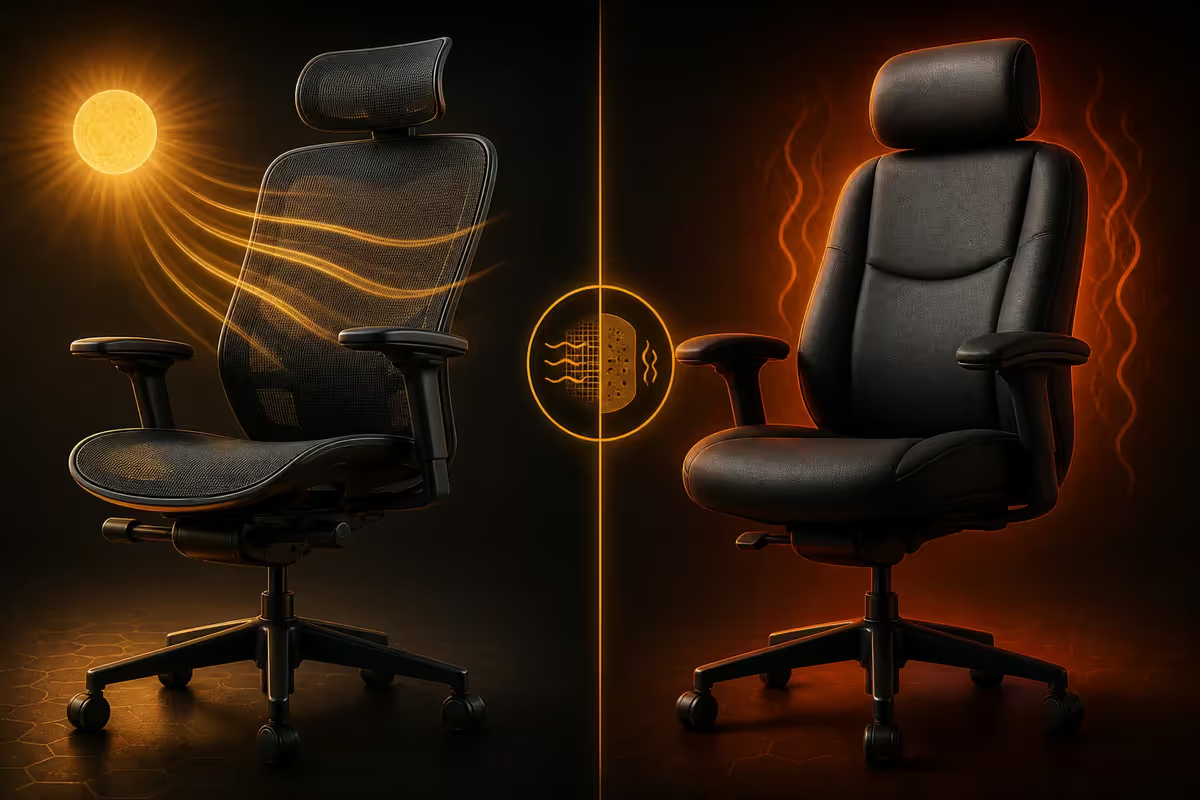
For SA conditions, mesh backs almost always beat foam. Joburg, Pretoria, Cape Town and Durban all see summer afternoon temperatures regularly in the 28-35°C range. A foam-backed chair traps heat between your body and the back, and by mid-afternoon you're sticking to it. A mesh back lets air flow continuously through the back surface.
The trade-offs:
- Mesh pros: stays cool in heat, doesn't compress over years, easier to clean, shows wear less.
- Mesh cons: less initial cushion sensation, some mesh patterns leave temporary imprints on light clothing, edges can feel sharper without padding.
- Foam pros: immediate plush comfort, warmer in winter (a feature in Cape winter), softer initial sit.
- Foam cons: compresses over years and loses support, traps heat in summer, harder to clean, fabric can absorb sweat and develop odour over time.
Seat pan material is a separate decision. Most ergonomic chairs use foam (with breathable fabric cover) on the seat itself even when the back is mesh — because the seat doesn't have the same heat-trap problem as the back. The Aeron and Ergohuman both use this hybrid approach.
Wheels — match them to your floor
Stock office chair wheels (hard nylon casters) are designed for carpeted office floors. On hard surfaces — laminate, wood, tile, polished concrete — they slide poorly, can scratch the surface, and don't grip when you stop.
For hard floors, swap to polyurethane (PU) caster wheels. They roll smoothly, grip when you stop, don't scratch, and run quieter. Replacement is straightforward on most premium chairs — pull the old wheel out, push the new one in. A set of 5 PU casters runs R300-R600 in SA from Officescape and similar retailers.
Wheel diameter affects roll smoothness too. 65mm wheels (standard) work for most use. 75mm wheels roll more smoothly and clear thicker carpet, but cost slightly more and raise the chair by 5mm.
If you have a chair mat (clear plastic mat over carpet), standard hard nylon wheels work fine. If you sit on bare carpet, hard nylon also works. Only swap to PU if you sit on bare hard floors regularly.
Warranty — the single best quality signal
Office chair warranties tell you exactly what the manufacturer thinks of their own engineering. The pattern is remarkably consistent across the market:
| Tier | Warranty | What it means |
|---|---|---|
| Premium | 10-12 years (Herman Miller, Steelcase) | Engineered for two decades; rare claims |
| Upper mid | 5-7 years (Ergohuman, DKS) | Strong build, expect maintenance after year 7 |
| Mid | 3-5 years | Adequate for moderate use, replace by year 6 |
| Budget | 1-2 years (most gaming chairs) | Mechanism wear common by year 2-3 |
A 12-year warranty on a R30,000 chair amortises to R2,500 per year. A 2-year warranty on a R6,000 gaming chair amortises to R3,000 per year — and you replace the chair after two years anyway. The premium chair often turns out cheaper per year of useful life.
What warranties usually cover: mechanism (recline, gas piston, base), frame, plastic parts. What they usually don't cover: wear on fabric / mesh, armrest pads (consumable), wheels.
Sit-test strategy — before R10,000+
For premium chairs (R10,000+), spending 10-15 minutes sitting in the actual chair before buying tells you more than every YouTube review combined. Bodies vary; the chair that's perfect for a reviewer might fit you wrong.
Where to sit-test in South Africa:
- Officescape showrooms (Joburg, Cape Town, Pretoria) — wide selection from R3,000 to R30,000, very welcoming to walk-in testing.
- Herman Miller / Steelcase resellers — usually corporate-office-furniture specialists; call ahead for an appointment.
- Wantitall often holds demo Ergohumans at their Cape Town showroom.
- Evetech and Wootware stock a curated chair selection — Ergohuman, ErgoChair, and similar mid-premium picks.
What to test during a 15-minute sit:
- Adjust lumbar height — does it land in the curve of your back?
- Adjust seat depth — two-finger gap behind your knees?
- Set armrests to 90° elbow position — does your shoulder relax?
- Recline back fully — does the chair support you or feel like it's about to dump you?
- Sit for 10 minutes doing something normal (phone, scrolling) — any pressure points emerging?
SA pricing tiers — May 2026
| Tier | Example chairs | SA price band |
|---|---|---|
| Budget | Officescape mesh basics, generic imports | R3,000-R6,000 |
| Lower mid | Officescape Mid-back ergonomic, ErgoChair basic | R6,000-R9,000 |
| Mid (sweet spot) | Ergohuman Plus, DKS, ErgoChair Pro+ | R10,000-R14,000 |
| Upper mid | Ergohuman Elite, Humanscale Freedom | R15,000-R22,000 |
| Premium | Herman Miller Aeron, Steelcase Series 1 | R22,000-R32,000 |
| Flagship | Herman Miller Embody, Steelcase Leap, Steelcase Gesture | R35,000-R55,000 |
The sweet spot for serious WFH in SA is the R10,000-R14,000 band. At this tier you get adjustable lumbar (height + depth), 4D armrests, seat depth slider, synchro-tilt with tension control, mesh back, and a 5-7 year warranty. Spending under R10,000 means giving up at least one of these features; spending above R14,000 mainly buys you build quality, longer warranty, and brand cachet rather than dramatic comfort gains.
Common office chair mistakes
Buying a gaming chair for an 8-hour workday. Adequate for 2-3 hour gaming sessions; uncomfortable for full workdays. The bolsters of a bucket seat actively work against neutral typing posture.
Underspending on the chair. A R3,000 chair has no adjustable lumbar, no seat depth slider, basic armrests, and a 1-year warranty. Replacing it every 2-3 years costs more total than a R12,000 chair that lasts 7-10 years.
Ignoring foam vs mesh in SA. Foam-backed chairs in unconditioned home offices become unpleasant from October through March. Mesh is the safer call in 90% of SA homes.
Not adjusting the chair after buying. Most users sit in their chair at the factory-default settings forever. The 10 minutes of initial adjustment (lumbar height, seat depth, armrest height, recline tension) makes more difference than any other variable.
Skipping the sit-test on a R20,000+ chair. Bodies vary. A Steelcase Leap perfect for one person is uncomfortable for another. Always sit before spending serious money.
Buying a fixed-lumbar chair if you're tall or short. Fixed lumbar lands in one specific spine height range. If you're outside that range, it'll dig in too high or sit too low, defeating the purpose entirely.
Key takeaways
- Adjustable lumbar (height + depth) is the single most important feature — it removes 80% of daily back fatigue.
- 4D armrests, seat depth slider and synchro-tilt with tension control are the other essentials for an 8-hour chair.
- For SA heat, mesh back beats foam — stays cool from October through March.
- SA sweet spot: R10,000-R14,000 (Ergohuman class). Spending less means giving up adjustability; spending more buys cachet not comfort.
- Warranty is the single best quality signal — 10-12 years is premium engineering; 1-2 years means plan to replace by year three.
Frequently asked questions
Is an office chair better than a gaming chair for long sessions?
Yes — almost universally for 8+ hour sessions. Ergonomic office chairs are built around posture science (adjustable lumbar, 4D armrests, breathable mesh). Gaming chairs prioritise aesthetics and fixed bucket seats that work against neutral posture.What is the single most important feature in an office chair?
Adjustable lumbar support — both height and depth. Your lower back has a natural curve; a chair that supports it removes 80% of daily back fatigue.What does 4D armrests mean and do I need them?
Height + width + depth + pivot. Your elbows need 90° with shoulders relaxed — exact position varies by desk, body and task. 3D armrests cover 90% of needs; 2D is the minimum acceptable; fixed armrests don't belong on a work chair.Is mesh or foam better for an office chair in South Africa?
Mesh, almost universally. SA summer temperatures (28-35°C) make foam chairs uncomfortably warm by mid-afternoon. Mesh breathes and stays cool.What is the price range for a good ergonomic office chair in SA?
Budget R3,000-R6,000, mid-tier R8,000-R14,000 (the sweet spot), premium R20,000-R45,000. For 8+ hour daily use, R10,000+ is the floor for not regretting the purchase in year two.How important is the warranty on an office chair?
Critical — and the single best quality signal. Premium chairs warranty 10-12 years; mid-tier 5-7 years; budget and gaming chairs typically 1-2 years.Should I sit-test a chair before buying online?
For R10,000+ chairs, yes — even 10 minutes reveals fit issues. Officescape, Wantitall and Herman Miller resellers have showrooms in major SA cities.Can I use my office chair on both carpet and hard floor?
Stock hard-nylon wheels are for carpet. For hard floors, swap to polyurethane (PU) caster wheels (R300-R600 for a set of 5) — they roll smoothly, grip when stopping, don't scratch.
Get the Evetech app
Exclusive app-only prices, daily flash sales, and free delivery on orders over R4,000 — download the app and start saving.