Mac Security — Honest 2026 Answer
Does Mac need antivirus? — Built-in covers 90%. Behaviour matters more.
The honest answer in 2026: macOS ships with XProtect, Gatekeeper and SIP — a multi-layer defence that handles 90% of realistic threats. The apps that ARE the threat are the ones that aggressively market themselves as “Mac cleaners”.
- = 90% coverage
- XProtect
- real threat
- Cracked SW
- > antivirus
- Behaviour
The macOS built-in security stack
Before deciding if you need antivirus, you need to know what's already protecting you. macOS ships with four overlapping security layers — all enabled by default, all updating automatically, all invisible.
| Layer | What it does | User config? |
|---|---|---|
| XProtect | Built-in malware signature scanning. Apple pushes new sigs constantly. | None — always on |
| Gatekeeper | Blocks unsigned apps. Requires Developer ID + notarisation by Apple. | Right-click Open to override |
| System Integrity Protection (SIP) | Prevents privileged code from modifying protected OS files. | Never disable |
| App Sandbox | App Store apps run isolated — can't read files or system areas they shouldn't. | App-developer concern |
| Notarisation | Apple scans every Developer ID app before distribution. | None — invisible |
| Secure Enclave (M-series) | Hardware-isolated key storage for biometrics, passwords, FileVault. | None — built into chip |
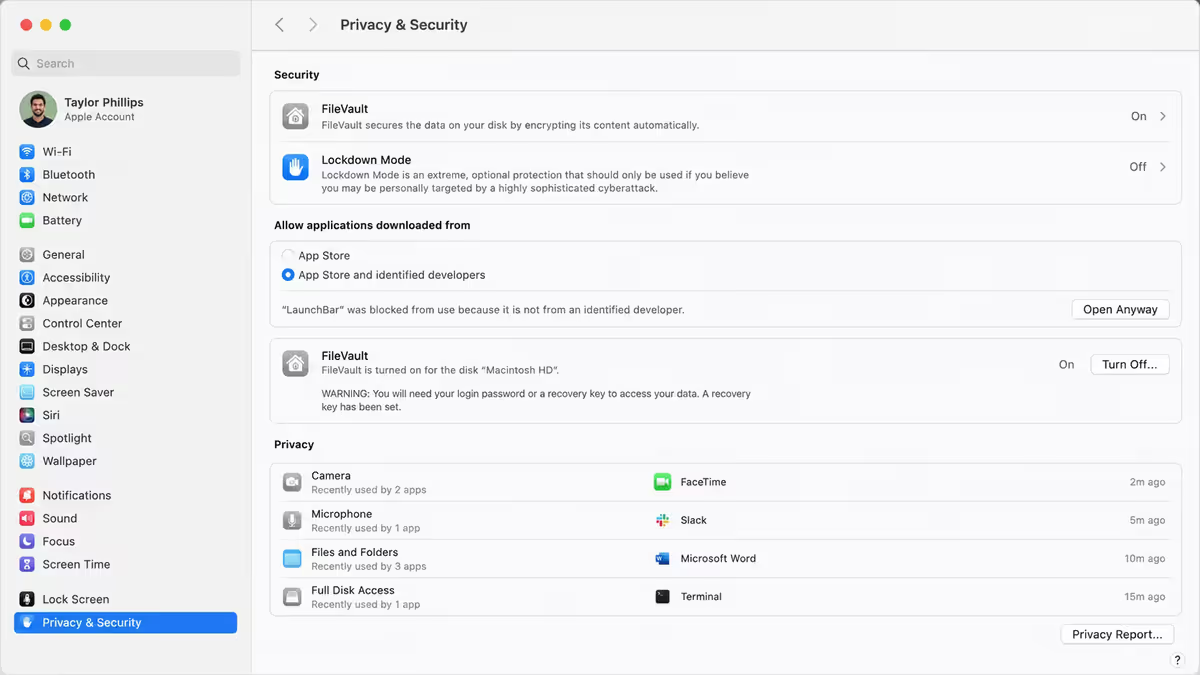
| FileVault | Full-disk encryption. Enable in System Settings → Privacy & Security. | One-time enable |
| Pointer Authentication (M-series) | Hardware-level prevention of exploit chains. | None — invisible |
This is genuinely good defence. Layered like this, the realistic attack surface on a current macOS install is narrow. The remaining attack vectors are mostly social engineering — convincing the user to override the warnings or install something themselves.
Why Mac malware is rarer than Windows
It's not magic. Mac malware is genuinely less common than Windows malware, but for a mix of historical, architectural and economic reasons — not because macOS is inherently invulnerable.
- Smaller market share historically. Attackers go where the users are; Windows dominated for decades. This is shifting as Macs gain share in professional and developer segments.
- Unix permission model. macOS inherits Unix's strict file-permission system — apps run as the user, not root. A compromised app affects the user's files, not the whole OS.
- Code-signing requirements. Apps shipped outside the App Store still need Apple Developer ID + notarisation, raising the cost-of-distribution for malware authors.
- Apple-controlled software distribution. The Mac App Store is curated; non-App Store apps go through notarisation. Malware authors can't simply upload a malicious “Adobe Reader” clone and reach millions.
- Apple Silicon hardening (M-series). Pointer authentication, Secure Enclave, kernel integrity protection make exploit chains expensive to develop.
- Faster patching cadence. macOS gets monthly security updates that ship to almost the entire installed base within weeks (vs the long-tail Windows update problem).
Real Mac threats in 2026
Mac malware exists. The realistic threats cluster on specific patterns — knowing them lets you defend against the actual risk, not theoretical ones.
| Threat type | How it spreads | Severity |
|---|---|---|
| Adware / PUP | Bundled with “cracked” Adobe/Office/games or fake free utilities | Annoying, rarely catastrophic |
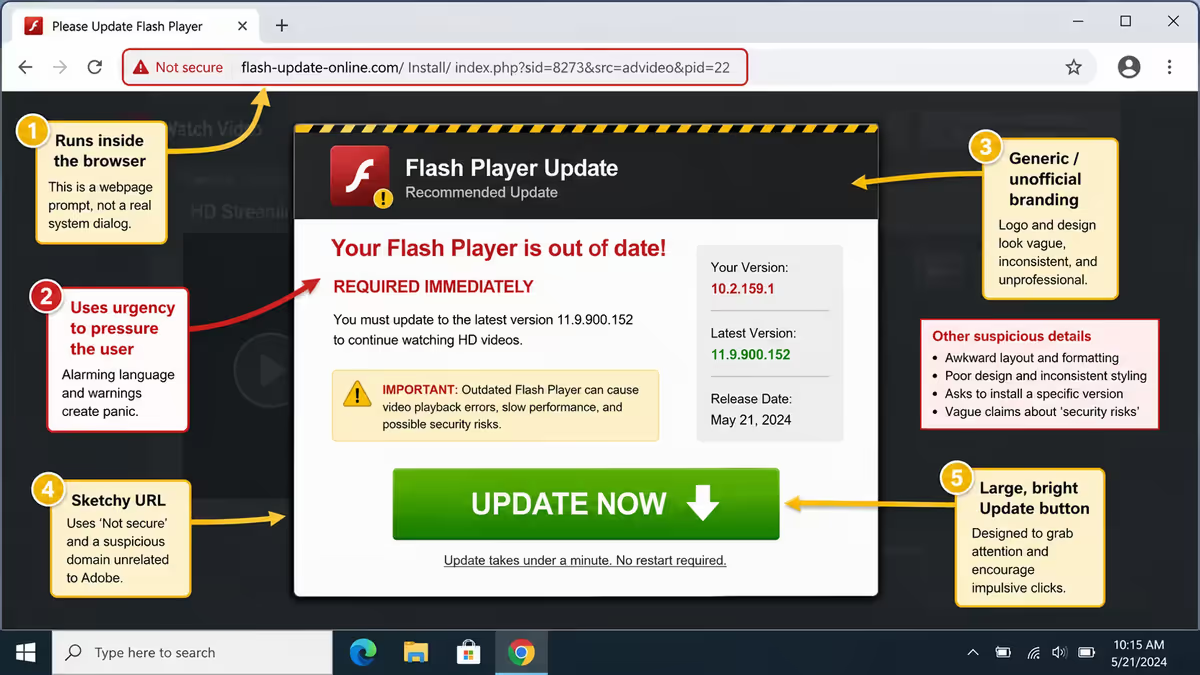
| Info stealers | Fake “Flash Player” updates, fake macOS updates, phishing | Severe — passwords, cookies, crypto wallets |
| Phishing sites | Email links, SMS, fake login pages mimicking legit services | Severe — credential theft + 2FA bypass |
| Malicious browser extensions | Chrome Web Store, Safari Extensions — even from “legit” looking publishers | Severe — tab reading, session hijack |
| Cryptojacking | Hidden in cracked games or fake media players | Performance theft + power use |
| Ransomware | Rare on Mac vs Windows; targeted attacks via phishing | Catastrophic when it hits |
| Pegasus-class spyware | Nation-state, targeted at activists / journalists / politicians | Severe but rare for normal users |
| Supply-chain attacks | Compromised dev tools, package registries (npm/PyPI typosquatting) | Developer-specific, growing |
When antivirus genuinely helps
For some user profiles, third-party antivirus adds real value beyond built-in protections. The honest list:
- Work-managed Macs with corporate compliance. Many companies require EDR (endpoint detection and response) software for compliance frameworks like ISO 27001 / SOC 2. If IT mandates CrowdStrike, SentinelOne or similar — that's not negotiable.
- Users who routinely install “cracked” software. Pirated Adobe CC, cracked games, key generators — these are the #1 actual Mac infection vector. If you do this anyway, run Malwarebytes scans regularly.
- Shared Macs with users who'll install anything. Family Macs with teenagers, household users who click “yes” on every prompt — defence-in-depth helps.
- High-value targets. Journalists, activists, lawyers handling sensitive material, business owners with substantial assets — additional EDR layers are reasonable.
- Dual-boot Windows users. Files moving between Windows and Mac partitions can carry Windows malware — your Mac is safe but you might propagate Windows infections to colleagues.
- Frequent attachment-handlers. Anyone whose job involves opening dozens of unknown email attachments daily (legal, recruiting, sales) benefits from active scanning.
Free scanners worth having
These are zero-cost tools that genuinely add to your security without slowing your Mac. Install for occasional use; they don't auto-run.
| Tool | What it does | When to use |
|---|---|---|
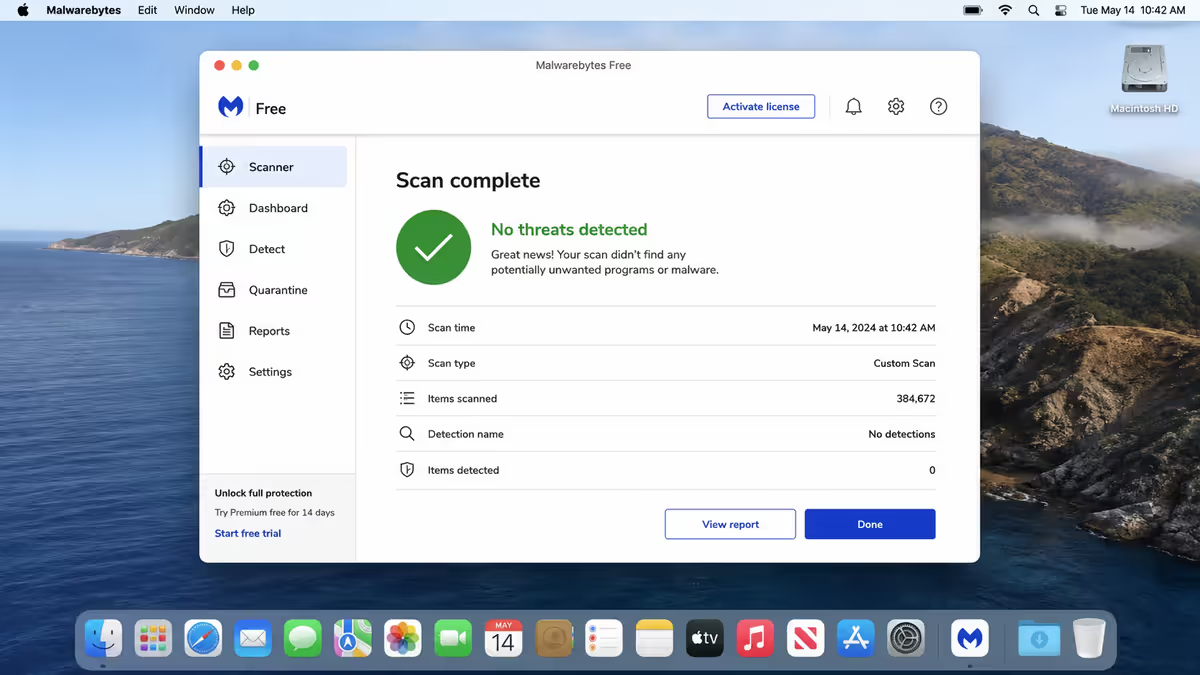
| Malwarebytes Free | On-demand malware scan | Monthly or when suspicious |
| KnockKnock (Objective-See) | Lists what apps persistently install themselves | Quarterly audit |
| BlockBlock (Objective-See) | Alerts when anything new tries to set up persistence | Always-on monitoring |
| LuLu (Objective-See) | Open-source firewall — blocks outbound network connections | If you want network-level oversight |
| RansomWhere (Objective-See) | Detects ransomware encryption behaviour | Always-on, low overhead |
| OverSight (Objective-See) | Alerts when mic/camera activate | Privacy-conscious users |
| Little Snitch (free trial) | Per-app outbound firewall — sees what's calling home | Highly recommended quarterly |
The Objective-See suite (by ex-NSA researcher Patrick Wardle) is the gold standard for free Mac security tools. They're open-source, professionally maintained, donation-supported and respected throughout the Mac security community.
Paid antivirus options
If you've decided your situation warrants paid antivirus, these are the credible options on Mac. Avoid the noisy marketing names not on this list.
| Product | Strengths | SA pricing (approx) |
|---|---|---|
| Bitdefender for Mac | Excellent detection, light system impact | R450/yr |
| ESET Cyber Security | Czech AV pedigree, well-respected | R550/yr |
| Intego Mac Internet Security X9 | Mac-specific, made by Mac people | R700/yr |
| Malwarebytes Premium | Real-time + on-demand combined | R600/yr |
| Sophos Home Premium | Web protection + ransomware focus | R650/yr |
| CrowdStrike Falcon (enterprise) | EDR/XDR for corporate use | Per-seat licensing, ask IT |
Apps that ARE the threat — avoid these
The cruellest irony: some of the most-installed “Mac protection” apps are themselves adware-grade or outright malicious. They use aggressive marketing pop-ups, exploit user anxiety about security, and provide minimal real value.
What Apple's built-in Storage manager already does: System Settings → General → Storage gives you the same “free up GB” view that “cleaner” apps charge for. Recommendations panel auto-identifies big files, old downloads, duplicates and offloadable cache.
Browser security hygiene — more important than antivirus
In 2026, the realistic attack surface lives in the browser. Phishing, malicious extensions, credential stuffing — none caught well by traditional antivirus.
The basics that defend you better than any antivirus install:
- uBlock Origin (free, open-source) — blocks ads, trackers and many malware-hosting domains at the network layer. Most-recommended browser extension period. Use Firefox or Brave for full uBlock support; on Safari, install AdGuard or Wipr.
- Quarterly extension audit. Open Chrome/Firefox/Safari → Extensions → review every installed extension. Remove anything you don't actively use. Extensions can read your tabs, harvest credentials, inject ads — they're high-trust components.
- HTTPS everywhere. Modern browsers handle this. Look for the lock icon on important transactions.
- Don't click links in emails for banking, Apple, Microsoft, government. Always navigate to the site directly. Phishing sites in 2026 are indistinguishable from real ones at first glance.
- Hover before click. On desktop, hover over links to preview the URL. app1e.com isn't the same as apple.com.
- Use Safari's “Private Relay” on iCloud+ if you subscribe — hides IP and adds extra DNS-level protection.
Password manager + 2FA — the actual upgrade
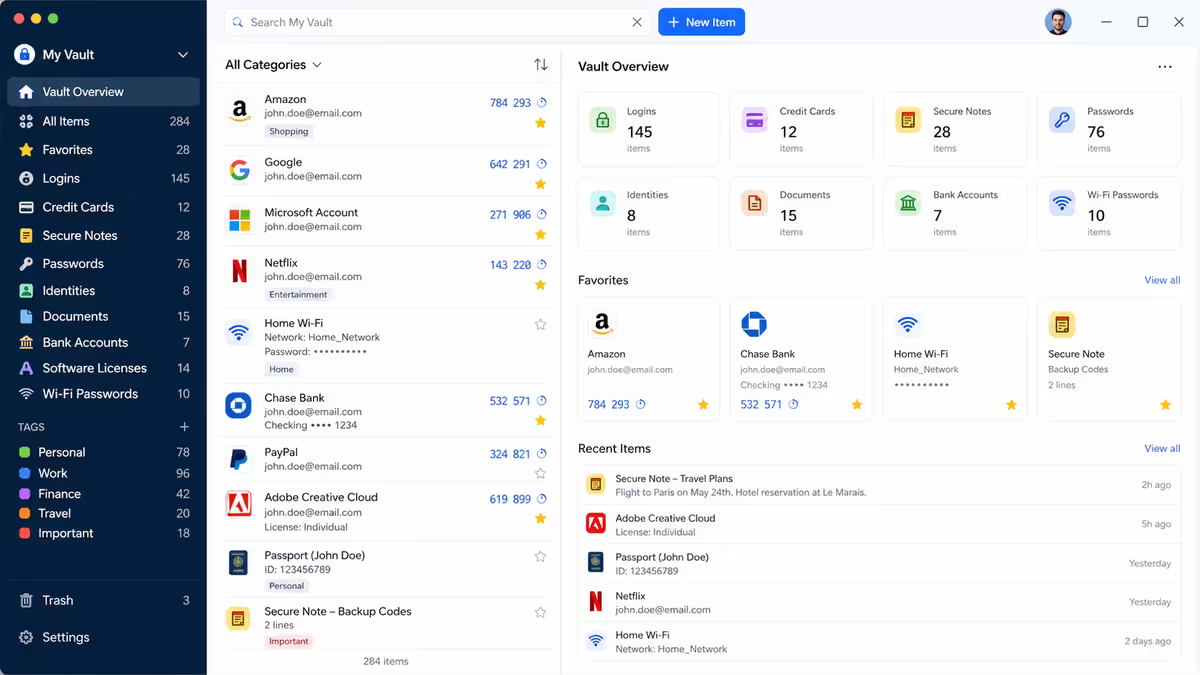
The single biggest security upgrade most users can make has nothing to do with antivirus: a password manager + 2FA on every important account.
Password manager picks:
- 1Password — best-in-class UX, R150/month family plan, includes secure notes and credit cards.
- Bitwarden (free or Premium R200/yr) — open-source, excellent free tier, less polished UX than 1Password but enormously capable.
- Apple Passwords (built into iOS/macOS) — free, integrated, became a real password manager in iOS 18. Good enough for most users; weaker for cross-platform.
- Avoid: LastPass (multiple breaches), browser-stored passwords without encryption.
2FA priority list (enable today, in this order):
- Apple ID — your iCloud account is the keys to your digital kingdom.
- Email primary — Gmail, Outlook, iCloud. Whoever owns your email controls password resets.
- Banking — usually mandatory but verify TOTP not just SMS.
- Password manager itself — 1Password / Bitwarden 2FA.
- GitHub, AWS, work productivity — anything that owns your livelihood.
- Social, shopping, secondary services — important but lower priority.
Prefer TOTP (Authenticator apps) over SMS. SMS 2FA is vulnerable to SIM-swap attacks. Use 1Password's TOTP, Authy, Google Authenticator or — better — physical keys (YubiKey) for highest-value accounts.
The verdict — what most users should do
After all that analysis, here's the action plan for the 90% case:
- Skip third-party antivirus install for now. Built-in is enough.
- Verify FileVault is on (System Settings → Privacy & Security).
- Install a password manager (1Password or Bitwarden) and migrate every password.
- Enable 2FA in order: Apple ID → email → banking → password manager → everything else.
- Install uBlock Origin (Firefox / Brave) or AdGuard (Safari).
- Install Malwarebytes Free for occasional on-demand scans (no auto-start).
- Audit browser extensions quarterly.
- Uninstall any “Mac cleaner” / “MacKeeper” / “antivirus pop-up” apps you have. They're the threat.
Common Mac security mistakes
Installing “MacKeeper” or “Mac Cleaner Pro” because of a pop-up. These apps ARE the problem. Built-in macOS Storage management does the same job. Uninstall today.
Believing fake “your Mac is infected” alerts. Apple never serves antivirus alerts via your browser. Any popup claiming your Mac is infected is itself the malware vector. Close the tab and ignore.
Reusing passwords across accounts. One breach exposes every account. A password manager is the single biggest security improvement most users can make.
Skipping 2FA on Apple ID. Your Apple ID controls iCloud backups, Find My, Apple Pay, password sync. Without 2FA, a stolen password gives an attacker everything.
Downloading apps from non-official sources. Mac App Store and well-known Developer ID apps are vetted by Apple. Random .dmg files from forums or torrent sites are how most Mac infections happen.
Granting broad permissions to every app. If an app asks for Full Disk Access, Screen Recording or Accessibility — pause. Does it genuinely need that? Granular permissions exist for a reason; treat them seriously.
Disabling SIP “to make development easier”. Some old tutorials suggest disabling System Integrity Protection. Don't. SIP is the layer preventing privilege escalation; it's never the right call for anything you're actually trying to do.
Key takeaways
- Built-in XProtect + Gatekeeper + SIP + Sandbox handles 90% of realistic threats — no install needed.
- Password manager + 2FA + ad-blocker stops more real compromises than any antivirus install.
- “MacKeeper”, “Mac Cleaner Pro” and pop-up antivirus alerts ARE the threat — never legitimate.
- Antivirus genuinely helps for corporate compliance, cracked-software downloaders, shared family Macs.
- Malwarebytes Free as on-demand scanner is enough belt-and-braces for most cautious users.
Frequently asked questions
Do I need antivirus on a Mac in 2026?
For most users, no. macOS has multi-layered built-in security — XProtect, Gatekeeper, SIP and app sandboxing — that covers the realistic threat surface when combined with sensible behaviour.What is XProtect on Mac?
Apple's built-in malware detection — scans apps when downloaded, run or modified against Apple's actively-updated signature database. Built into macOS, no setup, automatic updates, zero performance impact.Is Malwarebytes worth installing on Mac?
The free version is worth having as an on-demand scanner — install, run manual scans monthly, leave idle. Paid real-time version rarely necessary unless corporate compliance or high-risk download habits.What is the real malware risk on a Mac?
Real Mac threats cluster on adware from cracked software, info-stealers via fake updates, phishing sites and rogue browser extensions. Pegasus-class spyware exists but realistically targets activists and journalists.Should I avoid MacKeeper?
Yes — MacKeeper and similar “Mac cleaner” apps are the threat, not the protection. Aggressive marketing, bundled adware, persistent nagging, minimal real value. Apple's built-in Storage management does the same job.What is Gatekeeper on Mac?
Gatekeeper verifies apps are signed by a known developer (Apple Developer ID) and notarised by Apple before allowing launch. Apps from outside the App Store get an extra confirmation prompt.Is browser security more important than antivirus on Mac?
Yes. Phishing, credential stuffing and malicious extensions are the realistic threat vectors — none caught well by traditional antivirus. Password manager + 2FA + ad-blocker + quarterly extension audit stops more real compromises.Does Apple Silicon (M-series) make Macs more secure?
Meaningfully yes. Secure Enclave, boot-time integrity verification, pointer authentication codes and stronger sandbox enforcement raise the bar for compromise dramatically vs Intel Macs.
Get the Evetech app
Exclusive app-only prices, daily flash sales, and free delivery on orders over R4,000 — download the app and start saving.