Parent's Mac Guide
MacBook for kids. — The right Mac, locked down for safe school use.
The MacBook Air your child needs is cheaper than the YouTube parent forums make it sound, the parental controls are far better than Windows offers, and one Mac genuinely lasts long enough to be passed down between siblings.
- MacBook Air M4 starter
- ~R17k
- right age for a Mac
- Age 10+
- family device life
- 5-7 yrs

The right age to give a child a Mac
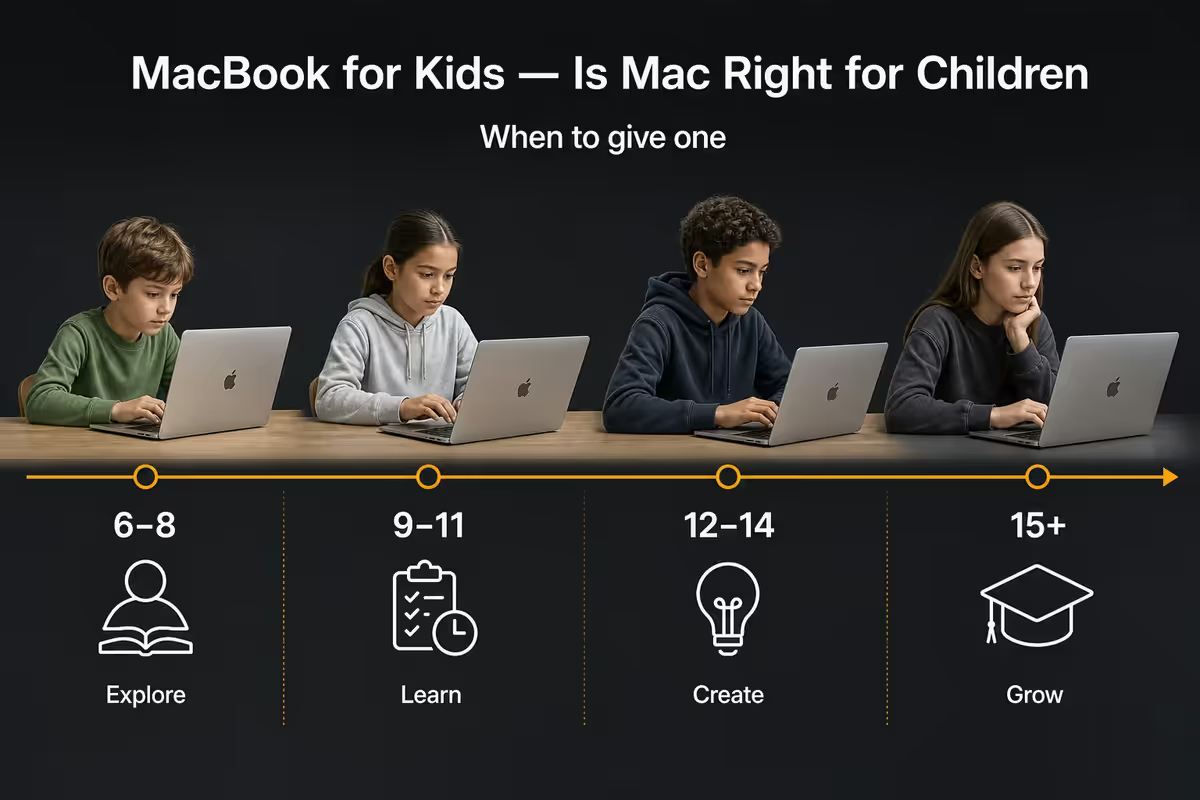
The honest answer is around age 10. Below that, the workload (and the wrist span) doesn't really match a laptop. From Grade 4-5 onward, schoolwork shifts toward typing essays, Google Classroom assignments, research with multiple browser tabs, presentations and the first taste of coding. That's the inflection point where a Mac starts paying back.
Below 10, an iPad gives you most of what kids need with fewer ways to break it, more touch-native learning apps, and a parental-controls model that's easier for non-technical parents to manage. Above 10, the iPad's keyboard story (even with a Magic Keyboard) feels like a workaround compared to a real MacBook.
| Child's age | Right Apple device | Why |
|---|---|---|
| 5-7 | iPad (entry) + Apple Pencil | Touch-first learning, no typing yet |
| 8-10 | iPad Air + keyboard case | School app coverage, light typing |
| 10-13 | MacBook Air M4 13" | Real keyboard, longer assignments |
| 14+ | MacBook Air M4 13" (or 15") | High-school workload, coding, video |
iPad vs MacBook for kids — quick frame
iPad wins for children under 10. It's touch-first (matches how primary school content is taught), drop-tolerant in a chunky case, cheaper to repair if the worst happens, and unlocks the Apple Pencil for drawing, handwriting practice and PDF mark-up. Screen Time and Family Sharing both work identically on iPad and Mac, so the parental-control layer is the same.
MacBook wins from age 10 up. Real keyboard for essay-length typing, proper multi-window multitasking for research, full desktop Safari, Pages/Numbers/Keynote at school-paper scale, plus Scratch and Python coding environments that don't run cleanly on an iPad. Google Classroom and Microsoft Teams also feel native on macOS.
One trap to avoid: the "iPad with Magic Keyboard" combo for a 12-year-old. By the time you've added the keyboard, the price approaches a MacBook Air, and you still don't have a real laptop. If typing is the bottleneck, buy the Mac.
Which MacBook to buy for your child
Three rules, in order of importance:
- Buy a MacBook Air. The 13-inch M4 (base config, 16GB unified memory, 256GB SSD) is the right answer for almost every kid. ~R17 000 retail in SA, slightly less via iStore for Education.
- Skip the MacBook Pro. The Pro is built for video editors and developers. Your child doesn't need ProMotion, mini-LED HDR, the M4 Pro/Max chip or active cooling — and it's roughly double the price.
- Skip the 15-inch Air unless they need it. The extra 200 grams and bigger footprint matters when it's living in a school bag every day. The 13-inch is easier on shoulders and desks.
| Model | Right for | SA price (approx) |
|---|---|---|
| MacBook Air M4 13" (16GB / 256GB) | Sweet spot for almost every child | R16 999 - R17 499 |
| MacBook Air M4 13" (16GB / 512GB) | Heavy creative coursework, video edits | R19 999 - R20 999 |
| MacBook Air M4 15" (16GB / 256GB) | Older teen wanting larger screen | R20 499 - R21 999 |
| MacBook Air M3 13" (refurb) | Budget route — still excellent | R12 999 - R14 999 |
| MacBook Pro 14" M4 | Skip for school use | R34 999+ |
Family Sharing — set up the Child Apple ID first
Before you hand the MacBook to your child, set up Family Sharing from your own iPhone or Mac. This is the foundation everything else depends on — Screen Time, App Store purchase approval, location sharing and shared subscriptions all flow through it.
What to do (roughly 10 minutes):
- On your iPhone: Settings → [your name] → Family Sharing → Add Member → Create Child Account. (A child under 13 cannot make their own Apple ID — only a parent can, through Family Sharing.)
- Enter your child's name and date of birth. Apple uses the DOB to apply age-appropriate defaults — be honest, it makes the controls work.
- Set up Ask to Buy: every App Store, in-app purchase and subscription request goes to your phone for approval.
- Share your Apple subscriptions (Apple Music, Apple TV+, iCloud+, Apple Arcade) with the Family — this saves a few hundred Rand a month vs separate plans.
- Decide on Screen Time as a Family — set the parent device as the controller. This is what lets you adjust limits remotely.
Now sign your child in on the new MacBook with their Child Apple ID. The moment they sign in, your Family Sharing rules are applied — Screen Time, Ask to Buy and shared subscriptions all activate automatically.
Screen Time, app limits and content filters
Once the Child Apple ID is signed in, switch on Screen Time from your parent device. Four levers do most of the work:
Downtime
Schedules windows where only essential apps (Phone, Messages, allowed school apps) work. A typical setup: downtime 8pm to 7am on school nights, 10pm to 8am on weekends. Even if you change your mind later, having a default keeps things honest.
App Limits
Caps daily time on specific app categories (Games, Social, Entertainment) or specific apps. Realistic SA defaults for a 12-year-old: 1 hour/day games on school days, 2 hours weekends, 30 minutes social. The Mac shows a countdown 5 minutes before the limit and locks the app at zero.
Communication Safety + Communication Limits
Communication Safety automatically blurs nudity in iMessage images sent to or from the child's account — on-device detection, nothing leaves the Mac. Communication Limits let you restrict who the child can contact during the day and during downtime (e.g. parents and grandparents only after bedtime).
Content & Privacy Restrictions
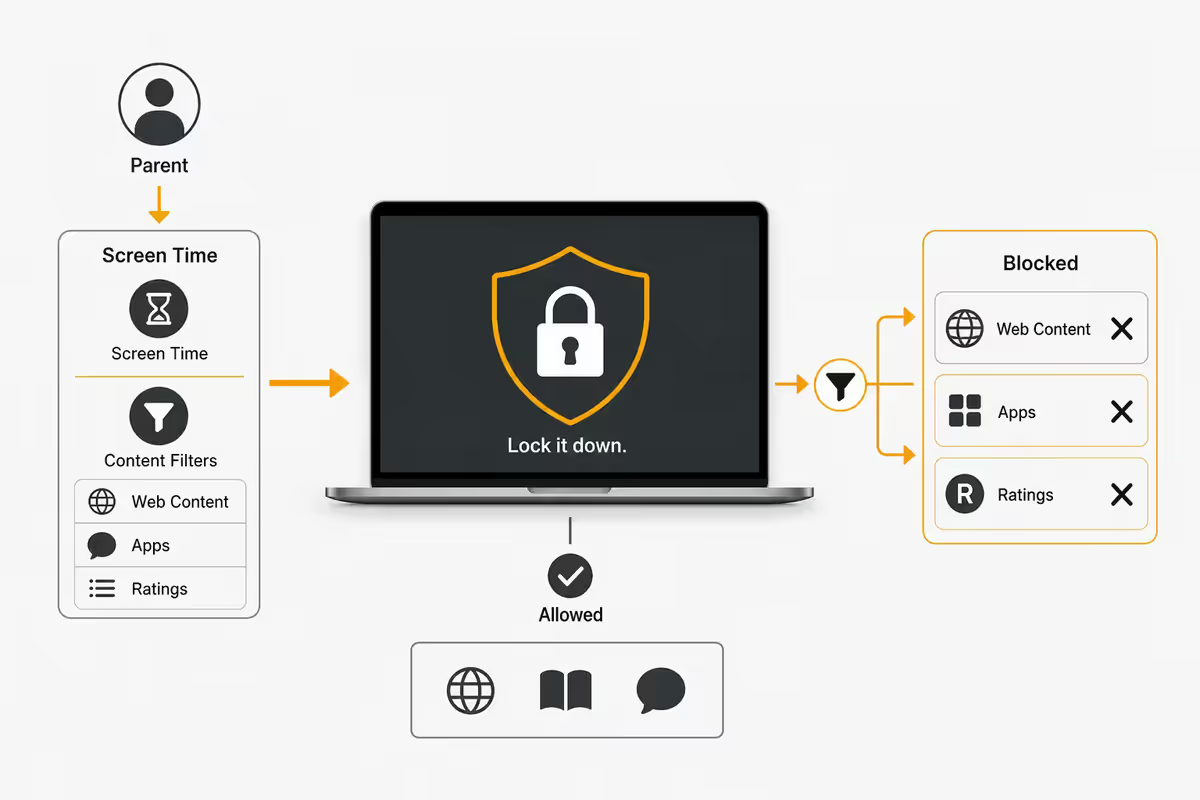
This is the big one. From your parent device, set:
- Web Content: "Limit Adult Websites" for most kids; switch to "Allowed Websites Only" with a hand-picked allow-list for younger primary-school children.
- App Store age limit: 9+ or 12+ depending on the child.
- Explicit Music, Podcasts, Books, News: off.
- App installation, in-app purchases, account changes: require parental approval.
AppleCare+ is non-negotiable for a child's Mac
If we'd write one rule in capital letters for parents buying a Mac, it's this: add AppleCare+ at point of purchase. You have 60 days from the sale to enrol, but doing it at the counter is the easiest path.
What AppleCare+ adds to a MacBook Air:
- Extends hardware warranty from 1 year to 3 years.
- Adds two accidental damage incidents per year at a fixed service excess — roughly R1 700 for a screen, R4 700 for other damage. Without AppleCare+, an out-of-warranty cracked MacBook Air screen is R10 000-R14 000 in SA.
- Apple-trained battery replacement if capacity drops below 80% in the 3-year window.
- Phone and chat support that actually answers (Apple, not third-party).
For an adult buying a Mac that lives on a desk, AppleCare+ is optional. For a child's Mac that goes into a school bag, gets opened on a moving car seat, and lives next to a water bottle — it pays for itself the first time the screen cracks. Cross-reference our full AppleCare+ for MacBook breakdown for the maths.
Education Store + Apple Certified Refurbished
Two routes save real money on a kid's Mac in SA — and they stack well together if you're patient.
iStore for Education (Education Store)
Apple's authorised SA education partner. Discount is typically 5-10% off retail, plus Back-to-School bundles (Jan and June) that often add AirPods or an Apple Pencil. Eligibility is broad: parents of school-age children with proof of enrolment, teachers, lecturers and university students all qualify. You'll need a school confirmation letter or student ID at checkout.
Apple Certified Refurbished
Previous-generation MacBook Airs (M2, M3) refurbished by Apple with a full 1-year warranty and AppleCare+ eligibility. Typical savings: 15-25% off equivalent new. An M3 13" Air refurbished is often around R13 000-R14 500 in SA — and for a child's first Mac, the M3 chip is more than enough for the next 5 years.
Durability — how rough can a kid be with a Mac?
The MacBook Air's unibody aluminium chassis genuinely is tough. Compared to the R7-R10k plastic-bodied school laptops most SA parents look at first, the Air's body is stiffer, doesn't flex in a book bag, and survives the kind of compression that cracks budget-laptop bottoms. The hinge is metal, not plastic — and that's where cheap laptops usually fail at year three.
The screen is still glass, though, and that's the failure point you have to plan around. Three cheap habits eliminate ~90% of the broken-screen risk:
- A hardshell case (R400-R600 in SA). Slips on like a clamshell, takes the surface scratches and corner drops instead of the chassis.
- A microfibre screen cloth between keyboard and screen when closing. The Air's hinge is tight; a single grain of grit or a pen cap left on the keyboard cracks screens. A folded cloth blocks both.
- A padded sleeve in the school bag. Around R250-R450 for a decent neoprene sleeve. Stops water-bottle dents and corner impacts.
Combine those three with AppleCare+ and a child's MacBook genuinely lasts 5-7 years. Many SA families pass it down to a younger sibling once the eldest moves to a uni-spec machine. Cross-reference our how long does a MacBook last guide for the deeper numbers, and repair vs replace for when the time finally comes.
Key takeaways
- Age 10 is the inflection point. Below that, iPad. From there, a MacBook Air is the right tool for the rest of school.
- Buy the MacBook Air M4 13" (16GB / 256GB). ~R17k retail in SA. Skip the Pro — kids don't need it.
- Stack the discounts. iStore for Education for new M4, Apple Certified Refurbished for M3 — both stay AppleCare+ eligible.
- AppleCare+ is non-negotiable on a kid Mac. One cracked screen out of warranty wipes the savings of skipping it.
- Set up Family Sharing + Screen Time before handover. Child Apple ID, Downtime, App Limits, Content & Privacy, Communication Safety — 20 minutes well spent.
Frequently asked questions
What's the right age to give a child a MacBook?
Around age 10 (Grade 4-5) when school shifts to longer typed assignments and multi-tab research. Below 10, an iPad is the better fit. From high school onward (Grade 8+), a Mac is the right tool, full stop.iPad or MacBook for a child — which should I buy?
iPad for under-10s — touch-first, drop-tolerant, cheaper to repair. MacBook from age 10 up — real keyboard, full Safari, proper multitasking, Scratch/Python coding. If only one device is in budget for a 9-11 year old, buy the Mac.Which MacBook should I buy for my child?
MacBook Air M4 13" (16GB / 256GB) — around R17 000 retail in SA, slightly less with iStore for Education. Skip the MacBook Pro. Skip the 15" unless they specifically want the bigger screen.How do I set up parental controls on a kid's MacBook?
Three layers — Family Sharing (Child Apple ID under 13), Screen Time (Downtime, App Limits, Communication Limits), and Content & Privacy Restrictions (web filter, App Store age limit, Communication Safety). About 20 minutes from your parent device.Is the Apple Education Store available in South Africa?
Yes — via iStore for Education, Apple's authorised SA partner. Typically 5-10% off retail, plus Back-to-School bundles. Eligible: parents of school-age children, teachers, lecturers, university students with valid proof.Do I need AppleCare+ for a child's MacBook?
Yes — non-negotiable for a kid Mac. Extends warranty to 3 years and adds two accidental damage incidents per year at a fixed excess (~R1 700 screen, R4 700 other). Without it, a single cracked Air screen out of warranty is R10 000+.How durable is a MacBook for rough kid handling?
The unibody aluminium chassis is far tougher than plastic-bodied school laptops. The screen is still glass — a hardshell case, a microfibre cloth between keyboard and screen, and a padded sleeve eliminate ~90% of the breakage risk.Will a MacBook bought today still be useful for high school?
Yes — a MacBook Air M4 bought for a 10-year-old receives 6-7 years of macOS updates and handles high-school workloads comfortably. Many SA families pass the Mac to a younger sibling once the eldest moves to a uni-spec machine.
Get the Evetech app
Exclusive app-only prices, daily flash sales, and free delivery on orders over R4,000 — download the app and start saving.