Glossary · PSU Efficiency
PSU efficiency — why it matters. — Gold sweet spot. Titanium myth. Bronze ceiling.
The percentage of wall power that survives the trip to your motherboard. The rest is heat — which means fan noise, hot cases and a slightly bigger Eskom bill. Most builders overpay for Titanium and skip Gold by accident. Here's the maths.
- gold efficiency
- 87-90%
- gold vs bronze save
- ~R200/yr
- peak-efficient load
- 40-60%
What PSU efficiency actually means
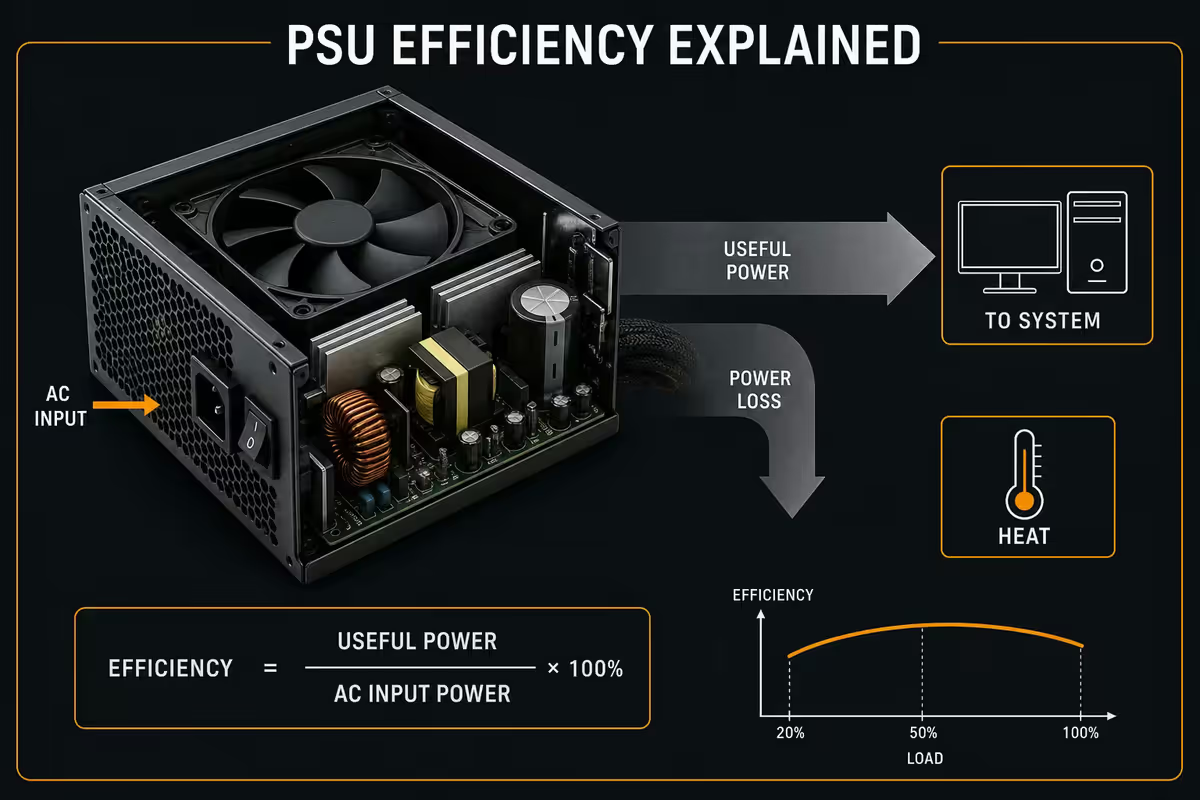
Your wall socket delivers AC power. Your motherboard, CPU and GPU need DC. The PSU is the box that does that conversion. Efficiency is the percentage of wall power that survives that conversion intact.
An 85%-efficient PSU drawing 471W from the wall delivers 400W of clean DC to your components. The other 71W becomes heat — radiated by the PSU casing and pushed out by the rear fan. That heat is why a hot PSU is an inefficient PSU.
Why this matters in practice:
- Electricity cost. Inefficient PSUs draw more wall power for the same useful work.
- Heat. Wasted watts become case heat the GPU and CPU then have to fight.
- Fan noise. Hotter PSUs spin their fans faster — audible in quiet rooms.
- Component longevity. Cooler PSUs use cooler capacitors that last longer.
- UPS sizing. Wall draw decides how big a UPS you need — material for SA buyers.
The 80 Plus certification ladder
80 Plus is an independent certification programme that tests PSUs at 20%, 50% and 100% load. Each tier guarantees a minimum efficiency at each load level. The tiers in ascending order:
| Tier | Efficiency @ 50% | Price premium | Verdict |
|---|---|---|---|
| 80 Plus White (base) | 80-82% | — | Avoid for gaming builds |
| Bronze | 82-85% | R0 | OK budget floor |
| Silver | 85-88% | +R100 | Rare in SA stock |
| Gold | 87-90% | +R200-R500 | Sweet spot |
| Platinum | 89-92% | +R600-R1,200 | SFF/quiet builds |
| Titanium | 90-94% | +R1,500-R3,000 | Diminishing returns |
The numbers look close — Bronze 85%, Gold 90%, Titanium 94%. That's only a 9-point spread across the whole ladder. But it's compounded against years of daily use, and it correlates with the build quality of the entire PSU. Manufacturers don't put cheap capacitors in a Gold-certified unit and call it Gold; the certification requires the higher-quality internals.
Real Rand savings at SA Eskom tariffs
Let's do the maths for a realistic SA gaming setup: 750W PSU, system pulling roughly 200W at idle and 400W gaming, used 8 hours/day light and 3 hours/day gaming, 360 days a year, at the 2026 Eskom residential tariff of R3.50/kWh (Block 2).
| PSU tier | Wall draw (gaming) | Annual cost | Save vs Bronze |
|---|---|---|---|
| 80 Plus Bronze (85%) | 471W | R2,280/year | — |
| 80 Plus Gold (89%) | 449W | R2,170/year | R110/year |
| 80 Plus Platinum (91%) | 440W | R2,125/year | R155/year |
| 80 Plus Titanium (93%) | 430W | R2,080/year | R200/year |
Across a typical 7-10 year PSU lifespan that's R770-R1,400 saved by going Gold over Bronze — meaningful, and roughly the same as the price premium for the better unit. Titanium would save you ~R2,000 over 10 years against a Bronze baseline but typically costs R2,500-R3,500 more upfront. The payback maths simply doesn't work for most desktops.
The payback gets dramatically better if you run 24/7 (servers, mining, ML training), have multiple high-draw GPUs, or live in a Block 3 Eskom tariff zone where rates climb to R5.50/kWh. Those edge cases are where Platinum and Titanium earn their keep.
Why oversizing your PSU hurts efficiency
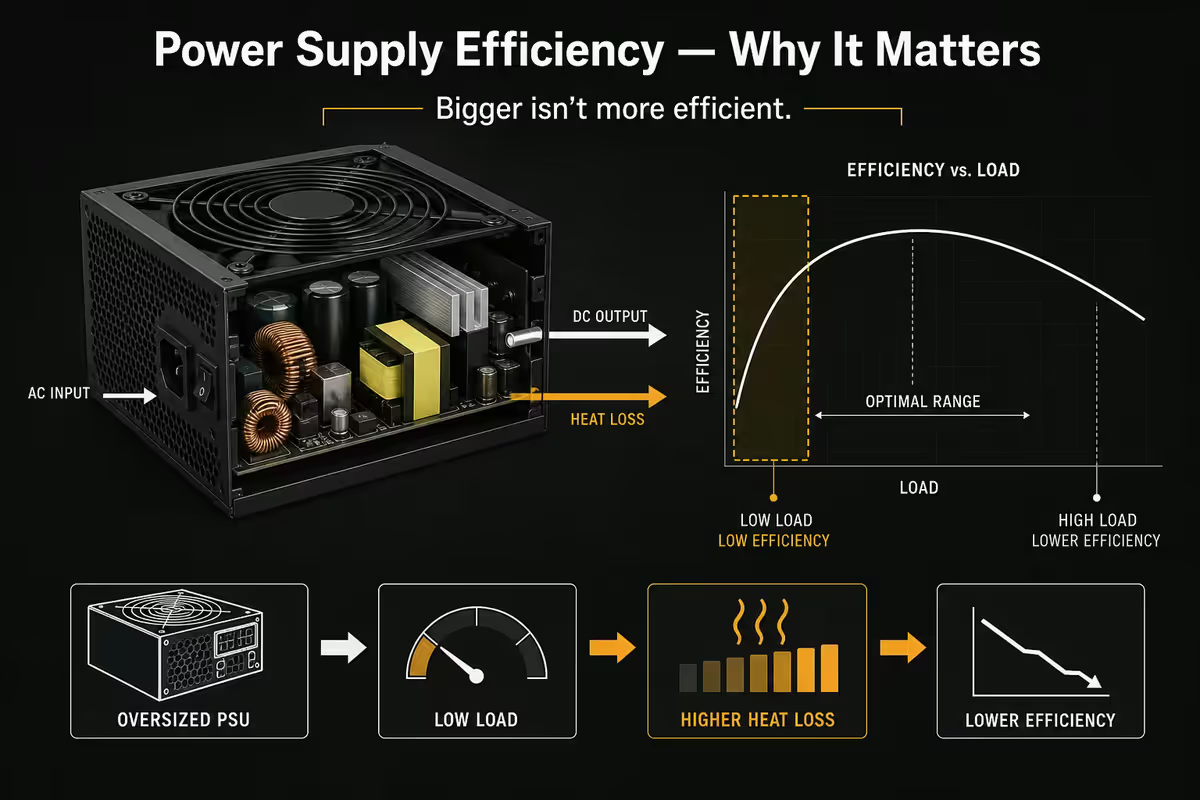
This is the single most counter-intuitive thing about PSU efficiency: buying a bigger PSU than you need actually reduces efficiency.
PSU efficiency follows a U-shape curve. It peaks between 40-60% load and drops off at both extremes. Below 20% load, efficiency tanks 5-8 points. Above 90% load, it drops similarly.
Example: a system that draws 400W under gaming load.
- On a 750W Gold PSU → 53% load → ~90% efficient → 444W from wall
- On a 1200W Gold PSU → 33% load → ~87% efficient → 460W from wall
- On a 1500W Gold PSU → 27% load → ~85% efficient → 470W from wall
The "bigger is better, just in case" reflex actually costs you efficiency. Right-size your PSU to your system: total system TDP × 1.4 typically lands you in the 40-60% load sweet spot at peak gaming, with 20-30% headroom for future upgrades.
ATX 3.1 vs older ATX standards
ATX 3.0 launched in 2022 to handle the power demands of RTX 40 series. ATX 3.1 (2024 update) refined the 12V-2x6 connector — a fix for the melted-cable issue that plagued early RTX 4090 launches.
Why ATX 3.1 matters:
- Native 12V-2x6 GPU connector. No adapter clutter; clean RTX 40/50 install.
- Better transient spike handling. Required to absorb 200% TDP millisecond spikes from modern GPUs without shutting down.
- Improved hold-up time. Keeps system running for 17ms+ after wall power cuts — long enough for a UPS to take over cleanly.
- Lower 12V ripple. Cleaner DC for sensitive motherboard VRMs.
Should you spend the premium? If your GPU is RTX 4070 or higher (current or future upgrade), yes — ATX 3.1 prevents the melted-connector failure mode. If you're on an RTX 4060, RX 7600 or AMD 7000-series GPU that doesn't use 12V-2x6, the benefit is small and the premium isn't urgent.
Modular vs semi-modular vs non-modular
Modularity is independent of efficiency rating — you can buy Bronze fully-modular or Gold non-modular. Each has trade-offs.
Fully modular: every cable detaches. Cleanest builds, best airflow, easiest upgrades. R150-R400 premium over non-modular. Worth it for SFF or build-show case builds.
Semi-modular: 24-pin and CPU cables are permanent; PCIe/SATA cables are detachable. R80-R150 premium. Sensible compromise — those two always-needed cables don't need to be modular.
Non-modular: all cables hardwired. Cheapest, fine for closed-case builds where you'll never see the cable mess. Cable management is harder but doable.
What to buy by build budget
| Build tier | Recommendation | SA price |
|---|---|---|
| Budget gaming (R12-R18k) | 650W Bronze, semi-modular, Cooler Master MWE Bronze V2 | R900-R1,200 |
| Mid-tier gaming (R18-R30k) | 750W Gold ATX 3.1, semi-modular, Corsair RM750x | R1,800-R2,400 |
| High-end gaming (R30-R50k) | 850W Gold ATX 3.1, fully modular, Seasonic Focus GX-850 | R2,500-R3,400 |
| Enthusiast / RTX 50 (R50k+) | 1000-1200W Platinum ATX 3.1, Corsair RM1000x or Seasonic PRIME PX | R3,800-R5,500 |
| SFF (Small form factor) | 750-850W SFX-L Platinum, Corsair SF750 or Cooler Master V850 SFX | R3,200-R4,200 |
| 24/7 server / ML rig | 1000W+ Titanium, Seasonic PRIME TX series | R5,500-R8,500 |
Key takeaways
- 80 Plus Gold is the sweet spot — 87-90% efficient, better internals, R200-R500 premium.
- Titanium rarely pays back at SA tariffs — 10+ year payback period exceeds PSU life.
- Right-size your PSU — 40-60% load is peak efficiency, oversizing actively hurts.
- ATX 3.1 is essential for RTX 4070+ and RTX 50 to handle transient power spikes.
- Tier-1 brand + Gold + ATX 3.1 from a warranty-backed retailer beats every spec-sheet comparison.
Frequently asked questions
What does 80 Plus certification actually mean?
80 Plus is an independent efficiency rating measuring what percentage of wall power makes it to DC output. 80 Plus Bronze guarantees 82-85% efficiency at typical loads. Gold guarantees 87-90%. Platinum guarantees 89-92%. Titanium guarantees 90-94%. The rest of the wall power becomes heat dissipated by the PSU. The certification testing is done at 20%, 50% and 100% load.Is Gold or Platinum worth the extra money?
Gold is the sweet spot for almost every build — typically R200-R500 more than Bronze for genuinely better efficiency, lower heat, quieter fan profiles and better-quality internal components. Platinum costs R600-R1,200 more than Gold but the efficiency delta is only 2-3% — at SA Eskom tariffs that's a R100-R200/year saving and a 6-12 year payback period. Buy Gold unless you specifically need Platinum's lower heat for SFF builds.How much electricity does a more efficient PSU save?
A 750W system pulling 400W gaming with 85% efficient PSU draws 471W from the wall. The same system with 92% efficient PSU draws 435W — a 36W saving. At SA Eskom residential rates (~R3.50/kWh, 2026), 4 hours of gaming daily over a year saves around R180-R220. Not life-changing, but real. Over the 7-10 year life of a quality PSU that's R1,200-R2,000 — typically more than the price premium for a higher tier.Why is Titanium rarely worth it?
Titanium-rated PSUs typically cost R1,500-R3,000 more than equivalent Gold units but deliver only 2-4% better efficiency. At SA electricity rates the payback period is 10-20 years — longer than the PSU's useful life. Titanium makes sense for 24/7 servers, ML training rigs and SFF builds where the lower heat output materially helps. For desktop gaming and creator workloads, Gold or Platinum is the smarter spend.Does PSU efficiency vary across load levels?
Yes — efficiency follows a U-shape curve. PSUs are most efficient between 40-60% load and lose 3-7% efficiency below 20% or above 90% load. A 1000W PSU running a 200W idle workload sits in the inefficient 20% zone. This is why oversizing your PSU "just in case" is counterproductive: a quality 750W Gold unit running at 50% load is more efficient than a 1200W Gold unit running at 20% load on the same system.What is ATX 3.1 and do I need it?
ATX 3.1 is the 2024-2025 PSU spec update designed for RTX 40 and RTX 50 series GPUs. Key features: native 12V-2x6 connector for the GPU (replacing the older 12VHPWR), better handling of GPU transient power spikes (cards now spike to 200% TDP for milliseconds), and improved hold-up time. If you have or plan to buy an RTX 4070+ or any RTX 50 card, ATX 3.1 is strongly recommended — it eliminates the melted-connector problem that plagued early 12VHPWR cables.Is modular PSU cabling worth the extra cost?
Fully modular PSUs cost R150-R400 more than non-modular equivalents and let you connect only the cables you need. Benefits: cleaner builds, better airflow, easier upgrades. Semi-modular keeps the 24-pin and CPU cables permanent (always needed) and modularises the rest — a sensible middle ground at R80-R150 premium. For airflow-critical SFF builds, fully modular is worth it. For mid-tower builds with good cable management space, semi-modular is fine.Does a PSU's efficiency degrade over time?
Modern quality PSUs (Seasonic, Corsair RMx, be quiet! Straight Power, Cooler Master MWE Gold, Gigabyte UD) lose roughly 1-2% efficiency over 5-7 years through capacitor ageing. After 10 years a Gold-rated unit might perform at Bronze levels. Cheap no-name PSUs degrade much faster — losing 5%+ efficiency in 2-3 years. The reason quality PSUs cost more is largely the capacitor specification, which dictates long-term efficiency stability.
Get the Evetech app
Exclusive app-only prices, daily flash sales, and free delivery on orders over R4,000 — download the app and start saving.