Display Glossary
What is QD-OLED? — Blue OLED meets quantum dots.
Samsung Display's hybrid architecture took everything good about OLED — perfect blacks, instant response — and bolted on quantum-dot colour conversion. The result is the highest colour volume of any panel technology shipping in 2026.
- DCI-P3 coverage
- ~99%
- Gen-3 peak HDR
- 3000 nits
- 2022 · 2023 · 2024+
- 3 gens
The QD-OLED architecture
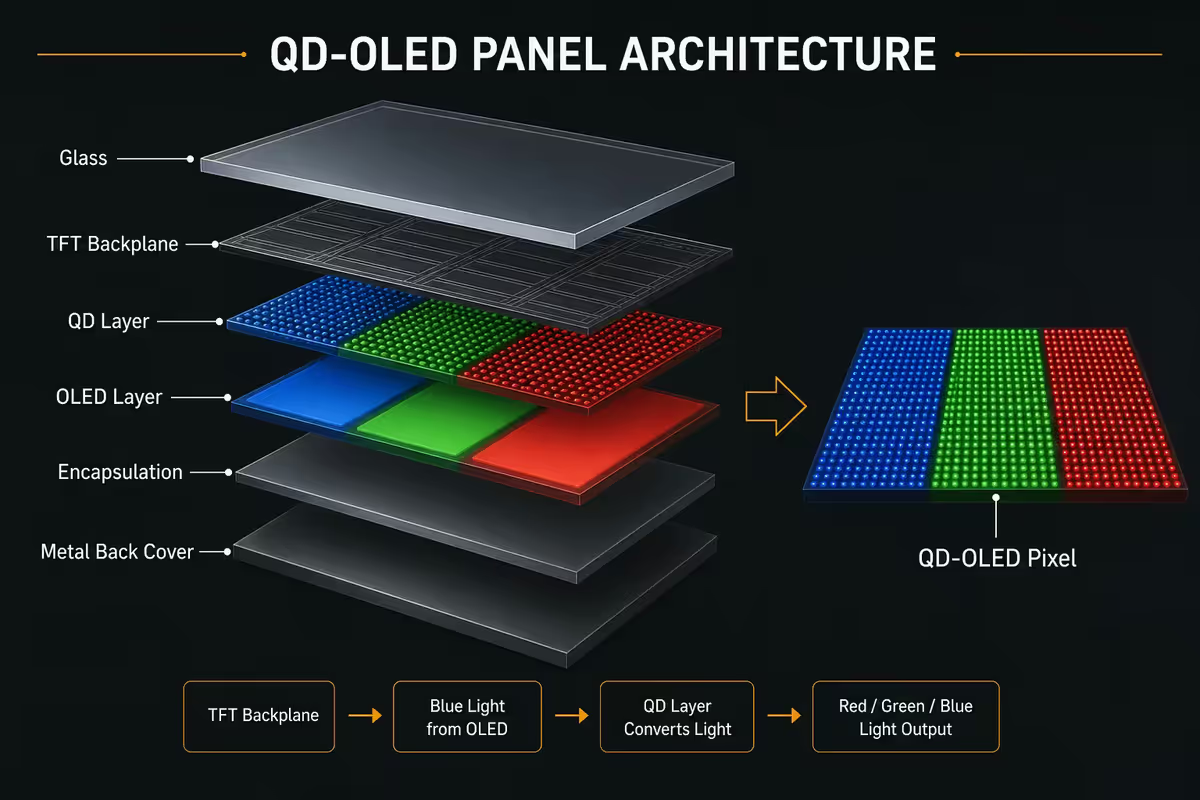
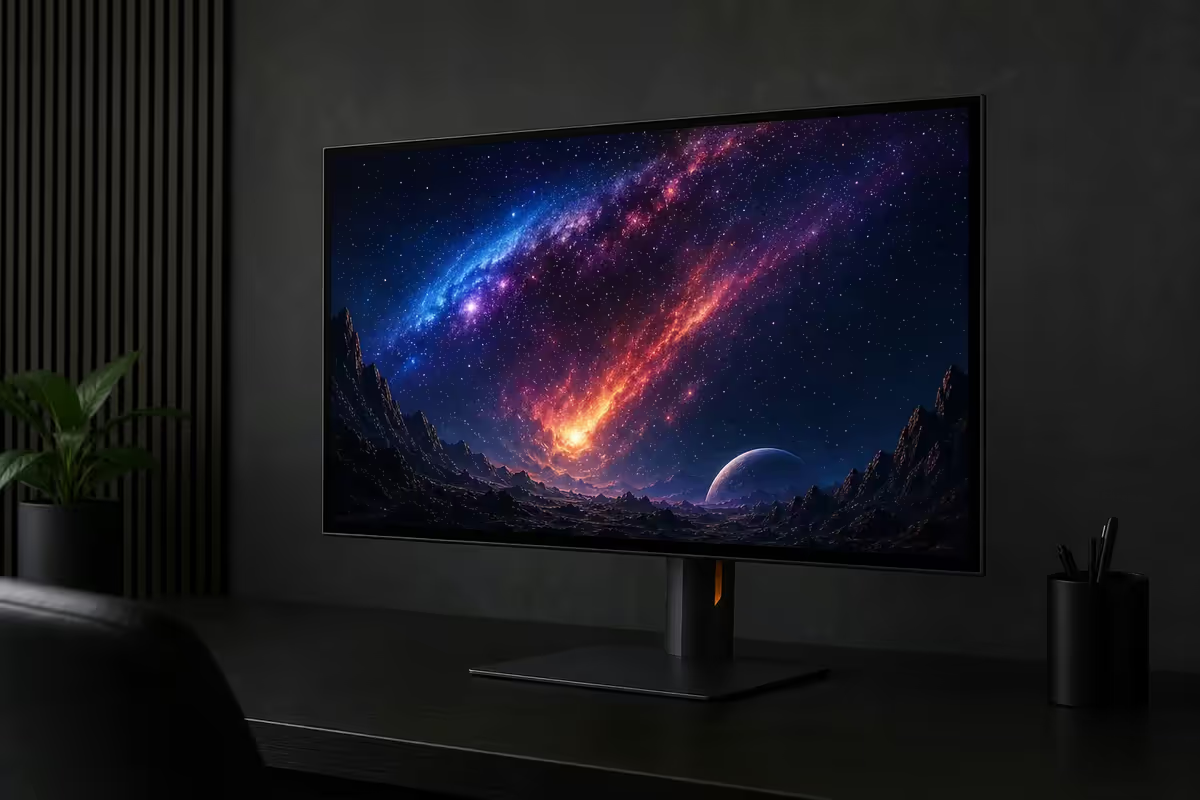
QD-OLED stacks two technologies. The light comes from blue OLED emitters — the most efficient OLED colour to manufacture at scale. The colour comes from quantum-dot layers that absorb blue light and re-emit it as pure red or green, depending on the dot size.
Each pixel has three subpixels:
- Red subpixel: blue OLED → red QD layer → pure red light out.
- Green subpixel: blue OLED → green QD layer → pure green light out.
- Blue subpixel: blue OLED → pass-through → pure blue light out.
Quantum dots are nanocrystals tuned by size. A 6nm dot absorbs blue and emits red. A 3nm dot absorbs blue and emits green. The emission spectrum is narrow (peaky), which translates to extremely saturated primaries — the foundation of QD-OLED's colour volume advantage.
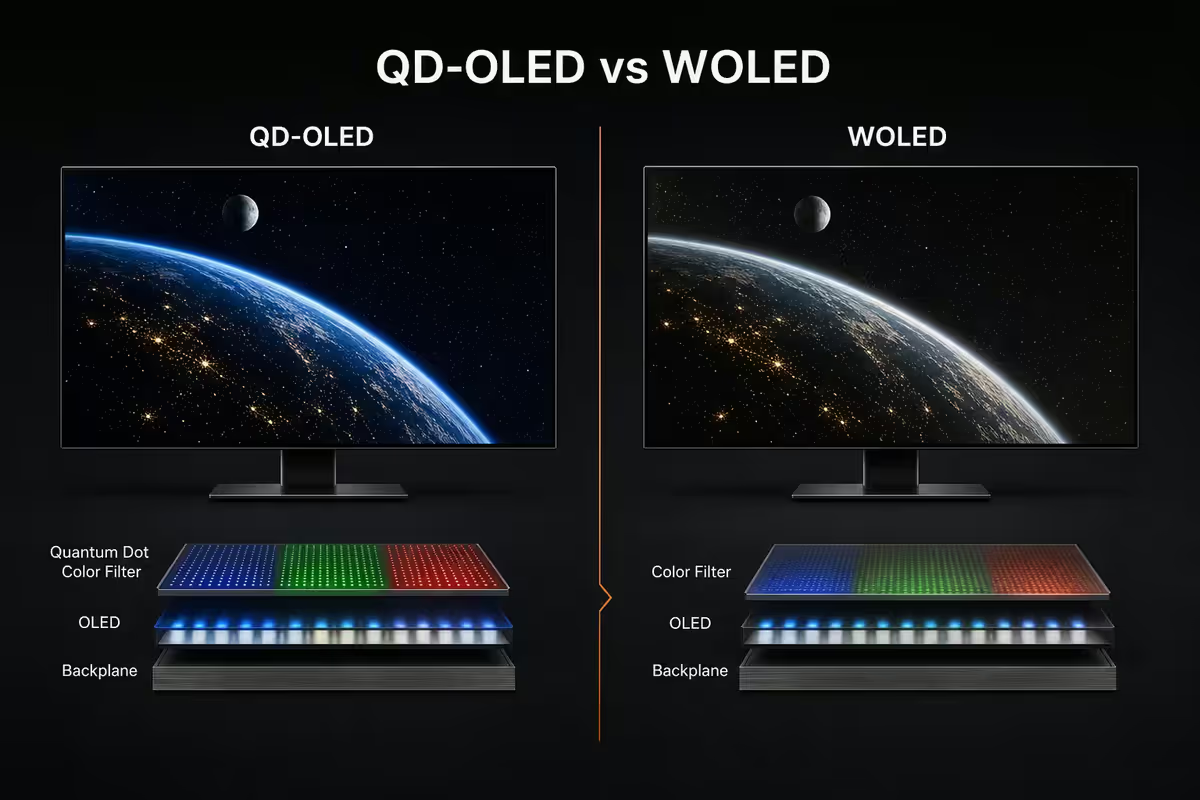
There's no white subpixel, no colour filter doing the heavy lifting (unlike LG WOLED), and no LED backlight (unlike LCD). The blue OLED itself is both light source and pixel switch — pixel-level control means perfect blacks because pixels can fully turn off.
QD-OLED vs WOLED — the LG comparison
LG Display's WOLED architecture uses a white OLED emitter with red/green/blue/white colour filters. The white subpixel boosts brightness — particularly for full-screen content — but desaturates colour at peak brightness.
| Metric | QD-OLED (Samsung) | WOLED (LG) |
|---|---|---|
| DCI-P3 colour gamut | ~99% | ~97% |
| Rec.2020 colour gamut | ~95% | ~75% |
| Colour volume (Rec.2020) | ~85% | ~55% |
| Peak HDR brightness (10% window) | ~2,800-3,000 nits (Gen-3) | ~1,500-1,800 nits |
| Full-screen white brightness | ~250-275 nits | ~300-340 nits |
| Subpixel layout | Triangular RGB | Rectangular RGBW |
| Text rendering (ClearType) | Mild fringing | Cleaner edges |
| Anti-reflective coating | Matte option (Gen-3 S95D) | Mostly glossy |
The simplest way to summarise: QD-OLED wins on colour and HDR highlight punch. WOLED wins on text rendering and bright-room SDR. For gaming and HDR cinema, QD-OLED is the choice. For mixed productivity and gaming in bright office light, WOLED has its place.
Triangular subpixels & the ClearType story
QD-OLED's most controversial design choice is the triangular subpixel arrangement: red at the bottom, green at the top, and blue running vertically on the side. Most monitor and OS text rendering — including Windows ClearType — assumes a horizontal RGB stripe.
The result on first-gen 1440p QD-OLED panels was subtle red/green fringing on text edges, especially visible on small fonts and high-contrast UI elements. Some users find this distracting; others adapt within a few hours and never notice again.
Three factors make this much less of an issue in 2026:
- 4K density. At 32-34" 4K resolution, each subpixel is small enough that fringing is below the eye's resolving threshold for most viewers.
- Mac ClearType-equivalent. macOS subpixel rendering handles QD-OLED more gracefully than Windows.
- Windows 11 24H2. Microsoft has tuned ClearType for emerging subpixel layouts. The visible fringing is significantly less pronounced than on early 2022 panels.
Burn-in status in 2026
OLED burn-in — permanent image retention from static UI elements — was a real concern through 2018-2021. By 2026, with three generations of QD-OLED refinement plus Samsung Display's panel-level mitigation, the practical risk is small for most users.
Built-in burn-in mitigation includes:
- Pixel shift. Imperceptible 1-2 pixel image shift every few minutes prevents subpixel wear concentration.
- ABL (Auto Brightness Limiter). Reduces full-screen brightness to extend pixel life, especially for bright static content.
- Logo dimming. Detects persistent bright UI elements (taskbar, browser address bar) and gently dims them.
- Panel refresh cycle. Compensation cycle runs after a few hours of off-time to even out pixel wear.
- Screen savers + auto-sleep. Aggressively recommended; black screen extends panel life.
rtings.com's long-term torture testing (10+ hours/day mixed content, 2 years running) shows QD-OLED Gen-2 and Gen-3 panels with minimal visible burn-in in normal usage. Static UI elements at max brightness for 8+ hours daily remain the realistic risk vector — primarily heavy office workers using one monitor exclusively for spreadsheets.
Warranty matters. Most QD-OLED gaming monitors now ship with explicit 2-3 year burn-in warranty (vs the original "OLED excluded" clauses). Check the warranty terms before buying.
QD-OLED generation history
| Generation | Year | Peak HDR nits | Notable monitors |
|---|---|---|---|
| Gen-1 | 2022 | ~1,000 nits | Sony A95K, Alienware AW3423DW, Samsung S95B |
| Gen-2 | 2023 | ~2,100 nits | Samsung S95C, Sony A95L, AW3423DWF |
| Gen-3 | 2024+ | ~3,000 nits | Samsung S95D, AW3225QF, MSI 321URX, PG34WCDM |
| Gen-4 (in development) | 2026-27 | 3,500+ nits | Announced for late-2026 monitors |
Gen-3 is the practical sweet spot for monitor buyers in 2026. The brightness gain over Gen-2 is meaningful in HDR, the matte coating option suits desktop use, and burn-in mitigation is fully mature. Gen-1 panels (now end-of-life retail) can still be a good buy at clearance pricing if HDR isn't your priority.
Best QD-OLED gaming monitors in SA
| Monitor | Size / res / Hz | SA price |
|---|---|---|
| Alienware AW3423DWF | 34" ultrawide · 3440x1440 · 165Hz | R22,000-R25,000 |
| ASUS PG34WCDM | 34" ultrawide · 3440x1440 · 240Hz | R28,000-R32,000 |
| Alienware AW3225QF | 32" curved · 4K · 240Hz | R33,000-R36,000 |
| MSI MPG 321URX QD-OLED | 32" flat · 4K · 240Hz | R32,000-R35,000 |
| Samsung Odyssey OLED G8 G80SD | 32" flat · 4K · 240Hz | R30,000-R34,000 |
| Samsung S95D TV (gaming option) | 55-77" 4K · 144Hz HDMI 2.1 | R45,000-R85,000 |
The picks at a glance:
- Best value ultrawide: Alienware AW3423DWF — Gen-2 panel, still excellent at R22k.
- Best ultrawide flagship: ASUS PG34WCDM — 240Hz Gen-3, premium chassis.
- Best 4K all-rounder: MSI 321URX — flat panel, 4K 240Hz, strong factory calibration.
- Best curved gaming: Alienware AW3225QF — immersive 1700R curve, Gen-3 panel.
- Best matte coating: Samsung S95D TV / Odyssey G8 — anti-glare for daylight gaming rooms.
Who QD-OLED actually serves best
QD-OLED is excellent for:
- HDR gamers — the highest peak brightness with saturated, not washed-out, highlights.
- Single-player narrative game fans — perfect blacks turn every dark scene into a contrast showcase.
- Creative pros doing colour-critical work — DCI-P3 native, Rec.2020 coverage best in class.
- Home cinema in moderate lighting — Gen-3 matte coating handles ambient light.
QD-OLED is not ideal for:
- Heavy 8+ hour productivity with static UI elements at max brightness all day — burn-in risk concentrates.
- Brightly-lit offices on Gen-1 or Gen-2 panels without matte coating.
- Tight budgets — entry point in SA is still R22,000+ for ultrawide, R30,000+ for 4K.
- Pure competitive esports where 360-540Hz IPS LCD outperforms QD-OLED on raw refresh.
Key takeaways
- QD-OLED = blue OLED emitter + quantum dot colour conversion. Highest colour volume on the market.
- vs WOLED: QD-OLED wins on HDR & colour; WOLED wins on text rendering & bright-room SDR.
- Gen-3 (2024+) hits 3,000-nit peak HDR with matte coating and mature burn-in mitigation.
- Burn-in in normal mixed use is now a minor risk. Static UI 8+ hrs at max brightness is the remaining vector.
- SA pricing R22,000 (ultrawide AW3423DWF) to R38,000 (32" 4K flagships). Down ~15% YoY.
Frequently asked questions
What does QD-OLED stand for?
QD-OLED stands for Quantum Dot OLED. It's Samsung Display's hybrid architecture combining a blue OLED light source with quantum-dot colour conversion layers for red and green pixels. The blue light passes through QD layers that absorb the blue and re-emit pure red or green, producing a wider colour gamut than WOLED (LG's white OLED + filters) approach.QD-OLED vs WOLED — what's the practical difference?
QD-OLED produces higher colour volume (~99% DCI-P3, ~95% Rec.2020 in real measurement) and higher peak HDR brightness at saturated colours. WOLED (LG Display) hits higher full-screen white brightness and has slightly better text rendering due to RGBW subpixel layout. For gaming and HDR content, QD-OLED is generally preferred; for productivity and bright-room desktop use, WOLED has advantages.Is QD-OLED prone to burn-in in 2026?
Significantly reduced vs early OLED generations but not eliminated. Gen-3 QD-OLED panels (2024+) have advanced burn-in mitigation: pixel shift, ABL (auto brightness limiter), screen savers, panel refresh cycles. Real-world data from rtings.com's long-term torture testing shows minimal burn-in on QD-OLED panels in normal usage (mixed content, ABL enabled) over 2+ years. Static UI elements at max brightness 8+ hours daily remain the only realistic risk.What are the QD-OLED generations?
Gen-1 (2022): Sony A95K, Alienware AW3423DW, Samsung S95B — 1000-nit peak HDR, 1500-nit full-screen, some uniformity issues. Gen-2 (2023): Samsung S95C, Sony A95L, AW3423DWF — improved efficiency, 2100-nit peak, brighter SDR. Gen-3 (2024+): Samsung S95D, AW3225QF, MSI 321URX — 3000-nit peak HDR, matte anti-reflective coating, much-reduced burn-in risk. Gen-4 panels in development for 2026-2027 promise further brightness gains.What's the triangular subpixel layout issue with QD-OLED?
QD-OLED uses a triangular RGB subpixel arrangement instead of the traditional rectangular RGB stripe. Windows ClearType text rendering — designed for the rectangular layout — produces subtle colour fringing on text edges. Most users adapt within hours and won't notice; some power users find it persistent and distracting. The effect is much less pronounced at 4K density vs 1440p, where each pixel is smaller relative to the eye's resolving power.What are the best QD-OLED gaming monitors?
Top picks for 2026: ASUS ROG Swift OLED PG34WCDM (34" 3440x1440 ultrawide), MSI MPG 321URX (32" 4K 240Hz), Alienware AW3225QF (32" 4K 240Hz curved), Samsung Odyssey OLED G8 G80SD (32" 4K 240Hz flat), Alienware AW3423DWF (34" 3440x1440 ultrawide). All use Samsung Display Gen-3 QD-OLED panels. Prices in SA range from R22,000 (ultrawide AW3423DWF) to R38,000 (32" 4K flagships).What is colour volume on QD-OLED?
Colour volume measures how saturated a display stays as brightness increases. QD-OLED maintains colour saturation at peak brightness — a 1000-nit highlight stays fully red, not washed-out pink. WOLED's white subpixel boosts brightness by adding white, which desaturates highlights. QD-OLED hits ~85% Rec.2020 colour volume vs WOLED's ~55%. Most visible in HDR gaming highlights — neon city lights, sun glints, explosion sparks.Who is QD-OLED actually best for?
QD-OLED is the gold standard for: HDR gamers (highest peak brightness with saturated colours), creative pros doing colour-critical work (DCI-P3, Rec.2020 native), single-player narrative game fans (perfect blacks, vivid worlds), and anyone using their monitor in moderate ambient lighting. Less ideal for: heavy productivity users with static UI elements at max brightness all day, brightly-lit office environments (older gen-1/2 panels), and tight budgets (still a R20,000+ entry point in SA).
Get the Evetech app
Exclusive app-only prices, daily flash sales, and free delivery on orders over R4,000 — download the app and start saving.