Glossary · Latency Explainer
What is latency? — Ping, input lag and response time. Three numbers, three fixes.
You can have a 12 ms ping and still feel laggy. You can have a 1 ms response-time monitor and still miss shots. "Latency" is three separate things stacked on top of each other, and only one of them is the network.
- typical total
- ~50 ms
- network · system · display
- 3 stages
- reflex / anti-lag 2 saving
- -20 to -40 ms
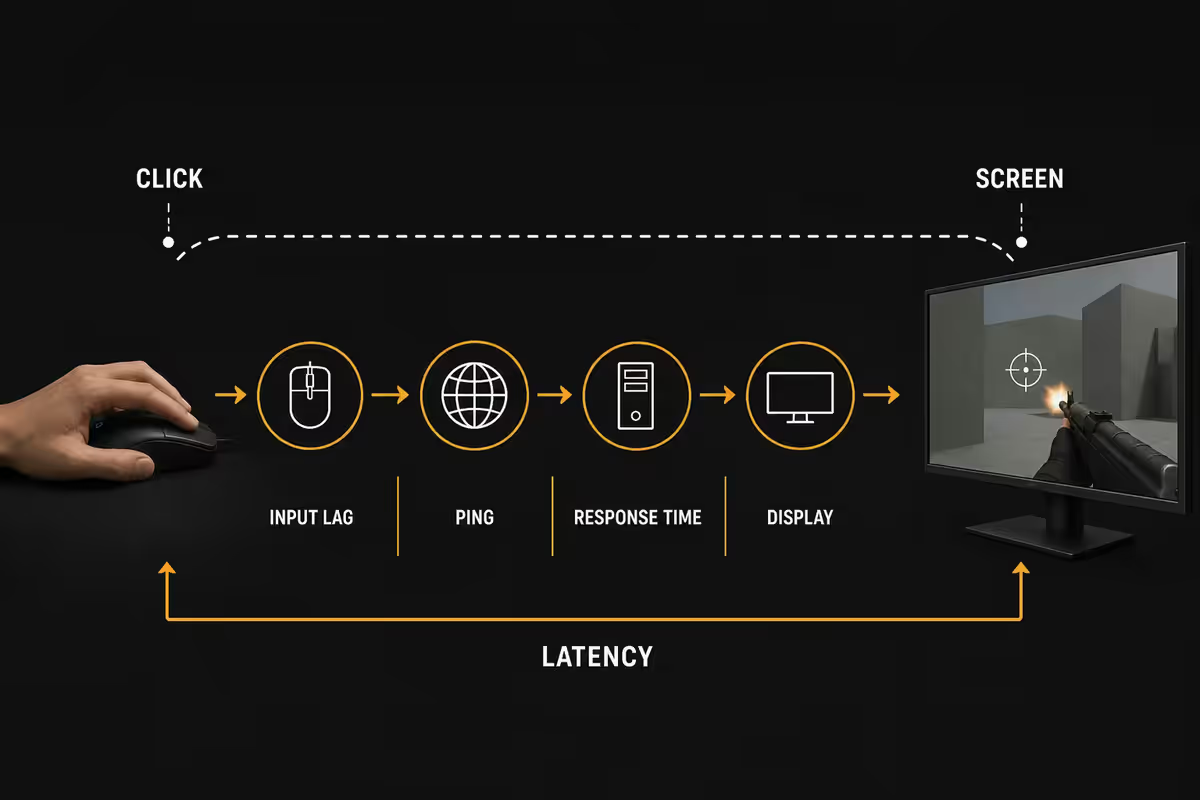
Three latencies, not one
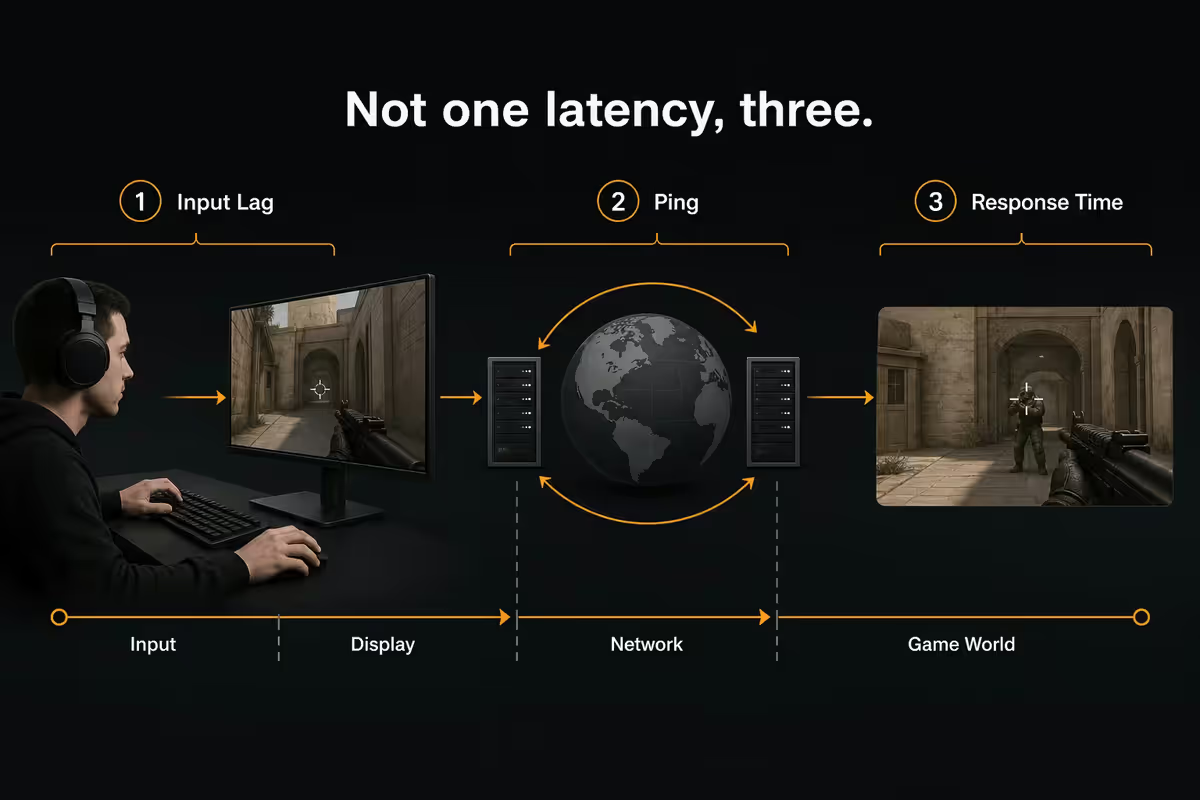
When someone says "the lag is killing me," they could mean three different things. Each is measured in milliseconds, each has different causes, and each has a different fix. Confusing them is why people buy expensive gear that fixes nothing.
| Latency type | What it measures | Typical range |
|---|---|---|
| Network ping | Packet round-trip to server | 5-260 ms (server-dependent) |
| System input lag | Click → frame rendered | 15-50 ms |
| Monitor response time | Pixel colour switch + scan-out | 2-15 ms |
Ping only exists in online games. Input lag exists in every game and every desktop interaction. Response time is a property of the screen itself, regardless of what's running.
How they stack — the perceived-lag equation
In an online game, your full click-to-bullet-fired-on-server path is:
mouse → OS → game logic → GPU render → monitor scan-out → panel response → (network ping for online actions)
Each stage adds delay. The end-to-end "click feels registered" number is the sum:
| Stage | Component | Typical contribution |
|---|---|---|
| Mouse input | Polling + click switch + USB | 1-2 ms |
| OS scheduling | Windows event loop | 5-10 ms |
| Game render queue | CPU prep + GPU render | 8-16 ms (Reflex cuts to 2-5) |
| HDMI / DisplayPort cable | Signal transmission | <1 ms |
| Monitor scan-out | Refresh interval (Hz) | 3-4 ms @ 144Hz, ~16 ms @ 60Hz |
| Panel response | Pixel colour switch | 1-5 ms |
| Network round trip | SA → game server → SA | 12-260 ms (server-dependent) |
A typical SA gamer on local fibre playing CS2 on a Johannesburg server: roughly 49 ms total click-to-screen. A US server doubles that. A 60Hz panel adds 12 ms on top. Enable Reflex and you claw back 10 ms.
Per-component contribution — where the milliseconds go
Mouse (1-2 ms)
A modern wired or wireless gaming mouse polling at 1000Hz reports position every 1 ms. The click switch itself fires in roughly 1 ms. The 4000Hz and 8000Hz polling-rate marketing is real but invisible — you're chasing 0.5 ms savings while 30 ms sits unfixed elsewhere.
OS scheduler (5-10 ms)
Windows event queues and driver stack add 5-10 ms in normal use. Game Mode and high-priority process settings shave 1-2 ms. Background scanner programs (overzealous antivirus, Discord overlay misconfigured) can add 5-15 ms in spikes.
GPU render queue (8-16 ms)
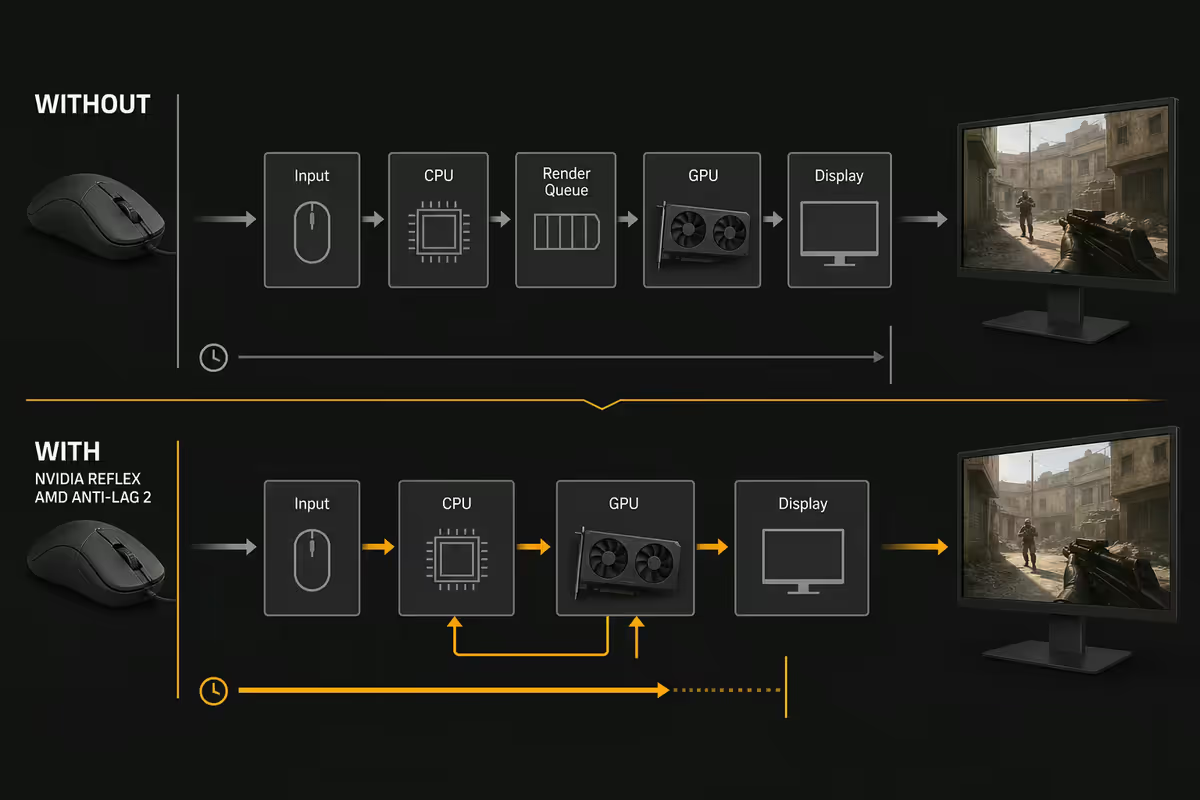
When a CPU and GPU are out of sync, the CPU queues frames the GPU hasn't rendered yet. Each queued frame adds its render time to your input lag. This is the single biggest fixable component — Nvidia Reflex and AMD Anti-Lag 2 directly attack this queue, dropping it from 8-16 ms to 2-5 ms.
Cable (under 1 ms)
HDMI and DisplayPort transmission time is sub-millisecond at typical lengths. Anyone selling you a "low latency" gaming cable is selling you nothing.
Monitor scan-out (3-16 ms)
Each refresh interval is the time between full screen updates. At 60Hz that's 16.6 ms. At 144Hz it's 6.9 ms. At 240Hz it's 4.2 ms. At 360Hz it's 2.8 ms. Halving your refresh interval halves this latency. This is the single biggest reason to buy a high-refresh monitor — not the smoothness, the latency cut.
Panel response (1-5 ms)
The pixel-switch number on the spec sheet. Modern IPS gaming panels are 1-3 ms grey-to-grey. OLEDs are sub-1 ms. Old VA panels and budget monitors can be 5-15 ms with visible ghosting. Going from 5 ms to 1 ms is a noticeable upgrade. Going from 1 ms to 0.5 ms is bragging rights.
Network ping (server-dependent)
Speed of light is the floor. Joburg-to-Joburg: 5-15 ms. Joburg-to-Cape Town: 25-35 ms. Joburg-to-London: 150-200 ms. Joburg-to-US East: 200-260 ms. No router, ISP or fibre upgrade can beat physics. The best you can do is pick servers in the right city.
"Low ping but it still feels laggy"
This is the single most common esports frustration. The network is fine — the lag is local. Five suspects, in order of impact:
- V-Sync on. Adds 16-33 ms of forced queue. Disable V-Sync, enable G-Sync/FreeSync instead.
- 60Hz monitor. Adds 12 ms over a 144Hz panel just from scan-out timing.
- Render queue piling up. Enable Nvidia Reflex or AMD Anti-Lag 2.
- CPU bottleneck. If GPU is at 99% utilisation, you're CPU-bound — input lag balloons. Lower settings or upgrade CPU.
- Background apps. Discord overlay misconfigured, OBS running, Chrome with 40 tabs — all add jitter spikes.
Fix in that order. Most "I have low ping but the game feels off" complaints disappear after items 1-3.
How Nvidia Reflex & AMD Anti-Lag 2 work
Both technologies do the same thing with different names: they pace CPU frame generation so the GPU never has a backlog. Instead of CPU racing ahead and queuing 2-3 frames the GPU hasn't rendered yet, the CPU waits for the GPU to be ready.
Result: render queue drops from 8-16 ms to 2-5 ms. Net input-lag saving in supported games: 20-40 ms.
- Nvidia Reflex — supported in 90+ games (Valorant, CS2, Apex Legends, Fortnite, Overwatch 2, Call of Duty: Warzone, etc.). Works on GTX 900-series and newer. Free.
- AMD Anti-Lag 2 — supported in CS2, Counter-Strike, Fortnite, growing list. Works on Radeon RX 5000-series and newer. Free.
- Reflex Boost (RTX) — additionally lifts GPU clocks during low-load moments to render faster. Marginal extra gain.
How to enable: in-game graphics settings → look for "Nvidia Reflex" or "AMD Anti-Lag 2" → set to "On + Boost" (Nvidia) or "On" (AMD). No driver tweaking required.
Decoding retailer and streamer marketing
The latency landscape is full of confusing claims. Here's the translation:
| Marketing claim | What it actually means |
|---|---|
| "1 ms response time" | Panel pixel-switch — fine, but not the only number |
| "360Hz refresh" | 2.8 ms scan-out — real input-lag improvement |
| "8000Hz polling" | 0.125 ms mouse-report — invisible vs 1000Hz |
| "Low-latency HDMI cable" | Marketing fiction — cable is <1 ms regardless |
| "Pro esports approved" | Sponsor deal — not a latency metric |
| "Sub-1 ms OLED" | Real — OLEDs genuinely switch faster than LCDs |
| "Gaming router for low ping" | Cannot beat physics — picks server & QoS instead |
| "AI-powered latency reduction" | Sometimes real (Reflex), often nonsense |
What to actually fix first
In order of impact-per-rand:
- Free fixes (10-40 ms saved): Disable V-Sync. Enable Nvidia Reflex / AMD Anti-Lag 2. Close Chrome. Disable Game Bar.
- Settings fixes (5-15 ms saved): Drop unnecessary in-game settings until GPU sits at 95-99% (not capped). Cap framerate just below monitor refresh.
- Monitor upgrade (10-15 ms saved): 60Hz → 144Hz is the largest single upgrade in PC gaming latency. 144 → 240Hz is meaningful for competitive. 240 → 360Hz is small.
- GPU upgrade (varies): only if you're CPU-bottlenecked or framerates drop below the refresh rate.
- Mouse upgrade (0.5-2 ms saved): the smallest cost-effective gain. Buy for grip, not polling rate.
Key takeaways
- "Latency" is three numbers: network ping, system input lag, monitor response — they stack into perceived lag.
- Typical SA gamer total: ~50 ms click-to-screen. Nvidia Reflex / AMD Anti-Lag 2 saves 20-40 ms for free.
- V-Sync adds 16-33 ms — disable it, use G-Sync / FreeSync instead.
- 60Hz → 144Hz monitor cuts ~10 ms. 144 → 240Hz cuts another 3 ms. 240 → 360Hz cuts 1 ms.
- Always join SA-hosted servers when available. Ping is bound by physics; no router upgrade beats geography.
Frequently asked questions
Difference between ping, input lag and response time?
Ping = network round-trip (5-50 ms SA fibre). Input lag = PC processing time (20-40 ms). Response time = monitor pixel switch (1-5 ms). They stack.Why low ping but still feels laggy?
The lag is local, not network. Usual suspects: V-Sync adding 16-33 ms, 60Hz monitor, no Reflex/Anti-Lag, CPU bottleneck, background app jitter.What is Nvidia Reflex and AMD Anti-Lag 2?
CPU-GPU coordination tech that drops the render queue. Cuts system input lag 20-40 ms in supported games. Free. Just toggle on in graphics settings.Good ping for SA gaming?
SA servers: 5-25 ms excellent. EU servers: 150-200 ms typical. US East: 200-260 ms. US West / Asia: 280+ ms. Always pick SA-hosted servers when available.How is total perceived lag calculated?
Mouse (2ms) + OS (8ms) + GPU (12ms) + scan-out (4ms) + panel (3ms) + ping (20ms) = ~49 ms click-to-screen on a typical SA fibre setup.Does monitor response time really matter?
5 ms → 1 ms is noticeable. 1 ms → 0.5 ms is bragging rights. Higher refresh rate helps more than chasing 1 ms response.Will a better mouse reduce input lag?
Modern mice contribute 1-2 ms — basically a rounding error. 8000Hz polling vs 1000Hz is invisible. Mouse choice matters for ergonomics, not latency.What is "glass-to-glass" latency for streamers?
Full camera-sensor-to-viewer-screen pipeline. Twitch/YouTube standard: 8-15 seconds. Low-latency: 2-5 seconds. WebRTC ultra-low: 800ms-1.5s.
Related guides
- Choose a 144Hz / 240Hz Gaming Monitor — The four numbers that actually matter.
- SA Fibre ISPs for Gaming — Vumatel vs Openserve vs Frogfoot.
- Best Gaming Mouse 2026 — Grip and sensor — not polling rate.
- G-Sync vs FreeSync vs V-Sync — Tearing, lag, and which to enable.
Get the Evetech app
Exclusive app-only prices, daily flash sales, and free delivery on orders over R4,000 — download the app and start saving.