Windows 10 EOL · Updated for 2026
What happens when Windows 10 support ends. — Eight months in. The real options.
Microsoft stopped patching Windows 10 on 14 October 2025. The PC still boots. So what changes, what's the real risk, and which migration path actually makes sense in SA?
- EOL date
- Oct 14 2025
- consumer ESU yr 1
- R570/yr
- migration routes
- 4 paths
What actually changed on 14 October 2025
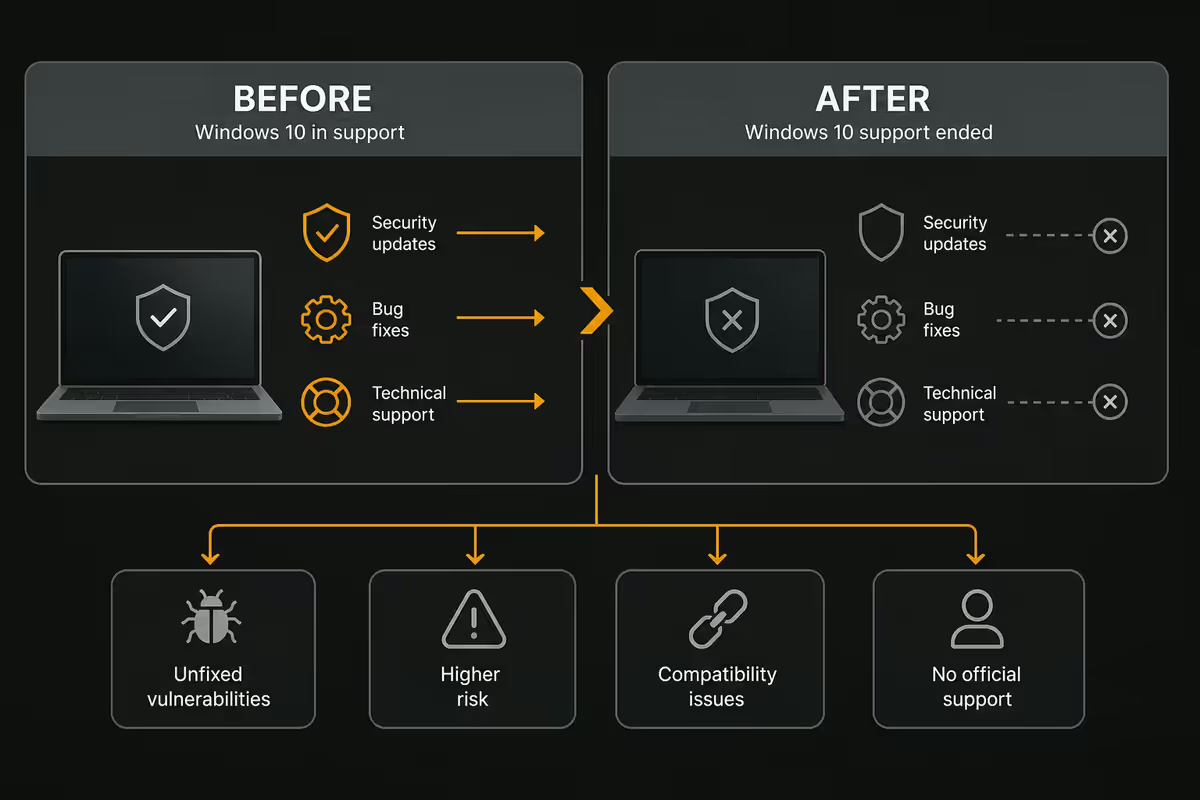
Windows 10 didn't stop working. Microsoft stopped three specific things on EOL day:
- Monthly security patches. Patch Tuesday no longer pushes Win10 security updates (except via paid ESU).
- Quality updates. Bug fixes, driver model refinements, network stack tweaks — all stopped.
- Microsoft support. Official troubleshooting via Microsoft Support no longer covers Win10.
What didn't stop: the OS itself, all installed apps, your file system, your network, your peripherals. As of June 2026, Win10 still boots and runs everything it did the day before EOL. Microsoft Edge still gets browser updates (until October 2028), Microsoft 365 desktop apps still work, and most third-party software vendors will continue Win10 support for 12-24 months after EOL.
Consumer ESU — what R570 actually buys
Microsoft made an unusual move in 2025 — they offered consumer ESU for the first time. Previously, ESU was enterprise-only at much higher prices.
| ESU type | Year 1 (USD/ZAR) | Year 2 | Year 3 |
|---|---|---|---|
| Consumer ESU | $30 / R570 | $60 / R1,140 | Not available |
| Business ESU | $61 / R1,160 | $122 / R2,320 | $244 / R4,640 |
| Education ESU | $1 / R20 | $2 | $4 |
| Microsoft 365 included | Free Year 1 | Free Year 2 | n/a |
The Microsoft 365 angle: if you have an active Microsoft 365 subscription on the PC, year one of consumer ESU is free. Year two costs R1,140. That covers Patch Tuesday security patches for that specific device.
For most SA home users, one year of consumer ESU (R570 or free with M365) makes sense as a bridge year while planning hardware refresh or OS migration. Beyond that, migration is cheaper than continued ESU.
The actual security risk eight months in
As of June 2026, eight months past EOL, security researchers have catalogued 40+ unpatched Windows 10 vulnerabilities. Most aren't actively exploited yet. But the risk profile is changing in three concrete ways:
- Vulnerability accumulation. Each new Patch Tuesday for Win11 reveals which underlying bugs Microsoft fixed. Many of those bugs exist in Win10 too — but stay open. Attackers can reverse-engineer Win11 patches to find Win10 exploits.
- Ransomware targeting. Ransomware groups specifically scan for out-of-support OS. Hospitals, schools and small businesses still on Win10 are the new soft targets.
- App support timeline. Browsers (Chrome, Firefox, Edge) and AV vendors (ESET, Norton, Bitdefender) currently support Win10 through 2027-2028. Banking apps are less reliable — some SA banking apps have already flagged Win10 in 2026 as "supported but not recommended".
Upgrading to Windows 11 — official and unofficial
Officially supported: Intel 8th gen or later, Ryzen 2000 or later, TPM 2.0 enabled, 4 GB RAM minimum, Secure Boot capable. If your CPU meets this, the upgrade is free and straightforward via Windows Update.
Unofficially supported: Most Intel 6th-7th gen and Ryzen 1000 PCs can run Win11 just fine — they just lack official certification. Rufus 4.5+ is currently the cleanest way to create a Win11 install USB that bypasses TPM, Secure Boot and CPU checks. The OS installs, runs and gets monthly security patches.
What you lose with TPM bypass: Microsoft no longer guarantees major feature updates (24H2, 25H1, etc.) on unsupported hardware. They may stop working at some point. The OS itself keeps getting security patches.
For SA users with 2017-era hardware: the TPM bypass to Win11 is a reasonable bridge. The hardware still works, the OS gets patches, you skip ESU costs. Plan a full hardware refresh inside 18-24 months.
Linux Mint 22 — when it actually works
Linux Mint 22 (Wilma) on Cinnamon is the closest 2026 OS in feel to classic Windows 10 — taskbar, start menu, file manager, everything where you expect it. It's free, gets security updates until 2029, runs well on older hardware.
Where Linux Mint is a clean fit:
- Web browsing (Firefox, Chrome, Brave all native).
- Office work (LibreOffice handles Word/Excel files well; Microsoft 365 browser version works fine).
- Gaming via Steam (Proton 9.x runs 90%+ of Steam library — check ProtonDB before migrating).
- Email, video calls (Zoom, Teams, Discord all native), streaming (Netflix, Disney+, YouTube).
- Programming and development (more first-class on Linux than Windows in many ways).
Where Linux Mint won't fit:
- Microsoft 365 desktop apps (use browser version or Office on the web).
- Adobe Creative Cloud (Photoshop, Premiere, After Effects — alternatives exist but workflow shift is real).
- Some SA banking apps with hardware tokens (Capitec, FNB browser-only banking works fine).
- Multiplayer games with kernel-level anti-cheat (Valorant, Fortnite, CoD Warzone, Apex on some configurations).
Alternative: Pop_OS 24.04. System76's Linux distro is a stronger gaming pick than Mint — pre-installed NVIDIA drivers, GameMode by default, slightly more aggressive desktop. Both are valid; Mint feels more familiar, Pop_OS feels more modern.
ChromeOS Flex — the older-hardware lifeline

ChromeOS Flex is Google's free OS for old hardware. Officially supported by Google, gets automatic security updates, runs well on 2014-era laptops with 4 GB RAM. Installs in 20 minutes via official Google ISO.
Best for: parents and grandparents who only browse, email, watch YouTube. The PC becomes effectively a Chromebook — boots in 10 seconds, runs cooler, battery life on old laptops often improves by 50-80%, and Google handles all OS security updates without user intervention.
Not for: gaming, productivity that needs Windows apps, anyone who needs offline Office, photo editing beyond browser tools. ChromeOS Flex is a deliberate downgrade in capability in exchange for security + simplicity.
When "stay on Windows 10" is actually rational
Three legitimate scenarios:
1. Offline-only PC. A music production rig that never connects to the internet. A retro-gaming machine. A workshop PC running CNC software. If it doesn't touch the internet, EOL security risk is essentially zero. Keep using Win10 indefinitely.
2. Specialised hardware-tied PC. Older audio interfaces (some Focusrite, Apogee, RME products), scientific instruments, industrial machines — drivers only work on Win10. Manufacturer hasn't shipped Win11 drivers and won't. Win10 stays as long as the hardware does.
3. Short-term bridge. The PC will be replaced in 12-18 months anyway. One year of consumer ESU (R570 or free with M365) plus careful browsing covers the gap. Don't invest in migration that won't pay back.
For everything else, migrate. Either to Win11 (official or Rufus bypass), to Linux Mint, or to ChromeOS Flex depending on workload. The unpatched Win10 daily driver is the option that isn't safe long-term.
Common Win10 EOL mistakes in 2026
Ignoring EOL because "the PC still works". Working and safe are different things. The PC still works the day before ransomware hits too.
Paying ESU on a PC you're replacing in 6 months. The R570 doesn't transfer to the new PC. Skip ESU on devices on their way out.
Buying new Win10 licences in 2026. Some grey-market resellers still sell Win10 keys. The OS is unsupported. Buy Win11 instead — same price, supported through 2031.
Skipping the TPM bypass option. If your hardware can run Win11 unofficially, the bypass is more cost-effective than annual ESU for the same outcome.
Trying Linux Mint without checking ProtonDB. Verify your specific games run before migrating. Most do — but the ones that don't are deal-breakers.
Key takeaways
- Win10 EOL was 14 October 2025 — the OS still works but is no longer security-patched.
- Consumer ESU is R570/year, free if you have an active Microsoft 365 subscription.
- Win11 TPM bypass via Rufus 4.5+ works on Intel 6-7th gen / Ryzen 1000 hardware.
- Linux Mint 22 is genuinely viable for browsing, office, Steam gaming and most workloads.
- Stay on Win10 only for offline machines, hardware-tied workflows, or short-term replacement bridges.
Frequently asked questions
Has Windows 10 actually stopped working in 2026?
No — Windows 10 still boots and runs apps. What stopped on 14 October 2025 was free security updates. The OS is functionally identical but new vulnerabilities aren't patched.How much does Windows 10 ESU cost in South Africa?
Consumer ESU is $30 USD (R570) for year one, doubling year two. Free for users with active Microsoft 365 subscription. Business ESU is $61 USD year one.What are the actual security risks of staying on Windows 10 without ESU?
40+ unpatched vulnerabilities catalogued by June 2026. Ransomware groups target out-of-support OS. Move banking and primary use to a patched device.Can my Windows 10 PC be upgraded to Windows 11?
Officially: Intel 8th gen / Ryzen 2000+ with TPM 2.0. Older hardware can use Rufus 4.5+ TPM bypass — works but feature updates aren't guaranteed.Is Linux Mint a realistic Windows 10 replacement in 2026?
For browsing, office, streaming and most Steam games — yes. Exceptions: M365 desktop apps, Adobe CC, specific banking apps, kernel-anti-cheat multiplayer games.What is ChromeOS Flex and should I install it?
Free Google OS for old hardware — turns a Win10 PC into a Chromebook. Best for parents who only browse and email. Not for gaming or productivity.When is 'stay on Windows 10' actually the right answer?
Offline-only PCs, specialised hardware-tied PCs, or short-term bridges for machines being replaced in 12-18 months. For everything else, migrate.What about business and enterprise Windows 10 ESU?
Available via volume licensing — $61 year one, $122 year two, $244 year three. Final Win10 ESU year ends October 2028.