Home Server Buying Guide
Best PC for a home server. — Always-on. Low-power. Load-shedding-proof.
Plex for the family, Home Assistant for the lights, Nextcloud for your photos. A home server pays for itself in two years of streaming subscriptions — if you build it right for SA's grid.
- idle draw target
- 10-15W
- three tier range
- R8k-R45k
- UPS runtime
- 90 min
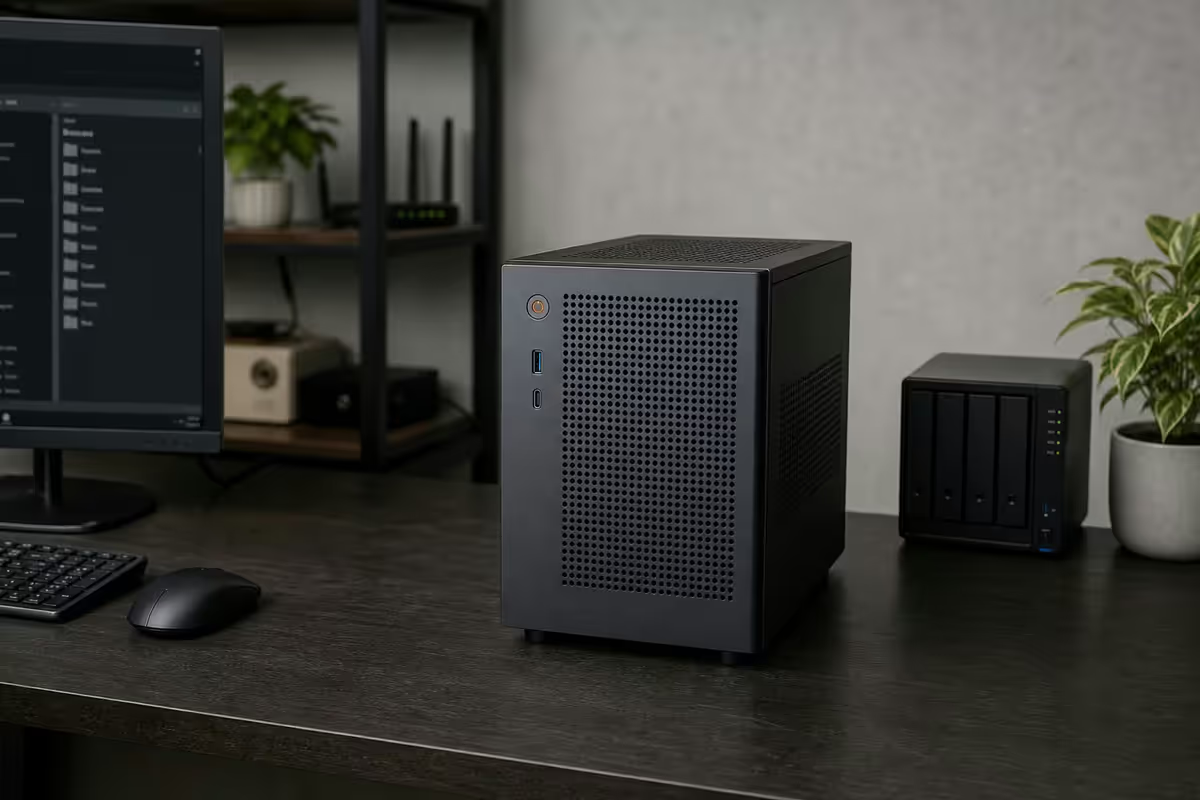
What you'll actually run
A "home server" can mean very different things. Before spec'ing hardware, map the services you actually want running 24/7. Most SA home servers fall into one of three workload patterns.
| Workload pattern | Typical services | Hardware target |
|---|---|---|
| Always-on light | Plex/Jellyfin, Home Assistant, Pi-hole, Tailscale, Syncthing | N100, 16GB, 2 drives |
| Family NAS + media | Above + Nextcloud, Immich, Frigate NVR (4 cameras), Vaultwarden | Ryzen 7600G, 32GB, 4-6 drives |
| Homelab enthusiast | Above + Proxmox VMs, K3s cluster, AI/ML containers, game servers | Ryzen 7 PRO 7745, 64GB ECC, 8 drives |
The biggest sizing mistake is buying for "maybe someday" workloads. Start with the services you'll run in month one — adding drives or RAM later is easy. Buying a 12-core CPU and 128GB RAM "just in case" wastes R10,000 and burns electricity for two years before you use it.
The second biggest sizing mistake: under-spec'ing the always-on tier. A R3,000 Raspberry Pi 5 sounds appealing until you try to run Plex transcoding plus Home Assistant plus Frigate on it. The N100 mini-PC tier sits at the price-performance sweet spot for most SA users.
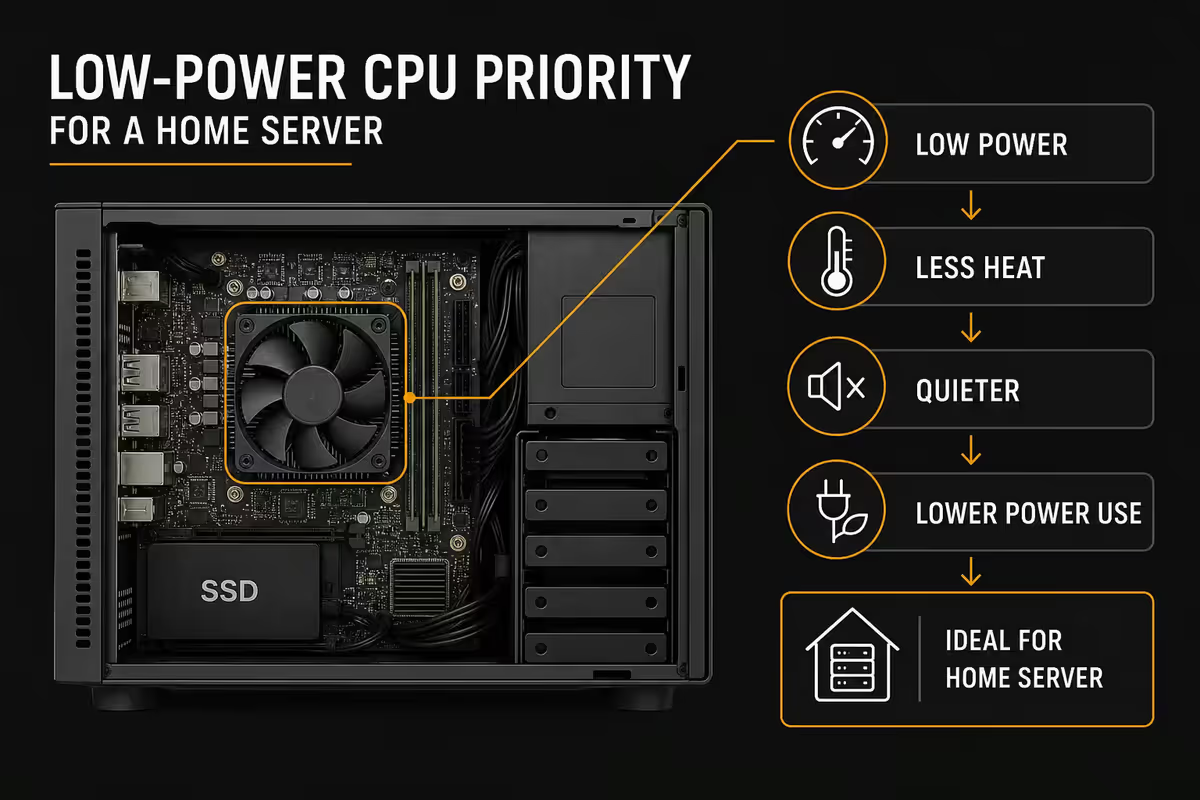
CPU — the low-power priority
A home server runs 24 hours a day, 365 days a year. At SA's R3.20/kWh, every 10W of idle draw costs you R280 per year. A 50W idle versus a 10W idle is R1,400 per year — over five years that's an extra R7,000 in electricity, plus the load-shedding generator/UPS sizing burden.
Intel N100 / N305 is the home-server king for 2026. 4 cores (N100) or 8 cores (N305) at 6W TDP, Quick Sync for Plex/Jellyfin hardware transcoding, 4K HEVC decode up to 6 simultaneous streams. Comes pre-installed on Topton, CWWK and Beelink mini-ITX boards at R3,000-R4,500.
Ryzen 5 7600G / Ryzen 7 7700 for the mid-tier. RDNA2 iGPU also handles Plex transcoding (slightly behind Quick Sync but capable), 8C/16T provides headroom for Nextcloud, Immich AI photo tagging, Frigate NVR and a few VMs. 35W TDP mode in BIOS keeps idle around 18-25W.
Ryzen 7 PRO 7745 / Ryzen 9 PRO 7945 for ECC support. AMD's PRO series enables ECC RAM on consumer AM5 platform — paired with an ASRock Rack X670E motherboard you get enterprise-grade memory error correction at ~40% the cost of a true Xeon/Epyc build.
RAM and storage planning
RAM sizing follows your workload. Plex/Jellyfin caches metadata in RAM — 4GB is enough. Home Assistant uses 1-2GB. Nextcloud with database adds 2-4GB. Frigate with object detection on 4 cameras eats 4-8GB. Add a 2GB headroom for the OS.
- 16GB minimum — Plex + Home Assistant + Pi-hole + Tailscale (always-on tier).
- 32GB sweet spot — above plus Nextcloud, Immich, Frigate (4 cameras), Vaultwarden, a couple of game servers.
- 64GB+ enthusiast — Proxmox host with 4-8 LXC/VM guests, ZFS dedup considerations, AI/ML containers.
- ECC tier — 32GB or 64GB ECC DDR5 on ASRock Rack / Asus W-series with Ryzen PRO CPU.
Storage tiering matters more than raw capacity. The pattern that works: fast NVMe for OS and frequently-accessed data, large HDD for bulk media. ZFS or Unraid cache pools handle the staging automatically.
For drives, stick to NAS-rated models. WD Red Pro, Seagate IronWolf Pro and Toshiba N300 are SA-available and rated for 24/7 operation with vibration tolerance for multi-drive bays. Avoid WD Blue / Seagate Barracuda desktop drives in a server — they're spec'd for 8-hour use and will fail at half the expected lifespan.
Capacity planning by tier
- Entry — 1x 1TB NVMe (OS + apps) + 2x 8TB HDD in mirror = 8TB usable.
- Mid — 1x 1TB NVMe (OS) + 1x 2TB NVMe (Unraid cache) + 4x 12TB HDD in RAIDZ1 = 36TB usable.
- Enthusiast — 2x 2TB NVMe (mirrored OS) + 2x 4TB NVMe (VM storage) + 6x 16TB HDD in RAIDZ2 = 64TB usable.
Three build tiers
R8,000 — Always-on light (N100)
Topton or CWWK N100 mini-ITX board (R3,500) with onboard CPU and 2.5GbE. 16GB DDR4 SODIMM (R900). 1TB NVMe Crucial P3 Plus (R1,000). 2x 8TB WD Red NAS HDD (R2,200 each). Jonsbo N3 case with 8 hot-swap bays (R2,800). Total ~R8,000 if you re-use a 350W SFX PSU, ~R11,000 with new PSU and Jonsbo case.
R20,000 — Family NAS & media (Ryzen 7600G)
Ryzen 5 7600G (R4,500). ASRock B650M Pro RS (R3,500). 32GB DDR5-5600 (R2,400). 1TB NVMe Crucial T500 (R1,200) + 2TB NVMe Samsung 990 Pro for cache (R2,800). 4x 12TB Seagate IronWolf Pro (R4,500 each = R18,000... budget reality: drop to 4x 8TB at R2,400 each = R9,600). Jonsbo N4 case (R3,200). Corsair SF600 PSU (R2,400). Total assembles around R20k-R26k depending on drive sizes.
R45,000+ — Enthusiast ECC homelab
Ryzen 7 PRO 7745 (R10,500). ASRock Rack X670E-W AS (R6,800). 64GB DDR5 ECC UDIMM (R7,200). 2x 2TB Samsung 990 Pro mirrored (R2,800 each). 2x 4TB Samsung 990 Pro for VM storage (R5,500 each). 6x 16TB WD Red Pro (R6,500 each = R39,000). Fractal Define 7 XL case (R4,500). Seasonic Prime PX-850 (R3,800). Total without drives ~R45k; with full 6x 16TB drive set ~R84k. Build the chassis first, add drives as data grows.
Operating system & software stack
The hardware is only half the home server. The OS choice shapes how much time you'll spend maintaining it.
| OS | Best for | Cost |
|---|---|---|
| Unraid | Easy GUI, mixed-size drives, Docker app store | R1,800 once-off (Pro) |
| TrueNAS Scale | ZFS pools, ECC builds, container support | Free |
| Proxmox VE | VMs + LXC, multi-node clusters, enthusiast tier | Free (paid support optional) |
| Home Assistant OS | Dedicated smart-home box on a Pi or N100 | Free |
| Debian + Docker Compose | Bare-bones flexibility for sysadmins | Free |
Unraid wins for most SA users. The GUI is friendly, the Community Applications store has every container you'd want pre-configured (Plex, Jellyfin, Home Assistant, Nextcloud, Frigate, Pi-hole, Tailscale, AdGuard) and you can mix drive sizes — buy a 16TB now, add another later without rebuilding the array.
TrueNAS Scale wins for ZFS purists with ECC RAM and identical-sized drives. The ZFS snapshot and replication story is best-in-class. Steeper learning curve than Unraid; expect a weekend to get comfortable.
Proxmox wins for the enthusiast running multiple VMs (a TrueNAS guest, a Home Assistant OS guest, a Windows VM for Blue Iris, a Linux VM for Plex). Cluster support means you can add a second node later and live-migrate workloads.
Across the <strong>home-server builds</strong> we've shipped from Centurion, the N100 mini-ITX has overtaken the older "repurposed Ryzen 3600" recipe as the most-ordered configuration. The reasons are practical: idle power dropped from 65W to 11W (a R190/month electricity saving in SA), the build fits in a 4-litre Jonsbo case, and a 1500VA UPS gives you <strong>2.5 hours of runtime</strong> instead of 25 minutes. For load-shedding-era SA, that delta isn't a nicety — it's the difference between Plex going down at stage 4 and Plex staying up through stage 6.
Behind the Build · From our service bench
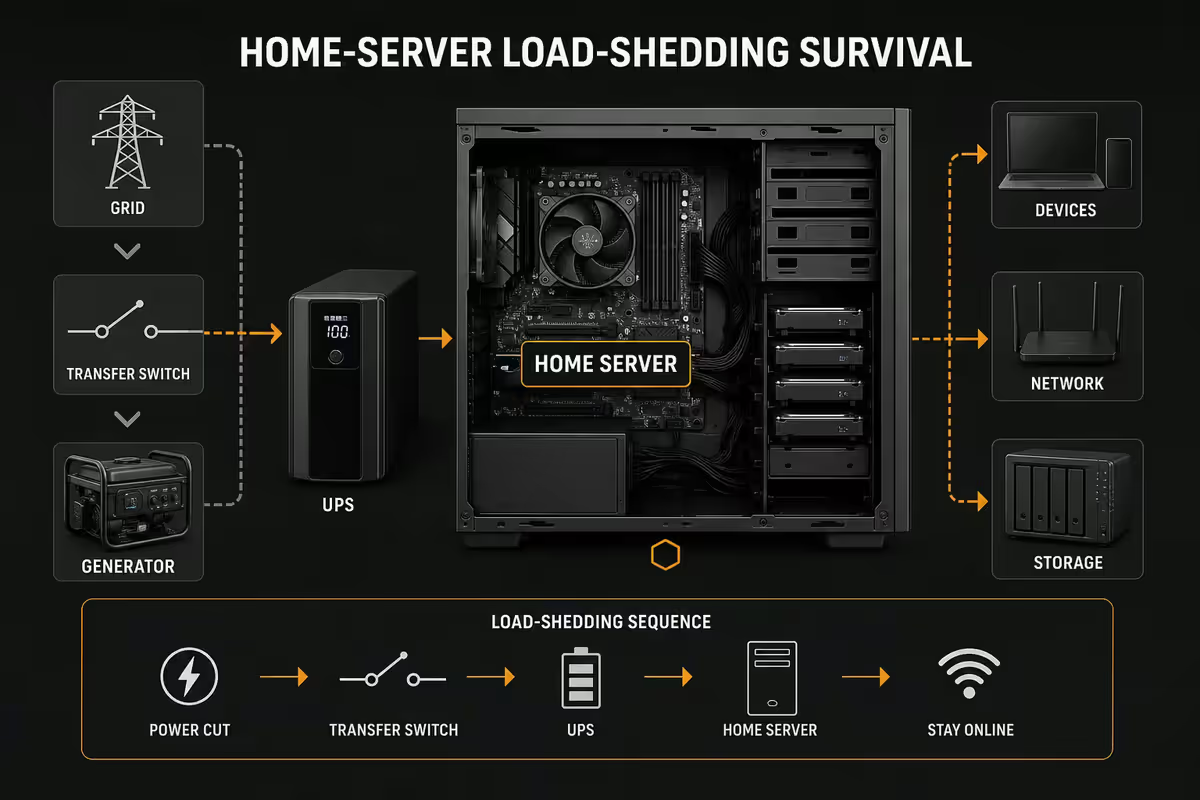
Load-shedding survival
A home server that crashes on every Eskom cycle isn't a home server — it's a frustration generator. SA's grid reality forces UPS planning into the design from day one.
The minimum baseline: a 1500VA pure-sine-wave UPS feeding the server, switch, fibre ONT and a CCTV NVR if you have one. Pure-sine matters — simulated-sine cheaper units cause modern switched-mode PSUs to behave unpredictably and shorten UPS battery life.
- APC BR1500MI — R3,500. 865W output. ~90 min runtime on a 15W N100 server + switch + ONT.
- CyberPower CP1500EPFCLCD — R3,200. 900W. Similar runtime, AVR included.
- Mecer 1500VA pure sine — R2,800. SA-friendly support, replacement batteries widely available.
- Eaton 5E Gen2 1600VA — R4,400. Premium build, longest battery life of the four.
Graceful shutdown is non-negotiable. Install NUT (Network UPS Tools) on the server and configure it to trigger a clean shutdown when the UPS hits 20% battery. Sudden power-off during ZFS or BTRFS writes can corrupt pools — even with COW filesystems, a graceful shutdown saves you a 4-hour scrub.
The next tier up: a 1.2-2kWh inverter + lithium combo (Mecer Axpert MAX 3kW, Kodak King 1.8kWh, Sunsynk 5kW) charged from grid. These run multiple hours per cycle and silently switch on grid loss. Pair with solar later if you want to disconnect from Eskom's whims entirely. Budget R18,000-R45,000 for inverter + battery + install.
Common home-server mistakes
Buying a 200W+ GPU for "AI later". A discrete RTX 3060 idles at 15-20W and pulls 170W under load. Over 24/7 operation that's ~R450/month in extra electricity. Use the iGPU for Plex/Jellyfin; if you genuinely need GPU AI compute, build a separate workstation you can turn off.
Using consumer SSDs for ZFS SLOG. ZFS write-cache (SLOG) needs power-loss-protected enterprise SSDs (Intel Optane 905P, Kioxia CD7). A consumer NVMe used for SLOG loses queued writes on power loss — defeating the entire point of having a SLOG.
Ignoring fan noise. A home server lives in your house, not a server room. Pick a Jonsbo, Fractal Define or be quiet! Pure Base case with sound-dampened side panels. Replace stock fans with Noctua NF-A12x25 (R420 each) — the noise floor drop is worth the spend.
Not setting up automated backups. RAID is not a backup. A home server hosting your family photos needs a 3-2-1 backup strategy — 3 copies, 2 different media, 1 off-site. Use Backblaze B2 (~R85/TB/month) or rsync to a friend's NAS over Tailscale. RAID rebuilds fail too often to trust as your only copy.
Skipping monitoring. Install Uptime Kuma or Beszel within the first week. You want to know before family members start complaining that Plex is down. Pair with a Telegram or Discord webhook for push notifications.
Key takeaways
- Intel N100 wins the always-on tier — 6-15W idle, Quick Sync transcoding, R8k entry build.
- 16GB RAM minimum, 32GB sweet spot, 64GB+ for Proxmox / ZFS dedup workloads.
- NAS-rated drives only — WD Red Pro, Seagate IronWolf Pro, Toshiba N300. Never desktop drives.
- 1500VA pure-sine UPS minimum + NUT for graceful shutdown. Inverter + lithium for true 24/7.
- RAID is not a backup. 3-2-1 backup strategy with Backblaze B2 or off-site sync from day one.
Frequently asked questions
What's the best CPU for a home server in SA?
Intel N100/N305 for always-on low-power, Ryzen 7600G for mid-tier all-rounders, Ryzen 7 PRO 7745 with ASRock Rack for the ECC enthusiast tier.How much RAM does a home server need?
16GB minimum for Plex + Home Assistant + Pi-hole, 32GB sweet spot adding Nextcloud + Frigate NVR, 64GB+ for Proxmox VM workloads.Do I need ECC RAM for a home server?
Only for ZFS with critical data or large databases. Non-ECC DDR5 is fine for media + Home Assistant workloads. ECC adds R3-6k to a build.How many drives should a home server have?
Entry: 1 NVMe + 2 HDD mirror. Mid: 2 NVMe + 4 HDD in RAIDZ1 or Unraid. Enthusiast: 4 NVMe + 6-8 HDD in RAIDZ2. Always NAS-rated drives.What OS should I run on a home server?
Unraid for the GUI-friendly path (~R1,800 once-off). TrueNAS Scale for free ZFS-focused builds. Proxmox for the VM-heavy enthusiast.How do I survive load-shedding with a home server?
1500VA pure-sine UPS (~90-120 min runtime on N100) + NUT for graceful shutdown. Inverter + lithium combo for true stage 6 survival.Can I use an old gaming PC as a home server?
Yes, but expect 50-80W idle vs 10W for an N100 — about R1,400-R2,200/year extra electricity. Use what you have, but purpose-built N100 pays back in 18-24 months.Do I need a GPU in a home server?
Not usually. Intel Quick Sync handles 4-6 simultaneous 4K transcodes natively. Add a low-profile GPU only for 8+ transcodes or AI workloads.
Get the Evetech app
Exclusive app-only prices, daily flash sales, and free delivery on orders over R4,000 — download the app and start saving.