SA University Buying Guide
Best PC for SA universities. — Wits, UCT, UP, Stellenbosch, NWU, UJ — what each course actually needs.
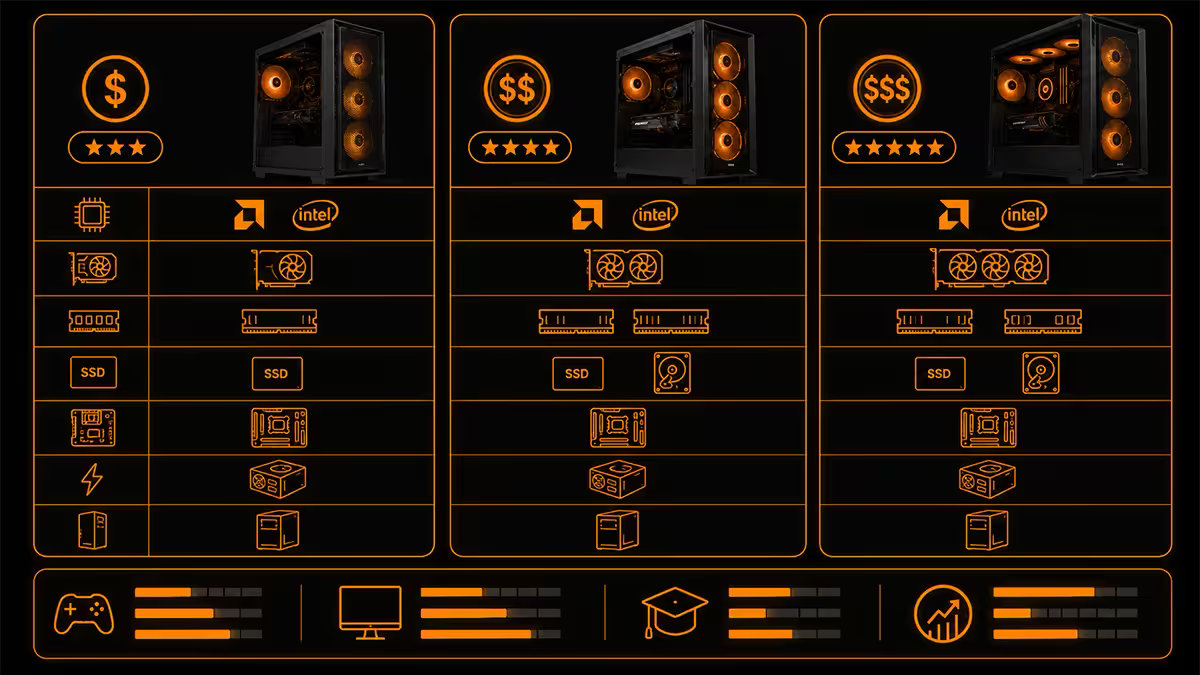
An engineering student at UP needs different hardware than a commerce student at UCT. This guide breaks down minimum specs by faculty and gives three honest SA budget tiers — R12,000, R18,000 and R28,000 — that hold up over a four-year degree.
- commerce / humanities
- R12k
- CS / design floor
- R18k
- engineering tier
- R28k
By faculty — the only sensible way to start
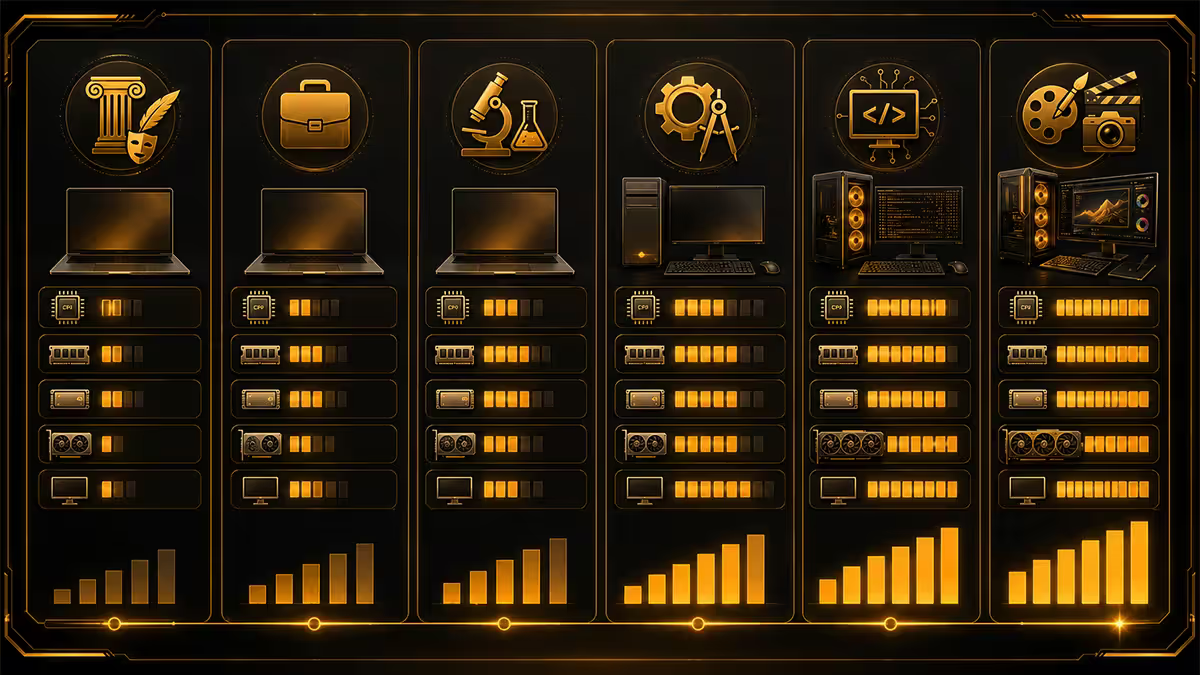
The choice of university barely affects the spec you need. The choice of course completely defines it. A B.Eng at Stellenbosch and a B.Eng at Wits use the same Solidworks, MATLAB and ANSYS workloads. A B.Com at UCT and a B.Com at UJ use the same Excel, Power BI and Stata workloads. Pick your course first, then pick what fits your living situation.
Below we cover the major faculty paths and what each genuinely needs in 2026. We've checked these against the published "recommended PC specifications" from Wits, UCT, UP, Stellenbosch, NWU, UJ, TUT and CPUT and added what we've learned shipping student builds since 2002.
Engineering — the most demanding workload by far
Engineering programmes — mechanical, civil, electrical, chemical, mechatronic, industrial — at the major SA universities all converge on similar software stacks: Solidworks, AutoCAD, MATLAB, ANSYS, MS Project, Adobe Creative Suite, plus electronics-specific tools like LTSpice, Altium and KiCad for electronic and electrical streams.
Of these, Solidworks and ANSYS set the floor. Both demand significant RAM, a real GPU, and an SSD. The official Solidworks 2026 minimum is 16 GB RAM with a CAD-certified GPU; the recommended is 32 GB RAM with an RTX or Radeon Pro card. ANSYS simulations on student-scale problems work happily on 16 GB but scale rapidly with RAM as your projects get bigger.
| Component | Minimum | Recommended |
|---|---|---|
| CPU | Intel i5 / Ryzen 5 (6-core) | Intel i7 / Ryzen 7 |
| RAM | 16 GB | 32 GB |
| GPU | RTX 4050 / Radeon RX 7600 | RTX 4060 / RTX 4070 |
| Storage | 512 GB NVMe SSD | 1 TB NVMe SSD |
| Display | 15.6" 1080p IPS | 16" 2K IPS or external 4K |
| Budget tier | R22,000–R26,000 | R28,000–R34,000 |
For engineering students at Wits, UCT, UP and Stellenbosch, our standard recommendation is a desktop tower at R28,000–R32,000 for serious CAD work at home plus an entry-tier laptop (R10,000–R12,000) for lectures and library work. Splitting the budget this way gives you more compute when you actually need it and a lighter, longer-battery-life device for campus.
Computer Science — RAM-hungry, GPU-light
CS at Wits, UCT, UP, Stellenbosch and NWU follows a recognisable pattern: light first year (introductory Python, simple IDEs), heavy second and third years (Docker containers, multiple VMs, language servers, AI coding assistants, large IDE workspaces).
CS coursework is less GPU-demanding than engineering — unless your honours project is in machine learning or computer graphics, integrated graphics are sufficient. But it is extremely RAM-hungry by senior year. A modern CS workflow can easily consume 20+ GB:
- Browser (Chrome with 30 tabs, Stack Overflow, docs) — 4–6 GB.
- Two IDE windows (VS Code with language servers) — 2–4 GB.
- Docker containers for backend services — 4–8 GB.
- One Linux VM for testing — 4–8 GB.
- Spotify, Discord, Slack background — 2 GB.
An 8 GB laptop swaps to disk constantly under that workload. 16 GB is the practical minimum; 32 GB is comfortable. Apple Silicon Macs are particularly strong for CS because their memory bandwidth and unified architecture mean a 16 GB Mac feels like a 24 GB Windows laptop in practice.
| Component | Minimum | Recommended |
|---|---|---|
| CPU | Intel i5 / Ryzen 5 / M3 | Intel i7 / Ryzen 7 / M5 |
| RAM | 16 GB | 32 GB |
| GPU | Integrated | Integrated unless ML focus |
| Storage | 512 GB NVMe | 1 TB NVMe |
| Battery | 8+ hours real-world | 12+ hours (Apple Silicon) |
| Budget tier | R18,000–R22,000 | R24,000–R32,000 |
Commerce, law and humanities — the lightest workload
B.Com, LLB, BA, B.Soc.Sci, education and theology courses at UCT, Wits, UP, Stellenbosch, UJ and NWU have the lightest computational requirements. The dominant workloads are:
- Microsoft Office (Word, Excel, PowerPoint) — modest RAM and CPU needs.
- Browser-based research (Lexis Nexis, JSTOR, university LMS like Sakai or Blackboard).
- Video conferencing (Teams, Zoom) for lectures and consultations.
- Specialised tools for some streams: Stata (B.Com economics), Adobe Acrobat (LLB casework), SPSS (psychology, sociology).
For these courses, the priorities flip from "more spec" to "better laptop". Focus on:
- Battery life — a 12-hour battery lets you attend full lecture days without finding a plug, which is genuinely useful given SA load shedding patterns.
- Weight — a sub-1.4 kg laptop is meaningfully more pleasant to carry than a 2.2 kg gaming laptop across campus daily.
- Keyboard quality — essays and case briefs are a lot of typing. A spongy keyboard is misery for four years.
- Screen quality — IPS or OLED at 1080p or 2K. Cheap TN panels are tiring during long reading sessions.
Specs to target: 16 GB RAM, 512 GB SSD, modern Intel or AMD CPU, integrated graphics, R12,000–R18,000. Lenovo ThinkPad E-series, ASUS Vivobook, Dell Inspiron 14/15, HP Pavilion, MacBook Air M3 all fit this brief.
Design, architecture and visual arts
Design programmes at Wits, UP, Stellenbosch, CPUT, UJ and TUT typically span graphic design, interaction design, fashion, industrial design and animation. Architecture (B.Arch.Stud) at Wits, UCT, UP and NMU overlaps significantly with engineering on CAD but with more emphasis on visualisation.
The common software stack: Adobe Creative Suite (Photoshop, Illustrator, InDesign, After Effects, Premiere), Figma, Blender, AutoCAD, Revit, SketchUp, ArchiCAD, Rhino.
Key spec considerations:
- Colour-accurate display — 99% sRGB minimum, P3 coverage if available. Your screen is your work surface.
- 16 GB RAM minimum, 32 GB for advanced 3D / animation — Photoshop on large multi-layer PSDs and After Effects on 4K footage are RAM-hungry.
- Discrete GPU for 3D students — Blender, Maya, Cinema 4D and Rhino all benefit from a real GPU. Pure graphic design can skip the dGPU.
- Larger SSD (1 TB recommended) — design files are large and accumulate fast across four years.
- Wacom or screen-pen support for illustration and digital painting streams.
Laptop or desktop — your living situation decides
The honest answer depends on three factors: where you sleep, where you study, and whether you have a home to leave a desktop in.
Laptop wins when:
- You're in residence and your laptop will move between res, library and lecture daily.
- You commute between home and campus regularly and want to work in both places.
- Your course is portable workload (notes, Office, research) rather than heavy CAD/sim.
- You'll graduate to a job that requires a laptop anyway.
Desktop wins when:
- You're at home or in long-term res and study primarily at a desk.
- Your course is GPU/CPU-heavy (engineering, animation, ML) and laptop equivalents cost 1.6× as much for the same performance.
- You want a build that lasts 5+ years comfortably with one mid-degree upgrade.
- You play games or content-create alongside studies and want the headroom.
Both wins when:
- You're engineering, animation, ML or video editing at scale and have R30,000+ to deploy.
- Split: R10k–R14k laptop for portability, R18k–R22k desktop for heavy work. Total R28k–R36k beats a R35k laptop alone for compute.
Across the 200,000+ custom PCs we've shipped from Centurion, our annual January student rush teaches us the same lessons. The students who come back two years later happy with their purchase always picked 16 GB RAM or more and 512 GB SSD or larger. The students who return frustrated almost always cheaped out on RAM. If you must save R1,500, drop the RGB lighting, drop the gaming branding, drop the slightly bigger GPU — never the RAM, never the SSD, never the screen quality. Those are what you live with for four years.
Behind the Build · 20 years of student PCs
NSFAS, bursaries and sponsor purchases
For students funded by NSFAS, Funza Lushaka, SETA bursaries, family sponsors or company sponsorships, the budget is usually fixed. Stretching it requires discipline about what matters.
Our priority order, in fixed-budget situations:
- RAM — 16 GB minimum, full stop. Don't compromise here.
- SSD storage — 512 GB minimum. 256 GB will fill up by second year.
- SA warranty with on-site support — international online deals from outside SA channels are a nightmare to warranty.
- Battery life — 8+ hours real-world for laptop. Crucial during load shedding.
- Build quality — laptop hinges and keyboards take a beating over four years. Avoid the absolute cheapest.
- Screen quality — IPS or OLED, not TN. Eye strain over four years is real.
Things to deprioritise on a tight budget:
- Discrete graphics on non-engineering/design courses — integrated Intel Arc or AMD Radeon is sufficient.
- RGB lighting, gamer aesthetics — adds R1,000–R2,000 of cost with zero academic benefit.
- 4K screen on a 14" laptop — 1080p IPS or 2K is the sweet spot for screen size at this scale.
- Per-application licences when university provides them — most SA universities supply MATLAB, Office 365, Adobe CC via student access.
R12k, R18k and R28k builds — concrete recommendations
Second-hand — when it's smart and when it's a trap
A second-hand laptop can save 30–50% off new pricing and let a student get tier-2 specs on a tier-1 budget. The risks are real but manageable with discipline.
What works:
- 2–3 year old MacBook Pro or MacBook Air from iStore Refurbished, Cash Crusaders Apple-certified or Evetech Refurbished — inspected, warrantied, battery checked.
- Ex-corporate Lenovo ThinkPad or Dell Latitude/Precision from accredited refurbishers — built to take abuse, parts widely available, often under-used.
- One-generation-old gaming laptops with battery and thermal report from reputable shops.
What to avoid:
- Facebook Marketplace, Gumtree, OLX — no warranty, often stolen goods, frequent battery swaps and undisclosed damage.
- Anything that "just needs a new battery" or "almost works perfectly" — these are euphemisms.
- Five-year-old laptops at any price — battery, hinge, keyboard and screen are all near end-of-life.
- Premium gaming laptops sold cheap — almost always thermally compromised by previous owner.
Key takeaways
- Course matters more than university — engineering at UP needs the same spec as engineering at UCT.
- Spend on RAM and SSD first — those age worst. 16 GB / 512 GB minimum for any tier.
- Commerce/humanities: R12k–R16k tier. CS/design: R18k–R24k. Engineering/3D: R26k–R34k.
- Desktop wins on performance per rand. Laptop wins on portability. Split-budget beats laptop-only for engineering.
- Second-hand only from inspected, warrantied sources. Skip Facebook Marketplace and Gumtree for first-time buyers.
Frequently asked questions
What's the minimum PC spec for SA university work?
Commerce / humanities / basic CS: 16 GB RAM, 512 GB SSD, integrated graphics. Engineering / design: 16–32 GB RAM, 512 GB–1 TB SSD, discrete GPU. Below 8 GB / 256 GB struggles by year two.Laptop or desktop for a SA student?
Laptop for residence and commuter students. Desktop for fixed location with better performance per rand. For engineering, split R15k laptop + R18k desktop often beats a R35k laptop alone.What spec for engineering at Wits, UP or Stellenbosch?
16 GB RAM minimum (32 GB recommended), Intel i7 / Ryzen 7, RTX 4050+ GPU, 512 GB NVMe SSD. Engineering build typically R22k–R32k.What about Computer Science specifically?
RAM-hungry by senior year (Docker, VMs, IDEs). 16 GB minimum, 32 GB comfortable. Apple Silicon Macs excel due to memory bandwidth. Budget R18k–R28k.Do design students need a Mac?
No. Adobe Creative Suite runs perfectly on Windows. A 16 GB RAM Windows laptop with 99% sRGB display matches a MacBook Pro for studio work at less cost. Mac wins on display, build, battery, resale.NSFAS / sponsor purchase priorities?
RAM 16 GB minimum, SSD 512 GB minimum, real SA warranty, 8+ hour battery. Skip gaming GPU unless required. Thinner with longer battery is the better trade for most NSFAS users.How long should a university PC last?
Plan 4 years. R12k tier feels slow by year three. R18k–R22k is value sweet spot. R28k+ feels premium throughout four years with meaningful resale value.Is buying second-hand smart for SA students?
Sometimes, with discipline. Only from iStore Refurbished, Cash Crusaders Apple-certified, Evetech Refurbished or accredited corporate-laptop dealers. Avoid Facebook Marketplace and Gumtree for first-time buyers.
Get the Evetech app
Exclusive app-only prices, daily flash sales, and free delivery on orders over R4,000 — download the app and start saving.