Monitor Arm Buying Guide
How to choose a monitor arm. — VESA-clear. Gas-spring. Zero sag.
Most monitor arms in SA fall into three buckets: R600 sag-traps, R1500 productivity hero, and Ergotron-tier built-to-last. Pick wrong and your screens droop within six months. Here's the right pick for each desk.
- VESA standard
- 100×100
- ultrawide weight
- 8-10kg
- SA price range
- R600-R6k+
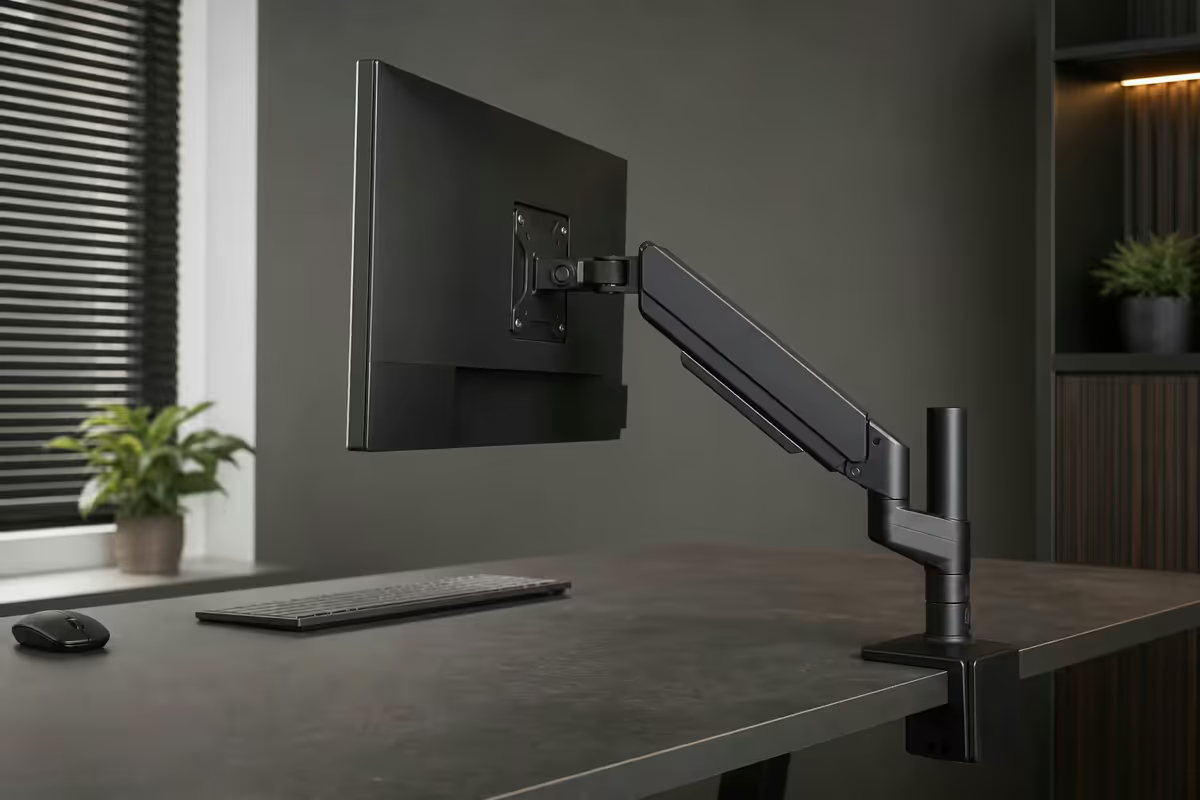
Single vs dual vs triple arm
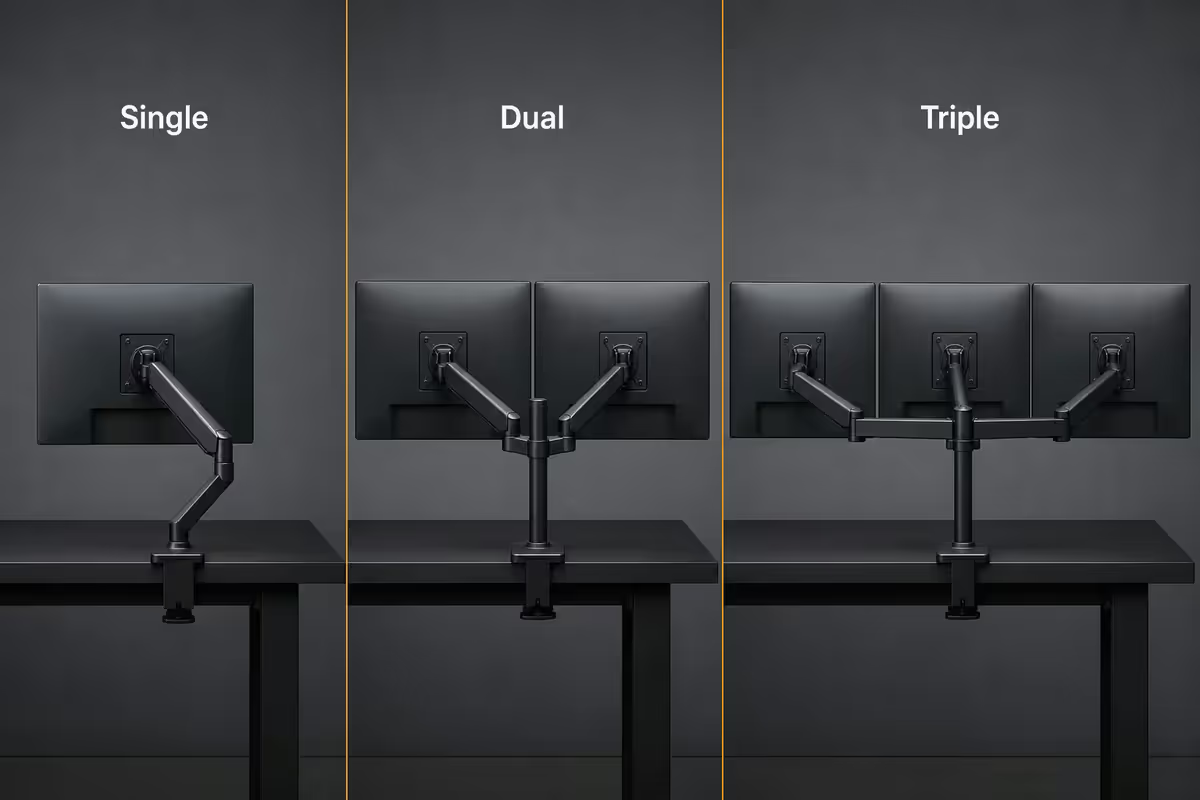
The number of arms you need is governed by your actual workflow, not by the desk you wish you had. Almost every modern productivity setup benefits from a dual — and once you've moved to dual, you rarely go back.
| Configuration | Best for | Typical desk width |
|---|---|---|
| Single arm | Compact desks, focused single-monitor work, video editing on one big screen | 1000-1200mm |
| Dual arm | The productivity sweet spot — dev, finance, content, daily multitasking | 1400-1800mm |
| Triple arm | Trading, video editing scopes, dispatch, niche power-user setups | 1800mm+ |
Dual is the sweet spot for almost every desk between 1400 and 1800mm wide. Two 27-inch monitors side by side give you the same effective workspace as a 49-inch ultrawide but with the bezel break that lets you snap windows naturally without splitter software.
Single arms make sense when one monitor is the focus — a colour-accurate 4K for editing, a 49-inch superwide for trading, or a compact 24-inch on a small desk. Triple arms are a niche choice for users who already know they need three screens; if you're asking whether you need three, you don't.
Mount type — clamp, grommet or wall
Almost every monitor arm sold in SA ships with both a desk clamp and a grommet plate in the box. Wall mounts are a separate category and require a slightly different conversation.
| Mount type | How it attaches | Best for |
|---|---|---|
| Desk clamp | Grips the desk edge (15-90mm thickness) | 95% of setups — no drilling, easy to reposition |
| Grommet mount | Bolts through a pre-drilled hole | Clean look, hides cables, permanent install |
| Wall mount | Bolts to wall studs or concrete | Frees the desk surface entirely, compact studio setups |
| Pole mount | Slides onto a vertical pole | Multi-screen broadcast or trading walls |
Desk clamp is the right pick for almost every user. No drilling, no commitment, and you can move the mount in five minutes if you rearrange the desk. The clamp grips desks from 15mm to 90mm thick — covering everything from cheap MDF to solid-oak chunkers.
Grommet mount uses an existing hole or one you drill yourself. The advantage is a cleaner look — the mount sits flush with the desk rather than clamping over the edge — and slightly better cable routing through the hole. The disadvantage is permanence: drill once, live with it.
Wall mount is the choice when desk real estate is the constraint. Common in compact studios, broadcast booths and standing-desk setups where you want zero footprint on the desk surface. Requires drilling into studs (for drywall) or anchoring into concrete — measure twice, drill once.
VESA sizing & weight rating
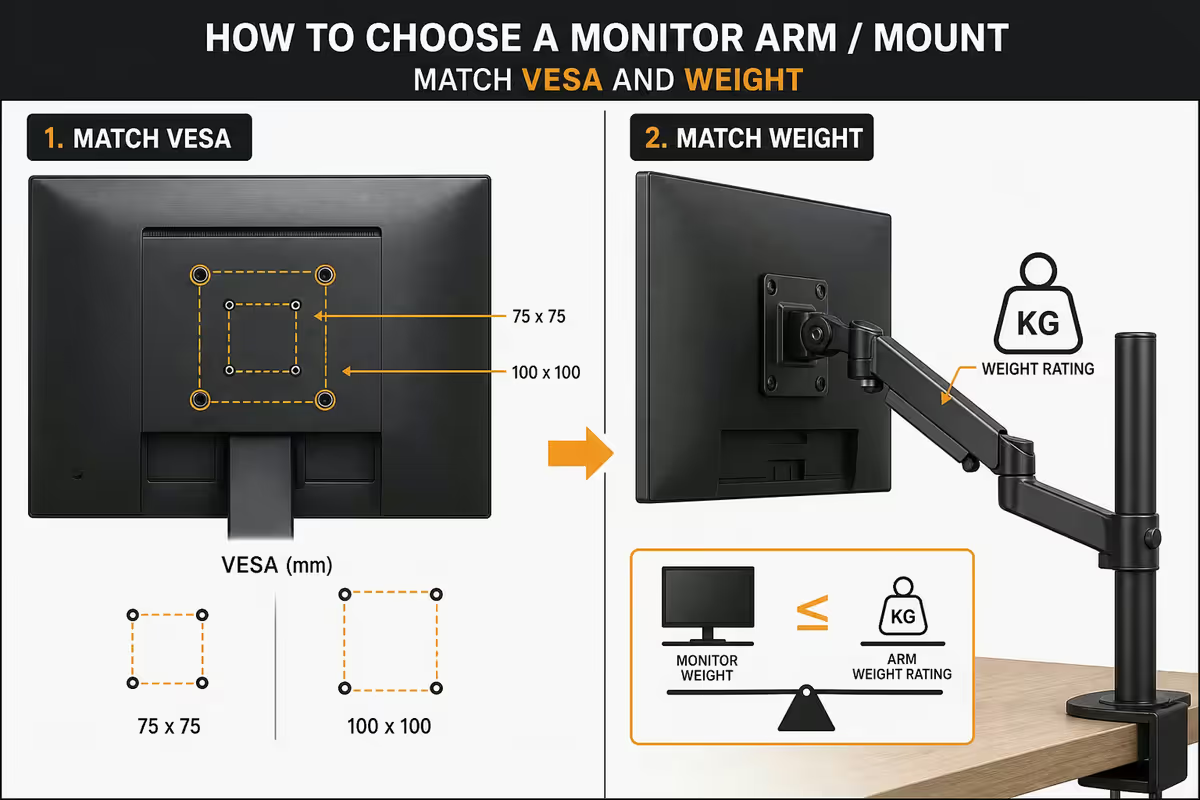
Two specs decide whether an arm physically fits your monitor: the VESA pattern on the back of the monitor and the weight rating the arm supports. Get either wrong and the arm either won't bolt up or will sag within weeks.
VESA — the screw-hole standard
VESA is the four-screw pattern on the back of every modern monitor, measured in millimetres between hole centres. The three sizes you'll see in SA are:
- VESA 75 × 75 — older 22-24 inch monitors and some lightweight portables. Rare on new monitors.
- VESA 100 × 100 — the modern standard. Roughly 80% of 24-32 inch monitors sold today use this pattern.
- VESA 200 × 100 or 200 × 200 — large 32-inch+ monitors, most ultrawides and all 43-inch+ business displays.
Check your monitor's spec sheet or look at the back panel for the four-screw square pattern. If the monitor has no VESA pattern at all (mostly cheap monitors with proprietary stands), you'll need a VESA adapter bracket — they exist for most popular models around R150-R300 in SA.
Weight rating — curved monitors are heavier than they look
The weight number on the arm spec sheet is the maximum it can safely support without sagging. The trap: modern curved and ultrawide monitors weigh significantly more than they look.
- Samsung Odyssey G7 32-inch curved — about 7kg stand-removed
- Standard 34-inch ultrawide (LG, Dell, Samsung) — 8-10kg
- 49-inch superwide (Samsung G9, Dell U4924) — 14-17kg
- 43-inch business display (LG, Philips) — 12-15kg
Budget arms rated for "up to 8kg" will physically hold a 10kg ultrawide on day one — but the gas spring slowly fails over weeks and the monitor droops. Always buy with at least 2-3kg of headroom above your monitor's actual weight.
Gas-spring vs mechanical-spring vs static
The mechanism that holds the monitor at a given height — and lets you move it — is the spring. Three flavours, three different feels.
Gas-spring (the productivity standard). A sealed nitrogen gas cylinder provides smooth, consistent counterforce. One-finger adjustment from sitting to standing, holds position rock-steady, no notching. Used on Ergotron LX, Brateck dual gas-spring, Humanscale M-Flex and every premium arm. This is what you want.
Mechanical-spring (coil spring). A traditional metal coil provides counterforce. Cheaper to manufacture, feels notchy and stepped during adjustment, and loses tension over 2-3 years as the coil fatigues. Common on R500-R900 budget arms. Acceptable if the monitor will live in one position; frustrating if you adjust daily.
Static / fixed (no spring). The monitor locks to a fixed position via tensioning screws. No counterforce, no smooth adjustment — you loosen screws, reposition, retighten. Useful for set-and-forget single-monitor wall mounts or budget mounts under R400. Useless for any setup where you want to move the screen day to day.
The tier ladder — Vivo to Herman Miller
The monitor arm market splits into four tiers in SA. Spending more buys smoothness, longevity and weight headroom — but the diminishing returns kick in fast above R3500.
| Tier | Brands | SA price |
|---|---|---|
| Entry / budget | Vivo, North Bayou (NB), generic clamp arms | R600-R1200 |
| Mid-tier (sweet spot) | Brateck, Husky, Loctek, Aluminium Eve-bracket dual | R1500-R2500 |
| Premium / pro | Ergotron LX Single (R3500), LX Dual (R5500) | R3500-R5500 |
| Heavy / ultrawide | Ergotron HX, Brateck Heavy-Duty | R6000-R8000 |
| Designer / executive | Herman Miller Flo, Humanscale M-Flex/M-Connect | R8000-R14000 |
Entry tier (R600-R1200). Vivo and North Bayou cover the budget shelf. They work, but mechanical springs, plasticky finishes, and 12-month service life are the trade-offs. Buy these if budget is the absolute constraint or as a stop-gap.
Mid-tier (R1500-R2500). Brateck and Husky are the sweet spot. Real gas springs, supports up to 9-10kg per arm, clamp + grommet in box, internal cable channels on the higher SKUs. The Brateck dual gas-spring at R1500-R1800 is the single most-recommended arm in our Centurion warehouse.
Premium (R3500-R5500). Ergotron LX is the workhorse — used in tens of thousands of corporate fitouts globally. Smoother gas spring, all-aluminium construction, 10-year warranty, 60-second tension adjust for different monitor weights. The LX Dual at R5500 is the upgrade-once-buy-for-life pick.
Heavy / ultrawide (R6000-R8000). Ergotron HX is built for 32-inch curved and 49-inch superwides up to 19kg. Same Ergotron quality, beefier counterspring. If you own a Samsung G9 or Dell U4924, this is the arm.
Designer (R8000+). Herman Miller Flo and Humanscale M-Flex are status pieces — gorgeous machined aluminium, near-invisible cable routing, the smoothest movement on the market. The pure functional gap above an Ergotron LX is small; the design and finish gap is large.
Cable management & the clean-desk promise
The visible difference between a R600 mount and a R5500 mount is rarely the arm itself — it's the cables. Premium arms hide them; budget arms drape them.
Internal cable channels are the premium move. Pop open the cover on the arm, lay your HDMI / DisplayPort / power cable inside, snap shut. The cable runs from the monitor through the arm and exits at the post base — nothing visible from the front. Ergotron LX, HX, Brateck Premium and Humanscale all do this well.
External velcro clips are the budget compromise. Cables run along the outside of the arm secured by velcro or plastic clips. Cheaper to manufacture and slightly easier to add or remove cables, but visually busier.
The clean-desk workflow:
- Mount the arm and monitor first, position roughly.
- Route cables through the arm channel or velcro clips before final tightening.
- Run the post-end of the cable into a desk cable tray or cable sock under the desk.
- Only the last 30cm to each monitor should be visible behind the screens.
Recommended picks by use case & ZAR tier
| Use case | Pick | SA price |
|---|---|---|
| Best value (most desks) | Brateck Dual Gas-Spring | R1500-R1800 |
| Budget single monitor | Vivo Mount-V001 or North Bayou F80 | R600-R900 |
| Budget dual | North Bayou NB-F195A Dual | R900-R1300 |
| Premium single (buy-for-life) | Ergotron LX Single Arm | R3500-R4000 |
| Premium dual (productivity pro) | Ergotron LX Dual Arm | R5500-R6500 |
| Ultrawide / 49-inch / curved 32 | Ergotron HX Heavy-Duty | R6000-R8000 |
| Triple monitor setup | Brateck Triple or NB FC36-3 | R2500-R3500 |
| Designer / executive | Herman Miller Flo or Humanscale M-Flex | R8000-R14000 |
The 60-second adjustment test
The fastest way to tell a good arm from a bad one in store: lift the monitor with one finger, move it 20cm in any axis, let go. A good gas-spring holds position the instant you let go. A cheap arm drifts down a centimetre or two before settling. If the arm fails the 60-second test in store, it will fail your daily workflow.
Key takeaways
- The Brateck dual gas-spring (R1500-R1800) is the right pick for 95% of SA desks — the productivity sweet spot.
- Check VESA pattern (75x75, 100x100 or 200x200) and the monitor's stand-removed weight before buying.
- Gas-spring beats mechanical-spring and static every time — one-finger adjust and holds position rock-steady.
- Desk clamp is right for almost every user; grommet for permanence; wall for studios; pole for trading walls.
- Step up to Ergotron LX (R3500-R5500) for buy-for-life; HX (R6000+) for ultrawides and 49-inch superwides.
Frequently asked questions
What monitor arm should I buy?
Brateck dual gas-spring (R1500-R1800) is the right pick for 95% of SA desks. Step up to Ergotron LX Dual (~R5500) if you adjust position multiple times per day or run heavy ultrawides.What is VESA and which size do I need?
VESA is the four-screw pattern on the back of your monitor. 75x75 (small/older monitors), 100x100 (modern standard — most 24-32 inch), 200x100 or 200x200 (32 inch+ and ultrawides). Check your monitor's spec sheet first.How much weight can a monitor arm hold?
Budget arms 2-8kg per arm; mid-tier (Brateck, Husky) 8-12kg; Ergotron LX up to 11.3kg; Ergotron HX up to 19kg. Curved monitors are heavier than they look — Samsung G7 32 inch is ~7kg, 34 inch ultrawide is 8-10kg, 49 inch superwide hits 14kg+.Single vs dual vs triple monitor arm — which is best?
Dual is the productivity sweet spot for almost every desk. Single fits compact desks or video editing setups. Triple is niche — traders, video editors and dispatch operators with very wide desks (1600mm+).Gas-spring vs mechanical-spring vs static — what is the difference?
Gas-spring uses a sealed gas cylinder — smooth one-finger adjust, the productivity standard. Mechanical uses a coil spring — cheaper but notchy and loses tension. Static locks via screws — fine for set-and-forget single monitors.Desk clamp vs grommet vs wall mount — which is best?
Desk clamp for almost every user — no drilling, easy to reposition. Grommet for permanence and a cleaner look. Wall mount when desk space is the constraint, but you lose flexibility forever.Are monitor arms worth it for productivity?
Yes — significantly. Arms reclaim ~30cm of desk depth per monitor, allow ergonomic height alignment (top of screen at eye level), and let you switch portrait/landscape in seconds. The ergonomic alignment alone is worth the price.How do I route cables through a monitor arm?
Premium arms have internal channels — pop open arm covers, lay cables inside, snap shut. Budget arms use external velcro clips. Best result: combine arm routing with an under-desk cable tray so the only visible cable is the last 30cm at the monitor.
Get the Evetech app
Exclusive app-only prices, daily flash sales, and free delivery on orders over R4,000 — download the app and start saving.