Lifestyle · Gamer Wellness
Reduce eye strain. — The real causes are not what the marketing says.
Blue-light glasses sold you a story. The actual reasons your eyes ache after a 4-hour session: you blinked half as often, your room was darker than your screen, and your monitor sat closer than your eye muscles wanted.
- break rhythm
- 20·20·20
- blink rate gaming
- 5x ↓
- bias lighting kit
- R350+
The real causes of gaming eye strain
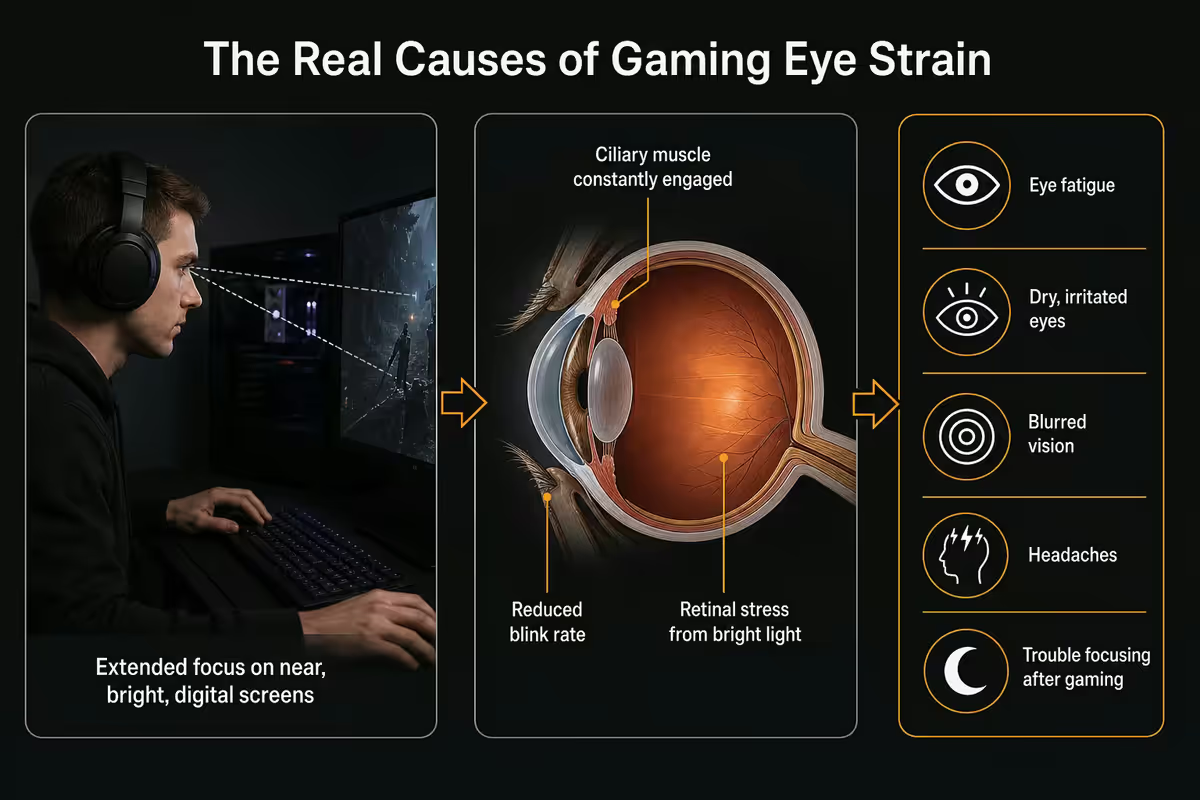
If you've ever finished a long gaming session feeling like someone sandpapered your eyes, you've experienced what optometrists call digital eye strain or computer vision syndrome. There are actual mechanisms behind it — and they're not the ones the supplement and blue-light-glasses industry sold you.
The peer-reviewed evidence in 2026 points to four primary causes:
1. Reduced blink rate. A relaxed adult blinks about 15-20 times per minute. While focused on a screen — and especially while focused on a competitive game — that rate drops to 4-7 per minute. Tears evaporate; the corneal surface dries; nerves fire pain signals. The number one cause, by a wide margin.
2. Accommodative fatigue. Your ciliary muscle constantly contracts to focus on something within 1 metre. Sustained for 3+ hours without break, the muscle fatigues the same way any other muscle does after sustained contraction. The result feels like a dull ache deep behind the eyes.
3. Glare and contrast strain. A bright monitor in a dark room creates a high-contrast scene the pupil constantly adjusts to. Windows behind you reflecting off the screen create direct glare. Both force the iris muscles to work continuously.
4. Convergence strain. Your two eyes must converge inward to focus on a near object. A monitor that's too close or improperly positioned (eyes pointing inward and downward simultaneously) compounds this. Position matters more than people realise.
Notice what's not on this list: blue light wavelengths. We'll come back to that.
Blue light — the truth in 2026
Two waves of marketing convinced people that screen blue light damages their eyes. Wave 1 (early 2010s): screen blue light disrupts sleep. Wave 2 (late 2010s onward): screen blue light damages the retina or causes eye strain. Wave 1 has some evidence in evening contexts. Wave 2 does not.
The American Academy of Ophthalmology, UK College of Optometrists, and Cochrane Reviews in the past five years have all concluded that typical screen blue light exposure does not damage the retina and does not cause eye strain at meaningful levels. Multiple double-blind trials have shown blue-light blocking glasses perform identically to clear control glasses for reducing eye strain.
This doesn't mean blue-light-filtering features (Windows Night Light, macOS Night Shift, monitor "low blue light" modes) are useless. They do help sleep quality when used in the 1-2 hours before bed, by reducing melatonin suppression. They do not measurably reduce eye strain during your gaming session itself.
Monitor distance and height — the math your eyes want
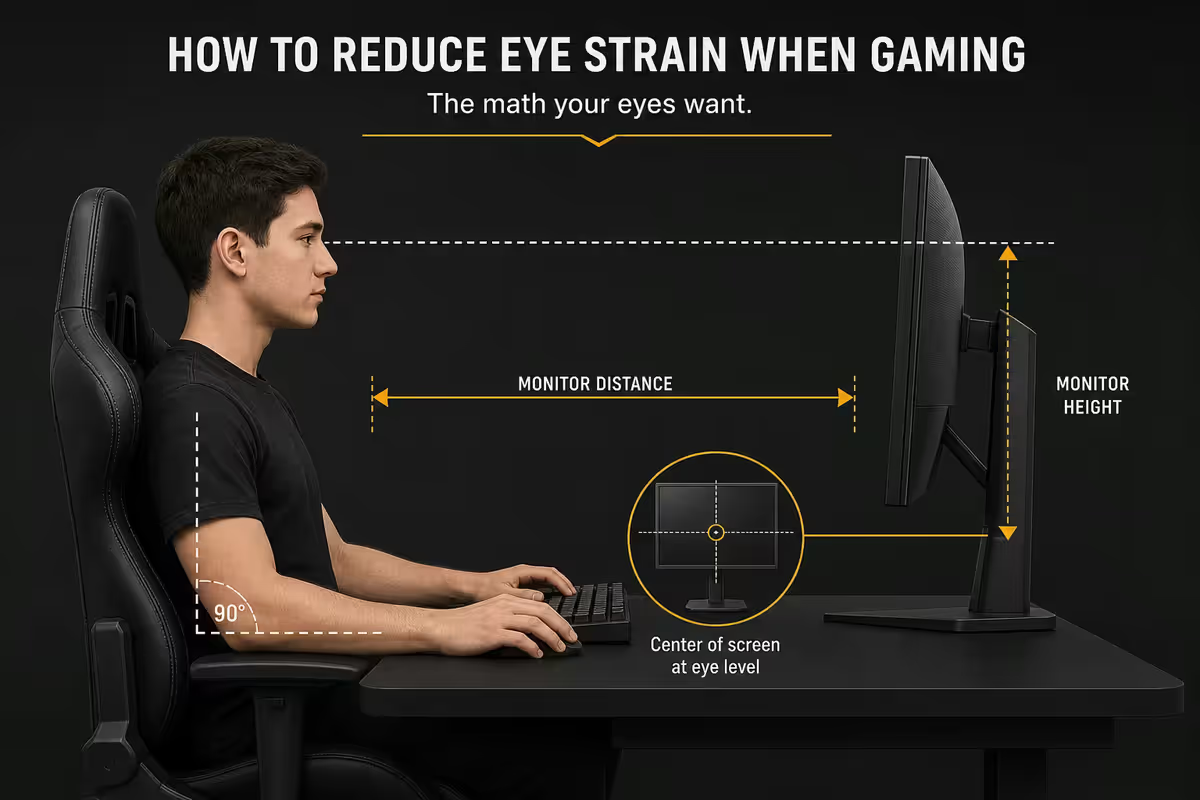
Where your monitor sits relative to your face is the single biggest one-time fix.
Distance. A 27 inch monitor should sit 50-80cm from your eyes (roughly arm's length when sitting upright). A 32 inch monitor 70-100cm. Larger panels need more distance. The test: at the correct distance, you should comfortably read small UI text without leaning in.
Height. The top edge of the monitor should be at or slightly below your eye level when sitting upright. Most people set monitors too high because the included stand has limited height adjustment. Use a monitor arm (NB North Bayou F80 around R600, or Ergotron HX higher end) or stack books under the existing stand.
Tilt. Tilt the screen 10-15° backward (top further away than bottom). Your eyes' natural resting position is slightly downward — looking at a screen tilted toward your face means your eyes track at a comfortable angle without straining the upper lid muscles.
| Monitor size | Eye distance | Top edge vs eye level |
|---|---|---|
| 24 inch | 45-65 cm | At or 2cm below |
| 27 inch | 50-80 cm | At eye level |
| 32 inch | 70-100 cm | 1-2cm above eye level |
| 34 inch ultrawide | 70-90 cm | At eye level, slight curve |
| 42 inch OLED | 90-120 cm | 2cm above eye level |
Brightness matching — the paper test
The wrong brightness causes more eye strain than any other monitor setting. Too bright in a dark room: glare. Too dim in a bright room: squint and lean. Your eye does not care about the spec sheet's max nits — it cares about matching the surrounding scene.
The paper test. Hold a clean white sheet of A4 paper next to your monitor while it displays a blank white document. Stand back at your normal viewing distance. If the paper looks brighter than the screen, raise monitor brightness. If the screen looks brighter than the paper, lower it. Match them.
SA-specific issue: afternoon sun through east- or west-facing windows changes the ambient brightness more than people realise. A monitor set for 7am sun is wrong by 4pm. Solutions: blackout blinds (Sheerwood, Stilbaai blinds in SA), or use Windows 11 / macOS auto-brightness if your laptop has a screen sensor, or buy a monitor with built-in ambient light sensor (BenQ EW3270U, ASUS ProArt PA279CV).
Practical brightness range for a 250-300 nit monitor: 25-35% in evening/dim rooms, 50-65% in normal day office, 75-90% in bright sun. Most factory defaults are too high.
Bias lighting — the underrated upgrade
Bias lighting is dim, indirect light placed behind the monitor pointed at the wall. It raises the apparent brightness of the wall behind your screen, narrowing the contrast gap between bright screen and dark surroundings. Your pupils stop constantly adjusting, and the muscle strain reduces dramatically.
SA options in 2026:
- Govee TV Backlight 3 Pro — R450-R650 at Takealot. Camera-based, syncs colour to screen content. Overkill for eye strain but enjoyable.
- Govee H6199 / H6175 strip — R350-R450. The "just put a warm white LED behind the TV" answer. Best value.
- Philips Hue Play bars — R1,800-R2,400 pair. Premium, integrates with Hue ecosystem.
- Yeelight LED Strip Plus — R280-R380. Best budget option.
- DIY USB strip (Wootware, Mantality) — R150-R250. Plain white warm LED strip via USB. Works just fine.
Set bias lighting to a warm 4000-5000K colour and dim brightness — about 10-15% of strip max. The point is to raise wall brightness slightly, not to floodlight the room. Cool blue 6500K bias light defeats the purpose.
20-20-20, gamer edition
The 20-20-20 rule: every 20 minutes, look at something 20 feet (~6 metres) away for at least 20 seconds. The reason this works: it relaxes the ciliary muscles that contract continuously to focus on near objects. The cycle of contract-and-release prevents accumulated fatigue.
The hard part for gamers is breaking flow every 20 minutes. A practical adaptation:
- Competitive shooters / MOBAs — between matches. Most CS2 and Valorant rounds run 20-40 min. Use the post-match screen.
- Battle royales — when you die. Look out a window instead of immediately re-queuing.
- RPGs / single-player — at save points, level transitions, cutscenes. Pause naturally.
- Streamers — between segments, during ad breaks, while talking to chat (look away from monitor).
- Anyone — set Windows "Eye Care" notifications via PowerToys or use the Pomodoro extension you forgot about.
Equally important: blink. Consciously blink fully (close eyes for 1 second) every few minutes during gaming. Sounds silly. Works. The blink reset re-coats the cornea and reduces dry-eye fatigue more than any drop or supplement.
Glasses vs contacts for long sessions
Contact lenses physically sit on your cornea and disrupt the tear film. When you blink less (which you do while gaming), contacts dry out faster than your natural cornea would alone. Most SA optometrists now suggest a "glasses for evening gaming" habit if you wear contacts during the day.
If you must wear contacts during long sessions: choose daily disposables with high water content (Acuvue Oasys 1-Day, Dailies Total 1, CooperVision MyDay). Use preservative-free artificial tears every 1-2 hours — Systane Ultra (Clicks, R130), Hylo-Comod (Dis-Chem, R180), or Oxyal (Spec-Savers, R95). Avoid eye drops with vasoconstrictors ("get the red out" products) — they make rebound dryness worse.
For glasses wearers: a "computer-specific" prescription (slightly under-corrected for the monitor distance of 50-80cm) reduces accommodative effort. Tell your optometrist your monitor distance specifically. Anti-reflective coating is genuinely useful for reducing reflected room light bouncing off the back of the lens into your eye.
When the fix is professional, not gadget
If you've done all of the above for a week and the strain persists, the right next step is an optometrist visit. Some causes only a professional can diagnose:
- Latent astigmatism — uncorrected slight cylinder powers cause significant eye strain at near distance.
- Convergence insufficiency — the eyes don't converge inward easily; common in heavy screen users. Treatable with vision therapy.
- Dry eye disease — beyond what drops solve; may require punctal plugs or prescription cyclosporine.
- Early presbyopia — in mid-30s and 40s, near-focus capacity starts declining. Reading-focused glasses help.
- Migraine-related photophobia — light sensitivity from migraines mimics screen strain.
SA optometrist landscape: Spec-Savers (most malls, R450-R650), Torga Optical (R500-R800), Execuspecs (Sandton, Centurion, Cape Town, R600-R900), and independent practices. Most medical aids cover one routine consultation per year — Discovery, Bonitas, Momentum, Medihelp all include basic optometry. Bring your latest prescription if you have one, and mention specifically that you're concerned about gaming-related strain. They'll do a focused screen-use assessment in addition to the standard refraction.
Key takeaways
- Blue light is mostly a marketing scare. The real causes are reduced blink rate, glare, dry eyes and accommodative fatigue.
- 20-20-20 rule: every 20 min, look 6m+ away for 20 seconds. Genuinely effective at relaxing focus muscles.
- Bias lighting behind the monitor narrows the contrast gap. Govee/Hue Play from R350 — the best value upgrade.
- Match brightness to ambient using the white-paper test. Monitor should equal a clean A4 sheet at viewing distance.
- If a week of changes doesn't fix it, see an SA optometrist. Mention gaming hours specifically.
Frequently asked questions
Is blue light from monitors really bad for your eyes?
The peer-reviewed evidence in 2026 shows blue light from monitors is overblown as a cause of eye strain. Major reviews — including by the American Academy of Ophthalmology — find no link between typical screen blue-light exposure and lasting eye damage or dry eye. The real culprits are reduced blink rate during focused gaming, screen glare, and accommodative fatigue from sustained near focus. Blue-light glasses make some users feel better via placebo, but don't address the actual underlying causes.What is the 20-20-20 rule and does it actually help?
Every 20 minutes, look at something 20 feet (~6 metres) away for 20 seconds. This relaxes the ciliary muscles that constantly contract to focus on near objects like a monitor. Yes, it genuinely helps — the muscle fatigue from continuous near-focus is one of the actual mechanisms behind eye strain. The hard part for gamers is breaking flow every 20 minutes. A practical adaptation: take the break between matches, rounds, or whenever you respawn — natural game pauses align with the timing.What is bias lighting and is it worth setting up?
Bias lighting is dim, indirect light placed behind the monitor pointed at the wall. It raises the room's ambient brightness so the difference between bright screen and dark surroundings is smaller — reducing the contrast strain your eyes experience. Yes, it's worth it. Strip LED kits (Govee, Philips Hue Play, Yeelight) start around R350 in SA. Set them to a warm 4000-5000K colour and dim brightness. The improvement after a 4-hour session is genuinely noticeable.How far away should my monitor be when gaming?
Roughly arm's length — 50-80 cm for a 27 inch monitor, 70-100 cm for a 32 inch. The top of the screen should be at or slightly below eye level, with the screen tilted back 10-15 degrees so you look down at it slightly. This matches the natural resting position of human eyes (slight downward gaze), which reduces strain over long sessions. A monitor too close forces over-convergence; too far causes squinting. Adjust until small text is comfortably readable without leaning in.Should I lower monitor brightness to reduce eye strain?
Match brightness to ambient lighting — not lower it arbitrarily. In a dark room a bright monitor causes glare strain; in a bright room a dim monitor causes squinting strain. The 'paper test' is reliable: hold a white sheet of paper next to the monitor while displaying a white background. If the paper looks brighter than the screen, raise brightness. If the screen looks brighter than the paper, lower it. Daily ambient changes (afternoon SA sun vs evening) genuinely matter — use Windows night mode or your monitor's ambient sensor.Are OLED monitors better or worse for eye strain?
Mixed verdict. OLEDs have perfect blacks (zero light bleed) and excellent contrast — which generally feels easier on the eyes in dark scenes. However, OLED auto-brightness limiter (ABL) and brightness fluctuations between scenes can cause low-level eye fatigue some users notice over long sessions. PWM (pulse-width modulation) dimming used in many OLED panels at low brightness levels can also trigger headaches in PWM-sensitive users. If you're PWM-sensitive, stick to IPS or VA. For most gamers, OLED is fine or actively easier on the eyes than older TN panels.Do contact lenses make gaming eye strain worse than glasses?
For long gaming sessions, yes — contact lenses worsen dry-eye symptoms because they reduce the natural tear film and you blink less while gaming. Many SA optometrists suggest a 'glasses-for-gaming' habit: contacts during the day, glasses during evening sessions. Daily disposable contacts with high water content (Acuvue Oasys 1-Day, Dailies Total 1) are the most comfortable for long screen sessions. Add preservative-free artificial tears (Systane Ultra, Hylo-Comod) every 1-2 hours if you stay in contacts during long sessions.When should I see an optometrist about gaming-related eye strain?
If eye strain persists after a full week of bias lighting, monitor calibration, the 20-20-20 rule and regular breaks. Also see one if you experience headaches, blurred vision after gaming, double vision, or notice you're closing one eye to read. SA optometrist appointments (Spec-Savers, Torga Optical, independent) cost R450-R800 and are covered by most medical aids. Mention the gaming workload specifically — they can prescribe computer-specific glasses with a slight power adjustment for your monitor distance.
Get the Evetech app
Exclusive app-only prices, daily flash sales, and free delivery on orders over R4,000 — download the app and start saving.