SA Smart Home Guide · 2026
A smart home that survives the slot. — Built for SA fibre, geysers and Eskom.
Most smart home guides assume reliable grid power, US prices and EU privacy law. South Africa is none of those. Here's the kit, the routines and the privacy posture that actually works in a Johannesburg, Cape Town or Durban household in 2026.
- starter to whole-home
- R5k-R30k
- google · apple · alexa
- 3 hubs
- friendly picks
- POPIA
Pick your ecosystem first — everything else follows
The number-one mistake South African first-time smart-home buyers make is buying random devices before deciding which ecosystem will run the house. Three serious choices in 2026: Google Home, Apple Home and HomeAssistant. Amazon Alexa works in SA but has the weakest local content support and shouldn't be your default.
| Ecosystem | Best for | SA reality |
|---|---|---|
| Google Home | Android households, mixed devices | Strongest local content, ZAR pricing, broad Matter support |
| Apple Home | iPhone-first, privacy-focused | Most on-device processing; needs HomePod or Apple TV as hub |
| HomeAssistant (DIY) | Power users, offline-first | Runs on a R900 Raspberry Pi; works during outages; steep learning curve |
| Amazon Alexa | Echo households imported from US | Local content weak; consider only if you already own Echo kit |
Once you pick, every subsequent purchase must be compatible. The good news in 2026: Matter 1.4 has narrowed the cross-compatibility gap dramatically — a Matter-certified bulb works across Google, Apple and Alexa hubs without re-pairing. The bad news: not every device is Matter yet. Older Sonoff and Tuya devices still need an ecosystem-specific bridge or HomeAssistant.
The SA-available kit that actually works
Not every brand on a US YouTube channel is sold in South Africa, and some that are sold here cost double what they should. The shortlist that's reliably available from Yuppiechef, Loot, Takealot, Wootware and select specialty importers in 2026:
- Lighting: Philips Hue (Yuppiechef, Loot), Govee strip lights (Takealot), IKEA TRÅDFRI (IKEA SA online), TP-Link Tapo (everywhere).
- Sensors & switches: Aqara (Yuppiechef), Sonoff (Loot, Takealot importers), TP-Link Tapo (mainstream).
- Plugs: TP-Link Tapo P100 (R250-R350), Sonoff S26 (R200), Govee plugs (R400 with energy monitoring).
- Hubs: Google Nest Hub 2nd gen (R2,200), Apple HomePod mini (R2,500), Aqara M2 (R1,500), SmartThings Station (R1,200).
- Cameras: Eufy 2K/4K (Takealot tech partners), Reolink (specialty importers), Ring (broader retail), UniFi Protect (Mustek & Miro).
- Geyser: Geyserwise IT5 (specialty installers nationwide), Sonoff TH16 (DIY).
Skip these in SA: Wyze (no local stock, no warranty path), Lutron (lighting standards differ), and US-region Echo Show devices (regional content blocks).
Load-shedding-aware automation
Standard smart home tutorials assume always-on power and gigabit internet. In South Africa, both assumptions break twice a day on a bad week. Designing around load shedding is what separates a smart home that works from one that's frustrating.
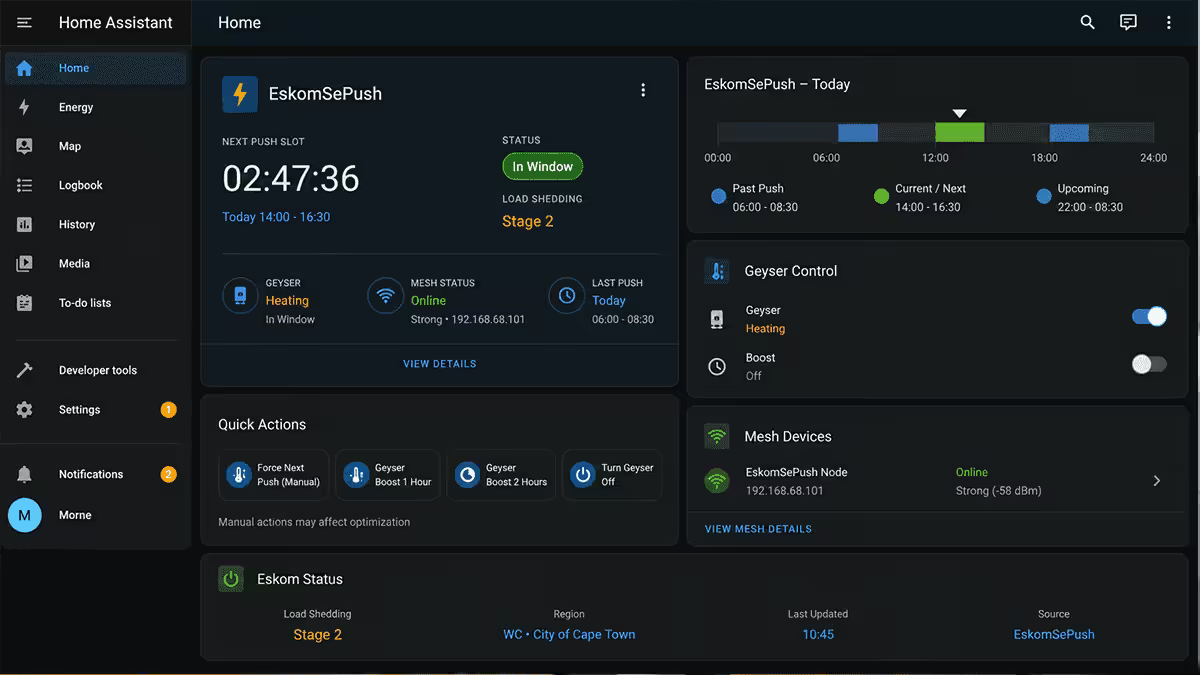
The architecture: integrate EskomSePush via its official API into HomeAssistant or use the IFTTT/Tasker bridge for Google Home. The system then knows your area's slot schedule in advance and can pre-stage routines:
- T-minus 30 minutes before slot: charge laptops, phones and torches; turn the geyser off; warn occupants.
- Slot start: turn off non-essential plugs to reduce inrush load when power returns; dim or kill standby loads.
- Slot end + 5 minutes: stagger device wake-up — modem first, then computers, then geyser, then non-essentials. Avoid hitting your CB with a 7kW surge.
What to put on a UPS: the router, mesh nodes and your hub. Without them, no smart automation works during a slot — and they barely draw 30W combined, so a R2,500 mini-UPS runs them for 2-3 hours easily.
Security cameras in SA context
In a country where home security is a real concern, smart cameras are usually the entry point to smart home for SA buyers — but they're also the highest-stakes purchase. Choose poorly and you have footage on overseas servers you can't access, or cameras that go dark every time Eskom shrugs.
The decision criteria for SA:
- Local-first storage — microSD, NVR or local NAS. Cloud as backup, not primary.
- Battery or PoE — so the camera keeps working during load shedding (a cloud cam plugged into the wall is useless when the wall has no power).
- POPIA-friendly retention policy — published, configurable, and ideally local-only.
- No mandatory monthly fee — if the camera bricks without a subscription, that's a recurring cost in foreign currency.
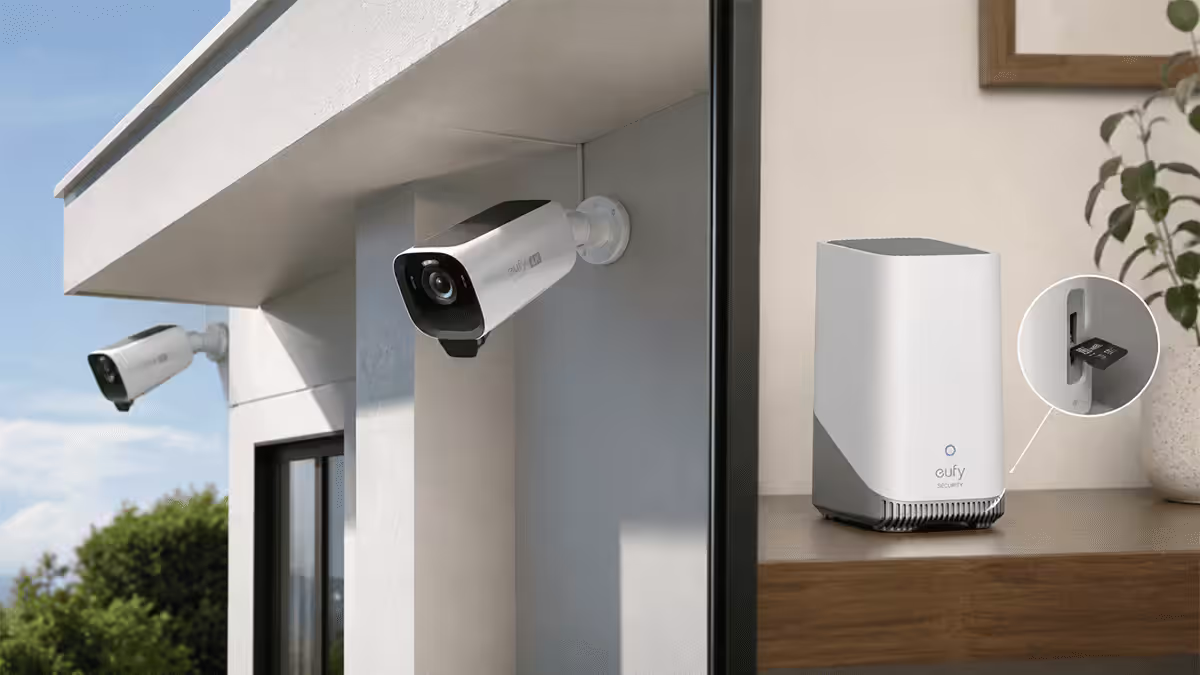
The 2026 picks: Eufy Cam 3 with HomeBase 3 (4K, local-only option, R6,500 for 2-cam kit), Reolink Argus battery cams with NVR, or UniFi Protect for the technically inclined (R12k+ but full local stack, perpetual). Ring still has the best deterrent siren and broadest SA retail presence but its strong default is cloud — configure carefully or skip.
Smart geyser & water — the SA-unique win
Most international smart home guides skip this entirely because most countries don't have 150-litre electric storage geysers eating 25-40% of a household's electricity bill. South Africa does — and a smart geyser controller is the single biggest ROI device a SA smart home can buy.
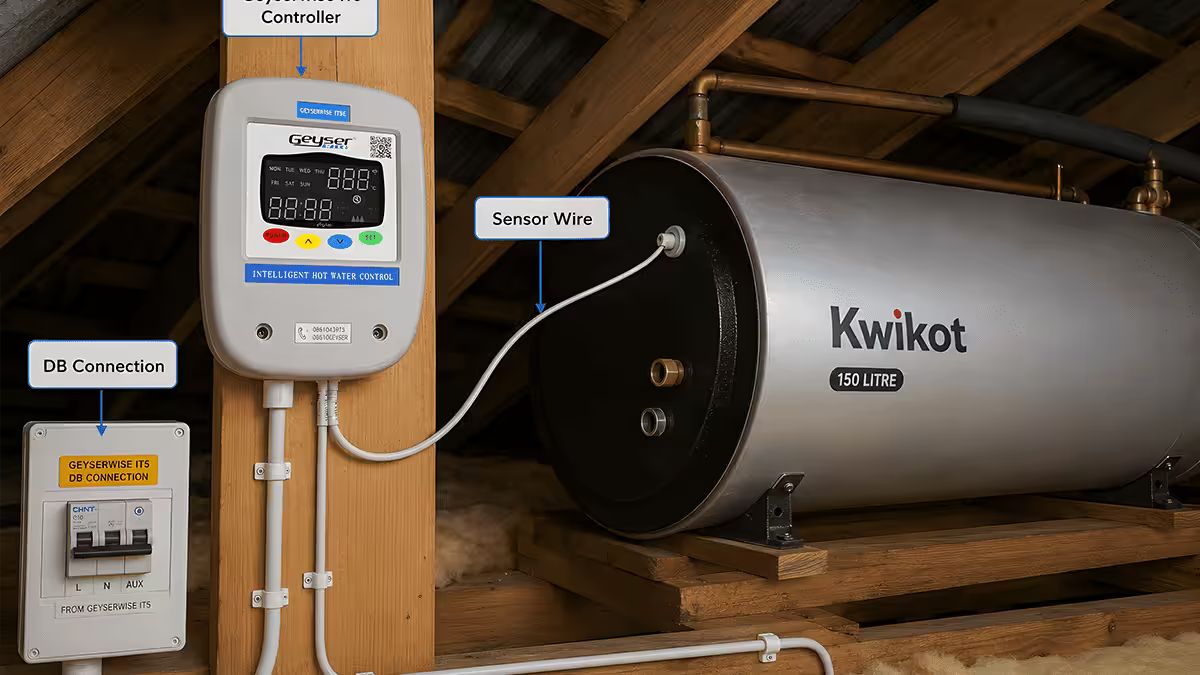
The Geyserwise IT5 (R3,500-R5,500 installed) is the local-favourite — a relay-and-sensor combo that learns your usage windows and only heats the geyser ahead of them. It also lets you schedule the geyser off during your Eskom slot, so it doesn't try to recover at full draw the instant power returns — protecting your circuit breaker and avoiding peak-tariff penalties on time-of-use meters.
DIY route: a Sonoff TH16 with temperature probe and HomeAssistant gives you 80% of the IT5's functionality for R600-R900 in parts. Wire it via a contactor (never directly to the geyser element — 4kW is too much current for a Sonoff relay), or hire an electrician for the certification.
Bonus: add a leak sensor (Aqara water leak, R350) under your washing machine, dishwasher and at the geyser drip tray. Insurance claim prevention pays for the whole smart home setup the day a hose fails.
Mesh WiFi & the Vumatel compatibility note
Your smart home is only as reliable as its WiFi. A single ISP-supplied router covering a typical SA double-storey home will leave the back bedroom, the garage and the boundary wall cameras with -75 dBm signal and constant drop-outs. Mesh WiFi solves it — but not all mesh kits play nicely with Vumatel, Openserve and the other Fibre to the Home networks.
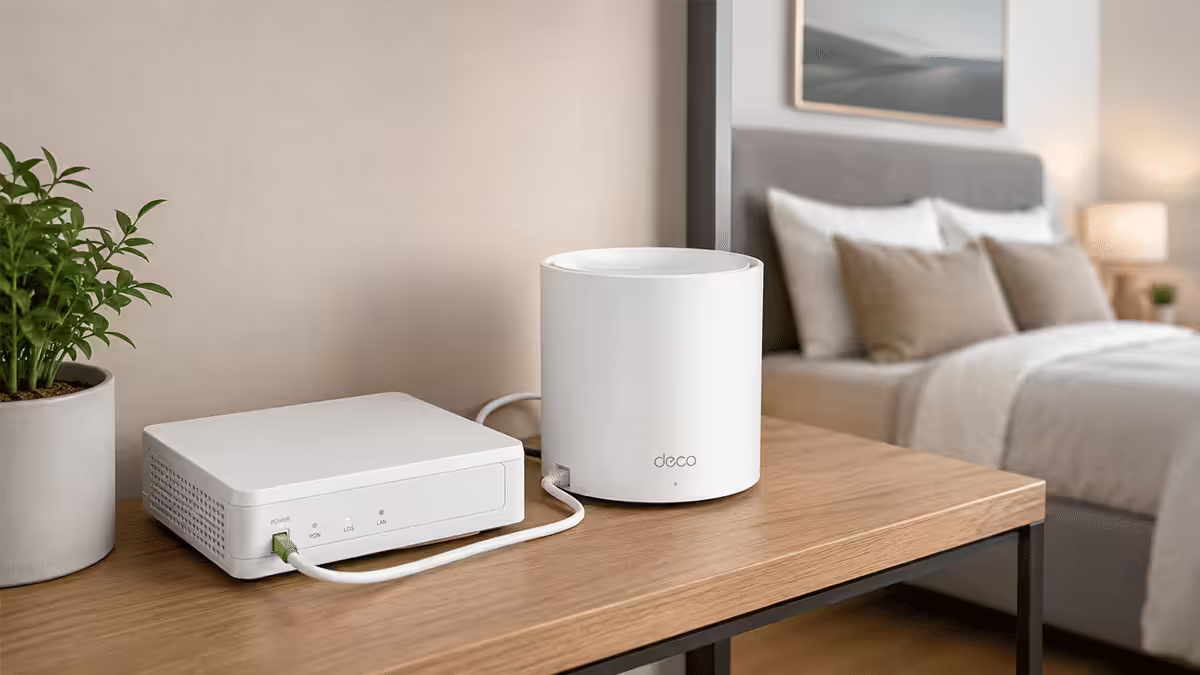
The compatibility note: most SA fibre networks deliver service via an ONT (Optical Network Terminal — a small box on the wall, often Huawei or Nokia). You connect your own router to its LAN port. That works fine with TP-Link Deco, ASUS ZenWifi, Ubiquiti UniFi, Google Nest WiFi Pro and Amazon eero — they all run as routers behind the ONT.
What needs care: some ISP-bundled routers (Vumatel "Vuma Reach" CPEs, Frogfoot's bundled units) want to stay in router mode and double-NAT your network if you add a mesh behind them. Bridge the ISP router to "modem mode" / "AP mode" before deploying mesh — your ISP support can usually do this on a phone call.
- Best mid-range mesh for SA homes (R4k-R7k): TP-Link Deco X50 (WiFi 6, 3-pack covers 300m²).
- Best premium (R8k-R12k): ASUS ZenWifi BT10 (WiFi 7, AI Mesh, future-proof).
- Best for smart home integration (R7k-R10k): TP-Link Deco X50 Pro or Aqara G3 — both have built-in Zigbee/Thread radios and double as smart hubs.
- Best for power users (R12k+): UniFi UDR + Mesh APs — fully local, VLAN-capable, integrates with UniFi Protect cameras.
POPIA & the data sovereignty angle
Most South Africans never think about who hears their voice commands or where their camera footage ends up. The Protection of Personal Information Act (POPIA) applies to your household's personal information just as it applies to a business — and smart home devices generate a lot of it: voice clips, presence patterns, video feeds, lock events.
The practical privacy posture:
- Prefer brands with published retention policies. Apple, Philips Hue and Aqara all document what's stored, where and for how long. Some Tuya-branded white-label devices don't.
- Disable voice assistant audio history where the app allows — Google Home and Alexa both let you, though it's buried in settings.
- Local-first camera storage means footage stays on your NVR or microSD, not a US/EU cloud bucket.
- Beware of "free" cloud cameras — if you're not paying, your footage and metadata likely are the product.
- HomeAssistant on a Pi is the gold standard for privacy-conscious SA setups: everything local, nothing leaves your LAN by default.
The Matter angle: Matter is designed to allow more local-only operation, with cloud as opt-in rather than mandatory. As more devices ship Matter-certified in 2026, the POPIA story gets better by default.
Common smart home mistakes in SA
Buying devices before picking an ecosystem. Every device you bought before deciding will eventually become an orphan. Pick first, buy second.
Cloud-only kit on critical functions. A WiFi smart lock that refuses to unlock when the cloud is unreachable is worse than a mechanical lock. Anything safety-critical needs a local fallback.
Forgetting the router on the UPS. The most common day-one fail. Your hub still talks Zigbee, but it can't reach the internet for cloud commands and notifications. R2,500 mini-UPS solves this for years.
WiFi-only sensors when battery Zigbee/Thread sensors exist. A WiFi sensor draws power constantly and needs reliable WiFi to its corner. Zigbee/Thread sensors last 1-2 years on a coin cell and survive WiFi drop-outs.
Skipping the geyser. The single biggest ROI smart device in a SA home, ignored because it's not glamorous. Wrong call.
Ignoring POPIA. "I have nothing to hide" is not the point — once footage of you, your children or your visitors is on a server in Frankfurt, you've lost control of where it goes next. Local-first is the default that matches SA law.
Key takeaways
- Pick an ecosystem first — Google Home for mixed households, Apple Home for iPhone-first, HomeAssistant for power users.
- Buy Matter-certified devices where possible — they survive ecosystem switches and POPIA holds up better.
- Layer in EskomSePush early so routines pre-stage around slots — geyser off, devices charged, gentle stagger on return.
- Geyserwise IT5 is the highest-ROI SA smart device — pays back in a year, keeps paying after.
- Cameras: local-first storage (Eufy, Reolink, UniFi) over cloud-only — better for POPIA and survives outages.
Frequently asked questions
Which smart home ecosystem is best for South Africa in 2026?
Google Home for most SA households (mixed Android/iPhone, strong local content). Apple Home for iPhone-first homes wanting strong privacy. HomeAssistant for power users who want full offline-capable control.How much does it cost to set up a smart home in South Africa?
Starter R5k-R8k (hub, four plugs, four bulbs, two sensors). Whole-home R25k-R35k including mesh WiFi, smart geyser, cameras and locks. Mesh WiFi and the geyser controller are the biggest single line items.Does Matter work in South Africa yet?
Yes. Google Nest Hub 2nd gen, Apple HomePod mini and Amazon Echo Hub all ship locally with Matter 1.4. New Hue, Aqara, Eve and TP-Link Tapo devices on Yuppiechef and Takealot carry the Matter logo.How do I make smart home routines load-shedding aware?
Integrate EskomSePush via the official API into HomeAssistant or via IFTTT into Google Home. Pre-stage routines 30 minutes before slot start (charge devices, geyser off, dim non-essentials), and stagger device wake-up after.Are cloud security cameras safe to use in South Africa?
Cloud-only cameras raise POPIA and outage concerns. Prefer local-first options: Eufy with HomeBase, Reolink with NVR, or UniFi Protect. Cloud as backup, not primary storage.Is a smart geyser controller worth the money in South Africa?
Yes — for most homes the highest-ROI smart device available. Geyserwise IT5 (R3,500-R5,500 installed) typically drops geyser cost 35-50% and pays back in 12-18 months.Do I need a separate hub if I have a mesh WiFi router?
If your mesh has built-in Zigbee/Thread (TP-Link Deco X50 Pro, Aqara G3, Amazon eero Pro), you can skip a standalone hub. Otherwise add a small Aqara M2 or SmartThings Station (R1,200-R2,500) for Zigbee/Thread device support.What about POPIA and smart home data?
Prefer brands with published retention policies. Disable voice history where possible. Local-first camera storage. HomeAssistant on a Raspberry Pi is the gold standard for keeping data inside your home.