USB Flash Drive Buying Guide
How to choose a flash drive. — Real speed. Real capacity. No QLC traps.
The R400 "1TB" drive on the kerbside table is lying about both numbers. Real flash drives advertise their NAND tier honestly — here's how to read the spec sheet and pick one that survives.
- Gen 2 reality
- 400-1000 MB/s
- sweet spot
- 128-256GB
- SA price band
- R100-R1500
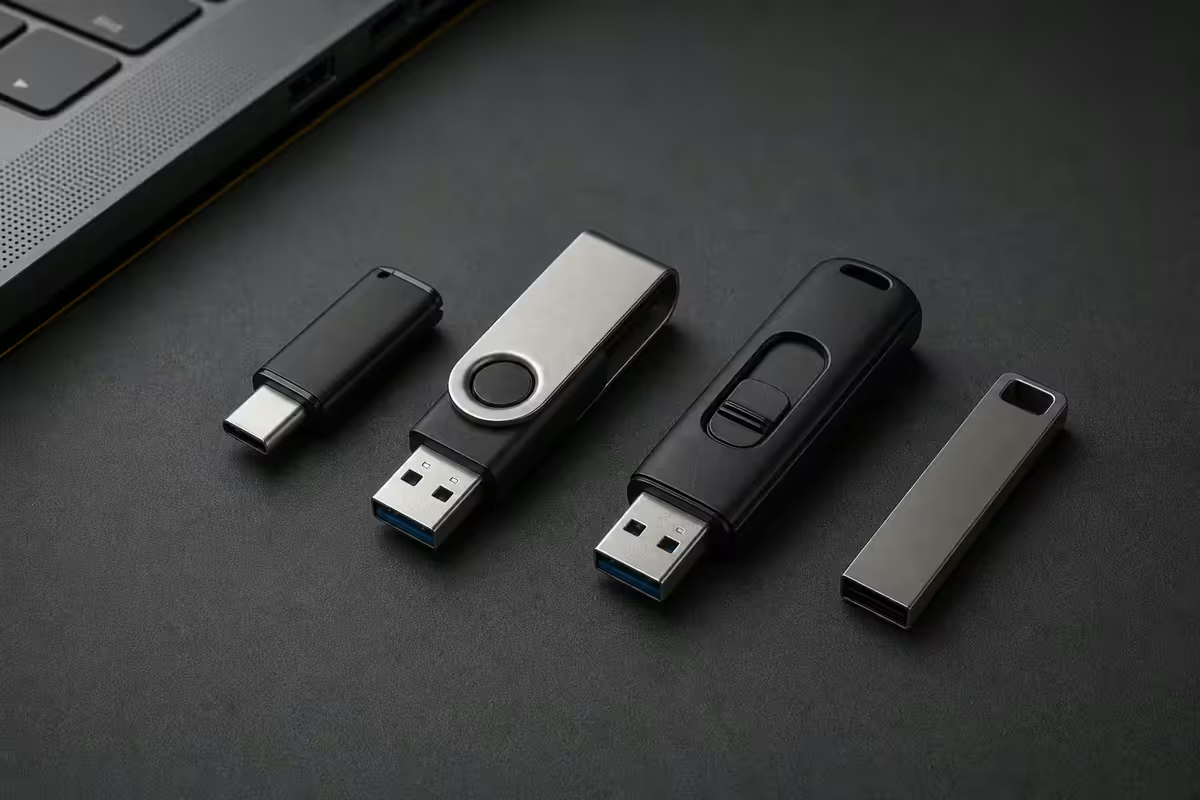
Speed reality — USB 2.0 vs 3.0 vs 3.2 Gen 1 vs Gen 2
The number on the box (USB 3.2 Gen 2, "10 Gbps") doesn't tell you what the drive actually does. NAND tier and controller matter just as much as the USB generation. Here's what you'll feel in real-world file transfers.
| USB generation | Real-world read | 4GB movie transfer |
|---|---|---|
| USB 2.0 | ~30 MB/s | ~2 min 15 sec |
| USB 3.0 / 3.1 Gen 1 | 80-150 MB/s | ~30-50 sec |
| USB 3.2 Gen 1 (quality drive) | 150-300 MB/s | ~15-25 sec |
| USB 3.2 Gen 2 (Extreme Pro tier) | 400-1,000 MB/s | ~4-10 sec |
There's a brutal asymmetry on cheap drives: advertised read speeds are usually honest, but sustained write speeds collapse. A R200 "USB 3.0" drive happily reads at 100 MB/s but writes at 8-15 MB/s once its tiny SLC cache fills — pour a 32GB folder onto it and you'll wait ten minutes. Quality drives keep their write speed up.
Three speed numbers to look for on the spec sheet: sequential read, sequential write, and random IOPS. Cheap drives only advertise the first. If a drive lists all three, the manufacturer is confident in all three.
Top picks at each tier
These are the five drives we'd actually buy with our own money — tested, stocked, and warranty-honoured in SA.
| Pick | Why it wins | SA price |
|---|---|---|
| SanDisk Ultra (32-256GB) | Budget keychain — USB 3.2 Gen 1, reliable | R150-R400 |
| Samsung BAR Plus (64-256GB) | Metal body, 5-yr warranty — the 95% pick | R200-R900 |
| Kingston DataTraveler Kyson | Slim metal, USB 3.2 Gen 1, premium build | R220-R750 |
| Kingston DataTraveler Max (128-1TB) | Gen 2 speeds at fair Rand-per-GB | R600-R2,000 |
| SanDisk Extreme Pro Solid State | SSD-in-a-stick — fastest legitimate option | R800-R1,500 |
The Samsung BAR Plus is genuinely difficult to beat for everyday use. Metal body that won't crack on your keyring, IP-rated against splashes, five-year warranty, ~300 MB/s read. It's been our most-returned-without-fault drive for three years running.
The SanDisk Extreme Pro Solid State Flash Drive is literally a tiny SSD with a USB-A plug — 1,000 MB/s read, 900 MB/s write, sustained without thermal throttling for transfers up to 30-40GB. It's the right pick if you regularly move project folders, video footage or VM images.
Capacity sweet spots & price-per-GB
Flash drive pricing in SA follows a predictable curve. Tiny drives are expensive per GB because the controller, plug and packaging cost more than the chip. Massive drives are expensive per GB because nobody buys them. The sweet spot in 2026 sits at 128-256GB.
- 32GB · R100-R150 · Single Windows installer, BIOS update stick. Buy two; lose one.
- 64GB · R150-R250 · Project transfer, holiday photo offload. Decent value.
- 128GB · R250-R450 · The sweet spot. Best Rand-per-GB at quality brands.
- 256GB · R400-R800 · Pocket-sized project drive. Excellent if you actually fill it.
- 512GB · R700-R1,200 · Video editor's roaming scratch disk. Pair with Gen 2 speeds.
- 1TB+ · R1,200-R3,000 · Niche. An external SSD is usually faster per Rand.
If you're considering a 1TB flash drive, do the maths first. A 1TB Samsung T7 external SSD costs around R2,200 in SA, reads at 1,050 MB/s and lasts decades. A 1TB Kingston DataTraveler Max costs ~R2,000 and is roughly the same speed. The SSD is more durable, more upgradeable, and easier to recover from. Choose the flash drive only when pocket-size matters more than the cable.
Endurance & the QLC trap
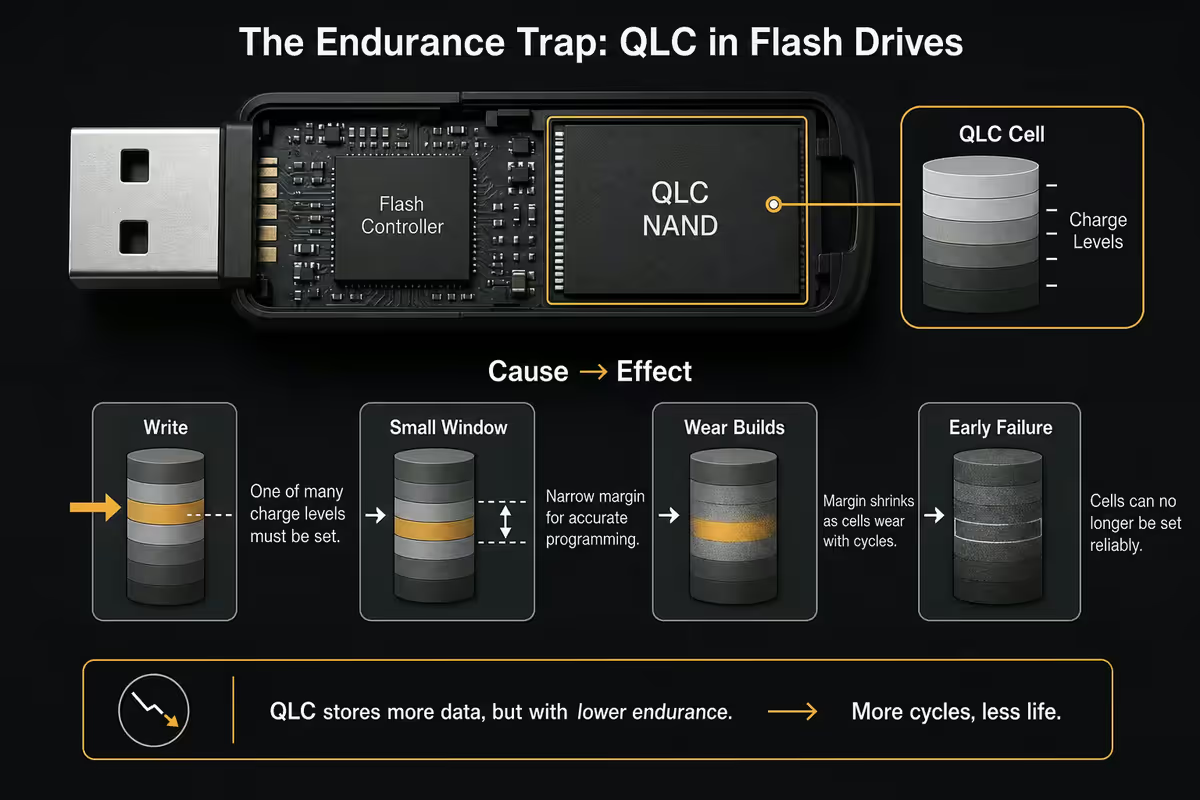
Every flash drive has a finite number of write cycles per NAND cell. NAND tier (SLC > MLC > TLC > QLC) determines how many writes before cells start failing. Brand drives use TLC for everything except their cheapest entry-level sticks. No-name drives use whatever's cheapest, usually low-bin QLC.
The QLC trap works like this: a R400 "1TB" drive at the kerbside is often a counterfeit. The controller reports 1TB to the operating system, but the actual NAND inside is 32GB or 64GB. Writes beyond the real capacity overwrite the original data silently. Your first hour of use looks normal; by the end of week one, your files start mysteriously corrupting.
How to spot the trap before you buy:
- Suspiciously cheap — under R6/GB for "high capacity" is a red flag.
- Spec sheet missing sustained write speed (only quotes "up to" read).
- Brand name you've never heard of — or a SanDisk/Kingston knockoff with a typo.
- No warranty period stated, or warranty served by an unbranded email address.
- Test with H2testw or FakeFlashTest — both free, both find counterfeit capacity in 20 minutes.
USB-A + USB-C dual drives — the phone-to-PC bridge
If you use both a phone and a laptop, a dual-connector flash drive is the easiest way to move large files without uploading them to a cloud you don't trust. One end is USB-A for your desktop or older laptop; the other end is USB-C for your phone, tablet, MacBook or new ultrabook.
Two we recommend without reservation:
- SanDisk Ultra Dual Drive Luxe — full metal swivel design, USB 3.2 Gen 1, 64GB at R280, 256GB at R550. The everyday choice.
- Kingston DataTraveler Bolt Duo — cap-style with both connectors exposed, USB 3.2 Gen 1, 128GB at R380. Slightly cheaper, slightly less elegant.
For phone offloads specifically (4K video, RAW photos from your phone camera), the dual drive is faster than uploading to Google Drive or iCloud — and it works offline at the airport. Plug into phone, copy folder, plug into laptop. Two minutes for 8GB.
Watch the phone-side compatibility: iPhone (Lightning) needs a Lightning version or a USB-C iPhone 15+. Android phones with OTG (USB On-The-Go) support pretty much all dual-C drives. Older Samsung phones may need to enable OTG in settings.
Windows To Go — boot Windows from a flash drive
You can install a fully functional copy of Windows 11 onto a USB flash drive and boot it from any compatible PC. Useful for travel without carrying your laptop, on-site repair of broken machines, or running a clean test environment.
The drive requirements are strict: Windows To Go needs a USB 3.2 Gen 2 drive with high random IOPS — random read/write performance matters more than sequential speed because Windows constantly reads small files from system folders. The SanDisk Extreme Pro Solid State (1,000 MB/s, high IOPS) or Kingston DataTraveler Max (900 MB/s) both qualify. Slower drives technically boot Windows but feel like 2005.
How to create it: Microsoft removed the official Windows To Go Creator from Windows 11, but Rufus 4.x still creates Windows To Go installs from any Windows 11 ISO. Open Rufus, select your flash drive, point at the ISO, choose "Windows To Go" mode, click Start. 20 minutes later you have a portable Windows install.
Encryption — BitLocker, VeraCrypt & hardware
If your flash drive ever leaves your desk, it should be encrypted. Three legitimate paths, in order of effort.
BitLocker To Go (free, built into Windows 10/11 Pro). Right-click the drive in Explorer, "Turn on BitLocker", set a passphrase. AES-128 or AES-256 encryption, the drive prompts for the password automatically on any Windows machine. Cross-platform reading is awkward (macOS needs M3 BitLocker, Linux needs dislocker) but for Windows-to-Windows it's effortless.
VeraCrypt (free, open-source, cross-platform). The successor to TrueCrypt. Creates an encrypted container file or encrypts the whole drive. Works on Windows, macOS and Linux. More setup but more portable. The right choice if you mix operating systems.
Hardware-encrypted drives (Kingston IronKey D500, ~R2,000-R3,500). Physical PIN pad on the drive itself, AES-256-XTS encryption certified to FIPS 140-3 Level 3, tamper-evident epoxy-filled internals. The right choice if you carry client data, medical records or anything you'd brief a lawyer about losing. Wrong-PIN counter wipes the drive after 10 failed attempts.
Key takeaways
- Samsung BAR Plus 128GB at R350 is the right pick for almost every user — metal body, 5-yr warranty, ~300 MB/s read.
- USB 3.2 Gen 2 (400-1,000 MB/s) only matters if you move large files daily. SanDisk Extreme Pro Solid State or Kingston DataTraveler Max.
- 128GB is the price-per-GB sweet spot in SA. 1TB flash drives are usually slower-per-Rand than a 1TB external SSD.
- Avoid no-name 1TB drives under R500. Test any new drive with CrystalDiskMark or H2testw before trusting it with data.
- If the drive leaves your desk, encrypt it. BitLocker To Go (free) for Windows-only, VeraCrypt for cross-platform, IronKey for serious data.
Frequently asked questions
What USB flash drive should I buy in 2026?
Samsung BAR Plus 128GB (R350) for almost every user — metal body, USB 3.2 Gen 1 at ~300 MB/s read, five-year warranty. Step up to SanDisk Extreme Pro Solid State or Kingston DataTraveler Max if you actually move large files.What's the real-world speed difference between USB 2.0, 3.0 and 3.2 Gen 2?
USB 2.0 caps around 30 MB/s. USB 3.0 / 3.2 Gen 1 averages 100-150 MB/s on quality drives. USB 3.2 Gen 2 delivers 400-1,000 MB/s on top-tier drives. A 4GB movie copies in ~2 minutes on USB 2.0 vs ~8 seconds on Gen 2.What capacity USB flash drive should I get?
128GB is the SA price-per-GB sweet spot at R250-R450. 64GB for transfers and installers. 256-512GB for project files or video footage. 1TB+ flash drives usually lose to a 1TB external SSD on price-per-GB and speed.Why do cheap 1TB flash drives die so quickly?
Bargain drives use low-bin QLC NAND with weak controllers — sustained writes collapse, cells wear out fast, and many are counterfeit (a 32GB drive reporting 1TB to the OS). Stick with SanDisk, Kingston, Samsung or Transcend.Do I need a USB-C flash drive or a dual A+C drive?
Dual A+C drives (SanDisk Ultra Dual Drive Luxe, Kingston Bolt Duo) are the convenience pick — works with laptops, desktops, phones, tablets and MacBooks. R250-R600 for 64-256GB.Can I run Windows from a USB flash drive?
Yes, with Rufus' Windows To Go mode. Needs a USB 3.2 Gen 2 drive with high random IOPS — SanDisk Extreme Pro Solid State or Kingston DataTraveler Max. Slower drives boot but feel painful.How do I encrypt a USB flash drive?
BitLocker To Go (free, Windows Pro) for Windows-only setups. VeraCrypt (free, cross-platform) for mixed OS. Kingston IronKey D500 (R2,000+, hardware PIN pad, FIPS 140-3) for serious client or medical data.How long does data last on a USB flash drive?
Quality TLC drives retain data for 5-10 years powered off. Cheap QLC can lose data in 1-2 years. Flash drives are transfer media, not archival storage — keep important files on at least two destinations.
Get the Evetech app
Exclusive app-only prices, daily flash sales, and free delivery on orders over R4,000 — download the app and start saving.