Gaming Wellness Guide
Gaming posture — avoid back pain.
The R30,000 rig is wasted if you have to stop playing because your neck won't turn. Most SA gamers learn ergonomics after the pain starts. Here's how to set up the battle station first.
- elbow / hip / knee
- 90°
- eye rule
- 20-20-20
- micro-break
- 25-30 min
Pain is the warning light — don't drive past it
When the engine warning light comes on in your car, you don't ignore it and keep driving. Yet most gamers do exactly that with their bodies. The first niggle in your wrist, the dull ache between your shoulder blades, the headache that creeps in after hour three — these aren't a normal cost of gaming. They're feedback that the setup is wrong.
The injuries SA physios see most often in gaming patients aren't dramatic. They're posture-driven, cumulative, and entirely preventable: forward-head posture causing neck strain, rounded shoulders compressing the mid-back, glute amnesia from sitting, wrist tendonitis from a too-high keyboard, eye strain headaches from poor monitor placement.
The good news: every one of them responds to setup correction and basic mobility work — if you act early. Wait until the pain is chronic and you're looking at months of rehab.
Set up the rig right — the six positions
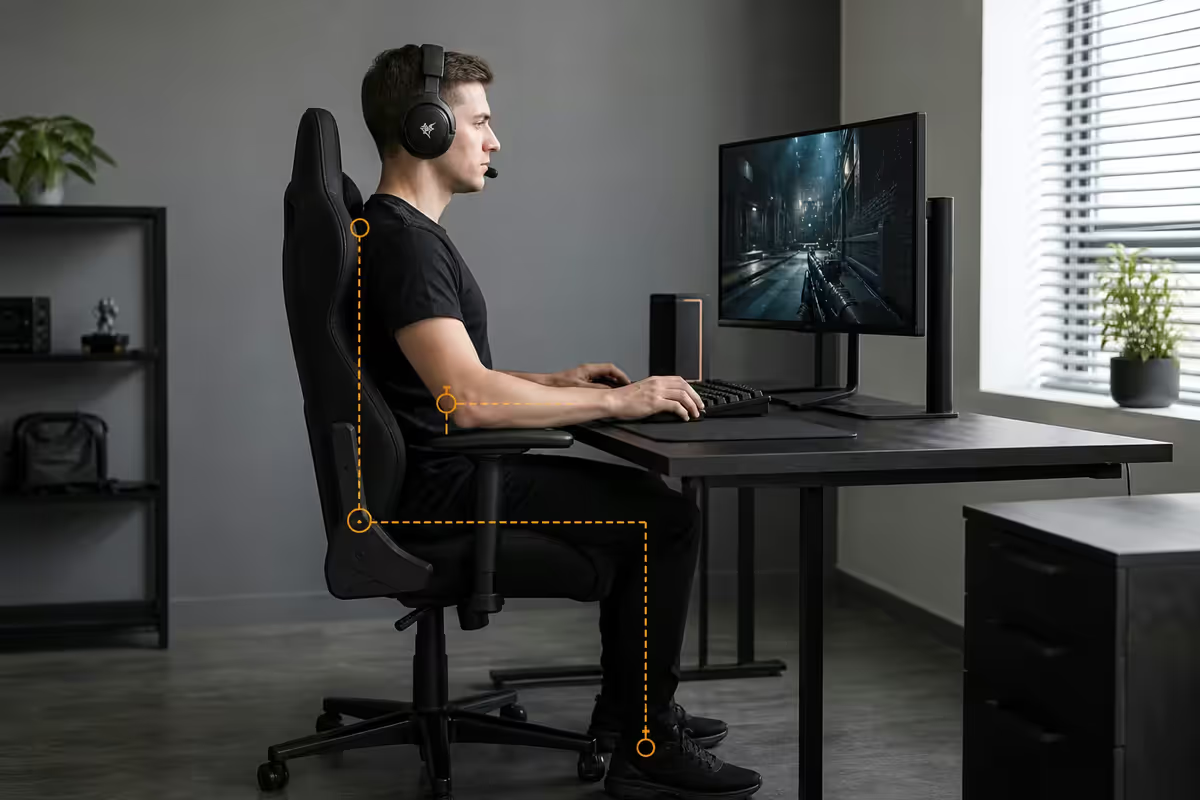
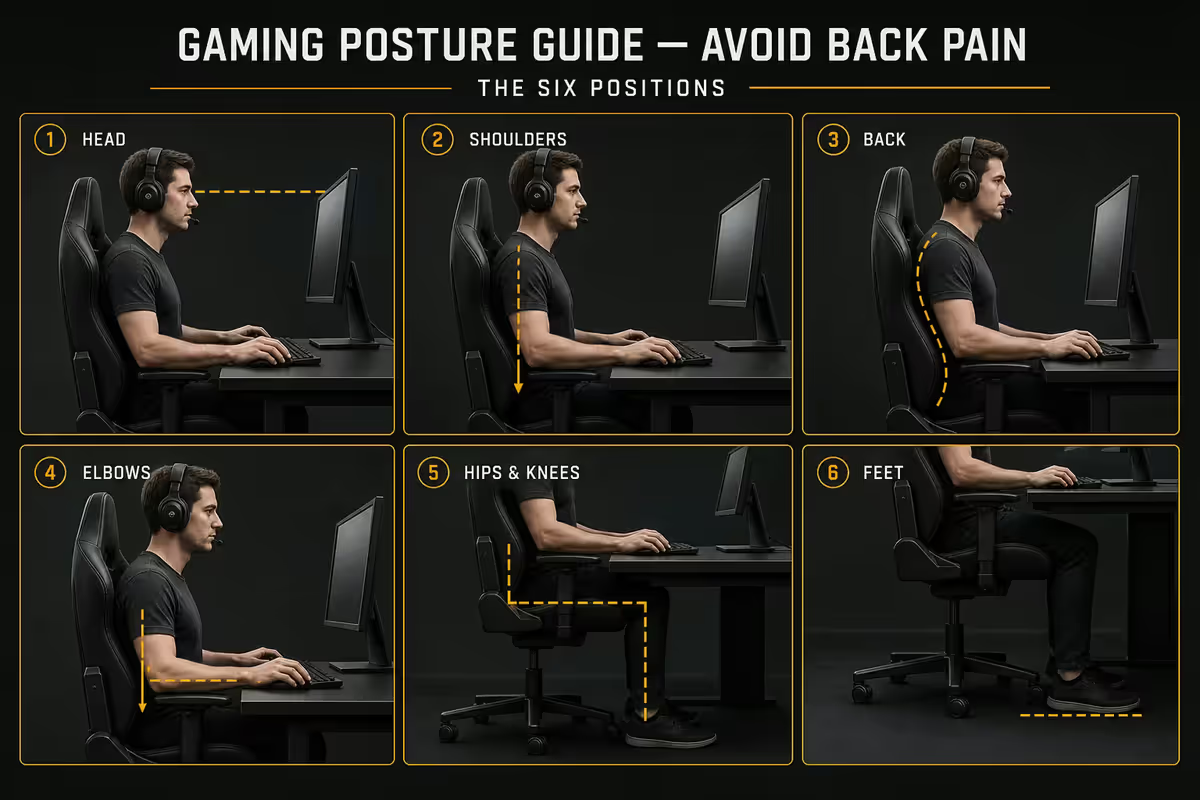
Ergonomic gaming setup comes down to six key body positions. If all six are right, your body can sit for a 3-hour session without compensating.
1. Monitor height. The top of the screen at or just below eye level when you sit upright. Your relaxed gaze drops 15-20° below horizontal, so the middle of the screen ends up around eye level. If you tilt your head down to read game UI, the monitor is too low — stack books or use an adjustable arm. Never sacrifice neck position.
2. Monitor distance. Arm's length away — roughly 50-70 cm. Closer and your eyes work too hard at accommodation. Further and you lean in. For a 27 inch monitor, 60 cm is the sweet spot.
3. Elbows at 90°. Forearms parallel to the floor, resting lightly on armrests. Wrists straight — not bent up over a tall keyboard. If your keyboard sits too high, the desk is too tall. A keyboard tray under the desk (R450-R900 in SA) drops it 4-7 cm.
4. Shoulders relaxed. Drop them. Most gamers carry their shoulders up toward their ears under fight-or-flight gaming stress. Conscious shoulder release every 15-20 minutes resets the trap muscles.
5. Hips and knees at 90-110°. Feet flat on the floor, or on a footrest if the chair is too high to lower further. Hips slightly higher than knees is better than the reverse.
6. Lumbar curve supported. The natural inward curve of your lower back should be supported by the chair's lumbar pad. Without support, the back rounds and the lumbar discs take 40-50% more load. A R250 rolled-towel lumbar prop works almost as well as a R3,000 cushion.
| Body position | Get it right | What goes wrong |
|---|---|---|
| Head & neck | Look straight ahead at top of screen | Forward head, neck strain, tension headaches |
| Shoulders | Down, relaxed, back | Raised traps, upper-back tension |
| Elbows | 90°, resting on armrests | Wrist tendonitis if bent |
| Wrists | Straight, in line with forearms | Carpal tunnel, RSI |
| Lower back | Lumbar curve supported | Disc compression, sciatica |
| Hips & knees | 90-110°, hips ≥ knees | Hamstring shortening, glute amnesia |
| Feet | Flat on floor or footrest | Knee strain, calf tightness |
The 20-20-20 rule — your eyes need breaks too
Your eyes lock into a fixed-distance accommodation when you stare at a screen. Held that way for hours, the ciliary muscles fatigue and the tear film evaporates faster (you blink less when concentrating). The result: end-of-session burning eyes, headaches and blurred vision.
The 20-20-20 rule, endorsed by the American Academy of Ophthalmology: every 20 minutes, look at something 20 feet (6 m) away for 20 seconds. It interrupts the accommodation lock, lets the tear film replenish, and reduces eye strain dramatically.
The hard part is remembering. Apps that nag you on schedule:
- Stretchly (Windows, macOS, Linux) — free, open-source.
- EyeLeo — Windows-only, dedicated to eye breaks.
- Time Out — macOS.
- Built-in Apple Screen Distance — iPad/iPhone, monitors viewing distance.
Also helps: a window in your peripheral vision so when you glance away you're focusing at distance. Anti-glare monitor settings (lower blue light, lower brightness in dim rooms). Dry-eye drops at the desk for long sessions.
Micro-breaks and session length
Your spine isn't built for static seated loading. Discs in the lower back get nutrients from movement — sitting still for hours starves them. Standing up briefly every 25-30 minutes flushes them and prevents the slow degenerative process that creates "I don't know why my back hurts" in your 30s.
The break hierarchy:
- Every 25-30 minutes — micro-break. Stand up, stretch overhead, walk to the kitchen, return. 30-60 seconds.
- Every 90 minutes — full break. Leave the room. Two to three minutes of mobility (cat-cow, doorway pec stretch, hip flexor stretch). Drink water. Look out a window.
- Session length cap. 3-4 hour single sessions. Marathon 8-12 hour ranked grinds are when posture and joint problems compound.
- End of day. 10 minutes of foam rolling or yoga. Reverses what 8 hours seated did.
Chair, stool or standing desk — what actually works
The cheapest part of your battle station is also the most consequential. You'll spend more hours touching the chair than the keyboard.
The gaming chair problem. Racing-style buckets look great in setup photos but most lack adjustable lumbar depth, the seat pan is too short for tall players, and the bolstered side wings push your hips together (bad for circulation on long sessions). The R6,000 noname gaming chair from Game outperforms cheap office chairs but loses to a proper ergonomic chair from a serious manufacturer.
The high-end gaming chair exception. Secretlab Titan Evo XL, Razer Iskur V2, Noblechairs Hero — these rival office chairs with full adjustability and proper lumbar systems. R10,000-R18,000 in SA. Worth it if the aesthetic matters to you.
The ergonomic office chair winner. Herman Miller Aeron (R28,000-R35,000), Steelcase Leap (R22,000-R28,000), Humanscale Freedom (R18,000-R24,000) at the top end. For 90% of SA gamers, the Ergohuman classic or local Boss Ergonomic Office Pro (R6,000-R10,000) hits the right balance of adjustability and price.
The standing desk option. Alternating between sit and stand is better than committing to either. A motorised sit/stand desk like Flexispot E7, MotionGrey or IKEA Bekant (R3,500-R8,500 in SA) lets you switch every 30-45 minutes. Don't just stand and lean — get a balance mat (R450-R900) and shoes that don't lock your ankles.
The stool wildcard. A saddle stool (Salli, Hag Capisco) puts your hips in a more open position and engages core muscles automatically. Best as an alternation tool with a regular chair, not a primary seat for FPS reaction work.
PT-recommended exercises for gamers
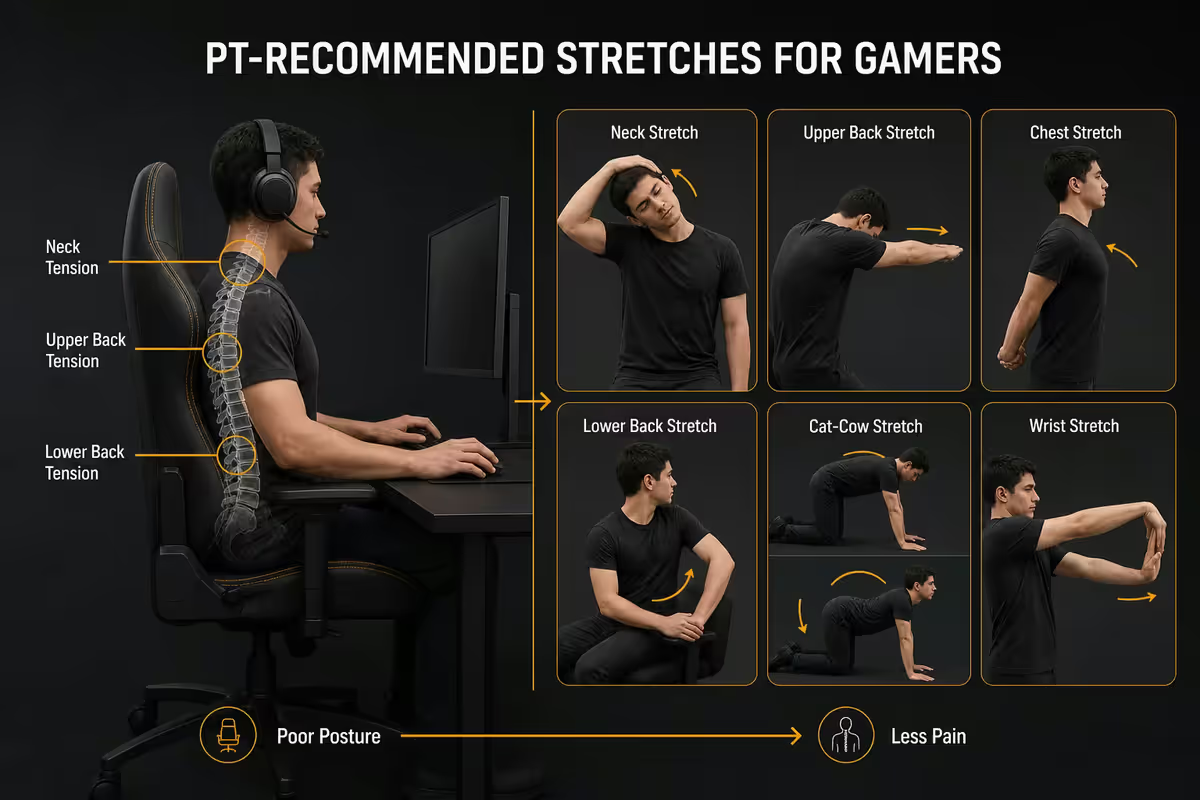
SA physiotherapists working with desk-bound clients consistently prescribe a small set of basic exercises that reverse the damage of seated days. None require equipment beyond a yoga mat. All take 10-15 minutes a day combined.
1. Plank — 30-60 seconds × 3 sets. Core strength counters spinal load. Forearm planks are easier on wrists than full planks. If you can't hold 30 seconds yet, start with knee planks.
2. Glute bridge — 12 reps × 3 sets. Sitting all day makes glutes "forget" how to fire. Bridges retrain them, taking load off the lumbar spine. Lie on back, knees bent, drive heels into floor, lift hips. Squeeze glutes at top.
3. Chin tuck — 10 reps × 3 sets daily. Counters the forward-head posture every screen user develops. Sit upright, draw chin straight back (not down) like making a double chin. Hold 5 seconds. Reverses neck strain.
4. Thoracic extension over foam roller — 90 seconds. Place foam roller horizontally under mid-back, hands behind head, gently arch backward. Reverses the rounded-shoulders gaming posture.
5. Doorway pec stretch — 30 seconds per side. Forearm against doorframe, gently lean forward to stretch chest. Tight pecs pull shoulders forward — this counters them.
6. Walk 30 minutes daily. The most under-prescribed exercise in modern medicine. Outdoors, ideally with sun on your face for circadian benefit. Reverses lower-back stiffness and improves circulation.
7. Wrist circles and stretches. Every break. Roll wrists in slow circles for 10 seconds each direction. Stretch palm-up and palm-down 10 seconds each. Prevents RSI build-up.
We've kitted out <strong>a great many SA gaming battle stations</strong> across the country and we ask every customer the same question at the consult: "Where does your pain start by hour four?" Most name a specific spot — usually upper back between the shoulder blades, or the right wrist for FPS players. We then spend ten minutes on the chair, the monitor stack, and a Y-shaped USB hub for the wrist before any GPU talk. The single intervention that changes the most lives: <strong>putting the monitor on a R400 stand or 4 chunky books to raise it to eye level</strong>. Costs nothing. Pays back in three sessions.
Behind the Build · From our setup studio
SA physiotherapy reality — when to call one
If pain meets any of these criteria, book a physio appointment this week. Don't wait six months hoping it resolves.
- Pain persists more than 7-10 days at the same intensity.
- Pain wakes you at night.
- Pain radiates down a limb (tingling, numbness, weakness).
- You can't grip your mouse normally, can't turn your neck fully, or your hand "buzzes" after sessions.
- Pain is now affecting work productivity, sleep or mood.
What an SA physio visit looks like: 45-60 minute initial assessment (R450-R900 typical Cape Town/Joburg/Centurion rates), 30-45 minute follow-up sessions (R380-R650). Most medical aid schemes cover physio under Day-to-Day benefits — check your plan. Many SA physios offer cash discounts for self-pay.
What to ask for: a posture assessment, a home exercise programme, and an ergonomic review of your gaming setup. Some physios offer remote ergonomic consults over video — useful if you can't bring the desk in.
What to bring: a phone photo of your gaming setup from the side, with you sitting at it normally. Most posture problems are obvious from one side-on photo.
Key takeaways
- Pain is the warning light — act on the first niggle, not after months of compensation.
- Six body positions: head/neck, shoulders, elbows, wrists, lumbar, hips/knees, feet. All matter.
- 20-20-20 for eyes. Micro-break every 25-30 min. Full break every 90 min.
- Skip cheap gaming chairs. Ergohuman or Secretlab Titan beats the R6k racing bucket.
- Six exercises × 10 min/day. Persistent pain past 7-10 days = physio appointment.
Frequently asked questions
What is the correct gaming posture?
Monitor top at eye level, elbows at 90°, wrists straight, feet flat, hips and knees at 90-110°, lumbar curve supported, shoulders relaxed.How high should my monitor be for gaming?
Top of screen at or just below eye level when sitting upright. Centre of screen falls in your natural 15-20° downward gaze. If you tilt your head down to read UI, raise it.What's the 20-20-20 rule and does it actually work?
Every 20 minutes, look at something 20 feet (6 m) away for 20 seconds. Endorsed by the American Academy of Ophthalmology. Free, takes no equipment, dramatically reduces eye strain.Is a gaming chair good for posture?
Most aren't. Racing-style buckets lack adjustable lumbar depth. A proper ergonomic office chair (Aeron, Ergohuman) or premium gaming chair (Secretlab Titan Evo XL) outperforms a R6k bucket.How often should I take breaks while gaming?
Micro-break every 25-30 minutes. Full 2-3 minute break every 90 minutes. Limit single sessions to 3-4 hours.Standing desk for gaming — is it worth it?
Alternating sit/stand is better than either alone. Motorised desks from R3.5k-R8.5k in SA. Use a balance mat — don't just stand and lean.What exercises do physiotherapists recommend for gamers?
Planks, glute bridges, chin tucks, thoracic extension over a foam roller, doorway pec stretches and 30 minutes daily walking. 10-15 minutes total.When should I see a physiotherapist for gaming pain?
Pain past 7-10 days, pain that wakes you, radiating tingling/numbness, or function loss. R450-R900 initial consult in SA, most medical aids cover.
Get the Evetech app
Exclusive app-only prices, daily flash sales, and free delivery on orders over R4,000 — download the app and start saving.