Podcast Studio Setup Guide
How to set up a home podcast studio.
Most beginner-podcast bad-audio problems are room sound, not gear. A Rode PodMic in a walk-in cupboard beats a Shure SM7B in a tiled bathroom. Here's how to build a studio that sounds broadcast-grade, from R5,000 to R45,000+.
- three studio tiers
- R5k-R45k
- compared head-to-head
- 4 mics
- to broadcast-ready
- 2 wks
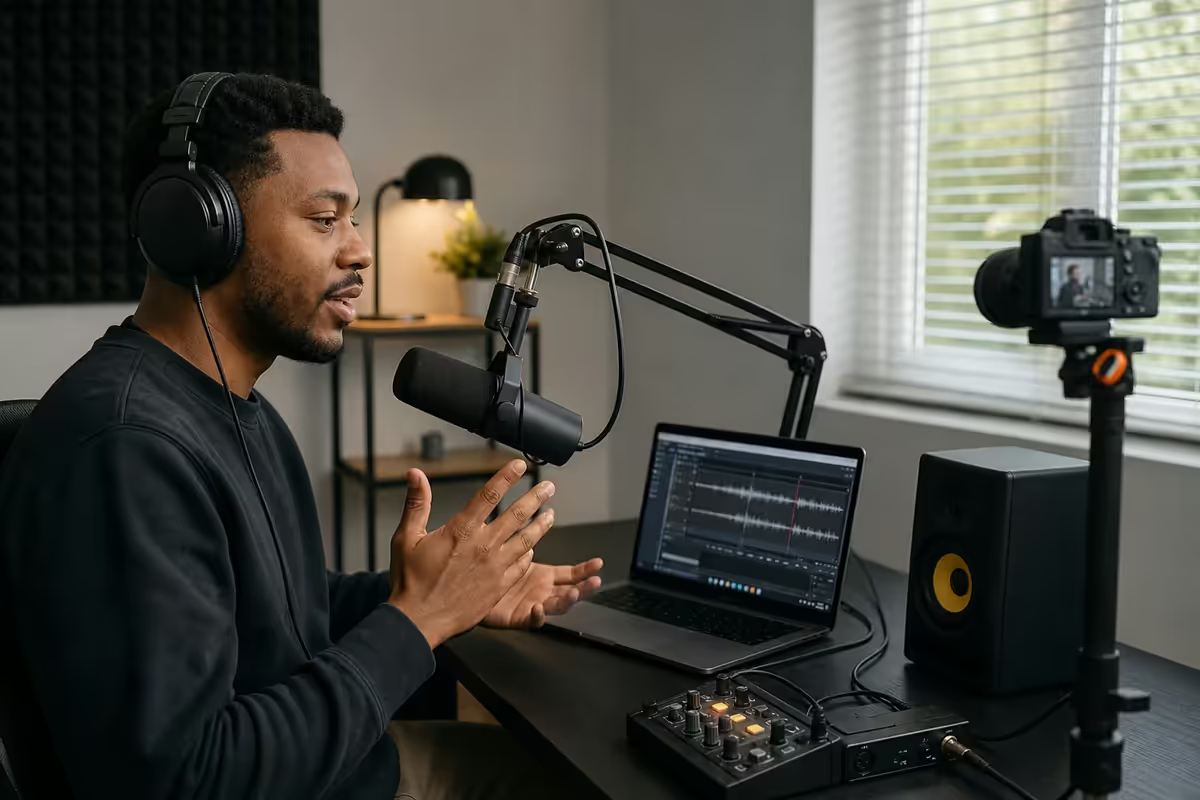
01 · Microphone hierarchy
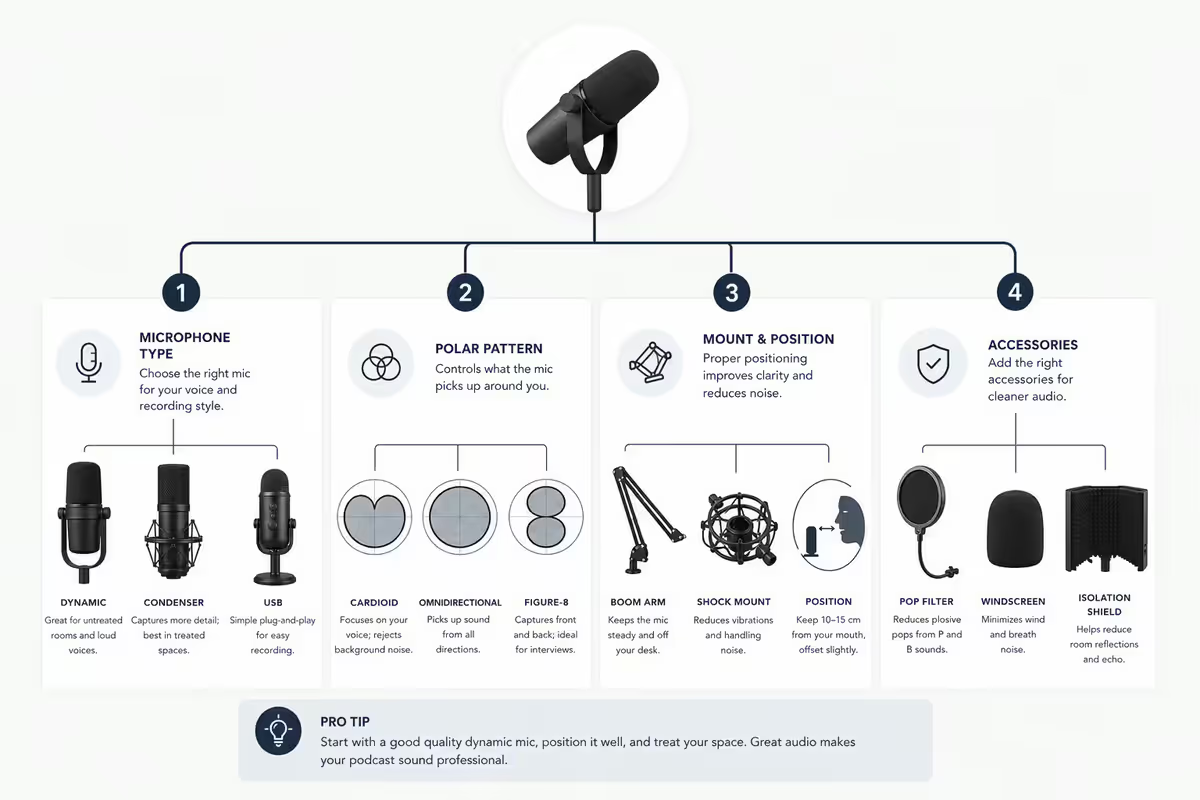
Mic choice is the single biggest determinant of how your podcast sounds. The hierarchy below is the one used by every working SA podcast producer I've spoken to — and it's deliberately short because most "podcast mic shootouts" on YouTube test gear that doesn't ship in SA.
| Mic | Type / connection | SA price |
|---|---|---|
| Audio-Technica AT2020USB+ | Condenser · USB-direct (no interface needed) | R4,800 |
| Rode PodMic | Dynamic · XLR (needs interface) | R3,200 |
| Shure MV7+ | Dynamic · USB + XLR (dual output) | R8,500 |
| Shure SM7B | Dynamic · XLR (broadcast standard) | R8,900 |
| Sennheiser MD 421 II | Dynamic · XLR (Joe Rogan-tier broadcast) | R9,800 |
| Neumann TLM 103 | Condenser · XLR (treated room only) | R24,500 |
Dynamic vs condenser — pick dynamic first
Dynamic mics (PodMic, SM7B, MD 421) reject room sound aggressively. You can record in an untreated bedroom and the listener will hear your voice, not your space. They need more gain (the SM7B is famously thirsty — pair with a Cloudlifter or RodeCaster Pro II) but they forgive a non-ideal room.
Condenser mics (AT2020, Neumann TLM 103) are more detailed and sensitive — they pick up everything, including the aircon, the neighbour's lawnmower and the cat in the next room. Only use a condenser if you have a treated space.
02 · Audio interface vs USB direct
USB-direct mics (AT2020USB+, Shure MV7+ in USB mode) plug straight into your laptop. They're fine for solo podcasting up to about R8,000 of total gear. The trade-off: no second-mic input, no flexibility to upgrade the mic later without throwing the old one away.
An XLR interface separates the mic from the connection, which means you can mix and match — start with a PodMic, upgrade to an SM7B next year, keep the same Scarlett 2i2 interface throughout.
- Focusrite Scarlett Solo (R3,500) — one XLR input, perfect for solo shows. Tried-and-tested studio standard.
- Focusrite Scarlett 2i2 (R4,500) — two XLR inputs for co-host or interview. Industry default for two-mic setups.
- RodeCaster Pro II (R18,500) — four XLR inputs, soundboard pads, multi-track recording to SD card, mix-minus for phone-ins. Built for podcasts specifically.
- Universal Audio Volt 276 (R7,800) — built-in 1176-style compressor on each input. Sounds noticeably more "produced" out of the box.
03 · Acoustic treatment (and the cupboard hack)
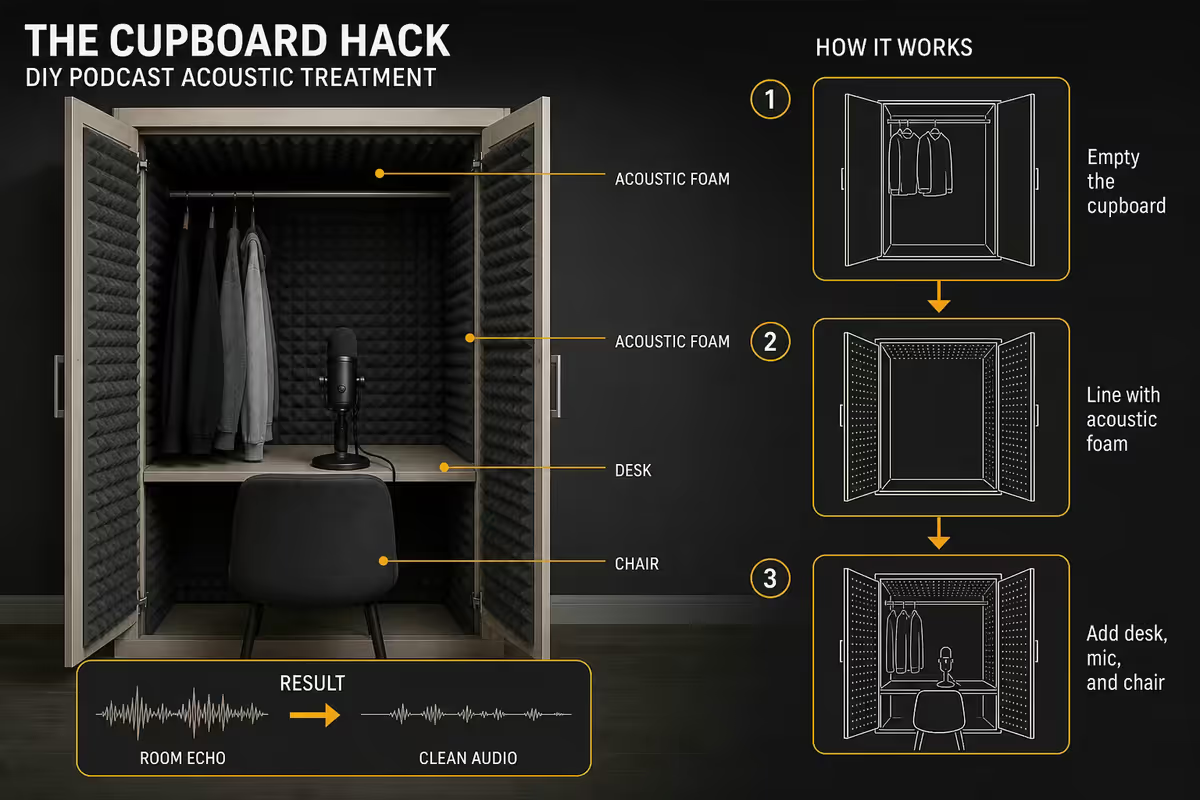
Here's the unglamorous truth: a walk-in cupboard full of clothes is acoustically better than R8,000 of foam panels in a bare room. Clothes are mass-loaded fibrous absorbers — they soak up mid and high frequencies (where speech lives) and break up parallel walls (which cause flutter echo and standing waves).
Most beginner podcasters spend two months obsessing over mic choice and zero days thinking about the room — and the room is 70% of the sound. Walk into your space, clap your hands once, and listen. If you hear a sharp slap-back or a long ringing tail, that's what your podcast will sound like with any mic in the world.
The cupboard hack (if you have a walk-in)
Stand in the walk-in cupboard with the door closed and the clothes packed normally. Clap your hands. You'll notice the clap dies almost instantly — that's a near-perfect record environment. Hang a duvet on the back wall, put a small desk in the middle, run the XLR cable under the door. Done. This is how a surprising number of working SA podcasts and audiobook narrators actually record.
If you can't use a cupboard
Treat the wall behind the mic (most important — that's where your reflected voice comes back into the mic), then the wall behind you, then the side walls. You want broad-spectrum absorption, not just foam.
- Absorber panels (6 × R250 each = R1,500) — 600mm × 600mm fabric-wrapped Rockwool panels. Pacific Audio, Sonic Distribution and Yebo Audio stock locally.
- Bass trap in one corner (R600) — corner traps catch the low frequencies that foam alone can't. Even one helps.
- Heavy curtains over windows (free if you have them) — windows are flat hard reflectors. Curtains plus a closed blind transforms a room.
- Rug on the floor (free) — bare tiles or laminate cause the worst flutter. Any thick rug helps.
Total realistic treatment budget: R2,500-R4,000. If you're spending more than that and you haven't tried the cupboard or moved a couch in the way, you're solving the wrong problem.
04 · Multi-host & remote-guest workflow
Recording two mics in one room is simple — a 2-input interface (Scarlett 2i2) or the RodeCaster handles it natively, with each mic going to a separate track. The hard problem is remote guests.
Zoom and Google Meet compress audio aggressively. They're built for "is this person intelligible," not "broadcast-quality podcast." Recording a Zoom call directly gives you that warbly, low-bitrate sound everyone associates with bad podcasts. The fix: use a platform that records each guest's audio locally on their machine in uncompressed quality, then uploads after.
Remote-guest platforms compared
- Riverside.fm (USD 24/month) — most popular in 2026, dead-simple guest UX (they just click a link, no software install), records up to 4K video locally per guest. Excellent.
- Zencastr (USD 20/month) — slightly cheaper, similar workflow, audio quality is identical to Riverside.
- SquadCast (USD 25/month) — now owned by Descript, popular with NPR-style narrative shows.
- Cleanfeed (free or USD 8/month pro) — uncompressed live audio over the browser, but only the single combined output, not per-guest local recordings. Fine for radio-style live shows where you don't edit much.
All three paid platforms work over typical SA home internet (10 Mbps up is enough). The local-recording approach means a load-shedding moment doesn't kill your guest's track — when their power comes back, the upload resumes.
05 · Editing software
Pick editing software that matches how you think, not what's "industry standard." A timeline-editor like Audition is faster for an experienced engineer; Descript is dramatically faster for someone who isn't.
- Descript (USD 24/month) — edit the transcript, the audio follows. Removes filler words ("um", "uh", "like") with one click. AI voice cloning for fixing flubs. Fastest workflow for podcasters who don't want to learn a DAW.
- DaVinci Resolve (free) — best free option, world-class video editor with Fairlight audio built in. Handles full video podcasts beautifully. Steeper learning curve than Descript.
- Adobe Audition (R350/month CC) — industry standard for audio-only podcasts. Spectral repair tool fixes mouth clicks and pops better than anything else.
- Hindenburg Pro (USD 12/month) — purpose-built for spoken-word. Automatic loudness levelling, voice profiler, simple multi-track. Easiest serious DAW for beginners.
- Reaper (USD 60 one-off) — full DAW for the price of a coffee. Power-user favourite. Ugly but unbeatable on value.
Honest take: if you're starting today and want to publish in a month, use Descript. If you're a video creator who also podcasts, use DaVinci. If you're already in the Adobe ecosystem, use Audition. The "best" tool is the one you'll actually open at 9pm to finish the episode.
06 · Video podcast — camera & lighting
Video podcasts are now table stakes — YouTube and Spotify both reward video uploads with bigger audience reach. The good news: you can hit "looks professional enough" without going full broadcast.
Cameras
- Sony ZV-1F (R12,500) — fixed-lens 4K compact, autofocus that doesn't hunt, designed for vloggers. Plug-and-play HDMI to capture card.
- Sony ZV-E10 II (R22,500) — interchangeable lens, dramatically better in low light. The sweet spot for serious creators.
- Sony FX30 (R45,000) — full cinema camera in compact form. Overkill for most, perfect for hybrid podcast/YouTube creators.
- Logitech Brio 4K (R3,800) — best webcam available, but still clearly behind any of the above. Acceptable backup, not a main camera.
Connect cameras via HDMI to an Elgato Cam Link 4K (R2,800) or use the camera's native USB-C streaming mode if supported. Modern Sonys have UVC streaming built in — no capture card needed.
Lighting
Two-point lighting beats any single ring light. Set up:
- Key light (camera-left, 45° angle) — Godox SL60W LED panel + softbox, R3,200 the pair.
- Fill or hair light (behind subject) — second Godox SL60W or a cheaper Aputure Amaran 60d, gives separation from the background.
- Avoid ceiling fluorescents. They flicker and dump green-tinted light onto your skin. Turn them off, use the LEDs.
07 · Three full studios by budget
Real builds at three SA price points, every item listed.
| Tier | Gear | Total (ZAR) |
|---|---|---|
| Entry · Solo audio podcast | Rode PodMic + Focusrite Scarlett Solo + boom arm + headphones + Reaper + cupboard recording | ~R5,000 |
| Mid · Two-host with remote guests | 2× Shure MV7+ or PodMic + RodeCaster Pro II + 2× boom arms + 2× headphones + 6 absorber panels + Riverside.fm sub + Descript sub | ~R20,000 |
| Pro · Video podcast, broadcast-ready | 2× Shure SM7B + RodeCaster Pro II + Cloudlifter CL-2 + Sony ZV-E10 II + Elgato Cam Link 4K + 2× Godox SL60W + treated room (8 panels + 2 traps) + Descript Pro | ~R45,000-R60,000 |
The jump from entry to mid is gear-driven (better mics, better mixer, treated room). The jump from mid to pro is mostly video — the audio chain at R20,000 already sounds broadcast-grade. Don't spend pro money on audio if you're not also doing video.
We run our own Evetech podcast and YouTube workflow out of a treated room in Centurion — and even after a full pro setup, we still record narration takes in the storeroom cupboard. The cupboard sounds measurably cleaner than the treated room because of mass-loaded clothing on three walls. The lesson we tell every customer building a first studio: solve the room first, then the mic, then everything else. A R3,200 PodMic in a great room beats a R24,500 Neumann in a bad one, every time.
Evetech Creator Team — Behind the Build · From our content room
08 · Common podcast-studio mistakes
Buying a Blue Yeti as your first mic. Already covered above — it's a side-address condenser disguised as a podcast mic. The PodMic at the same price tier sounds like an actual radio show.
Treating the room with cheap egg-crate foam. Doesn't absorb low frequencies, often doesn't absorb mids either. Either go proper Rockwool panels or use the cupboard.
Recording Zoom calls directly with remote guests. Zoom's compression is brutal. Use Riverside, Zencastr or SquadCast — they record each guest locally in WAV.
Buying a condenser before treating the room. A Neumann in a bad room sounds worse than a PodMic in a good one. Get the room sorted first.
Speaking too far from the mic. Dynamic mics like the SM7B want your lips 3-5cm from the grille. Most beginners speak from 30cm away, then over-amplify in post and introduce hiss. Get close. Pop filter handles plosives.
Forgetting load-shedding. A R3,500 small UPS on the laptop + interface saves your session. Don't lose a 90-minute take to Stage 4.
09 · Key takeaways & FAQ
- Room sound is 70% of how a podcast sounds. Solve the room before you spend on the mic.
- Dynamic mics (PodMic, SM7B) forgive a bad room. Condensers expose every problem.
- A walk-in cupboard full of clothes beats R8k of foam in a bare room.
- Use Riverside.fm / Zencastr for remote guests — local WAV beats Zoom every time.
- R5k entry · R20k mid · R45k+ pro. The audio chain is fully solved at R20k.
- RodeCaster Pro II replaces interface + mixer + recorder if you do 4+ episodes a month.
- Descript edits faster than any DAW. Use it unless you already know Audition or Reaper.
Frequently asked questions
What microphone should I buy for my first podcast?
Rode PodMic (R3,200) if you have an XLR interface, or Audio-Technica AT2020USB+ (R4,800) for USB-direct simplicity. Skip the Blue Yeti — it's a side-address condenser that picks up your keyboard and your room.Do I need an audio interface or is USB enough?
USB is fine for solo shows up to ~R8,000 of gear. Add a second mic and you need an interface. Focusrite Scarlett 2i2 (R4,500) or RodeCaster Pro II (R18,500) are the standard SA picks.How much acoustic treatment do I actually need?
Less than YouTube suggests. A walk-in cupboard of clothes beats R8k of bare foam panels. If you can't use one, treat the wall behind the mic and behind you with 4-6 Rockwool absorbers plus one bass trap.Best software for recording remote guests?
Riverside.fm or Zencastr — both record each guest's audio locally in WAV, solving Zoom's compression problem. ~USD 20-25/month. Cleanfeed is free but only gives combined output.DaVinci Resolve vs Descript vs Audition for editing?
Descript for fastest workflow (edit the transcript, audio follows). DaVinci Resolve free for video podcasts. Audition for traditional audio-only DAW. Hindenburg for spoken-word with auto-levelling.What about video podcasting — camera and lighting?
Sony ZV-1F (R12,500) or ZV-E10 II (R22,500) beat any webcam. Pair with two Godox SL60W LED softboxes (R3,200 each) — key light camera-left at 45°, hair light behind. Avoid ceiling fluorescents.Can I podcast from a laptop or do I need a desktop PC?
Any modern laptop with 16GB RAM handles single-host. For DaVinci multi-track video editing, you want 32GB RAM + Ryzen 7 8845HS or MacBook Air M4 (~R22-26k). Desktop only matters for 4K multi-cam edits.How long until my podcast sounds professional?
2-4 episodes if you get the room and gain staging right. The R45k studios sound better than R5k setups, but the bigger jump is from untreated bedroom to clothes-filled cupboard on the same mic.
Get the Evetech app
Exclusive app-only prices, daily flash sales, and free delivery on orders over R4,000 — download the app and start saving.